

What Is Helm and How Is It Different from Kustomize? Charts, Releases, Repositories and Installing Helm 4
Helm templates Kubernetes manifests, packages them as charts and records each installation as a release with upgrade, rollback and history, while Kustomize only overlays plain YAML. We install Helm 4, install the Valkey chart from Artifact Hub, open the Secret where the release is stored, and use Bitnami's 2025 catalog change to examine, with real output, a release that shows 'deployed' but never starts.
Version note: The examples in this post were run with Helm 4.3.2, kind 0.33 with Kubernetes 1.37, and kubectl 1.37.
Guess First
You install a version, released in the summer of 2025, of one of the best-known Redis charts on Artifact Hub. The command finishes cleanly and Helm prints STATUS: deployed. The question: is Redis running right now? Does "deployed" mean the pods are up, or does it say something else? The answer is in the last sections of this post, with real output. The same question will follow us through the series.
The Problem: YAML Copied per Environment
In the Kubernetes series we took Bookstore, the online bookstore used as the shared example across this site's series, to the cluster with plain manifests: Deployment, Service, ConfigMap, Secret, probes, Job. For one environment these files are readable and enough. When the second environment arrives, the first reflex is to copy the folder. By the third, the image tag, the replica count, the name of the Secret holding the connection string and the resources are updated in three places by hand; six months later nobody knows which copy is right. In the fourteenth post of the Kubernetes series we saw Kustomize's answer to this problem: bases and overlays.
Helm approaches the same problem from another side and does three jobs at once. First, templating: manifests are Go template files and everything that varies comes from values. Second, packaging: the templates, the default values and the metadata are versioned as one chart, put into a repository, and someone else installs it with one command. Third, the release lifecycle: Helm records what it installed in the cluster; upgrade, rollback, history and uninstall work through that record. Kustomize covers only the first job; the other two are not its concern.
Helm and Kustomize: One Problem, Two Answers
| Topic | Kustomize | Helm |
|---|---|---|
| Approach | Patches and overlays on plain YAML | Go templates and values |
| Source files | Every file is a valid manifest | Templates are not valid YAML until rendered |
| Distribution | A folder in Git | A versioned chart package (repository or registry) |
| Record in the cluster | None, just the results of kubectl apply | Release and revision history |
| Going back | Revert in Git and apply again | helm rollback |
| Best fit | Environment differences of your own app | Packages with many settings that others install |
The two are not rivals. A common setup installs third-party components (ingress controllers, cert-manager, database operators) with Helm charts and manages your own application's differences with Kustomize. In this series we write our own chart for Bookstore, because hooks, versioned packages and release history are useful for us too. Combining them is also possible: Kustomize's helmCharts field can render a chart and patch it, and Helm 4's post-renderer plugins can pass the rendered output through another tool (the seventh post of the series).
Concepts: Chart, Values, Release, Revision, Repository
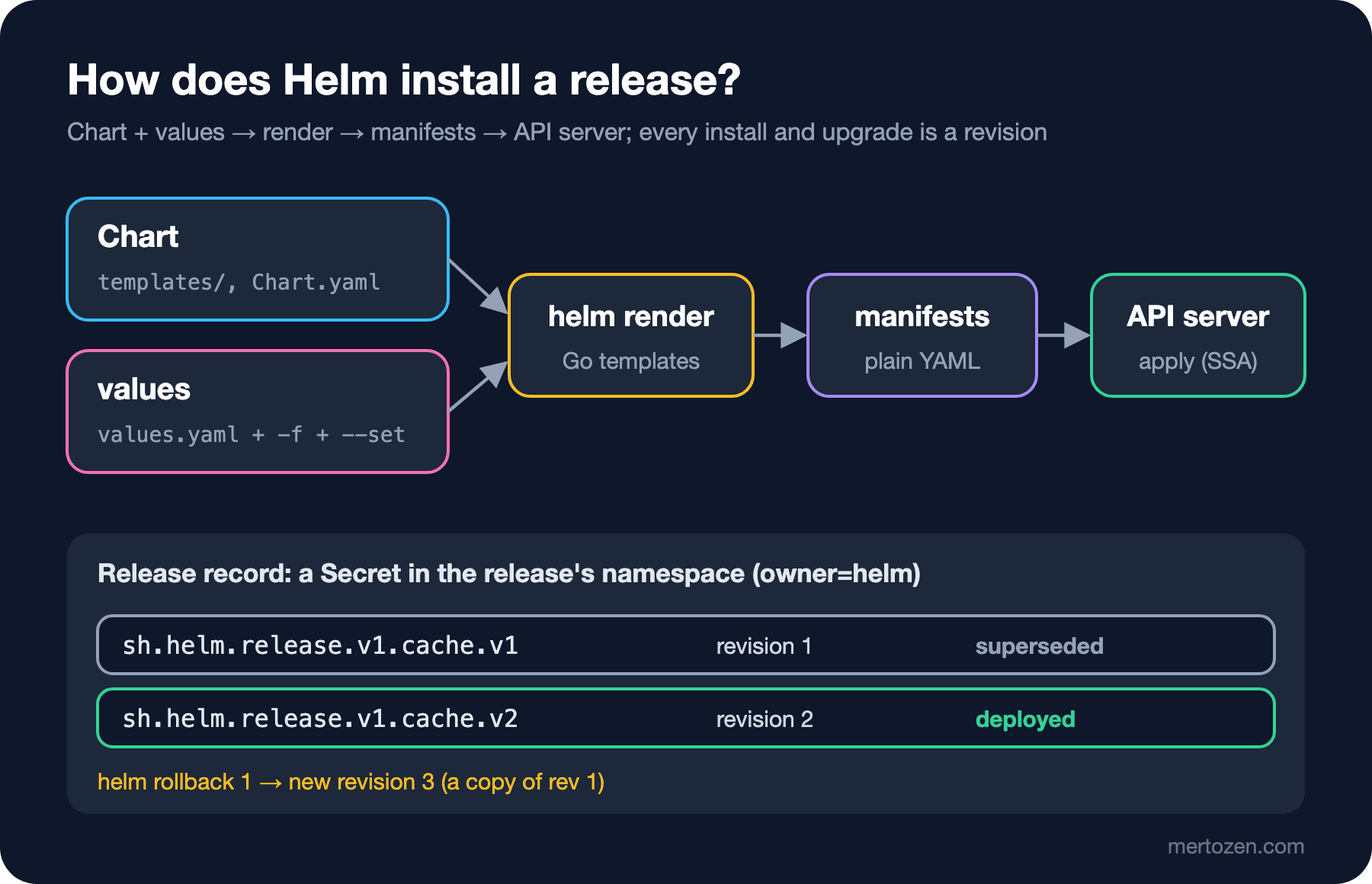
A chart is a folder with everything needed to install an application on Kubernetes: Chart.yaml (name, version, dependencies), values.yaml (default settings) and the templates under templates/. Values are the settings that go into the templates; the chart's defaults are overridden by files given with -f and by single values given with --set. Helm merges the two, renders the templates, and the result is plain YAML manifests that are sent to the API server.
A release is a chart installed under a given name into a given namespace. The same chart can be installed into the same cluster twice, as cache and sessions; they are two separate releases. Every install, upgrade and rollback produces a new revision of the release. A rollback does not "go back" to an old revision; it applies the content of the old revision again as a new revision. We will see this with real output in the fifth post.
Repositories come in two kinds. A classic repository is an index.yaml file on an HTTP server next to the .tgz packages; you add it with helm repo add. In an OCI registry, the chart is stored as an artifact, like a container image, and used directly with an oci:// address; no repo add is needed. Docker Hub, GHCR and the cloud providers' registries can store charts. In the sixth post we push the Bookstore chart to our own OCI registry.
Installing Helm 4
Helm 4.0.0 was released on November 12, 2025, at KubeCon: the first major version in six years. On the day this post was written, the current version is 4.3.2 (November 13, 2026). On Windows you can use one of the package managers listed on the official install page (I did not run these commands for this post; the winget package lists 4.3.2):
# Windows (PowerShell): any one of the three package managers is enough
winget install Helm.Helm
choco install kubernetes-helm
scoop install helm
After installing, check the version and which cluster it will talk to. Helm uses the same kubeconfig and the same current context as kubectl; a helm uninstall in the wrong context hurts as much as it does with kubectl.
helm versionversion.BuildInfo{Version:"v4.3.2", GitCommit:"8346aaa55e7161f7c547212d0a87f01367976727", GitTreeState:"clean", GoVersion:"go1.27.4", KubeClientVersion:"v1.37"}kubectl config current-context
kind-helmseries-1KubeClientVersion is the version of the Kubernetes client library Helm was built with. Commands that do not connect to a cluster, such as helm template, use it as the default Kubernetes version; we will look at what that means in the second post. The lab cluster for this series was created with kind; the setup is covered in the second post of the Kubernetes series.
Installing a Ready-Made Chart from Artifact Hub
Artifact Hub is the CNCF's search site for charts and other packages. You can search it straight from Helm:
helm search hub redis --max-col-width 60URL CHART VERSION APP VERSION DESCRIPTION
https://artifacthub.io/packages/helm/scalified-redis/redis 8.8.4 8.8.4 Redis Helm Chart
https://artifacthub.io/packages/helm/magefleet-redis/redis 0.1.0 7.2 A Helm chart for Redis 7.2 with persistence and configura...
https://artifacthub.io/packages/helm/redis-arm/redis 17.8.0 7.0.8 Redis(R) is an open source, advanced key-value store. It ...
https://artifacthub.io/packages/helm/redis/redis 0.1.1 6.0.8.9 A Helm chart for Redis.
https://artifacthub.io/packages/helm/ot-container-kit/redis 0.16.10 0.16.10 Provides easy redis setup definitions for Kubernetes serv...
...Searching for "redis" returns dozens of charts; all of them are called redis and for most it is not clear who maintains them. Picking a chart is no different from picking a NuGet package: who maintains it, when the last version came out, which image it pulls and from where, what the license is. In this example we use the chart published by the Valkey project itself, the open source fork of Redis. On Artifact Hub its publisher is shown as verified, and its image is the official valkey/valkey on Docker Hub. This chart lives in a classic repository:
helm repo add valkey https://valkey.io/valkey-helm/
helm repo update
helm search repo valkey
"valkey" has been added to your repositories
Hang tight while we grab the latest from your chart repositories...
...Successfully got an update from the "valkey" chart repository
Update Complete. ⎈Happy Helming!⎈
NAME CHART VERSION APP VERSION DESCRIPTION
valkey/valkey 1.0.0 9.1.3 Valkey, an open source, high-performance in-mem...
valkey/valkey-operator 0.9.0 v0.9.0 A Helm chart for the Valkey Operator
valkey/valkey-resources 0.6.0 v0.9.0 Helm chart for operator-managed Valkey resource...Installing it, with a release name and a namespace:
helm install cache valkey/valkey --version 1.0.0 -n cache --create-namespace --wait --timeout 3mNAME: cache
LAST DEPLOYED: Sun Nov 15 07:00:17 2026
NAMESPACE: cache
STATUS: deployed
REVISION: 1
DESCRIPTION: Install complete
TEST SUITE: None
NOTES:
⭐ Valkey has been deployed!
Release: cache
Namespace: cache
Chart: valkey 1.0.0
App version: 9.1.3
...
🔓 Authentication is DISABLED
- Enable with: `--set auth.enabled=true` and provide `.auth.aclUsers`.
...
💾 Persistence
- Persistence is DISABLED. Data will not survive Pod restarts.The --wait here matters: with this flag Helm 4 watches the resources with the kstatus library and does not return until the Deployment is ready. Without it, Helm returns right after sending the manifests to the API server. The NOTES section is text the chart author shows after the install; here it says plainly that authentication and persistence are off. Do not assume the default values are fit for production; helm show values valkey/valkey --version 1.0.0 lets you read every setting before installing.
helm list -n cache
kubectl -n cache get pods,svc
NAME NAMESPACE REVISION UPDATED STATUS CHART APP VERSION
cache cache 1 2026-11-15 07:00:17.714917 +0300 +03 deployed valkey-1.0.0 9.1.3
NAME READY STATUS RESTARTS AGE
pod/cache-valkey-7577b98f4f-6qg2s 1/1 Running 0 11s
NAME TYPE CLUSTER-IP EXTERNAL-IP PORT(S) AGE
service/cache-valkey ClusterIP <cluster-ip> <none> 6379/TCP 12shelm status shows the release's latest state and, in Helm 4 by default, the resources that belong to the release:
helm status cache -n cacheNAME: cache
LAST DEPLOYED: Sun Nov 15 07:06:13 2026
NAMESPACE: cache
STATUS: deployed
REVISION: 1
DESCRIPTION: Install complete
RESOURCES:
==> v1/ServiceAccount
NAME AGE
cache-valkey 12s
==> v1/ConfigMap
NAME DATA AGE
cache-valkey-init-scripts 1 12s
==> v1/Service
NAME TYPE CLUSTER-IP EXTERNAL-IP PORT(S) AGE
cache-valkey ClusterIP <cluster-ip> <none> 6379/TCP 12s
==> v1/Deployment
NAME READY UP-TO-DATE AVAILABLE AGE
cache-valkey 1/1 1 1 12s
==> v1/Pod(related)
NAME READY STATUS RESTARTS AGE
cache-valkey-7577b98f4f-t2jfc 1/1 Running 0 12sWhere Is the Release Stored?
In Helm 2 this information was kept by a server component in the cluster called Tiller. Since Helm 3 there is no server side: the release record is stored as a Secret in the release's namespace. Helm 4 uses the same structure:
kubectl -n cache get secrets -l owner=helm --show-labelsNAME TYPE DATA AGE LABELS
sh.helm.release.v1.cache.v1 helm.sh/release.v1 1 20s modifiedAt=1794715229,name=cache,owner=helm,status=deployed,version=1Let us upgrade and look at the history. In the upgrade we changed the memory request:
helm upgrade cache valkey/valkey --version 1.0.0 -n cache --set resources.requests.memory=64Mi --wait
helm history cache -n cache
Release "cache" has been upgraded. Happy Helming!
...
REVISION UPDATED STATUS CHART APP VERSION DESCRIPTION
1 Sun Nov 15 07:00:17 2026 superseded valkey-1.0.0 9.1.3 Install complete
2 Sun Nov 15 07:00:37 2026 deployed valkey-1.0.0 9.1.3 Upgrade completeNow there are two Secrets: sh.helm.release.v1.cache.v1 and .v2. Each holds that revision's chart, the values the user supplied and the rendered manifest. Looking inside is the shortest way to understand what Helm knows:
# The release inside the Secret: base64 (Kubernetes) + base64 + gzip-compressed JSON
kubectl -n cache get secret sh.helm.release.v1.cache.v2 -o jsonpath='{.data.release}' \
    | base64 -d | base64 -d | gunzip \
| jq -c '{name, version, status: .info.status, chart: .chart.metadata.version, config}'{"name":"cache","version":2,"status":"deployed","chart":"1.0.0","config":{"resources":{"requests":{"memory":"64Mi"}}}}The config field holds only the value we supplied, not the chart's defaults; this detail matters in the fourth post, when we look at the --reuse-values pitfall. The same JSON has a field specific to Helm 4: apply_method, with the value ssa. Helm 4 installs new releases with server-side apply; in the fifth and seventh posts we look at what that means for upgrades. Because the release Secrets hold all of the chart's values in the clear, anyone who can read these Secrets can read the application's settings too, which is why restricting Secret read access with RBAC matters.
helm uninstall cache -n cache
kubectl -n cache get secrets -l owner=helm
release "cache" uninstalled
No resources found in cache namespace.Uninstall deletes the release's resources and all its revision records. Two exceptions are worth remembering: PVCs created by StatefulSets are not deleted, and resources carrying the helm.sh/resource-policy: keep annotation stay in place. To remove a release without deleting its record there is --keep-history; the release then stays in the list with the uninstalled status.
The Risk of Third-Party Charts: the Bitnami Case
Back to the opening question. For years Bitnami was the most widely used free catalog of charts and images. In August 2025 the catalog changed: the versioned tags of the free images moved to an archive called docker.io/bitnamilegacy that gets no updates, the free tier kept only a small set of images tagged latest, and the versioned images on Docker Hub were later removed. A version of the Redis chart published before the change:
helm install old-redis oci://registry-1.docker.io/bitnamicharts/redis --version 21.2.13 \
    -n legacy --create-namespace --set architecture=standalone
kubectl -n legacy get pods
Pulled: registry-1.docker.io/bitnamicharts/redis:21.2.13
Digest: sha256:efb1a25cf784…
NAME: old-redis
LAST DEPLOYED: Sun Nov 15 07:00:58 2026
NAMESPACE: legacy
STATUS: deployed
REVISION: 1
DESCRIPTION: Install complete
...
NAME READY STATUS RESTARTS AGE
old-redis-master-0 0/1 ImagePullBackOff 0 45skubectl -n legacy describe pod old-redis-master-0 Warning Failed 1s (x3 over 40s) kubelet spec.containers{redis}: Failed to pull image "docker.io/bitnami/redis:8.0.3-debian-12-r1": rpc error: code = NotFound desc = failed to pull and unpack image "docker.io/bitnami/redis:8.0.3-debian-12-r1": failed to resolve reference "docker.io/bitnami/redis:8.0.3-debian-12-r1": docker.io/bitnami/redis:8.0.3-debian-12-r1: not foundHelm said "deployed" because we did not pass --wait, and Helm's job ended with sending the manifests to the API server. The pod never started: the image the chart points to no longer exists. What Helm calls "deployed" is the state of the release record, not the health of the application. That is the answer to the opening question. The first fix that comes to mind is pointing the image at the archive; the chart objects with a check of its own:
helm upgrade old-redis oci://registry-1.docker.io/bitnamicharts/redis --version 21.2.13 -n legacy \
    --reuse-values --set image.repository=bitnamilegacy/redis
Error: UPGRADE FAILED: execution error at (redis/templates/NOTES.txt:216:4):
⚠ ERROR: Original containers have been substituted for unrecognized ones. Deploying this chart with non-standard containers is likely to cause degraded security and performance, broken chart features, and missing environment variables.
Unrecognized images:
- docker.io/bitnamilegacy/redis:8.0.3-debian-12-r1
If you are sure you want to proceed with non-standard containers, you can skip container image verification by setting the global parameter 'global.security.allowInsecureImages' to true.You can switch this check off with global.security.allowInsecureImages=true, but then you have put an image that receives no security updates into production. Current Bitnami charts, in turn, reference the free-tier images with the latest tag:
helm show chart oci://registry-1.docker.io/bitnamicharts/redis | head -15Pulled: registry-1.docker.io/bitnamicharts/redis:28.3.12
Digest: sha256:a80baff98e6d…
annotations:
fips: "true"
images: |
- name: kubectl
version: 1.37.2
image: registry-1.docker.io/bitnami/kubectl:latest
- name: os-shell
version: "5"
image: registry-1.docker.io/bitnami/os-shell:latest
- name: redis
version: 8.10.3
image: registry-1.docker.io/bitnami/redis:latestA mutable tag means the same chart version installs a different image today and tomorrow. The lesson: choosing a chart is a dependency decision. Before installing, check who maintains the chart, when the last version came out, where the images come from (helm show values) and the license. Copying the charts and images you use in production into your own registry keeps a vendor's decision from leaving you unable to deploy one morning.
In Production
Check the context and the namespace before running the command; Helm uses kubectl's context and, without -n, installs into the current namespace. Pass --version on every install; without it Helm installs the latest version and the same command installs a different chart a month later. In CI, use --wait with a sensible --timeout, otherwise the pipeline is green while the application is red. Release Secrets pile up for every revision; by default Helm keeps 10 revisions (--history-max), and setting it to zero lets the Secrets in the namespace grow without limit. Restrict with RBAC who can read the Secrets of releases whose values hold passwords.
Common Pitfalls
Reading "deployed" as "the application runs". Installing without --version and getting a different chart version on the next install. Picking the first result on Artifact Hub without looking at its maintainer and image sources. Staying in production on images that point to an archive with no updates. Thinking uninstall also removes PVCs and resources with the keep policy. Forgetting that values sit in plain form inside the release Secrets. Running commands in the wrong kube context.
A Small Experiment
★☆☆ Install the Valkey chart without --version, then compare the chart version in helm list with helm search repo valkey --versions. Why is it risky to use the same command in a CI script?
★★☆ Upgrade the release twice, then run helm rollback cache 1. In helm history, see that the rollback marks a new revision as "deployed", not revision 1, and count the release Secrets.
★★★ Write a checklist for choosing a chart: maintainer, date of the last version, image sources (the image: lines in helm show values and helm template), mutable tags, license. Compare the Valkey chart and the current Bitnami Redis chart against it.
We have installed a ready-made chart and seen how a release is recorded. In the next post we write our own chart: we start with helm create and turn Bookstore.Api's Deployment, Service and ServiceAccount into templates.