

Designing Values: Per-environment Values, --set, Validation with values.schema.json and Secrets
Helm merges values from the chart defaults, then the -f files in order and finally --set; values.schema.json validates the merged result, and secrets enter not through values but as a reference to an existing Secret. We build dev, staging and prod values files for Bookstore and look with real output at Helm 4's multi-document values and --set-json, the comma and dot pitfalls of --set, meaningful errors with required and fail, and an upgrade where --reuse-values swallows new defaults.
Version note: The examples in this post were run with Helm 4.3.2, kind 0.33 with Kubernetes 1.37, kubectl 1.37 and .NET 10.
Guess First
In the chart's new version you added a new key to values.yaml: database.secretKey: connection-string. The template uses it to say which key to read from the Secret. Someone on the team upgrades with --reuse-values as always, "so the previous settings are kept". Does the new default make it into the release? If not, what happens: does Helm fail, does Kubernetes fail, or does the pod break silently? The answer is in the pitfall section at the end of this post, with the real error message.
Values Files per Environment
Bookstore, the online bookstore used as the shared example across this site's series, runs in three environments. The chart's values.yaml carries safe defaults, and each environment writes only its differences into its own file:
helm/
  charts/
    bookstore/
      Chart.yaml
      values.yaml
      values.schema.json
      templates/
  deploy/
    values-dev.yaml
    values-staging.yaml
    values-prod.yaml
environment: Development
database:
provider: InMemory
config:
storeName: Bookstore (dev)environment: Staging
database:
provider: SqlServer
existingSecret: bookstore-db-connection
config:
storeName: Bookstore (staging)environment: Production
replicaCount: 2
database:
provider: SqlServer
existingSecret: bookstore-db-connection
resources:
requests:
cpu: 250m
memory: 256Mi
limits:
memory: 512Mi
web:
replicaCount: 2Keeping the files small is deliberate. If an environment file is longer than the chart's values.yaml, the defaults were chosen badly. In the chart's own defaults database.provider is now SqlServer: an install without a values file stops with a clear error, as we will see below, instead of quietly starting with an in-memory database. Bookstore's database is SQL Server; this chart does not install it, it only connects to it. The "database outside the cluster" decision from the twelfth post of the Kubernetes series still holds.
The Merge Order
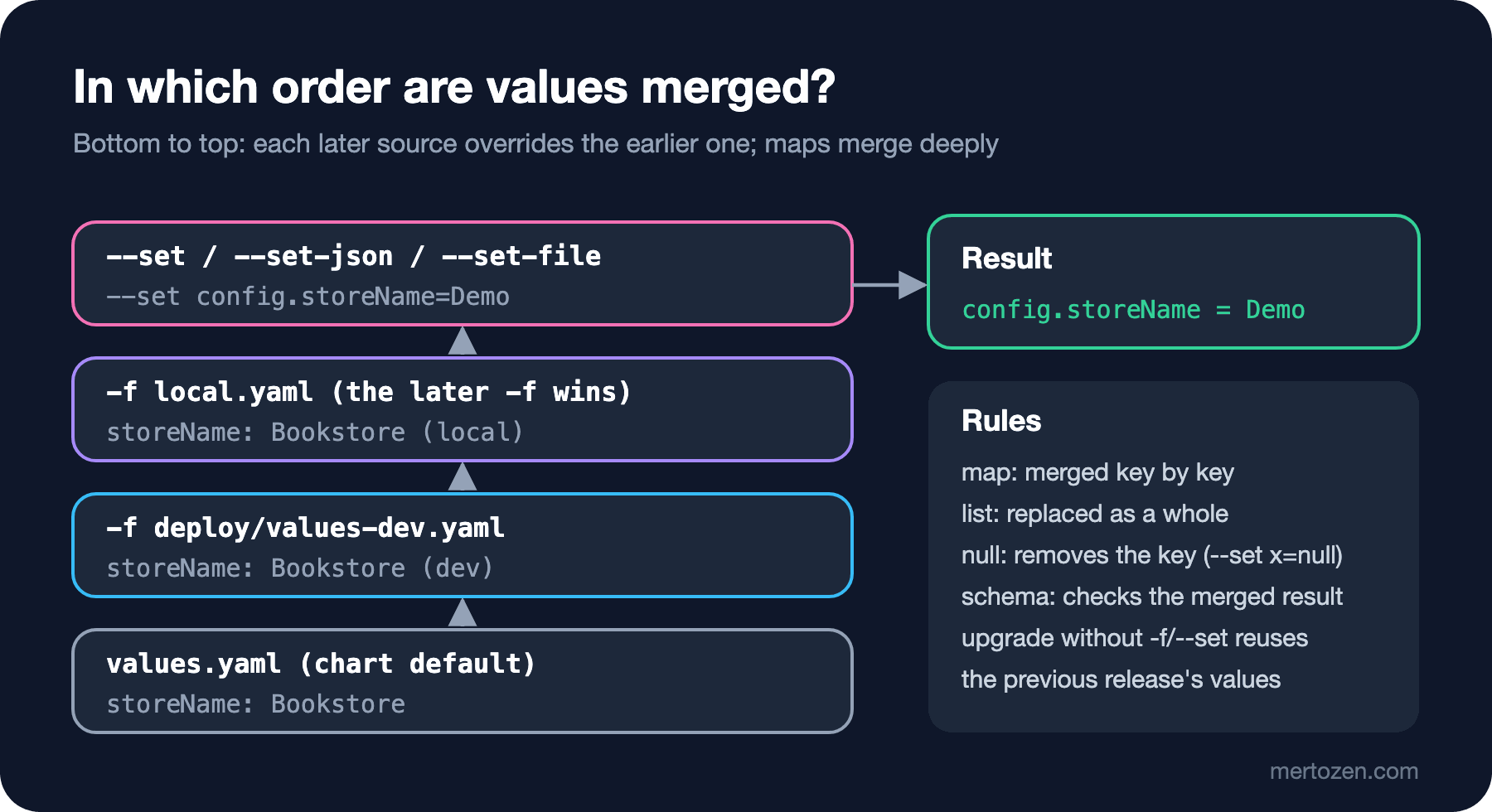
Helm merges values in this order: first the chart's values.yaml, then the files given with -f in the order they appear on the command line, and last the --set family. Each later source overrides the earlier one. We saw this with the store name; local.yaml contains only config.storeName: Bookstore (local):
render() {
    helm template bookstore charts/bookstore --set database.provider=InMemory \
        --show-only templates/configmap.yaml "$@" | grep StoreName
}
render
render -f deploy/values-dev.yaml
render -f deploy/values-dev.yaml -f local.yaml
render -f local.yaml -f deploy/values-dev.yaml
render -f deploy/values-dev.yaml -f local.yaml --set config.storeName=Demo
Bookstore__StoreName: "Bookstore"
Bookstore__StoreName: "Bookstore (dev)"
Bookstore__StoreName: "Bookstore (local)"
Bookstore__StoreName: "Bookstore (dev)"
Bookstore__StoreName: "Demo"The fourth and fifth lines pass the same two files in a different order and the result changes. That is why the file order matters in CI scripts: shared files first, the environment file after, local overrides last. Maps are merged key by key; when we passed the prod file after dev, the resources map was written over the chart's default:
helm template bookstore charts/bookstore -f deploy/values-dev.yaml -f deploy/values-prod.yaml \
    --show-only templates/deployment.yaml | grep -A6 "resources:"
resources:
limits:
memory: 512Mi
requests:
cpu: 250m
memory: 256Mi
volumeMounts:Lists, on the other hand, are not merged; they are replaced as a whole: if the chart has a list with two elements and you pass a list with one, the result has one. To remove a key entirely, pass null:
helm template bookstore charts/bookstore -f deploy/values-prod.yaml --set resources.limits=null \
    --show-only templates/deployment.yaml | grep -A4 "resources:"
resources:
requests:
cpu: 250m
memory: 256Mi
volumeMounts:Helm 4 brought two conveniences. The first is multi-document values: one values file can contain several documents separated by ---, and the documents are merged in order.
# Shared settings
config:
  storeName: Bookstore
extraEnv:
  Logging__LogLevel__Default: Information
---
# Local overrides
extraEnv:
  Logging__LogLevel__Default: Debug
helm template bookstore charts/bookstore -f deploy/values-dev.yaml -f multi.yaml --show-only templates/configmap.yamldata:
ASPNETCORE_ENVIRONMENT: "Development"
Database__Provider: "InMemory"
Bookstore__StoreName: "Bookstore"
Logging__LogLevel__Default: "Debug"The second is JSON arguments: --set-json now takes not only key=json but a whole JSON object too. We will see it below, together with the pitfalls of --set.
How --set Parses Its Input
--set is a small language: a comma separates two assignments, a dot means a nested key, square brackets are a list index. That is why a value containing a comma breaks:
helm template bookstore charts/bookstore -f deploy/values-dev.yaml --set config.storeName="Bookstore, Ankara"
helm template bookstore charts/bookstore -f deploy/values-dev.yaml --set config.storeName="Bookstore\, Ankara" \
    --show-only templates/configmap.yaml | grep StoreName
Error: failed parsing --set data: key " Ankara" has no value
Bookstore__StoreName: "Bookstore, Ankara"The escape character works but is hard to read. Worse is a value with dots after the comma: we wanted to pass two origins for CORS:
helm template bookstore charts/bookstore -f deploy/values-dev.yaml \
    --set extraEnv.Bookstore__Cors__Origins="https://www.example.com,https://admin.example.com"
Error: failed parsing --set data: key "com" has no valueHelm took the second origin for a new assignment, split the dots inside it into nested keys and found no value in the last part. JSON is the safest route here, because it is clear where the string starts and ends:
helm template bookstore charts/bookstore -f deploy/values-dev.yaml --show-only templates/configmap.yaml \
    --set-json 'extraEnv={"Bookstore__Cors__Origins":"https://www.example.com,https://admin.example.com"}' \
    | grep Cors
helm template bookstore charts/bookstore -f deploy/values-dev.yaml --show-only templates/configmap.yaml \
    --set-json '{"config":{"storeName":"Bookstore (json)"},"extraEnv":{"Logging__LogLevel__Default":"Debug"}}'
Bookstore__Cors__Origins: "https://www.example.com,https://admin.example.com"
data:
ASPNETCORE_ENVIRONMENT: "Development"
Database__Provider: "InMemory"
Bookstore__StoreName: "Bookstore (json)"
Logging__LogLevel__Default: "Debug"Mind the types too. --set turns integers and true/false into their types and leaves everything else as a string. 1.10 stayed a string, 110 became a number and the schema rejected it:
helm template bookstore charts/bookstore -f deploy/values-dev.yaml --set image.tag=1.10 \
    --show-only templates/deployment.yaml | grep image:
helm template bookstore charts/bookstore -f deploy/values-dev.yaml --set image.tag=110
image: "helmseries-bookstore-api:1.10"
Error: values don't meet the specifications of the schema(s) in the following chart(s):
bookstore:
- at '/image/tag': got number, want string--set-string always makes the value a string, and --set-file reads the value from a file's content (a certificate, a long piece of config). A practical rule: use --set only for single, simple values such as the image tag from CI, and write the rest into a values file.
Validation with values.schema.json
values.schema.json, placed in the chart's root folder, is applied with JSON Schema to the final, merged values; install, upgrade, template and lint check it. The Bookstore chart's schema:
{
  "$schema": "https://json-schema.org/draft/2020-12/schema",
  "type": "object",
  "additionalProperties": false,
  "required": ["image", "replicaCount", "environment", "database", "service"],
  "properties": {
    "global": { "type": "object" },
    "nameOverride": { "type": "string" },
    "fullnameOverride": { "type": "string" },
    "image": { "$ref": "#/$defs/image" },
    "replicaCount": { "type": "integer", "minimum": 1, "maximum": 20 },
    "environment": { "enum": ["Development", "Staging", "Production"] },
    "database": {
      "type": "object",
      "additionalProperties": false,
      "required": ["provider"],
      "properties": {
        "provider": { "enum": ["SqlServer", "InMemory"] },
        "existingSecret": { "type": "string" },
        "secretKey": { "type": "string", "minLength": 1 }
      }
    },
    "config": {
      "type": "object",
      "properties": {
        "storeName": { "type": "string", "minLength": 1 }
      }
    },
    "extraEnv": {
      "type": "object",
      "additionalProperties": { "type": ["string", "number", "boolean"] }
    },
    "service": {
      "type": "object",
      "properties": {
        "type": { "enum": ["ClusterIP", "NodePort", "LoadBalancer"] },
        "port": { "type": "integer", "minimum": 1, "maximum": 65535 }
      }
    },
    "probes": { "type": "object" },
    "resources": { "type": "object" },
    "web": {
      "type": "object",
      "properties": {
        "enabled": { "type": "boolean" },
        "replicaCount": { "type": "integer", "minimum": 1 },
        "image": { "$ref": "#/$defs/image" },
        "apiUpstream": { "type": "string" },
        "service": { "type": "object" },
        "resources": { "type": "object" }
      }
    }
  },
  "$defs": {
    "image": {
      "type": "object",
      "additionalProperties": false,
      "required": ["repository"],
      "properties": {
        "repository": { "type": "string", "minLength": 1 },
        "tag": { "type": "string" },
        "pullPolicy": { "enum": ["Always", "IfNotPresent", "Never"] }
      }
    }
  }
}
additionalProperties: false at the root catches typos; the global key is already allowed, because when we add a dependency in the sixth post Helm will hand this key to every chart. We tried with wrong values:
helm template bookstore charts/bookstore -f deploy/values-dev.yaml --set replicaCount=two
helm template bookstore charts/bookstore -f deploy/values-dev.yaml --set environment=Prod --set replicas=3
Error: values don't meet the specifications of the schema(s) in the following chart(s):
bookstore:
- at '/replicaCount': got string, want integer
Error: values don't meet the specifications of the schema(s) in the following chart(s):
bookstore:
- at '/environment': value must be one of 'Development', 'Staging', 'Production'
- at '': additional properties 'replicas' not allowedWithout the schema, a key written as replicas would be silently ignored and nobody would understand why the replica count did not change. The reason for requiring "type": "string" for the image tag is this: an unquoted 1.10 in a YAML file is a number.
image:
  tag: 1.10
helm template bookstore charts/bookstore -f deploy/values-dev.yaml -f tag.yamlError: values don't meet the specifications of the schema(s) in the following chart(s):
bookstore:
- at '/image/tag': got number, want stringWhen we rendered the same file with a copy whose schema was deleted, Helm did not fail; the image line came out like this:
image: "helmseries-bookstore-api:%!s(float64=1.1)"This is how Go's printf says it cannot print a float with %s. If this line reaches Kubernetes, it becomes an ImagePullBackOff with an invalid image name. The schema caught the error before the render.
Meaningful Errors with required and fail
A schema validates individual fields well, but cross-field rules such as "if the provider is SqlServer, the Secret name is required" become hard to read in a schema, even though they can be written there. Keeping these rules in the template is clearer:
database:
  # SqlServer for real environments; InMemory only for demos and chart tests.
  provider: SqlServer
  # Name of an existing Secret with the connection string. The chart never creates it.
  existingSecret: ""
  secretKey: connection-string
{{- if eq .Values.database.provider "SqlServer" }}
env:
- name: ConnectionStrings__BookstoreDb
valueFrom:
secretKeyRef:
name: {{ required "database.existingSecret is required when database.provider is SqlServer" .Values.database.existingSecret }}
key: {{ .Values.database.secretKey }}
{{- end }}{{- if and (eq .Values.environment "Production") (eq .Values.database.provider "InMemory") }}
{{- fail "database.provider InMemory is for demos and tests; Production needs SqlServer" }}
{{- end }}helm template bookstore charts/bookstore -f deploy/values-prod.yaml --set database.provider=InMemory
helm template bookstore charts/bookstore -f deploy/values-staging.yaml --set database.existingSecret=Error: execution error at (bookstore/templates/deployment.yaml:3:4): database.provider InMemory is for demos and tests; Production needs SqlServer
Error: execution error at (bookstore/templates/deployment.yaml:43:27): database.existingSecret is required when database.provider is SqlServerOne detail: in lint mode, helm lint turns required errors into warnings and counts the chart as passing.
helm lint charts/bookstorelevel=WARN msg="missing required values" message="database.existingSecret is required when database.provider is SqlServer"
==> Linting charts/bookstore
[INFO] Chart.yaml: icon is recommended
1 chart(s) linted, 0 chart(s) failedIf CI relies on helm lint alone, missing values slip through. You need to run lint with each environment's values file and also render with helm template; the CI steps in the sixth post do that. We updated the dev release with its values file:
helm upgrade bookstore charts/bookstore -n bookstore-dev -f deploy/values-dev.yaml --wait
helm get values bookstore -n bookstore-dev
Release "bookstore" has been upgraded. Happy Helming!
NAME: bookstore
LAST DEPLOYED: Sun Nov 15 07:18:15 2026
NAMESPACE: bookstore-dev
STATUS: deployed
REVISION: 10
DESCRIPTION: Upgrade complete
...
USER-SUPPLIED VALUES:
config:
storeName: Bookstore (dev)
database:
provider: InMemory
environment: DevelopmentSecrets Stay Out of Values
Writing the connection string into values and letting the chart create a Secret looks easy. It has three problems. The values file goes into Git. As we saw in the first post, Helm keeps all of a release's values in the release Secret; anyone who can read that Secret reads the password too. helm get values prints the password as plain text. So the chart takes the name of an existing Secret and never creates a Secret. A process independent of the chart creates it:
# The value comes from an environment variable; it never reaches shell history or Git
kubectl -n bookstore-staging create secret generic bookstore-db-connection \
    --from-literal=connection-string="Server=mssql.bookstore-db.svc.cluster.local,1433;Database=BookstoreDb;User Id=sa;Password=$DB_PASSWORD;TrustServerCertificate=True"
In the lab a script creates this Secret and the SQL Server with a random password; the password is never written to a file. In production a secret manager does this job: External Secrets Operator syncs the value from a secret service such as Azure Key Vault into a Kubernetes Secret, and the chart only knows that Secret's name. This setup is covered in detail in the Configuration and Secret Management series.
For teams that want to keep encrypted values in Git, another option is the helm-secrets plugin: the values file is encrypted with SOPS and committed, and the plugin decrypts the file during the install and hands it to Helm. I did not run this approach for this post. The point to remember: the decrypted values still go into values, so they are stored in the release Secret in plain form. Encryption protects the file in Git, not the release record in the cluster.
The --reuse-values Pitfall
Back to Guess First. We moved a release installed with version 0.2.0 of the chart to 0.3.0, which adds the database.secretKey default, with --reuse-values:
# A release installed with 0.2.0; moving to 0.3.0 with --reuse-values
helm install bookstore v020/charts/bookstore -n bookstore-qa --set config.storeName="Bookstore (qa)" --wait
helm upgrade bookstore charts/bookstore -n bookstore-qa --reuse-values \
    --set database.provider=SqlServer --set database.existingSecret=bookstore-db-connection
Error: UPGRADE FAILED: server-side apply failed for object bookstore-qa/bookstore-api apps/v1, Kind=Deployment: Deployment.apps "bookstore-api" is invalid: spec.template.spec.containers[0].env[0].valueFrom.secretKeyRef.key: Required valuehelm get values bookstore -n bookstore-qa --all...
database:
existingSecret: bookstore-db-connection
provider: SqlServer
environment: Development
...Helm did not fail and the schema passed; Kubernetes raised the error. --reuse-values takes the previous release's values and also the chart defaults from the old chart. The secretKey: connection-string added in the new version never arrived, and the template produced an empty key. This behaviour is documented but it is not what most people expect. Since Helm 3.14 there is a separate flag for this: --reset-then-reuse-values takes the new chart's defaults, puts the previous release's user values on top, and the command line last.
helm upgrade bookstore charts/bookstore -n bookstore-qa --reset-then-reuse-values \
    --set database.provider=SqlServer --set database.existingSecret=bookstore-db-connection \
    --dry-run=server | grep -A4 ConnectionStrings__BookstoreDb
- name: ConnectionStrings__BookstoreDb
valueFrom:
secretKeyRef:
name: bookstore-db-connection
key: connection-stringAnother behaviour we saw in the second post matters here too: when helm upgrade gets no -f or --set at all, Helm reuses the previous values on its own. The safest setup is to pass the environment's values file explicitly on every upgrade; then the release's values come from the file in Git every time and no earlier command-line value is carried along.
In Production
Keeping the values files in the same repo as the chart lets you see a chart change and an environment setting in the same pull request; if you deploy with GitOps, these files are where Argo CD will read from anyway (in the GitOps and Argo CD series). Treat the schema as the chart's contract: removing a field or narrowing its type is a breaking change for everyone whose values file uses it and should bump the chart's major version. There is a --skip-schema-validation flag, but using it in CI defeats the reason the schema exists. Because values sit in plain form in the release Secrets, nothing that goes into values may be secret; as a check, you can search the output of helm get values --all for passwords.
Common Pitfalls
Passing a value with a comma or a dot through --set. Writing values that YAML turns into another type, such as an unquoted 1.10 or on/yes. Passing the -f files in a random order. Thinking lists merge like maps. Moving to a new chart version with --reuse-values and losing the new defaults. Assuming helm lint reports missing required values as errors. Putting a secret value into values and polluting Git and the release Secret at once. Making a typo at the root level without a schema and spending hours wondering why the value has no effect.
A Small Experiment
★☆☆ Add a wrong key to values-dev.yaml (replica: 2) and compare the error with the schema and with a copy without the schema.
★★☆ Add a rule to the schema: when environment is Production, replicaCount must be at least 2. Use JSON Schema's if/then and compare its readability with writing the same rule in the template with fail.
★★★ Write a CI step that runs helm template for each environment and then stops the pipeline if it finds a line with Password= or password: in an output like helm get values --all (the rendered ConfigMaps and the values).
The values are organised, validated, and the secrets are outside. In the next post we move to release management: upgrade --install, rollback, history, --wait, server-side apply, and a pre-upgrade hook that applies the EF Core migrations to SQL Server.