

Managing Releases: install, upgrade --install, rollback, history, --wait and Migrations with Hooks
helm upgrade --install is the deploy command that leads to the same result on every run; a pre-upgrade hook runs the migration before the Deployment, but a rollback does not undo the database migration. We run Bookstore's EF Core migration bundle as a hook against SQL Server and look with real output at three real hook failures, Helm 4's kstatus-based --wait and --rollback-on-failure, recovering a release stuck in pending-upgrade, and server-side apply's field ownership conflicts.
Version note: The examples in this post were run with Helm 4.3.2, kind 0.33 with Kubernetes 1.37, kubectl 1.37, .NET 10, Entity Framework Core 10.0.15 and SQL Server 2025.
Guess First
Version 1.2.0 of Bookstore.Api brings an EF Core migration that adds a Subtitle column to books, and this migration runs before the upgrade through a Helm hook. The upgrade succeeds. Half an hour later a problem makes you go back to 1.1.0 with helm rollback. Helm says "Rollback was a success". What happened to the Subtitle column in the database? Did Helm undo the migration? The answer is in the rollback section, with the output of a query sent straight to the database.
upgrade --install: Install and Update with One Command
In this post the staging environment of Bookstore, the online bookstore used as the shared example across this site's series, runs against a real SQL Server. In the lab, SQL Server sits inside the kind cluster as a Deployment independent of the chart; in production the database stays outside the cluster. The lab scripts create SQL Server and the Secret holding the connection string:
# Lab: SQL Server in the kind cluster, outside the chart, plus the connection string Secret
./lab/scripts/create-db-secrets.sh bookstore-staging
kubectl apply -f lab/sqlserver.yaml
kubectl label namespace bookstore-staging pod-security.kubernetes.io/enforce=restricted
In CI you do not want to choose between helm install and helm upgrade: install the release if it does not exist, update it if it does. helm upgrade --install does exactly that, and the same command leads to the same result on every run. That is also why passing the environment file explicitly with -f matters; as we saw in the fourth post, the values then come from the file in Git every time.
Running the Migration with a Hook
In the thirteenth post of the Kubernetes series we ran the EF Core migration bundle as a Job; the Job had to be started by hand before the deploy. Helm hooks make this ordering part of the release. A hook is an ordinary Kubernetes resource that Helm creates at a given moment (before install, after upgrade, before rollback and so on); what makes it a hook is the helm.sh/hook annotation.
# EF Core migration bundle, run as a pre-install/pre-upgrade hook (only with SqlServer).
migrations:
  enabled: true
  image:
    repository: helmseries-bookstore-migrations
    tag: ""
    pullPolicy: IfNotPresent
  backoffLimit: 1
  activeDeadlineSeconds: 300
{{- if and .Values.migrations.enabled (eq .Values.database.provider "SqlServer") }}
{{- $component := dict "ctx" . "component" "migrate" -}}
apiVersion: batch/v1
kind: Job
metadata:
name: {{ include "bookstore.fullname" . }}-migrate
labels:
{{- include "bookstore.labels" $component | nindent 4 }}
annotations:
# Runs before any chart resource is created or updated; a failure stops the release.
"helm.sh/hook": pre-install,pre-upgrade
"helm.sh/hook-weight": "0"
# Delete the previous Job before a new one; delete it after success, keep it after a failure.
"helm.sh/hook-delete-policy": before-hook-creation,hook-succeeded
spec:
backoffLimit: {{ .Values.migrations.backoffLimit }}
activeDeadlineSeconds: {{ .Values.migrations.activeDeadlineSeconds }}
template:
metadata:
labels:
{{- include "bookstore.selectorLabels" $component | nindent 8 }}
spec:
restartPolicy: Never
automountServiceAccountToken: false
securityContext:
{{- include "bookstore.podSecurityContext" . | nindent 8 }}
containers:
- name: migrate
image: {{ include "bookstore.image" (dict "ctx" . "image" .Values.migrations.image) | quote }}
imagePullPolicy: {{ .Values.migrations.image.pullPolicy }}
env:
# The bundle is a single-file app; it extracts itself here (the root filesystem is read-only).
- name: DOTNET_BUNDLE_EXTRACT_BASE_DIR
value: /tmp
# The bundle builds BookstoreContext through Program.cs, which reads this setting.
- name: ConnectionStrings__BookstoreDb
valueFrom:
secretKeyRef:
name: {{ required "database.existingSecret is required when database.provider is SqlServer" .Values.database.existingSecret }}
key: {{ .Values.database.secretKey }}
securityContext:
{{- include "bookstore.containerSecurityContext" . | nindent 12 }}
resources:
requests:
cpu: 100m
memory: 128Mi
limits:
memory: 256Mi
volumeMounts:
- name: tmp
mountPath: /tmp
volumes:
- name: tmp
emptyDir:
sizeLimit: 64Mi
{{- end }}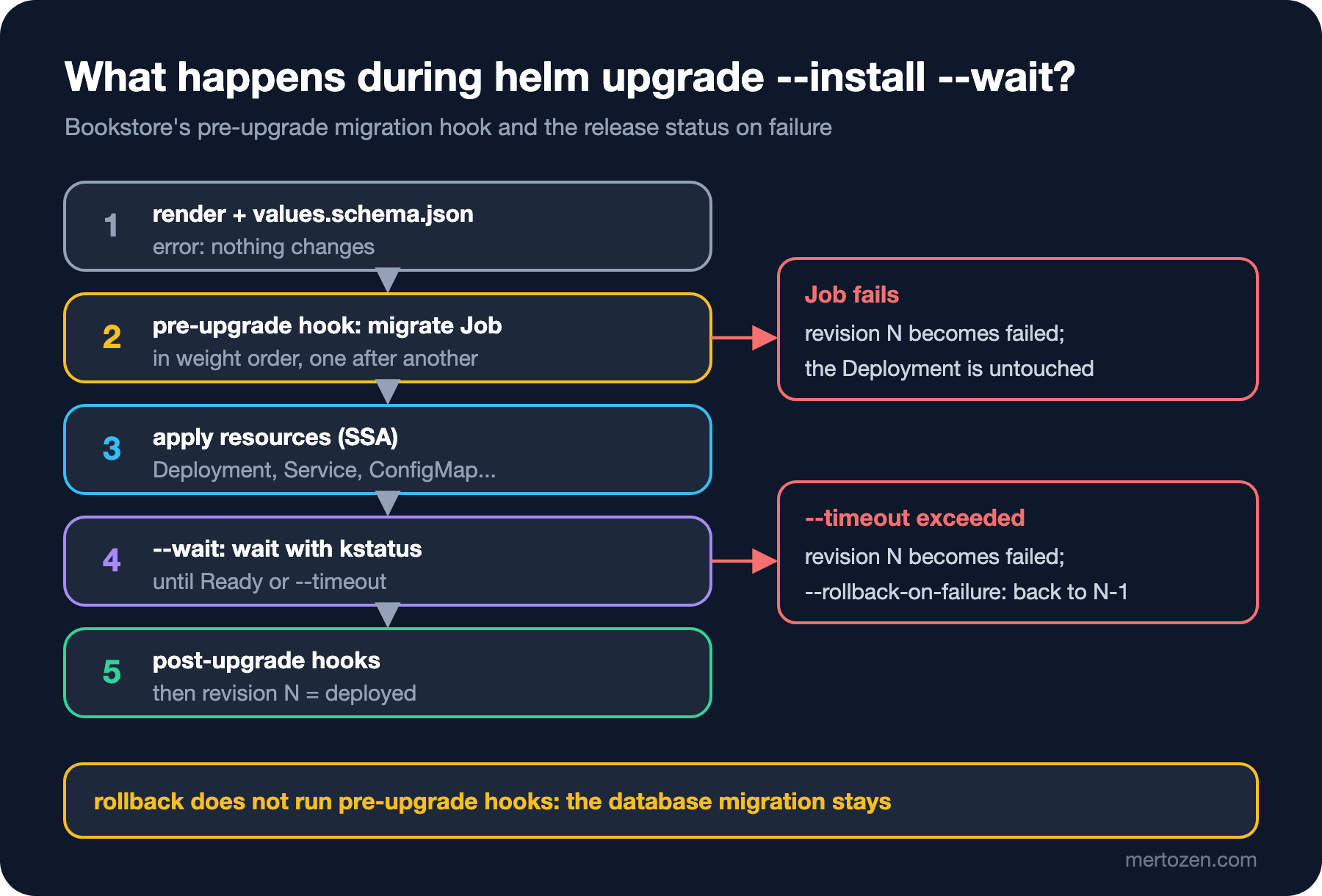
pre-install,pre-upgrade: the Job is created before the chart's other resources, and Helm waits until the Job completes. If the Job fails, the Deployment is not touched at all; this keeps code that expects the new schema from starting against the old one. When there are several hooks, helm.sh/hook-weight sets the order: the lower one runs first, equal ones are sorted by kind and name, and each is waited on until it is ready. For example, you give a Job that checks database access -5 and the migration 0. helm.sh/hook-delete-policy says when the Job is deleted: before-hook-creation deletes the old Job and creates a new one on the next upgrade (the default when there is no annotation), and hook-succeeded deletes it after success. Because we did not add hook-failed, a failed Job stays in place with its logs for inspection.
Hook resources have one more property: they are not counted as part of the release. helm uninstall does not delete them, and they do not show up in helm get manifest. That is why every hook needs a deletion policy; otherwise completed Jobs pile up in the namespace. The migration bundle is a separate image: it sits in the chart as migrations.image and, when its tag is empty, uses the same appVersion as the API, so code and schema move with the same version.
When a Hook Fails
The first install did not go smoothly, and that was useful, because we saw what the hook does on failure with three different errors. The first try:
helm upgrade --install bookstore charts/bookstore -n bookstore-staging \
    -f deploy/values-staging.yaml --wait --timeout 5m
Release "bookstore" does not exist. Installing it now.
Error: failed pre-install: resource Job/bookstore-staging/bookstore-migrate not ready. status: Failed, message: Job Failed. failed: 2/1helm list -n bookstore-staging
kubectl -n bookstore-staging get jobs,pods,deploy
kubectl -n bookstore-staging logs -l app.kubernetes.io/component=migrateNAME NAMESPACE REVISION UPDATED STATUS CHART APP VERSION
bookstore bookstore-staging 1 2026-11-15 07:19:09.298785 +0300 +03 failed bookstore-0.4.0 1.1.0
NAME STATUS COMPLETIONS DURATION AGE
job.batch/bookstore-migrate Failed 0/1 18s 18s
NAME READY STATUS RESTARTS AGE
pod/bookstore-migrate-6277g 0/1 Error 0 18s
pod/bookstore-migrate-9xg4z 0/1 Error 0 7s
Default extraction directory [/home/app] either doesn't exist or is not accessible for read/write.
Failure processing application bundle.
Failed to determine location for extracting embedded files.
DOTNET_BUNDLE_EXTRACT_BASE_DIR is not set, and a read-write cache directory couldn't be created.The release is failed, the Job was tried twice (backoffLimit: 1) and the Deployment was never created. The mistake was ours: the migration bundle is a single-file .NET application and extracts itself to disk when it runs; with a read-only root filesystem it found nowhere to write. We added DOTNET_BUNDLE_EXTRACT_BASE_DIR=/tmp and mounted an emptyDir at /tmp. The second try (upgrade --install continues a failed first install as an upgrade) and the Job's log:
Error: UPGRADE FAILED: pre-upgrade hooks failed: resource Job/bookstore-staging/bookstore-migrate not ready. status: Failed, message: Job Failed. failed: 2/1

An error occurred while accessing the Microsoft.Extensions.Hosting services. Continuing without the application service provider. Error: Connection string 'BookstoreDb' is missing. Set it with user-secrets or the ConnectionStrings__BookstoreDb environment variable (see README.md).
Unable to create a 'DbContext' of type 'Bookstore.Data.BookstoreContext'. ...
The bundle builds BookstoreContext through the application's Program.cs, and Program fails at startup when there is no connection string. The bundle's --connection argument only comes into play after the context is built, so it did not help; we passed the Secret as an environment variable named ConnectionStrings__BookstoreDb. The third try:
System.NotSupportedException: Globalization Invariant Mode is not supported.This time the image was the problem: chiseled .NET images do not contain ICU and run in globalization invariant mode, and Microsoft.Data.SqlClient does not support that mode. The fix is the -extra variant, which includes ICU; we made the same change to the API image. Image design is the topic of the upcoming Docker series.
# -extra: includes ICU, which Microsoft.Data.SqlClient needs (it does not run in globalization invariant mode).
FROM mcr.microsoft.com/dotnet/runtime-deps:10.0-noble-chiseled-extra
COPY --from=build /out/efbundle /efbundle
ENTRYPOINT ["/efbundle"]
Release "bookstore" has been upgraded. Happy Helming!
NAME: bookstore
LAST DEPLOYED: Sun Nov 15 07:21:35 2026
NAMESPACE: bookstore-staging
STATUS: deployed
REVISION: 4
DESCRIPTION: Upgrade complete
...helm history bookstore -n bookstore-stagingREVISION UPDATED STATUS CHART APP VERSION DESCRIPTION
1 Sun Nov 15 07:19:09 2026 failed bookstore-0.4.0 1.1.0 Release "bookstore" failed: failed pre-install: res...
2 Sun Nov 15 07:19:37 2026 failed bookstore-0.4.0 1.1.0 Upgrade "bookstore" failed: pre-upgrade hooks faile...
3 Sun Nov 15 07:20:03 2026 superseded bookstore-0.4.0 1.1.0 Upgrade "bookstore" failed: pre-upgrade hooks faile...
4 Sun Nov 15 07:21:35 2026 deployed bookstore-0.4.0 1.1.0 Upgrade complete{"version":"1.1.0","environment":"Staging","pod":"bookstore-api-788648899-kgbcq","database":"SqlServer","storeName":"Bookstore (staging)"}The history reads like a log: failed tries are revisions too. One detail stands out: the description of revision 3 says "failed" but its status is superseded; Helm updates the status of earlier revisions like this when a successful new one arrives.
Revisions, history and rollback
Now the scenario from Guess First. Chart 0.5.0, appVersion 1.2.0; the 1.2.0 image contains the AddBookSubtitle migration.
# Chart.yaml: version 0.5.0, appVersion "1.2.0"; 1.2.0 has a migration adding a Subtitle column to Book
helm upgrade --install bookstore charts/bookstore -n bookstore-staging \
    -f deploy/values-staging.yaml --wait --timeout 5m
Release "bookstore" has been upgraded. Happy Helming!
NAME: bookstore
LAST DEPLOYED: Sun Nov 15 07:23:28 2026
NAMESPACE: bookstore-staging
STATUS: deployed
REVISION: 5
DESCRIPTION: Upgrade completeBecause the hook Job is deleted after success, we captured its log during the upgrade with kubectl logs -f in a separate terminal; a shortened version:
info: Microsoft.EntityFrameworkCore.Migrations[20411]
      Acquiring an exclusive lock for migration application. See https://aka.ms/efcore-docs-migrations-lock for more information if this takes too long.
...
info: Microsoft.EntityFrameworkCore.Migrations[20402]
      Applying migration '20261115042231_AddBookSubtitle'.
...
      ALTER TABLE [catalog].[Books] ADD [Subtitle] nvarchar(200) NULL;
...
      INSERT INTO [__EFMigrationsHistory] ([MigrationId], [ProductVersion])
      VALUES (N'20261115042231_AddBookSubtitle', N'10.0.15');
...
Done.
Since EF Core 9 a lock is taken in the database while migrations are applied; even if two pods try to run the migration at the same time, the second one waits. We asked the database directly:
# The sa password is read from the pod's environment, not written on the command line
kubectl -n bookstore-db exec deploy/mssql -- bash -c '/opt/mssql-tools18/bin/sqlcmd -S localhost -U sa \
    -P "$MSSQL_SA_PASSWORD" -C -d BookstoreDb -W -Q "SET NOCOUNT ON; SELECT MigrationId FROM __EFMigrationsHistory"'
MigrationId
-----------
20261114005447_InitialCreate
20261115042231_AddBookSubtitleA rollback is done by giving a revision number:
helm rollback bookstore 4 -n bookstore-staging --wait
helm history bookstore -n bookstore-staging | tail -3Rollback was a success! Happy Helming!
4 Sun Nov 15 07:21:35 2026 superseded bookstore-0.4.0 1.1.0 Upgrade complete
5 Sun Nov 15 07:23:28 2026 superseded bookstore-0.5.0 1.2.0 Upgrade complete
6 Sun Nov 15 07:23:48 2026 deployed bookstore-0.4.0 1.1.0 Rollback to 4{"version":"1.1.0","environment":"Staging","pod":"bookstore-api-788648899-mqmtn","database":"SqlServer","storeName":"Bookstore (staging)"}The ReplicaSet hash in the pod name (788648899) is the same as in revision 4: the Deployment's template went back exactly to its old form and Kubernetes scaled the old ReplicaSet up again. The database, however, stayed as it was:
MigrationId
-----------
20261114005447_InitialCreate
20261115042231_AddBookSubtitle
SubtitleColumn
--------------
1The answer to Guess First: Helm does not run pre-upgrade hooks on a rollback (rollback has its own pre-rollback/post-rollback hooks), and the EF Core bundle only moves forward. The column and the history entry remain. This time there was no harm, because the migration only added a nullable column and the 1.1.0 code ignores it. After a migration that drops or renames a column, a rollback would run old code against an incompatible schema. That is why migrations should be written in the expand-contract style: first expand to a schema both the old and the new code can work with, and contract in a later version, after the old code is fully gone. The details are in the sixth post of the Deployment Strategies series.
--wait, kstatus and --rollback-on-failure
In Helm 4, --wait now takes a strategy:
helm upgrade --help | grep -A1 -- "--wait " --wait WaitStrategy[=watcher] wait until resources are ready (up to --timeout). Use '--wait' alone for 'watcher' strategy, or specify one of: 'watcher', 'hookOnly', 'legacy'. Default when flag is omitted: 'hookOnly'. (default hookOnly)When the flag is not given at all, the default is hookOnly: Helm waits only for hooks, not for Deployments to become ready. --wait on its own means watcher; Helm watches the resources with the kstatus library and, for a Deployment, checks that the new ReplicaSet is ready and the old pods are gone. legacy is Helm 3's old polling behaviour. We tried with a non-existent image tag and automatic rollback switched on:
helm upgrade bookstore charts/bookstore -n bookstore-staging -f deploy/values-staging.yaml \
    --set image.tag=1.2.1 --rollback-on-failure --timeout 60s
helm history bookstore -n bookstore-staging | tail -1
level=WARN msg="upgrade failed" name=bookstore error="resource Deployment/bookstore-staging/bookstore-api not ready. status: InProgress, message: Pending termination: 1\ncontext deadline exceeded"
Error: UPGRADE FAILED: release bookstore failed, and has been rolled back due to rollback-on-failure being set: resource Deployment/bookstore-staging/bookstore-api not ready. status: InProgress, message: Pending termination: 1
context deadline exceeded
12 Sun Nov 15 07:25:53 2026 deployed bookstore-0.5.0 1.2.0 Rollback to 10The error message is in kstatus' language: the Deployment is InProgress, and the reason is a pod termination still pending. Helm waited 60 seconds, marked the release failed and went back to the last successful revision. Helm 3's --atomic does the same, but its name changed in Helm 4; the old name keeps working with a warning:
Flag --atomic has been deprecated, use --rollback-on-failure insteadUsing --rollback-on-failure in CI keeps a failed deploy from leaving the cluster half done. The cost is that the traces of the failure disappear too: on rollback the broken pods go away, so the pipeline itself has to collect the logs and events for the post-incident review.
A Release Stuck in pending-upgrade
When Helm starts an operation, it puts the release into pending-install, pending-upgrade or pending-rollback and updates it when the operation ends. We tried what happens when the operation is cut off, with two signals. First SIGTERM:
# Upgrade with a missing image tag; SIGTERM to the helm process after 15 seconds
helm upgrade bookstore charts/bookstore -n bookstore-staging -f deploy/values-staging.yaml \
    --set image.tag=1.2.1 --wait --timeout 3m &
sleep 15; kill $!
Release bookstore has been cancelled.
level=WARN msg="upgrade failed" name=bookstore error="context canceled"
Error: UPGRADE FAILED: context canceledNAME NAMESPACE REVISION UPDATED STATUS CHART APP VERSION
bookstore bookstore-staging 7 2026-11-15 07:24:02.359507 +0300 +03 failed bookstore-0.5.0 1.2.0Helm 4 caught the signal and closed the release as failed; the next upgrade worked without trouble. It is different when a CI runner kills the process with SIGKILL at a timeout:
# The same test, this time with SIGKILL: like a CI runner killing the process hard
helm upgrade bookstore charts/bookstore -n bookstore-staging -f deploy/values-staging.yaml \
    --set image.tag=1.2.1 --wait --timeout 3m &
sleep 15; kill -9 $!
helm history bookstore -n bookstore-staging | tail -2
helm upgrade bookstore charts/bookstore -n bookstore-staging -f deploy/values-staging.yaml
8 Sun Nov 15 07:24:17 2026 deployed bookstore-0.5.0 1.2.0 Upgrade complete
9 Sun Nov 15 07:24:28 2026 pending-upgrade bookstore-0.5.0 1.2.0 Preparing upgrade
Error: UPGRADE FAILED: another operation (install/upgrade/rollback) is in progressHelm had no chance to clean up; revision 9 stayed in pending-upgrade, and every later upgrade is rejected with this error. The cleanest way out is a rollback to the last successful revision; without a revision number, Helm goes back to the previous one:
helm rollback bookstore -n bookstore-staging
helm history bookstore -n bookstore-staging | tail -3
Rollback was a success! Happy Helming!
8 Sun Nov 15 07:24:17 2026 superseded bookstore-0.5.0 1.2.0 Upgrade complete
9 Sun Nov 15 07:24:28 2026 pending-upgrade bookstore-0.5.0 1.2.0 Preparing upgrade
10 Sun Nov 15 07:24:43 2026 deployed bookstore-0.5.0 1.2.0 Rollback to 8Revision 9 stays in the history as pending-upgrade, but it is no longer in the way. The "delete the release Secret by hand" route suggested in older blog posts also works, but done without knowing which Secret you are deleting it damages the release history; a rollback leaves a record and brings the cluster to a known state.
Server-Side Apply and Field Ownership
Helm 4 installs new releases with server-side apply. Releases installed with Helm 3 keep using client-side apply on upgrade; Helm 4 records which method each release uses and picks the same one on later upgrades. We will see this with real output in the seventh post. To see what server-side apply means in day-to-day operations, imagine someone touched the Deployment by hand during an incident:
kubectl -n bookstore-staging scale deploy/bookstore-api --replicas=2
kubectl -n bookstore-staging set env deploy/bookstore-api Logging__LogLevel__Default=Debug
helm upgrade bookstore charts/bookstore -n bookstore-staging -f deploy/values-staging.yaml --wait
deployment.apps/bookstore-api scaled
deployment.apps/bookstore-api env updated
level=WARN msg="upgrade failed" name=bookstore error="conflict occurred while applying object bookstore-staging/bookstore-api apps/v1, Kind=Deployment: Apply failed with 1 conflict: conflict with \"kubectl\" with subresource \"scale\" using apps/v1: .spec.replicas"
Error: UPGRADE FAILED: conflict occurred while applying object bookstore-staging/bookstore-api apps/v1, Kind=Deployment: Apply failed with 1 conflict: conflict with "kubectl" with subresource "scale" using apps/v1: .spec.replicasHelm saw that the replicas field now belongs to kubectl and stopped instead of overwriting it. The owners of the fields:
kubectl -n bookstore-staging get deploy bookstore-api -o json --show-managed-fields \
    | jq -r '.metadata.managedFields[] | "\(.manager)\t\(.operation)\t\(.subresource // "-")"'
helm Apply -
kubectl Update scale
kubectl-set Update -
kube-controller-manager Update statusThere are two separate managers here: kubectl scale became the owner of replicas through the scale subresource, and kubectl set env became the owner of the new environment variable under the name kubectl-set. The conflict appeared only on the field Helm manages too. When the change is to be undone deliberately, there is --force-conflicts:
helm upgrade bookstore charts/bookstore -n bookstore-staging -f deploy/values-staging.yaml --force-conflicts --wait
kubectl -n bookstore-staging get deploy bookstore-api \
    -o jsonpath='{.spec.replicas}{"\n"}{range .spec.template.spec.containers[0].env[*]}{.name}{"\n"}{end}'
Release "bookstore" has been upgraded. Happy Helming!
1
ConnectionStrings__BookstoreDb
Logging__LogLevel__Defaultreplicas went back to Helm's value, but the Logging__LogLevel__Default added by hand is still there: server-side apply does not delete fields owned by another manager that Helm never knew about. After an incident, the assumption "a Helm upgrade brings everything back to what is in Git" is therefore wrong. The lasting fix is either not making changes by hand or using a GitOps tool that keeps correcting drift; in the GitOps and Argo CD series we saw that even Argo CD's self-heal does not see fields like this.
In Production
A migration hook is safe only for expand steps; do not ship a change that drops a column in the same version. Give the hook Job an activeDeadlineSeconds and a small backoffLimit; a migration that retries forever also holds the pipeline until --timeout runs out. Run upgrades with --wait and a measured --timeout; --timeout is not a total, it applies separately to each Kubernetes operation (waiting for the hook Job, resources becoming ready), so count that in when you work out the pipeline's total time. To keep two pipelines from touching the same release at once, put a per-environment concurrency limit in CI (concurrency in GitHub Actions). If you deploy the chart with Argo CD, Argo CD turns Helm hooks into its own hooks: pre-install and pre-upgrade become PreSync hooks and sync waves set the order; since Argo CD does not run helm upgrade, there is no release record and no helm history either. The details are in the GitOps and Argo CD series' post on sync waves and hooks.
Common Pitfalls
Believing a rollback also undoes the database migration. Not writing a deletion policy for hooks and piling up Jobs in the namespace, or losing the logs of a failed Job too with hook-succeeded. Seeing "deployed" without --wait and thinking the job is done. Trying to fix a pending-upgrade left by a Helm process killed hard in CI by deleting release Secrets at random. Adding --force-conflicts to every upgrade by default and silently overwriting someone else's deliberate change. Assuming a Helm upgrade also cleans up fields added by hand. Forgetting that chiseled images have no ICU and being surprised when SqlClient fails at startup.
A Small Experiment
★☆☆ Remove hook-succeeded from the migration Job's hook-delete-policy, do two upgrades and check with kubectl get jobs how many Jobs are left. Then run helm uninstall and see that the Job is still there.
★★☆ Add a second pre-upgrade hook with weight -5: a short Job that checks a TCP connection to SQL Server can be opened. Stop the database and confirm at which hook the upgrade stops and that the Deployment did not change.
★★★ Write a 1.3.0 migration that drops the Subtitle column and remove it from the code in the same version. Upgrade to 1.3.0, roll back to 1.2.0 and watch what error the API gives, then try the same change again split into two versions with expand-contract.
Our chart can now be installed and updated, and it moves the database forward in order. In the next post we make the chart shareable: dependencies and Chart.lock, helm push to an OCI registry, helm lint, helm test, chart-testing and GitHub Actions.