

Building a Clean Architecture Solution in .NET 10: Domain, Application, Infrastructure, Web
A Clean Architecture solution in .NET 10 is four projects wired in one direction: Domain references nothing, Application only Domain, Infrastructure Application, and Web Application plus Infrastructure for the composition root only. We build Bookstore Ordering with .slnx, Directory.Build.props, Central Package Management and internal Infrastructure types, and show the IApplicationDbContext versus repository choice and pitfalls such as CS0122 and MSB4006 with real output.
Version note: The code in this post was built and run with C# 14 and .NET 10.
Guess First
By the end of this post Bookstore's ordering side will be a four-project solution, and Program.cs will stay this short:
using Bookstore.Application;
using Bookstore.Application.Ordering;
using Bookstore.Infrastructure;

WebApplicationBuilder builder = WebApplication.CreateBuilder(args);

// Composition root: Web sees Infrastructure only here, in a single line
builder.Services.AddApplication();
builder.Services.AddInfrastructure(builder.Configuration);

WebApplication app = builder.Build();
await app.Services.InitialiseDatabaseAsync();

app.MapPost("/orders", async (PlaceOrderRequest request, PlaceOrderHandler handler, CancellationToken ct) =>
{
    Result<PlaceOrderResponse> result = await handler.HandleAsync(request, ct);
    return result.IsSuccess
        ? Results.Created($"/orders/{result.Value!.OrderId}", result.Value)
        : Results.Problem(result.Error!.Message, statusCode: StatusCodes.Status409Conflict);
});

app.Run();
Bookstore.Web references Bookstore.Infrastructure so it can call AddInfrastructure. Three questions: if a developer wants to inject BookstoreDbContext directly into a new endpoint, what does the compiler say? If someone says "I need a type from Application in Domain" and adds a reference from Bookstore.Domain to Bookstore.Application, what happens? And if someone adds the Entity Framework Core (EF Core) package to Domain and puts an [Index] attribute on an entity, does the build break?
Setting Up the Four Projects
In the first four posts of the series we saw the idea and its sources; from here on it is implementation. The layout we will build is the four projects common in the .NET world: Domain, Application, Infrastructure and Web. Microsoft's "Common web application architectures" guide describes the same idea with three projects called ApplicationCore, Infrastructure and UI (user interface); among the popular templates, jasontaylordev/CleanArchitecture (v10.8.0) uses the names Domain, Application, Infrastructure, Web, and ardalis/CleanArchitecture uses Core, UseCases, Infrastructure, Web. The names change but the core is the same: business rules in a project that depends on nothing, infrastructure in a project that references them.
Let us set up the solution with the CLI (command-line interface):
dotnet new sln -n Bookstore
dotnet new classlib -n Bookstore.Domain -o src/Bookstore.Domain
dotnet new classlib -n Bookstore.Application -o src/Bookstore.Application
dotnet new classlib -n Bookstore.Infrastructure -o src/Bookstore.Infrastructure
dotnet new web -n Bookstore.Web -o src/Bookstore.Web
dotnet new xunit -n Bookstore.Application.Tests -o tests/Bookstore.Application.Tests
dotnet sln add src/Bookstore.Domain src/Bookstore.Application src/Bookstore.Infrastructure src/Bookstore.Web tests/Bookstore.Application.Tests
In the .NET 10 SDK (Software Development Kit), dotnet new sln produces an XML (Extensible Markup Language) based .slnx file by default instead of the old .sln. The Bookstore.slnx created on my machine (SDK 10.0.402):
<Solution>
  <Folder Name="/src/">
    <Project Path="src/Bookstore.Application/Bookstore.Application.csproj" />
    <Project Path="src/Bookstore.Domain/Bookstore.Domain.csproj" />
    <Project Path="src/Bookstore.Infrastructure/Bookstore.Infrastructure.csproj" />
    <Project Path="src/Bookstore.Web/Bookstore.Web.csproj" />
  </Folder>
  <Folder Name="/tests/">
    <Project Path="tests/Bookstore.Application.Tests/Bookstore.Application.Tests.csproj" />
  </Folder>
</Solution>
It is readable, can be fixed by hand in a merge conflict, and has no GUID (Globally Unique Identifier) lines. In namespaces we will use feature folders such as Bookstore.Domain.Ordering and Bookstore.Application.Ordering; Book belongs to Catalog, so it lives in Bookstore.Domain.Catalog.
Reference Rules
The Dependency Rule's counterpart in the solution is four lines:
dotnet add src/Bookstore.Application reference src/Bookstore.Domain
dotnet add src/Bookstore.Infrastructure reference src/Bookstore.Application
dotnet add src/Bookstore.Web reference src/Bookstore.Application src/Bookstore.Infrastructure
dotnet add tests/Bookstore.Application.Tests reference src/Bookstore.Application
Domain references nothing, Application only Domain, Infrastructure only Application. Infrastructure does not need a separate reference to Domain: project references flow transitively, so Domain types are already visible through Application. Web references Application and, for the composition root only, Infrastructure:
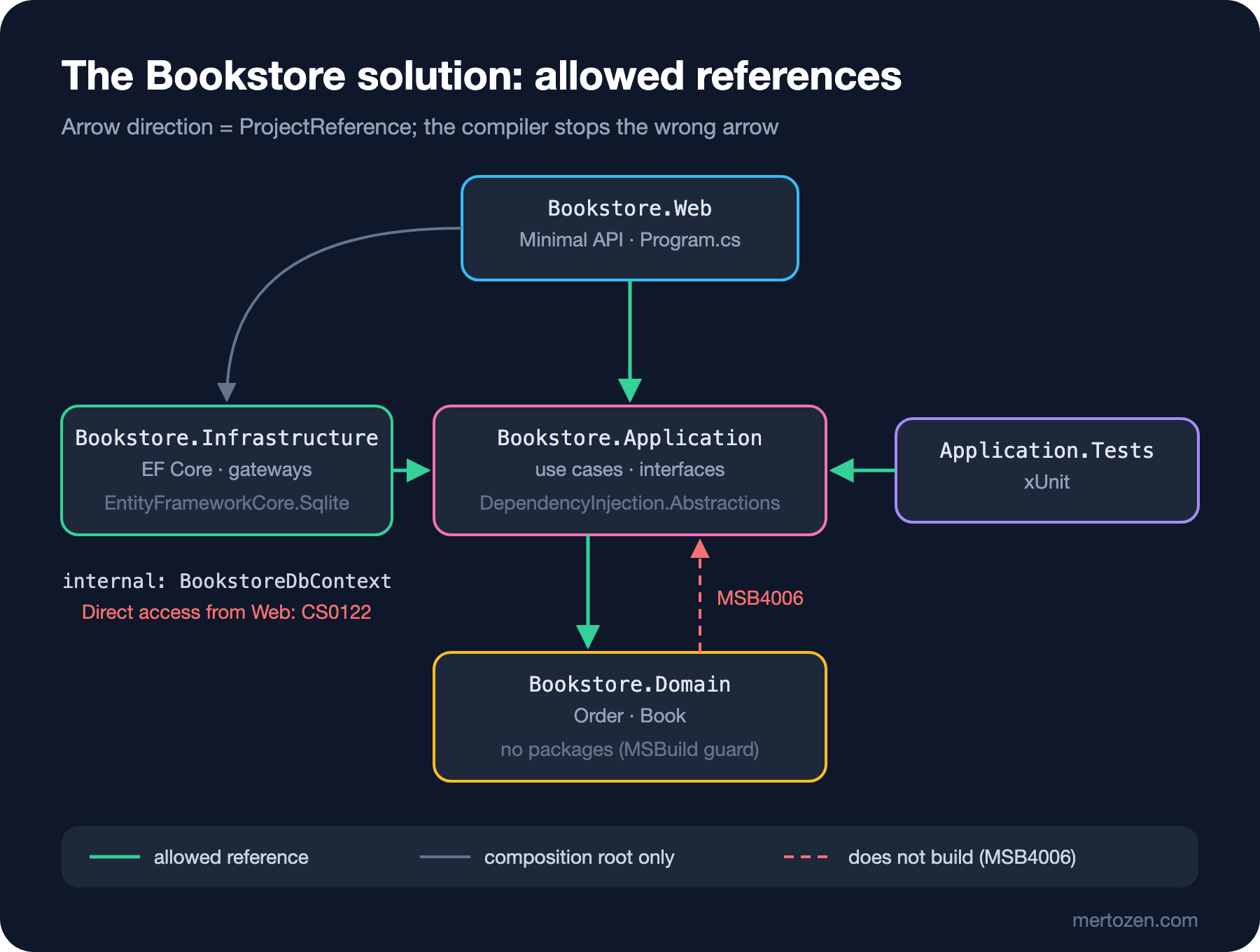
Checking with dotnet list reference, the graph is exactly this:
== src/Bookstore.Application
../Bookstore.Domain/Bookstore.Domain.csproj
== src/Bookstore.Domain
== src/Bookstore.Infrastructure
../Bookstore.Application/Bookstore.Application.csproj
== src/Bookstore.Web
../Bookstore.Application/Bookstore.Application.csproj
../Bookstore.Infrastructure/Bookstore.Infrastructure.csproj
The criteria for splitting a solution into projects, principles such as acyclic dependencies (ADP, Acyclic Dependencies Principle) and depending in the direction of stability (SDP, Stable Dependencies Principle), are in the SOLID (the initials of Robert C. Martin's five class design principles) and Design Principles series post "Component Principles: Splitting a .NET Solution into Projects". The four projects here are those principles' concrete answer for Clean Architecture: the most stable and most abstract, Domain, at the bottom; the most volatile, Web and Infrastructure, at the top.
Directory.Build.props and Central Package Management
The templates write the same TargetFramework, Nullable and ImplicitUsings lines into every csproj. Moving them into a single Directory.Build.props at the solution root means each csproj states only what is specific to it; MSBuild imports this file automatically for every project in the folders below:
<Project>
  <PropertyGroup>
    <TargetFramework>net10.0</TargetFramework>
    <LangVersion>14</LangVersion>
    <Nullable>enable</Nullable>
    <ImplicitUsings>enable</ImplicitUsings>
    <TreatWarningsAsErrors>true</TreatWarningsAsErrors>
    <ManagePackageVersionsCentrally>true</ManagePackageVersionsCentrally>
  </PropertyGroup>
</Project>
The last line turns on Central Package Management: package versions live in one place, Directory.Packages.props, and the PackageReference items in the csproj files carry no version. That way Infrastructure and the test project do not end up on different versions of the same package:
<Project>
  <ItemGroup>
    <PackageVersion Include="Microsoft.EntityFrameworkCore.Sqlite" Version="10.0.14" />
    <PackageVersion Include="Microsoft.Extensions.DependencyInjection.Abstractions" Version="10.0.14" />
    <PackageVersion Include="Microsoft.NET.Test.Sdk" Version="17.14.1" />
    <PackageVersion Include="xunit" Version="2.9.3" />
    <PackageVersion Include="xunit.runner.visualstudio" Version="3.1.4" />
  </ItemGroup>
</Project>
Who takes which package is part of the architecture too. EF Core is only in Infrastructure. Application takes only Microsoft.Extensions.DependencyInjection.Abstractions; the AddApplication extension method has to know IServiceCollection, and this package contains only the interfaces, not the container itself. Domain takes no packages at all.
Domain and Application: Order and the PlaceOrder Use Case
The Order in Domain is the previous post's entity made slightly more ready for persistence: its properties have private set so EF Core can write values, but there is no EF Core type or attribute anywhere.
using Bookstore.Domain.Catalog;

namespace Bookstore.Domain.Ordering;

public sealed record OrderItem(int BookId, decimal UnitPrice, int Quantity);

public sealed class Order
{
    public const decimal FreeShippingThreshold = 500m;
    private readonly List<OrderItem> _items = [];

    public Order(string customerEmail, string postalCode) =>
        (CustomerEmail, PostalCode) = (customerEmail, postalCode);

    public int Id { get; private set; }
    public string CustomerEmail { get; private set; }
    public string PostalCode { get; private set; }
    public IReadOnlyList<OrderItem> Items => _items;
    public decimal ShippingFee { get; private set; }
    public decimal Subtotal => _items.Sum(i => i.UnitPrice * i.Quantity);
    public decimal Total => Subtotal + ShippingFee;

    public bool TryAddItem(Book book, int quantity)
    {
        if (!book.TryReserve(quantity)) return false;
        _items.Add(new OrderItem(book.Id, book.Price, quantity));
        return true;
    }

    public void ApplyShipping(decimal quotedFee) =>
        ShippingFee = Subtotal >= FreeShippingThreshold ? 0m : quotedFee;
}
Application defines what the use case needs from the outside world as interfaces. We gave saving to a separate IUnitOfWork: when a use case touches several repositories, a single SaveChanges call means a single transaction. We will talk about the transaction boundary in detail in the 6th post of this series.
// What Application needs from the outside world; implementations live in Infrastructure
public interface IBookRepository
{
    Task<Book?> FindAsync(int bookId, CancellationToken ct);
}

public interface IOrderRepository
{
    void Add(Order order);
}

public interface IUnitOfWork
{
    Task SaveChangesAsync(CancellationToken ct);
}

public interface IShippingRates
{
    Task<decimal> QuoteAsync(string postalCode, int weightGrams, CancellationToken ct);
}
public sealed record PlaceOrderRequest(string CustomerEmail, string PostalCode, int BookId, int Quantity);
public sealed record PlaceOrderResponse(int OrderId, decimal Subtotal, decimal ShippingFee, decimal Total);
public sealed class PlaceOrderHandler(
IBookRepository books, IOrderRepository orders, IShippingRates rates, IUnitOfWork unitOfWork)
{
private const int GramsPerBook = 400;
public async Task<Result<PlaceOrderResponse>> HandleAsync(PlaceOrderRequest request, CancellationToken ct)
{
Book? book = await books.FindAsync(request.BookId, ct);
if (book is null)
return new Error("book.not_found", $"Book {request.BookId} not found.");
Order order = new(request.CustomerEmail, request.PostalCode);
if (!order.TryAddItem(book, request.Quantity))
return new Error("book.out_of_stock", $"Only {book.Stock} copies of '{book.Title}' left.");
order.ApplyShipping(await rates.QuoteAsync(request.PostalCode, request.Quantity * GramsPerBook, ct));
orders.Add(order);
await unitOfWork.SaveChangesAsync(ct);
return new PlaceOrderResponse(order.Id, order.Subtotal, order.ShippingFee, order.Total);
}
}Result<T> and Error are the small types we wrote in the previous post; here they sit at the root of Application. The Application tests reference only Application and satisfy the four interfaces with a single fake class. I tested the rule "nothing is saved when stock is insufficient" by counting how many times SaveChangesAsync was called:
Passed! - Failed: 0, Passed: 2, Skipped: 0, Total: 2, Duration: 7 ms - Bookstore.Application.Tests.dll (net10.0)Infrastructure: DbContext, IEntityTypeConfiguration and internal
The EF Core mapping lives in Infrastructure, in one IEntityTypeConfiguration<T> class per entity. Using the Fluent API (Application Programming Interface) instead of writing attributes such as [Index] or [MaxLength] on the entity is how Domain stays unaware of EF Core; the general comparison of the two approaches is in the EF Core series post "Data Annotations or Fluent API in EF Core? OnModelCreating and IEntityTypeConfiguration".
// Mapping lives in Infrastructure; the Order in Domain carries no EF Core attribute
internal sealed class OrderConfiguration : IEntityTypeConfiguration<Order>
{
    public void Configure(EntityTypeBuilder<Order> builder)
    {
        builder.HasKey(o => o.Id);
        builder.Property(o => o.CustomerEmail).HasMaxLength(256);
        builder.Property(o => o.PostalCode).HasMaxLength(10);
        builder.HasIndex(o => o.CustomerEmail);
        builder.Ignore(o => o.Subtotal);
        builder.Ignore(o => o.Total);
        builder.OwnsMany(o => o.Items, items =>
        {
            items.ToTable("OrderItems");
            items.WithOwner().HasForeignKey("OrderId");
            items.Property<int>("Id");
            items.HasKey("Id");
        });
        builder.Navigation(o => o.Items).HasField("_items");
    }
}
The DbContext and the repositories are internal. The only public type Infrastructure exposes is the DependencyInjection class with the extension methods that register services:
internal sealed class BookstoreDbContext(DbContextOptions<BookstoreDbContext> options)
    : DbContext(options), IUnitOfWork
{
    public DbSet<Book> Books => Set<Book>();
    public DbSet<Order> Orders => Set<Order>();

    protected override void OnModelCreating(ModelBuilder modelBuilder) =>
        modelBuilder.ApplyConfigurationsFromAssembly(typeof(BookstoreDbContext).Assembly);

    Task IUnitOfWork.SaveChangesAsync(CancellationToken ct) => SaveChangesAsync(ct);
}

public static class DependencyInjection
{
    public static IServiceCollection AddInfrastructure(this IServiceCollection services, IConfiguration configuration)
    {
        services.AddDbContext<BookstoreDbContext>(o =>
            o.UseSqlite(configuration.GetConnectionString("Bookstore")));
        services.AddScoped<IUnitOfWork>(sp => sp.GetRequiredService<BookstoreDbContext>());
        services.AddScoped<IBookRepository, BookRepository>();
        services.AddScoped<IOrderRepository, OrderRepository>();
        decimal flatRate = decimal.Parse(configuration["Shipping:FlatRate"] ?? "0", CultureInfo.InvariantCulture);
        services.AddSingleton<IShippingRates>(new FlatRateShipping(flatRate));
        return services;
    }
}
We registered IUnitOfWork not as a separate object but by forwarding it to the same scoped BookstoreDbContext instance; the repositories and the unit of work share the same change tracker. The examples use SQLite; moving to Bookstore's production SQL (Structured Query Language) Server database means changing a single line in this method. On the shipping side FlatRateShipping is just a placeholder; the typed HttpClient adapter that calls the real carrier API is the topic of this series' "Persistence Ignorance and Infrastructure Adapters" post.
Composition Root: AddApplication and AddInfrastructure
Application's own registration method is short:
public static class DependencyInjection
{
    public static IServiceCollection AddApplication(this IServiceCollection services)
    {
        services.AddScoped<PlaceOrderHandler>();
        return services;
    }
}
Each project registering its own services through its own extension method is a .NET tradition. When I asked via reflection where AddDbContext is defined, the answer was:
Microsoft.Extensions.DependencyInjection.EntityFrameworkServiceCollectionExtensions in Microsoft.EntityFrameworkCoreThe method lives in EF Core's assembly but its namespace is Microsoft.Extensions.DependencyInjection, so the caller does not need to know EF Core's internal namespaces. AddInfrastructure does the same for us: Web plugs Infrastructure in with a single line without knowing what is inside it. We covered the composition root and why it should be in one place, together with the difference between DIP (Dependency Inversion Principle), DI (Dependency Injection) and IoC (Inversion of Control), in the SOLID series post "Dependency Inversion Principle: DIP vs DI vs IoC and the Composition Root". Microsoft's guide also notes that the UI project may have to reference Infrastructure to wire up DI, but that actual references to Infrastructure types should be limited to the composition root.
Running the application and ordering 2 copies of Dune, 1 copy of Emma and then 2 copies of Dune again:
HTTP/1.1 201 Created
{"orderId":1,"subtotal":500.0,"shippingFee":0,"total":500.0}
HTTP/1.1 201 Created
{"orderId":2,"subtotal":180.0,"shippingFee":40,"total":220.0}
HTTP/1.1 409 Conflict
{"type":"https://tools.ietf.org/html/rfc9110#section-15.5.10","title":"Conflict","status":409,"detail":"Only 1 copies of 'Dune' left."}
IApplicationDbContext or Repositories?
In this solution Application reaches the database through IBookRepository, IOrderRepository and IUnitOfWork. The common second way is the one the jasontaylordev template chose: an IApplicationDbContext interface in Application that exposes EF Core's DbSet<T>s. The template's Application.csproj at v10.8.0 does indeed reference the Microsoft.EntityFrameworkCore package. I wrote the same use case that way in Bookstore too:
// Alternative: Application sees EF Core's DbSet directly
public interface IApplicationDbContext
{
    DbSet<Book> Books { get; }
    DbSet<Order> Orders { get; }
    Task<int> SaveChangesAsync(CancellationToken ct);
}

public sealed class PlaceOrderWithDbContextHandler(IApplicationDbContext db, IShippingRates rates)
{
    public async Task<Result<PlaceOrderResponse>> HandleAsync(PlaceOrderRequest request, CancellationToken ct)
    {
        Book? book = await db.Books.SingleOrDefaultAsync(b => b.Id == request.BookId, ct);
        if (book is null)
            return new Error("book.not_found", $"Book {request.BookId} not found.");

        Order order = new(request.CustomerEmail, request.PostalCode);
        if (!order.TryAddItem(book, request.Quantity))
            return new Error("book.out_of_stock", $"Only {book.Stock} copies of '{book.Title}' left.");

        order.ApplyShipping(await rates.QuoteAsync(request.PostalCode, request.Quantity * 400, ct));
        db.Orders.Add(order);
        await db.SaveChangesAsync(ct);
        return new PlaceOrderResponse(order.Id, order.Subtotal, order.ShippingFee, order.Total);
    }
}
The difference between the two ways in the package lists (line counts from dotnet list package --include-transitive):
| Project | Repository interfaces | IApplicationDbContext |
|---|---|---|
| Bookstore.Application | 1 package, 0 EF Core lines | 11 packages, 3 EF Core lines |
| Bookstore.Application.Tests | 14 packages, 0 EF Core lines | 24 packages, 3 EF Core lines |
Repository interfaces: Application is completely unaware of EF Core and tests are written with simple fakes; the cost is one interface method per query need, with EF Core's LINQ (Language Integrated Query) power left behind the interface. IApplicationDbContext: handlers use Include, projections and AsNoTracking directly and no repository layer is written; the cost is Application depending on EF Core and unit tests needing a provider such as SQLite in-memory. The second loosens the Dependency Rule: a library from the Frameworks and Drivers circle enters the Use Cases circle. Some teams accept this knowingly, since EF Core itself is already a repository and unit of work. We opened the EF Core side of this debate and the read side of CQRS (Command Query Responsibility Segregation) in the EF Core series post "EF Core and Architecture: Repositories, the Read Side of CQRS and Moving to Dapper". In Bookstore we choose the first way; on the read side it is always possible to add separate query handlers that use EF Core directly when needed.
Common Pitfalls
EF Core attributes leaking into Domain
The answer to the third opening question is annoying: the build does not break. After adding the Microsoft.EntityFrameworkCore.Sqlite package to Domain and writing [Index(nameof(CustomerEmail))] on Order, the solution compiles without complaint and EF Core shows up in Domain's package list:
   Top-level Package                           Requested   Resolved
   > Microsoft.EntityFrameworkCore.Sqlite      10.0.14     10.0.14
The compiler does not count this as an error, because a project taking a package is legitimate. A cheap guard is an MSBuild target in Domain's csproj:
<Project Sdk="Microsoft.NET.Sdk">
  <!-- Domain may not reference any NuGet package or project -->
  <Target Name="GuardDomainDependencies" BeforeTargets="Build">
    <Error Condition="'@(PackageReference)' != '' Or '@(ProjectReference)' != ''"
           Text="Bookstore.Domain must stay dependency-free. Found: @(PackageReference);@(ProjectReference)" />
  </Target>
</Project>
The clean solution builds fine with this target; with the package added, the build stops with this error:
src/Bookstore.Domain/Bookstore.Domain.csproj(8,5): error : Bookstore.Domain must stay dependency-free. Found: Microsoft.EntityFrameworkCore.Sqlite;This is only a coarse check for Domain; type-level rules such as "Application may not use any type in Infrastructure" are covered by the architecture tests written with ArchUnitNET in the 8th post of this series.
Web reaching into Infrastructure directly
Since Web references Infrastructure for the composition root, what stops an endpoint from injecting BookstoreDbContext? Nothing, if the types in Infrastructure were public. Because they are internal, the compiler stops it:
Program.cs(28,75): error CS0122: 'BookstoreDbContext' is inaccessible due to its protection levelIf Infrastructure's integration tests need these internal types, adding an InternalsVisibleTo line for the test assembly to the csproj is enough; do not open that door for Web.
Circular references
The second opening question: adding a reference from Domain to Application. The dotnet add reference command adds it without objection, but the restore step stops at the first build:
NuGet.targets(1298,5): error MSB4006: There is a circular dependency in the target dependency graph involving target "_GenerateRestoreProjectPathWalk". [src/Bookstore.Application/Bookstore.Application.csproj]When you see this error, the fix is not to force the reference but to ask why Domain needs a type from Application. Most of the time that type actually belongs in Domain, or Domain should define an interface that Application implements.
Everything ending up in a "Common" project
When four projects are not enough, the first reflex is to open a Bookstore.Common: extension methods, constants, DTOs (Data Transfer Objects), logging helpers. Since everyone references it, it should be the most stable project, yet it turns into the one that changes most often. A type's home should be decided by who uses it; Result<T> sits at the root of Application, a value object that does money arithmetic sits in Domain.
A Small Experiment
★☆☆ Build the solution from scratch with the commands in this post and verify that the dotnet list reference output matches the one here. Then delete the Infrastructure reference from Bookstore.Web.csproj and see which line stops compiling.
★★☆ Add a Bookstore.Infrastructure.Tests project, opened up with InternalsVisibleTo, and test with a SQLite in-memory database that OrderConfiguration really produces the OrderItems table.
★★★ Generalize the GuardDomainDependencies target: move it to Directory.Build.props and define the allowed references for each project through a property (for example, Application only to Domain). Add a reference that breaks the rule and show the build stopping.
The solution is set up and the arrows point the right way. In the next post we go inside the Application layer: designing a use case as a single-purpose handler, where validation lives, the choice between Result and exceptions, and the transaction boundary, all without needing MediatR.