

.NET 10'da Clean Architecture Solution'ı Kurmak: Domain, Application, Infrastructure, Web
.NET 10'da Clean Architecture için dört project kurulur ve referanslar tek yöne bağlanır: Domain hiçbir şeye, Application yalnız Domain'e, Infrastructure Application'a, Web ise Application'a ve yalnız composition root için Infrastructure'a. Bookstore Ordering'i .slnx, Directory.Build.props, Central Package Management ve internal Infrastructure tipleriyle kuruyor; IApplicationDbContext ile repository tercihini ve CS0122, MSB4006 gibi tuzakları gerçek çıktılarla gösteriyoruz.
Sürüm notu: Bu yazıdaki kodlar C# 14 ve .NET 10 ile derlenip denenmiştir.
Önce Tahmin Et
Bu yazının sonunda Bookstore'un sipariş tarafı dört project'lik bir solution olacak ve Program.cs şu kadar kısa kalacak:
using Bookstore.Application;
using Bookstore.Application.Ordering;
using Bookstore.Infrastructure;

WebApplicationBuilder builder = WebApplication.CreateBuilder(args);

// Composition root: Web, Infrastructure'ı yalnız burada, tek satırla görür
builder.Services.AddApplication();
builder.Services.AddInfrastructure(builder.Configuration);

WebApplication app = builder.Build();
await app.Services.InitialiseDatabaseAsync();

app.MapPost("/orders", async (PlaceOrderRequest request, PlaceOrderHandler handler, CancellationToken ct) =>
{
    Result<PlaceOrderResponse> result = await handler.HandleAsync(request, ct);
    return result.IsSuccess
        ? Results.Created($"/orders/{result.Value!.OrderId}", result.Value)
        : Results.Problem(result.Error!.Message, statusCode: StatusCodes.Status409Conflict);
});

app.Run();Bookstore.Web, AddInfrastructure'ı çağırabilmek için Bookstore.Infrastructure'a referans veriyor. Üç soru: Bir geliştirici yeni bir endpoint'te BookstoreDbContext'i doğrudan inject etmek isterse derleyici ne der? Biri "Domain'den Application'daki bir tipe ihtiyacım var" deyip Bookstore.Domain'den Bookstore.Application'a referans eklerse ne olur? Ve Domain'e Entity Framework Core (EF Core) paketini ekleyip entity'ye bir [Index] attribute'u koyarsa build kırılır mı?
Dört Project'i Kurmak
Serinin ilk dört yazısında fikri ve kaynakları gördük; bundan sonrası uygulama. Kuracağımız düzen .NET dünyasında yaygın olan dört project: Domain, Application, Infrastructure ve Web. Microsoft'un "Common web application architectures" rehberi aynı fikri ApplicationCore, Infrastructure ve UI (user interface) diye üç project'le anlatıyor; popüler template'lerden jasontaylordev/CleanArchitecture (v10.8.0) Domain, Application, Infrastructure, Web adlarını, ardalis/CleanArchitecture ise Core, UseCases, Infrastructure, Web adlarını kullanıyor. İsimler değişse de çekirdek aynı: iş kuralları hiçbir şeye bağımlı olmayan bir project'te, altyapı onlara referans veren bir project'te.
Solution'ı CLI (command-line interface) ile kuralım:
dotnet new sln -n Bookstore
dotnet new classlib -n Bookstore.Domain -o src/Bookstore.Domain
dotnet new classlib -n Bookstore.Application -o src/Bookstore.Application
dotnet new classlib -n Bookstore.Infrastructure -o src/Bookstore.Infrastructure
dotnet new web -n Bookstore.Web -o src/Bookstore.Web
dotnet new xunit -n Bookstore.Application.Tests -o tests/Bookstore.Application.Tests
dotnet sln add src/Bookstore.Domain src/Bookstore.Application src/Bookstore.Infrastructure src/Bookstore.Web tests/Bookstore.Application.Tests
.NET 10 SDK'sında (Software Development Kit) dotnet new sln varsayılan olarak eski .sln yerine XML (Extensible Markup Language) tabanlı .slnx dosyası üretiyor. Benim makinemde (SDK 10.0.402) oluşan Bookstore.slnx:
<Solution>
  <Folder Name="/src/">
    <Project Path="src/Bookstore.Application/Bookstore.Application.csproj" />
    <Project Path="src/Bookstore.Domain/Bookstore.Domain.csproj" />
    <Project Path="src/Bookstore.Infrastructure/Bookstore.Infrastructure.csproj" />
    <Project Path="src/Bookstore.Web/Bookstore.Web.csproj" />
  </Folder>
  <Folder Name="/tests/">
    <Project Path="tests/Bookstore.Application.Tests/Bookstore.Application.Tests.csproj" />
  </Folder>
</Solution>
Okunabilir, merge conflict'te elle düzeltilebilir ve GUID (Globally Unique Identifier) satırları yok. Namespace'lerde Bookstore.Domain.Ordering, Bookstore.Application.Ordering gibi feature klasörleri kullanacağız; Book ise Catalog'a ait olduğu için Bookstore.Domain.Catalog'da duruyor.
Reference Kuralları
Dependency Rule'un solution'daki karşılığı dört satır:
dotnet add src/Bookstore.Application reference src/Bookstore.Domain
dotnet add src/Bookstore.Infrastructure reference src/Bookstore.Application
dotnet add src/Bookstore.Web reference src/Bookstore.Application src/Bookstore.Infrastructure
dotnet add tests/Bookstore.Application.Tests reference src/Bookstore.Application
Domain hiçbir şeye referans vermiyor, Application yalnız Domain'e, Infrastructure yalnız Application'a. Infrastructure'ın Domain'e ayrıca referans vermesine gerek yok: project reference'lar transitive akıyor, Application üzerinden Domain tipleri zaten görünüyor. Web ise Application'a ve, yalnız composition root için, Infrastructure'a referans veriyor:
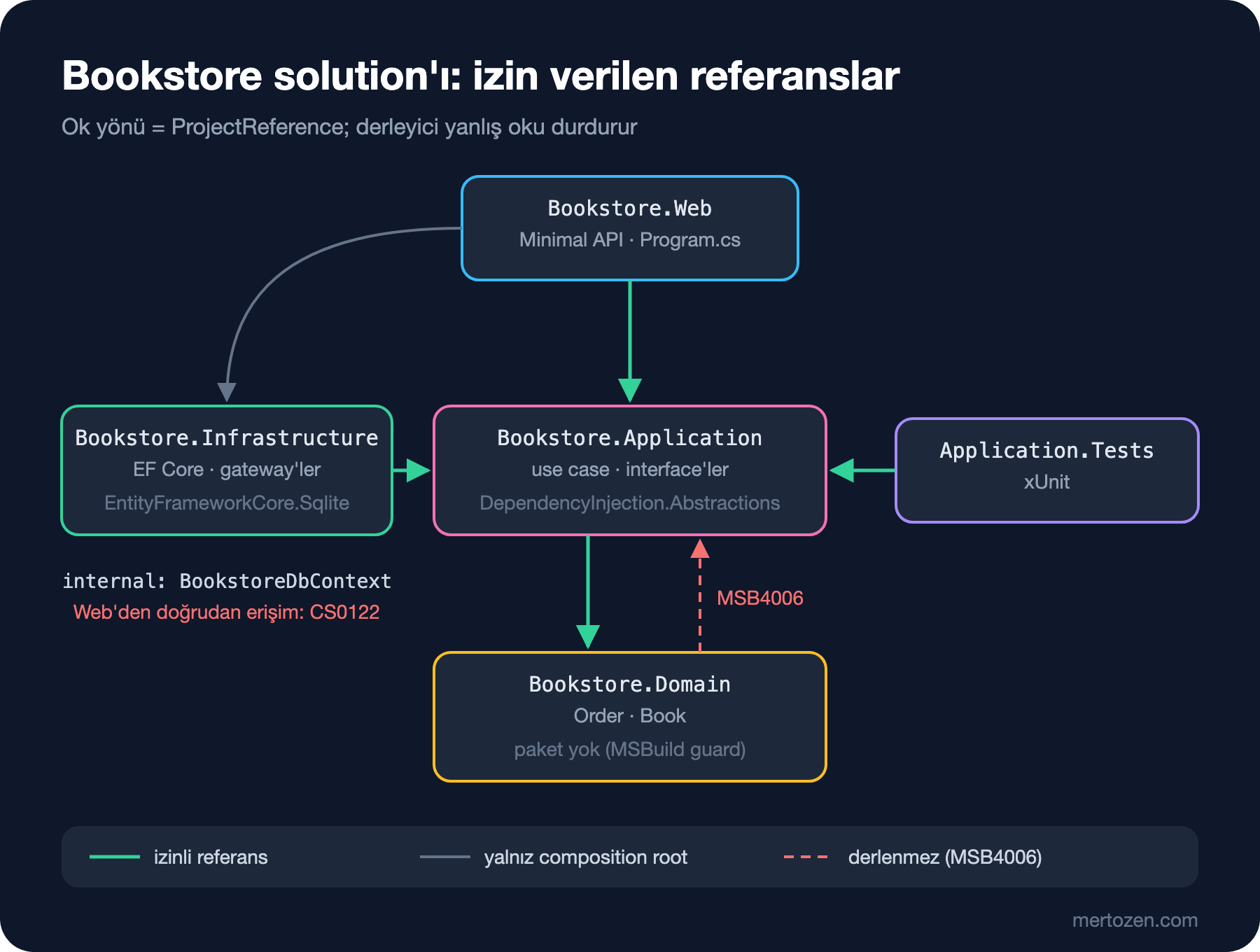
dotnet list reference ile kontrol ettiğimde grafik tam olarak bu:
== src/Bookstore.Application
../Bookstore.Domain/Bookstore.Domain.csproj
== src/Bookstore.Domain
== src/Bookstore.Infrastructure
../Bookstore.Application/Bookstore.Application.csproj
== src/Bookstore.Web
../Bookstore.Application/Bookstore.Application.csproj
../Bookstore.Infrastructure/Bookstore.Infrastructure.csproj
Bir solution'ı project'lere hangi ölçütle böleceğin, döngüsüz bağımlılık (ADP, Acyclic Dependencies Principle) ve stabil olana doğru bağımlılık (SDP, Stable Dependencies Principle) gibi prensipler SOLID (Robert C. Martin'in beş class tasarımı prensibinin baş harfleri) ve Design Principles serisinin "Component Prensipleri: .NET Solution'ını Project'lere Bölmek" yazısında. Buradaki dört project o prensiplerin Clean Architecture için verdiği somut cevap: en stabil ve en soyut olan Domain en altta, en değişken olan Web ve Infrastructure en üstte.
Directory.Build.props ve Central Package Management
Template'ler her csproj'a aynı TargetFramework, Nullable ve ImplicitUsings satırlarını yazıyor. Bunları solution kökündeki tek bir Directory.Build.props'a taşıyınca her csproj yalnız kendine özgü olanı söylüyor; MSBuild bu dosyayı alt klasörlerdeki her project için otomatik içeri alıyor:
<Project>
  <PropertyGroup>
    <TargetFramework>net10.0</TargetFramework>
    <LangVersion>14</LangVersion>
    <Nullable>enable</Nullable>
    <ImplicitUsings>enable</ImplicitUsings>
    <TreatWarningsAsErrors>true</TreatWarningsAsErrors>
    <ManagePackageVersionsCentrally>true</ManagePackageVersionsCentrally>
  </PropertyGroup>
</Project>
Son satır Central Package Management'ı açıyor: paket sürümleri Directory.Packages.props'ta tek yerde, csproj'lardaki PackageReference'lar sürümsüz. Böylece Infrastructure ile test project'i aynı paketin farklı sürümlerine düşmüyor:
<Project>
  <ItemGroup>
    <PackageVersion Include="Microsoft.EntityFrameworkCore.Sqlite" Version="10.0.14" />
    <PackageVersion Include="Microsoft.Extensions.DependencyInjection.Abstractions" Version="10.0.14" />
    <PackageVersion Include="Microsoft.NET.Test.Sdk" Version="17.14.1" />
    <PackageVersion Include="xunit" Version="2.9.3" />
    <PackageVersion Include="xunit.runner.visualstudio" Version="3.1.4" />
  </ItemGroup>
</Project>
Kimin hangi paketi aldığı da mimarinin bir parçası. EF Core yalnız Infrastructure'da. Application yalnız Microsoft.Extensions.DependencyInjection.Abstractions alıyor; AddApplication extension method'u IServiceCollection'ı tanımak zorunda ve bu paket yalnız interface'leri içeriyor, container'ın kendisini değil. Domain hiç paket almıyor.
Domain ve Application: Order ve PlaceOrder Use Case
Domain'deki Order, önceki yazıdaki entity'nin persistence'a biraz daha hazır hâli: EF Core'un değer yazabilmesi için property'lerin private set'i var, ama hiçbir EF Core tipi ya da attribute'u yok.
using Bookstore.Domain.Catalog;

namespace Bookstore.Domain.Ordering;

public sealed record OrderItem(int BookId, decimal UnitPrice, int Quantity);

public sealed class Order
{
    public const decimal FreeShippingThreshold = 500m;
    private readonly List<OrderItem> _items = [];

    public Order(string customerEmail, string postalCode) =>
        (CustomerEmail, PostalCode) = (customerEmail, postalCode);

    public int Id { get; private set; }
    public string CustomerEmail { get; private set; }
    public string PostalCode { get; private set; }
    public IReadOnlyList<OrderItem> Items => _items;
    public decimal ShippingFee { get; private set; }
    public decimal Subtotal => _items.Sum(i => i.UnitPrice * i.Quantity);
    public decimal Total => Subtotal + ShippingFee;

    public bool TryAddItem(Book book, int quantity)
    {
        if (!book.TryReserve(quantity)) return false;
        _items.Add(new OrderItem(book.Id, book.Price, quantity));
        return true;
    }

    public void ApplyShipping(decimal quotedFee) =>
        ShippingFee = Subtotal >= FreeShippingThreshold ? 0m : quotedFee;
}
Application, use case'in dış dünyadan istediklerini interface olarak tanımlıyor. Kaydetmeyi ayrı bir IUnitOfWork'e verdik: use case birden çok repository'ye dokunduğunda tek bir SaveChanges çağrısı tek bir transaction demek. Transaction sınırını ayrıntılı olarak serinin 06. yazısında konuşacağız.
// Application'ın dış dünyadan istedikleri; implementation'ları Infrastructure'da
public interface IBookRepository
{
    Task<Book?> FindAsync(int bookId, CancellationToken ct);
}

public interface IOrderRepository
{
    void Add(Order order);
}

public interface IUnitOfWork
{
    Task SaveChangesAsync(CancellationToken ct);
}

public interface IShippingRates
{
    Task<decimal> QuoteAsync(string postalCode, int weightGrams, CancellationToken ct);
}
public sealed record PlaceOrderRequest(string CustomerEmail, string PostalCode, int BookId, int Quantity);
public sealed record PlaceOrderResponse(int OrderId, decimal Subtotal, decimal ShippingFee, decimal Total);
public sealed class PlaceOrderHandler(
IBookRepository books, IOrderRepository orders, IShippingRates rates, IUnitOfWork unitOfWork)
{
private const int GramsPerBook = 400;
public async Task<Result<PlaceOrderResponse>> HandleAsync(PlaceOrderRequest request, CancellationToken ct)
{
Book? book = await books.FindAsync(request.BookId, ct);
if (book is null)
return new Error("book.not_found", $"Book {request.BookId} not found.");
Order order = new(request.CustomerEmail, request.PostalCode);
if (!order.TryAddItem(book, request.Quantity))
return new Error("book.out_of_stock", $"Only {book.Stock} copies of '{book.Title}' left.");
order.ApplyShipping(await rates.QuoteAsync(request.PostalCode, request.Quantity * GramsPerBook, ct));
orders.Add(order);
await unitOfWork.SaveChangesAsync(ct);
return new PlaceOrderResponse(order.Id, order.Subtotal, order.ShippingFee, order.Total);
}
}Result<T> ve Error, önceki yazıda yazdığımız küçük tipler; burada Application'ın kökünde duruyorlar. Application testleri yalnız Application'a referans veriyor ve dört interface'i tek bir fake class'la karşılıyor. "Stok yetmezse hiçbir şey kaydedilmez" kuralını SaveChangesAsync'in kaç kez çağrıldığını sayarak test ettim:
Passed! - Failed: 0, Passed: 2, Skipped: 0, Total: 2, Duration: 7 ms - Bookstore.Application.Tests.dll (net10.0)Infrastructure: DbContext, IEntityTypeConfiguration ve internal
EF Core mapping'i Infrastructure'da, entity başına bir IEntityTypeConfiguration<T> class'ında. [Index] ya da [MaxLength] gibi attribute'ları entity'nin üstüne yazmak yerine Fluent API (Application Programming Interface) kullanmak, Domain'i EF Core'dan habersiz tutmanın yolu; iki yaklaşımın genel karşılaştırması EF Core serisinin "EF Core'da Data Annotation mı Fluent API mı? OnModelCreating ve IEntityTypeConfiguration" yazısında.
// Mapping Infrastructure'da; Domain'deki Order hiçbir EF Core attribute'u taşımıyor
internal sealed class OrderConfiguration : IEntityTypeConfiguration<Order>
{
    public void Configure(EntityTypeBuilder<Order> builder)
    {
        builder.HasKey(o => o.Id);
        builder.Property(o => o.CustomerEmail).HasMaxLength(256);
        builder.Property(o => o.PostalCode).HasMaxLength(10);
        builder.HasIndex(o => o.CustomerEmail);
        builder.Ignore(o => o.Subtotal);
        builder.Ignore(o => o.Total);
        builder.OwnsMany(o => o.Items, items =>
        {
            items.ToTable("OrderItems");
            items.WithOwner().HasForeignKey("OrderId");
            items.Property<int>("Id");
            items.HasKey("Id");
        });
        builder.Navigation(o => o.Items).HasField("_items");
    }
}
DbContext ve repository'ler internal. Infrastructure'ın dışarıya açtığı tek public tip, servisleri kaydeden extension method'ların bulunduğu DependencyInjection class'ı:
internal sealed class BookstoreDbContext(DbContextOptions<BookstoreDbContext> options)
    : DbContext(options), IUnitOfWork
{
    public DbSet<Book> Books => Set<Book>();
    public DbSet<Order> Orders => Set<Order>();

    protected override void OnModelCreating(ModelBuilder modelBuilder) =>
        modelBuilder.ApplyConfigurationsFromAssembly(typeof(BookstoreDbContext).Assembly);

    Task IUnitOfWork.SaveChangesAsync(CancellationToken ct) => SaveChangesAsync(ct);
}

public static class DependencyInjection
{
    public static IServiceCollection AddInfrastructure(this IServiceCollection services, IConfiguration configuration)
    {
        services.AddDbContext<BookstoreDbContext>(o =>
            o.UseSqlite(configuration.GetConnectionString("Bookstore")));
        services.AddScoped<IUnitOfWork>(sp => sp.GetRequiredService<BookstoreDbContext>());
        services.AddScoped<IBookRepository, BookRepository>();
        services.AddScoped<IOrderRepository, OrderRepository>();
        decimal flatRate = decimal.Parse(configuration["Shipping:FlatRate"] ?? "0", CultureInfo.InvariantCulture);
        services.AddSingleton<IShippingRates>(new FlatRateShipping(flatRate));
        return services;
    }
}IUnitOfWork'ü ayrı bir object olarak değil, aynı scoped BookstoreDbContext instance'ına yönlendirerek kaydettik; repository'ler ve unit of work aynı change tracker'ı paylaşıyor. Örneklerde SQLite kullanıyoruz; Bookstore'un üretimdeki SQL (Structured Query Language) Server veritabanına geçmek bu method'daki tek bir satırı değiştirmek demek. Kargo tarafında FlatRateShipping sadece bir yer tutucu; gerçek kargo API'sine giden typed HttpClient adapter'ı serinin "Persistence Ignorance ve Infrastructure Adapter'ları" yazısının konusu.
Composition Root: AddApplication ve AddInfrastructure
Application'ın kendi kayıt method'u kısa:
public static class DependencyInjection
{
    public static IServiceCollection AddApplication(this IServiceCollection services)
    {
        services.AddScoped<PlaceOrderHandler>();
        return services;
    }
}
Her project'in kendi servislerini kendi extension method'uyla kaydetmesi .NET'in kendi geleneği. AddDbContext'in nerede tanımlandığını reflection ile sorduğumda cevap şu oldu:
Microsoft.Extensions.DependencyInjection.EntityFrameworkServiceCollectionExtensions in Microsoft.EntityFrameworkCoreMethod EF Core'un assembly'sinde, ama namespace'i Microsoft.Extensions.DependencyInjection; böylece çağıran tarafın EF Core'un iç namespace'lerini bilmesi gerekmiyor. AddInfrastructure aynı işi bizim için yapıyor: Web, Infrastructure'ın içinde ne olduğunu bilmeden onu tek satırla takıyor. Composition root kavramını ve neden tek bir yerde olması gerektiğini, DIP (Dependency Inversion Principle), DI (Dependency Injection) ve IoC (Inversion of Control) farkıyla birlikte SOLID serisinin "Dependency Inversion Principle: DIP, DI ve IoC Arasındaki Fark ve Composition Root" yazısında anlattık. Microsoft'un rehberi de UI project'inin DI kurulumu için Infrastructure'a referans vermek zorunda kalabileceğini, ama Infrastructure tiplerine gerçek referansların composition root ile sınırlı tutulması gerektiğini yazıyor.
Uygulamayı çalıştırıp sırasıyla 2 adet Dune, 1 adet Emma ve tekrar 2 adet Dune sipariş ettiğimde:
HTTP/1.1 201 Created
{"orderId":1,"subtotal":500.0,"shippingFee":0,"total":500.0}
HTTP/1.1 201 Created
{"orderId":2,"subtotal":180.0,"shippingFee":40,"total":220.0}
HTTP/1.1 409 Conflict
{"type":"https://tools.ietf.org/html/rfc9110#section-15.5.10","title":"Conflict","status":409,"detail":"Only 1 copies of 'Dune' left."}
IApplicationDbContext mi, Repository mi?
Bu solution'da Application, veritabanına IBookRepository, IOrderRepository ve IUnitOfWork üzerinden ulaşıyor. Yaygın ikinci yol, jasontaylordev template'inin seçtiği yol: Application'da EF Core'un DbSet<T>'lerini açan bir IApplicationDbContext interface'i. Template'in v10.8.0 sürümündeki Application.csproj gerçekten Microsoft.EntityFrameworkCore paketine referans veriyor. Aynı use case'i Bookstore'da bu yolla da yazdım:
// Alternatif: Application, EF Core'un DbSet'ini doğrudan görür
public interface IApplicationDbContext
{
    DbSet<Book> Books { get; }
    DbSet<Order> Orders { get; }
    Task<int> SaveChangesAsync(CancellationToken ct);
}

public sealed class PlaceOrderWithDbContextHandler(IApplicationDbContext db, IShippingRates rates)
{
    public async Task<Result<PlaceOrderResponse>> HandleAsync(PlaceOrderRequest request, CancellationToken ct)
    {
        Book? book = await db.Books.SingleOrDefaultAsync(b => b.Id == request.BookId, ct);
        if (book is null)
            return new Error("book.not_found", $"Book {request.BookId} not found.");

        Order order = new(request.CustomerEmail, request.PostalCode);
        if (!order.TryAddItem(book, request.Quantity))
            return new Error("book.out_of_stock", $"Only {book.Stock} copies of '{book.Title}' left.");

        order.ApplyShipping(await rates.QuoteAsync(request.PostalCode, request.Quantity * 400, ct));
        db.Orders.Add(order);
        await db.SaveChangesAsync(ct);
        return new PlaceOrderResponse(order.Id, order.Subtotal, order.ShippingFee, order.Total);
    }
}
İki yolun paket listesindeki farkı (dotnet list package --include-transitive satır sayıları):
| Project | Repository interface'leri | IApplicationDbContext |
|---|---|---|
| Bookstore.Application | 1 paket, 0 EF Core satırı | 11 paket, 3 EF Core satırı |
| Bookstore.Application.Tests | 14 paket, 0 EF Core satırı | 24 paket, 3 EF Core satırı |
Repository interface'leri: Application EF Core'dan tamamen habersiz, testler basit fake'lerle yazılıyor; bedeli her sorgu ihtiyacı için bir interface method'u ve EF Core'un LINQ (Language Integrated Query) gücünün interface'in arkasında kalması. IApplicationDbContext: handler'lar Include, projection ve AsNoTracking'i doğrudan kullanıyor, repository layer'ı yazılmıyor; bedeli Application'ın EF Core'a bağımlı olması ve unit testlerin SQLite in-memory gibi bir provider'a ihtiyaç duyması. İkincisi Dependency Rule'u gevşetiyor: Frameworks and Drivers çemberindeki bir library, Use Cases çemberine giriyor. Bunu bilerek kabul eden ekipler var, çünkü EF Core'un kendisi zaten bir repository ve unit of work. Bu tartışmanın EF Core tarafını ve CQRS'in (Command Query Responsibility Segregation) okuma tarafını EF Core serisinin "EF Core ve Mimari: Repository, CQRS'in Okuma Tarafı ve Dapper'a Geçiş" yazısında açtık. Bookstore'da ilk yolu seçiyoruz; okuma tarafında gerekirse EF Core'u doğrudan kullanan ayrı query handler'lar açmak her zaman mümkün.
Sık Düşülen Tuzaklar
Domain'e EF Core attribute'larının sızması
Açılıştaki üçüncü sorunun cevabı can sıkıcı: build kırılmıyor. Domain'e Microsoft.EntityFrameworkCore.Sqlite paketini ekleyip Order'ın üstüne [Index(nameof(CustomerEmail))] yazınca solution sorunsuz derleniyor ve Domain'in paket listesinde EF Core beliriyor:
   Top-level Package                           Requested   Resolved
   > Microsoft.EntityFrameworkCore.Sqlite      10.0.14     10.0.14
Derleyici bunu bir hata saymıyor, çünkü bir project'in paket alması meşru. Ucuz bir koruma, Domain'in csproj'ına bir MSBuild target'ı eklemek:
<Project Sdk="Microsoft.NET.Sdk">
  <!-- Domain hiçbir NuGet paketine ve project'e referans veremez -->
  <Target Name="GuardDomainDependencies" BeforeTargets="Build">
    <Error Condition="'@(PackageReference)' != '' Or '@(ProjectReference)' != ''"
           Text="Bookstore.Domain must stay dependency-free. Found: @(PackageReference);@(ProjectReference)" />
  </Target>
</Project>
Temiz solution bu target'la sorunsuz derleniyor; paket eklenmiş hâlde ise build şu hatayla duruyor:
src/Bookstore.Domain/Bookstore.Domain.csproj(8,5): error : Bookstore.Domain must stay dependency-free. Found: Microsoft.EntityFrameworkCore.Sqlite;Bu yalnız Domain için kaba bir kontrol; "Application, Infrastructure'daki hiçbir tipi kullanamaz" gibi tip seviyesindeki kurallar için ArchUnitNET ile yazılan architecture test'leri serinin 08. yazısında.
Web'in Infrastructure'a doğrudan erişmesi
Web, composition root için Infrastructure'a referans verdiğine göre bir endpoint'in BookstoreDbContext'i inject etmesini ne engelliyor? Infrastructure'daki tipler public olsaydı hiçbir şey. internal oldukları için derleyici engelliyor:
Program.cs(28,75): error CS0122: 'BookstoreDbContext' is inaccessible due to its protection levelInfrastructure'ın integration testleri bu internal tiplere ihtiyaç duyarsa csproj'a test assembly'si için bir InternalsVisibleTo satırı eklemek yeterli; Web için bu kapıyı açma.
Döngüsel referans
Açılıştaki ikinci soru: Domain'den Application'a referans eklemek. dotnet add reference komutu itiraz etmeden referansı ekliyor, ama ilk build'de restore aşaması duruyor:
NuGet.targets(1298,5): error MSB4006: There is a circular dependency in the target dependency graph involving target "_GenerateRestoreProjectPathWalk". [src/Bookstore.Application/Bookstore.Application.csproj]Bu hatayı gördüğünde çözüm referansı zorlamak değil, Domain'in neden Application'daki bir tipe ihtiyaç duyduğunu sormak. Çoğu zaman o tip ya aslında Domain'e ait, ya da Domain'in bir interface tanımlayıp Application'ın onu implement etmesi gerekiyor.
Her şeyin "Common" project'ine dolması
Dört project yetmediğinde ilk refleks bir Bookstore.Common açmak oluyor: extension method'lar, sabitler, DTO'lar (Data Transfer Object), logging helper'ları. Herkes ona referans verdiği için en stabil project olması gerekirken en sık değişen project'e dönüşüyor. Bir tipin yeri, onu kimin kullandığına göre belirlenmeli; Result<T> Application'ın kökünde, para hesabı yapan bir value object Domain'de durur.
Küçük Bir Deneme
★☆☆ Bu yazıdaki komutlarla solution'ı sıfırdan kur ve dotnet list reference çıktısının bu yazıdakiyle aynı olduğunu doğrula. Ardından Bookstore.Web.csproj'dan Infrastructure referansını silip hangi satırın derlenmediğine bak.
★★☆ Infrastructure'a InternalsVisibleTo ile açılan bir Bookstore.Infrastructure.Tests project'i ekle ve OrderConfiguration'ın gerçekten OrderItems tablosunu ürettiğini SQLite in-memory veritabanıyla test et.
★★★ GuardDomainDependencies target'ını genelleştir: Directory.Build.props'a taşı ve her project için izin verilen referansları bir property ile tanımla (ör. Application yalnız Domain'e). Kuralı ihlal eden bir referans ekleyip build'in durduğunu göster.
Solution kuruldu ve oklar doğru yöne bakıyor. Bir sonraki yazıda Application layer'ın içine giriyoruz: use case'i tek amaçlı bir handler olarak tasarlamak, validation'ın nerede durduğu, Result ile exception arasındaki tercih ve transaction sınırı; hepsi MediatR'a ihtiyaç duymadan.