

Data Protection in Depth: The Key Ring, Rotation, Key Storage, Encrypting Keys and Multiple Instances
Random logouts and empty-bodied 400s in a multi-instance ASP.NET Core app usually come from a separate Data Protection key ring per instance. Using real logs, we cover the key ring lifetime, rotation and revocation, the purpose hierarchy, file, Redis and database stores, encrypting keys with a certificate and the role of SetApplicationName.
Version note: The code in this post was built and run with .NET 10 (ASP.NET Core 10.0.13 runtime), using Redis 8.2 and Microsoft.AspNetCore.DataProtection.StackExchangeRedis 10.0.14, Microsoft.AspNetCore.DataProtection.EntityFrameworkCore 10.0.14 and Microsoft.EntityFrameworkCore.Sqlite 10.0.14.
Guess First
You moved Bookstore to Kubernetes and two pods are running. A user signs in, browses a few pages and, for no apparent reason, lands on the login screen again. Some of the people submitting the payment form get a 400 with an empty body. There are no errors in the log and CPU (Central Processing Unit) usage is normal. After every deploy everyone is logged out once more. If I told you the cause is a single missing line of code, could you guess which line? A hint: it is not in the configuration of cookie authentication or antiforgery.
It is the line that configures Data Protection. In ASP.NET Core the authentication cookie, the antiforgery token, TempData and Identity's email and password reset tokens, among other things, are encrypted behind the scenes with IDataProtector. In the "OWASP A04: Cryptographic Failures (2)" post of the Web Security series, which covers the OWASP (Open Worldwide Application Security Project) Top 10, we used Data Protection to produce a signed link. This post looks inside the engine: how the key ring lives, where keys are stored, how they are encrypted and how several instances share it.
Purposes, Protectors and Payloads
Let us first try the visible API (Application Programming Interface) in a console app. We write the keys to the working folder; if you do not, on macOS and Linux the keys land under .aspnet/DataProtection-Keys in the user's home folder:
string keyFolder = Path.Combine(AppContext.BaseDirectory, "lab-keys");
if (Directory.Exists(keyFolder))
{
    Directory.Delete(keyFolder, recursive: true);
}

ServiceCollection services = new();
services.AddLogging(logging => logging.AddSimpleConsole(o => o.SingleLine = true).SetMinimumLevel(LogLevel.Warning));
services.AddDataProtection()
    .SetApplicationName("bookstore")
    .PersistKeysToFileSystem(new DirectoryInfo(keyFolder));
await using ServiceProvider provider = services.BuildServiceProvider();

IDataProtectionProvider dataProtection = provider.GetRequiredService<IDataProtectionProvider>();
IDataProtector orderLinks = dataProtection.CreateProtector("Bookstore.OrderLinks", "v1");
IDataProtector chained = dataProtection.CreateProtector("Bookstore.OrderLinks").CreateProtector("v1");
IDataProtector invoices = dataProtection.CreateProtector("Bookstore.Invoices", "v1");

string token = orderLinks.Protect("order:1042");
Console.WriteLine($"protected: {token[..24]}... ({token.Length} chars), key {KeyIdOf(token)}");
Console.WriteLine($"chained purpose: {chained.Unprotect(token)}");
TryUnprotect("other purpose", invoices, token);
warn: Microsoft.AspNetCore.DataProtection.KeyManagement.XmlKeyManager[35] No XML encryptor configured. Key {646f071e-3198-4da4-87b3-1763df17072c} may be persisted to storage in unencrypted form.
protected: CfDJ8B4Hb2SYMaRNh7MXY98X... (134 chars), key 646f071e-3198-4da4-87b3-1763df17072c
chained purpose: order:1042
other purpose: CryptographicException: The payload was invalid. For more information go to https://aka.ms/aspnet/dataprotectionwarningWe learn three things. First, a purpose is a hierarchy: CreateProtector("A", "v1") and CreateProtector("A").CreateProtector("v1") give the same protector. Second, a purpose is isolation: even though both use the same key ring, the Bookstore.Invoices protector cannot open a Bookstore.OrderLinks payload. The framework relies on this; cookie authentication builds its own purpose chain and antiforgery builds its own. Third, you do not write the topmost purpose yourself: SetApplicationName (or, if not set, the app's content root path) is prepended to the chain. We will see this in production shortly.
The payload itself tells us something too. Every payload starts with CfDJ8, the Base64 form of a 4-byte magic header, followed by a 16-byte key id. The KeyIdOf method above reads exactly that:
static Guid KeyIdOf(string payload) =>
    // first 4 bytes: magic header, next 16 bytes: key id
    new(WebEncoders.Base64UrlDecode(payload).AsSpan(4, 16));
So an instance that cannot open a cookie reads "which key encrypted this" from the payload and looks for that key in its key ring. If it cannot find it, the error message gives you the key id, which is gold when troubleshooting.
The Key Ring: Lifetime, Rotation and Revocation
The key ring is a list of master keys stored as XML (Extensible Markup Language) files. The default algorithms are 256-bit AES (Advanced Encryption Standard) in CBC (Cipher Block Chaining) mode and HMAC (Hash-based Message Authentication Code) with SHA-256 from the SHA (Secure Hash Algorithm) family, that is AES_256_CBC and HMACSHA256; for each payload these two subkeys are derived from a 512-bit master key. A key on disk looks like this:
<key id="026cdee8-dbe3-4170-902e-11ec06b4b4c4" version="1">
  <creationDate>2026-11-08T05:29:33.732704Z</creationDate>
  <activationDate>2026-11-08T05:29:33.732704Z</activationDate>
  <expirationDate>2027-02-06T05:29:33.732704Z</expirationDate>
  <descriptor deserializerType="Microsoft.AspNetCore.DataProtection.AuthenticatedEncryption.ConfigurationModel.AuthenticatedEncryptorDescriptorDeserializer, Microsoft.AspNetCore.DataProtection, Version=10.0.0.0, Culture=neutral, PublicKeyToken=adb9793829ddae60">
    <descriptor>
      <encryption algorithm="AES_256_CBC" />
      <validation algorithm="HMACSHA256" />
      <masterKey p4:requiresEncryption="true" xmlns:p4="http://schemas.asp.net/2015/03/dataProtection">
        <!-- Warning: the key below is in an unencrypted form. -->
        <value>...</value>
      </masterKey>
    </descriptor>
  </descriptor>
</key>
There are 90 days between activation and expiration. That is the default lifetime, and according to Microsoft's key management documentation the rules are: a new key becomes active 2 days after it is created (a propagation window so the other instances see it). If the default key expires in less than 2 days and no key will take over, the system creates a new one whose activation date is the old key's expiration date. If the ring is empty or every key has expired, the new key is activated immediately. That is why the activation in the XML above equals the creation time.
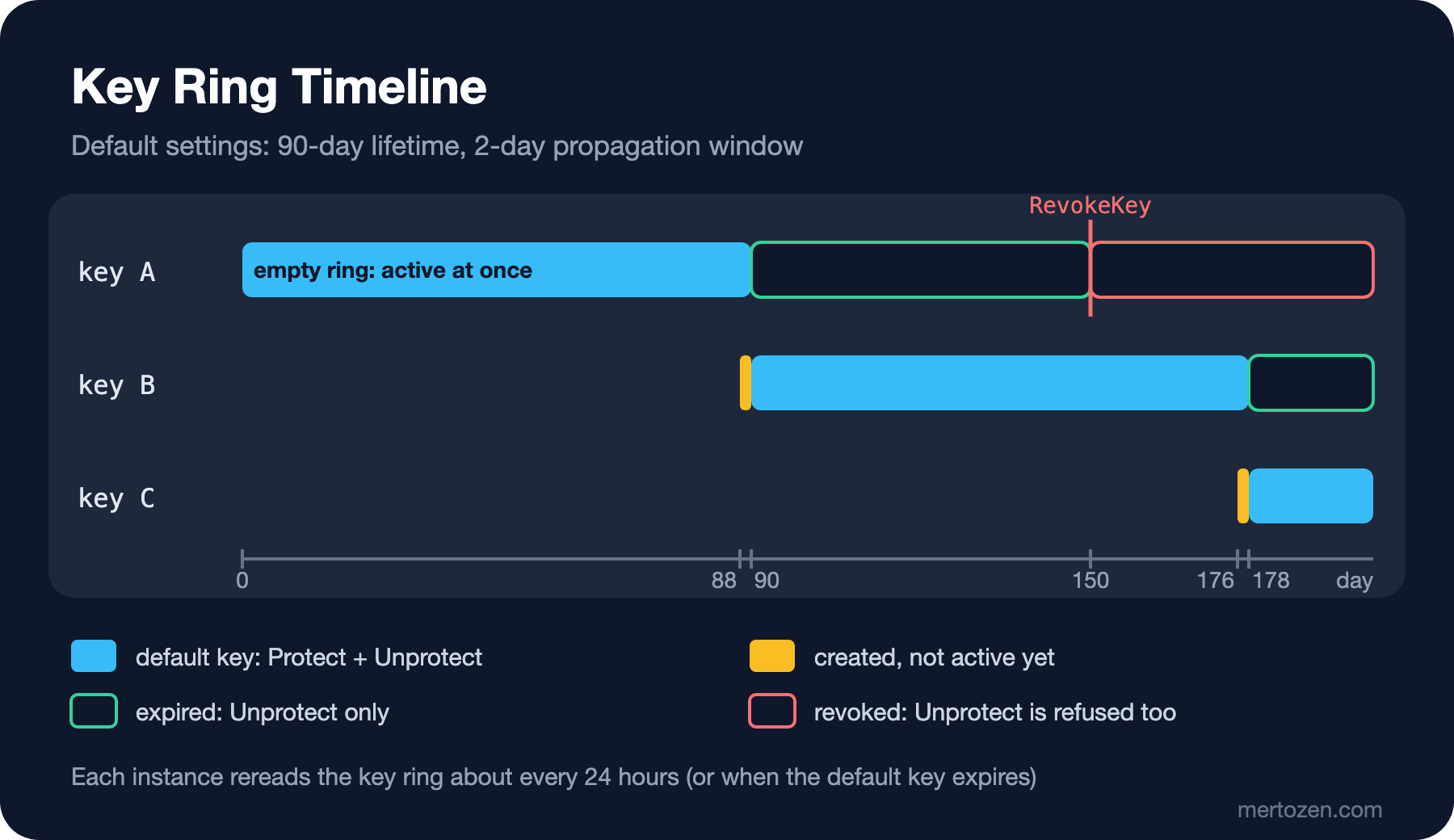
An expired key is no longer used for new Protect operations, but old payloads can still be opened. A revoked key is refused for Unprotect as well. Deleting the key file is different from both: everything encrypted with that key becomes permanently unreadable. You can change the lifetime with SetDefaultKeyLifetime, but there is a lower bound; trying a one-day lifetime gave me: System.ArgumentOutOfRangeException: The new key lifetime must be at least one week.
Let us try rotation and revocation in the console. With IKeyManager we create a new key that is active immediately and then revoke the old key:
IKeyManager keyManager = provider.GetRequiredService<IKeyManager>();
IKey oldKey = keyManager.GetAllKeys().Single();
IKey newKey = keyManager.CreateNewKey(DateTimeOffset.UtcNow, DateTimeOffset.UtcNow.AddDays(90));
Console.WriteLine($"created {newKey.KeyId}, activation now");

Stopwatch clock = Stopwatch.StartNew();
string fresh = orderLinks.Protect("order:1043");
Console.WriteLine($"+{clock.ElapsedMilliseconds} ms: new payload uses key {KeyIdOf(fresh)}");
while (KeyIdOf(fresh) != newKey.KeyId)
{
    await Task.Delay(250);
    fresh = orderLinks.Protect("order:1043");
}
Console.WriteLine($"+{clock.ElapsedMilliseconds} ms: new payload uses key {KeyIdOf(fresh)}");
Console.WriteLine($"old payload still readable: {orderLinks.Unprotect(token)}");

keyManager.RevokeKey(oldKey.KeyId, reason: "Key file was found in a public backup.");
clock.Restart();
TryUnprotect($"+{clock.ElapsedMilliseconds} ms after revocation", orderLinks, token);
while (true)
{
    await Task.Delay(250);
    try
    {
        orderLinks.Unprotect(token);
    }
    catch (CryptographicException ex)
    {
        Console.WriteLine($"+{clock.ElapsedMilliseconds} ms after revocation: {ex.Message}");
        break;
    }
}
created ed38b457-40dc-4a7b-b3b4-07bc105eba37, activation now
+0 ms: new payload uses key 646f071e-3198-4da4-87b3-1763df17072c
+252 ms: new payload uses key ed38b457-40dc-4a7b-b3b4-07bc105eba37
old payload still readable: order:1042
+0 ms after revocation: order:1042
+252 ms after revocation: The key {646f071e-3198-4da4-87b3-1763df17072c} has been revoked. For more information go to https://aka.ms/aspnet/dataprotectionwarningThis output surprised me on the first run. The Protect right after creating the new key still uses the old key, and the Unprotect right after revocation still succeeds. The reason is a change in KeyRingProvider that came with .NET 9: when the key ring is invalidated, request threads do not wait for the new ring to be computed; they carry on with the old ring while the computation happens in the background. Even in the same process this takes a few hundred milliseconds. The revocation is written to disk as revocation-646f071e-....xml; other instances see it at their next key ring refresh, which happens roughly every 24 hours or when the default key expires. The documentation warns about exactly this: if revocation must take effect across the whole deployment immediately, restart every instance.
The Answer: One Key Ring per Instance
Back to the opening problem. Bookstore.Web is a small app: cookie login, a /me endpoint and an antiforgery-protected form. We configure Data Protection with a store chosen from configuration:
IDataProtectionBuilder dataProtection = builder.Services.AddDataProtection()
    .SetApplicationName("bookstore");

string store = builder.Configuration["DataProtection:Store"] ?? "File";
switch (store)
{
    case "Redis":
        IConnectionMultiplexer redis = ConnectionMultiplexer.Connect(builder.Configuration["DataProtection:Redis"]!);
        dataProtection.PersistKeysToStackExchangeRedis(redis, "bookstore:dataprotection:keys");
        break;
    case "Db":
        builder.Services.AddDbContext<KeysDbContext>(o => o.UseSqlite(builder.Configuration["DataProtection:Db"]));
        dataProtection.PersistKeysToDbContext<KeysDbContext>();
        break;
    default:
        dataProtection.PersistKeysToFileSystem(new DirectoryInfo(builder.Configuration["DataProtection:KeyFolder"]!));
        break;
}
First we imitate two containers without a persistent volume: two instances, each with its own key folder. Ada signs in on A, then goes to B with the same cookie; she also takes the antiforgery token from A and posts the form to B:
curl -s -c run/jar -X POST http://127.0.0.1:19302/login -d userName=ada
# {"signedIn":"ada","instance":"a"}
curl -s -i -b run/jar http://127.0.0.1:19302/me
# HTTP/1.1 200 OK
curl -s -i -b run/jar http://127.0.0.1:19303/me
# HTTP/1.1 401 Unauthorized
curl -s -i -b run/jar -X POST http://127.0.0.1:19303/checkout -d "bookId=7&__RequestVerificationToken=$TOKEN"
# HTTP/1.1 400 Bad Request
# Content-Length: 0
B's log:
info: Microsoft.AspNetCore.DataProtection.KeyManagement.XmlKeyManager[58]
      Creating key {be684a8d-1102-4079-aa43-b4a1aeed2ae9} with creation date 2026-11-08 05:30:40Z, activation date 2026-11-08 05:30:40Z, and expiration date 2027-02-06 05:30:40Z.
info: Microsoft.AspNetCore.Authentication.Cookies.CookieAuthenticationHandler[7]
      Cookies was not authenticated. Failure message: Unprotect ticket failed
info: Microsoft.AspNetCore.Authentication.Cookies.CookieAuthenticationHandler[12]
      AuthenticationScheme: Cookies was challenged.
Cookie authentication treats a cookie it cannot open not as an error but as an "unauthenticated user", so there is no exception, only a line at Information level. The cause of the 400 does not show up at all with the default log levels. Raising the log level to Debug gave me:
dbug: Microsoft.AspNetCore.Http.RequestDelegateFactory[9]
      Invalid anti-forgery token found when reading parameter "int bookId" from the request body as form.
      Microsoft.AspNetCore.Antiforgery.AntiforgeryValidationException: The antiforgery token could not be decrypted.
       ---> System.Security.Cryptography.CryptographicException: The key {10e54d69-49f3-41e8-aa08-5ad62ba04508} was not found in the key ring. For more information go to https://aka.ms/aspnet/dataprotectionwarning
10e54d69... is A's key. That is the whole Kubernetes story: whichever pod the load balancer sends the request to tries to open the cookie with its own key ring. When containers are recreated on deploy, the keys go with them and everyone is logged out. In the official .NET container images, keys are written to the home folder inside the container, and at startup the app logs a warning that this folder will be lost when the container is destroyed; if you see that warning, this is very likely your problem.
When we connect the same two instances to a shared Redis key:
curl -s -c run/jar -X POST http://127.0.0.1:19302/login -d userName=ada
# {"signedIn":"ada","instance":"a"}
curl -s -b run/jar http://127.0.0.1:19303/me
# {"user":"ada","instance":"b"}
curl -s -b run/jar -X POST http://127.0.0.1:19303/checkout -d "bookId=7&__RequestVerificationToken=$TOKEN"
# {"ordered":7}
docker exec aspsecwork-redis redis-cli LLEN bookstore:dataprotection:keys
# 1
A shared ring alone is not enough; the application name must match too. I temporarily removed the SetApplicationName line and started the two instances with the same Redis key but different content roots. Redis still held a single key, yet B answered A's cookie with 401 Unauthorized and logged the same Unprotect ticket failed line. Because the application name sits at the top of the purpose chain, a different content root means a different protector. In containers this usually goes unnoticed because every pod runs from the same path, but if you deliberately want two different apps sharing one key ring (say, an API and an admin panel) to understand each other, SetApplicationName is mandatory.
Key Storage Options
| Store | Package / API | When |
|---|---|---|
| File system | PersistKeysToFileSystem | A single instance or a shared volume (NFS, that is Network File System, or Azure Files) |
| Redis | PersistKeysToStackExchangeRedis | Multi-instance deployments that already run Redis |
| Database | PersistKeysToDbContext<T> | Apps on EF (Entity Framework) Core that want no extra infrastructure |
| Azure Blob Storage | PersistKeysToAzureBlobStorage | Apps on Azure that need sharing across slots |
For the database option the DbContext only needs to implement the IDataProtectionKeyContext interface:
public sealed class KeysDbContext(DbContextOptions<KeysDbContext> options)
    : DbContext(options), IDataProtectionKeyContext
{
    public DbSet<DataProtectionKey> DataProtectionKeys => Set<DataProtectionKey>();
}
$ sqlite3 run/keys.db "select Id, FriendlyName, length(Xml) from DataProtectionKeys;"
1|key-98da50d2-b3d4-4e40-a547-3aea51910057|884The table has three columns and stores the key's XML as is. In a real project create the table with an EF Core migration; I used EnsureCreated here for brevity. In Redis the keys sit in a single list. If you run Redis purely as a cache (persistence off, eviction on), be careful: if Redis restarts or the key is evicted, every session drops. The Redis you use for Data Protection needs persistence enabled and this key kept out of the eviction policy.
Encrypting the Keys
The Warning: the key below is in an unencrypted form. comment in the XML above and the No XML encryptor configured warning at startup say the same thing: anyone with read access to the place where the keys live can open every cookie and mint a new cookie for any user. On Windows the default setup encrypts keys with DPAPI (Data Protection API), but as soon as you choose the key storage yourself that automatic encryption is turned off. On Linux and macOS it does not exist at all. The fix is to encrypt the keys with a certificate. I generated the certificate in the working folder with openssl:
openssl req -x509 -newkey rsa:3072 -sha256 -days 365 -nodes -keyout certs/dp.key -out certs/dp.crt -subj "/CN=bookstore-dataprotection"
openssl pkcs12 -export -inkey certs/dp.key -in certs/dp.crt -out certs/dp.pfx -passout pass:$PW
string? certPath = builder.Configuration["DataProtection:CertificatePath"];
if (certPath is not null)
{
X509Certificate2 certificate = X509CertificateLoader.LoadPkcs12FromFile(
certPath, builder.Configuration["DataProtection:CertificatePassword"]);
dataProtection.ProtectKeysWithCertificate(certificate).UnprotectKeysWithAnyCertificate(certificate);
}This time no warning was logged, and the master key in the key file was replaced by an encrypted block:
<encryptedSecret decryptorType="Microsoft.AspNetCore.DataProtection.XmlEncryption.EncryptedXmlDecryptor, Microsoft.AspNetCore.DataProtection, Version=10.0.0.0, Culture=neutral, PublicKeyToken=adb9793829ddae60" xmlns="http://schemas.asp.net/2015/03/dataProtection">
  <EncryptedData Type="http://www.w3.org/2001/04/xmlenc#Element" xmlns="http://www.w3.org/2001/04/xmlenc#">
    <EncryptionMethod Algorithm="http://www.w3.org/2001/04/xmlenc#aes256-cbc" />
    <KeyInfo xmlns="http://www.w3.org/2000/09/xmldsig#">
      <EncryptedKey xmlns="http://www.w3.org/2001/04/xmlenc#">
        <EncryptionMethod Algorithm="http://www.w3.org/2001/04/xmlenc#rsa-1_5" />
        ...
Why is UnprotectKeysWithAnyCertificate needed? By default EncryptedXmlDecryptor looks for the certificate in the operating system's certificate store. If you load the certificate from a file or a secret store, you must hand it to the decryption side explicitly. The same method is the key to certificate rotation: when you switch to a new certificate for encryption, you pass the old certificate here as well and old keys stay readable. On Azure, ProtectKeysWithAzureKeyVault does the same job. Where the certificate and its password live is the subject of the Configuration and Secret Management series; the certificate itself will be covered in detail in the Cryptography for Developers series.
Production Notes
First, look at the app's startup log: if you see a Creating key line on every deploy, your keys are not persistent. In a healthy multi-instance system this line appears only once every 90 days, from a single instance. The second indicator is the number of Unprotect ticket failed lines; cookie authentication writes them at Information level, so a log query can count them. In the series post on observing security events we will turn this into an alert.
If instances start at the same moment against an empty store, both may create a key. That is not dangerous: the ring simply contains two keys, and for two minutes after startup KeyRingProvider rereads the ring when it sees a key id it does not know. Still, doing the first deploy with a single replica keeps the log clean.
Revocation is an emergency procedure and its steps should be written down in advance: create a new key, revoke the old one, restart every instance, watch the rise in Unprotect ticket failed. Everyone will be logged out once; plan for that as an acceptable cost. Data Protection was not designed for long-term data encryption. If you encrypt a database column that will live for years with IDataProtector, key rotation and revocation affect that data too; for persistent data, look at the approaches in the Cryptography for Developers series.
Common Pitfalls
Leaving the key folder inside the container is the most common mistake; the symptoms are mass logouts after a deploy and sporadic 400s. Put the keys on a persistent volume or in a shared store.
Configuring key storage and forgetting encryption. A plain-text key in Redis or in the database hands every user's session to anyone with read access to that system.
Deleting old keys "to clean up". Expired keys are still used for Unprotect; delete them and everything encrypted with that key becomes irreversibly unreadable. Keys are small, letting them accumulate is fine.
Connecting staging and production to the same key ring. A cookie issued in staging then becomes valid in production. Do not share a ring across environments; in apps that share a ring on purpose, distinct SetApplicationName values keep them isolated.
A Small Experiment
★☆☆ In the console app, call CreateNewKey with an activation date two days from now. Which key do new Protect calls use? Interpret the dates of both keys in the GetAllKeys output.
★★☆ Run Bookstore.Web as two instances with a shared file folder, sign in on A, then edit the key XML by hand to move expirationDate into the past and restart both instances. Does the cookie still open, and is a new key created?
★★★ Generate two different certificates. First encrypt keys with the first one, then pass the second to ProtectKeysWithCertificate and both to UnprotectKeysWithAnyCertificate. Verify from the XML that the old cookie still opens and the new key is encrypted with the second certificate.
The key ring is now the same on every instance. In the next post we look at another problem of the multi-instance world, this time the traffic itself: rate limiting algorithms, partition keys and chained limiters.