

Inside Authorization: Policy Providers, Requirement Handlers, IAuthorizationMiddlewareResultHandler and Testing Policies
On every request AuthorizationMiddleware merges endpoint metadata into one policy, authenticates, runs the handlers and turns the result into 401 or 403. We show OR between handlers, AND between requirements and the veto of Fail() with real output, then build a dynamic policy provider, IAuthorizationRequirementData, a 403 with a ProblemDetails body and an endpoint × user test matrix.
Version note: The code in this post was built and run with .NET 10 (ASP.NET Core 10.0.13 runtime); the tests ran on xUnit v3 4.0.2 and Microsoft.AspNetCore.Mvc.Testing 10.0.14.
Guess First
We wrote a policy for the Bookstore refund endpoint: the user must hold the orders.refund permission and the account must not be suspended. Edsger's token carries an orders.refund claim, but his account was suspended last week. The permission handler calls Succeed(), the account status handler calls Fail(). Does the request return 200 or 403? And if a third handler also calls Succeed() for the same requirement, does the result change? Hold on to your answer; we will look at the real output halfway through the post.
This series is about the internals of ASP.NET Core's security tooling. In the Web Security series, which covers the OWASP (Open Worldwide Application Security Project) Top 10, the post "OWASP A01: Broken Access Control (1)" introduced policies, resource-based authorization and deny-by-default with a fallback policy; the ASP.NET Core Web API (Application Programming Interface) series post "Authorization: Roles, Policies and Resource-Based Authorization" covers the basic API. Here we go one level deeper: when you write [Authorize], which pieces run inside the framework and in which order, which of them you can replace, and how you test them. Choosing an authorization model, meaning RBAC (Role-Based Access Control), ABAC (Attribute-Based Access Control) or a permission-based model, is the subject of the "Authorization Models" post in the Authentication and Authorization series.
What Does AuthorizationMiddleware Do on a Request?
Everything happens inside AuthorizationMiddleware. After routing has selected an endpoint, the middleware looks at that endpoint's metadata and reaches a decision in five steps. The flow below was taken straight from the source code on the release/10.0 branch of the dotnet/aspnetcore repository.
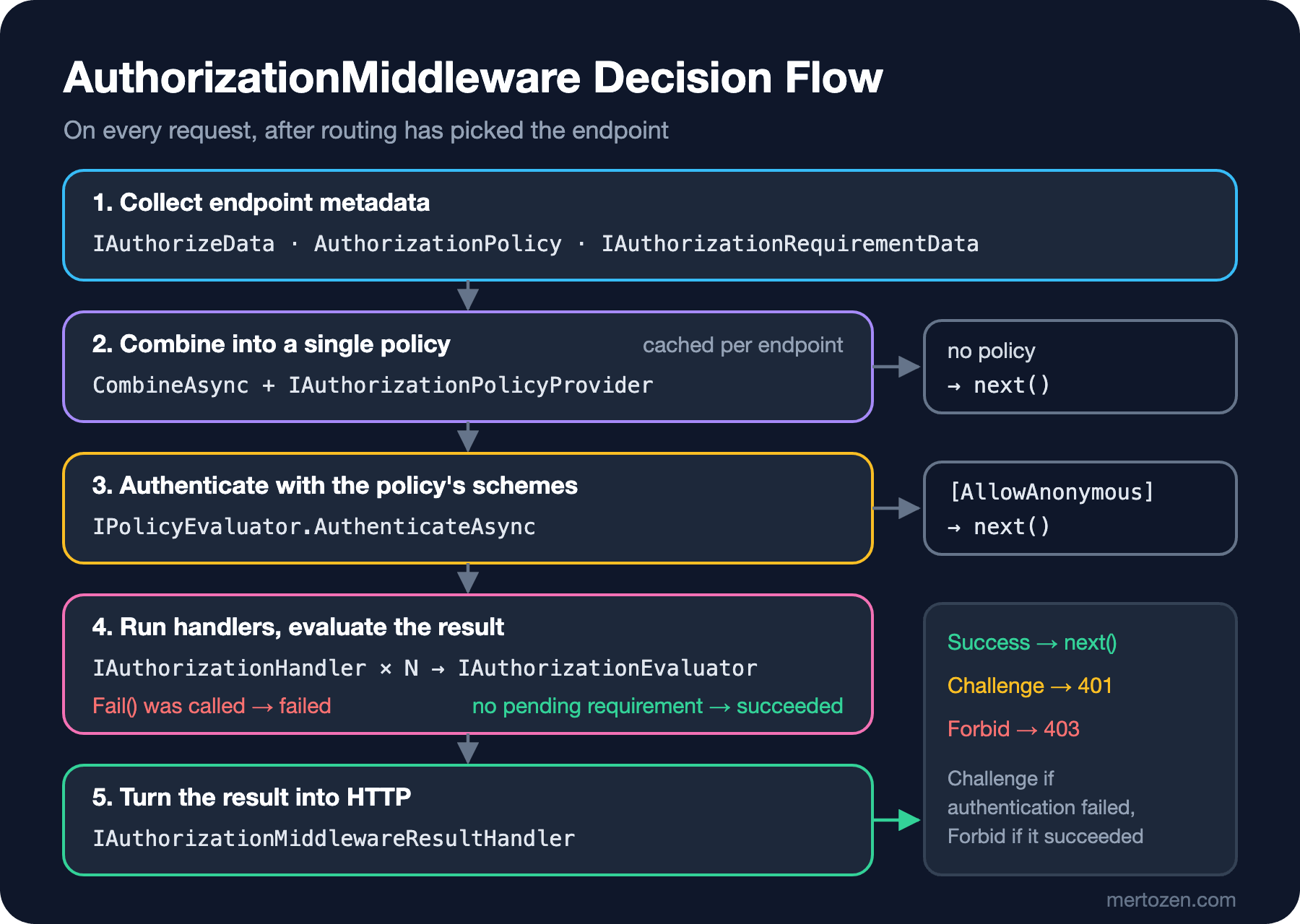
In the first step three kinds of metadata are collected from the endpoint: [Authorize] attributes and RequireAuthorization("...") calls (IAuthorizeData), AuthorizationPolicy objects added directly, and the IAuthorizationRequirementData attributes that arrived with .NET 8. In the second step AuthorizationPolicy.CombineAsync merges them into a single policy, calling IAuthorizationPolicyProvider to resolve policy names. If the provider allows it, the combined policy is cached per endpoint. If there is no policy at all, the middleware simply calls next(); unless you defined a fallback policy, unprotected endpoints pass through here.
In the third step IPolicyEvaluator.AuthenticateAsync runs. If the policy has AuthenticationSchemes, only those schemes are tried; otherwise HttpContext.User is used as is. If the endpoint carries [AllowAnonymous], the check ends here. Note that authentication has still run, so even on an anonymous endpoint you can read User when it is populated.
The fourth step is the real work: IAuthorizationService takes the policy's requirements, asks IAuthorizationHandlerProvider for every registered handler and runs them in order. Then IAuthorizationEvaluator evaluates the outcome. In the fifth step the outcome becomes HTTP (Hypertext Transfer Protocol): Challenge (usually 401) if authentication failed, Forbid (usually 403) if the user is authenticated but not authorized. The piece doing this last step is IAuthorizationMiddlewareResultHandler, and you can replace it.
Requirements and Handlers: OR, AND and Fail()
A requirement only carries data; the handler makes the decision. Bookstore has two requirements:
using Microsoft.AspNetCore.Authorization;

namespace Bookstore.Api.Authorization;

public sealed record PermissionRequirement(string Permission) : IAuthorizationRequirement;

public sealed record ActiveAccountRequirement : IAuthorizationRequirement;
We write two separate handlers for PermissionRequirement. One looks for a permission claim on the user; the other lets the on-call support team issue refunds:
public sealed class PermissionClaimHandler : AuthorizationHandler<PermissionRequirement>
{
    protected override Task HandleRequirementAsync(
        AuthorizationHandlerContext context, PermissionRequirement requirement)
    {
        if (context.User.HasClaim("permission", requirement.Permission))
        {
            context.Succeed(requirement);
        }

        return Task.CompletedTask;
    }
}

public sealed class OnCallSupportHandler : AuthorizationHandler<PermissionRequirement>
{
    protected override Task HandleRequirementAsync(
        AuthorizationHandlerContext context, PermissionRequirement requirement)
    {
        if (requirement.Permission == "orders.refund"
            && context.User.IsInRole("support")
            && context.User.HasClaim("on_call", "true"))
        {
            context.Succeed(requirement);
        }

        return Task.CompletedTask;
    }
}
The rules are set by DefaultAuthorizationService and DefaultAuthorizationEvaluator. In the source code the decision is a single line: HasSucceeded is true only if Fail() was never called, at least one Succeed() was called and no pending requirement is left. Three behaviors follow from that:
- Multiple handlers for the same requirement are combined with OR: if one calls
Succeed(), the requirement leaves the pending list. - Requirements within one policy are combined with AND: each must be satisfied by at least one handler.
Fail()is a veto: whatever the other handlers say, the result is a failure. Not callingSucceed()merely means "I have nothing to say about this".
So the rule inside a handler is simple: if you are not sure, call nothing. Fail() is only for cases where you can say "no other rule can rescue this", such as a suspended account. AuthorizationOptions.InvokeHandlersAfterFailure defaults to true, so the remaining handlers still run after a Fail(). If you have expensive handlers you can set it to false and skip needless database calls, but then the log tells you less about which requirements were missing.
DI and Async Data Access in a Handler
Putting the account status into a claim is tempting but wrong: if the token is valid for an hour, a suspended user keeps issuing refunds for another hour. The handler that reads the status from its source on every request takes a store through DI (dependency injection):
public sealed class ActiveAccountHandler(IAccountStatusStore statusStore)
    : AuthorizationHandler<ActiveAccountRequirement>
{
    protected override async Task HandleRequirementAsync(
        AuthorizationHandlerContext context, ActiveAccountRequirement requirement)
    {
        string? userName = context.User.FindFirstValue(ClaimTypes.Name);
        if (userName is null)
        {
            return;
        }

        AccountStatus status = await statusStore.GetStatusAsync(userName);
        if (status == AccountStatus.Suspended)
        {
            context.Fail(new AuthorizationFailureReason(this, "account_suspended"));
            return;
        }

        context.Succeed(requirement);
    }
}
Watch the lifetime when you register it. In a real project IAccountStatusStore uses a DbContext and is scoped. If you register the handler as a singleton out of habit, the app does not even start in the Development environment:
Unhandled exception. System.AggregateException: Some services are not able to be constructed (...)
 ---> System.InvalidOperationException: Cannot consume scoped service 'Bookstore.Api.Authorization.IAccountStatusStore' from singleton 'Microsoft.AspNetCore.Authorization.IAuthorizationHandler'.
Scope validation is on in Development, so the error is caught at startup. In Production validation is off; the same registration silently creates a captive dependency there, meaning a single DbContext instance is shared by every request. The correct registration looks like this:
builder.Services.AddSingleton<IAuthorizationPolicyProvider, PermissionPolicyProvider>();
builder.Services.AddSingleton<IAuthorizationHandler, PermissionClaimHandler>();
builder.Services.AddSingleton<IAuthorizationHandler, OnCallSupportHandler>();
builder.Services.AddScoped<IAuthorizationHandler, ActiveAccountHandler>();
builder.Services.AddScoped<IAccountStatusStore, InMemoryAccountStatusStore>();
builder.Services.AddSingleton<IAuthorizationMiddlewareResultHandler, ProblemDetailsAuthorizationResultHandler>();
DefaultAuthorizationHandlerProvider resolves handlers as IEnumerable<IAuthorizationHandler> from the request scope, so a scoped handler works fine. There is no CancellationToken in a handler; if you need the request's token, use the RequestAborted property of the HttpContext that arrives through context.Resource. By default the middleware passes the HttpContext as the resource.
Dynamic Policies: IAuthorizationPolicyProvider
As the number of permissions grows, the AddPolicy("orders.refund", ...), AddPolicy("orders.cancel", ...) lines never end. IAuthorizationPolicyProvider lets you build the policy at the moment you see its name. Our rule: every policy whose name starts with Permission: requires that permission and an active account.
public sealed class PermissionPolicyProvider(IOptions<AuthorizationOptions> options) : IAuthorizationPolicyProvider
{
    public const string Prefix = "Permission:";

    private readonly DefaultAuthorizationPolicyProvider _fallback = new(options);

    public bool AllowsCachingPolicies => true;

    public Task<AuthorizationPolicy> GetDefaultPolicyAsync() => _fallback.GetDefaultPolicyAsync();

    public Task<AuthorizationPolicy?> GetFallbackPolicyAsync() => _fallback.GetFallbackPolicyAsync();

    public Task<AuthorizationPolicy?> GetPolicyAsync(string policyName)
    {
        if (!policyName.StartsWith(Prefix, StringComparison.Ordinal))
        {
            return _fallback.GetPolicyAsync(policyName);
        }

        AuthorizationPolicy policy = new AuthorizationPolicyBuilder()
            .RequireAuthenticatedUser()
            .AddRequirements(new PermissionRequirement(policyName[Prefix.Length..]), new ActiveAccountRequirement())
            .Build();
        return Task.FromResult<AuthorizationPolicy?>(policy);
    }
}
On the endpoint you only write the name: .RequireAuthorization("Permission:orders.cancel"). Three details of the provider matter. First, if you do not delegate unknown names to DefaultAuthorizationPolicyProvider, static policies defined with AddPolicy, such as "Refund", disappear. Second, the DI container holds a single IAuthorizationPolicyProvider; yours replaces the default. Third, AllowsCachingPolicies. On the interface this property defaults to false, and DefaultAuthorizationPolicyProvider returns true only for its own type. If you leave this line out, the middleware does not cache the policy and calls the provider again on every request. I put a temporary Console.WriteLine into the provider and ran the two cancel requests from the test matrix: with AllowsCachingPolicies => false the provider was called twice, with true once. If your policy does not vary per request (it is not, say, tenant-specific), return true.
The Provider-Free Route: IAuthorizationRequirementData
.NET 8 introduced the IAuthorizationRequirementData interface, which removes the need for a provider in most cases. The attribute produces its own requirements, and the middleware collects them in the first step and adds them to the policy:
[AttributeUsage(AttributeTargets.Class | AttributeTargets.Method, AllowMultiple = true)]
public sealed class RequirePermissionAttribute(string permission)
    : AuthorizeAttribute, IAuthorizationRequirementData
{
    public string Permission { get; } = permission;

    public IEnumerable<IAuthorizationRequirement> GetRequirements() =>
        [new PermissionRequirement(Permission), new ActiveAccountRequirement()];
}
app.MapPost("/orders/{id:int}/refund", (int id) => Results.Ok(new { id, status = "refunded" }))
.RequireAuthorization("Refund");
app.MapPost("/orders/{id:int}/cancel", (int id) => Results.Ok(new { id, status = "cancelled" }))
.RequireAuthorization("Permission:orders.cancel");
app.MapDelete("/books/{id:int}", [RequirePermission("books.delete")] (int id) => Results.NoContent());Because the attribute derives from AuthorizeAttribute, it also counts as IAuthorizeData and brings in the default policy (an authenticated user); the requirements are added on top of it. The difference from the provider: you do not parse strings, the permission name is a type-safe argument at compile time. In .NET 10 these attributes are read by the middleware, so they apply to minimal APIs and to controller actions running on endpoint routing. Consistent support in MVC (Model-View-Controller) filters, SignalR hubs and Blazor's AuthorizeView comes with .NET 11; we will return to that change in the last post of the series.
Giving 403 a Body: IAuthorizationMiddlewareResultHandler
By default, Forbid calls the authentication handler's ForbidAsync method: the cookie handler redirects browser requests to the AccessDenied page, and the JWT (JSON Web Token) bearer handler returns a 403 with an empty body. An API client cannot tell why it was rejected. IAuthorizationMiddlewareResultHandler lets you take over the fifth step:
public sealed class ProblemDetailsAuthorizationResultHandler(
    IProblemDetailsService problemDetailsService,
    ILogger<ProblemDetailsAuthorizationResultHandler> logger) : IAuthorizationMiddlewareResultHandler
{
    private readonly AuthorizationMiddlewareResultHandler _defaultHandler = new();

    public async Task HandleAsync(
        RequestDelegate next, HttpContext context, AuthorizationPolicy policy, PolicyAuthorizationResult authorizeResult)
    {
        if (!authorizeResult.Forbidden)
        {
            await _defaultHandler.HandleAsync(next, context, policy, authorizeResult);
            return;
        }

        AuthorizationFailure? failure = authorizeResult.AuthorizationFailure;
        string[] reasons = failure?.FailureReasons.Select(r => r.Message).ToArray() ?? [];
        string[] pending = failure?.FailedRequirements.Select(r => r.GetType().Name).ToArray() ?? [];
        logger.LogWarning("Forbidden {Path} for {User}. Pending: {Pending}. Reasons: {Reasons}",
            context.Request.Path, context.User.Identity?.Name, pending, reasons);

        context.Response.StatusCode = StatusCodes.Status403Forbidden;
        await problemDetailsService.WriteAsync(new ProblemDetailsContext
        {
            HttpContext = context,
            ProblemDetails =
            {
                Status = StatusCodes.Status403Forbidden,
                Title = "Forbidden",
                Detail = "You are not allowed to perform this operation.",
                Extensions = { ["reasons"] = reasons }
            }
        });
    }
}
We leave Success and Challenge to the default AuthorizationMiddlewareResultHandler and only change Forbid. Now the answer to the opening question. The real log and response for Edsger's refund request:
info: Microsoft.AspNetCore.Authorization.DefaultAuthorizationService[2]
      Authorization failed. Fail() was explicitly called.
warn: Bookstore.Api.Authorization.ProblemDetailsAuthorizationResultHandler[0]
      Forbidden /orders/1/refund for edsger. Pending: . Reasons: account_suspended

403 application/problem+json
{"type":"https://tools.ietf.org/html/rfc9110#section-15.5.4","title":"Forbidden","status":403,"detail":"You are not allowed to perform this operation.","reasons":["account_suspended"],"traceId":"00-d083ea5cc1892f022e6786097695ede6-c48742339a24c269-00"}
Fail() won: the permission handler's Succeed() changed nothing. One more detail: the "Pending" list is empty. When Fail() has been called, AuthorizationFailure carries only FailureReasons and FailedRequirements comes back empty. For Alan, who lacks the permission, it is the other way around; the log lists the missing requirement and the reason list is empty:
info: Microsoft.AspNetCore.Authorization.DefaultAuthorizationService[2]
      Authorization failed. These requirements were not met:
      PermissionRequirement { Permission = orders.refund }
warn: Bookstore.Api.Authorization.ProblemDetailsAuthorizationResultHandler[0]
      Forbidden /orders/1/refund for alan. Pending: PermissionRequirement. Reasons:
A small benefit of making requirements records shows up here: the text PermissionRequirement { Permission = orders.refund } in the log line is the record's generated ToString() output.
Testing Policies
Authorization code is tested at two levels. Handlers are pure logic, so you build an AuthorizationHandlerContext by hand and write a unit test:
[Fact]
public async Task Fail_wins_over_succeed()
{
    PermissionRequirement permission = new("orders.refund");
    ActiveAccountRequirement active = new();
    AuthorizationHandlerContext context = new(
        [permission, active],
        User(new Claim(ClaimTypes.Name, "edsger"), new Claim("permission", "orders.refund")),
        null);

    await new PermissionClaimHandler().HandleAsync(context);
    await new ActiveAccountHandler(new InMemoryAccountStatusStore()).HandleAsync(context);

    Assert.Empty(context.PendingRequirements.OfType<PermissionRequirement>());
    Assert.True(context.HasFailed);
    Assert.False(context.HasSucceeded);
    Assert.Equal("account_suspended", Assert.Single(context.FailureReasons).Message);
}
But only an end-to-end test shows that the handlers are wired to the right endpoint, that the provider resolves the name correctly and that the result handler really writes a 403. We use the WebApplicationFactory from the "Integration Test" post of the ASP.NET Core Web API series and replace real authentication with a test scheme that reads claims from headers:
public sealed class TestAuthHandler(
    IOptionsMonitor<AuthenticationSchemeOptions> options, ILoggerFactory logger, UrlEncoder encoder)
    : AuthenticationHandler<AuthenticationSchemeOptions>(options, logger, encoder)
{
    public const string SchemeName = "Test";

    protected override Task<AuthenticateResult> HandleAuthenticateAsync()
    {
        // X-Test-User: alan ; X-Test-Claims: role=support;on_call=true
        if (!Request.Headers.TryGetValue("X-Test-User", out var userName))
        {
            return Task.FromResult(AuthenticateResult.NoResult());
        }

        List<Claim> claims = [new(ClaimTypes.Name, userName.ToString())];
        foreach (string pair in Request.Headers["X-Test-Claims"].ToString()
                     .Split(';', StringSplitOptions.RemoveEmptyEntries))
        {
            string[] parts = pair.Split('=', 2);
            string type = parts[0] == "role" ? ClaimTypes.Role : parts[0];
            claims.Add(new Claim(type, parts[1]));
        }

        ClaimsPrincipal principal = new(new ClaimsIdentity(claims, SchemeName));
        return Task.FromResult(AuthenticateResult.Success(new AuthenticationTicket(principal, SchemeName)));
    }
}

public sealed class BookstoreFactory : WebApplicationFactory<Program>
{
    protected override void ConfigureWebHost(IWebHostBuilder builder)
    {
        builder.ConfigureTestServices(services =>
            services.AddAuthentication(TestAuthHandler.SchemeName)
                .AddScheme<AuthenticationSchemeOptions, TestAuthHandler>(TestAuthHandler.SchemeName, _ => { }));
    }
}
This scheme lives only in the test project; no "test header" leaks into application code. Then we write the endpoint × user matrix as a single Theory:
public static TheoryData<string?, string, string, string, HttpStatusCode> Matrix => new()
{
    { null,     "",                                "POST",   "/orders/1/refund", HttpStatusCode.Unauthorized },
    { "alan",   "role=customer",                   "POST",   "/orders/1/refund", HttpStatusCode.Forbidden },
    { "ada",    "permission=orders.refund",        "POST",   "/orders/1/refund", HttpStatusCode.OK },
    { "grace",  "role=support;on_call=true",       "POST",   "/orders/1/refund", HttpStatusCode.OK },
    { "grace",  "role=support",                    "POST",   "/orders/1/refund", HttpStatusCode.Forbidden },
    { "edsger", "permission=orders.refund",        "POST",   "/orders/1/refund", HttpStatusCode.Forbidden },
    { "ada",    "permission=orders.cancel",        "POST",   "/orders/1/cancel", HttpStatusCode.OK },
    { "grace",  "role=support;on_call=true",       "POST",   "/orders/1/cancel", HttpStatusCode.Forbidden },
    { "ada",    "permission=books.delete",         "DELETE", "/books/1",         HttpStatusCode.NoContent },
    { "alan",   "role=customer",                   "DELETE", "/books/1",         HttpStatusCode.Forbidden },
    { null,     "",                                "GET",    "/books",           HttpStatusCode.OK },
};
$ dotnet test --project Bookstore.Api.Tests
Test run summary: Passed!
total: 16
failed: 0
succeeded: 16
skipped: 0
duration: 1s 125msThe matrix reads like documentation of the authorization rules. On-call Grace can issue refunds but cannot cancel orders, because OnCallSupportHandler only speaks for orders.refund. When a new endpoint is added, "where is its row in the matrix?" is the easiest question to ask in code review.
Production Notes
Handlers run on every authorized request. A data-reading handler like ActiveAccountHandler means one query for every request to the refund endpoint. Measure it through that query's duration (if you already see EF Core, that is Entity Framework Core, or Dapper queries in your traces, look there); if needed, keep the account status in a memory cache for a few seconds. There is a conscious trade-off here: the cache duration decides how much longer a suspended account can keep acting.
If your policy provider goes to the database inside GetPolicyAsync, with AllowsCachingPolicies => false you run that query on every request. What makes a policy dynamic should be its name, not the permission list in the database; read user-specific data in the handler.
We log rejected requests, but the reasons field should only contain codes that are safe to show the client. account_suspended is reasonable; a reason like "IP (Internet Protocol) address is blocklisted" hands information to an attacker. Write the detail to the log, give the client a code. We will see how to monitor 401 and 403 counts with metrics in the series post on observing security events.
Common Pitfalls
A typo in a policy name is not caught at compile time. Code asking for the name "Refnud" throws an InvalidOperationException on the first request; the real message in the test was No policy found: Refnud.. Collect name constants in a static class or use an IAuthorizationRequirementData attribute; every row of the matrix catches this mistake too.
Using Fail() everywhere when simply not calling Succeed() would do breaks the OR behavior. If OnCallSupportHandler called Fail() because Grace is not on call, a support employee who does hold the permission claim could not issue refunds either.
Getting the requirement type of a handler wrong is a silent bug: if you write another type instead of AuthorizationHandler<PermissionRequirement>, the handler is never called, the requirement stays pending and everyone gets 403. The matrix test shows this on the first run.
Writing a custom provider and forgetting to delegate to _fallback loses the policies defined with AddPolicy and the fallback policy. When the fallback policy is lost, endpoints without [Authorize] silently open up to everyone.
A Small Experiment
★☆☆ Set AuthorizationOptions.InvokeHandlersAfterFailure to false, register ActiveAccountHandler before PermissionClaimHandler and send Edsger's request again. Do the log message and FailureReasons change?
★★☆ Apply RequirePermissionAttribute to a route group (MapGroup("/admin").WithMetadata(...)) and add a second [RequirePermission] to an endpoint inside the group. Verify by adding rows to the matrix whether the two permissions combine with AND or OR.
★★★ Extend PermissionPolicyProvider to produce tenant-specific policies (Permission:orders.refund@tenant) and measure why the AllowsCachingPolicies value matters in that case.
We have made the authorization decision; in the next post we move to the subsystem that encrypts the cookies and antiforgery tokens that decision relies on, and that most people only notice when something breaks: the Data Protection key ring.