

Containers and Deployment: SDK Container Builds, Kubernetes and an Independent Pipeline per Service
Images are built without a Dockerfile, with dotnet publish /t:PublishContainer on a chiseled base and a non-root user; Angular goes into the BFF's image. The preview aspire publish produces a valid Helm chart but turns migrators into Deployments and adds no probes; the post covers hand-written Kustomize manifests, the data loss seen on kind, the managed infrastructure decision and a GitHub Actions pipeline per service with path filters.
Version note: The code in this post was built and run with .NET 10 (SDK container builds), Aspire 13.6 (Aspire.Hosting.Kubernetes 13.6.5-preview), Kubernetes 1.37 (kind 0.33), Helm 4.3 and actionlint 1.7; the GitHub Actions workflows were checked with actionlint, not run on GitHub.
Guess First
We build Catalog's image with the .NET SDK, without writing a Dockerfile. How many MB apart are the default ASP.NET Core base image and the Ubuntu chiseled image, and does the container run as root? Second question: Aspire's aspire publish generates a Helm chart from the AppHost. What happens in that chart to the migrators we have been running with WaitForCompletion since post 02? The answers come from real builds and the generated chart.
Building Images: SDK Container Builds
The .NET SDK can build an image without a Dockerfile: dotnet publish compiles the application, puts it as a layer on top of Microsoft's base image, and sends the result to the local Docker or to a registry. It stands in for the multi-stage build with a Dockerfile from the Docker series. In Bookstore, the online bookstore used as the shared example across this site's series, the common settings are in Directory.Build.props and the image name is in each service's own csproj (<ContainerRepository>bookstore-catalog</ContainerRepository>):
<!-- Images built with `dotnet publish /t:PublishContainer` (post 14) -->
<PropertyGroup Label="Containers">
  <!-- Ubuntu "chiseled" base: no shell, no package manager, a non-root user. "extra" keeps ICU and tzdata,
       which SqlClient and time zone conversions need. -->
  <ContainerFamily>noble-chiseled-extra</ContainerFamily>
  <!-- The OpenAPI documents are generated by `dotnet build` and committed (post 03). Publishing for another
       runtime would start the app built for that runtime to generate them again, which fails across architectures. -->
  <OpenApiGenerateDocumentsOnBuild Condition="'$(_IsPublishing)' == 'true'">false</OpenApiGenerateDocumentsOnBuild>
</PropertyGroup>
dotnet publish src/Services/Catalog/Bookstore.Catalog.Api -c Release --os linux --arch x64 /t:PublishContainer -p ContainerImageTag=14
Building image 'bookstore-catalog' with tags '14' on top of base image 'mcr.microsoft.com/dotnet/aspnet:10.0-noble-chiseled-extra'.
Pushed image 'bookstore-catalog:14' to local registry via 'docker'.Since no ContainerRegistry is given, the image goes to the local Docker; in CI the same command sends it to a registry with -p ContainerRegistry=... (below). The OpenApiGenerateDocumentsOnBuild setting in the second line came from a failure. When we published for an architecture different from the build machine's, the build-time OpenAPI generation from post 03 tried to load the application built for that architecture, and the publish broke:
Microsoft.Extensions.ApiDescription.Server.targets(67,5): error : System.IO.FileNotFoundException: Could not load file or assembly 'Bookstore.Catalog.Api, Culture=neutral, PublicKeyToken=null'. The system cannot find the file specified.The document is already generated and committed during the build, so generating it again at publish time is unnecessary. The answer to the first Guess First question, the compressed sizes of the x64 images:
| Image | Base | Size |
|---|---|---|
bookstore-catalog | aspnet:10.0 (default) | 135 MB |
bookstore-catalog | aspnet:10.0-noble-chiseled-extra | 110 MB |
bookstore-ordering, -inventory, -payments | chiseled-extra | 108–109 MB |
bookstore-notifications | chiseled-extra | 91 MB |
bookstore-bff (with Angular) | chiseled-extra | 75 MB |
The chiseled image is 25 MB smaller, but size is not its main gain: there is no shell and no package manager in it, so a compromised container also gives an attacker no tools to use. In both images the user is 1654: since .NET 8 Microsoft's images come with the non-root app user, and the application listens on 8080. The six images share their base layers; pulling all of them onto a node is not 600 MB but the base plus each service's own layer.
Embedding Angular in the BFF's Image
In post 11 we put Angular's build output into the BFF's wwwroot; so that the production image also has a single origin, the BFF's publish builds Angular and takes the files into the publish output:
<Target Name="BuildAngular" BeforeTargets="ComputeResolvedFilesToPublishList" Condition="'$(SkipAngularBuild)' != 'true'">
  <Exec Command="npm ci --no-audit --no-fund" WorkingDirectory="$(AngularRoot)" />
  <Exec Command="npm run build" WorkingDirectory="$(AngularRoot)" />
</Target>

<Target Name="PublishAngular" AfterTargets="ComputeResolvedFilesToPublishList">
  <ItemGroup>
    <AngularFiles Include="wwwroot/**" />
    <ResolvedFileToPublish Include="@(AngularFiles->'%(FullPath)')" Exclude="@(ResolvedFileToPublish)">
      <RelativePath>wwwroot/%(RecursiveDir)%(Filename)%(Extension)</RelativePath>
      <CopyToPublishDirectory>PreserveNewest</CopyToPublishDirectory>
    </ResolvedFileToPublish>
  </ItemGroup>
</Target>
In the first attempt wwwroot still held the development build from post 11 (main.js, styles.css), and the publish broke in the SDK's static web assets pipeline: Microsoft.NET.Sdk.StaticWebAssets.Compression.targets(403,5): error : The asset '.../obj/Release/net10.0/linux-x64/compressed/...'. The SDK was trying to compress the files it saw when the project was evaluated; Angular's production build had deleted them and written new ones with hashed names. For us wwwroot is build output, not source: in the BFF we turned off StaticWebAssetsEnabled and removed wwwroot from the default content items; the files are served by the UseStaticFiles from post 11. After a clean publish, the files in the image:
app/wwwroot/
app/wwwroot/3rdpartylicenses.txt
app/wwwroot/favicon.ico
app/wwwroot/index.html
app/wwwroot/main-UPE27H4M.js
app/wwwroot/styles-N2GZJMYJ.css
If CI builds and tests Angular in a separate step, -p SkipAngularBuild=true skips the second build.
Health Endpoints in Every Environment
The ServiceDefaults template from post 02 mapped /health and /alive only in Development. Kubernetes probes need them in production too:
public static WebApplication MapDefaultEndpoints(this WebApplication app)
{
    // Kubernetes probes them in every environment (post 14): /health for readiness (all checks, including the
    // database Aspire's EF Core integration registers), /alive for liveness (only "live": the process answers).
    // The answers carry no details. Only the BFF is reachable from outside the cluster; its ingress should not
    // route these paths.
    app.MapHealthChecks(HealthEndpointPath);
    app.MapHealthChecks(AlivenessEndpointPath, new HealthCheckOptions
    {
        Predicate = r => r.Tags.Contains("live")
    });

    return app;
}
The difference between the two endpoints matters. Readiness depends on the database: without a database the pod should get no traffic. Liveness only says that the process answers; restarting pods during a database outage does not fix it, it only adds load. Probes are covered in detail in the "Kubernetes Health Probe'ları" post of the Kubernetes series.
aspire publish: A Starting Point for Kubernetes
Aspire can generate a Helm chart from the model in the AppHost. Aspire.Hosting.Kubernetes was still a preview on the day this post was written (13.6.5-preview). We added one line to the AppHost: builder.AddKubernetesEnvironment("k8s");. The first aspire publish stopped right away:
System.InvalidOperationException: Step 'prepare-deployment-targets-k8s' failed: Bind mounts are not supported by the Kubernetes publisherThe bind mount is the Keycloak realm import from post 10: the Realms folder is mounted into the container. A production realm should not be managed that way anyway (post 10), so we left the import to aspire run only:
// The realm import is a bind mount of Realms/; the Kubernetes publisher does not support bind mounts,
// and production manages its realm elsewhere anyway (post 10).
if (builder.ExecutionContext.IsRunMode)
{
    keycloak.WithRealmImport("./Realms");
}
On the second attempt the pipeline passed and helm lint reported no errors. The chart has a folder per resource: bff, catalog, catalog-migrator, inventory, inventory-migrator, k8s-dashboard, keycloak, mailpit, notifications, ordering, ordering-migrator, payment-provider, payments, payments-migrator, rabbitmq, redis, sql. helm template produced 14 Deployments, 3 StatefulSets, 13 Services, 14 ConfigMaps and 15 Secrets. The answer to the second Guess First question: the migrators became Deployments, not Jobs:
apiVersion: "apps/v1"
kind: "Deployment"
metadata:
  name: "catalog-migrator-deployment"
...
      containers:
        - image: "{{ .Values.parameters.catalog_migrator.catalog_migrator_image }}"
          name: "catalog-migrator"
          args:
            - "--migrate"
...
  replicas: 1
A Deployment restarts the container when the process exits; a process that exits when the migration is done gets restarted forever. The chart had other gaps too: no container has probes (the WithHttpHealthCheck in the AppHost was not carried over), there are no securityContext settings or resource requests, the images are placeholders such as catalog:latest, and the secrets in values.yaml are empty. The fake payment provider, Mailpit and the Aspire dashboard are in the chart as well; those are local development resources. The chart itself is valid and works as a starting point on the day of writing; the gaps have to be filled before it goes to production.
Hand-Written Manifests: Kustomize
For comparison we wrote Catalog's manifests by hand with Kustomize (the base/overlay layout from the Kustomize post of the Kubernetes series): the Deployment, Service and migration Job in deploy/k8s/base/catalog, and the namespace, secrets and throwaway dependencies for a local cluster in deploy/k8s/overlays/local. The parts of the Deployment that the Aspire output lacks:
securityContext:
  # The chiseled image already runs as the non-root "app" user (1654); Kubernetes enforces it
  runAsNonRoot: true
  runAsUser: 1654
  seccompProfile:
    type: RuntimeDefault
containers:
  - name: catalog
    image: bookstore-catalog
    envFrom:
      # Connection strings with passwords: a Secret per environment, never in this repository
      - secretRef:
          name: catalog-connections
    # Liveness: the process answers. Readiness: its database answers too (post 14, ServiceDefaults)
    livenessProbe:
      httpGet:
        path: /alive
        port: http
      periodSeconds: 10
    readinessProbe:
      httpGet:
        path: /health
        port: http
      periodSeconds: 5
      failureThreshold: 3
    startupProbe:
      httpGet:
        path: /alive
        port: http
      periodSeconds: 2
      failureThreshold: 30
    resources:
      requests:
        cpu: 100m
        memory: 192Mi
      limits:
        memory: 384Mi
    securityContext:
      allowPrivilegeEscalation: false
      readOnlyRootFilesystem: true
      capabilities:
        drop: ["ALL"]
The migrator is a Job: the same image with --migrate, running until it completes. The deploy order is the one from the Jobs post of the Kubernetes series: the Job first, kubectl wait --for=condition=complete, then the Deployment. Where migrations belong in a deployment and backward-compatible schemas (expand-contract) are covered in the sixth post of the Deployment Strategies series; for a Job to be applied while the old and new versions run side by side, the schema change has to be backward compatible. The secrets are not in the repository: make-secrets.sh generates two .env files with random passwords, Kustomize's secretGenerator turns them into Secrets, and the files are in .gitignore.
We tried the overlay on a local kind cluster. The migration Job completed:
job.batch/catalog-migrate condition met
      Applied 2 migration(s): 20261114122715_InitialCreate, 20261114130249_AddBookVersion
      Sample data ready: 20 books
      catalogdb is up to date in 1653 ms
Catalog, however, never became Ready. The SQL Server pod inside the cluster restarted three times in twelve minutes because it ran out of memory (OOMKilled); it had no volume, so catalogdb was gone with every restart. Catalog lost its connection while creating Wolverine's tables at startup (A transport-level error has occurred ... Connection was terminated), the startup probe restarted the container when its 60 seconds ran out, and the pod went into CrashLoopBackOff. The rolling update kept the old pod too: the Deployment's status was MinimumReplicasUnavailable. The probes worked as designed (no traffic ever reached an unhealthy pod), but the system did not work. We added two fixes to the overlay: a memory request and limit for SQL Server, and activeDeadlineSeconds: 600 for the Job (so a hanging migration does not block the deploy forever).
The Managed Infrastructure Decision
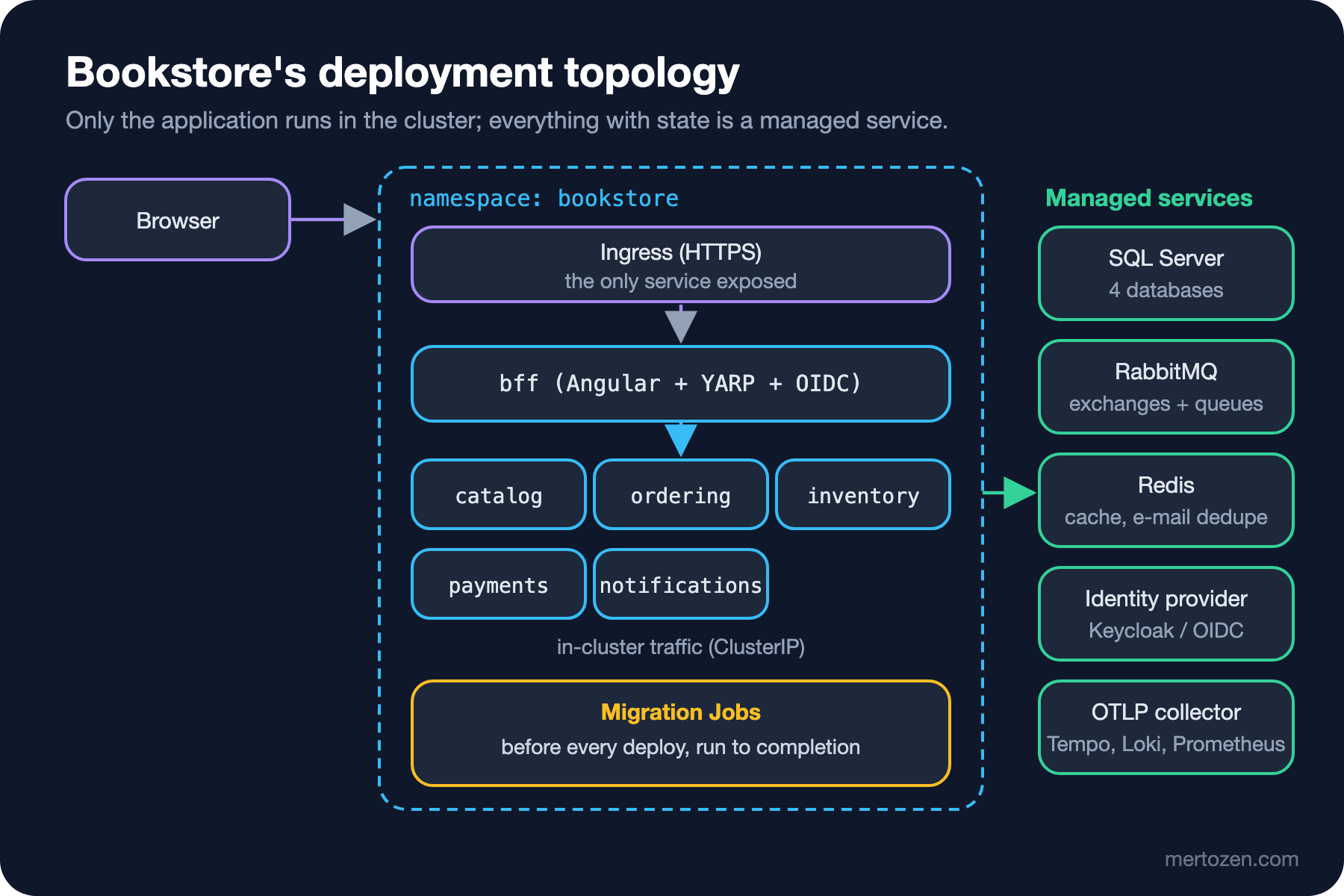
This attempt made concrete a decision we should take up front: do SQL Server, RabbitMQ and Redis run inside the cluster, or as the cloud provider's managed services? Running them in the cluster means taking on persistent volumes, backups, version upgrades, high availability and memory planning; in the attempt we skipped the first and lost our data. For Bookstore, with three developers and one part-time ops person (the assumption in the Introduction to Architecture series), the answer is managed services: only stateless application pods and Jobs run in the cluster. Cloud options and the cost side are in the Cloud Fundamentals series. Local development keeps the containers; Aspire already does that. The 17th post of the Kubernetes series is an end-to-end example of moving a .NET and Angular application to managed Kubernetes.
An Independent Pipeline per Service
One of the promises of moving to microservices is that each service is deployed at its own pace. There is a single repository (the mono-repo decision from post 01), so in GitHub Actions each service has a small workflow, and its paths filter runs it only when that service changes; a shared reusable workflow does the real work:
name: catalog

on:
  push:
    branches: [main]
    paths:
      - src/Services/Catalog/**
      - src/BuildingBlocks/**
      - tests/Bookstore.Catalog.ContractTests/**
      - tests/pacts/**
      - Directory.Packages.props
...
jobs:
  catalog:
    uses: ./.github/workflows/service.yml
    with:
      service: catalog
      project: src/Services/Catalog/Bookstore.Catalog.Api/Bookstore.Catalog.Api.csproj
      # The provider side of the BFF's pact runs here: a Catalog change that breaks the BFF fails Catalog's build
      tests: tests/Bookstore.Catalog.ContractTests
    secrets: inherit
service.yml builds, runs the service's tests, the architecture and message schema tests, and on main builds the image and sends it to GitHub's container registry. This is where the contract test from post 13 finds its place. The BFF's workflow runs the consumer test, and if the pact file changed, git diff --exit-code tests/pacts stops the pull request; the changed pact file matches the tests/pacts/** filter, so Catalog's workflow starts too and the provider verification runs in Catalog's pipeline. The end-to-end test is in a separate workflow, after merges to main and at night. We checked the workflows with actionlint (actionlint exit 0); we did not run them on GitHub. We left out the deploy step on purpose: how to reach the cluster (GitOps with Argo CD, or kubectl from the pipeline) is a separate decision and the subject of the GitOps and Argo CD series.
Independent deployment has a precondition: the src/BuildingBlocks/** filter. When Bookstore.Contracts or ServiceDefaults change, every service's pipeline runs. That is one reason we limited shared code to these two projects in post 01; in post 15 we measure whether the rule held.
In Production
Sign and scan the images. Every image that goes to the registry should go with an SBOM and a signature; the chiseled base also reduces the number of findings a scan reports.
Don't deploy with the latest tag. A tag like catalog:latest in Aspire's chart says nothing about which code is running and makes rolling back impossible. The workflow also tags the image with the commit SHA; that tag is what the manifest should use.
Separate the migration from the deploy. Sending the Job and the Deployment with a single kubectl apply leads, as we saw in the attempt, to the application starting before the schema is ready. Use either sequential steps in the pipeline, or Argo CD sync waves and Helm hooks.
The ingress should expose only the BFF. The other services are ClusterIP; health endpoints and internal APIs must not be reachable from outside. Narrowing service-to-service traffic with NetworkPolicy is the network-level counterpart of the "don't trust the internal network" rule from post 10.
Common Pitfalls
Running a migrator as a Deployment. A process that exits when done restarts forever in a Deployment; it should be a Job or a Helm hook.
Running a stateful container without a volume and without a memory request. Under memory pressure it is the first to die, and it takes its data with it.
Tying the liveness probe to the database. A database outage turns into every pod restarting.
Forgetting shared folders in the paths filter. If src/BuildingBlocks/** is not in the filter, a service whose contract changed is deployed with the old contract.
Applying a generated manifest without reviewing it. The aspire publish output has no probes, no securityContext and no Jobs; the tool is a starting point, not the final shape.
A Small Experiment
★☆☆ Build Catalog's image once more without ContainerFamily and compare the two images' layers with docker history. Which layer makes the difference?
★★☆ Write the Kustomize base for Ordering: Deployment, Service and migration Job. Which extra settings does Ordering need that Catalog does not (for example, RabbitMQ queues, the payment timeout)?
★★★ Create Wolverine's tables in the migration Job and turn off schema creation at startup in the services. How does that affect the startup probe problem from the attempt?
The system can now be deployed with its images, manifests and pipelines. In the last post of the series we look back at everything we built: distributed monolith symptoms, resource usage and cost with real measurements, a comparison with the monolith version of the same function, and what we would merge again.