

Async Communication with Integration Events: RabbitMQ, a Messaging Library and the Transactional Outbox
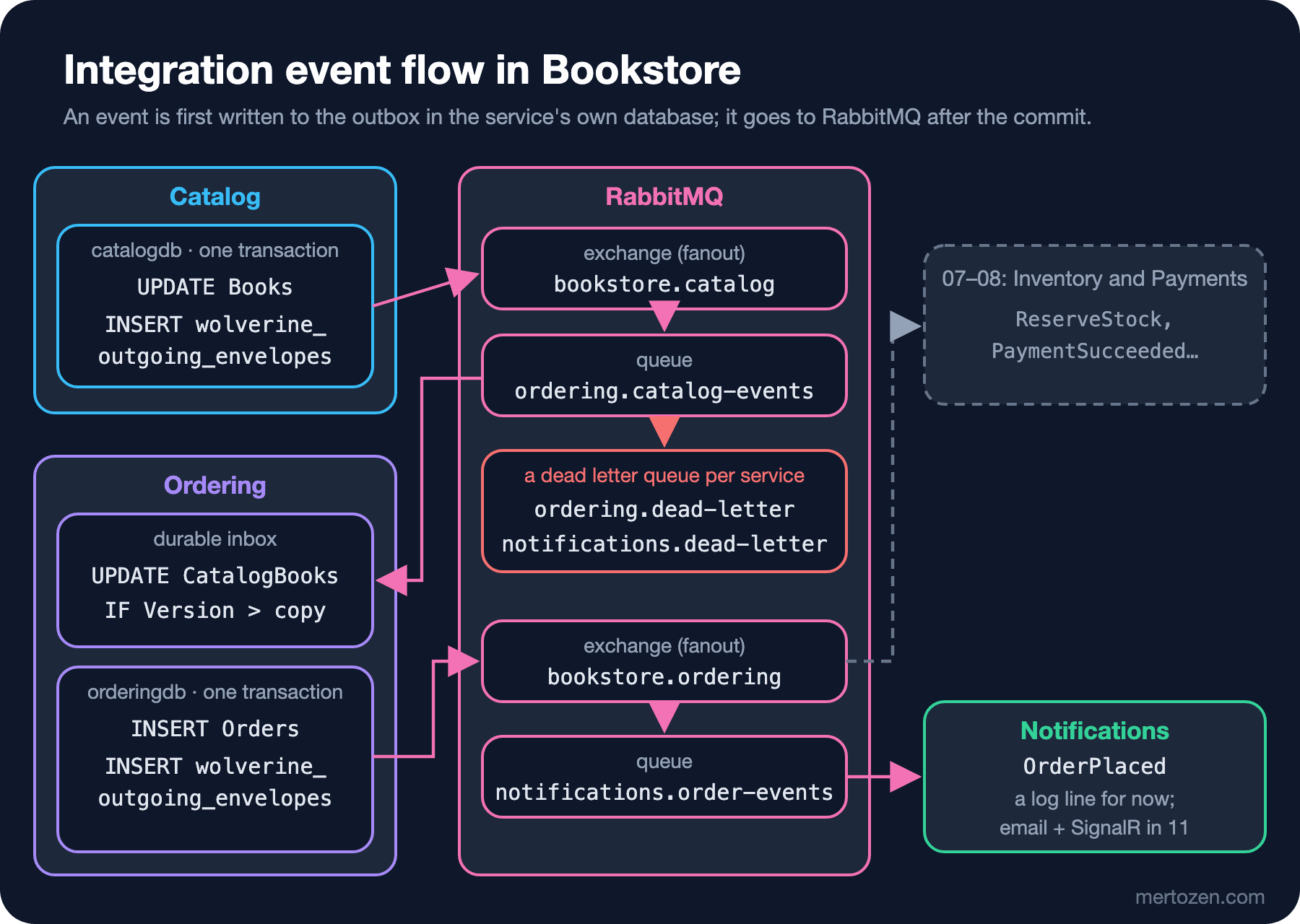
Catalog and Ordering write integration events to their own databases through WolverineFx's EF Core outbox and send them to RabbitMQ after the commit; even with RabbitMQ down a price change returns 204, and the event reaches Ordering once the broker is back. Ordering's durable inbox drops repeated messages, a per-field version drops late old events, and poison messages land in the service's own dead letter queue with exception details.
Version note: The code in this post was built and run with .NET 10, Aspire 13.6, WolverineFx 6.64, RabbitMQ 4.3 and Entity Framework Core 10.
Guess First
We stop RabbitMQ and change Emma's price in Catalog. What does PUT /api/v1/admin/books/{isbn}/price return: 500, 503 or 204? If it returns 204, where does the BookPriceChanged event wait, and does it reach Ordering once RabbitMQ is back? Second question: if Ordering's book copy had a single Version column and the book's BookRenamed v6 event were handled after BookPriceChanged v7, what would the book's title be? Both answers come from the real runs below.
Domain Event or Integration Event?
In 04, Ordering's Order.Place method raised an OrderPlaced domain event; in 03, Catalog's Book raised BookPriceChanged and BookRenamed. Until now both only went to the log. In this post the services of Bookstore, the online bookstore used as the shared example across this site's series, send each other messages for the first time, so we first have to separate the two kinds of event.
A domain event stays inside the service: it speaks the aggregate's language, carries the service's own types such as OrderId and value objects such as Money, and changes when the model changes. An integration event is the promise the service makes to the outside: another team's code reads it, so it carries only primitive types and changes slowly. That is why Ordering has two OrderPlaced types. The integration one lives in the Bookstore.Contracts project:
namespace Bookstore.Contracts.Ordering;

// Integration event published by Ordering when an order is accepted. It carries what consumers need
// (no Order aggregate, no EF Core types), so it can stay stable while the domain model changes.
public sealed record OrderPlaced(
    Guid OrderId, string CustomerEmail, IReadOnlyList<OrderPlacedLine> Lines, decimal Total, string Currency,
    DateTimeOffset PlacedAtUtc);

public sealed record OrderPlacedLine(string Isbn, int Quantity, decimal UnitPrice);
Exchange names came with it: every publishing service has one fanout exchange (bookstore.catalog, bookstore.ordering) and consumers bind their own queues to it. We covered the versioning rules for contracts in the Message Contracts post of the Working with Message Queues series; the part we apply here is this: adding a field is fine, removing or renaming one means a new message type. Wolverine writes the message type into a header by its full name, such as Bookstore.Contracts.Catalog.BookPriceChanged, so the namespace and the record name are part of the contract too. The Bookstore.Contracts project still depends on no package; the architecture test from 01 keeps guarding that.
Setting Up Wolverine: RabbitMQ, a SQL Server Outbox and EF Core
In 01 we explained why we use WolverineFx instead of MassTransit. On the day this post was written the latest stable version is 6.64. In Wolverine 6 the Roslyn compiler needed for generating code at runtime moved to a separate package: without a reference to WolverineFx.RuntimeCompilation the application stops at startup and asks for that package or for pre-generated code. Catalog's setup:
builder.UseWolverine(opts =>
{
    if (!openApiBuild)
    {
        // Outbox tables live in Catalog's own database, in the "wolverine" schema.
        opts.PersistMessagesWithSqlServerUsingNamedConnection("catalogdb", "wolverine");
        opts.UseRabbitMqUsingNamedConnection("rabbitmq").AutoProvision();
    }
    opts.UseEntityFrameworkCoreTransactions();

    opts.PublishMessage<BookPriceChanged>().ToRabbitExchange(Exchanges.Catalog);
    opts.PublishMessage<BookRenamed>().ToRabbitExchange(Exchanges.Catalog);

    // Nothing leaves the service without first being written to the outbox table.
    opts.Policies.UseDurableOutboxOnAllSendingEndpoints();
});
"catalogdb" and "rabbitmq" are the names of the connection strings Aspire passes through WithReference; in the AppHost we added WithReference(rabbitmq) and WaitFor(rabbitmq) to Catalog and Ordering. On first start Wolverine created the wolverine schema in catalogdb and nine tables such as wolverine_outgoing_envelopes, wolverine_incoming_envelopes and wolverine_dead_letters. The outbox lives in the service's own database; there is no need for another service's connection string or a shared "messaging database".
We hit two errors on the way to this block. The first came during the build. Since 03 the OpenAPI document is generated on every build, and for that the host runs briefly under a tool called GetDocument.Insider. That run has no Aspire and no connection strings; Wolverine checks for missing connection strings at startup, and the build broke with: 2 connection strings required by this Wolverine application are missing from configuration. The openApiBuild variable recognizes that run, turns off Wolverine's transports and message store, and skips the broker and database lines. The Wolverine documentation recommends the same approach. The committed OpenAPI files showed no difference at all.
The second error came as a 500 on the first price change:
[catalog]       System.InvalidOperationException: The configured execution strategy 'SqlServerRetryingExecutionStrategy' does not support user-initiated
transactions. Use the execution strategy returned by 'DbContext.Database.CreateExecutionStrategy()' to execute all the operations in the transaction as a
retriable unit.
[catalog]          at Wolverine.EntityFrameworkCore.DbContextOutbox`1.SaveChangesAndFlushMessagesAsync(CancellationToken token)
Aspire's AddSqlServerDbContext turns on Entity Framework Core's retrying execution strategy by default. That strategy does not allow a transaction opened by your own code, and that is exactly what the outbox does to write the entity and the message in one transaction. In Ordering the same problem showed up earlier, at startup: Wolverine refused to start the application because it saw its transaction middleware on a handler together with this strategy. The fix is to keep retries in one place:
// EF Core's retrying execution strategy (on by default in Aspire) does not allow the explicit transaction
// the outbox needs, so the service turns it off and leaves retries to Wolverine's error policies.
// The migrator keeps it: right after a container start, the first connection attempts may fail.
builder.AddSqlServerDbContext<CatalogDbContext>("catalogdb", settings => settings.DisableRetry = !DatabaseMigration.IsMigrationRun(args));
Our first attempt turned retries off everywhere, and then the migrator failed: right after the SQL Server container restarted, the first connection failed with error occurred during the pre-login handshake and was not retried. The migrator has no outbox with an explicit transaction, so it keeps the retries.
The Transactional Outbox in Catalog
ChangeBookAsync from 03 only logged the events, and its comment named the problem: a crash between SaveChanges and a direct publish loses the event (dual write). We covered the mechanism in the Transactional Outbox and Inbox post of the Messaging and Event-Driven Architecture series, and the .NET options in the Transactional Outbox post of the Working with Message Queues series. In Bookstore the code now looks like this:
Book? book = await outbox.DbContext.Books.FirstOrDefaultAsync(b => b.Isbn == isbn, ct);
if (book is null)
{
    return BookNotFound(isbn);
}

change(book);
foreach (object integrationEvent in book.Events)
{
    // Not sent yet: queued in memory, written to the outbox table in the same transaction as the book.
    await outbox.PublishAsync(integrationEvent);
}
book.ClearEvents();

try
{
    // One transaction: UPDATE Books + INSERT into wolverine_outgoing_envelopes. After the commit,
    // Wolverine sends the messages to RabbitMQ and deletes them from the outbox.
    await outbox.SaveChangesAndFlushMessagesAsync(ct);
}
outbox is the IDbContextOutbox<CatalogDbContext> injected into the endpoint. Minimal API endpoints are not Wolverine handlers, so they use the outbox through this service; its DbContext property is the context of the same scope. On a concurrency error we still return 409; the messages waiting in memory are then dropped with the scope without ever being written.
Now the first experiment from Guess First. We stopped the broker with aspire resource rabbitmq stop and changed the price:
HTTP 204 in 0.063339s

message_type                                 destination                           attempts owner_id
Bookstore.Contracts.Catalog.BookPriceChanged rabbitmq://exchange/bookstore.catalog 0        4
The answer is 204 in 63 ms. Catalog's log kept reporting that it could not open a channel to RabbitMQ (Error trying to start a new Rabbit MQ channel for RabbitMqSender: rabbitmq://exchange/bookstore.catalog), but the event was not lost: it was waiting in the outbox table in catalogdb. We started RabbitMQ at 14:16:59, the table was empty at 14:17:06, and Ordering's log had this line:
[ordering] info: Bookstore.Contracts.Catalog.BookPriceChanged[0]
[ordering]       Copy of 9780141439587 now costs 219.90 (v3)
That answers the first question: while the broker is down the write succeeds, the event waits in the database, and it leaves when the broker returns. There is a cost too: while Catalog's admin screen said "saved", Ordering's copy stayed 40 seconds behind. That is eventual consistency in concrete terms.
Ordering: A Durable Inbox and Updating the Book Copy
Ordering binds its own queue to Catalog's exchange. The consumer owns the queue, so the queue carries its name: ordering.catalog-events.
opts.UseRabbitMqUsingNamedConnection("rabbitmq")
    .AutoProvision()
    // Ordering owns this queue and its binding to Catalog's exchange.
    .DeclareExchange(Exchanges.Catalog, exchange => exchange.BindQueue(Queues.CatalogEvents));

// Durable inbox: the message is stored in orderingdb before it is acknowledged to RabbitMQ.
opts.ListenToRabbitQueue(Queues.CatalogEvents).UseDurableInbox();
opts.UseEntityFrameworkCoreTransactions();
// A handler that takes OrderingDbContext gets SaveChanges + outbox flush in one transaction.
opts.Policies.AutoApplyTransactions();
The handler is a static class; Wolverine finds it by its name (ending in Handler) and its Handle methods:
public static async Task Handle(
    BookPriceChanged message, OrderingDbContext db, TimeProvider clock, ILogger logger, CancellationToken ct)
{
    CatalogBook book = await FindAsync(db, message.Isbn, ct);
    if (IsStale(book.Isbn, message.Version, book.PriceVersion, nameof(BookPriceChanged), logger))
    {
        return;
    }
    if (message.Currency != book.Currency)
    {
        throw new InvalidOperationException($"Price of {message.Isbn} came in {message.Currency}, the copy is in {book.Currency}.");
    }

    book.Price = message.NewPrice;
    book.PriceVersion = message.Version;
    book.UpdatedAtUtc = clock.GetUtcNow().UtcDateTime;
    logger.LogInformation("Copy of {Isbn} now costs {Price} (v{Version})", book.Isbn, book.Price, message.Version);
    // No SaveChanges here: Wolverine's transaction middleware commits it together with the inbox row.
}
RabbitMQ delivers at least once. The same message can arrive twice, and because Wolverine's durable listener processes messages in parallel by default, order is not guaranteed even on a single queue. IsStale logs and skips an event whose version is not greater than the copy's. In 03 we made Catalog increment Version on every change; this check is what that decision pays for.
In 04 the copy had a single Version column. The second question in Guess First targets exactly that. We stopped Ordering, changed Emma's title (v6) and price (v7), took both messages out of Ordering's queue, put them back in reverse order and started Ordering. With a single version the v7 price moves the copy to v7, and the v6 title change that follows counts as "old" and is skipped; the book would keep its old title and nobody would notice. Price and title are different fields, so each needs its own version. We added PriceVersion and TitleVersion columns to the copy with a migration (the old Version value was copied into both). The same experiment afterwards:
[ordering]       Copy of 9780141439587 renamed to Emma: A Novel (v6)
[ordering]       Copy of 9780141439587 now costs 199.90 (v7)

Isbn          Title         Price  PriceVersion TitleVersion
9780141439587 Emma: A Novel 199.90 7            6
Then we tried two replay scenarios. First we republished the v7 price message with the same message id; Wolverine's inbox never let it reach the handler. Then we sent an older v5 price event with a new message id; this time the inbox had nothing to recognize, and the version check stepped in:
[ordering] info: Wolverine.Runtime.WorkerQueues.DurableReceiver[0]
[ordering]       Discarding a duplicate delivery of envelope dc270000-0000-0200-9244-08df425a07ac at rabbitmq://queue/ordering.catalog-events, which the inbox
already holds
[ordering] info: Bookstore.Contracts.Catalog.BookPriceChanged[0]
[ordering]       Ignoring BookPriceChanged v5 for 9780141439587: copy is already at v7
The two layers guard two different things. The inbox catches a repeat of the same message: a broker redelivery or a message whose ack was lost. The version check catches the same information arriving in a different message: Catalog republishing an event, or an old message arriving late. The theory of the idempotent consumer is in the Idempotent Consumer post of the Messaging and Event-Driven Architecture series, and the .NET inbox in the Idempotent Consumer and Inbox post of the Working with Message Queues series.
OrderPlaced: Ordering's Outbox and the First Consumer
Ordering publishes its own event the same way. PlaceOrderHandler now takes an IDbContextOutbox<OrderingDbContext> and turns the domain event into an integration event:
db.Orders.Add(order);

// The domain event stays inside Ordering; what leaves the service is the integration event.
foreach (object domainEvent in order.DomainEvents)
{
    if (domainEvent is Domain.OrderPlaced)
    {
        await outbox.PublishAsync(ToIntegrationEvent(order));
    }
}
order.ClearDomainEvents();

// INSERT Orders/OrderItems and the outbox row in one transaction, then hand the message to RabbitMQ.
await outbox.SaveChangesAndFlushMessagesAsync(ct);
The first consumer is Notifications. It has no database, so it has no inbox either; for now it only writes a log line, and email and SignalR arrive in 11. After Ada's order its log said:
[notifications] info: Bookstore.Contracts.Ordering.OrderPlaced[0]
[notifications]       Order 01a1da6d-ba84-7382-8620-60e8b93ca01c placed by ada@example.com: 399.80 TRY, 1 line(s)
The order is still created in StockReserved status through the synchronous gRPC reservation from 05. In 07 that call becomes a step of the saga, and Inventory and Payments will be fed by this exchange or by commands Ordering sends.
Retries, the Dead Letter Queue and Poison Messages
The reasoning behind the retry and DLQ policy is in the Retry and Dead-Letter Queue posts of the Working with Message Queues series. Ordering has two rules: three retries with pauses for transient database errors, and straight to the DLQ for an error that can never succeed.
// Transient database errors: three retries with growing pauses, then the dead letter queue.
opts.OnException<SqlException>().RetryWithCooldown(
    TimeSpan.FromMilliseconds(200), TimeSpan.FromSeconds(1), TimeSpan.FromSeconds(5));
// A message that can never succeed goes straight to the dead letter queue; retrying it only adds load.
opts.OnException<InvalidOperationException>().MoveToErrorQueue();
In the first poison message test we sent two messages: a price event for an ISBN that is not in the copy and a JSON body with a broken newPrice field. Both correctly went to a DLQ, but the destination was a surprise: wolverine-dead-letter-queue. Wolverine's default DLQ has the same name in every application, so the poison messages of Ordering and Notifications were mixing in one queue. We gave each listener its own DLQ:
opts.ListenToRabbitQueue(Queues.CatalogEvents)
    .UseDurableInbox()
    .DeadLetterQueueing(new DeadLetterQueue("ordering.dead-letter"));
After that change Ordering did not start: PRECONDITION_FAILED - inequivalent arg 'x-dead-letter-exchange' for queue 'ordering.catalog-events' in vhost '/': received 'ordering.dead-letter'. In RabbitMQ the arguments of a queue cannot change after it is created. Locally, deleting and recreating the queue was enough; in production it means opening a new queue and draining the old one, or setting the argument with a RabbitMQ policy. We repeated the experiment and read the headers of the messages in ordering.dead-letter through the management API (type, exception-type, exception-message, original-destination, attempts):
Bookstore.Contracts.Catalog.BookPriceChanged | System.Text.Json.JsonException | The JSON value could not be converted to Bookstore.Contracts.Catalog.BookPriceChanged. Path: $.newPrice | LineNumber: 0 | BytePositionInLine: 48. | rabbitmq://queue/ordering.catalog-events |attempts None
Bookstore.Contracts.Catalog.BookPriceChanged | System.InvalidOperationException | Book 9780000000002 is not in Ordering's catalog copy. | rabbitmq://queue/ordering.catalog-events |attempts 1
Wolverine adds the exception type, message and stack trace and the queue the message came from as headers; the same information shows up under "Get messages" for the queue in the management UI, so you don't have to search the logs to see why a poison message is there. attempts 1 shows that the MoveToErrorQueue rule did not retry. The broken JSON never reached the handler at all: a deserialization error goes straight to the DLQ.
In Production
Watch the outbox table. The row count in wolverine_outgoing_envelopes and the age of the oldest row are the earliest signal that the broker is unreachable. If the 40-second delay above grows to a minute or an hour, you want an alert before users notice anything.
Alert on the DLQ and name its owner. Every message that lands in ordering.dead-letter is the Ordering team's job; the process and tools for reprocessing a DLQ are in the Dead-Letter Queue post of the Working with Message Queues series.
Don't leave code generation to startup in production. Wolverine generates and compiles C# code for its handlers; the log line The Wolverine code generation mode is Dynamic says so. Generating the code at build time and running with TypeLoadMode.Static speeds up startup and removes Roslyn from the image; we'll come back to it when we build the container images in 14.
Who creates the queues and bindings? AutoProvision() is convenient locally. In production the service account may not, and should not, have the right to create exchanges and queues; then infrastructure code sets up the topology and the application only uses it.
Memory. We added WithExplicitStart() to Keycloak in the AppHost: nothing uses it before post 10, and it took about 500 MB next to SQL Server, RabbitMQ and Redis. It starts on demand from the dashboard or with aspire resource keycloak start.
Common Pitfalls
Sending the message straight to the broker after SaveChanges. It works most of the time; if the process crashes right in between, or the broker is down at that moment, the event is silently lost. The outbox exists to close exactly that gap.
Guarding different fields with one version. As the experiment above showed, when the order breaks, an update to one field makes the other field's update look "old".
Leaving the default DLQ shared by all services. You can tell which service a poison message came from only by reading its headers, and the alert has no clear owner.
Trying to change an existing queue's arguments from code. RabbitMQ refuses with PRECONDITION_FAILED and the consumer never starts.
Stacking two retry layers. If EF Core's execution strategy and Wolverine's error policy each repeat the same error, three retries become nine, and the outbox's transaction does not work anyway.
Sending the domain event to the broker as it is. Exposing the Money and OrderId types makes Ordering's internal model the consumers' contract.
A Small Experiment
★☆☆ Stop Ordering with aspire resource ordering stop, change Middlemarch's price three times and count the messages waiting in ordering.catalog-events in the RabbitMQ management UI. After starting Ordering, which price and which PriceVersion does the copy have?
★★☆ When a new book is added to Catalog, Ordering's copy does not know about it; the "is not in Ordering's catalog copy" message in the DLQ is exactly that gap. Design a BookAdded integration event: which Catalog endpoint publishes it, what does the Ordering handler do, and what happens if BookPriceChanged arrives before BookAdded?
★★★ Write a small tool that moves the messages in ordering.dead-letter back to ordering.catalog-events once their cause is fixed (with the RabbitMQ management API or RabbitMQ.Client). If you keep the same message id, does the inbox treat the message as a repeat? With a new id, what does the version check do?
The services now send each other messages without losing them, but ordering still depends on the synchronous gRPC call from 05: while Inventory is down no order can be taken, and there is no payment at all. In the next post we turn checkout into a saga owned by Ordering: the states from Pending to Confirmed, the stock and payment steps, compensation on a declined payment and on a timeout, and the tests that check all of it.