

Compute Options in the Cloud: Choosing Between VMs, App Service, Container Apps, Kubernetes and Functions
Choosing compute is a balance between the control an application needs and the operational load a team can carry: from VMs to AKS, from App Service to Container Apps and Functions, the platform takes on more work. We cover the AWS equivalents (App Runner closing, ECS Express Mode), a decision tree for Bookstore, scaling models, a measured cold start of Bookstore.Api and the pricing units.
Version note: The examples in this post were run with .NET 10 (SDK 10.0.404), Docker Engine 29 and a SQL Server 2025 container. The cold start measurements were made on local Docker; Azure and AWS service details come from Microsoft Learn and the AWS documentation, and list prices from the Azure Retail Prices API, all checked on 14 November 2026.
Guess First
The API of Bookstore, the online bookstore used as the shared example across this site's series, runs on Container Apps with a minimum replica count of zero. There is no traffic overnight, so the replica count dropped to zero. In the morning the first customer opens the catalog page. How many milliseconds does the GET /api/books request take: 50, 500 or 3000? And what is the largest part of that time: the container starting, the .NET runtime starting, or something else? We measured it; the answer is in the middle of the post.
The Control Versus Operational Load Axis
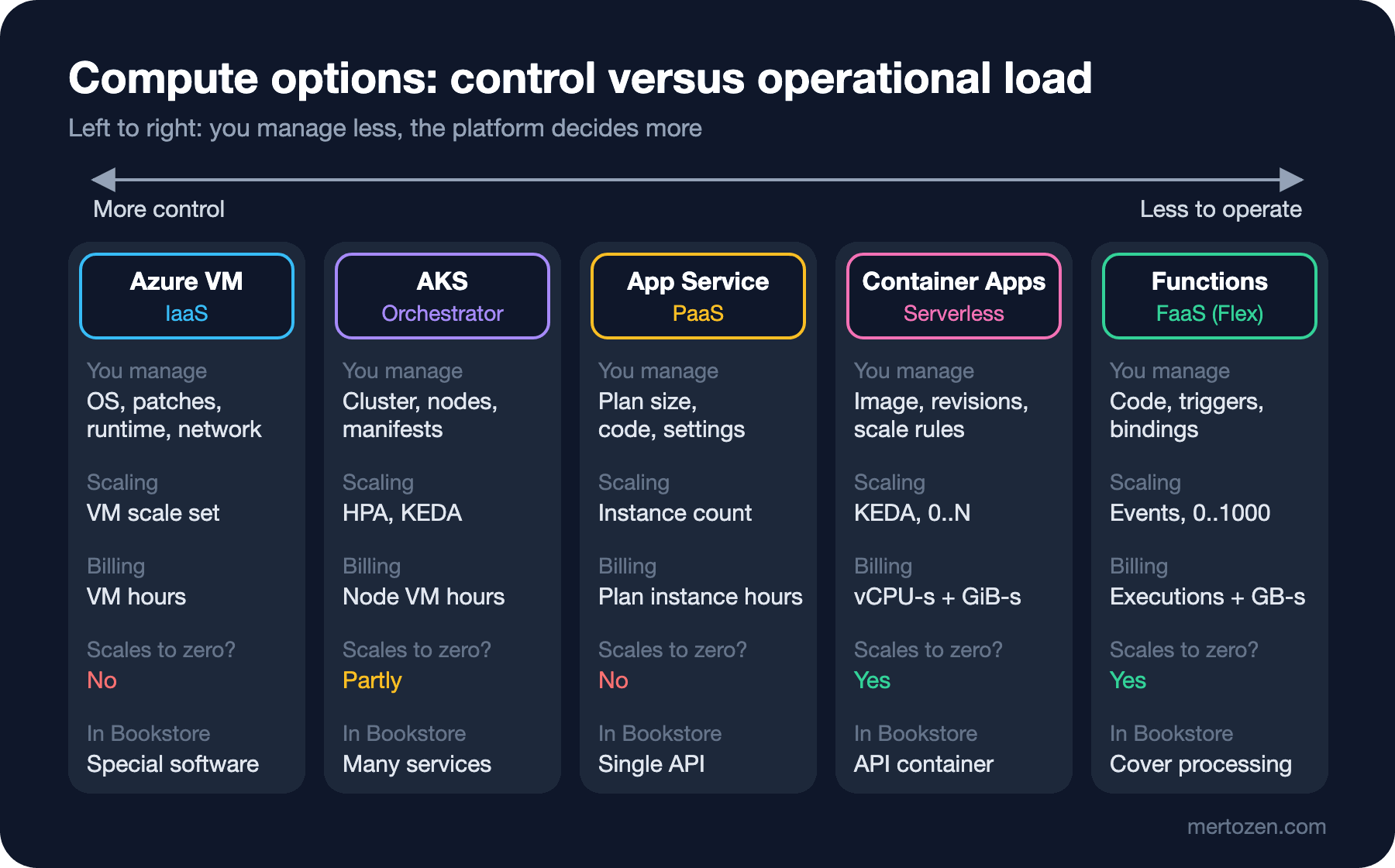
Compute options line up on an axis. At the left end you control everything and you operate everything; moving to the right, the platform decides more and less work is left to you. The right option is where the control the application really needs meets the operational load the team can carry.
The Options on Azure: VMs, AKS, App Service, Container Apps, Functions
Azure Virtual Machines is IaaS itself: you choose the operating system, patch it, and install the .NET runtime and the reverse proxy. If you need a special operating system component, software licensed per machine, or a long-running process that holds state, this is the right place. Bookstore.Api needs none of these.
AKS is a Kubernetes cluster whose control plane Microsoft manages. You manage the manifests, node pools, cluster upgrades and ingress. It is powerful for systems with dozens of services and people on the team who know Kubernetes; for a single API it's heavier than necessary. Post 17 of the Kubernetes series moves Bookstore to AKS and to the managed Kubernetes services of other providers.
App Service is PaaS for web applications. You buy an App Service plan (a VM size and an instance count) and place one or more applications on it. You can deliver the code as a zip file or as a container image; deployment slots, health checks, authentication and certificate management come built in. You pay for as long as the plan runs; it doesn't scale to zero when there is no traffic.
Container Apps is a serverless container platform built on Kubernetes and KEDA that doesn't expose either of them to you. You run container apps inside an environment; every change produces a revision, you can split traffic between revisions, and it scales down to zero according to rules such as HTTP requests or queue length. According to Learn, the minimum replica count defaults to 0 and the maximum to 10.
Azure Functions is FaaS: a trigger (an HTTP request, a timer, a queue message, a new blob) runs a function. The recommended serverless plan for new applications is Flex Consumption: it runs on Linux, you choose an instance size of 512 MB, 2,048 MB or 4,096 MB, and it can go up to 1,000 instances per function group. The older Consumption plan on Linux retires on 30 September 2028. We set up Functions in post 6 with Bookstore's cover image processing.
AWS Equivalents and Where Things Stand
AWS has the same axis, but an important change happened in the last year. App Runner, recommended for years as the simple way to run a container, closed to new customers from 30 April 2026; existing customers can keep using it, but no new features are coming. AWS recommends ECS Express Mode instead, announced on 21 November 2025: given a container image and two IAM roles, it sets up an ECS service on Fargate, an Application Load Balancer, autoscaling and networking with a single API call; Express Mode itself has no extra charge, and the resources it creates are billed.
| Need | Azure | AWS | Note |
|---|---|---|---|
| Virtual machine | Virtual Machines | EC2 | The operating system and patches are yours |
| PaaS for web apps | App Service | Elastic Beanstalk | Beanstalk builds EC2 and a load balancer in your account |
| Serverless containers | Container Apps | ECS on Fargate, ECS Express Mode | App Runner closed to new customers since April 2026 |
| Managed Kubernetes | AKS | EKS | The control plane is the provider's, the nodes are yours |
| FaaS | Functions (Flex Consumption) | Lambda | A single Lambda invocation runs at most 15 minutes |
A Decision Tree for Bookstore
The compute decision tree in Microsoft's Azure Architecture Center is a long flow; for Bookstore it comes down to four questions. First: does the application need a special operating system setting, a license tied to a machine, or a Windows-specific component? If so, a VM. Second: are you running a single HTTP API and an SPA? If so, App Service or Container Apps; the choice between them depends on whether the team builds the image and whether scaling to zero is worth something. Third: are there many services talking to each other, with service discovery and traffic rules between services? Container Apps covers most of these needs; if you need the Kubernetes API, your own operators or node-level control, AKS. Fourth: is the work triggered by an event and short (a new cover image, a nightly report)? If so, Functions; for long-running or constantly busy work, Container Apps jobs or a hosted service inside the API fit better.
Today Bookstore is a single API, an Angular application and a database. So in post 5 we deploy the API in two ways, as code to App Service and as a container to Container Apps; the Angular application goes to Static Web Apps; and cover image processing is split out to Functions in post 6.
Scaling Models
Scaling comes in four forms. With manual scaling you set the instance count, like saying "3 instances" on an App Service plan. With autoscale you attach rules to a metric such as CPU, memory or request count; App Service and VM scale sets do this, but the lower bound is at least one instance. Event-driven scaling looks at an event source. On Container Apps the default threshold of the HTTP rule is 10 concurrent requests; when it is exceeded replicas are added, in steps that grow as 1, 4, 8, 16. According to Learn, scale-in decisions use a 300-second window, and after the last event the app waits 300 seconds before scaling to zero. Scale-to-zero is the extreme end of event-driven scaling: when there is no work no replica runs and nothing is charged. The price is the cold start.
Measuring the Cold Start
Instead of guessing how long a cold start takes for Bookstore.Api, we measured it. We produced the API's container image with the .NET SDK's container support, without writing a separate Dockerfile; the details of producing images are a topic for the Docker series:
$ dotnet publish src/Bookstore.Api -c Release /t:PublishContainer
  Building image 'bookstore-api' with tags 'latest' on top of base image 'mcr.microsoft.com/dotnet/aspnet:10.0'.
  Pushed image 'bookstore-api:latest' to local registry via 'docker'.
The measuring tool starts the container with a given CPU limit, records separately the moment the application starts answering (a 404 that doesn't touch the database), and then measures the first and subsequent /api/books requests:
// Measures a Bookstore.Api cold start in a container: docker run → app answers → first and warm /api/books.
// Run: dotnet run tools/cloud/coldstart.cs -- [cpus] [image]
// BOOKSTORE_DB: SQL Server connection string as seen from inside the container.
using System.Diagnostics;

string cpus = args.Length > 0 ? args[0] : "1";
string image = args.Length > 1 ? args[1] : "bookstore-api:latest";
string connectionString = Environment.GetEnvironmentVariable("BOOKSTORE_DB")
    ?? throw new InvalidOperationException("Set BOOKSTORE_DB to the SQL Server connection string.");
string container = Environment.GetEnvironmentVariable("COLDSTART_CONTAINER") ?? "bookstore-coldstart";
const int Port = 18080;

using HttpClient http = new() { BaseAddress = new Uri($"http://localhost:{Port}"), Timeout = TimeSpan.FromSeconds(10) };
await DockerAsync("rm", "-f", container);

Stopwatch clock = Stopwatch.StartNew();
await DockerAsync("run", "-d", "--name", container, "--cpus", cpus, "--memory", "1g", "-p", $"{Port}:8080",
    "-e", $"ConnectionStrings__BookstoreDb={connectionString}", image);
TimeSpan containerStarted = clock.Elapsed;

// A path that doesn't exist: a 404 means Kestrel answers, without touching the database
while (true)
{
    try
    {
        using HttpResponseMessage ping = await http.GetAsync("/ping");
        break;
    }
    catch (HttpRequestException)
    {
        await Task.Delay(20);
    }
}
TimeSpan appAnswers = clock.Elapsed;

TimeSpan first = await TimeRequestAsync();
TimeSpan firstTotal = clock.Elapsed;
List<double> warm = [];
for (int i = 0; i < 20; i++)
{
    warm.Add((await TimeRequestAsync()).TotalMilliseconds);
}
warm.Sort();

Console.WriteLine($"cpus={cpus}");
Console.WriteLine($"  docker run returned          {containerStarted.TotalMilliseconds,7:0} ms");
Console.WriteLine($"  app answers (404 on /ping)   {appAnswers.TotalMilliseconds,7:0} ms");
Console.WriteLine($"  first /api/books took        {first.TotalMilliseconds,7:0} ms  (done at {firstTotal.TotalMilliseconds:0} ms)");
Console.WriteLine($"  warm /api/books median/max   {warm[warm.Count / 2],7:0.0} / {warm[^1]:0.0} ms");

await DockerAsync("rm", "-f", container);

async Task<TimeSpan> TimeRequestAsync()
{
    Stopwatch sw = Stopwatch.StartNew();
    using HttpResponseMessage response = await http.GetAsync("/api/books?pageSize=5");
    response.EnsureSuccessStatusCode();
    await response.Content.ReadAsStringAsync();
    return sw.Elapsed;
}

static async Task DockerAsync(params string[] arguments)
{
    using Process process = Process.Start(new ProcessStartInfo("docker", arguments) { RedirectStandardOutput = true, RedirectStandardError = true })!;
    await process.StandardOutput.ReadToEndAsync();
    await process.StandardError.ReadToEndAsync();
    await process.WaitForExitAsync();
}
BOOKSTORE_DB has to be the address as seen from inside the container; on Docker Desktop the SQL Server on the host is reached through host.docker.internal:
$ export BOOKSTORE_DB="Server=host.docker.internal,1433;Database=BookstoreDb;User Id=sa;Password=<password>;TrustServerCertificate=True"
$ dotnet run tools/cloud/coldstart.cs -- 0.5
cpus=0.5
  docker run returned              253 ms
  app answers (404 on /ping)       631 ms
  first /api/books took           1200 ms  (done at 1833 ms)
  warm /api/books median/max       3.0 / 71.0 ms
We ran each CPU limit three times; the table shows the medians of the three runs:
| CPU limit | App answers | First /api/books | Total to first answer | Later requests (median) |
|---|---|---|---|---|
| 2 vCPU | 348 ms | 598 ms | 954 ms | 4.3 ms |
| 1 vCPU | 356 ms | 558 ms | 914 ms | 2.9 ms |
| 0.5 vCPU | 631 ms | 1,200 ms | 1,768 ms | 3.1 ms |
| 0.25 vCPU | 745 ms | 2,109 ms | 2,846 ms | 3.7 ms |
The answer to the guess: at 0.5 vCPU Bookstore.Api's first request returns in about 1.8 seconds; once warm, the same request takes 3 milliseconds. The largest part isn't the container or the runtime starting but the first database request: EF Core building its model, SqlClient opening the first connection, and the JIT compiling that code path for the first time. As the CPU is halved, this part grows almost linearly. These numbers are a lower bound: the image was already local. In the cloud a replica starting from zero first has to be placed on a node and pull the image from the registry; the bigger the image, the longer that takes. Your numbers will differ on your machine; what matters is the order and the ratios.
In practice this leaves two options. For a latency-sensitive API you set the minimum replica count to 1; Container Apps bills an idle replica at a lower "idle" rate. Or you accept scaling to zero and shrink the cost of the first request: a warm-up step that sends a small query to the database during startup, a readiness probe and a smaller image. In Functions, the always ready instances of Flex Consumption play the same role.
Pricing Models
Each option bills in a different unit. The figures below are West Europe list prices from the Azure Retail Prices API on 14 November 2026; they are undiscounted and change, so calculate your own scenario with the Pricing Calculator before deciding.
- App Service: plan instance hours. Linux B1 costs 0.018 dollars per hour and Premium v3 P0v3 0.089 dollars per hour; you pay while the plan runs, traffic or not.
- Container Apps (Consumption): 0.000034 dollars per active vCPU second, 0.000004 dollars per GiB second and 0.000004 dollars per idle vCPU second, plus a charge per million requests. The first 180,000 vCPU seconds, 360,000 GiB seconds and 2 million requests are free every month per subscription; a revision at zero has no resource charge.
- Functions (Flex Consumption): 0.000026 dollars per GB second of on-demand execution time and 0.000004 dollars per 10 executions; the first 100,000 GB seconds and 250,000 executions a month are free. Always ready instances have a separate, lower baseline charge.
- AKS and VMs: node or VM hours, plus side items such as disks, load balancers and public IPs.
A rough comparison: Bookstore.Api with 0.5 vCPU and 1 GiB of memory and one replica always on costs about 13 dollars (replica always idle) to 47 dollars (always active) a month on Container Apps after the free grants; a B1 App Service plan costs about 13 dollars a month. The Retail Prices API also shows a Container Apps meter called "Environment Management Hour" at 0.10 dollars per hour, effective from 1 November 2026; the billing page on Learn mentions a separate management charge for features such as private endpoints and planned maintenance. Check on the pricing page which environments it applies to before deciding.
In Production
Think about the instance count together with the SLA. A single instance on App Service means short outages during platform maintenance or while an instance is being replaced; that's why Learn recommends several instances. Zone redundancy needs at least two instances on Premium v2 and higher plans.
Don't forget that scaling out pushes other resources. When Bookstore.Api goes to 10 replicas, the number of connections to the database grows tenfold too; the connection and worker limits of the Azure SQL tier you chose are the real ceiling of scaling. That's the topic of post 8.
Keep the application stateless. A cart, session or file written to an instance's disk or memory is lost when the instance changes. In Bookstore the cart lives in the database and cover images in Blob Storage.
Common Pitfalls
Setting up Kubernetes for a single API. Even with a managed control plane, node upgrades, ingress, certificates and manifests are left to the team. For one service and a small team that load doesn't pay off.
Turning on scale-to-zero for everything. Making the first customer wait 2 seconds at midnight is acceptable for a catalog page, not for a payment callback. Critical endpoints get a minimum of one replica.
Choosing App Runner for a new project. Old blog posts and samples still recommend App Runner; it hasn't accepted new customers since 30 April 2026.
Thinking a cold start is only application time. In the cloud, image pull and placement time are added; the difference between a 500 MB image and a 100 MB image is felt directly on the first request.
A Small Experiment
★☆☆ Run tools/cloud/coldstart.cs on your machine with 1 and 0.5 vCPU; check whether the ratios in the table hold for you.
★★☆ Add a warm-up step to Bookstore.Api that runs a small query through BookstoreContext while the application starts (for example an IHostedService). Repeat the measurement: how does the sum of "app answers" and "first /api/books" change?
★★★ Write the compute decision for Bookstore as an ADR: compare App Service and Container Apps in terms of cost, cold start, deployment method, scaling and team knowledge, and add the corresponding choice on AWS.
In the next post we apply the decision: we deploy Bookstore.Api to App Service and to Container Apps, configure health checks and forwarded headers, and put the Angular application on Static Web Apps.