

What Is the Cloud? IaaS, PaaS, SaaS, Serverless, Shared Responsibility, Regions and Availability Zones
The cloud means renting capacity in minutes through an API and paying for what you use; IaaS, PaaS, SaaS and serverless decide which layer of the stack is left to you. We cover the shared responsibility matrix, regions, availability zones and region pairs, the questions to ask about KVKK, a composite SLA calculation for Bookstore (99.94%, about 26 minutes a month) and when the cloud gets expensive, with AWS and GCP equivalents.
Version note: The examples in this post were run with .NET 10 (SDK 10.0.404). No Azure resources were created; service, region and availability commitment details come from Microsoft Learn and list prices from the Azure Retail Prices API, all checked on 14 November 2026.
Guess First
You have moved Bookstore, the online bookstore used as the shared example across this site's series, to the cloud: Bookstore.Api runs on App Service and BookstoreDb on Azure SQL Database. According to Microsoft's published figures, App Service commits to 99.95% and Azure SQL Database to 99.99%. For a customer to add a book to the cart, both have to be up. How many minutes of downtime per month should you consider "normal" for Bookstore as a whole: 4 minutes, 22 minutes, or something else? Second question: if you had put the same API on a VPS you rent yourself, who would do that calculation? The answers are in the middle of the post.
What the Cloud Sells: Rented Capacity, Management Through an API, Pay As You Go
Calling the cloud "someone else's computer" isn't wrong, but it's incomplete. Renting a server has been possible since the 2000s. Three things make the cloud different. First, capacity arrives in minutes through an API call: whether you click a button in the portal or run an az command, what gets called behind the scenes is the Azure Resource Manager REST API. That is the precondition for describing infrastructure as code; the whole Infrastructure as Code: Terraform series sits on top of this API. Second, elasticity: during a campaign week you can take Bookstore.Api from two instances to eight and back down when the week is over. Third, pay as you go: you pay for the hours, gigabytes and requests you use, and you don't buy hardware up front.
All three have a price. Capacity that is easy to get is easy to forget; elasticity only helps if the application is stateless, keeping its state outside the instance; and pay as you go also means the bill changes every month. The last two posts of the series are exactly about these costs.
IaaS, PaaS, SaaS and Serverless
Service models differ in which layer of the stack is left to you. With IaaS you get a VM, disks and a virtual network; operating system updates, installing the .NET runtime and configuring the reverse proxy are your job. Azure Virtual Machines is the example. With PaaS you hand over Bookstore.Api as a zip file or an image; the operating system, runtime patches and the load balancer are the platform's job. App Service, Azure SQL Database and Azure Functions belong here. With SaaS you don't write the software either: the e-mail and office suite the Bookstore team uses, or Jira, are in this class.
Serverless isn't a separate layer; it's a billing and scaling style of PaaS. It doesn't mean "no servers"; it means you don't think about servers, the service drops to zero when there is no work, and you pay for usage. That's why the Flex Consumption plan of Azure Functions and the Consumption plan of Container Apps count as serverless; both can scale the instance count down to zero when no requests arrive. The price is that the first request lands on an instance that is just waking up. That is called a cold start, and we measure it on Bookstore.Api in post 4.
Shared Responsibility: Who Manages What?
When you choose a model, you are really choosing a split of responsibilities. Microsoft's shared responsibility page explains it with a table; the figure below summarizes that table.
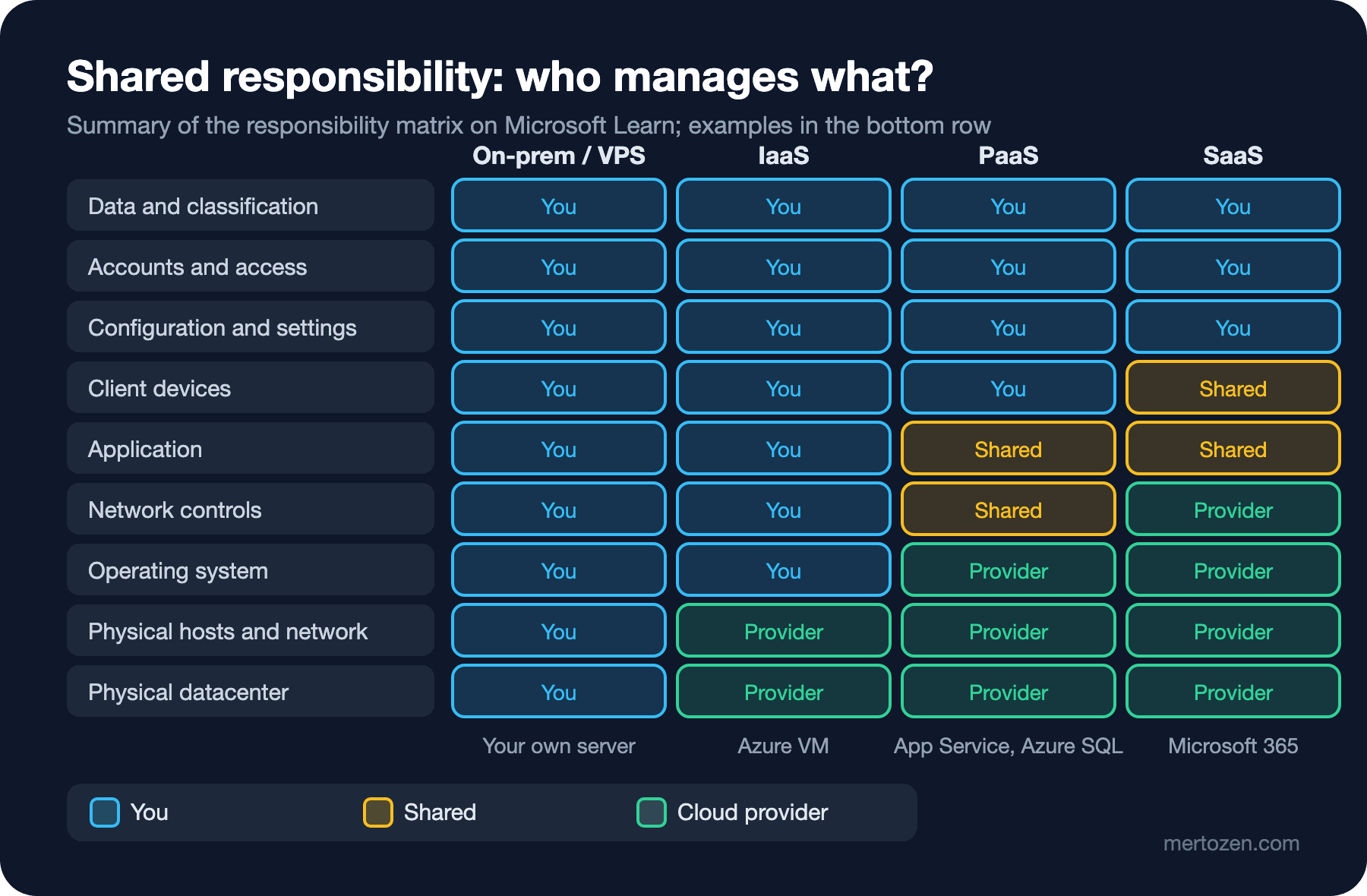
The most important rows are at the top. Data, accounts, who can access what, and configuration are yours in every model. Even with SaaS, if an employee's account is taken over or you leave a storage container open to everyone, that is your problem. For example, when you choose Azure SQL, Microsoft patches SQL Server, but adding a 0.0.0.0-255.255.255.255 firewall rule to the database and committing the password to the repo is your mistake. The "shared" cells in the middle are where most of the confusion happens in practice: in PaaS the platform provides basic network protection, while you decide who may reach the application from which IP addresses.
The same logic applies to reliability. Microsoft is responsible for keeping the region and its zones running; making Bookstore.Api retry a request after a transient connection error, running it on two instances, and testing that a backup really restores are your responsibilities.
Regions, Availability Zones and Region Pairs
A region is one or more datacenters in the same metropolitan area, connected by a low-latency network. According to Microsoft Learn, Azure has more than 70 regions, and each region belongs to exactly one geography, a data residency boundary such as Europe. In code you use the region's short name: in the Infrastructure as Code: Terraform series Bookstore's resources lived in westeurope (the Netherlands), and this series uses the same region.
An availability zone is a physically separate group of datacenters inside a region, with its own power, cooling and network. Regions that support zones have at least three of them. When you deploy your application zone-redundant, for example with at least two instances and zone redundancy enabled on an App Service Premium v3 plan, a failing datacenter doesn't stop your application. A region pair is Microsoft pairing some regions two by two: the pair of West Europe is North Europe (Ireland). Some services write their geo-redundant copies to the paired region, and Microsoft tries not to roll out updates to both regions of a pair at the same time. Most newer regions have no pair (Italy North, Poland Central, Spain Central and others); they rely on zones first for resilience. When you choose a region, ask three questions in order: is it close to the users (latency), are the services and zone support you need available there, and does it meet your data residency requirement?
The last question matters even more for teams in Türkiye. Azure's region list as of November 2026 has no region in Türkiye; Google Cloud has announced a Türkiye region in partnership with Turkcell, but it wasn't open when this post was written. So Bookstore's customer data on Azure will most likely live abroad. This isn't legal advice, but before you make the architecture decision you need to take these questions to your legal or compliance team: Which personal data do we process (names, addresses, order history, employees of institutional customers)? After the amendment to Article 9 of KVKK, Türkiye's personal data protection law, which took effect on 1 June 2024, what will the legal basis for the transfer abroad be: an adequacy decision, or the standard contract published by the Board? If a standard contract is signed, it has to be reported to the Authority within five business days of signing. Do logs, backups and the provider's support access carry the same data? The answers change the choice of region, which data goes to which service, and sometimes the cloud decision itself.
Reading an SLA: Calculating a Composite SLA
An SLA isn't a goal; it's a contract that states the availability the provider commits to and the credit you get when it isn't met. In Microsoft's example on Learn, App Service web apps commit to 99.95% and Azure SQL Database to 99.99%; the current, binding figures are in the "SLA for Online Services" document, with separate conditions for each service. Because a Bookstore request goes through both services, their probabilities are multiplied. Instead of doing the math by hand, we put a small file-based app into the repo:
// Composite SLA and downtime budget for Bookstore's request path.
// Run: dotnet run tools/cloud/sla.cs

const double MinutesPerMonth = 30 * 24 * 60; // 43,200 minutes, the 30-day month the SLA tables use

(string Name, double Sla)[] chain =
[
    ("App Service (Bookstore.Api)", 99.95),
    ("Azure SQL Database (BookstoreDb)", 99.99),
];

double composite = chain.Aggregate(1.0, (product, part) => product * part.Sla / 100) * 100;

Console.WriteLine("Serial dependencies (all must be up):");
foreach ((string name, double sla) in chain)
{
    Console.WriteLine($"  {name,-34} {sla,7:0.###}%  {Downtime(sla),6:0.0} min/month");
}
Console.WriteLine($"  {"Composite",-34} {composite,7:0.###}%  {Downtime(composite),6:0.0} min/month");

Console.WriteLine();
Console.WriteLine("Downtime budget per 30-day month:");
foreach (double target in new[] { 99.0, 99.9, 99.95, 99.99, 99.999 })
{
    Console.WriteLine($"  {target,7:0.###}%  {Downtime(target),7:0.0} min");
}

// Two regions behind a failover router: the app is down only if both regions are down.
double twoRegions = (1 - Math.Pow(1 - composite / 100, 2)) * 100;
Console.WriteLine();
Console.WriteLine($"Same stack in two regions (ignoring the router): {twoRegions:0.#####}%  {Downtime(twoRegions):0.00} min/month");

static double Downtime(double slaPercent) => (1 - slaPercent / 100) * MinutesPerMonth;
Thanks to file-based apps in .NET 10 there is no project file; dotnet run tools/cloud/sla.cs is enough:
Serial dependencies (all must be up):
  App Service (Bookstore.Api)          99.95%    21.6 min/month
  Azure SQL Database (BookstoreDb)     99.99%     4.3 min/month
  Composite                            99.94%    25.9 min/month

Downtime budget per 30-day month:
       99%    432.0 min
     99.9%     43.2 min
    99.95%     21.6 min
    99.99%      4.3 min
   99.999%      0.4 min

Same stack in two regions (ignoring the router): 99.99996%  0.02 min/month
That's the answer to the guess: the upper bound you can commit to for Bookstore as a whole is 99.94%, roughly 26 minutes in a 30-day month. Add one more service to the chain, such as Storage for cover images or a separate identity service, and the number drops further. The figures have three limits. First, an SLA measures only the situation it covers: as the Well-Architected Framework points out, the App Service SLA covers the app returning 200, not features like slot swaps. Second, bugs in your code, wrong configuration and downtime during deployments don't enter this calculation at all. Third, when the commitment isn't met, what you get back is part of the bill as credit, not the value of lost orders. So read an SLA as "the best I can expect from the platform" and set your own target, your SLO, below it. The two-region line at the end isn't realistic either: the router, data replication and failover cost of running in two regions are the subject of post 11.
And the VPS question: on a single VPS nobody does this calculation, because there is no committed figure and no zones. Server, disk and network are one piece; if one goes, everything goes.
When the Cloud Is Unnecessary or Expensive
The cloud isn't the right answer for every job. Think twice in three situations. First, applications with a small, steady load: for an internal application whose traffic stays the same all year, elasticity doesn't help and what you pay for is only ease of management. For comparison, West Europe list prices on 14 November 2026: a Linux App Service B1 costs 0.018 dollars per hour (about 13 dollars a month), Premium v3 P0v3 0.089 dollars per hour (about 65 dollars a month), and a two-vCPU B2s Linux VM 0.048 dollars per hour. These are undiscounted list prices and they change often, but they are enough to show that running a small site on a VPS with a fixed monthly fee can be cheaper. Second, egress-heavy work: the first 100 GB per month of traffic from Azure to the internet is free, and after that traffic leaving from Europe or North America costs 0.087 dollars per GB over the Microsoft network. If Bookstore served 2 TB of cover images a month, that line alone would cost about 170 dollars a month, which is why CDN and caching are a cost topic. Third, when the team lacks the knowledge to operate the cloud: a subscription with badly configured identity, networking and cost settings can be less secure and more expensive than a well-run VPS.
The reverse is also true. For a team whose load grows tenfold during campaigns, that has several environments and will use managed databases, backups and identity services, the cloud is usually cheaper than building the same things alone, because the expensive part isn't the hardware but the people's time spent operating it.
AWS, Azure and GCP Terminology
We work on Azure throughout the series, but the concepts are provider-neutral. Later posts give the AWS equivalent of each topic separately; GCP appears only in this table.
| Concept | AWS | Azure | GCP |
|---|---|---|---|
| Account hierarchy | Organizations, OU, account | Tenant, management group, subscription, resource group | Organization, folder, project |
| Identity and access | IAM user, role, policy | Entra ID, Azure RBAC, managed identity | Cloud IAM, service account |
| Virtual machine | EC2 | Virtual Machines | Compute Engine |
| PaaS for web apps | Elastic Beanstalk | App Service | App Engine |
| Serverless containers | ECS on Fargate, ECS Express Mode | Container Apps | Cloud Run |
| Managed Kubernetes | EKS | AKS | GKE |
| Function as a Service | Lambda | Azure Functions | Cloud Run functions |
| Object storage | S3 | Blob Storage | Cloud Storage |
| Managed SQL | RDS, Aurora | Azure SQL Database, PostgreSQL Flexible Server | Cloud SQL |
| Virtual network | VPC, security group | VNet, NSG | VPC, firewall rule |
| Cost | Cost Explorer, Budgets | Cost Management | Cloud Billing, budgets |
The mapping isn't one to one. Azure's resource group has no direct AWS equivalent (the closest are tags and CloudFormation stacks); in AWS an account is both the billing and the security boundary, while in Azure those two roles are split between the subscription and the tenant. Post 2 looks at what this difference means day to day.
In Production
Choose the region once and write it down. All of Bookstore's resources are in westeurope; if the database is in one region and the API in another, every query comes with cross-region latency and traffic charges. Before adding a new service, check on the "Products available by region" page that it is available in the region, with zone redundancy.
Put the SLA calculation in a document. Bookstore's architecture document should state which service gives which SLA, what the composite result is, and where the team's own target sits below it; when a service is added, the calculation is updated. When an SLA isn't met the credit doesn't arrive automatically; you request it through a support ticket, so keep incident records for that as well.
Set up cost visibility from day one. Budget alerts, tags and a view of what each environment spends are the subjects of posts 2 and 10, but the habit starts here: whoever creates a resource should also know its monthly price.
Common Pitfalls
Assuming "it's in the cloud, so it's highly available". An App Service plan with a single instance, a database without zone redundancy and a single region may be more resilient than a VPS, but they are not highly available on their own. Instance count, zone settings and backups are your choice.
Adding SLAs together or taking the lowest one. The figures of serially dependent services are multiplied; 99.95% combined with 99.99% is 99.94%, not 99.95%.
Treating lift-and-shift, moving the application to a VM unchanged, as the final step. An application moved to a VM brings every job with it, from operating system patches to backups. For Bookstore the target is PaaS, as we'll see in post 5.
Thinking about data residency after the deployment. Changing regions is a migration project for most services; make this decision at the start, together with the legal team.
A Small Experiment
★☆☆ Add Blob Storage to the chain in tools/cloud/sla.cs (look up the current SLA figure on Learn yourself) and recalculate the monthly minutes of the composite result.
★★☆ Write a "why this region" note for Bookstore: compare westeurope with a region without a pair that is geographically closer to Türkiye, such as Italy North or Poland Central, in terms of latency, zone support, paired region and service availability.
★★★ List Bookstore's customer, order and institutional user data; for each type of data, write in a table the questions you would take to the legal team regarding KVKK and which Azure service it would live in.
In the next post we go inside an Azure account: the tenant, management group, subscription and resource group hierarchy, Bookstore's naming and tagging standard, the first resource group and the budget alert you should set up on day one.