

Cloud Networking Basics: VNets, Subnets, NSGs, Private Endpoints and Taking Your App Off the Public Internet
To take a PaaS app off the internet, you route outbound traffic into the VNet with VNet integration, give the database and storage private IPs with private endpoints, link the private DNS zone to the VNet and close public access last. We check Bookstore's address plan with a tool and cover NSG rules, NAT gateway, why DNS is the real trap, the cost and the AWS VPC equivalents.
Version note: The examples in this post were run with .NET 10 (SDK 10.0.404), Azure CLI 2.92.0 and ShellCheck 0.11.0. The address plan tool ran locally; the network script was checked with ShellCheck and its parameters with az ... --help, but it wasn't run against Azure. Azure behaviour comes from Microsoft Learn, and list prices from the Azure Retail Prices API (14 November 2026).
Guess First
In Bookstore, the online bookstore used as the shared example across this site's series, you created a private endpoint for BookstoreDb's server and then turned off the server's public access. But you forgot to link the private DNS zone to the VNet. What happens when Bookstore.Api tries to connect to sql-bookstore-dev-weu.database.windows.net from its connection string: does it reach the private endpoint's address, or does it get an error, and which one? Second question: if you also turn off the storage account's public access, what breaks in Bookstore? The answers are in the post.
VNets, Subnets and an Address Plan
A VNet is the private network in which your resources in a region talk to each other over private IP addresses. You give its address range in CIDR notation and split it into subnets. The basics of CIDR and subnets, together with NAT, are in the post "IP Adresi, Subnet, Port ve NAT: localhost, 0.0.0.0 ve Container'larda Bağlantı" in the Networking ve HTTP series; here we look at the rules specific to Azure.
First rule: Azure keeps five addresses in every subnet. According to Learn these are the network address, the default gateway, two addresses that map Azure DNS into the VNet, and the broadcast address. The smallest subnet is a /29, so three of its eight addresses are usable. Second rule: some services want a subnet for themselves. For App Service VNet integration the subnet is delegated to Microsoft.Web/serverFarms and must be at least a /28; Learn recommends a /26 to cover a plan's maximum scale. A Container Apps workload profiles environment needs at least a /27 delegated to Microsoft.App/environments and keeps 12 addresses for infrastructure. Once an environment is in a subnet, growing that subnet isn't easy, so we write the plan up front. A small tool checks it:
// Address plan for Bookstore's VNet: checks sizes, overlaps and the addresses Azure keeps in every subnet.
// Run: dotnet run tools/cloud/subnets.cs
using System.Net;

IPNetwork vnet = IPNetwork.Parse("10.20.0.0/16");
// Networks this VNet may be peered or connected with later: they must not overlap
(string Name, IPNetwork Range)[] neighbours =
[
    ("vnet-bookstore-prod-weu", IPNetwork.Parse("10.21.0.0/16")),
    ("office network over VPN", IPNetwork.Parse("10.20.128.0/20")),
];

(string Name, string Cidr, int MinPrefix, string Purpose)[] plan =
[
    ("snet-app", "10.20.1.0/26", 28, "App Service VNet integration (Microsoft.Web/serverFarms)"),
    ("snet-cae", "10.20.2.0/27", 27, "Container Apps environment (Microsoft.App/environments)"),
    ("snet-pe", "10.20.3.0/27", 29, "Private endpoints: SQL, Blob"),
    ("snet-jobs", "10.20.4.0/28", 27, "A mistake: too small for a second environment"),
    ("snet-pe-old", "10.20.3.16/28", 29, "A mistake: overlaps snet-pe"),
];

const int AzureReserved = 5; // network, gateway, 2 x Azure DNS, broadcast
List<(string Name, IPNetwork Range)> accepted = [];

Console.WriteLine($"{"Subnet",-12} {"CIDR",-15} {"First usable",-13} {"Usable",6}  Result");
foreach ((string name, string cidr, int minPrefix, string purpose) in plan)
{
    IPNetwork range = IPNetwork.Parse(cidr);
    int size = 1 << (32 - range.PrefixLength);
    byte[] first = range.BaseAddress.GetAddressBytes();
    first[3] += 4; // .0 network, .1 gateway, .2 and .3 Azure DNS
    string result =
        !vnet.Contains(range.BaseAddress) ? "outside the VNet"
        : range.PrefixLength > minPrefix ? $"too small, needs /{minPrefix} or larger"
        : accepted.FirstOrDefault(a => Overlaps(a.Range, range)) is { Name: not null } hit ? $"overlaps {hit.Name}"
        : "ok";
    if (result == "ok")
    {
        accepted.Add((name, range));
    }
    Console.WriteLine($"{name,-12} {cidr,-15} {new IPAddress(first),-13} {size - AzureReserved,6}  {result}  ({purpose})");
}

foreach ((string name, IPNetwork range) in neighbours)
{
    Console.WriteLine($"VNet {vnet} vs {name} {range}: {(Overlaps(vnet, range) ? "OVERLAP, they can not be connected" : "no overlap")}");
}

static bool Overlaps(IPNetwork a, IPNetwork b) => a.Contains(b.BaseAddress) || b.Contains(a.BaseAddress);
We put two mistakes into the plan on purpose. The output:
$ dotnet run tools/cloud/subnets.cs
Subnet       CIDR            First usable  Usable  Result
snet-app     10.20.1.0/26    10.20.1.4         59  ok  (App Service VNet integration (Microsoft.Web/serverFarms))
snet-cae     10.20.2.0/27    10.20.2.4         27  ok  (Container Apps environment (Microsoft.App/environments))
snet-pe      10.20.3.0/27    10.20.3.4         27  ok  (Private endpoints: SQL, Blob)
snet-jobs    10.20.4.0/28    10.20.4.4         11  too small, needs /27 or larger  (A mistake: too small for a second environment)
snet-pe-old  10.20.3.16/28   10.20.3.20        11  overlaps snet-pe  (A mistake: overlaps snet-pe)
VNet 10.20.0.0/16 vs vnet-bookstore-prod-weu 10.21.0.0/16: no overlap
VNet 10.20.0.0/16 vs office network over VPN 10.20.128.0/20: OVERLAP, they can not be connected
Note that the first usable address is .4. The last line shows the most expensive mistake: if the office network uses a range inside the VNet, then once they're connected over VPN both sides try to reach the same addresses in different places. Changing a VNet's address range means moving the resources inside it. So keep the ranges of all the company's networks (offices, other VNets, other clouds) in one place and give every new VNet a range that doesn't overlap; separate /16s for dev, staging and prod are a comfortable start.
NSG Rules and AWS Equivalents
An NSG is a list of traffic rules attached to a subnet or a network interface; it filters inbound and outbound traffic in priority order. The priority is a number between 100 and 4096; lower numbers are evaluated first and the first matching rule wins. Below your rules sit defaults you can't delete: inbound, allow traffic within the VNet (65000) and from the Azure load balancer (65001), then deny everything at 65500; outbound, allow to the VNet and to the internet, then deny. NSGs are stateful: return traffic of an allowed connection needs no separate rule. Instead of IP ranges you can use service tags such as VirtualNetwork, Internet and AzureLoadBalancer as source or destination. The table below gives the AWS equivalents of the concepts in this post; VPC is AWS's counterpart of a VNet, and S3 appeared in earlier posts.
| Azure | AWS equivalent | Note |
|---|---|---|
| VNet, subnet | VPC, subnet | Both keep 5 addresses in every subnet |
| NSG (stateful, allow and deny rules) | Security group (stateful, allow only) and network access control list (stateless) | Two separate layers on AWS |
| Private endpoint | Interface VPC endpoint (PrivateLink) | Reach a service from inside the VNet over a private IP |
| Service endpoint | Gateway endpoint (S3 and DynamoDB, free) | A private path to the service's public address |
| NAT gateway | NAT gateway | List price on both: 0.045 dollars per hour and per GB |
| Private DNS zone | Route 53 private hosted zone | DNS that answers only in linked networks |
Default Outbound Access and NAT Gateway
A VM in a subnet used to be able to reach the internet without any setup; Azure gave it outbound access through an invisible public IP. According to Learn, in new VNets created with API versions released after 31 March 2026, subnets are private by default: that implicit outbound access is gone. Tools pinned to older API versions keep the old behaviour, and existing VNets don't change. That's why the script states --default-outbound false explicitly: the result is the same whichever tool creates it.
When the application must reach the internet from a fixed address, you use a NAT gateway. Bookstore has a ready example: the shipping company's API only accepts requests from IPs on its allow list. You attach the NAT gateway to the subnet, give it one or more public IPs, and all traffic from that subnet to the internet leaves from those addresses. According to Learn, the Standard SKU is zonal and the new StandardV2 is zone-redundant. It isn't cheap: a list price of 0.045 dollars per hour (about 33 dollars a month) plus 0.045 dollars per GB processed, and on top of that 0.005 dollars per hour for a public IPv4 address. Without a real need such as a partner allow list, don't put one in the dev environment.
Connecting PaaS to the Network: In and Out
App Service, Container Apps and Azure SQL are PaaS services; they don't run inside your VNet. When you connect them to the network, you have to separate the two directions.
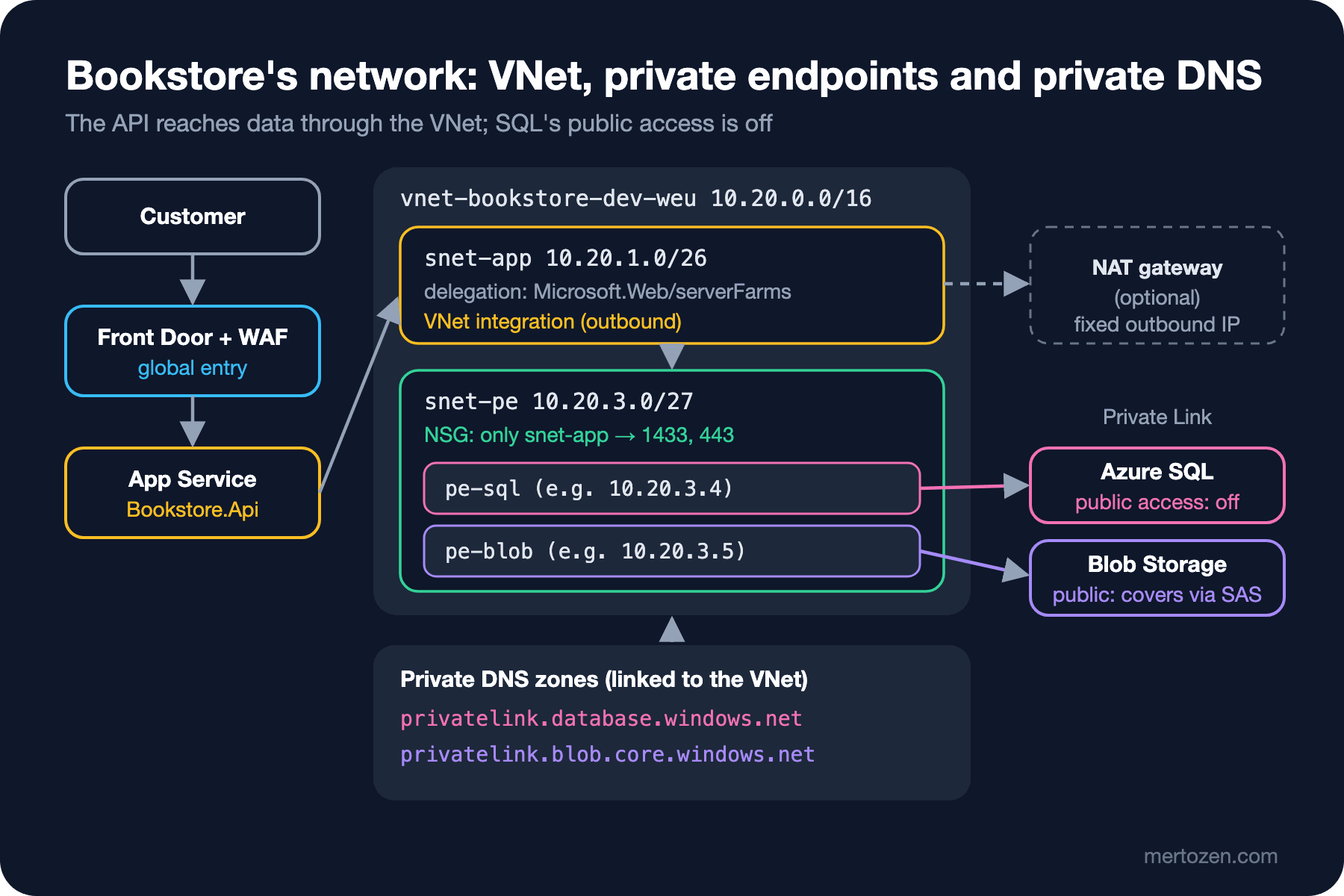
For outbound traffic, App Service has VNet integration. Learn says it plainly: VNet integration is outbound only and doesn't give the app inbound traffic from the VNet. The app's instances attach to the delegated snet-app subnet, and requests to SQL and storage go through the VNet. --vnet-route-all-enabled true also sends internet-bound traffic into the VNet; only then do NSGs and a NAT gateway apply to all traffic. In Container Apps the equivalent is giving the environment a subnet when you create it; that can't be changed later, so the environment we created without a VNet in post 5 has to be recreated.
For inbound traffic there's the private endpoint: it gives a PaaS resource a private IP address from your subnet. The SQL server gets, for example, 10.20.3.4 in snet-pe, and everything in the VNet reaches it at that address. The alternative, a service endpoint, opens a path from the subnet to the service's public address over the Azure backbone; the resource still uses its public IP, it doesn't work from on-premises, and it targets the whole service rather than one resource. Learn recommends private endpoints for new designs. The price is 0.01 dollars per endpoint per hour (about 7.3 dollars a month) plus 0.01 dollars per GB processed in each direction.
Private Endpoints and Private DNS
The subtle part of private endpoints is DNS. The name in the connection string doesn't change: sql-bookstore-dev-weu.database.windows.net. When the private endpoint is created, Azure adds a CNAME from this public name to sql-bookstore-dev-weu.privatelink.database.windows.net. That CNAME is visible from everywhere; the real question is where the privatelink name resolves. If there's a privatelink.database.windows.net private DNS zone linked to the VNet, queries in the VNet go to Azure's DNS address (168.63.129.16) and the A record in the zone returns the private IP. If there's no zone, or it isn't linked to the VNet, the name resolves to the public IP.
That's the answer to the guess. With the link forgotten, the API goes to the server's public address. Since public access is off, SQL rejects the connection; according to Learn, connections from outside get error 47073 while public access is disabled. The error message doesn't mention DNS; at first glance it looks like "the private endpoint doesn't work". To check, run nslookup sql-bookstore-dev-weu.database.windows.net from a machine in the VNet (or from App Service's Kudu console): if the answer isn't 10.20.3.x, the problem is DNS. A newer warning on Learn matters too: DNS isn't access. Even if the public name resolves, the service rejects the connection while public access is off; and conversely, setting DNS up correctly doesn't turn public access off by itself.
The cleanest way to tie the zone to the endpoint is a DNS zone group: it writes the endpoint's A record to the zone, updates it if the IP changes and deletes it when the endpoint is deleted. Developers connecting from the office over VPN have the same problem: Learn says the conditional forwarder on the on-premises DNS server should point to the public zone (database.windows.net), not to the privatelink zone.
Bookstore's Network Script
The script that puts it all together:
#!/usr/bin/env bash
# Bookstore's network: a VNet, delegated subnets, private endpoints for SQL and Blob, then public access off.
set -euo pipefail

: "${AZURE_SUBSCRIPTION_ID:?Set AZURE_SUBSCRIPTION_ID to the target subscription}"
ENVIRONMENT="${1:?Usage: 09-network.sh <dev|staging|prod>}"
LOCATION="westeurope"
RG="rg-bookstore-${ENVIRONMENT}-weu"
VNET="vnet-bookstore-${ENVIRONMENT}-weu"
NSG_PE="nsg-bookstore-pe-${ENVIRONMENT}-weu"
APP="app-bookstore-${ENVIRONMENT}-weu"
SQL_SERVER="sql-bookstore-${ENVIRONMENT}-weu"
STORAGE="stbookstore${ENVIRONMENT}weu"

az account set --subscription "$AZURE_SUBSCRIPTION_ID"

# Address plan from tools/cloud/subnets.cs; no default outbound internet access in any subnet
az network vnet create --name "$VNET" --resource-group "$RG" --location "$LOCATION" \
  --address-prefixes 10.20.0.0/16
az network vnet subnet create --vnet-name "$VNET" --resource-group "$RG" --name snet-app \
  --address-prefixes 10.20.1.0/26 --delegations Microsoft.Web/serverFarms --default-outbound false

# Private endpoint subnet: only the app subnet may reach SQL (1433) and Blob (443)
az network nsg create --name "$NSG_PE" --resource-group "$RG" --location "$LOCATION"
az network nsg rule create --nsg-name "$NSG_PE" --resource-group "$RG" --name allow-app-to-data \
  --priority 100 --direction Inbound --access Allow --protocol Tcp \
  --source-address-prefixes 10.20.1.0/26 --destination-port-ranges 1433 443
az network nsg rule create --nsg-name "$NSG_PE" --resource-group "$RG" --name deny-other-vnet \
  --priority 4000 --direction Inbound --access Deny --protocol '*' \
  --source-address-prefixes VirtualNetwork --destination-port-ranges '*'
az network vnet subnet create --vnet-name "$VNET" --resource-group "$RG" --name snet-pe \
  --address-prefixes 10.20.3.0/27 --nsg "$NSG_PE" --default-outbound false \
  --private-endpoint-network-policies NetworkSecurityGroupEnabled

# Private DNS: inside the VNet, these zones answer for the privatelink.* names
for ZONE in privatelink.database.windows.net privatelink.blob.core.windows.net; do
  az network private-dns zone create --resource-group "$RG" --name "$ZONE"
  az network private-dns link vnet create --resource-group "$RG" --zone-name "$ZONE" \
    --name "link-${VNET}" --virtual-network "$VNET" --registration-enabled false
done

SQL_ID=$(az sql server show --name "$SQL_SERVER" --resource-group "$RG" --query id --output tsv)
STORAGE_ID=$(az storage account show --name "$STORAGE" --resource-group "$RG" --query id --output tsv)

# One private endpoint per resource and sub-resource; the zone group keeps the A record up to date
az network private-endpoint create --name "pe-sql-bookstore-${ENVIRONMENT}-weu" --resource-group "$RG" \
  --vnet-name "$VNET" --subnet snet-pe --private-connection-resource-id "$SQL_ID" \
  --group-id sqlServer --connection-name sql
az network private-endpoint dns-zone-group create --endpoint-name "pe-sql-bookstore-${ENVIRONMENT}-weu" \
  --resource-group "$RG" --name default --private-dns-zone privatelink.database.windows.net --zone-name sql

az network private-endpoint create --name "pe-blob-bookstore-${ENVIRONMENT}-weu" --resource-group "$RG" \
  --vnet-name "$VNET" --subnet snet-pe --private-connection-resource-id "$STORAGE_ID" \
  --group-id blob --connection-name blob
az network private-endpoint dns-zone-group create --endpoint-name "pe-blob-bookstore-${ENVIRONMENT}-weu" \
  --resource-group "$RG" --name default --private-dns-zone privatelink.blob.core.windows.net --zone-name blob

# Bookstore.Api's outbound traffic enters the VNet, so its DNS lookups see the private zones
az webapp vnet-integration add --name "$APP" --resource-group "$RG" --vnet "$VNET" --subnet snet-app
az webapp config set --name "$APP" --resource-group "$RG" --vnet-route-all-enabled true

# Close the public doors last: doing it earlier would cut the API off
az sql server update --name "$SQL_SERVER" --resource-group "$RG" --enable-public-network false

# Browsers download covers with SAS URLs (post 07) and the function app reads covers too. Close Blob
# only after covers go through Front Door Premium with a Private Link origin and the function is in the VNet.
if [[ "${CLOSE_STORAGE:-false}" == "true" ]]; then
  az storage account update --name "$STORAGE" --resource-group "$RG" --public-network-access Disabled
fi
The order matters. First the network, DNS and private endpoints are set up, App Service is connected to the VNet, and only at the very end is SQL's public access turned off. In the opposite order, the API loses its public path before the private one is ready. The NSG on snet-pe allows only ports 1433 and 443 from snet-app; for an NSG to apply to private endpoints the subnet needs the --private-endpoint-network-policies setting, because according to Learn these policies are off by default.
The answer to the second question is in the script's last block. If you turn off storage's public access, the SAS URLs from post 7 stop working in browsers, because browsers come from the internet; and the function from post 6 can't read covers unless it's connected to the VNet. Covers first have to be served through a Front Door Premium Private Link origin and the function has to join the VNet. That's why the line closing storage depends on a flag and doesn't run by default.
The Entry Point: Front Door and Application Gateway
There are two options for the application's internet-facing side. Application Gateway is a layer 7 load balancer that runs inside a region and can be used with a WAF. Front Door works globally: it terminates TLS at the point closest to the user, caches and applies a WAF. Since Bookstore's customers are spread out and it has plenty of static content, Front Door is the natural choice. The Premium plan can connect to the origin over Private Link, so you can turn off App Service's public access too and accept traffic only from Front Door. Front Door (classic) retires on 31 March 2027; new setups should use Standard or Premium. The DNS, certificate and CDN details are in the Domain, DNS ve CDN series.
One thing doesn't change once you're on the network: the Proxy__KnownNetworks setting from post 5. Front Door and App Service's front-end servers still forward requests from private addresses; trusting forwarded headers only from those networks is still right.
In Production
Add up the cost. Each private endpoint is about 7.3 dollars a month; with SQL, blob, and later a queue and Key Vault, four or five endpoints come to 30-40 dollars a month. A NAT gateway is about 33 dollars a month plus traffic. In a small dev environment this can cost more than compute; you can decide differently for dev and prod.
Turn on flow logs. The way to understand why a connection was rejected is to see the NSG's decisions. According to Learn, NSG flow logs retire on 30 September 2027 and can no longer be created; VNet flow logs replace them.
Review network rules like code. Writing Any into an NSG rule or adding a "temporary" IP to a firewall is easy; remembering to undo it is hard. With Azure Policy you can report SQL servers and storage accounts that still have public access on.
Common Pitfalls
Forgetting to link the private DNS zone to the VNet. The symptom is traffic going to the public IP although a private endpoint exists; while public access is on, everything seems to work, and the problem surfaces the day you turn public access off.
Creating subnets too small. When you scale the App Service plan or Container Apps adds replicas, addresses run out; growing a delegated subnet while it's in use is painful.
Closing public access first. Closing the public path before the private one is ready cuts the application off. The order: network, DNS, private endpoint, VNet integration, test, then close.
Forgetting egress and NAT. Traffic inside the VNet is cheap, but every GB through the NAT gateway and every GB to the internet shows up as its own line on the bill.
A Small Experiment
★☆☆ Add a subnet for the Flex Consumption function app to subnets.cs. Find the requirement on Learn (delegation and minimum size) and encode it in the tool's rule.
★★☆ Add a NAT gateway to 09-network.sh for reaching the shipping company from a fixed IP: create the public IP, attach it to the NAT gateway and assign it to snet-app. Write down which traffic leaves from this IP, relating it to the --vnet-route-all-enabled setting.
★★★ Put Bookstore's covers behind Front Door Premium and turn off storage's public access. How should the SAS approach from post 7 change? Compare two options: passing the SAS through Front Door, or using Front Door's managed identity authentication to the origin (in preview in November 2026). Note the limitations Learn lists for the second.
In the next post we look at the bill for these resources: pricing models, budget alerts, cost allocation with tags and the mistakes that lose the most money.