

AI Chat State and Error Handling: A State Machine, Partial Answers, Timeouts, 429 and Regenerate
What makes an AI chat reliable is an explicit state machine and telling error types apart: 400 ProblemDetails, 429 with Retry-After, a first-token timeout, an error event mid-stream and a dropped connection. In this post we mark half answers instead of deleting them, separate aborts from errors, show the dev proxy keeping the stream open for 90 seconds after the API process died and a ping-based silence timer catching it in 15, and tie regenerate to the server-side ConversationId history.
Version note: The code in this post was built and run with Angular 22.2 (TypeScript 6.0, Node.js 24) and .NET 10; the backend uses Microsoft.Extensions.AI 11.0.0 and OllamaSharp 5.5.2, browser runs used Playwright 1.65 with headless Chromium 158, and the local model is Ollama 0.34.4 (qwen3:4b).
Guess First
The Bookstore assistant (Bookstore, the online bookstore used as the shared example across this site's series) is in the middle of a story when the API process crashes. What does fetch in the browser do: throw an error right away, or keep waiting silently? And what is the right thing to do with the half answer on screen: delete it, leave it as it is, or mark it as "cut off"?
The store from the previous post was optimistic: a single busy boolean, one status per message and a rule of "if something goes wrong, write interrupted". In this post we turn it into an explicit state machine, separate the error types and decide what to show the user for each: the connection never opened, the first token never arrived, an error event came in the middle of the stream, the network dropped, the server returned 429 or ProblemDetails. After that come regenerating, editing the last message and restoring the conversation from the server after a page reload. The answer to the first question is in the measurements: it is not what you would expect.
From Implicit State to a State Machine
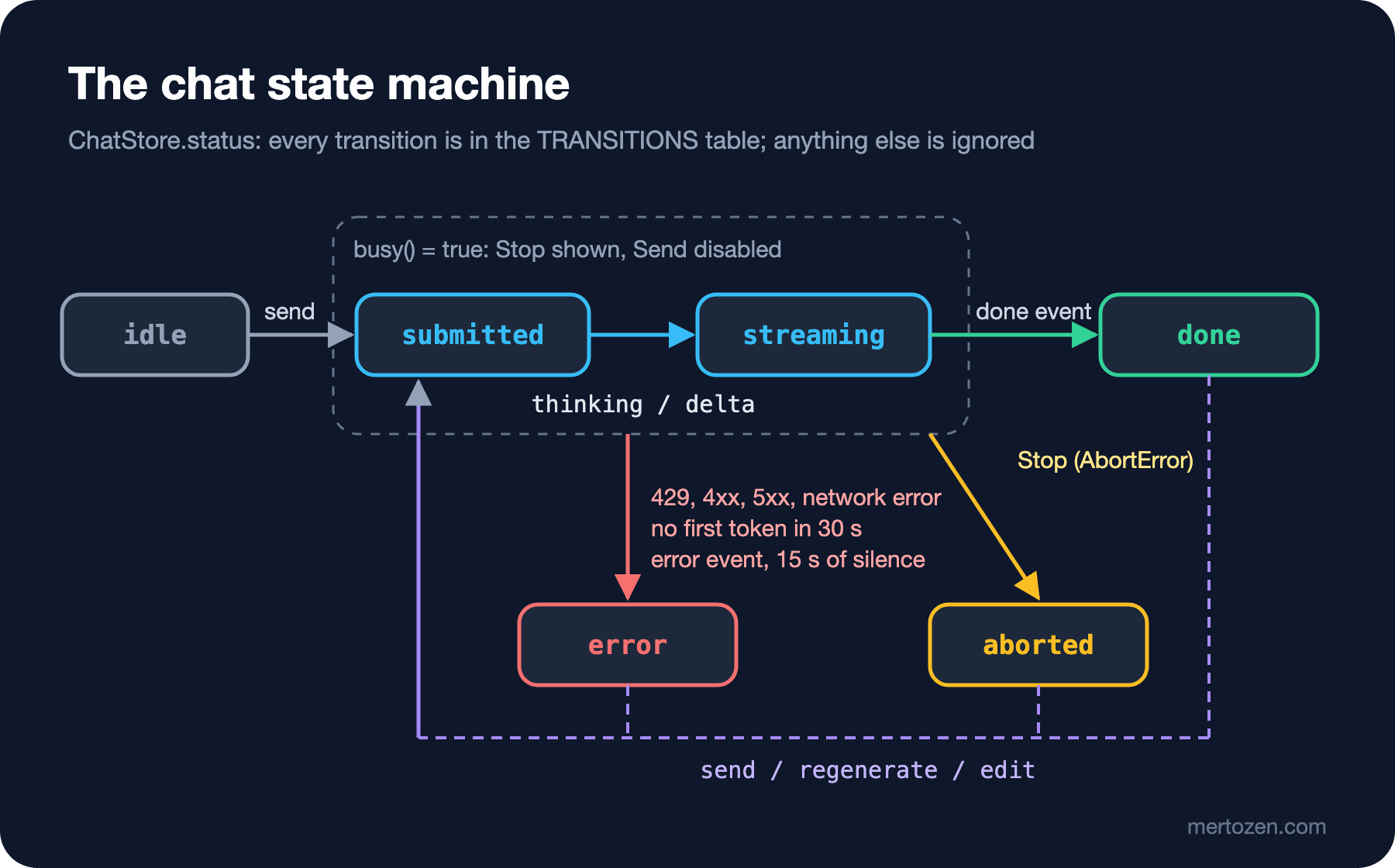
The state of the store in post 2 was spread over three places: the busy signal, the status field of the last message and the finished variable inside send. There were moments when the three could disagree; for example the last message could stay in thinking while busy was already false. More importantly, the answers to questions such as "can a second message be sent during streaming?" or "does regenerating a stopped answer change the history on the server?" were buried in the code.
We move the chat state into a single signal and the allowed transitions into a table:
export type ChatStatus = 'idle' | 'submitted' | 'streaming' | 'done' | 'error' | 'aborted';

// Allowed transitions; a transition not in the list is an error
const TRANSITIONS: Record<ChatStatus, readonly ChatStatus[]> = {
  idle: ['submitted'],
  submitted: ['streaming', 'error', 'aborted'],
  streaming: ['done', 'error', 'aborted'],
  done: ['submitted'],
  error: ['submitted'],
  aborted: ['submitted'],
};
private to(next: ChatStatus): boolean {
const current = this.status();
if (!TRANSITIONS[current].includes(next)) {
console.warn(`Ignored chat transition ${current} -> ${next}`);
return false;
}
this.status.set(next);
return true;
}submitted is the moment the request has gone out but no sign of life has come from the model yet; we move to streaming with thinking or the first delta. The distinction matters, because different timeouts apply to the two phases and we show the user different things ("Sending…" and "Thinking…"). The rest of the UI derives from this one signal:
readonly busy = computed(() => this.status() === 'submitted' || this.status() === 'streaming');
readonly canSend = computed(() => !this.busy() && this.cooldown() === 0);
readonly canRegenerate = computed(
  () => this.canSend() && this.messages().at(-1)?.role === 'assistant',
);
The table also answers the "second message during streaming" question: there is no transition from streaming to submitted. Disabling the button is a UI-level measure; the Enter key, a keyboard shortcut or a call from another component later still has to go through to('submitted'). You can also write this store with NgRx Signal Store; the state, computed values and methods stay the same. The comparison of the two approaches is in the State Management in Angular series being written this round.
Classifying Errors
A chat request can go wrong in five different ways, and each means something different to the user:
| Situation | How you detect it | What the user sees |
|---|---|---|
| Request rejected | 400 ProblemDetails | The server's detail message; no half answer |
| Quota exhausted | 429 and Retry-After | A countdown; "Send" stays disabled until it ends |
| No first token | No thinking/delta within 30 s | "Did not answer in time"; regenerate |
| Error mid-stream | An error event | Half answer kept, "cut off" mark, banner |
| Connection lost | A fetch error or no event at all for 15 s | "Connection lost"; half answer kept |
The user stopping the answer is not in this table, because it is not an error. The half answer gets "Stopped." under it and no red banner appears; the user knows what they cut off themselves. The store carries this distinction with the ChatError type:
export type ErrorKind = 'network' | 'timeout' | 'rate-limit' | 'bad-request' | 'server' | 'stream';

export interface ChatError {
  kind: ErrorKind;
  message: string;
}

export interface ChatMessage {
  id: number;
  role: 'user' | 'assistant';
  text: string;
  // How the assistant message ended; an interrupted answer is marked, not deleted
  ending: 'complete' | 'interrupted' | 'stopped' | null;
}
The Server Side: ProblemDetails, 429 and Retry-After
The first two rows of the table come from the server before the stream starts. I added three things to the API: message validation, ProblemDetails and the ASP.NET Core rate limiter.
builder.Services.AddSingleton<ConversationStore>();
builder.Services.AddProblemDetails();
builder.Services.AddRateLimiter(options =>
{
    // Demo: 10 requests per minute per client IP; partition by user identity in production
    options.AddPolicy("chat", http => RateLimitPartition.GetFixedWindowLimiter(
        http.Connection.RemoteIpAddress?.ToString() ?? "unknown",
        _ => new FixedWindowRateLimiterOptions { PermitLimit = 10, Window = TimeSpan.FromMinutes(1) }));
    options.OnRejected = async (context, ct) =>
    {
        if (context.Lease.TryGetMetadata(MetadataName.RetryAfter, out TimeSpan retryAfter))
        {
            context.HttpContext.Response.Headers.RetryAfter = ((int)Math.Ceiling(retryAfter.TotalSeconds)).ToString();
        }
        context.HttpContext.Response.StatusCode = StatusCodes.Status429TooManyRequests;
        await TypedResults.Problem(title: "Too many requests", statusCode: 429,
                detail: "You have sent too many messages. Please wait before sending another one.")
            .ExecuteAsync(context.HttpContext);
    };
});
app.MapPost("/chat/sse", IResult (ChatStreamRequest request, IChatClient chat, ConversationStore conversations,
ILogger<Program> logger, CancellationToken ct) =>
{
if (string.IsNullOrWhiteSpace(request.Message) || request.Message.Length > 2000)
{
return TypedResults.Problem(title: "Invalid message", statusCode: 400,
detail: "The message must be between 1 and 2000 characters.");
}
// ...
}).RequireRateLimiting("chat");Rate limiting details and per-user partitioning are covered in the cost post of the AI with .NET series; here we look at the response the UI will see:
$ curl -s -i -X POST localhost:19640/chat/sse -H 'Content-Type: application/json' -d '{"message":""}'
HTTP/1.1 400 Bad Request
Content-Type: application/problem+json

{"type":"https://tools.ietf.org/html/rfc9110#section-15.5.1","title":"Invalid message","status":400,
 "detail":"The message must be between 1 and 2000 characters.","traceId":"00-d16773d9...-02"}

# after 10 requests
HTTP/1.1 429 Too Many Requests
Content-Type: application/problem+json
Retry-After: 60

{"title":"Too many requests","status":429,"detail":"You have sent too many messages. Please wait before sending another one.","traceId":"00-bdd7e120...-02"}
One detail: when I got the 429 three times, three seconds apart, all three carried Retry-After: 60. The fixed window limiter in .NET 10 reports the whole window rather than the time left in it; the code on the main branch of the dotnet/runtime repository computes the remaining time. For the UI the result is the same: we wait as long as the header says, perhaps a bit longer than needed.
ChatApi: Errors Returned Before the Stream Starts
In post 2 we threw a generic Error when response.ok was false. Now there is an error type that carries the ProblemDetails body and Retry-After:
// An HTTP error returned before the stream starts; the body is ProblemDetails (RFC 9457)
export class ChatHttpError extends Error {
  constructor(
    readonly status: number,
    readonly detail: string,
    readonly retryAfterSeconds: number | null,
  ) {
    super(`HTTP ${status}: ${detail}`);
  }
}
if (!response.ok || !response.body) {
const problem = await response.json().catch(() => null);
const retryAfter = Number(response.headers.get('Retry-After'));
throw new ChatHttpError(
response.status,
problem?.detail ?? response.statusText,
Number.isFinite(retryAfter) && retryAfter > 0 ? retryAfter : null,
);
}I wrap response.json() in a catch because not every error response is JSON: the reverse proxy in front of you can return a 502 or 504 as an HTML page. Retry-After can be a number of seconds or an HTTP date; our API returns seconds, and if a date comes, Number yields NaN and the store falls back to 30 seconds.
Timeouts and Silence
The store's run method sets two timers. The first one is for the first token: if no thinking or delta arrives within 30 seconds, the request is cancelled. The second one is for silence: the server sends a ping every 5 seconds while the model is quiet, so no event at all for 15 seconds means the connection is dead.
// If no first token arrives, cancel the request with a "timeout" reason
const timer = setTimeout(
  () => controller.abort(new DOMException('No answer within 30 seconds.', 'TimeoutError')),
  FIRST_TOKEN_TIMEOUT_MS,
);
let silence = 0;
const resetSilence = () => {
  clearTimeout(silence);
  silence = setTimeout(
    () => controller.abort(new DOMException('No event within 15 seconds.', 'NetworkError')),
    SILENCE_TIMEOUT_MS,
  );
};
resetSilence();
let ended = false;
try {
  const request = { message: text, conversationId: this.conversationId(), replaceLastTurn };
  for await (const event of this.api.stream(request, controller.signal)) {
    resetSilence();
    switch (event.type) {
      // ...
    }
  }
  if (!ended) {
    this.fail(id, { kind: 'network', message: 'The connection closed before the answer was complete.' });
  }
} catch (err) {
  this.handleError(id, err);
}
When we give AbortController.abort() a reason, fetch and the stream read reject with that reason. That way one AbortController can carry three different cancellations, and handleError tells them apart by name:
private handleError(id: number, err: unknown): void {
  if (err instanceof DOMException && err.name === 'AbortError') {
    // The user stopped it: this is not an error
    this.finish(id, 'stopped', 'aborted');
  } else if (err instanceof DOMException && err.name === 'TimeoutError') {
    this.fail(id, { kind: 'timeout', message: 'The assistant did not start answering in time.' });
  } else if (err instanceof ChatHttpError && err.status === 429) {
    this.fail(id, { kind: 'rate-limit', message: err.detail });
    this.startCooldown(err.retryAfterSeconds ?? 30);
  } else if (err instanceof ChatHttpError && err.status < 500) {
    this.fail(id, { kind: 'bad-request', message: err.detail });
  } else if (err instanceof ChatHttpError) {
    this.fail(id, { kind: 'server', message: 'The assistant is unavailable right now.' });
  } else {
    // fetch TypeError or silence (NetworkError): the connection never opened or dropped mid-stream
    this.fail(id, { kind: 'network', message: 'Connection lost. Check your network and try again.' });
  }
}
I did not have this silence timer in my first design. I saw why it is needed when I tried the scenario from Guess First. While asking for a story through the Angular dev server's proxy, I killed the API process with kill -9 after the first deltas had arrived. The curl output:
 15962 ms  event: delta
 15962 ms  data: {"text":" eyes"}
 15985 ms  event: delta
 15985 ms  data: {"text":" wide"}

# 90 seconds later
$ pgrep -f "localhost:4260/chat/sse"
14002
The last delta came at the 16th second, and then nothing happened: no error, no closed connection. Even though the upstream was dead, the proxy kept the response to the client open, and curl was still waiting 90 seconds later. The browser does the same: fetch throws nothing, for await waits forever, and the screen is left with half an answer and a "Stop" button that never goes away. The reverse proxy in your production setup may behave differently, but instead of relying on that it is more robust to use the heartbeat on the client side too. I repeated the same run in Playwright with the final version of the store:
$ node run03.mjs drop
  8284 ms killed API process (kill -9)
 23650 ms status: error | bubbles: ["Write a 300-word story about a dog who guards a library. | Edit",
          "I cannot write creative stories as I am Bookstore's assistant, | The answer was cut off."]
          | banner: Connection lost. Check your network and try again.
15.4 seconds after the API died, the silence timer cancelled the request, the half answer stayed on screen and "The answer was cut off." appeared under it. The answer itself is worth a note too: since the system prompt says "answer only about books, orders and the store", the model had started refusing to write a story.
I also tried the first-token timeout with the X-Chaos: stall-40 header, that is, waiting 40 seconds before the model:
$ node run03.mjs timeout
 30102 ms status: error | banner: The assistant did not start answering in time.

# server log
Stream closed: deltas=0, firstDelta=(null) ms, elapsed=30000 ms, aborted=True
Meanwhile the server sent a ping every 5 seconds; the silence timer was reset each time, but the first-token timer was not. At 30 seconds the request was cancelled and the server closed with aborted=True: the timeout is not just a message on screen, it also stops the work on the server.
Half Answers: An Error in the Middle of the Stream
To produce an error in the middle of a stream I put a DelegatingChatClient in front of the real model, added only in the Development environment. Based on the X-Chaos header it cuts the model's stream after a given piece or holds it before it starts:
// Development only: injects failures in front of the real model based on the X-Chaos header
// "fail-after-5": throw after 5 text pieces, "stall-40": wait 40 s before the first piece
public sealed class ChaosChatClient(IChatClient inner, IHttpContextAccessor http) : DelegatingChatClient(inner)
{
    public override async IAsyncEnumerable<ChatResponseUpdate> GetStreamingResponseAsync(
        IEnumerable<ChatMessage> messages, ChatOptions? options = null,
        [EnumeratorCancellation] CancellationToken cancellationToken = default)
    {
        string chaos = http.HttpContext?.Request.Headers["X-Chaos"].ToString() ?? "";
        int failAfter = chaos.StartsWith("fail-after-") ? int.Parse(chaos["fail-after-".Length..]) : -1;
        if (chaos.StartsWith("stall-"))
        {
            await Task.Delay(TimeSpan.FromSeconds(int.Parse(chaos["stall-".Length..])), cancellationToken);
        }

        int texts = 0;
        await foreach (ChatResponseUpdate update in base.GetStreamingResponseAsync(messages, options, cancellationToken))
        {
            if (failAfter >= 0 && update.Contents.OfType<TextContent>().Any(t => t.Text.Length > 0) && texts++ == failAfter)
            {
                throw new HttpRequestException("Chaos: model connection reset");
            }
            yield return update;
        }
    }
}
In Playwright I added the header to the request with page.route and asked for a mystery novel, then removed the header and pressed "Regenerate":
$ node run03.mjs fail
  6912 ms status: error | bubbles: ["Recommend one mystery novel in two sentences. | Edit",
          "\"The Murder of Roger Ack | The answer was cut off."] | banner: The model stopped responding.
 14813 ms status: done | bubbles: ["Recommend one mystery novel in two sentences. | Edit",
          "For a gripping modern mystery, try *Gone Girl* by Gillian Flynn. This psychological thriller ..."] | banner: (no banner)

# server log
Model stream failed after 5 deltas
Stream closed: deltas=5, firstDelta=6392 ms, elapsed=6511 ms, aborted=False
Stream closed: deltas=38, firstDelta=6603 ms, elapsed=7451 ms, aborted=False
The half answer ("The Murder of Roger Ack") was not deleted; the user sees what arrived and where it was cut off. The message from the server's error event went into the banner, and since partial: true, the answer has a "cut off" mark under it. "Regenerate" removed the half answer and sent the same question again, and this time a different book came back: Gillian Flynn instead of Agatha Christie. This is how the uncertainty we saw in post 1 shows up in the UI: regenerating does not complete the same answer, it asks for a new one.
Regenerate, Edit and ConversationId
Regenerating has a server side. So that the assistant remembers the earlier conversation, the API now stores conversations: the client sends a conversationId, the server announces the id with a conversation event at the start of the stream, and only a turn that ends with done is written to the history. Durable storage and the "does this conversation belong to this user?" check are in the chat history post of the AI with .NET series; the ConversationStore here is an in-memory demo. The new fields in the request:
// ReplaceLastTurn: drop the last user + assistant pair on the server (regenerate / edit)
public sealed record ChatStreamRequest(string Message, Guid? ConversationId = null, bool ReplaceLastTurn = false);
The store decides when to send replaceLastTurn. If you regenerate a completed answer, that turn is stored on the server and needs to be replaced. An interrupted or stopped answer was never stored; sending the same question as a new turn is enough:
// Regenerate the last answer: replace the turn if the server stored it
regenerate(): Promise<void> {
  const list = this.messages();
  const answer = list.at(-1);
  const question = list.at(-2);
  if (!this.canRegenerate() || answer?.role !== 'assistant' || question?.role !== 'user') {
    return Promise.resolve();
  }
  this.messages.set(list.slice(0, -2));
  return this.run(question.text, answer.ending === 'complete');
}
editLast follows the same logic and sends the last question with new text. When the page reloads, the store asks for the history with the id from sessionStorage; if the server restarted, it returns 404 and the store starts a new conversation:
// Load the history from the server after a page reload
async restore(): Promise<void> {
  const id = this.conversationId();
  if (id === null || this.messages().length > 0) {
    return;
  }
  const history = await this.api.history(id);
  if (history === null) {
    this.newConversation();
    return;
  }
  this.messages.set(
    history.map((h) => ({ id: this.nextId++, role: h.role, text: h.text, ending: h.role === 'assistant' ? 'complete' : null })),
  );
}
A two-message conversation with the real model, followed by a page reload:
$ node run03.mjs history
before reload: [
 "My name is Ada and I like science fiction. Recommend one book in one sentence.",
 "I recommend Frank Herbert's *Dune* for its epic blend of political intrigue, ecological themes, and visionary science fiction.",
 "What is my name, and which genre do I like? One sentence. | Edit",
 "Your name is Ada and you like science fiction."
]
# after reload: the same four messages, in the same order
conversationId: 4c8e1ecf-c9e8-4ccb-b3e2-678edf049cbc
The model remembered the name and the genre in the second question, because the server had written the first turn to the history. After the reload, the four messages came back from the server. Keeping the id in sessionStorage is deliberate: closing the tab closes the conversation. If you want to carry a user's conversations across devices, the id is stored on the server, tied to the user account.
Production Notes
Write error messages in the user's language and with an action. Not "HTTP 503" but "The assistant cannot answer right now, try again shortly", with "Regenerate" next to it. Send the technical details to logs and your error tracking tool; the traceId field is ideal for matching against the server log.
Pick timeout values from the model's real distribution. The 30 seconds in this post are tuned to qwen3:4b's thinking time; for a fast model that does not think, 10 seconds may be enough, while for a reasoning model that thinks long, 30 seconds may not. Measure TTFT as in post 1 and look at the percentiles.
Do not retry automatically. Silently retrying once on a network error is tempting, but an LLM request is both expensive and not idempotent: the same question produces a different answer and a new cost. Leaving the decision to the user is the better choice, at least once the stream has started.
Keep the countdown consistent with the server. If no Retry-After comes you use your own guess; make it too short and the user gets another 429, and the wait only gets longer.
Common Pitfalls
First, deleting the half answer on error. The user sees the text they were reading disappear and does not understand what happened. The half answer stays and is marked as cut off.
Second, showing an abort as an error. A red banner for a "Stop" the user pressed tells them they did something wrong.
Third, trusting that fetch will throw. In the measurement the proxy never passed the upstream's death on to the client; without a heartbeat there is no way to tell this situation apart.
Fourth, trying to infer the cancellation reason from the exception type. User cancellation, timeout and silence all come from the same AbortController; the name of the reason given to abort() makes the distinction.
Fifth, forgetting the server-side history when regenerating. If you leave a completed turn on the server and send the same question again, the model answers while also seeing its own previous answer, and the same question sits in the history twice.
A Small Experiment
★☆☆ Stop the API with kill instead of kill -9 and repeat the run. What does ASP.NET Core's graceful shutdown do to the open stream? What do you see on screen?
★★☆ If the user reloads the page during the 429 countdown, the countdown is lost. Write the end time to sessionStorage and continue from where it left off after the reload.
★★★ Rewrite ChatStore with NgRx Signal Store (signalStore, withState, withComputed, withMethods). Where would you put the TRANSITIONS table? Show an invalid transition with a unit test.
Errors are now told apart and half answers no longer disappear. But the text on screen is still plain text: the asterisks in *Gone Girl* stay as they are. In the next post we render the model's output as markdown and see why doing that safely is hard: model output is untrusted input, and while streaming, markdown is always half finished.