

Why Are AI Interfaces Different? Streaming, Uncertainty and the Angular + ASP.NET Core Architecture
What sets an AI interface apart from a classic CRUD screen is that the answer arrives in pieces, differs every time and can stop halfway: the same question got two different books, a 6 and 13 second time to first token and 2.5 times different token usage in two runs. In this post we set up the architecture between Angular, ASP.NET Core and the model, show why the API key must never enter the bundle, and define the event vocabulary of /chat/sse.
Version note: The code in this post was built and run with Angular 22.2 (TypeScript 6.0, Node.js 24) and .NET 10; the backend uses Microsoft.Extensions.AI 11.0.0 and OllamaSharp 5.5.2, and the local model is Ollama 0.34.4 (qwen3:4b).
Guess First
You ask the Bookstore assistant (Bookstore, the online bookstore used as the shared example across this site's series) the same question twice in a row: "Recommend one classic novel for a long train trip, in one sentence." Same server, same prompt, same model, same machine. Do you get the same answer twice? And which wait does the user actually feel: the first word appearing, or the whole answer arriving?
On a classic CRUD screen both answers are obvious: the same request returns the same response, and the response arrives in one piece. On an LLM-backed screen both change. In this series we build the Angular side of the Bookstore assistant end to end: showing a streamed answer with signals, errors and cancellation, rendering LLM output safely, tool calls and an approval UI, standard protocols, accessibility and testing. This first post measures what is different before we write any UI code, and sets up the architecture we use throughout the series.
Same Question, Two Different Answers
The backend is the /chat/sse endpoint from the AI with .NET series post "LLM Streaming in ASP.NET Core: Minimal API, IAsyncEnumerable and Server-Sent Events", running locally against Ollama and the qwen3:4b model. I sent the question twice with curl and prefixed every line with the time elapsed since the start of the request:
$ curl -sN -i -X POST localhost:19640/chat/sse -H 'Content-Type: application/json' \
    -d '{"message":"Recommend one classic novel for a long train trip, in one sentence."}'

# run 1
  1295 ms  HTTP/1.1 200 OK
  1295 ms  Content-Type: text/event-stream
  1296 ms  event: thinking
  1296 ms  data: {}
  6135 ms  event: delta
  6135 ms  data: {"text":"For"}
# ...
  6931 ms  event: usage
  6931 ms  data: {"inputTokens":62,"outputTokens":253}
  6931 ms  event: done
  6931 ms  data: {}

# run 2
    31 ms  HTTP/1.1 200 OK
    32 ms  event: thinking
    32 ms  data: {}
  5033 ms  event: ping
  5033 ms  data: {}
 10035 ms  event: ping
 10035 ms  data: {}
 13411 ms  event: delta
 13411 ms  data: {"text":"For"}
# ...
 14166 ms  event: usage
 14166 ms  data: {"inputTokens":62,"outputTokens":627}
 14166 ms  event: done
 14166 ms  data: {}
The two answers you get by joining the deltas, and the measurements from the server log:
| Run 1 | Run 2 | |
|---|---|---|
| Recommended book | Moby-Dick (Herman Melville) | Pride and Prejudice (Jane Austen) |
| First piece of text (TTFT) | 6.1 s | 13.4 s |
| Total time | 6.9 s | 14.2 s |
| Number of deltas | 35 | 33 |
| Output tokens | 253 | 627 |
The answer to the first question in Guess First is "no". The model picks every token from a probability distribution, and unless the temperature is zero the same prompt drifts down different paths; the sampling post in the LLM Fundamentals series covers this in detail. The consequence for the UI: no logic that depends on the text, length or format of the answer is reliable. An answer that is one sentence today can be three paragraphs and a table tomorrow.
The answer to the second question is in the middle of the table. In both runs the gap between TTFT, the time from the start of the request to the first piece of text, and the total time is under a second; almost all of the user's wait happens before the first word. qwen3:4b is a reasoning model: it thinks first and writes afterwards. The thinking time is not constant either; in the second run the model thought twice as long about the same question and spent 627 output tokens instead of 253. With a cloud provider output tokens are billed, so the same question on the same screen cost two and a half times as much.
How Is It Different from a Classic CRUD Screen?
These two measurements show the first two of five differences that set an AI interface apart from a classic form or list screen. Here they are side by side:
- The answer arrives in pieces. The speed the user feels is TTFT, not total time. If the screen shows no state such as "the model is thinking" before the first piece, the user is looking at a frozen page.
- The answer is uncertain. The same question gets a different answer, a different length and a different format. Snapshot tests, "if the answer starts with this word" checks and regexes that pull data out of the text all break.
- The stream can stop halfway. The user presses "Stop", the network drops or the model provider fails in the middle of the stream. Half an answer stays on the screen, and the UI has to know whether it is "done", "interrupted" or "stopped".
- Other things happen in between. The model can call a tool (a stock check, an order lookup), wait for approval or think. If these intermediate states are not shown, 20 seconds of silence reads as "broken".
- Every request costs money and quota. Pricing is per token, and both the provider and your own API apply rate limits. A 429 is not an exception but a normal state the UI has to be ready for.
Each of these maps to a post in the series: streaming and cancellation in post 2, partial answers, timeouts and 429 in post 3, tool calls and approval in post 5, perceived waiting in post 7.
Architecture: Angular, ASP.NET Core and the Model
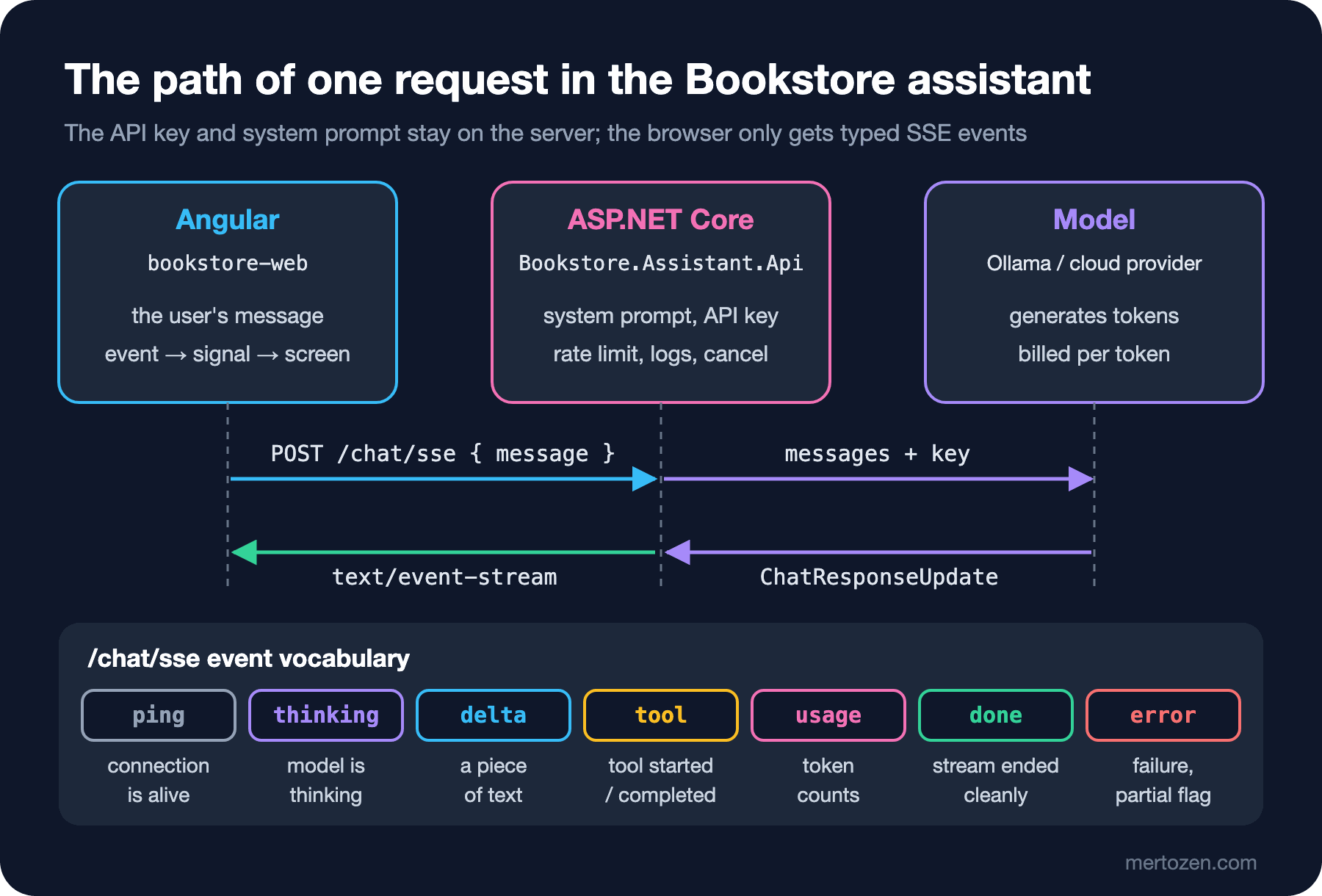
The architecture we use throughout the series has three parts. The Angular app (bookstore-web) only sends the user's message. The ASP.NET Core API (Bookstore.Assistant.Api) adds the system prompt, calls the model and turns the model's ChatResponseUpdate stream into typed SSE events. The model is local Ollama in this post; in production it can be a cloud provider. This is the whole API:
using Bookstore.Assistant.Api;
using Microsoft.Extensions.AI;
using OllamaSharp;

WebApplicationBuilder builder = WebApplication.CreateBuilder(args);

// The model address, model name (and with a cloud provider, the API key) live only in the server's configuration
string endpoint = builder.Configuration["Assistant:OllamaEndpoint"] ?? "http://localhost:11434";
string model = builder.Configuration["Assistant:Model"] ?? "qwen3:4b";
builder.Services.AddChatClient(new OllamaApiClient(
    new HttpClient { BaseAddress = new Uri(endpoint), Timeout = TimeSpan.FromMinutes(10) }, model));

WebApplication app = builder.Build();

// The system prompt lives on the server too: the browser only sends the user's message
const string SystemPrompt =
    "You are the assistant of Bookstore, an online bookstore. Answer briefly and only about books, " +
    "orders and the store. If you are not sure, say so.";

app.MapPost("/chat/sse", (ChatStreamRequest request, IChatClient chat, ILogger<Program> logger, CancellationToken ct) =>
{
    List<ChatMessage> messages = [new(ChatRole.System, SystemPrompt), new(ChatRole.User, request.Message)];
    IAsyncEnumerable<ChatResponseUpdate> updates = chat.GetStreamingResponseAsync(messages, cancellationToken: ct);
    return TypedResults.ServerSentEvents(
        ChatStreaming.ToSseAsync(updates, logger, ct).WithHeartbeatAsync(TimeSpan.FromSeconds(5), ct));
});

app.Run();
ChatStreaming.ToSseAsync and WithHeartbeatAsync come straight from the streaming post in the AI with .NET series, where we covered how they work. In this series we change the server only as much as the UI needs.
The obvious shortcut is to call the provider's API directly from Angular: no backend in between, less code. Let us try it once. A component that puts the key in environment.ts:
// DON'T: this file is part of the bundle shipped to the browser
export const environment = {
  llmApiKey: 'sk-demo-1234567890abcdef',
  llmBaseUrl: 'https://llm-provider.example.com/v1',
};
$ npx ng build
Output location: .../dist/bookstore-web
$ grep -o '.\{30\}sk-demo.\{40\}' dist/bookstore-web/browser/main-*.js
var gl={llmApiKey:"sk-demo-1234567890abcdef",llmBaseUrl:"https://lThe production build is minified, yet the key sits in the bundle as plain text; every visitor of the site can read it from the browser's developer tools. The Angular CLI's environment files are for build-time settings, not for secrets. The post "Angular SSR Security: allowedHosts, Host Header Validation, TransferState and Secrets Leaking into Bundles" in the Frontend Security series also shows the SSR side of this leak.
The key is not the only problem. With a direct call the system prompt also lives in the browser, and the user can change it. There is no place left for per-user rate limits, cost caps, logs or an audit trail. Switching providers means redeploying every client. That is why the backend is more than a proxy: it is where you decide which model is called, with which prompt, on whose behalf and how much.
The Event Vocabulary: What Does /chat/sse Send?
The UI needs to know not only the pieces of text but also the state of the stream. So the API turns every update from the model into an event with a known name and shape. The records on the server:
namespace Bookstore.Assistant.Api;

public sealed record ChatStreamRequest(string Message);

// The /chat/sse event vocabulary: the same fields as chat-events.ts on the Angular side
public sealed record DeltaEvent(string Text);
public sealed record ToolEvent(string CallId, string Name, string Phase);
public sealed record UsageEvent(long? InputTokens, long? OutputTokens);
public sealed record ErrorEvent(string Message, bool Partial);
The only difference from the version in the AI with .NET series is that I added CallId to ToolEvent. There the completed event had an empty tool name, because FunctionResultContent only carries a CallId. ToSseAsync now maps the CallId it sees in the started event to the name and writes the name into the completed event as well, so the UI knows which tool finished its "checking stock" line.
On the Angular side we define the same vocabulary as a discriminated union:
// The /chat/sse event vocabulary: the same fields as the records in Bookstore.Assistant.Api
export type ChatEvent =
  | { type: 'ping' }
  | { type: 'thinking' }
  | { type: 'delta'; text: string }
  | { type: 'tool'; callId: string; name: string; phase: 'started' | 'completed' }
  | { type: 'usage'; inputTokens: number | null; outputTokens: number | null }
  | { type: 'done' }
  | { type: 'error'; message: string; partial: boolean };

// Turns the raw SSE event name and JSON data into a typed ChatEvent
export function toChatEvent(event: string, data: string): ChatEvent | null {
  switch (event) {
    case 'ping':
    case 'thinking':
    case 'done':
      return { type: event };
    case 'delta':
    case 'tool':
    case 'usage':
    case 'error':
      return { type: event, ...JSON.parse(data) };
    default:
      // Ignore unknown events: an older client must not break when the server adds a new one
      return null;
  }
}
What the events mean: ping says the connection is alive while the model is silent and changes nothing on screen. thinking reports that a reasoning model started thinking; we do not send the thinking text, only the state. delta is a piece of the answer. tool says a tool call started or completed. usage carries the input and output token counts of one model turn; a request that uses tools can have more than one. done says the stream ended cleanly, error says it stopped halfway, and its partial field says whether any text had been sent by then.
Two rules make this vocabulary robust. First, the client never treats the connection closing as "done" on its own; only done means done. A proxy timeout or a server restart also closes the connection, and in that case the answer on screen is not complete, it is interrupted. Second, toChatEvent silently skips unknown events. When we add the approval and ui events in post 5, a client on the older version will not break; it simply will not show the new feature.
Protocol Options
These events are our own contract. Two standards do the same job, and in post 6 we move the Bookstore assistant to one of them and compare:
- AG-UI, an open protocol for the event stream between an agent and its user interface: event families for the run lifecycle, text message start/content/end, tool calls and shared state snapshots/deltas. Microsoft Agent Framework has a ready-made endpoint for it on the .NET side.
- The AI SDK UI message stream: a format carried over SSE and made of parts such as
text-delta,tool-input-availableandfinish; a custom backend producing it has to send thex-vercel-ai-ui-message-stream: v1header. There is an@ai-sdk/angularpackage for Angular.
I start with our own contract to teach: once you manage the stream, the state and the errors by hand on the Angular side, it is much easier to see what a library hides and what it solves.
A Sketch of the Bookstore Assistant Screen
By the end of the series the assistant screen will have a message list with user and assistant bubbles, a message box at the bottom with a "Stop" button that replaces "Send" while a stream runs, a "thinking" state until the first token, a "checking stock" line while a tool runs, an approval card for sensitive actions, book cards with an "Add to cart" button instead of text for recommendations, and sources and token usage under the answer. But an AI interface is more than this chat box. Other things the same backend can do in Bookstore: a one-paragraph summary of reader reviews on the book detail page, turning free text such as "crime novels under 20 TL" in the search box into filters, prefilling the Institutional Order form from the e-mail a school sent. None of these is a chat; in post 2 we also write a one-off AI feature with resource.
The code lives in two folders: the ASP.NET Core project under api/ and the Angular app under web/. During development the Angular dev server forwards requests starting with /chat to the API, so from the browser's point of view everything is on the same origin and no CORS setup is needed:
{
  "/chat": {
    "target": "http://localhost:19640",
    "secure": false
  }
}
This file is registered as proxyConfig in the serve target of angular.json. To run it you need Ollama installed and the qwen3:4b model pulled, as we did in the first-request post of the LLM Fundamentals series:
cd api
dotnet run

# in a second terminal
cd web
npm ci
npm start
In production the same-origin setup comes from a reverse proxy or from the ASP.NET Core app that serves the Angular app. Angular 22.2 requires TypeScript 6.0, so the project is set up with TypeScript 6.0.
Production Notes
Put rate limits per user. The provider's quota is the whole application's shared quota; if one user or one bot exhausts it, everyone gets a 429. Apply the limit in the API by user identity and report it to the UI with Retry-After; in post 3 we show a countdown based on that header.
Set timeouts for long waits. In the second run the first token arrived after 13 seconds; with a busy provider queue it takes even longer. If the idle timeout of the load balancer or reverse proxy in front of you is shorter than that, the connection closes silently. The ping event exists to fill that silence.
Measure usage and show it. The usage events carry the cost of every request; aggregate them per user and per feature. With a reasoning model that swings between 253 and 627 tokens for the same question, the distribution matters, not the average.
Be careful about what you log. User messages can contain personal data. If you log prompts and answers, decide up front how long you keep them and who can read them.
Common Pitfalls
First, putting the API key in environment.ts or any other frontend file. We saw it above: it sits in plain text even in a minified bundle. "Nobody will find it" is not a security control.
Second, thinking of an AI feature only as a chat box in the bottom-right corner. Often the most useful AI feature is a small helper on the screen the user is already on: a summary, a suggestion, a prefilled form.
Third, taking a closed connection for a finished answer. Without a separate done event in the contract you show an interrupted answer as complete, and the user decides based on half the information.
Fourth, tying business logic to the format of the model's output. The assumption "the book title comes in quotes" holds in the first run and fails in the second. If you need structured data, use structured output or a tool call; we come back to this in post 5, where the model picks a component instead of writing text.
A Small Experiment
★☆☆ Send the same question five times and note TTFT, total time and the number of output tokens for each run. How far apart are the fastest and the slowest run? Is an "average wait" a meaningful number to show the user with this distribution?
★★☆ Add "Always answer in exactly one sentence." to the system prompt and repeat the measurement. Does the number of output tokens go down? Are the thinking tokens independent of the length of the answer?
★★★ Add a meta event to the contract: send the model name and a request id issued by the server at the start of the stream. Before updating toChatEvent, verify with curl and the browser console that the old client really ignores this event.
The architecture and the event vocabulary are in place. In the next post we read this stream in Angular: since EventSource cannot send a POST, we write an SSE parser with fetch and ReadableStream, render the deltas with signals, and wire a "Stop" button through AbortController to the CancellationToken on the server.