

Web Servers, Application Servers and Reverse Proxies: How Does an HTTP Request Reach Your App?
Kestrel is both a web server and an application server; a reverse proxy is the layer that accepts the request, forwards it to the app behind it and takes on TLS termination, static files, compression, buffering and load balancing. We send the same request straight to Kestrel and then through Nginx, compare the IP, headers and Angular deep-link behaviour the app sees, and put five hosting topologies side by side.
Version note: The examples in this post were run with .NET 10 (ASP.NET Core runtime 10.0.14), Nginx 1.30.6, Angular 22.2 and curl 8.23 on Docker 29.
Guess First
The Bookstore API (Application Programming Interface) is going onto a Linux VM (virtual machine) for the first time. Someone on the team says "Kestrel is already a web server, let's give it port 80 directly"; someone else says "let's put Nginx in front". We send the same GET /api/whoami request first straight to Kestrel, then through Nginx. In both cases the app reports who sent the request, which Host it arrived with and which server the response came from.
Guess: when the request goes through Nginx, does the app see the client's IP (Internet Protocol) address or Nginx's? What does the Server header in the response say? And does a user who refreshes Angular's /orders/42 page in the browser get the same result in both setups?
Three Roles: Web Server, Application Server, Reverse Proxy
These three terms are often used interchangeably, but they describe different jobs. To read a request's path correctly you first have to separate the roles.
A web server is the software that speaks HTTP (Hypertext Transfer Protocol), listens on a port, accepts connections, parses requests and writes responses back. Nginx, IIS (Internet Information Services), Apache and Kestrel all fit this definition. The application server is the layer that runs your code: in ASP.NET Core, the request pipeline, middleware, routing and endpoints. In .NET these two roles usually live in the same process: Kestrel listens on the port and hands the request straight to your middleware pipeline. Tomcat on the Java side and Gunicorn in Python play a similar "HTTP server that runs the app" role.
A reverse proxy is an intermediary that accepts the client's request and forwards it to one or more servers behind it. The client only sees the proxy; it doesn't know how many Kestrel instances are behind it or which ports they run on. "Reverse" distinguishes it from the forward proxy that sits on the client side in corporate networks: a forward proxy represents clients, a reverse proxy represents servers.
The same software can play several roles. In the setup in this post Nginx is both a web server (it serves Angular's build output from disk) and a reverse proxy (it forwards /api/ requests to Kestrel). Kestrel is both a web server and an application server.
A Request's Journey: Seeing the Layers with curl
The test rig is small: a Docker network, a Kestrel container running Bookstore.Api at 172.30.85.21, Nginx at 172.30.85.10 and a client container at 172.30.85.50 that sends the requests. The API's /api/whoami endpoint returns, as JSON (JavaScript Object Notation), how the request reached the app:
app.MapGet("/api/whoami", (HttpContext ctx) => new
{
    Instance = instance,
    RemoteIp = ctx.Connection.RemoteIpAddress?.ToString(),
    RemotePort = ctx.Connection.RemotePort,
    ConnectionId = ctx.Connection.Id,
    ctx.Request.Protocol,
    ctx.Request.Scheme,
    Host = ctx.Request.Host.Value,
    PathBase = ctx.Request.PathBase.Value,
    Path = ctx.Request.Path.Value,
    XForwardedFor = ctx.Request.Headers["X-Forwarded-For"].ToString(),
    XOriginalFor = ctx.Request.Headers["X-Original-For"].ToString(),
    XForwardedProto = ctx.Request.Headers["X-Forwarded-Proto"].ToString(),
    Link = $"{ctx.Request.Scheme}://{ctx.Request.Host}{ctx.Request.PathBase}/api/books/1",
});
First, straight to Kestrel:
$ curl -si http://172.30.85.21:8080/api/books/1
HTTP/1.1 200 OK
Content-Type: application/json; charset=utf-8
Date: Sun, 08 Nov 2026 03:28:16 GMT
Server: Kestrel
Transfer-Encoding: chunked

{"id":1,"title":"Dune","author":"Frank Herbert","price":12.50}
Kestrel produces the response and says so with the Server: Kestrel header. Now we put Nginx in front of the same API. This is the whole config:
server {
    listen 80;
    server_name bookstore.local;

    gzip on;
    gzip_types application/json;

    # Angular build: Nginx serves the files straight from disk
    location / {
        root /srv/bookstore-web;
        try_files $uri $uri/ /index.html;
    }

    # API: Nginx forwards the request to Kestrel
    location /api/ {
        proxy_pass http://172.30.85.21:8080;
        proxy_set_header Host $host;
        proxy_set_header X-Forwarded-For $proxy_add_x_forwarded_for;
        proxy_set_header X-Forwarded-Proto $scheme;
    }
}
From the same client, this time to Nginx. First we look only at the response headers, saying we accept gzip; then at the JSON body:
$ curl -s -o /dev/null -D - --compressed -H "Host: bookstore.local" http://172.30.85.10/api/whoami
HTTP/1.1 200 OK
Server: nginx/1.30.6
Date: Sun, 08 Nov 2026 03:28:27 GMT
Content-Type: application/json; charset=utf-8
Transfer-Encoding: chunked
Connection: keep-alive
Content-Encoding: gzip

$ curl -s -H "Host: bookstore.local" http://172.30.85.10/api/whoami | jq .
{
  "instance": "api1",
  "remoteIp": "::ffff:172.30.85.10",
  "remotePort": 59598,
  "connectionId": "0HNPT8URF4Q5V",
  "protocol": "HTTP/1.1",
  "scheme": "http",
  "host": "bookstore.local",
  "pathBase": "",
  "path": "/api/whoami",
  "xForwardedFor": "172.30.85.50",
  "xOriginalFor": "",
  "xForwardedProto": "http",
  "link": "http://bookstore.local/api/books/1"
}
Here is the answer to the guess. The RemoteIp the app sees is no longer the client's but Nginx's address (172.30.85.10; the ::ffff: prefix is Kestrel showing an IPv4 address in IPv6 form). The client's real address only lives in the X-Forwarded-For header that Nginx added. The Server header changed too: the client never sees Kestrel any more, Nginx sends the response and Nginx also did the gzip compression. Kestrel produced plain JSON; the Content-Encoding: gzip header is Nginx's work.
A header being present doesn't mean the app uses it. Request.Scheme and RemoteIpAddress still describe the connection between Nginx and Kestrel; correcting them from the X-Forwarded-* values is the job of ASP.NET Core's forwarded headers middleware and the topic of the third post in this series.
The third part of the question is Angular. For a user who refreshes the /orders/42 page, the two setups behave differently:
$ curl -sI -H "Host: bookstore.local" http://172.30.85.10/orders/42
HTTP/1.1 200 OK
Server: nginx/1.30.6
Date: Sun, 08 Nov 2026 03:28:17 GMT
Content-Type: text/html
Content-Length: 528
Last-Modified: Sun, 08 Nov 2026 03:22:48 GMT
Connection: keep-alive
ETag: "6aefeb08-210"
Accept-Ranges: bytes

$ curl -s -o /dev/null -w "%{http_code}\n" http://172.30.85.21:8080/orders/42
404
There's no file called orders/42 on disk. Nginx returns index.html through try_files and the Angular router resolves the route in the browser. The API on Kestrel doesn't know this path and returns 404. You can do the same in ASP.NET Core with UseStaticFiles and MapFallbackToFile; the point is that "static files and SPA (Single Page Application) fallback" is a responsibility, and someone has to own it. The Nginx side is covered in detail in the sixth post.
What a Reverse Proxy Takes On
Even the ten-line config above took several jobs away from Kestrel. A reverse proxy's typical responsibilities:
| Responsibility | In the reverse proxy | Kestrel's equivalent |
|---|---|---|
| TLS (Transport Layer Security) termination | Certificate in one place, plain HTTP to Kestrel | Kestrel can do TLS too; every instance needs the certificate |
| Static files | root, try_files, sendfile | UseStaticFiles, MapStaticAssets |
| Compression | gzip, gzip_static for precompressed files | UseResponseCompression |
| Request and response buffering | Nginx collects a slow client's body first | Kestrel waits on every connection itself |
| Load balancing | Several instances via upstream | None; a single process |
| Protection layer | Rate limiting, connection limits, rejecting unknown Host values | AddRateLimiter, host filtering |
| Port sharing | Several domains and apps on the same 443 | One port, one process |
Buffering is the least known item on the list but does a lot of work. If a user on a mobile network uploads a 10 MB file in 30 seconds, without a proxy Kestrel keeps a connection and a request reading that body open for all 30 seconds. By default Nginx collects the request body itself (proxy_request_buffering on) and forwards it to Kestrel only once it has arrived in full, at local network speed. The same holds on the response side (proxy_buffering on): Kestrel drops the response off at Nginx quickly and goes back to work, and trickling it out to the slow client becomes Nginx's problem. You pay for this behaviour on streaming endpoints such as Server-Sent Events; we'll see that in the fifth post.
Port sharing is a limit spelled out in the Kestrel documentation on Microsoft Learn: when Kestrel runs alone at the edge, it can't share the same IP and port with other processes; when it listens on a port it takes all traffic on that port regardless of the Host header. If you want to publish api.bookstore.example and admin.bookstore.example as two separate apps on 443 of the same server, you need something in front that routes by host.
When Is Kestrel Enough on Its Own?
Microsoft's position is clear: running Kestrel alone at the edge and running it behind a reverse proxy are both supported configurations. Kestrel is hardened to face the internet with HTTPS (HTTP Secure), HTTP/2, HTTP/3, request limits and timeouts. The advice "Kestrel isn't production ready, always put something in front of it" dates from the ASP.NET Core 1.x years; it no longer applies.
Typical cases where Kestrel alone is enough:
- There's one app on the server, one port is enough and you're fine giving the certificate to Kestrel.
- There's already a cloud load balancer or gateway in front doing TLS termination and distribution (Azure App Service's front end, AWS (Amazon Web Services) ALB (Application Load Balancer), a Kubernetes ingress).
- An internal service whose clients are other services, with traffic already collected by a gateway.
What makes a proxy necessary are the rows in the table above where the right column says "none" or "every instance": several apps on the same machine, load distribution across several instances, managing the certificate in one place, serving an SPA such as Angular from the same origin, an edge layer the team already knows and monitors.
Five Hosting Topologies
There are five common ways to publish a .NET app. We'll go through each of them over the series; here's the big picture.
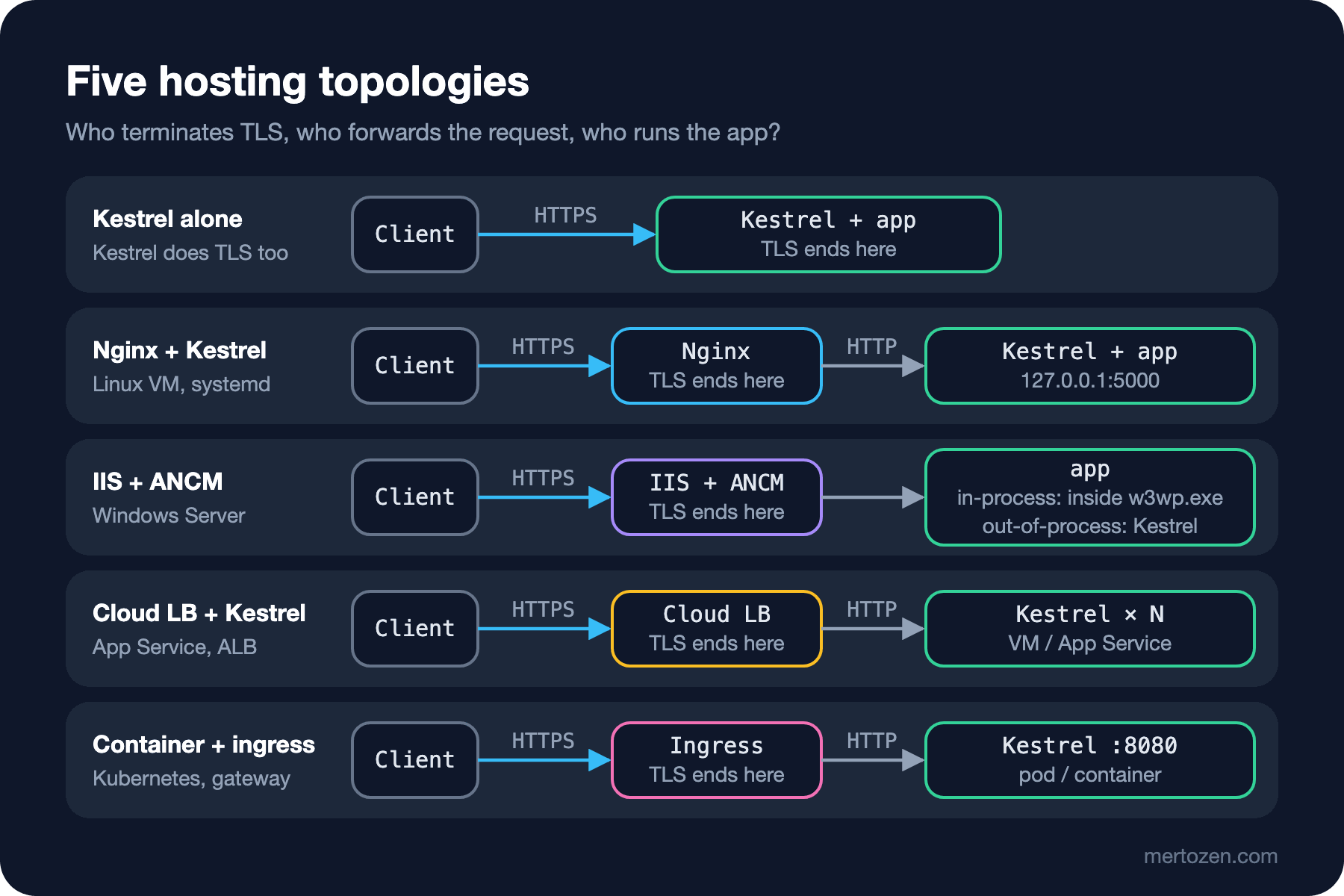
Kestrel alone: the client connects straight to Kestrel and Kestrel does TLS. Fewest parts, least flexibility.
Nginx and Kestrel: the classic setup on a Linux VM. Nginx listens on 80 and 443, terminates TLS, serves static files and forwards /api to Kestrel on a local address such as 127.0.0.1:5000. systemd keeps Kestrel running. Posts four to eight of this series build this setup step by step.
IIS and the ASP.NET Core Module: the Windows Server equivalent. ANCM (ASP.NET Core Module) is a native module plugged into IIS; it either runs the app inside the IIS worker process (w3wp.exe) (in-process, using IIS HTTP Server instead of Kestrel) or starts Kestrel in a separate process and forwards requests to it (out-of-process). That's the topic of posts nine and ten.
Cloud load balancer and Kestrel: Azure App Service, AWS ALB or a cloud load balancer takes on TLS and distribution and forwards to Kestrel on VMs or containers. There's still a proxy; it's just not software you run yourself.
Container and ingress or gateway: the app is Kestrel listening on 8080 in a container; in front of it a Kubernetes ingress controller, the Gateway API or an API gateway. This topology itself belongs to the upcoming Docker and Kubernetes series; what matters here is that the reverse proxy concept doesn't change: the process accepting the request and the one handling it are still different, and the X-Forwarded-* headers are still needed.
In Production
Whichever topology you pick, write down once who terminates the request. If the answers to "where does TLS end, which header carries the client IP, which layer has which timeout" are scattered, three teams stare at each other at the first 502 or 504. For Bookstore the table has three rows: TLS ends at Nginx, the client IP arrives in X-Forwarded-For, Nginx's upstream timeout is 60 seconds and Kestrel's request header timeout is 30 seconds.
Every layer keeps its own log and one request produces a separate line in each. Nginx's access log recorded the requests above like this:
172.30.85.50 - - [08/Nov/2026:03:28:27 +0000] "GET /api/whoami HTTP/1.1" 200 237 "-" "curl/8.23.0" "-"
172.30.85.50 - - [08/Nov/2026:03:28:27 +0000] "GET /api/whoami HTTP/1.1" 200 330 "-" "curl/8.23.0" "-"
Both lines hit the same endpoint but the sizes differ: 237 bytes is the compressed body of the first call, which asked for gzip; 330 bytes is the plain JSON of the second call, which didn't. In Kestrel's log both show the same size. A timestamp isn't enough to match the two logs; you need to carry a correlation ID or W3C (World Wide Web Consortium) trace context. The "Correlation ID and Trace Context" post in the Logging in .NET series covers that link.
Adding a layer adds latency too, but less than people think. Going from Nginx to Kestrel on the same machine over loopback costs microseconds; the real cost is misconfigured buffers and keepalive being off, which opens a new TCP (Transmission Control Protocol) connection for every request. Both are measured in the fifth post.
Common Pitfalls
Putting Kestrel behind Nginx and leaving it exposed as well. If Kestrel listens on 0.0.0.0:5000 and the firewall isn't closed, anyone who bypasses the proxy and talks to Kestrel directly escapes rate limiting and Nginx's security headers. Kestrel behind a proxy should listen on 127.0.0.1 or a Unix socket.
Assuming the header the proxy adds is used by the app automatically. As you saw in the experiment, X-Forwarded-For arrived but RemoteIpAddress is still Nginx's address. An app that rate limits by IP counts every user as one client in this state.
Doing the same job in two layers. With gzip in Nginx and UseResponseCompression in Kestrel the CPU (Central Processing Unit) isn't spent twice, but the config lives in two places and when one changes the other is forgotten. Having both layers add the HSTS (HTTP Strict Transport Security) header leads to two separate headers in the response. Pick a single owner for each responsibility.
Adding a needless layer out of the belief that "Kestrel can't face the internet". Putting Nginx on the VM of an app that already has a cloud load balancer in front means one more hop, one more config and one more patch schedule. Add a proxy for a need.
A Small Experiment
★☆☆ Delete the proxy_set_header Host $host; line from the experiment's Nginx config, reload the config and call /api/whoami again. What did the host and link fields turn into? Where would an email confirmation link generated from this value take the user?
★★☆ From the client container, add an X-Forwarded-For: 1.2.3.4 header yourself and send the request to Nginx. How many addresses do you see in the xForwardedFor field, and which one is really the client? How does the result change when you use $remote_addr instead of $proxy_add_x_forwarded_for?
★★★ Turn off the Server: Kestrel header with KestrelServerOptions.AddServerHeader = false and add server_tokens off; in Nginx. After both settings, can an attacker still work out from the response which technologies run behind it? Check the error pages (502, 404) too.
In this post we always ran Kestrel as it comes, on the 8080 port the container provides. In the next post we go into Kestrel itself: which port it listens on and why, which wins when --urls, ASPNETCORE_URLS, ASPNETCORE_HTTP_PORTS and Kestrel:Endpoints are given at the same time, certificate and limit settings, HTTP/2 and HTTP/3.