

Nginx Fundamentals: Installation, nginx.conf Structure, server and location Blocks

Installing Nginx from the nginx.org repository gives you the current stable branch (1.30); Ubuntu 24.04's package stays on 1.24. With real runs we look at master and worker processes, nginx.conf contexts, rejecting unknown hosts with default_server, the location matching algorithm (=, longest prefix, ^~, regex), root versus alias, the trailing slash in proxy_pass, and how reload and restart behave differently with a broken config.
Version note: The examples in this post were run with Nginx 1.30.6 (the nginx.org package and the official nginx:1.30 image), Ubuntu 24.04 and .NET 10 (ASP.NET Core runtime 10.0.14) on Docker 29.
Guess First
Bookstore's Nginx config has six location blocks:
location = /health { return 200 "exact: = /health\n"; }
location ^~ /static/ { return 200 "prefix with ^~: /static/\n"; }
location ~* \.(png|jpg|css|js)$ { return 200 "regex: ~* extension\n"; }
location /api/ { return 200 "prefix: /api/\n"; }
location /api/books/ { return 200 "longer prefix: /api/books/\n"; }
location / { return 200 "prefix: / (fallback)\n"; }
Guess: which block do /api/books/1, /api/books/cover.jpg, /static/app.js and /health/ (with a trailing slash) land in? Is the config read in the order it's written in the file, by longest match, or both?
Installation: the nginx.org Repository or the Distribution's Package?
On Ubuntu 24.04, apt install nginx gives you the distribution's own package:
$ apt-cache policy nginx
nginx:
  Installed: (none)
  Candidate: 1.24.0-2ubuntu7.19
1.24 is the stable branch released in April 2023. Ubuntu backports security patches to it itself (the ubuntu7.19 in the package name says that), but features that arrived since 1.25 (the upstream keepalive defaults, sticky and the native ACME (Automatic Certificate Management Environment) module that we'll use in this series) aren't in this package. Nginx's own repository always offers the current stable and mainline branches. The steps from the "Linux packages" page on nginx.org:
sudo apt install curl gnupg2 ca-certificates lsb-release ubuntu-keyring
curl https://nginx.org/keys/nginx_signing.key | gpg --dearmor \
    | sudo tee /usr/share/keyrings/nginx-archive-keyring.gpg >/dev/null
gpg --dry-run --quiet --no-keyring --import --import-options import-show /usr/share/keyrings/nginx-archive-keyring.gpg
echo "deb [signed-by=/usr/share/keyrings/nginx-archive-keyring.gpg] \
https://nginx.org/packages/ubuntu `lsb_release -cs` nginx" \
    | sudo tee /etc/apt/sources.list.d/nginx.list
# prefer nginx.org packages over the distribution's
echo -e "Package: *\nPin: origin nginx.org\nPin: release o=nginx\nPin-Priority: 900\n" \
    | sudo tee /etc/apt/preferences.d/99nginx
sudo apt update
sudo apt install nginx
The gpg command after downloading the key shows the fingerprints of the keys in the file; don't continue without comparing them with the list on the nginx.org page. After pinning and installing:
$ apt-cache policy nginx
nginx:
  Installed: 1.30.6-1~noble
  Candidate: 1.30.6-1~noble
  Version table:
 *** 1.30.6-1~noble 900
        900 https://nginx.org/packages/ubuntu noble/nginx arm64 Packages
        100 /var/lib/dpkg/status
     1.30.5-1~noble 900
$ nginx -v
nginx version: nginx/1.30.6
Stable or mainline? In Nginx's versioning model odd-numbered branches (1.29) are mainline and even-numbered ones (1.30) are stable. Only critical fixes and security patches go into the stable branch; 1.30.0 came out in April 2026 and almost every change up to 1.30.6 is a CVE (Common Vulnerabilities and Exposures) fix. Pick the stable branch for production and keep it current; whatever package you use, "nginx is installed" and "nginx is up to date" aren't the same thing.
Another difference between the two packages is the folder layout. The nginx.org package includes /etc/nginx/conf.d/*.conf; the Debian and Ubuntu package brings sites-available and sites-enabled folders instead:
$ dpkg -c nginx-common_1.24.0-2ubuntu7.19_all.deb | grep -E "sites-(available|enabled)"
./etc/nginx/sites-available/
./etc/nginx/sites-available/default
./etc/nginx/sites-enabled/
A file in sites-available becomes active when it's symlinked into sites-enabled; to turn a site off you remove the link rather than delete the file. In conf.d you do the same by changing the file's extension to something other than .conf. Both work; what matters is picking one method for the team. In this series we use the conf.d layout that the official image and the nginx.org package use.
Master and Worker Processes
When you start Nginx you see a family, not a single process:
$ ps -o user,pid,ppid,cmd -C nginx
USER         PID    PPID CMD
root        3200       1 nginx: master process nginx
nginx       3201    3200 nginx: worker process
nginx       3202    3200 nginx: worker process
nginx       3203    3200 nginx: worker process
nginx       3204    3200 nginx: worker process
nginx       3205    3200 nginx: worker process
nginx       3206    3200 nginx: worker process
nginx       3207    3200 nginx: worker process
nginx       3209    3200 nginx: worker process
nginx       3210    3200 nginx: worker process
nginx       3211    3200 nginx: worker process
The master process runs as root: it reads the config, opens privileged ports such as 80 and 443, and starts and watches the workers. The real work happens in the workers: each manages thousands of connections at once with an event loop and runs with dropped privileges as the nginx user. worker_processes auto; sets the number of workers; this machine has 10 CPU (Central Processing Unit) cores, so there are 10 workers. These workers were also the ones that got "Permission denied" on the Unix socket in the previous post: what connects to the socket is the nginx user, not the master running as root.
The practical consequence of this split shows up on reload. nginx -s reload sends SIGHUP (the hangup signal; for Nginx it means "reread the config") to the master; the master reads the new config, starts new workers and tells the old ones "finish your connections and exit":
2026/11/08 04:00:21 [notice] 1#1: signal 1 (SIGHUP) received from 30, reconfiguring
2026/11/08 04:00:21 [notice] 1#1: reconfiguring
2026/11/08 04:00:21 [notice] 1#1: using the "epoll" event method
2026/11/08 04:00:21 [notice] 1#1: start worker processes
2026/11/08 04:00:21 [notice] 1#1: start worker process 35
2026/11/08 04:00:21 [notice] 1#1: start worker process 36
2026/11/08 04:00:21 [notice] 20#20: gracefully shutting down
2026/11/08 04:00:21 [notice] 21#21: gracefully shutting down
Open connections aren't cut and the port isn't closed even for a moment. A restart kills the process and starts it again; requests arriving in between are refused. Reload for config changes, restart when you upgrade the Nginx binary.
The Structure of nginx.conf: Contexts and include
The main file that comes with the nginx.org package is short:
user  nginx;
worker_processes  auto;

error_log  /var/log/nginx/error.log notice;
pid        /run/nginx.pid;


events {
    worker_connections  1024;
}


http {
    include       /etc/nginx/mime.types;
    default_type  application/octet-stream;

    log_format  main  '$remote_addr - $remote_user [$time_local] "$request" '
                      '$status $body_bytes_sent "$http_referer" '
                      '"$http_user_agent" "$http_x_forwarded_for"';

    access_log  /var/log/nginx/access.log  main;

    sendfile        on;
    #tcp_nopush     on;

    keepalive_timeout  65;

    #gzip  on;

    include /etc/nginx/conf.d/*.conf;
}
The config consists of nested contexts. The outermost main context concerns the processes (user, worker_processes, error_log). events holds connection handling settings; worker_connections 1024 means at most 1024 concurrent connections per worker, and every proxied request uses two connections (client and upstream). http is the umbrella for all HTTP (Hypertext Transfer Protocol) settings; inside it are one or more server blocks (virtual hosts), and inside those are location blocks. A directive defined in an outer context is inherited by inner ones and overridden if it's defined again in an inner context. A sneaky exception to this rule is array directives such as add_header and proxy_set_header: define even one in an inner context and all the outer ones are dropped. We'll come back to this when we set up security headers in the seventh post.
include pastes a file or a glob in place. App configs live in conf.d, shared pieces (proxy headers, TLS (Transport Layer Security) settings) live in separate files and are included where needed. nginx -T prints everything with all includes expanded in one output; the answer to "which file does this setting come from" is there.
server Blocks and default_server
When a request arrives, Nginx first picks which server answers: first by IP (Internet Protocol) address and port with listen, then by matching the Host header against server_name. If no server_name matches, the block marked default_server for that port answers, and if there isn't one, the first block defined in the file does. That's why Microsoft's Nginx documentation recommends an explicit default server that returns 444 for unknown hosts:
server {
    listen 80 default_server;
    return 444;
}
444 is an Nginx-specific code: close the connection without writing a response. A request with an unknown host:
$ curl -s -o /dev/null -w "%{http_code}\n" -H "Host: evil.example" http://172.30.85.10/; echo "exit=$?"
000
exit=52
curl's exit code 52 is "Empty reply from server". Bots scanning by IP address, or a domain whose DNS (Domain Name System) record points at your server by mistake, never reach your app. This is also the "the proxy should reject unknown hosts" rule we mentioned for forwarded headers in the previous post.
location Matching Order
The answer to the opening guess:
/health                -> exact: = /health
/health/               -> prefix: / (fallback)
/static/app.js         -> prefix with ^~: /static/
/img/logo.png          -> regex: ~* extension
/api/books/1           -> longer prefix: /api/books/
/api/orders            -> prefix: /api/
/api/books/cover.jpg   -> regex: ~* extension
/about                 -> prefix: / (fallback)
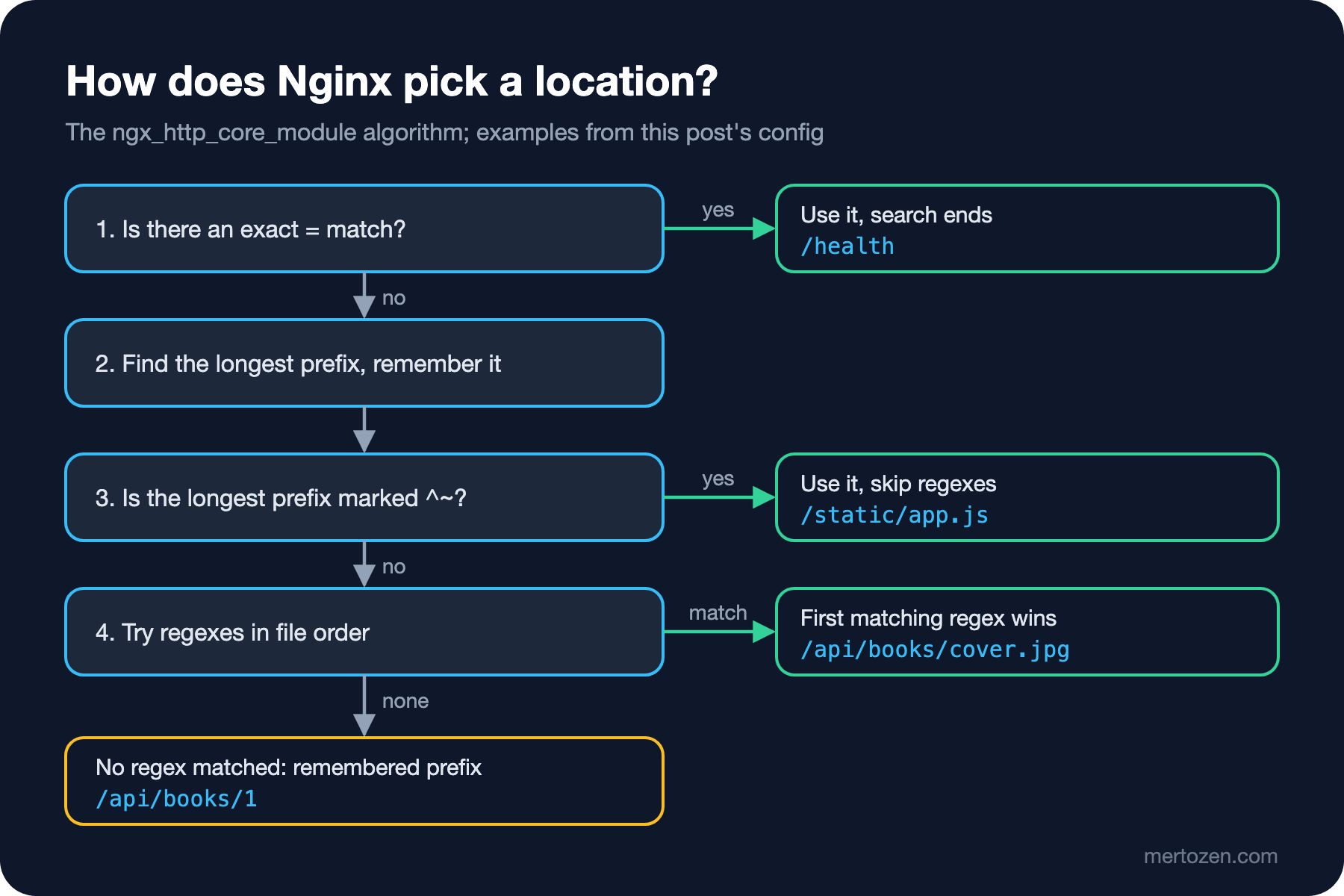
The order in the file isn't decisive on its own. The algorithm from Nginx's ngx_http_core_module documentation:
- If an exact location defined with
=is identical to the URI (Uniform Resource Identifier), the search stops there./healthmatches,/health/doesn't. - Otherwise the longest matching prefix location among all prefix locations is found and remembered. Order doesn't matter;
/api/books/wins even if written after/api/. - If the longest prefix is marked with
^~, regexes aren't checked at all and it's used./static/app.jsalso matched the regex, but^~protected it. - Otherwise regex locations (
~case-sensitive,~*case-insensitive) are tried in file order; the first match wins. - If no regex matches, the remembered longest prefix is used.
The most surprising line is /api/books/cover.jpg: a longer prefix location matched, yet the regex won, because a prefix match is only "remembered" and regexes are still tried. If one day you add an endpoint ending in .jpg under the API (Application Programming Interface), the request never reaches Kestrel and falls into the static file rule. Marking proxied prefixes with ^~ prevents this surprise.
root versus alias
There are two directives for serving static files, and they differ in how the path is built:
server {
    listen 80;
    server_name files.bookstore.local;

    # root: the location path is appended to root
    location /covers/ {
        root /srv/www;
    }

    # alias: the location path is replaced by alias
    location /img/ {
        alias /srv/www/static/img/;
    }
}
/covers/dune.jpg -> dune cover
/img/logo.png -> logo from /srv/staticFor /covers/dune.jpg, Nginx appends the whole URI to root and opens /srv/www/covers/dune.jpg. For /img/logo.png, it drops the matched /img/ part and puts alias in its place: /srv/www/static/img/logo.png. The rule is simple: if the URL (Uniform Resource Locator) and the disk have the same structure use root, if they differ use alias. With alias the trailing slashes must be consistent with the location; combining location /img/ with alias /srv/www/static/img (no slash) shifts the paths.
The Trailing Slash in proxy_pass
The same rule exists in proxy_pass, and it's what made the /bookstore/ sub-path in the previous post work:
server {
    listen 80;
    server_name slash.bookstore.local;

    # no URI part: the request path is passed as is
    location /shop/ {
        proxy_pass http://172.30.85.21:8080;
    }

    # URI part "/": the matched /store/ prefix is replaced by /
    location /store/ {
        proxy_pass http://172.30.85.21:8080/;
    }
}
Kestrel's HTTP log shows what arrived:
$ for u in /shop/api/whoami /store/api/whoami; do curl -s -o /dev/null -w "$u -> %{http_code}\n" -H "Host: slash.bookstore.local" http://172.30.85.10$u; done
/shop/api/whoami -> 404
/store/api/whoami -> 200

      Request starting HTTP/1.1 GET http://172.30.85.21:8080/shop/api/whoami - - -
      Request finished HTTP/1.1 GET http://172.30.85.21:8080/shop/api/whoami - 404 0 - 67.4155ms
      Request starting HTTP/1.1 GET http://172.30.85.21:8080/api/whoami - - -
      Request finished HTTP/1.1 GET http://172.30.85.21:8080/api/whoami - 200 - application/json;+charset=utf-8 4.2388ms
If the address in proxy_pass has a URI part after the host (even a single /), Nginx replaces the part of the request that matched the location with that URI. Without a URI part the path goes through untouched. The difference is one character, the result is 404 versus 200. The host in the log being 172.30.85.21:8080 is a separate lesson: since you didn't set proxy_set_header Host, Nginx sent the upstream's address as Host.
In Production
nginx -t before every change. I tried what happens with a broken line in three steps. First the test:
$ nginx -t
2026/11/08 03:58:58 [emerg] 36#36: unexpected "}" in /etc/nginx/conf.d/bookstore.conf:14
nginx: [emerg] unexpected "}" in /etc/nginx/conf.d/bookstore.conf:14
nginx: configuration file /etc/nginx/nginx.conf test failed
Then SIGHUP straight to the master. systemctl reload nginx in the nginx.org package's systemd unit does exactly this: ExecReload=/bin/sh -c "/bin/kill -s HUP $(/bin/cat /run/nginx.pid)".
$ kill -HUP $(cat /run/nginx.pid)
2026/11/08 03:59:09 [notice] 1#1: reconfiguring
2026/11/08 03:59:09 [emerg] 1#1: unexpected "}" in /etc/nginx/conf.d/bookstore.conf:14
$ curl -s -H "Host: bookstore.local" http://172.30.85.10/api/orders
prefix: /api/
Unable to read the new config, the master carried on with the old one; the site is up. But a restart with the same broken config:
$ docker restart webhwork-nginx
$ docker ps -a --filter name=webhwork-nginx --format '{{.Status}}'
Exited (1) 1 second ago
$ curl -sS -H "Host: bookstore.local" http://172.30.85.10/api/orders
curl: (7) Failed to connect to 172.30.85.10:80 after 3109 ms: Could not connect to server
Reload protects you from a broken config, but silently: the error is only in the error log, the old config keeps running and the team thinks the change was applied. At the next restart (server reboot, package upgrade) the site goes down. In a deploy script the order is always nginx -t && nginx -s reload.
Think about where the logs go and their format from the start. The default main format writes the client IP, the request, the status and X-Forwarded-For, but no timing. Adding $request_time (Nginx's total time) and $upstream_response_time (Kestrel's time) to find slow requests will also help with telling 502 from 504 in the fifth post. In the official Docker image the access and error logs are symlinks redirected to stdout and stderr; tail -f /var/log/nginx/access.log waits forever inside the container, use docker logs.
Common Pitfalls
Reloading without testing the config. As you saw above, reload swallows the error and the site goes down on restart.
Mixing alias with a regex location. According to the Nginx documentation, if you use alias inside a regex location the regex should contain captures and alias should refer to them; otherwise paths are built in unexpected ways. The 1.30.6 release notes also include a fix for a buffer overflow triggered by combining alias and rewrite (CVE-2026-15176): complicated alias rules are both a bug risk and a security risk.
Assuming a prefix location beats a regex. The /api/books/cover.jpg example: a longer prefix isn't enough, you need ^~.
Adding or removing the trailing slash in proxy_pass out of habit. A one-character change someone makes as "cleanup" turns the whole API into 404s. Don't deploy the change without a curl test.
Assuming the distribution package is current. Ubuntu 24.04's 1.24 gets security patches but lacks the defaults and directives in the later posts of this series; Microsoft's documentation also points to the nginx.org packages.
A Small Experiment
★☆☆ In the matching experiment's config, change location /api/books/ to location ^~ /api/books/ and request /api/books/cover.jpg again. Then make the regex location ~ (case-sensitive) and request /img/LOGO.PNG. Explain both results with the algorithm.
★★☆ Remove the trailing slash from alias in the location /img/ block and request /img/logo.png. Find in the error log which file Nginx tried to open. How does location /img (no slash) with a request for /imgfoo make the same mistake more dangerous?
★★★ Define a log_format bookstore that adds $request_time, $upstream_response_time and $upstream_addr and writes JSON (JavaScript Object Notation) (escape=json). Call Bookstore.Api's /api/reports/slow?seconds=2 endpoint and interpret what the difference between the two timings tells you.
Nginx's basics are in place: the process model, contexts, server and location selection, static files and proxy_pass. In the next post we take Microsoft's Nginx config apart line by line: the proxy_set_header set, the upgrade map for WebSockets and SignalR, buffering for Server-Sent Events, the upstream keepalive defaults that came with 1.29.7, timeouts, and telling 502 from 504.