

HTTPS, Security Headers, Rate Limiting and Load Balancing in Nginx
With real runs: TLS termination in Nginx, HTTP/3 with http2 on and listen quic, security headers that don't disappear thanks to add_header_inherit merge, HSTS from a single place, 429s with limit_req, and round robin spreading unevenly without an upstream zone. ip_hash, the sticky cookie that came with 1.29.6 and passive health checks with max_fails: when an instance dies the client sees no error, but non-idempotent requests and unhealthy yet running processes need separate handling.
Version note: The examples in this post were run with Nginx 1.30.6 (the official image, built with OpenSSL 3.5.7), .NET 10 (ASP.NET Core runtime 10.0.14), libmsquic 2.6.3 and curl 8.23 on Docker 29; the certificates are test certificates generated in the work folder.
Guess First
Bookstore.Api now runs on three Kestrel instances with a single Nginx in front of them. The upstream block has three server lines and no load balancing method, so it's the default round robin. A client sends 12 requests in a row and looks at which instance answered each one.
Guess: does each instance get 4 requests? Then one instance's process dies; how many of 12 requests fail?
TLS Termination: Putting the Certificate on Nginx
Bookstore's complete HTTPS (HTTP Secure) config:
limit_req_zone $binary_remote_addr zone=api_per_ip:10m rate=5r/s;
limit_conn_zone $binary_remote_addr zone=conn_per_ip:10m;

upstream bookstore_api {
    server 172.30.85.21:8080 max_fails=3 fail_timeout=30s;
    server 172.30.85.22:8080 max_fails=3 fail_timeout=30s;
    server 172.30.85.23:8080 max_fails=3 fail_timeout=30s;
}

server {
    listen 80;
    server_name bookstore.test;
    return 301 https://$host$request_uri;
}

server {
    listen 443 ssl;
    listen 443 quic reuseport;
    http2 on;
    server_name bookstore.test;

    ssl_certificate     /certs/bookstore.test.crt;
    ssl_certificate_key /certs/bookstore.test.key;
    ssl_protocols       TLSv1.2 TLSv1.3;

    server_tokens off;
    add_header Strict-Transport-Security "max-age=31536000" always;
    add_header X-Content-Type-Options "nosniff" always;
    add_header Content-Security-Policy "frame-ancestors 'none'" always;
    add_header Alt-Svc 'h3=":443"; ma=86400' always;

    location /api/ {
        limit_req zone=api_per_ip burst=10 nodelay;
        limit_req_status 429;
        limit_conn conn_per_ip 20;

        proxy_pass http://bookstore_api;
        proxy_set_header Host $host;
        proxy_set_header X-Forwarded-For $proxy_add_x_forwarded_for;
        proxy_set_header X-Forwarded-Proto $scheme;
    }

    # a location with its own add_header
    location = /favicon.ico {
        root /srv/bookstore-web;
        add_header Cache-Control "public, max-age=86400";
    }
}
TLS (Transport Layer Security) ends here; plain HTTP (Hypertext Transfer Protocol) goes to the Kestrels, and they learn the request came over HTTPS through forwarded headers, as in the third post. The server on port 80 redirects everything to 443:
$ curl -s -o /dev/null -D - http://bookstore.test/api/books | grep -E "^HTTP|Location|Server"
HTTP/1.1 301 Moved Permanently
Server: nginx/1.30.6
Location: https://bookstore.test/api/books
ssl_protocols TLSv1.2 TLSv1.3 has already been Nginx's default since 1.27.3 (TLS 1.0 and 1.1 were disabled by default in that release), but writing it explicitly helps whoever reads the config. Handshakes with three versions:
tls1_1 (SECLEVEL=0): 20DD72A0FFFF0000:error:0A00042E:SSL routines:ssl3_read_bytes:tlsv1 alert protocol version:ssl/record/rec_layer_s3.c:918:SSL alert number 70
tls1_2: New, TLSv1.2, Cipher is ECDHE-ECDSA-AES256-GCM-SHA384
tls1_3: New, TLSv1.3, Cipher is TLS_AES_256_GCM_SHA384
For the TLS 1.1 attempt I had to lower the OpenSSL client's own security level with SECLEVEL=0; otherwise the client says "no protocols available" and never connects, and the test tells you nothing about the server. The "protocol version" alert shows the server refusing. Instead of writing the cipher list by hand, start from the "intermediate" profile of Mozilla's SSL (Secure Sockets Layer) Configuration Generator; Microsoft's documentation points there too.
Where the certificate comes from isn't this series' topic. The classic way to obtain and renew it automatically with Let's Encrypt is certbot; Nginx's own ngx_http_acme_module now ships as a module in the official image too. Both, the renewal schedule and the certificate chain are in the upcoming SSL/TLS Certificates and HTTPS series.
HTTP/2 and HTTP/3
In the config above http2 on; turns on HTTP/2. Older documentation, including Microsoft's sample nginx.conf, writes listen 443 ssl http2;; on 1.30 that line works but warns:
nginx: [warn] the "listen ... http2" directive is deprecated, use the "http2" directive instead in /etc/nginx/conf.d/old.conf:2
nginx: the configuration file /etc/nginx/nginx.conf syntax is ok
nginx: configuration file /etc/nginx/nginx.conf test is successful
For HTTP/3 a second listen line (443 quic reuseport) opens UDP (User Datagram Protocol) 443, and the Alt-Svc header tells the browser "try the next request over QUIC (the UDP-based transport under HTTP/3)". The official image is built with --with-http_v3_module, so there's nothing extra to install. With the .NET HttpClient app from the second post:
$ dotnet H3Client.dll https://bookstore.test/api/whoami /certs/ca.crt
QuicConnection.IsSupported: True
200 HTTP/3.0
{"instance":"api1","remoteIp":"172.30.85.51","remotePort":0,"connectionId":"0HNPTA10K1JVH","protocol":"HTTP/1.1","scheme":"https","host":"bookstore.test","pathBase":"","path":"/api/whoami","xForwardedFor":"","xOriginalFor":"[::ffff:172.30.85.10]:39198","xForwardedProto":"","link":"https://bookstore.test/api/books/1"}

172.30.85.51 - - [08/Nov/2026:04:25:11 +0000] "GET /api/whoami HTTP/3.0" 200 321 "-" "-" "-"
HTTP/3 between the client and Nginx, HTTP/1.1 between Nginx and Kestrel. Terminating QUIC at Nginx means not dealing with libmsquic and UDP settings on the Kestrel side.
Staying current matters especially here. The HTTP/3 and QUIC code is the youngest and fastest-changing part of Nginx; the 2026 release notes of the 1.30 branch include address spoofing via QUIC connection migration (CVE-2026-40460, 1.30.1), a heap overflow when using HTTP/3 with OpenSSL 3.5.0 and earlier (CVE-2026-90439, 1.30.5), and an unknown HTTP/3 frame being treated as request body so that client_max_body_size could be bypassed (CVE-2026-95101, 1.30.6). If you don't follow the CVE (Common Vulnerabilities and Exposures) list, don't turn on HTTP/3; if you did, apply every patch of the stable branch.
Security Headers and add_header Inheritance
What the four add_header lines in the config do: Strict-Transport-Security tells the browser to come to this domain over HTTPS only for a year, X-Content-Type-Options: nosniff stops the browser from guessing the content type, Content-Security-Policy: frame-ancestors 'none' stops the page from opening inside another site's iframe (clickjacking). The always parameter makes the header go onto 4xx and 5xx responses too; otherwise it's added only to 200, 201, 204, 206, 301, 302, 303, 304, 307 and 308. server_tokens off removes the version from the Server header.
$ curl -s -o /dev/null -D - https://bookstore.test/api/books
HTTP/2 200
server: nginx
date: Sun, 08 Nov 2026 04:24:35 GMT
content-type: application/json; charset=utf-8
strict-transport-security: max-age=31536000
x-content-type-options: nosniff
content-security-policy: frame-ancestors 'none'
alt-svc: h3=":443"; ma=86400
The 301 response, on the other hand, said Server: nginx/1.30.6: I put server_tokens off only in the server block on 443. If you want the version gone everywhere, write the directive in the http context. Now the location with its own add_header:
$ curl -s -o /dev/null -D - https://bookstore.test/favicon.ico | grep -i -E "^HTTP|strict|nosniff|security-policy|cache-control|alt-svc"
HTTP/2 200
cache-control: public, max-age=86400
All four security headers are gone. This is the rule we mentioned in the fourth post: define even a single add_header in a location and the ones from the outer context aren't inherited into it. The locations with cache headers in the sixth post are in the same situation. Since 1.29.3 there's a fix:
location = /favicon.ico {
    root /srv/bookstore-web;
    add_header_inherit merge;
    add_header Cache-Control "public, max-age=86400";
}
HTTP/2 200
cache-control: public, max-age=86400
strict-transport-security: max-age=31536000
x-content-type-options: nosniff
content-security-policy: frame-ancestors 'none'
alt-svc: h3=":443"; ma=86400add_header_inherit merge appends the headers from the outer level to the ones at this level. Since the directive itself is inherited, writing it once at the http or server level covers all locations. On versions older than 1.29.3 the only way is to put the shared headers in a file and include it in every location.
Where Should HSTS Come From?
In the third post we produced the HSTS (HTTP Strict Transport Security) header in Kestrel with UseHsts. With the same app behind this Nginx:
$ curl -s -o /dev/null -D - https://bookstore.test/api/books | grep -i strict
strict-transport-security: max-age=2592000
strict-transport-security: max-age=31536000
Two headers, two different durations: one is ASP.NET Core's default of 30 days, the other Nginx's one year. According to RFC (Request for Comments) 6797, when the browser sees more than one HSTS header it processes only the first; which one comes first depends on who adds the headers in which order. That's why HSTS must come from a single place. If Nginx terminates TLS, keep HSTS in Nginx too: one rule adds it to every response, Angular's static files included, and it doesn't depend on whether the app sees the scheme correctly. Remove UseHsts from the app or run it only in environments without Nginx. If you're turning on HSTS for the first time, start with a short max-age; taking back a long value means waiting for the entry in browsers to expire.
Rate Limiting and Connection Limits
limit_req_zone defines a budget of 5 requests per second per client IP ($binary_remote_addr); burst=10 nodelay allows a spike of 10 more requests on top of that without delay. I sent 30 requests at once:
$ seq 1 30 | xargs -P 30 -I{} curl -s -o /dev/null -w "%{http_code}\n" https://bookstore.test/api/books | sort | uniq -c
     11 200
     19 429

[error] 23#23: *22 limiting requests, excess: 10.820 by zone "api_per_ip", client: 172.30.85.50, server: bookstore.test, request: "GET /api/books HTTP/2.0", host: "bookstore.test"
11 requests got through: one from the normal budget, ten from the burst. The rest got 429 (Too Many Requests); without limit_req_status 429 Nginx's default would have been 503, which gets mixed up with a real outage in monitoring. limit_conn conn_per_ip 20 limits concurrent connections from the same IP (Internet Protocol) address; the first defence against attacks that keep the server busy with slow connections.
Two warnings. An IP-based limit counts all employees of a company behind NAT (Network Address Translation) as one client; set limits by measuring real traffic. If a CDN (Content Delivery Network) or cloud load balancer sits in front, $binary_remote_addr is their address; you have to extract the real client IP with the set_real_ip_from and real_ip_header directives of ngx_http_realip_module, taking it only from addresses you trust. That's the Nginx counterpart of the KnownIPNetworks rule from the third post. ASP.NET Core has its own rate limiter too; it's in the ".NET 7 What's New in ASP.NET Core" post of the ASP.NET Core Web API (Application Programming Interface) series. Coarse traffic limits in Nginx, per-user or per-plan limits in the app is a good split.
Load Balancing: Round Robin, least_conn, ip_hash and sticky
The answer to the guess came out unexpectedly on the first try. I sent 12 requests each to the same upstream, changing only the method:
RR without zone:      10 api1       1 api2       1 api3
RR with zone:          4 api1       4 api2       4 api3
ip_hash:              12 api2
least_conn:            4 api1       4 api2       4 api3
In the first line the requests weren't spread evenly. The reason is the worker processes: each worker keeps its own round robin counter, and when consecutive requests land on different workers each one starts from the top of the list. Adding zone bookstore_api 64k; to the upstream moves the counter and the servers' state to shared memory, all workers share the same order and the distribution becomes 4/4/4. The zone also lets the passive health check's state be shared between workers; add it to every upstream with more than one server.
least_conn picks the instance with the fewest active connections at that moment; since the requests are short it makes no visible difference from round robin here, it shows when long reports or SSE (Server-Sent Events) connections are mixed in. ip_hash sends the same client IP to the same instance every time; the 12 requests in the experiment came from one client, so they all landed on api2. Simple session affinity, but it can pile thousands of users behind a NAT onto one instance.
Since 1.29.6 open-source Nginx also has cookie-based session affinity:
upstream bookstore_api {
    zone bookstore_api 64k;
    sticky cookie bookstore_srv expires=1h httponly secure;
    server 172.30.85.21:8080 max_fails=3 fail_timeout=30s;
    server 172.30.85.22:8080 max_fails=3 fail_timeout=30s;
    server 172.30.85.23:8080 max_fails=3 fail_timeout=30s;
}
$ curl -s -o /dev/null -D - -c /tmp/j https://bookstore.test/api/whoami | grep -i set-cookie
set-cookie: bookstore_srv=911fa9424219d56541fffcdcbb678d3f; expires=Sun, 08-Nov-26 05:26:21 GMT; max-age=3600; httponly; secure
# 6 requests with the cookie
6 api1
# 6 requests without the cookie
2 api1 2 api2 2 api3The first response writes which instance was used into a cookie (the value is an MD5 (Message-Digest 5) hash of the server's address); a client that sends the cookie back always goes to the same instance. According to the Nginx documentation, if that instance can't answer, the client is assigned to a new one. The classic case that needs sticky sessions is SignalR across several instances with transports other than WebSockets; it doesn't replace sharing Data Protection keys, and the problem from the third post comes back when the instance restarts.
Passive Health Checks with max_fails
Now the second half of the guess. 12 requests with round robin and a zone, then 12 more after killing api2's process:
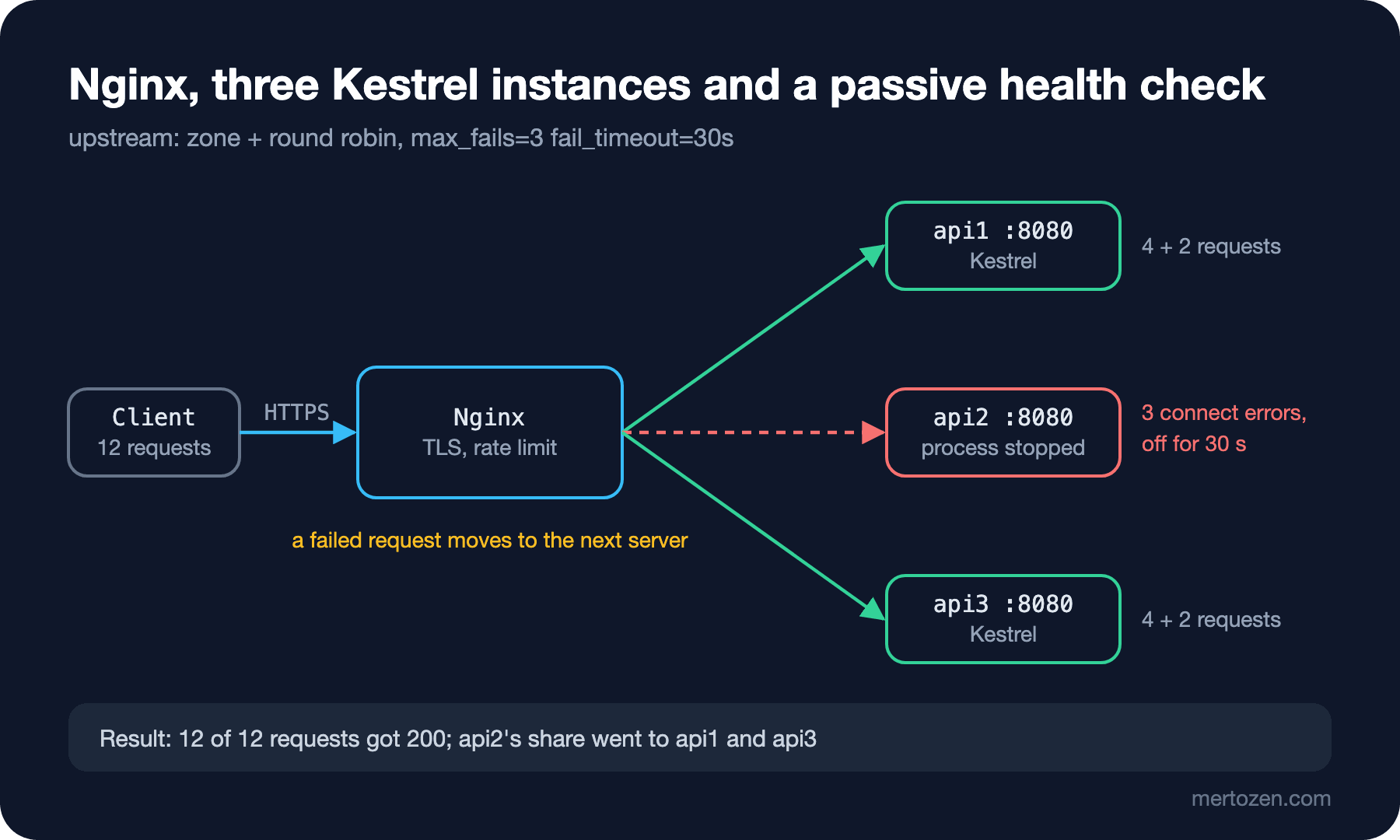
all healthy:            4 200 api1       4 200 api2       4 200 api3
api2 down:              6 200 api1       6 200 api3
again (in 30s):         6 200 api1       6 200 api3

[error] 21#21: *26 connect() failed (111: Connection refused) while connecting to upstream ... upstream: "http://172.30.85.22:8080/api/whoami", host: "bookstore.test"
[error] 21#21: *30 connect() failed (111: Connection refused) while connecting to upstream ... upstream: "http://172.30.85.22:8080/api/whoami", host: "bookstore.test"
[error] 21#21: *34 connect() failed (111: Connection refused) while connecting to upstream ... upstream: "http://172.30.85.22:8080/api/whoami", host: "bookstore.test"
[warn] 21#21: *34 upstream server temporarily disabled while connecting to upstream ... upstream: "http://172.30.85.22:8080/api/whoami", host: "bookstore.test"
The client didn't see a single error. The three requests that went to api2 got connection errors, but thanks to the default of proxy_next_upstream (error timeout) Nginx resent each to the next instance. On the third error max_fails=3 was reached and api2 was taken out for fail_timeout=30s; when that time is up Nginx will try a request on it again.
This is a "passive" health check: Nginx learns only from real requests and sends no check requests of its own. That has two consequences. First, retrying is safe only for idempotent requests: by default Nginx doesn't resend non-idempotent requests such as POST to another instance once they've been sent upstream, and changing that setting can mean duplicate orders. Second, if the process is up but unhealthy (it can't reach the database, it answers every request with 500), Nginx doesn't count that as a connection error. Active health checks, calling /health at intervals and taking unhealthy instances out, don't exist in open-source Nginx; for that you need to wire the readiness endpoint from the "Health Check" post of the ASP.NET Core Web API series to an orchestrator or a load balancer that does active checks. To take an instance out in a controlled way during a deploy, look at the server ... drain parameter that came with 1.29.6.
In Production
Put TLS settings and security headers in separate files and include them; every new server block should get the same settings. Searching the nginx -T output for ssl_protocols and add_header quickly shows whether a server was skipped.
Don't make the rate limit strict on day one. Start with limit_req_dry_run on; to log only, look at the distribution of real traffic, then set the threshold. Define a separate, stricter zone for endpoints such as login and password reset.
Don't rely on Nginx's passive check when deploying upstream instances. Before stopping Kestrel, cut the traffic (mark the instance with drain or remove it from the upstream and reload), let open requests finish, then stop it. The Kestrel side of graceful shutdown is in the next post, with systemd.
Common Pitfalls
Adding a single add_header to a location and losing the security headers. Fix it with add_header_inherit merge or an include; verify with a curl test.
Sending HSTS from both Nginx and the app. Two headers, two durations, and it's unclear which one applies.
Not using a zone in an upstream with several servers. Round robin spreads unevenly and the health check state isn't shared between workers.
Rate limiting by $binary_remote_addr behind a CDN or load balancer. All traffic seems to come from a few IPs and everyone gets a 429 on the first campaign.
Turning on HTTP/3 and not updating Nginx. The QUIC code is the source of a large share of 2026's CVE list.
A Small Experiment
★☆☆ Move server_tokens off; to the http context and look at the 301 response on port 80 and at the 404 error page of a non-existent page. Does the version still show up anywhere?
★★☆ Add an endpoint that accepts POST on /api/orders, set api2 up to wait 5 seconds when a request arrives and then kill its process, and send a POST. Does Nginx resend the request to another instance? What changes when you add proxy_next_upstream non_idempotent, and why is it dangerous?
★★★ Define a separate zone of 10 requests per minute for the login endpoint, put a second Nginx in front to simulate a CDN, and verify with set_real_ip_from and real_ip_header X-Forwarded-For that the limit is applied per real client IP.
Nginx now terminates TLS, sets the headers, limits traffic and spreads it across three Kestrels. But who starts those Kestrels, who brings them back when they crash, how are they stopped during a deploy? In the next post we run the .NET app as a systemd service on Linux.