

How Frameworks Map to the Patterns: Is Angular MVC or MVVM? React, Blazor, WPF and ASP.NET Core

Angular is neither classic MVC nor pure MVVM: the component class carries view state and view logic like a ViewModel, the template binds to it, and signals derive the UI from state the way React does. We write and run the same order form with React, Blazor and Razor Pages as well, and show how to read frameworks with three questions (where does state live, how does it sync, can you test without the view) instead of labels.
Version note: The examples in this post were tested with Angular 22 and TypeScript, and the comparison examples with .NET 10.
Guess First
Almost everyone learning Angular asks this question at some point: "Is Angular MVC (Model-View-Controller) or MVVM (Model-View-ViewModel)?" The answers on forums fall into three groups. One group says "MVC; services are the model, the template is the view, the component is the controller." Another says "MVVM; the component class is the ViewModel, the template is the view." The third says "neither, it is component-based."
Ask the same question for five frameworks: Angular, React, Blazor, WPF (Windows Presentation Foundation) and ASP.NET Core MVC. Write down the label in your head for each. Then step back and ask: if one of these labels turned out to be wrong, what would you do differently in the code you write? The claim of this post is that the answer is usually "nothing", but the answers to the three questions behind the label change everything.
Why the Label Is Confusing
In the previous posts we saw that even the word MVC describes two different flows: Smalltalk's MVC, where the view observes the model, and Web MVC, rendered once per request. MVVM and Presentation Model are two names for the same idea. MVP (Model-View-Presenter) itself was split by Fowler into Passive View and Supervising Controller. Pattern names are not categories with sharp borders but a family resemblance.
Frameworks also used these labels in different eras for different purposes. In the early years of AngularJS the community got so buried in the "MVC or MVVM?" debate that Igor Minar from the team declared AngularJS an MVW (Model-View-Whatever) framework in 2012, where "Whatever" means "whatever works for you". His reasoning was that he would rather see developers build well-designed applications that follow separation of concerns than argue about labels such as MVC, MVP and MVVM. This post reaches the same conclusion, but wants to get there with a tool.
Reading a Framework with Three Questions
The common thread of the first four posts was three questions. When you look at a framework, drop the label and ask these:
- Where do view state and view logic live? In an event handler, a presenter, a ViewModel, a component, or an object created per request?
- How does the view stay in sync with state? Through Observer, through the presenter's explicit calls, through binding, through re-rendering when state changes, or through rendering from scratch on every request?
- Can you test presentation logic without the view? Does the test need a DOM (Document Object Model), a browser or a UI (User Interface) thread?
The answers to these three questions say much more than a pattern name: where to write the code, where to look for bugs and how to set up the test.
Angular: A Component Like a ViewModel, a UI Derived Through Signals
Let's read the OrderForm component from the fourth post with the three questions. View state and view logic live in the component class: the quantityText and saving signals are view state, the total, error and canPlaceOrder computeds are view logic, the placeOrder method is the command. Template bindings do the synchronization; when a signal changes Angular re-evaluates the relevant template, and thanks to the OnPush strategy that is the default in Angular 22 only the affected components are checked. For the test we created the component with TestBed.createComponent and read the signals without looking at the DOM.
These answers place Angular in the Presentation Model and MVVM family: the component class does not know the view, the template binds to it. But there are two differences. First, an Angular component is also a unit of composition: part of a tree with its own inputs, outputs and child components. A WPF ViewModel has no such role. Second, with signals Angular's synchronization moved from a "you raise the notification" model to a "the framework tracks the dependency" model; this is close to React's "the UI derives from state" approach. The old form of change detection is in the "Change Detection and Zone.js in Angular: OnPush, ChangeDetectorRef and NgZone" post of the Angular series, the new defaults in "Angular 22: OnPush by Default, Stable Signal Forms and a File-by-File Comparison with Angular 12".
And the "services are the model" claim? Partly true. The OrderApi service from the fourth post is the Angular gateway to the model side, that is, the domain and data access. But in Angular services do other jobs too: state services that hold view state shared by several components are really part of the ViewModel. Separating which service belongs to which role is the topic of the seventh and ninth posts of the series. The short answer: Angular is not MVC, because there is neither a controller interpreting input nor a controller receiving requests. It is very close to MVVM, but with the component tree and signals it is more than that.
React and Blazor: UI = f(state)
React
React does not introduce itself with a pattern name. Its documentation describes the approach as declarative UI: instead of turning elements on and off one by one, you describe the states the component can be in and React brings the screen to that state. In the community this is usually summarized as UI = f(state). The same order form, with React 19.3:
import { useState } from 'react';
import { catalog, parseQuantity, priceOrder } from '../domain/pricing';

export function OrderForm() {
  const [bookId, setBookId] = useState(1);
  const [quantityText, setQuantityText] = useState('1');

  // recomputed from state on every render: UI = f(state)
  const check = parseQuantity(quantityText);
  const book = catalog.find(b => b.id === bookId)!;
  const summary = check.ok ? `Total: ${priceOrder(book, check.quantity).toFixed(2)}` : check.error;

  return (
    <form>
      <select value={bookId} onChange={e => setBookId(Number(e.target.value))}>
        {catalog.map(b => <option key={b.id} value={b.id}>{b.title}</option>)}
      </select>
      <input value={quantityText} onChange={e => setQuantityText(e.target.value)} />
      <p>{summary}</p>
      <button type="button" disabled={!check.ok}>Place order</button>
    </form>
  );
}
✓ src/p05/OrderForm.spec.tsx > React re-renders the form from state 9ms
Test Files 1 passed (1)
Tests 1 passed (1)Three questions: view state lives in useState hooks, and view logic is plain code that runs again on every render. There is no separate ViewModel; the component function carries both the view and the view logic. Synchronization is re-rendering: when state changes the function runs from the top, and React compares the new result with the previous one and applies only the difference to the DOM. Testing goes through the DOM unless you extracted the view logic separately; that is why the test needed the input's native setter and act. When the logic grows, the answer in the React world is to move it into custom hooks or plain functions such as pricing.ts; in other words, to rebuild Separated Presentation from inside the framework.
Blazor
Blazor builds the same component model with C#. Markup and the @code block sit in the same file:
@using System.Globalization

<select @bind="BookId">
    @foreach (Book book in Catalog.Books)
    {
        <option value="@book.Id">@book.Title</option>
    }
</select>
<input @bind="QuantityText" @bind:event="oninput" />
<p>@Summary</p>
<button disabled="@(!IsValid)" @onclick="PlaceOrder">Place order</button>

@code {
    [Parameter] public string InitialQuantity { get; set; } = "1";

    private int BookId { get; set; } = 1;
    private string QuantityText { get; set; } = "1";

    private bool IsValid => int.TryParse(QuantityText, out int quantity) && quantity is >= 1 and <= 10;

    private string Summary => IsValid
        ? string.Create(CultureInfo.InvariantCulture,
            $"Total: {Pricing.PriceOrder(Catalog.Books.Single(b => b.Id == BookId), int.Parse(QuantityText)):0.00}")
        : "Quantity must be between 1 and 10";

    protected override void OnInitialized() => QuantityText = InitialQuantity;

    private void PlaceOrder()
    {
        // a real app would call an injected service
    }
}
We can render the component from a console, without a browser, using the HtmlRenderer available since .NET 8:
using Bookstore.Blazor;
using Microsoft.AspNetCore.Components;
using Microsoft.AspNetCore.Components.Web;
using Microsoft.AspNetCore.Components.Web.HtmlRendering;
using Microsoft.Extensions.DependencyInjection;
using Microsoft.Extensions.Logging;

await using ServiceProvider services = new ServiceCollection().AddLogging().BuildServiceProvider();
await using HtmlRenderer renderer = new(services, services.GetRequiredService<ILoggerFactory>());

foreach (string quantity in new[] { "3", "abc" })
{
    string html = await renderer.Dispatcher.InvokeAsync(async () =>
    {
        ParameterView parameters = ParameterView.FromDictionary(
            new Dictionary<string, object?> { [nameof(OrderForm.InitialQuantity)] = quantity });
        HtmlRootComponent root = await renderer.RenderComponentAsync<OrderForm>(parameters);
        return root.ToHtmlString();
    });
    Console.WriteLine(html);
}
<select value="1"><option value="1" selected>The Hobbit</option><option value="2">Emma</option></select>
<input value="3" />
<p>Total: 37.80</p>
<button>Place order</button>
<select value="1"><option value="1" selected>The Hobbit</option><option value="2">Emma</option></select>
<input value="abc" />
<p>Quantity must be between 1 and 10</p>
<button disabled>Place order</button>Three questions: view state lives in the properties inside @code, view logic in computed properties (IsValid, Summary). Synchronization resembles React: after an event handler runs, Blazor re-renders the component, compares render trees and applies only the difference. @bind looks like a short form of WPF's two-way binding, but there is no INotifyPropertyChanged behind it; it writes the value and triggers a re-render. For tests you look at the render output with HtmlRenderer or a library such as bUnit; if the logic is extracted into a separate class, you test that with a plain unit test.
WPF and .NET MAUI: Textbook MVVM
WPF and .NET MAUI (Multi-platform App UI) are the only example in this list where name and implementation match one to one. The OrderFormViewModel from the fourth post does not know the view, XAML (Extensible Application Markup Language) binds to it, INotifyPropertyChanged and ICommand carry the synchronization, and we tested the ViewModel from a console application on macOS, without WPF. The answers to the three questions fit the description of Presentation Model exactly. That is why, when looking for an example of "what is MVVM?", looking at WPF is less confusing than looking at Angular.
ASP.NET Core MVC and Razor Pages: Web MVC and the Page Model
We saw ASP.NET Core MVC in the second post: Web MVC. View state lives in a view model that lasts for the request, synchronization is rendering from scratch on every request, and the testability of view logic depends on how far you move it out of the controller and Razor.
Razor Pages is a page-focused face of the same infrastructure. Microsoft's documentation describes it as easier and more productive than controllers and views for page-focused scenarios, and says the PageModel class separates a page's logic from its presentation. The same form with Razor Pages:
using Bookstore.Web.Domain;
using Bookstore.Web.Models;
using Microsoft.AspNetCore.Mvc;
using Microsoft.AspNetCore.Mvc.RazorPages;

namespace Bookstore.Web.Pages.Orders;

public sealed class QuickModel : PageModel
{
    [BindProperty]
    public OrderForm Form { get; set; } = new();

    public OrderSummary? Summary { get; private set; }

    public void OnGet()
    {
    }

    public IActionResult OnPost()
    {
        if (!ModelState.IsValid)
        {
            return Page();
        }

        Book book = Catalog.Books.Single(b => b.Id == Form.BookId);
        Summary = new(book.Title, Form.Quantity, Pricing.PriceOrder(book, Form.Quantity));
        return Page();
    }
}
@page
@model Bookstore.Web.Pages.Orders.QuickModel
@{ Layout = null; }
@if (Model.Summary is { } summary)
{
<p>Total: @summary.Total.ToString("0.00", CultureInfo.InvariantCulture)</p>
}
<form method="post">
<input asp-for="Form.Quantity" />
<span asp-validation-for="Form.Quantity"></span>
<button type="submit">Place order</button>
</form>$ curl -s -b jar.txt -d "Form.BookId=2&Form.Quantity=4&__RequestVerificationToken=$TOKEN" http://localhost:5391/Orders/Quick | head -2
<p>Total: 34.20</p>
<form method="post">
$ curl -s -o /dev/null -w "%{http_code}\n" -d "Form.Quantity=4" http://localhost:5391/Orders/Quick
400QuickModel is two things at once: a controller receiving the request (the OnGet and OnPost handlers) and a view model the view reads (Form, bound with [BindProperty], and Summary, going to the view). In PoEAA (Patterns of Enterprise Application Architecture, Martin Fowler, 2002) terms this is a Page Controller. Antiforgery validation is on by default in Razor Pages, which is why the request without a token returns 400. Some authors liken PageModel to a ViewModel and call Razor Pages MVVM; but binding runs once per request and afterwards no live link remains between view and model. The answer to the synchronization question is the same as for Web MVC.
All Together
| Framework | View state and view logic | Synchronization | Closest family |
|---|---|---|---|
| ASP.NET Core MVC | Controller action and a per-request view model | Render on every request | Web MVC |
| Razor Pages | PageModel handlers and bound properties | Render on every request | Web MVC, Page Controller |
| WPF, .NET MAUI | ViewModel | Binding and INotifyPropertyChanged | MVVM |
| AngularJS | $scope and the controller function | Two-way binding, dirty checking | MVVM ("MVW") |
| Angular | Component class: signals and computeds | Template binding, re-evaluation through signals | Between MVVM and component |
| React | Component function and hook state | Re-render when state changes | Component, UI = f(state) |
| Blazor | The @code block | Re-render after events, render tree diff | Component, UI = f(state) |
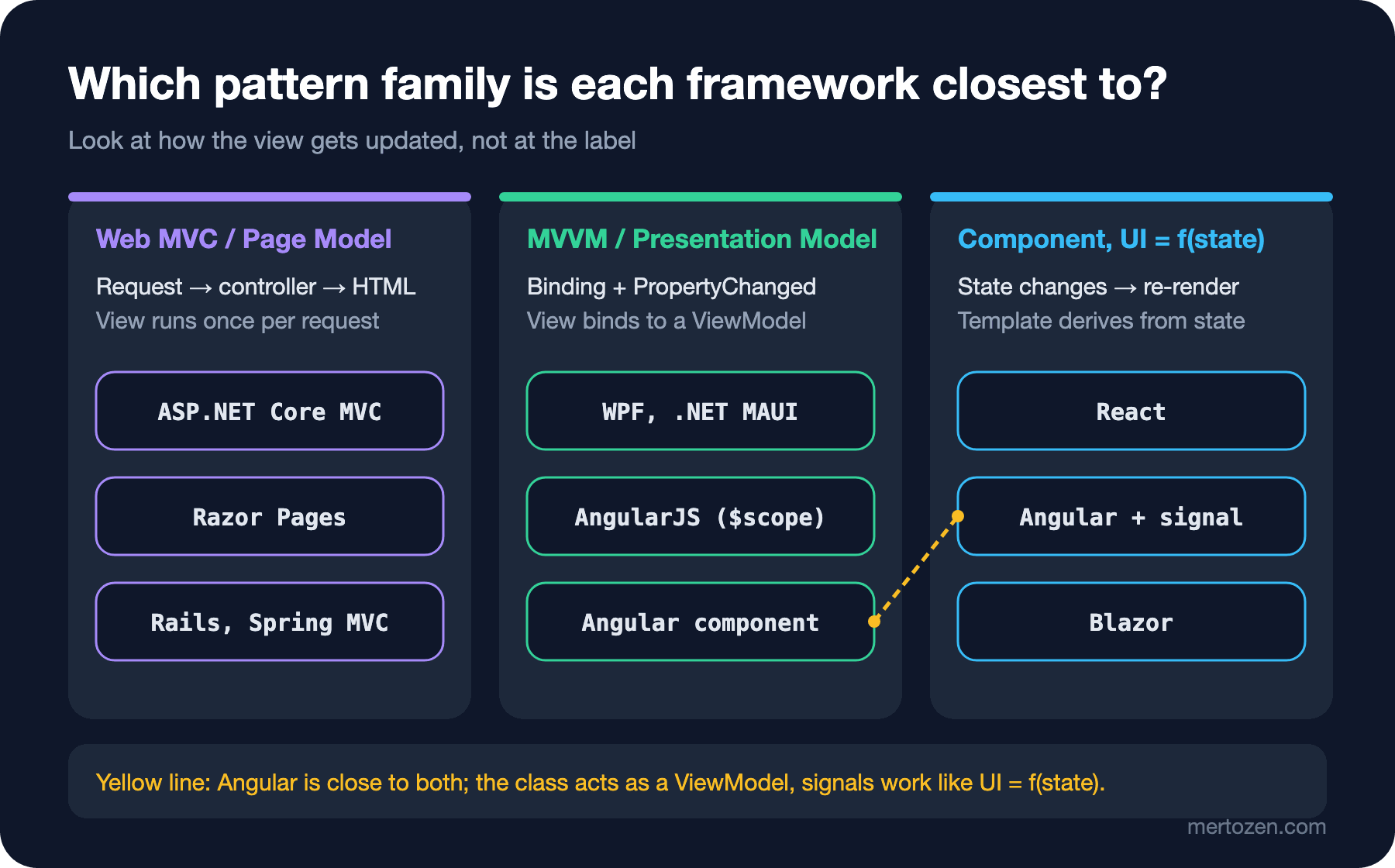
The figure and the table say the same thing: what decides the "closest family" column is the synchronization column. If the view runs once per request, you are in the Web MVC family; if the view is bound to a long-lived object, you are in the MVVM family; if the view is derived from state every time, you are in the component family. Angular sitting between the second and third families in the table is not indecision but the result of it actually changing direction with signals over the last few releases.
Common Pitfalls
Deriving rules from the label. Thinking "Angular is MVC, so logic goes into the controller, that is, the component" and writing domain rules into the component means rebuilding the Smart UI from the first post in a new framework. Whichever label you pick, the domain rule should live somewhere unaware of the framework, like pricing.ts.
Forcing another framework's pattern in. A team coming from WPF setting up a separate ...ViewModel class and a hand-written PropertyChanged event next to every Angular component is a common sight. In Angular the component class already plays that role and signals do the notification automatically; a second layer only adds indirection.
Thinking of Razor Pages as "MVC for small projects". Both use the same infrastructure (routing, model binding, validation, filters); the difference is not scale but organization: Razor Pages groups by page, MVC by controller. A large application can be written perfectly well with Razor Pages and a small one with MVC.
Leaving everything in the component in React. Because the framework takes over synchronization, the pressure to separate view logic is felt less; the result is large components for which you set up a DOM every time you test. You still have to build Separated Presentation yourself with custom hooks or plain functions.
When the Label Matters and When It Does Not
The label is useful as a shared vocabulary within a team. The sentence "this screen's ViewModel is bloated" is understood in an Angular team as well as in a WPF team. When learning a framework, saying "this looks like the X I know" also speeds up learning; someone coming from WPF gets a long way by thinking of an Angular component as a ViewModel.
As a decision tool, however, the label does not help. The answers to "where does this code go?", "where do I look for this bug?" and "how do I test this?" are not in the label but in the three questions above. If you get "Is Angular MVC or MVVM?" in an interview, a good answer is not to pick a label but to answer these three questions for Angular.
A Small Experiment
★☆☆ Answer the three questions for a screen in your own project. Do the answers match the row of your framework in the table? If not, where does the difference come from?
★★☆ Move the view logic of the React version into a useOrderForm custom hook and test the hook without the DOM. How much does the resulting hook resemble the Angular component class from the fourth post?
★★★ Extract the IsValid and Summary logic of the Blazor component into a separate OrderFormState class and rewrite both the Blazor component and the WPF ViewModel from the fourth post to use the same class. Which parts stayed shared, and which are framework-specific?
Block A ends here: we went from the Separated Presentation idea to MVC, MVP and MVVM, and from there to today's frameworks. Block B starts with the next post, where we move to Flux and unidirectional data flow with the question of why two-way binding did not scale in large applications.