

Why UI Architecture Patterns Exist: Separated Presentation and a Short History from MVC to Signals

UI architecture patterns exist to solve one problem: when screen code and domain logic are tangled, neither can be changed or tested. In this post we move the Bookstore order form from a Smart UI with all logic in event handlers to Separated Presentation, separate view state from domain state, and walk the history from MVC to signals together with the problem each pattern solved.
Version note: The examples in this post were tested with Angular 22 and TypeScript.
Guess First
The Bookstore web front end needs a small order form: pick a book, type a quantity, see the total, place the order. The rule is simple: the quantity must be a whole number between 1 and 10, and 3 or more copies get 10 percent off. Here is the first version, written in plain TypeScript and the DOM (Document Object Model), no framework:
const books = [
  { id: 1, title: 'The Hobbit', price: 14.0 },
  { id: 2, title: 'Emma', price: 9.5 },
];

export function mountOrderForm(root: HTMLElement): void {
  root.innerHTML = `
    <select id="book">
      ${books.map(b => `<option value="${b.id}">${b.title}</option>`).join('')}
    </select>
    <input id="quantity" value="1">
    <p id="total"></p>
    <p id="error"></p>
    <button id="place-order">Place order</button>`;

  const bookSelect = root.querySelector<HTMLSelectElement>('#book')!;
  const quantityInput = root.querySelector<HTMLInputElement>('#quantity')!;
  const totalLabel = root.querySelector<HTMLElement>('#total')!;
  const errorLabel = root.querySelector<HTMLElement>('#error')!;
  const placeButton = root.querySelector<HTMLButtonElement>('#place-order')!;

  const refresh = () => {
    const book = books.find(b => b.id === Number(bookSelect.value))!;
    const quantity = Number(quantityInput.value);
    if (!Number.isInteger(quantity) || quantity < 1 || quantity > 10) {
      errorLabel.textContent = 'Quantity must be between 1 and 10';
      totalLabel.textContent = '';
      placeButton.disabled = true;
      return;
    }
    let total = book.price * quantity;
    if (quantity >= 3) total = total * 0.9; // 10% off from 3 copies
    errorLabel.textContent = '';
    totalLabel.textContent = `Total: ${total.toFixed(2)}`;
    placeButton.disabled = false;
  };

  bookSelect.addEventListener('change', refresh);
  quantityInput.addEventListener('input', refresh);
  placeButton.addEventListener('click', async () => {
    placeButton.disabled = true;
    const response = await fetch('/api/orders', {
      method: 'POST',
      headers: { 'Content-Type': 'application/json' },
      body: JSON.stringify({ bookId: Number(bookSelect.value), quantity: Number(quantityInput.value) }),
    });
    totalLabel.textContent = response.ok ? 'Order placed' : 'Something went wrong';
  });

  refresh();
}
It works. Pick The Hobbit, type 3 and the screen shows "Total: 37.80"; type "abc" and the button turns off. Now two questions. First: if you wanted to test the "10 percent off for 3 books" rule, what would the test need? Second: tomorrow the cart page has to show the same discount. Where will that rule come from?
Smart UI: Everything in the Event Handler
The code above has a name. In his DDD (Domain-Driven Design) book (2003), Eric Evans calls it Smart UI (UI: User Interface) and deliberately puts "anti-pattern" in quotes: business rules are written into the screen, each screen carrying its own copy. In Martin Fowler's "GUI Architectures" essay (2006, GUI: Graphical User Interface) the equivalent is Forms and Controls: the model of the 1990s Visual Basic, Delphi and PowerBuilder tools, where you draw a form and write code in the events of its controls. It was the fastest way to build a desktop application, and for a small screen it still is.
The answer to the first question is what the test needs. The rule lives inside the refresh callback, between strings read from DOM elements. To test it you have to actually mount the form, write into the input, fire an event and read the result from a paragraph's textContent:
import { expect, test } from 'vitest';
import { mountOrderForm } from './order-form.smart';

test('3 copies of The Hobbit get 10% off', () => {
  const root = document.createElement('div');
  mountOrderForm(root);

  const quantity = root.querySelector<HTMLInputElement>('#quantity')!;
  quantity.value = '3';
  quantity.dispatchEvent(new Event('input'));

  expect(root.querySelector('#total')!.textContent).toBe('Total: 37.80');
});
Vitest runs this test on jsdom and it passes. But half the test is DOM setup and the other half is selectors. The rule itself is one line; to verify it you have to know the #quantity and #total ids, the event type and the text format. When the designer changes "Total" to "Order total", the discount rule's test breaks.
Why It Does Not Scale
When Fowler describes Forms and Controls he talks about three copies of the same data. Record state is the persistent record in the database. Session state is the working copy the application keeps in memory. Screen state is the value held inside the controls: the text in an input, the selected option of a select. In a Smart UI the second copy is barely there. The quantity never lives anywhere as a number; its only source of truth is the quantityInput.value string, parsed again on every event.
As the number of screens grows, this structure cracks in three places. The first is duplication: the cart page, the order summary and the email template all have to compute the same discount, and each copies the rule into its own event handler. When the rule becomes "15 percent off from 5 copies", nobody knows how many places will change. The second is testing: the only way to verify the rule is to mount the screen, so tests are either never written or break with every design change. The third is change: when you want to move the screen to Angular, you have to pick the logic out of the DOM code with tweezers, because both sit in the same function.
Note that the problem is not badly written code. The code is readable, short and works. The problem is two things that change at different speeds living in the same place: the screen design changes every sprint, the pricing rule changes once a year, but when it does it must change everywhere at once.
Separated Presentation: The First and Most Important Split
Fowler calls this split Separated Presentation: keep the code that models the domain clearly apart from the code that manages the screen, and keep the domain code completely unaware of the presentation code. The dependency goes one way: the screen knows the domain, the domain does not know the screen. It is the oldest and most useful application in UI code of the Separation of Concerns you saw in the "Lesser-Known Principles" post of the SOLID (Robert C. Martin's five design principles, named by their initials) and Design Principles series.
For the order form, the first step is to move the rules into a module that knows nothing about the DOM:
export interface Book {
  readonly id: number;
  readonly title: string;
  readonly price: number;
}

export const catalog: readonly Book[] = [
  { id: 1, title: 'The Hobbit', price: 14.0 },
  { id: 2, title: 'Emma', price: 9.5 },
];

export type QuantityCheck =
  | { ok: true; quantity: number }
  | { ok: false; error: string };

export function parseQuantity(text: string): QuantityCheck {
  const quantity = Number(text);
  if (!Number.isInteger(quantity) || quantity < 1 || quantity > 10) {
    return { ok: false, error: 'Quantity must be between 1 and 10' };
  }
  return { ok: true, quantity };
}

export function priceOrder(book: Book, quantity: number): number {
  const subtotal = book.price * quantity;
  return quantity >= 3 ? subtotal * 0.9 : subtotal; // 10% off from 3 copies
}
parseQuantity returns a discriminated union, the pattern from the "Union and Literal Types in TypeScript: One Value, Several Possibilities" post in the TypeScript series. Now the test never touches the DOM:
import { describe, expect, it } from 'vitest';
import { catalog, parseQuantity, priceOrder } from './pricing';

const hobbit = catalog[0];

describe('priceOrder', () => {
  it('charges full price below 3 copies', () => {
    expect(priceOrder(hobbit, 2)).toBe(28);
  });

  it('gives 10% off from 3 copies', () => {
    expect(priceOrder(hobbit, 3)).toBeCloseTo(37.8);
  });
});

describe('parseQuantity', () => {
  it.each(['0', '11', '2.5', 'abc', ''])('rejects %j', text => {
    expect(parseQuantity(text).ok).toBe(false);
  });
});
✓ src/domain/pricing.spec.ts > priceOrder > charges full price below 3 copies 0ms
✓ src/domain/pricing.spec.ts > priceOrder > gives 10% off from 3 copies 0ms
✓ src/domain/pricing.spec.ts > parseQuantity > rejects "0" 0ms
✓ src/domain/pricing.spec.ts > parseQuantity > rejects "11" 0ms
✓ src/domain/pricing.spec.ts > parseQuantity > rejects "2.5" 0ms
✓ src/domain/pricing.spec.ts > parseQuantity > rejects "abc" 0ms
✓ src/domain/pricing.spec.ts > parseQuantity > rejects "" 0ms
Test Files 1 passed (1)
Tests 7 passed (7)The cart page and the email template now get the rule from the same function. That also answers the second question.
View State and Domain State Are Not the Same
When teams apply Separated Presentation, the same question comes up: "So where does the error message go? Where does the button's enabled or disabled flag live?" These do not belong to the domain. What the domain has to know is the rule "an order quantity must be between 1 and 10"; the fact that the user has typed "ab" into the input right now, that the error shows in red, or that the button locks while the order is being saved is the state of the screen.
So it helps to split the split. Domain state: book, price, quantity, discounted total; meaningful even without a screen. View state: the raw text in the input, the selected tab, the "saving" flag, whether a field has been touched; meaningful only while the screen is open. View logic is the decisions derived from view state: "disable the button if the quantity is invalid", "block double clicks while saving".
The first step in this post separated domain state and domain rules, but view state and view logic are still in the event handler. Almost every pattern in the rest of the series gives a different answer to exactly this question: who carries the view logic, and how does it stay in sync with the view? MVC (Model-View-Controller) largely leaves the question open, MVP (Model-View-Presenter) hands it to the presenter, MVVM (Model-View-ViewModel) hands it to the ViewModel.
Humble View: Make the Hard-to-Test Part Dumb
The second idea is about testability. In 2002 Michael Feathers proposed in "The Humble Dialog Box": leave the object that is hard to test (back then a dialog window) with as little behavior as possible, and move the logic into an object you can test. Gerard Meszaros generalized this in his book xUnit Test Patterns under the name Humble Object; in the UI context Fowler calls it Humble View.
Applied to the order form, the refresh callback becomes:
  const refresh = () => {
    const book = catalog.find(b => b.id === Number(bookSelect.value))!;
    const check = parseQuantity(quantityInput.value);
    errorLabel.textContent = check.ok ? '' : check.error;
    totalLabel.textContent = check.ok ? `Total: ${priceOrder(book, check.quantity).toFixed(2)}` : '';
    placeButton.disabled = !check.ok;
  };
The event handler is still there, but it no longer decides anything; it reads, asks the domain function, writes the result to the screen. The untested part got smaller and mechanical. That is half of Humble View. The other half is moving view logic such as "when does the button turn off" out of the screen as well; we finish that with the MVP presenter in the third post.
A Short History: From Smalltalk to Signals
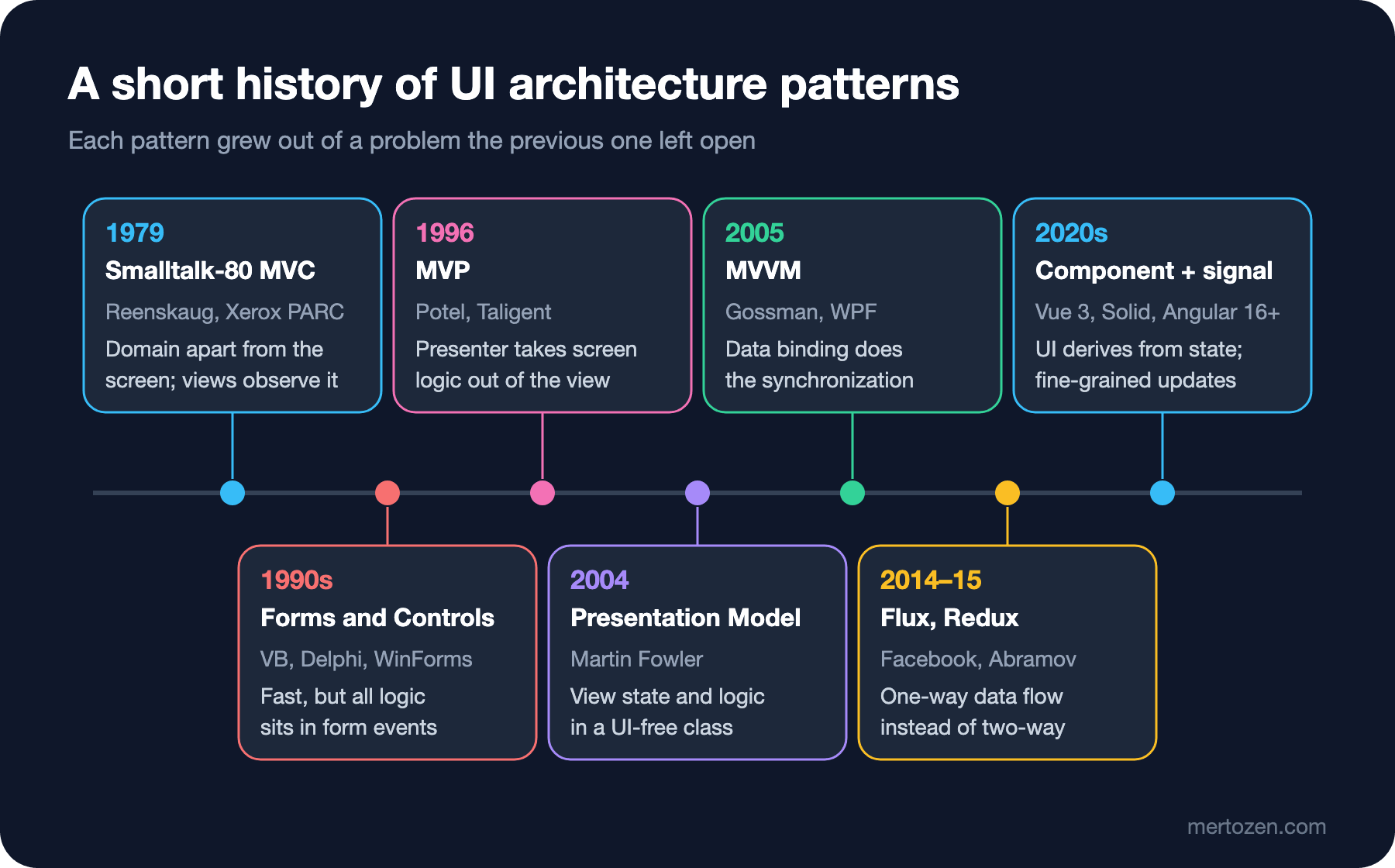
None of these ideas is new, and their order tells a story. In 1978–79, as a visiting researcher at Xerox PARC (Palo Alto Research Center), Trygve Reenskaug described MVC for Smalltalk; in his 1979 notes its first name was Thing-Model-View-Editor. Smalltalk-80 shipped with an evolved version of the idea: the model knew nothing about the screen, views observed the model, and the controller interpreted the user's keyboard and mouse actions. Separated Presentation was born here.
In the 1990s desktop tools went another way: dragging controls onto a form and writing code in their events with Visual Basic and Delphi was fast, and Forms and Controls became almost the standard. In 1996 Taligent's CTO (Chief Technology Officer) Mike Potel generalized Smalltalk MVC in his MVP paper; the presenter replaced the controller and took over the screen logic. In 2000 the Dolphin Smalltalk team made MVP the basis of their UI framework.
In 2004 Fowler wrote up Presentation Model: keep the state and behavior of the view in a class independent of the controls on the screen. A year later, in October 2005, John Gossman at Microsoft built the same idea on data binding for WPF (Windows Presentation Foundation) and announced it as MVVM. In 2014 Facebook introduced Flux as an answer to the side effects of two-way binding in large applications; Redux, released by Dan Abramov in 2015, made one-way data flow mainstream. Today frameworks such as Angular, Vue and Solid derive the UI from state and use signals to update only the part that changed; on the Angular side this started with the "What's New in Angular 16: Signals, Required Inputs and takeUntilDestroyed" post of the Angular series.
Each stop tries to solve a problem the previous one left behind: MVC separated the domain from the screen but left no room for view state; MVP and Presentation Model moved view logic to a testable place; MVVM handed the synchronization code to the framework; Flux turned the data flow that binding had tangled into one direction. The series follows the same order: MVC in the second post, MVP in the third, MVVM in the fourth and the "Is Angular MVC or MVVM?" question in the fifth.
Common Pitfalls
Mistaking Separated Presentation for a folder split. Creating components/ and services/ folders and cutting the same code in two does not change the direction of dependencies. The test is simple: does the domain module import anything from the DOM, Angular or HTTP (Hypertext Transfer Protocol)? If it does, there is no separation.
Pushing view state into the domain. Putting the error message text or a "saving" flag into the Order class ties the domain to the screen. The domain says "the quantity is invalid"; in which language and in which color that is shown is the screen's job.
Shaping the domain to fit the screen. Making priceOrder return a string because the screen needs two decimals locks the domain to one view. Formatting stays on the presentation side.
Doing money math in floating point and testing it with toBe. That is why I used toBeCloseTo in the test; with toBe(37.8) the real output is:
 FAIL  src/domain/pricing.spec.ts > priceOrder > gives 10% off from 3 copies
AssertionError: expected 37.800000000000004 to be 37.8 // Object.is equality

- Expected
+ Received

- 37.8
+ 37.800000000000004
Because the example rounds with toFixed(2) on screen, the user never sees the difference, but in a real system you compute amounts as integer cents or as decimal on the server; since the topic of the series is patterns, I will keep this simplification throughout.
When Not to Use It
Not every screen needs Separated Presentation. A one-off admin screen, a prototype or a two-field search box lives perfectly well as a Smart UI; Evans also mentions Smart UI as a legitimate choice for simple, short-lived applications. The price of the split is extra files and indirection. If the rule is used in one place, is not expected to change and is cheap to get wrong, you do not have to pay that price.
But learn the signals: when the same calculation shows up on a second screen, when you want to write a test for a rule, or when the screen is about to change framework, it is time to split. You can split later; the transformation above took ten minutes. What is expensive is a five-year-old code base where the split never happened.
A Small Experiment
★☆☆ Give parseQuantity the text " 3 " (with spaces at both ends). Does it accept it? Does this behavior of Number() match your business rule? If not, write the test first, then fix it.
★★☆ Add a new condition to the rule: "no discount for Emma". Make the change once in the Smart UI version and once in the pricing.ts version. How many files and how many tests did you touch?
★★★ List every piece of information the form shows under three headings: record state, session state, screen state. Then mark which parts of the screen state are inputs to view logic; that list will become the presenter's interface in the third post.
In the next post we look at MVC itself: we build the original Smalltalk MVC in TypeScript with the same order form, then compare it with the Web MVC of ASP.NET Core MVC and see why the same three letters describe two different flows.