

Component Architecture: Container and Presentational Components, Composition and Contracts

A container component knows about data and side effects, while a presentational component only takes inputs and reports what happened through outputs; the split is not a strict rule but a thinking tool for testability and reuse. We split the Bookstore's product list into three components and show with real output how renaming an input causes NG8002/NG8008 errors, content projection, and how light a presentational test is.
Version note: The examples in this post were tested with Angular 22 and TypeScript.
Guess First
The Bookstore's product list page lists the books in the Catalog: a search box, an "in stock only" checkbox, a card for every book, a "Sold out" or "Only 3 left" label on the card and an add-to-cart button. The first version works and is quite short:
import { Component, computed, inject, signal } from '@angular/core';
import { CurrencyPipe } from '@angular/common';
import { HttpClient } from '@angular/common/http';
import { toSignal } from '@angular/core/rxjs-interop';
import type { Product } from '../product';

@Component({
    selector: 'app-product-list-page-before',
    imports: [CurrencyPipe],
    template: `
        <input placeholder="Search" (input)="query.set($any($event.target).value)" />
        <label><input type="checkbox" (change)="inStockOnly.set($any($event.target).checked)" /> In stock</label>
        @for (p of visible(); track p.id) {
            <article class="card">
                <h3>{{ p.title }}</h3>
                <p>{{ p.author }} · {{ p.price | currency: 'EUR' }}</p>
                @if (p.stock === 0) {
                    <span class="badge">Sold out</span>
                } @else if (p.stock < 5) {
                    <span class="badge">Only {{ p.stock }} left</span>
                }
                <button [disabled]="p.stock === 0" (click)="cartCount.set(cartCount() + 1)">Add to cart</button>
            </article>
        }
        <p>Cart: {{ cartCount() }}</p>
    `,
})
export class ProductListPageBefore {
    // Everything in one place: HTTP, filter, card, cart
    private readonly products = toSignal(inject(HttpClient).get<Product[]>('/api/products'), { initialValue: [] });
    protected readonly query = signal('');
    protected readonly inStockOnly = signal(false);
    protected readonly cartCount = signal(0);
    protected readonly visible = computed(() =>
        this.products().filter(p =>
            p.title.toLowerCase().includes(this.query().toLowerCase()) && (!this.inStockOnly() || p.stock > 0),
        ),
    );
}
Two questions. First: you want to test that the card of a sold-out book says "Sold out" and that its button is disabled. What do you need to set up to write that test? Second: you are asked to show the same card on the wishlist page with a "Remove" button instead of "Add to cart". How do you do that without copying the card's markup?
Container and Presentational: Where the Split Comes From
The answer to the first question is annoying: since the card is not a separate piece, testing a single label means testing the whole page. The HttpClient test infrastructure, a fake response to the /api/products request, then finding the right card in the DOM (Document Object Model). There is no good answer to the second question either; the card is the body of an @for inside the page's template.
The best-known answer to this pain is Dan Abramov's 2015 post "Presentational and Container Components". Abramov named the "smart" and "dumb" component split that was spreading in the React world like this: container components are concerned with how things work (they know where the data comes from and what happens to events), presentational components are concerned with how things look (they take data as inputs and report user interaction outward). The Angular community applied the same split one to one with inputs and outputs.
| Container | Presentational | |
|---|---|---|
| What it knows | Services, the store, route parameters, HTTP (Hypertext Transfer Protocol) | Only its inputs |
| What it tells the outside | Usually nothing; it is opened by a route | Outputs: it reports what happened |
| State | Owns the page's state or reads it from a service | At most its own UI (user interface) state (open, hovered) |
| Reuse | Rare; specific to one page or flow | Common; the same piece on different pages |
| Test | Needs providers and fake services | Give inputs, look at the DOM and the outputs |
An important note: in 2019 Abramov added an update to the top of his post saying he no longer suggests this split in this form, that in React the same separation can be achieved with hooks without splitting components, but that it can still be useful if it fits a codebase naturally. Read it as a thinking tool rather than a strict rule. The goal is not to put every component into one of two boxes; it is to keep the pieces that know about data and side effects few and well defined, and to write the rest as pieces that talk only through inputs and outputs, are easy to test and are reused. OrderForm and QuantityStepper in the previous post were in exactly this relationship.
Splitting the Page
We split the page into three components and one rules file. First the shared types:
export interface Product {
    readonly id: number;
    readonly title: string;
    readonly author: string;
    readonly price: number;
    readonly stock: number;
}

export interface ProductCriteria {
    readonly query: string;
    readonly inStockOnly: boolean;
}
The card now shows a single product only; it does not know about HTTP, the cart or the filter:
import { Component, computed, input } from '@angular/core';
import { CurrencyPipe } from '@angular/common';
import type { Product } from './product';
import { stockLabel } from './product-rules';

@Component({
    selector: 'app-product-card',
    imports: [CurrencyPipe],
    template: `
        <article class="card">
            <h3>{{ product().title }}</h3>
            <p>{{ product().author }} · {{ product().price | currency: 'EUR' }}</p>
            @if (label(); as text) {
                <span class="badge">{{ text }}</span>
            }
            <!-- Whoever uses the card decides on the buttons -->
            <ng-content select="[cardActions]" />
        </article>
    `,
})
export class ProductCard {
    readonly product = input.required<Product>();
    protected readonly label = computed(() => stockLabel(this.product().stock));
}
The filter takes the criteria as an input and reports a change as a new criteria object:
import { Component, input, output } from '@angular/core';
import type { ProductCriteria } from './product';

@Component({
    selector: 'app-product-filter',
    template: `
        <input placeholder="Search" [value]="criteria().query" (input)="changeQuery($event)" />
        <label>
            <input type="checkbox" [checked]="criteria().inStockOnly" (change)="toggleInStock($event)" />
            In stock
        </label>
    `,
})
export class ProductFilter {
    readonly criteria = input.required<ProductCriteria>();
    readonly criteriaChange = output<ProductCriteria>();

    protected changeQuery(event: Event): void {
        const query = (event.target as HTMLInputElement).value;
        this.criteriaChange.emit({ ...this.criteria(), query });
    }

    protected toggleInStock(event: Event): void {
        const inStockOnly = (event.target as HTMLInputElement).checked;
        this.criteriaChange.emit({ ...this.criteria(), inStockOnly });
    }
}
The container brings all the pieces together. It is the only component that knows where the data comes from (CatalogApi), what adding to the cart means (CartStore) and the state of the filter criteria:
import { Component, computed, inject, signal } from '@angular/core';
import { toSignal } from '@angular/core/rxjs-interop';
import { CartStore } from './cart-store';
import { CatalogApi } from './catalog-api';
import type { ProductCriteria } from './product';
import { ProductCard } from './product-card';
import { ProductFilter } from './product-filter';
import { filterProducts } from './product-rules';

@Component({
    selector: 'app-product-list-page',
    imports: [ProductCard, ProductFilter],
    template: `
        <app-product-filter [criteria]="criteria()" (criteriaChange)="criteria.set($event)" />
        @for (product of visible(); track product.id) {
            <app-product-card [product]="product">
                <button cardActions [disabled]="product.stock === 0" (click)="cart.add(product)">Add to cart</button>
            </app-product-card>
        }
        <p class="cart">Cart: {{ cart.count() }}</p>
    `,
})
export class ProductListPage {
    // Container: knows where the data comes from and what happens to events
    protected readonly cart = inject(CartStore);
    private readonly products = toSignal(inject(CatalogApi).getProducts(), { initialValue: [] });
    protected readonly criteria = signal<ProductCriteria>({ query: '', inStockOnly: false });
    protected readonly visible = computed(() => filterProducts(this.products(), this.criteria()));
}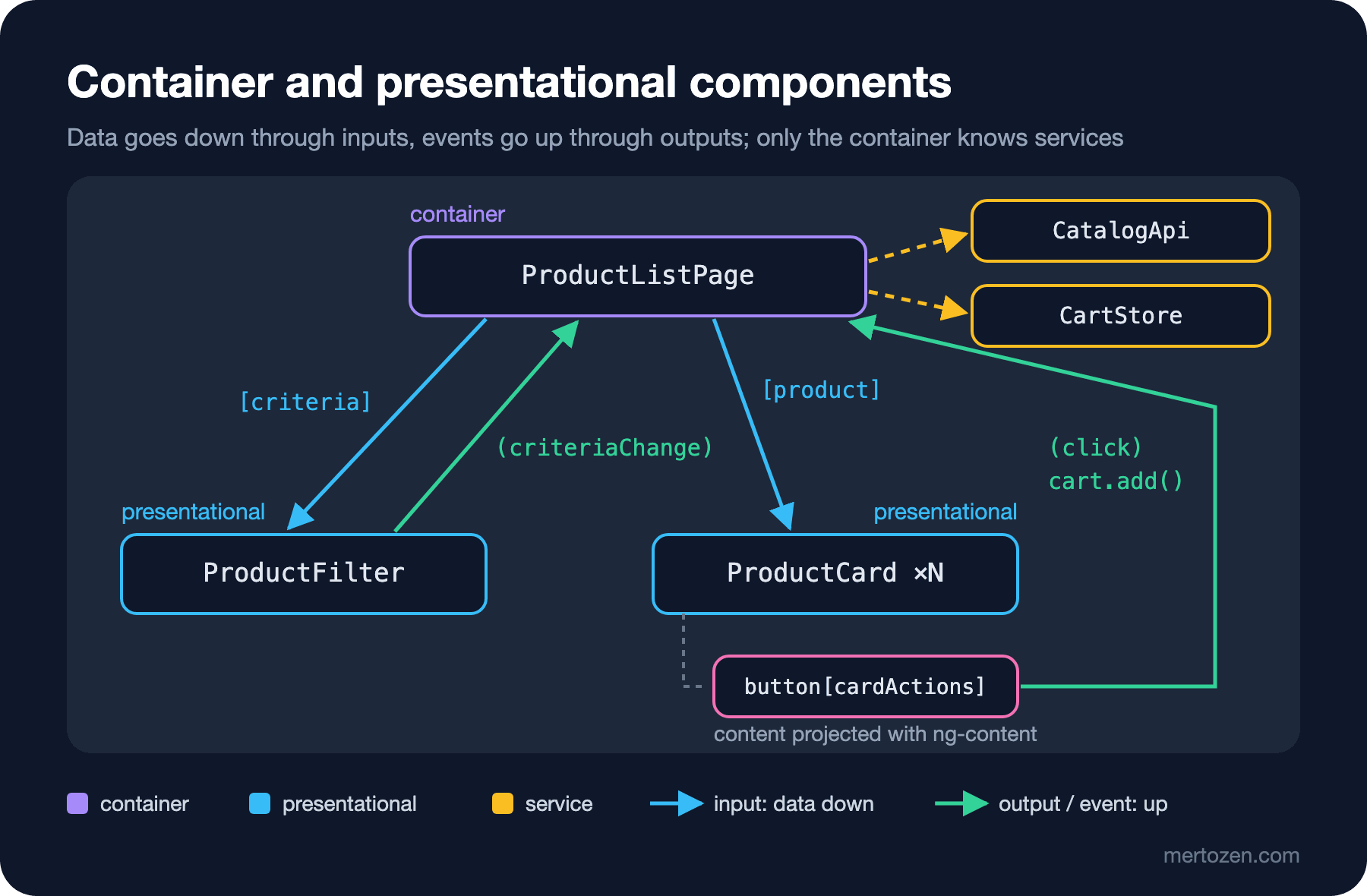
The direction of the flow is the same as in the previous two posts: criteria and products go down as inputs, and everything the user does goes up to the container as an output or event. The container's template is now enough to read the skeleton of the page; if you want to see what a card looks like, you go to ProductCard.
A Component's Public API Is a Contract
A component's inputs and outputs are a contract that everyone who uses it relies on. product, declared with input.required, says "this card is meaningless without a product"; the compiler checks that in every template that uses it. If one day someone renames the input to item to make it more "generic":
$ npx ng build
✘ [ERROR] NG8002: Can't bind to 'product' since it isn't a known property of 'app-product-card'.
    src/app/p08/product-list-page.ts:16:30
✘ [ERROR] NG8008: Required input 'item' from component ProductCard must be specified.
    src/app/p08/product-list-page.ts:16:13
✘ [ERROR] NG8002: Can't bind to 'product' since it isn't a known property of 'app-product-card'.
    src/app/p08/wishlist-page.ts:10:30
✘ [ERROR] NG8008: Required input 'item' from component ProductCard must be specified.
    src/app/p08/wishlist-page.ts:10:13
The compiler reports two separate errors: there is no input called product anymore (NG8002), and the required item input is not provided (NG8008). The errors show up not in the card itself but in the two pages that use it. Changing the contract breaks its consumers, just like changing a method signature in a C# interface. This compile error is a good thing: strictTemplates is on by default in Angular 22 and does not leave this kind of breakage to runtime.
A few questions help when designing the contract. Is the input a domain object (Product), or the fields the card actually uses? Passing the domain object makes usage easy but ties the card to the shape of Product; individual fields make the card usable with different types but increase the number of inputs. Do the outputs say what happened (criteriaChange), or do they dictate to the parent what to do? And most importantly: will you use this component in more than one place? The contract of a small piece inside a single page and the contract of a library component shared across teams do not need the same care.
Content Projection and Composition
Back to the second question: the same card, with a different button on the wishlist. The first solution that comes to mind is adding boolean inputs to the card:
import { Component, input, output } from '@angular/core';
import type { Product } from '../product';

// Bad example: every new place of use means a new boolean input
@Component({
    selector: 'app-product-card-flags',
    template: `
        <h3>{{ product().title }}</h3>
        @if (showAddButton()) {
            <button [disabled]="product().stock === 0" (click)="add.emit(product())">{{ addLabel() }}</button>
        }
        @if (showRemoveButton()) {
            <button (click)="remove.emit(product().id)">Remove</button>
        }
    `,
})
export class ProductCardFlags {
    readonly product = input.required<Product>();
    readonly showAddButton = input(true);
    readonly showRemoveButton = input(false);
    readonly addLabel = input('Add to cart');
    readonly add = output<Product>();
    readonly remove = output<number>();
}
This looks innocent on first use; on the third page showCompareButton is added, on the fourth compact, and the card turns into a switch that carries knowledge about every place it is used. The component-world counterpart of the Composition over Inheritance idea from the SOLID (the five design principles collected by Robert C. Martin) and Design Principles series is content projection: the card defines its own skeleton and leaves the part that varies to the caller. The <ng-content select="[cardActions]" /> line in ProductCard does exactly that. The list page puts "Add to cart" there, the wishlist page puts something else:
import { Component, signal } from '@angular/core';
import type { Product } from './product';
import { ProductCard } from './product-card';

@Component({
    selector: 'app-wishlist-page',
    imports: [ProductCard],
    template: `
        @for (product of wishlist(); track product.id) {
            <app-product-card [product]="product">
                <!-- Same card, different action -->
                <button cardActions (click)="remove(product.id)">Remove</button>
            </app-product-card>
        }
    `,
})
export class WishlistPage {
    protected readonly wishlist = signal<readonly Product[]>([
        { id: 3, title: 'Dracula', author: 'Bram Stoker', price: 11, stock: 12 },
    ]);

    protected remove(id: number): void {
        this.wishlist.update(list => list.filter(p => p.id !== id));
    }
}
The card's code did not change; a new place of use does not mean a new input. The cost is this: the card gives up control over what the projected button looks like. If you want consistency, you can turn the buttons into small presentational components too and collect them in a library. The basics of content projection are in the Component Communication post of the Angular series; the point here is what the card knows and what it leaves to the outside.
protected for Template-Only Members
The Angular Style Guide recommends protected for members that are read only from the template. That is why label in ProductCard is protected; product is public because it is an input. The visibility of the class thus sends a three-level message: public members are the component's contract (inputs, outputs), protected members are what the template needs, private members are the class's internal business.
Out of curiosity we made label private and ran ng build: on Angular 22.2 the build completed without errors. In older versions AOT (ahead-of-time) compilation did not allow a template to access a private member; today the compiler does not prevent it. So the protected recommendation is not a compiler rule but a signal to the reader: anyone who tries to reach fixture.componentInstance.label from another component or from a test hits a TypeScript error and learns that it is not part of the contract.
Moving Logic Out of the UI
Another recommendation of the Style Guide is that the code inside components and directives should generally relate to the UI shown on the page; a meaningful piece of code that is independent of the UI should move to a separate file. The filtering rule and the stock label are of this kind. We turned both into two functions that do not touch Angular at all:
import type { Product, ProductCriteria } from './product';

// Rules independent of the UI: they do not need Angular
export function filterProducts(products: readonly Product[], criteria: ProductCriteria): readonly Product[] {
    const query = criteria.query.trim().toLowerCase();
    return products.filter(
        p => (query === '' || p.title.toLowerCase().includes(query)) && (!criteria.inStockOnly || p.stock > 0),
    );
}

export function stockLabel(stock: number): string | null {
    if (stock === 0) return 'Sold out';
    return stock < 5 ? `Only ${stock} left` : null;
}
import { filterProducts, stockLabel } from './product-rules';
import type { Product } from './product';
const products: Product[] = [
{ id: 1, title: 'The Hobbit', author: 'J. R. R. Tolkien', price: 14, stock: 3 },
{ id: 2, title: 'Emma', author: 'Jane Austen', price: 9.5, stock: 0 },
{ id: 3, title: 'Dracula', author: 'Bram Stoker', price: 11, stock: 12 },
];
describe('product rules', () => {
it('filters by title and stock', () => {
expect(filterProducts(products, { query: ' HOBBIT ', inStockOnly: false }).map(p => p.id)).toEqual([1]);
expect(filterProducts(products, { query: '', inStockOnly: true }).map(p => p.id)).toEqual([1, 3]);
});
it('labels low and empty stock', () => {
expect([0, 3, 12].map(stockLabel)).toEqual(['Sold out', 'Only 3 left', null]);
});
});These tests do not use TestBed, do not create a component and do not look at the DOM. Rules such as getting the right result when ' HOBBIT ' with spaces and capitals is typed into the search box, or the label changing when stock drops below 5, are tested here in milliseconds. The card and the container only call these functions.
How Easy Presentational Tests Are
Let's go back to the first question from the opening, with the page split up. To test the "Sold out" label, creating the card and giving it an input is now enough:
import { TestBed } from '@angular/core/testing';
import { ProductCard } from './product-card';

describe('ProductCard', () => {
    it('shows a sold-out badge', async () => {
        const fixture = TestBed.createComponent(ProductCard);
        // Presentational test: no HTTP, no services, only inputs
        fixture.componentRef.setInput('product', { id: 2, title: 'Emma', author: 'Jane Austen', price: 9.5, stock: 0 });
        await fixture.whenStable();
        expect(fixture.nativeElement.querySelector('.badge').textContent).toBe('Sold out');
    });
});
The filter's test verifies that the component does not change its input but reports a new criteria object through its output:
import { TestBed } from '@angular/core/testing';
import type { ProductCriteria } from './product';
import { ProductFilter } from './product-filter';

describe('ProductFilter', () => {
    it('emits new criteria instead of changing its input', async () => {
        const fixture = TestBed.createComponent(ProductFilter);
        fixture.componentRef.setInput('criteria', { query: '', inStockOnly: true });
        const emitted: ProductCriteria[] = [];
        fixture.componentInstance.criteriaChange.subscribe(c => emitted.push(c));
        await fixture.whenStable();

        const search: HTMLInputElement = fixture.nativeElement.querySelector('input');
        search.value = 'domain';
        search.dispatchEvent(new Event('input'));

        expect(emitted).toEqual([{ query: 'domain', inStockOnly: true }]);
    });
});
The container's test is still as heavy as before: HTTP infrastructure, a fake response, more than one render:
import { provideHttpClient } from '@angular/common/http';
import { HttpTestingController, provideHttpClientTesting } from '@angular/common/http/testing';
import { TestBed } from '@angular/core/testing';
import { ProductListPage } from './product-list-page';

describe('ProductListPage', () => {
    it('disables the button of a sold-out product', async () => {
        // Container test: needs HTTP infrastructure and a fake response
        TestBed.configureTestingModule({ providers: [provideHttpClient(), provideHttpClientTesting()] });
        const fixture = TestBed.createComponent(ProductListPage);
        await fixture.whenStable();
        TestBed.inject(HttpTestingController).expectOne('/api/products').flush([
            { id: 1, title: 'The Hobbit', author: 'J. R. R. Tolkien', price: 14, stock: 3 },
            { id: 2, title: 'Emma', author: 'Jane Austen', price: 9.5, stock: 0 },
        ]);
        await fixture.whenStable();

        const buttons: HTMLButtonElement[] = Array.from(fixture.nativeElement.querySelectorAll('button'));
        buttons.forEach(b => b.click());
        await fixture.whenStable();

        expect(buttons.map(b => b.disabled)).toEqual([false, true]);
        expect(fixture.nativeElement.querySelector('.cart').textContent).toBe('Cart: 1');
    });
});
$ npx ng test --watch=false --reporters=verbose --include src/app/p08
✓ |bookstore| src/app/p08/product-rules.spec.ts > product rules > filters by title and stock
✓ |bookstore| src/app/p08/product-rules.spec.ts > product rules > labels low and empty stock
✓ |bookstore| src/app/p08/product-card.spec.ts > ProductCard > shows a sold-out badge
✓ |bookstore| src/app/p08/product-filter.spec.ts > ProductFilter > emits new criteria instead of changing its input
✓ |bookstore| src/app/p08/product-list-page.spec.ts > ProductListPage > disables the button of a sold-out product
Tests 5 passed (5)That is not a flaw; it is the point of the split. There are one or two heavy tests per page, verifying that the wiring is right; the details of the rules and the view are spread across light tests. Component testing itself (TestBed, harnesses, an Angular testing strategy with Vitest) is the topic of the upcoming Frontend Testing series in the Testing and Quality category.
Component Size and Signals to Split
When should you split a component? Line count alone is not a good measure; the signals below are more reliable:
- Writing its test needs unrelated providers, such as mocking HTTP to test a label.
- It has more than one reason to change: by the "single actor" measure of the SRP (Single Responsibility Principle) post in the SOLID series, requests from the designer, the product owner and the backend team all land in the same file.
- The same markup block repeats in the template, or an
@forbody tells a story of its own. - Boolean inputs multiply and each one represents another place of use.
- A template expression has grown too long to read; the Style Guide recommends moving that logic into TypeScript, preferably into a
computed.
The opposite direction is just as real. In an over-split tree a value is carried as an input through four levels only to be passed along (the React world calls this "prop drilling"), wrapper components used in one place and doing nothing multiply, and you open six files to follow one change. Splitting should pay off in either easier testing or reuse; if neither, don't split.
Common Pitfalls
Injecting a service into a presentational component. Injecting CartStore into the card "just this once" ties it to that store everywhere it is used and makes its test as heavy as the container's. If the card needs to change something, an output or projected content is enough.
Making everything a container, or nothing. A tree in which every component fetches its own data makes the same HTTP request four times; a tree in which everything is passed down from a single giant container is nothing but input relaying. Containers usually sit at the route level or at the top of large sections.
Passing a callback input instead of an output. Taking a function from the parent with input<() => void>() works but hides the flow: no (event) shows up in the template, and the child comes to know that it calls a method on the parent.
Not treating inputs as a contract. Changing the name, type or requiredness of a shared component's input breaks the build of everyone who uses it. In shared components, make the change by first adding a new input and keeping the old one alive for a while.
Connecting the split components to each other again. The card reading the filter's selection through a service ties two presentational components together through an invisible channel. The container should set up the relationship between them.
A Small Experiment
★☆☆ Add a discounted price next to the price in ProductCard. Would you do it as an input of the card, or as a projected slot? Justify your decision by how many places the card is used in.
★★☆ Add a "minimum price" field to ProductFilter. The rule goes into filterProducts, so write its test first; add only one line to the component test that verifies the new field shows up in the output.
★★★ Turn ProductListPageBefore from the opening into the structure of this post step by step, running the tests at each step: first move the rules into functions, then extract the card, then the filter. At which step did the scope of the container test shrink?
In this post we split the inside of a page: a container that knows about data, presentational components that talk only through inputs and outputs, and rules independent of the UI. In the last post of the series we go one level up: in an Angular app with dozens of pages and several teams, how do we draw the boundaries between features, how does a facade service shield components from state and HTTP details, and how do we enforce those boundaries with lint?