

The MVC Pattern: Original Smalltalk MVC and Web MVC Are Not the Same

In the original Smalltalk-80 MVC, views observe the model and the controller only interprets user input; in Web MVC the view never observes the model, the controller runs once per HTTP request and the view renders once. We build the same order form first in TypeScript with an observable model, then with ASP.NET Core MVC, and compare the two flows along with the fat controller and anemic view model traps.
Version note: The examples in this post were tested with Angular 22 and TypeScript, and the comparison examples with .NET 10.
Guess First
A question that comes up often in job interviews: "What is MVC (Model-View-Controller)?" The answer usually goes: "The request comes to the controller, the controller gets data from the model, passes it to the view, the view produces HTML (HyperText Markup Language)." For someone who works with ASP.NET Core, that answer looks right.
Now ask the same question about the Bookstore order form. The user types "3" into the quantity input. Whose job is that keystroke: the model, the view or the controller? If the total and the "10% off" badge appear in two separate places on the screen, who updates both? And is the OrdersController in ASP.NET Core the same thing as the controller in that definition? Write down your answer; by the end of the post we will see that two different answers are both "right" but describe different patterns.
Reenskaug's Three Roles
As we saw in the previous post, MVC came out of Trygve Reenskaug's work on Smalltalk at Xerox PARC (Palo Alto Research Center) in 1978–79 and spread with Smalltalk-80. In this MVC the responsibilities of the three roles are clear. The model represents the domain and knows nothing about the screen; this is the split Fowler calls Separated Presentation. The view shows part of the model on screen. The controller takes the user's keyboard and mouse actions, decides what they mean and tells the model.
Two details differ from today's common understanding. First, every view had its own controller; view and controller worked as a pair, and one screen could have dozens of view-controller pairs. Second, the controller did not update the view. What kept the view current was the model itself: when the model changed it announced "I changed", and every view watching it redrew itself.
Observer Synchronization: Views That Observe the Model
Fowler calls this mechanism Observer Synchronization. Let's build the order form with this idea in TypeScript. The model uses pricing.ts from the previous post and notifies its listeners when it changes:
import { catalog, priceOrder, type Book } from '../domain/pricing';

type Listener = () => void;

export class OrderModel {
  #book: Book = catalog[0];
  #quantity = 1;
  readonly #listeners = new Set<Listener>();

  get book(): Book { return this.#book; }
  get quantity(): number { return this.#quantity; }
  get total(): number { return priceOrder(this.#book, this.#quantity); }

  subscribe(listener: Listener): () => void {
    this.#listeners.add(listener);
    return () => this.#listeners.delete(listener);
  }

  selectBook(id: number): void {
    this.#book = catalog.find(b => b.id === id)!;
    this.#changed();
  }

  changeQuantity(quantity: number): void {
    this.#quantity = quantity;
    this.#changed();
  }

  #changed(): void {
    this.#listeners.forEach(listener => listener());
  }
}
OrderModel imports no DOM (Document Object Model) type; the word HTMLElement does not appear in this file. Now let's attach two views to the same model: one shows the total, the other the discount badge.
import type { OrderModel } from './order-model';

export class OrderTotalView {
  constructor(private readonly element: HTMLElement, private readonly model: OrderModel) {
    model.subscribe(() => this.render()); // observes the model
    this.render();
  }

  render(): void {
    this.element.textContent = `Total: ${this.model.total.toFixed(2)}`;
  }
}

export class DiscountBadgeView {
  constructor(private readonly element: HTMLElement, private readonly model: OrderModel) {
    model.subscribe(() => this.render());
    this.render();
  }

  render(): void {
    this.element.hidden = this.model.quantity < 3;
    this.element.textContent = '10% off';
  }
}
The two views do not know each other. Both subscribe to the model and redraw themselves by reading from the model every time it changes. The controller interprets the input:
import { parseQuantity } from '../domain/pricing';
import type { OrderModel } from './order-model';

export class QuantityController {
  constructor(
    private readonly input: HTMLInputElement,
    private readonly errorLabel: HTMLElement,
    private readonly model: OrderModel,
  ) {
    input.addEventListener('input', () => this.onInput());
  }

  private onInput(): void {
    const check = parseQuantity(this.input.value);
    if (!check.ok) {
      this.errorLabel.textContent = check.error; // the model does not change, the error is only on screen
      return;
    }
    this.errorLabel.textContent = '';
    this.model.changeQuantity(check.quantity);
  }
}
The controller never sends invalid text such as "abc" to the model. It writes the error message straight to the screen, because "something invalid is typed in the input right now" does not belong to the domain; in the terms of the previous post, it is view state. Classic MVC has no dedicated place for this kind of state; it ends up scattered between controller and view. This gap is one of the reasons MVP (Model-View-Presenter) and Presentation Model were born.
Let's verify the behavior with three tests:
import { beforeEach, expect, test } from 'vitest';
import { OrderModel } from './order-model';
import { DiscountBadgeView, OrderTotalView } from './views';
import { QuantityController } from './quantity-controller';

const $ = (id: string) => document.getElementById(id)!;

let model: OrderModel;
beforeEach(() => {
  document.body.innerHTML = `
    <input id="quantity" value="1">
    <p id="error"></p>
    <p id="total"></p>
    <span id="badge"></span>`;
  model = new OrderModel();
  new OrderTotalView($('total'), model);
  new DiscountBadgeView($('badge'), model);
  new QuantityController($('quantity') as HTMLInputElement, $('error'), model);
});

test('one input event updates both views through the model', () => {
  const input = $('quantity') as HTMLInputElement;
  input.value = '3';
  input.dispatchEvent(new Event('input'));
  expect($('total').textContent).toBe('Total: 37.80');
  expect($('badge').hidden).toBe(false);
});

test('a change from code reaches the views too', () => {
  model.selectBook(2);
  model.changeQuantity(4);
  expect($('total').textContent).toBe('Total: 34.20');
});

test('invalid text never reaches the model', () => {
  model.changeQuantity(2);
  const input = $('quantity') as HTMLInputElement;
  input.value = 'abc';
  input.dispatchEvent(new Event('input'));
  expect($('error').textContent).toBe('Quantity must be between 1 and 10');
  expect(model.quantity).toBe(2);
  expect($('total').textContent).toBe('Total: 28.00');
});
✓ src/p02/mvc.spec.ts > one input event updates both views through the model 3ms
✓ src/p02/mvc.spec.ts > a change from code reaches the views too 1ms
✓ src/p02/mvc.spec.ts > invalid text never reaches the model 0ms
Test Files 1 passed (1)
Tests 3 passed (3)The second test shows the real strength of MVC. The model.selectBook(2) and model.changeQuantity(4) calls come neither from a controller nor from an event, yet the total view updates. Whoever changes the model (an input, a timer, a message from the server), all views stay consistent. Anyone who has tried to keep three windows showing the same data in sync by hand knows why this matters.
In the same essay Fowler also notes the price: because Observer behavior is implicit, it is hard to understand and debug. When you put a breakpoint on changeQuantity, you cannot read from the code which parts of the screen will redraw; the subscriber list is built at runtime.
The Controller Is an Input Handler, Not a Router
The controller in Smalltalk MVC is, in current terms, an input handler. It answers the question "the user typed something into this input, what does it mean?" It does not decide which page opens or which class a URL (Uniform Resource Locator) goes to; Smalltalk had no URLs. As graphical interfaces evolved, this role became more and more invisible: the operating system and the widgets started handling keyboard and mouse themselves. John Gossman, who first announced MVVM (Model-View-ViewModel), describes this in his 2005 post by saying the controller has not disappeared but we no longer need to think about it as much as we did in 1979.
In Angular the counterpart is an (input) event binding and the method that receives it. Interpreting input is shared between the framework and a small method you write, and nobody calls it a controller.
MVC Through GoF Eyes: Observer, Composite, Strategy
GoF (Gang of Four: the 1994 Design Patterns book by Gamma, Helm, Johnson and Vlissides) uses exactly Smalltalk MVC as its introductory example and reads it as a combination of three patterns. The subscription between view and model is Observer. Nested views (panels inside a window, buttons inside panels) are Composite. The view leaving its reaction to user input to the controller, and the ability to change behavior by swapping the controller, is Strategy.
That is why it is more accurate to think of MVC not as a single pattern but as a family of patterns, or an architectural pattern. The "Observer Pattern in Depth: event, IObservable<T>, IChangeToken and Domain Events", "Composite Pattern: Treating Tree Structures Through One Interface" and "Strategy Pattern in Depth: Keyed Services, IEnumerable<IStrategy> and Func for Runtime Selection" posts of the Design Patterns series cover these three parts one by one.
Moving to the Web: Model 2 and Web MVC
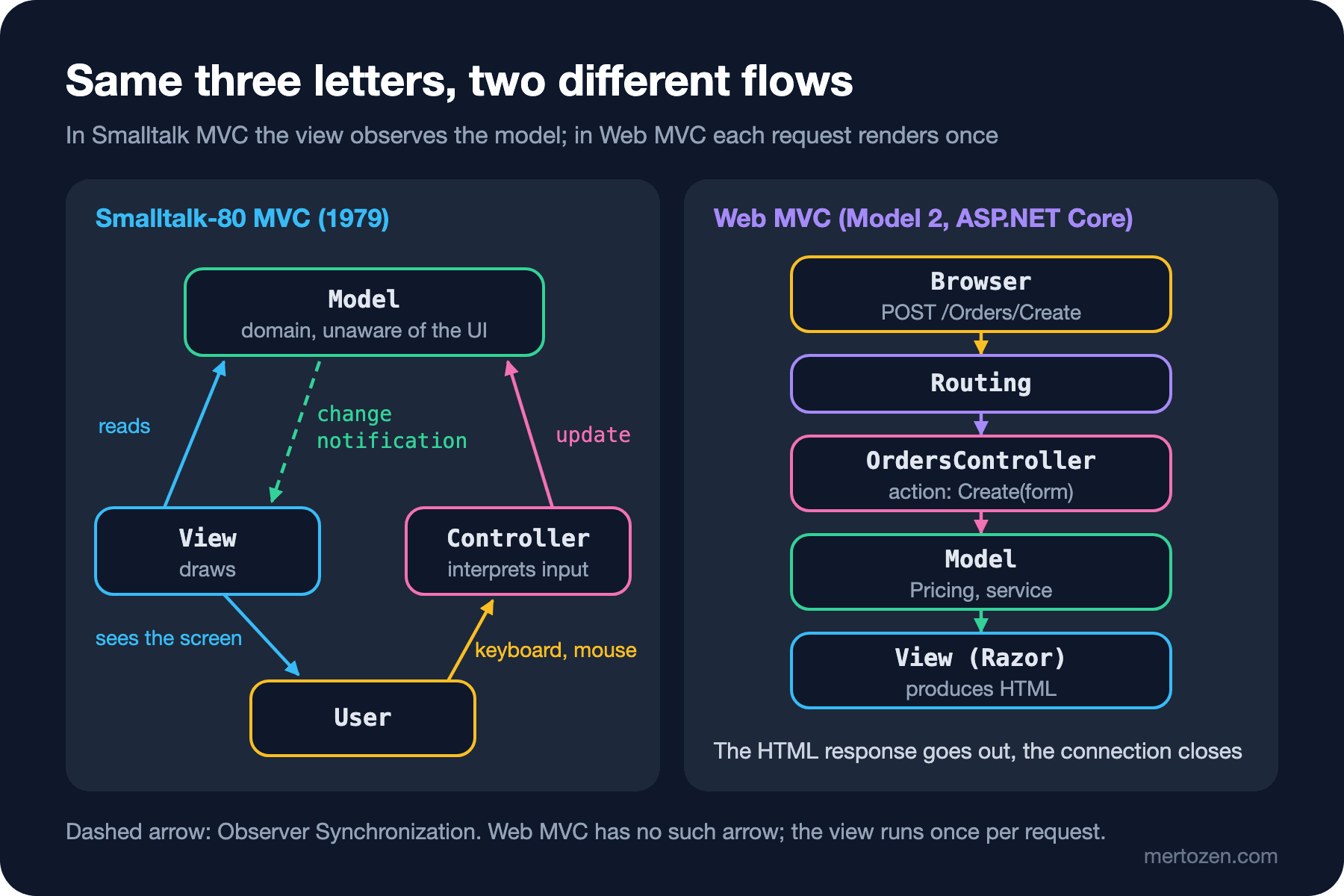
In the late 1990s, on the Java side, the JSP (JavaServer Pages) specification named the approach where a servlet receives the request and has a JSP page render the result "Model 2", and the approach soon came to be called MVC. Struts, Ruby on Rails, Spring MVC and, in 2009, ASP.NET MVC follow this line. The role names are the same but the flow is different: an HTTP (Hypertext Transfer Protocol) request arrives, routing hands it to a controller action, the action calls the model, passes the result to a view, the view produces HTML and the response goes out.
The difference in the figure fits in one sentence: Web MVC has no dashed arrow. The view does not observe the model; once the request ends there is no view left to observe anything. All synchronization is solved by "render from scratch on every request". Reading ASP.NET Core with the names from Fowler's PoEAA (Patterns of Enterprise Application Architecture, Martin Fowler, 2002): routing and the middleware pipeline are a Front Controller, the controller action is the input controller that receives the request, and Razor is a Template View.
The Same Order Form in ASP.NET Core MVC
Here is the Web MVC version of the same form. On the domain side, Pricing.PriceOrder and Catalog apply the same rule as the TypeScript version, in C#. The data the form carries and the result:
using System.ComponentModel.DataAnnotations;

namespace Bookstore.Web.Models;

public sealed class OrderForm
{
    public int BookId { get; set; } = 1;

    [Range(1, 10, ErrorMessage = "Quantity must be between 1 and 10")]
    public int Quantity { get; set; } = 1;
}

public sealed record OrderSummary(string Title, int Quantity, decimal Total);
The controller has two actions; one shows the empty form, the other processes the submitted form:
using Bookstore.Web.Domain;
using Bookstore.Web.Models;
using Microsoft.AspNetCore.Mvc;

namespace Bookstore.Web.Controllers;

public sealed class OrdersController : Controller
{
    [HttpGet]
    public IActionResult Create() => View(new OrderForm());

    [HttpPost]
    [ValidateAntiForgeryToken]
    public IActionResult Create(OrderForm form)
    {
        if (!ModelState.IsValid)
        {
            return View(form);
        }

        Book book = Catalog.Books.Single(b => b.Id == form.BookId);
        OrderSummary summary = new(book.Title, form.Quantity, Pricing.PriceOrder(book, form.Quantity));
        return View("Summary", summary);
    }
}
The views, without a layout and as short as possible:
@model Bookstore.Web.Models.OrderForm
@{ Layout = null; }
<form asp-action="Create" method="post">
    <select asp-for="BookId" asp-items="@(new SelectList(Catalog.Books, "Id", "Title"))"></select>
    <input asp-for="Quantity" />
    <span asp-validation-for="Quantity"></span>
    <button type="submit">Place order</button>
</form>
@model Bookstore.Web.Models.OrderSummary
@{ Layout = null; }
<p>@Model.Quantity x @Model.Title</p>
<p>Total: @Model.Total.ToString("0.00", CultureInfo.InvariantCulture)</p>We run the application and submit the form with curl. I took the antiforgery cookie and token from the first GET and put the token into the $TOKEN variable:
$ curl -s -b jar.txt -d "BookId=1&Quantity=3&__RequestVerificationToken=$TOKEN" http://localhost:5391/Orders/Create
<p>3 x The Hobbit</p>
<p>Total: 37.80</p>
$ curl -s -b jar.txt -d "BookId=1&Quantity=11&__RequestVerificationToken=$TOKEN" http://localhost:5391/Orders/Create | grep valmsg-for
    <span class="field-validation-error" data-valmsg-for="Quantity" data-valmsg-replace="true">Quantity must be between 1 and 10</span>
$ curl -s -o /dev/null -w "%{http_code}\n" -d "BookId=1&Quantity=3" http://localhost:5391/Orders/Create
400
The three calls show the character of Web MVC. A valid form produces the Summary view in one go. For an invalid form, ModelState carries the error and the same view is rendered again with the error message; the details of Data Annotations validation are in the "Model Validation in ASP.NET Core: Data Annotations and FluentValidation" post of the ASP.NET Core Web API (Application Programming Interface) series. A request without the token returns 400; [ValidateAntiForgeryToken] protects against CSRF (Cross-Site Request Forgery).
In the TypeScript version the total changed the moment the user typed "3"; here you have to press the button and go to the server. The view has no link to the model; it only shows the OrderSummary record it received once. This is not a shortcoming but a different design for a different problem: the server serves thousands of users and cannot keep an open view for each of them. The Web API side of controllers and actions, with a CRUD (Create, Read, Update, Delete) skeleton, is in the "Controllers and Actions in ASP.NET Core: A CRUD Skeleton with [ApiController]" post of the ASP.NET Core Web API series; building applications with Razor and tag helpers will be covered in the upcoming Backend › ASP.NET Core MVC and Razor Pages series.
Fat Controller and Anemic View Model
The best-known disease of Web MVC is the fat controller. When validation, price calculation, stock checks, sending emails and logging pile into one action, the controller becomes both untestable and impossible to reuse from another entry point (a background job, an API endpoint). That is why Jamis Buck's 2006 post for the Rails world, "Skinny Controller, Fat Model", is still quoted. In the action above the calculation lives in Pricing.PriceOrder; the controller only translates HTTP into the domain. The "Layered Structure in ASP.NET Core Web API: The Service Layer and the Repository Debate" post of the ASP.NET Core Web API series covers the same discussion from the service layer side.
The less discussed opposite disease is the anemic view model. In Web MVC it is normal for the view model to be a data carrier; the problem is when the decisions the view needs are made inside Razor instead of in the view model. Once @if blocks such as "show the badge if a discount applied, write free if the amount is zero, hide the button if the user is not an admin" pile up in Razor, that logic sits where no unit test can reach it. The fix is to put ready-made decisions such as ShowDiscountBadge into the view model; the view only reads them.
Common Pitfalls
Saying "Angular is MVC, because services are the model, the template is the view and the component is the controller." In the Smalltalk sense a controller is an input handler; in the Web MVC sense it receives requests. An Angular component is neither; we will return to this question in detail in the fifth post.
Thinking the model is "a database table". In both MVCs the model is the domain itself: rules, calculations, invariants. An Entity Framework Core (EF Core) entity can be part of it, but it is not the whole model.
Not cleaning up observer subscriptions. subscribe returns an unsubscribe function; if a view removed from the screen does not drop its subscription, the model keeps a reference to it forever, causing both a memory leak and an "invisible view is being updated" bug.
Returning a view directly after a POST in Web MVC. In the example I returned View("Summary", summary) for simplicity; in a real order form you use PRG (Post/Redirect/Get) and return RedirectToAction first, so that refreshing the page does not submit the order a second time.
When Not to Use It
You will rarely need to build classic Smalltalk MVC by hand today. Frameworks such as Angular, React and Blazor already take over the synchronization between view and state; adding an observable model and a controller layer on top means running two synchronization mechanisms side by side. If you are writing a framework-free widget, a canvas application or a desktop tool where several independent views show the same data, it is still one of the simplest solutions.
Nor do you have to choose Web MVC for every server-side page. For page-focused scenarios made of a single form and its result, Razor Pages needs less ceremony; we put the two models side by side in the fifth post. If you are writing a backend that returns only JSON (JavaScript Object Notation) instead of pages, the view role moves entirely to the client and the "V" of Web MVC disappears; what you need then is a Web API.
A Small Experiment
★☆☆ Add a third view to OrderModel: a heading showing the selected book's title. Did you have to touch the controller or the other views?
★★☆ Keep the unsubscribe function returned by subscribe in DiscountBadgeView and call it in a destroy() method. Then write a test: after the view is destroyed, a model.changeQuantity(5) call must not change the badge's hidden property.
★★★ Add PRG to the ASP.NET Core version: when the POST succeeds, redirect to the order summary with RedirectToAction. Where will the summary page get its data? Compare TempData, a route parameter and a saved order.
In classic MVC view state had no home and testing the view was still hard. In the next post we move to MVP: we hide the view behind an interface and move all screen logic into a presenter that we can test without the view.