

What Is Threat Modeling? The Four Questions, Data Flow Diagrams and Trust Boundaries for the Bookstore Checkout
Threat modeling means asking "what can go wrong?" on a representation of the system before the code is written, and it helps most at design time. With the four questions of the Threat Modeling Manifesto, DFD elements and trust boundaries we model the Bookstore checkout, payment and shipping flow, version the model as JSON in the repo with OWASP Threat Dragon 2.6.2 and tie it to the PR template.
Version note: The examples in this post were tried with .NET 10 and OWASP Threat Dragon 2.6.2; Microsoft Threat Modeling Tool 7.3 runs only on Windows, so it is described from its documentation.
Guess First
Bookstore, the online bookstore used as the shared example across this site's series, has so far taken the order and reserved stock; there was no payment. This sprint the team integrates a payment provider: the customer enters the card on the provider's hosted payment page, the provider sends a webhook to Bookstore when the payment completes, and Bookstore marks the order Paid and opens the shipment. Emre writes the code in two days, the tests are green, the PR is approved.
Guess: the webhook endpoint is a URL open to the internet. What happens if a handcrafted payment.succeeded request arrives that did not come from the provider? More importantly, who should have asked that question, and in which meeting? During code review the reviewer reads the endpoint's code, but "who can send this request?" is not written inside the code. A pentest might find it, weeks after the release. The natural place for this question is design time, and its name is threat modeling. In this post we model the Bookstore checkout with four questions, a DFD and trust boundaries.
What Is Threat Modeling?
The Threat Modeling Manifesto, published in November 2020 by a working group of fifteen people, keeps the definition short: "Threat modeling is analyzing representations of a system to highlight concerns about security and privacy characteristics." The key word is "representation": you examine not the system itself but a representation of it (a diagram, a list, even a whiteboard sketch). That is why threat modeling can happen before any code is written, and that is where it helps most, because fixing a design mistake still costs no more than a commit.
The Manifesto builds on the four questions Adam Shostack has used for years. In our words:
- What are we working on? A shared picture of the system, or of the part that changes this sprint.
- What can go wrong? Looking for threats on that picture; this is where STRIDE comes in.
- What are we going to do about it? A decision for every threat: a control, a design change, a risk transfer or a deliberate acceptance.
- Did we do a good enough job? A review of the model, the decisions and the tests.
This post focuses on the first question. The second and third are the subject of the next post in the series; the introduction to STRIDE was already given in the Insecure Design post of the Web Security (OWASP Top 10) series, and we do not repeat it here. The fourth question is the one skipped most often, and we come back to it under "Common Pitfalls".
When, with Whom, for How Long?
If you see threat modeling as "the security exercise we do once a year", the model is always out of date. What works better is tying it to specific triggers. The list the Bookstore team uses: a new feature crosses a trust boundary (a new endpoint reachable from the internet, a new data store), a third-party integration is added or replaced (payment, shipping, e-mail, identity provider), the architecture changes (a new service, queue, cache or deployment environment), or an incident or pentest finding shows that the model was wrong. A bug fix or a change to UI text does not open the model.
Keep the group small. The developer who will build the feature (Emre here) is essential, because nobody knows the system better. The tech lead, or someone who knows the architecture, fills in the context. The Product Owner (Selin) states the business impact: she has the answer to "what do we lose if an order ships after a fake payment confirmation?". Someone who knows operations knows the deployment environment, the logs and the secrets. If you have no separate security team, these four people are enough; in the third post of the series we discuss a security champion who takes on this role regularly.
A good measure for the time: one session of 60–90 minutes per feature. If the session runs longer, the scope is too big; split the model. Checkout, Payments and Shipping fit in one session; back office and Institutional Orders are separate sessions.
The Four DFD Elements and the Trust Boundary
The representation used most in threat modeling is the DFD. Unlike an architecture diagram, it shows the movement of data, not servers or classes. Four elements and one line are enough:
| Element | Drawn as | Example in Bookstore | First question to ask |
|---|---|---|---|
| External entity | Rectangle | The customer's browser, the payment provider, the shipping carrier | Not under our control; how do we know who it is? |
| Process | Circle | Ordering, Payments, Shipping | Which input does it accept, with which privileges does it run? |
| Data store | Two parallel lines | BookstoreDb | Who reads, who writes, where are the backups? |
| Data flow | Arrow | POST /api/orders, webhook | What does it carry, is it encrypted, can it be changed? |
| Trust boundary | Dashed line | Between the internet and Bookstore.Api | Why do we trust the data that crosses this line? |
A trust boundary is where the two sides have different levels of trust or different owners: the internet and the API, the API and the database, our code and the provider's system. Most threats show up on the data flows that cross these lines, because an assumption made on one side of the line does not hold on the other. The Angular SPA is our code, but it runs in the customer's browser, so it sits outside the line: a price, a total or a role coming from there is not trusted.
Modeling the Bookstore Checkout
In the session Emre first drew the customer on the whiteboard, then the endpoint the customer calls; the team went on by asking "what does this carry?" for every arrow. Half an hour later this is the diagram:
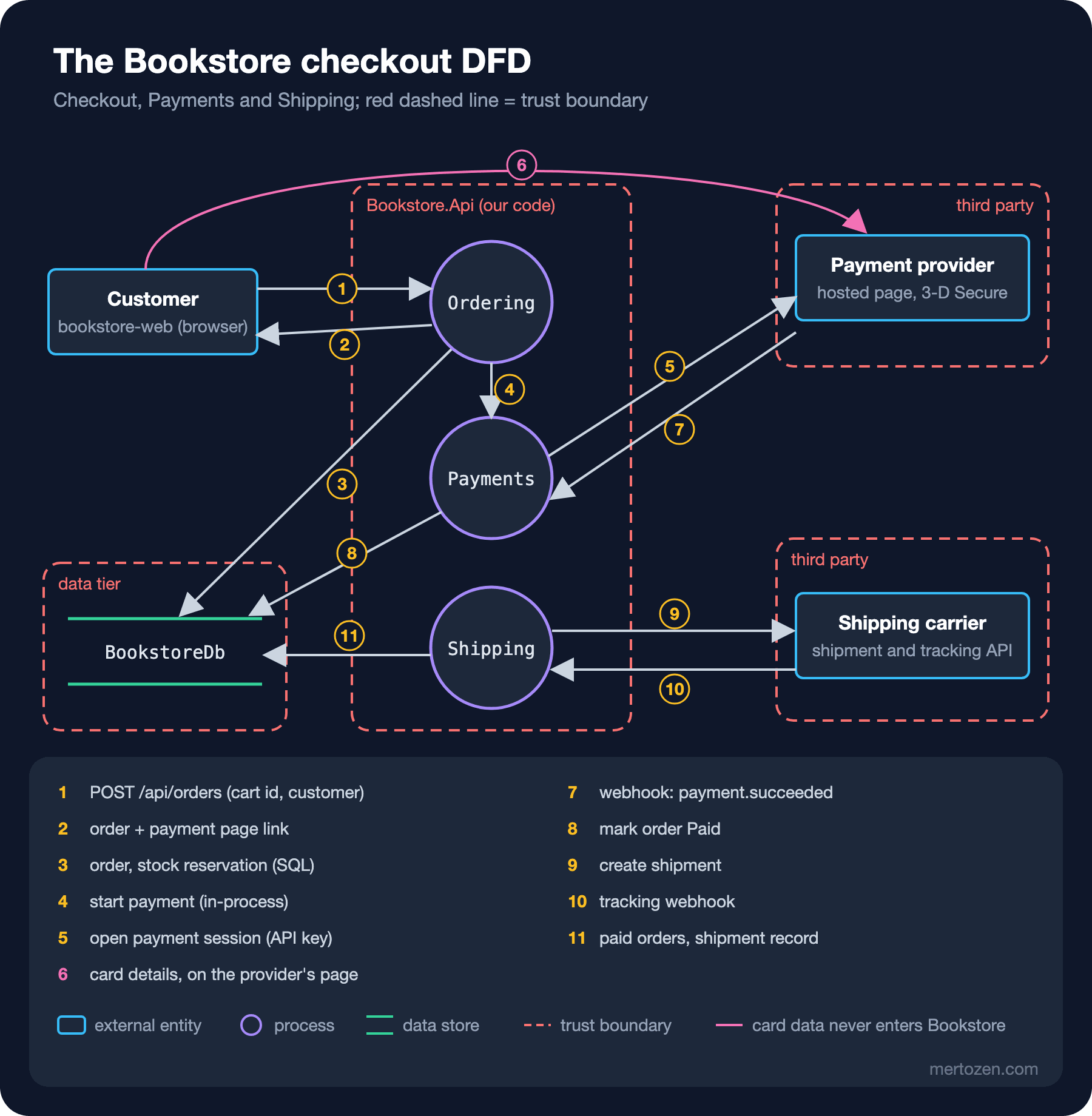
Drawing the diagram alone produced three decisions. First, flow 6: card details go from the customer's browser straight to the provider's page and never enter the Bookstore.Api boundary. That is a design decision, and it is what keeps the PCI DSS burden small. The diagram makes the decision visible; if someone later says "let's move the card form to our own page", it is clear that the model has to change.
Second, flow 7. The webhook comes from the internet and changes the state of the order directly. This is exactly where the question from "Guess First" belongs: does the request crossing this boundary really come from the provider, and what happens if the same request is sent twice? We look for the answer with STRIDE in the second post; for now the model records that this flow comes from a public network and that Payments is a process that changes state.
Third, flow 9 made us ask what we send to the shipping carrier. The code was sending the whole order: books, prices and the e-mail address, while the carrier needs a name, an address and parcel data. That is less a vulnerability than data minimisation, and the details are in the Data Privacy and KVKK series. The good side of threat modeling is that security and privacy questions can be asked on the same picture.
What the diagram does not show is a decision too: back office, catalog administration and Notifications are outside this model. threat-model/README.md says so explicitly; an out-of-scope area that is not written down is assumed to be "modeled".
Tools: Threat Dragon, Microsoft Threat Modeling Tool, Whiteboard
The best tool for the first session is a whiteboard: everyone can hold a pen and nobody worries about how pretty the drawing is. After the session, though, the model has to move into a file, preferably close to the code. Two common free tools fit here.
The latest OWASP Threat Dragon release is 2.6.2, published on 10 May 2026. It ships a Windows desktop installer (Threat-Dragon-ng-Setup-2.6.2.exe) and a Docker image of the web application. It stores the model as JSON, which makes it possible to version it in Git and read its diff in a PR. Running the web version locally needs three keys; we generate them with a cryptographic random number generator in PowerShell 7 and write them to a td.env file:
function New-HexKey { [Convert]::ToHexStringLower([Security.Cryptography.RandomNumberGenerator]::GetBytes(16)) }
@"
ENCRYPTION_JWT_REFRESH_SIGNING_KEY='$(New-HexKey)'
ENCRYPTION_JWT_SIGNING_KEY='$(New-HexKey)'
ENCRYPTION_KEYS='[{"isPrimary": true, "id": 0, "value": "$(New-HexKey)"}]'
NODE_ENV='development'
SERVER_API_PROTOCOL='http'
"@ | Set-Content -Encoding utf8NoBOM td.env
Do not copy the example keys from the documentation, and do not put the file in the repo. We pulled the image, compared its digest with the digest of the v2.6.2 tag on Docker Hub, then started the container bound only to 127.0.0.1:
docker image inspect owasp/threat-dragon:v2.6.2 --format '{{index .RepoDigests 0}}'
docker run --rm -d -p 127.0.0.1:8080:3000 -v "${PWD}/td.env:/app/.env:ro" owasp/threat-dragon:v2.6.2owasp/threat-dragon@sha256:ec26312b472ad364d5b79283d795f946b9aff9639b798e9f76bfdd243810af17At http://127.0.0.1:8080/, after "Login to Local Session", dropping bookstore-checkout.json onto the "Open an existing threat model" screen opens the diagram and the element properties (protocol, public network, encrypted). Saving updates the same JSON. Because the file is plain JSON, you can read it without the tool too; listing the flows with jq, for example, gives a summary to paste into a PR description:
jq -r '.detail.diagrams[0].cells[] | select(.data.type == "tm.Flow") | [.data.name, .data.protocol, (if .data.isPublicNetwork then "public" else "internal" end)] | @tsv' threat-model/bookstore-checkout.json1 POST /api/orders HTTPS public
2 order + payment URL HTTPS public
3 order, stock (SQL) SQL/TLS internal
4 start payment in-process internal
5 create payment session HTTPS public
6 card details (hosted page) HTTPS public
7 webhook payment.succeeded HTTPS public
8 mark order Paid SQL/TLS internal
9 create shipment HTTPS public
10 tracking webhook HTTPS public
11 paid orders, shipment SQL/TLS internalThe latest Microsoft Threat Modeling Tool release is 7.3.51110.1, dated 10 November 2025. It runs only on Windows 10 and later, with .NET Framework 4.7.1; it keeps the model in a .tm7 file and suggests STRIDE threats for every element based on the template you choose. Those suggestions help as a starting point but make the list long; the team has to go through each one and ask "does this apply to us?". The description is based on the release notes and documentation on Microsoft Learn.
There are also "threat model as code" tools: instead of drawing the model in a diagram tool, you describe it in code and generate the diagram and the threat list from it. In OWASP pytm the system is described in Python (the latest release is 1.4.1, from 1 November 2026); in Threagile it is YAML. Both produce files with readable diffs but ask the team to learn one more language. For Bookstore, Threat Dragon's JSON is enough.
Keeping the Model Alive in the Repo
A model that sits close to the code has a better chance of staying current. In Bookstore we put the model in the threat-model/ folder and wrote in the README next to it when it gets updated. The real reminder, however, is the PR template, because everybody sees it on every PR:
## What changes

<!-- One or two sentences. Link the backlog item. -->

## Threat model check

- [ ] This change adds or changes a data flow, a data store, an external entity or a trust boundary.
      If checked: `threat-model/bookstore-checkout.json` is updated in this PR, or the reason is written here.
- [ ] New threats found in this PR are in the model or in the backlog (link).
If the box is ticked but the model has not changed, the reviewer's question is simple: "Does this PR draw a new arrow?" Adding this item to the questions in the reviewer checklist post of the Code Review series is enough; no separate process is needed.
In Production
A threat model is a map of a system's weak points. Bookstore's code lives in a public GitHub repo, and because this series is written to teach, we keep the whole model there, open threats included. Do not do this in a real product: a public DFD is usually fine, because it describes flows an attacker can see anyway, but the details of open threats ("the webhook signature is not verified yet") hand an attacker a to-do list. In a public repo keep only the diagram; keep the threats and decisions in a private repo or in a backlog only the team can see. A fixed threat goes into the model together with its test.
Write the date of the last review at the top of the model. A model nobody has touched for six months means either that the system has not changed at all or that the model was forgotten; the second is far more likely. One of the first things to do after an incident is to open the model and check "was this flow in the model?". If it was not, the problem is not only in the code but in the process.
Finally, give the model one owner. "The team's model" in practice becomes nobody's model. In Bookstore the tech lead owns the model; the developer who builds a feature updates their own arrows, and the owner keeps track of the scope and the date.
Common Pitfalls
The most common mistake is trying to model the whole system in one go. A wall-sized diagram is not finished in the first session, nobody comes to the second, and what remains is a picture nobody reads. Start with one feature, one flow, and grow the model piece by piece.
The second mistake is drawing the diagram once and forgetting it. A DFD drawn a year ago, without the webhook, gives a false sense of safety; it does more harm than having no model at all. That is why tying the model to triggers and to the PR template matters.
The third mistake is taking the tool for the work itself. The tool lists a hundred suggested threats, the team writes "N/A" on all of them and the model counts as "done". The value is not in the list the tool produces but in the conversation the team has. The fourth is skipping the fourth question: if nobody asks at the end of the session "what might we have missed, and who will follow up on the decisions?", the decisions never reach the backlog.
A Small Experiment
★☆☆ Bookstore starts sending order confirmation e-mails through an e-mail provider. Which external entity, which process and which flow are added to the diagram? How many trust boundaries are crossed?
★★☆ Open bookstore-checkout.json in Threat Dragon, write a description for the tracking webhook (flow 10) and save it. Look at which fields changed in the Git diff; what does a reviewer need to be able to read this diff in a PR?
★★★ Turn the jq query above into a check that runs in CI: the build fails if a flow has an empty protocol field or comes from a public network and is marked unencrypted. What kind of mistake does this check catch, and what kind can it never catch?
We now have a shared picture: the first question is answered. In the second post of the series we apply STRIDE to every element of the same diagram, find threats for the webhook and the institutional purchase approval, rank them by likelihood and impact, and turn the most important one into a test.