

The Browser Security Model: Same-Origin Policy, Origin vs Site, SameSite Cookies and Fetch Metadata
The Same-Origin Policy does not stop a cross-origin request, it only stops the response from being read; SameSite decides which cookies go with the request, and the server can reject it by looking at the Sec-Fetch-* headers. In this post we log the real behaviour of origin vs site, CORS, Strict/Lax/None cookies and Fetch Metadata headers from headless Chrome against an ASP.NET Core 10 lab, and build a Fetch Metadata policy with tests.
Version note: The examples in this post were built and run with .NET 10, Chrome 156 and Playwright 1.65.
Guess First
A Bookstore user has signed in to api.bookstore.test, and the browser now holds three session cookies: one SameSite=Strict, one SameSite=Lax and one SameSite=None. In another tab of the same browser a page called attacker.test opens and sends a request to the API (Application Programming Interface) with fetch(..., { credentials: 'include' }). There is no CORS (Cross-Origin Resource Sharing) configuration, and a red error shows up in the browser console. The question: did the request reach the server, and if it did, which cookies came with it? And what changes if the same request is sent from shop.bookstore.test?
Most teams say "it failed with a CORS error, so the request never left". By the end of this post we will see in our own logs why that is wrong. In the first post of the Frontend Security series we build the browser's security model: the difference between origin and site, what the Same-Origin Policy actually blocks, SameSite cookies, and the Fetch Metadata headers the server can use to make a decision. Every experiment runs against the Bookstore lab on my own machine; only send requests like these to systems you own.
Origin and Site: Two Different Boundaries
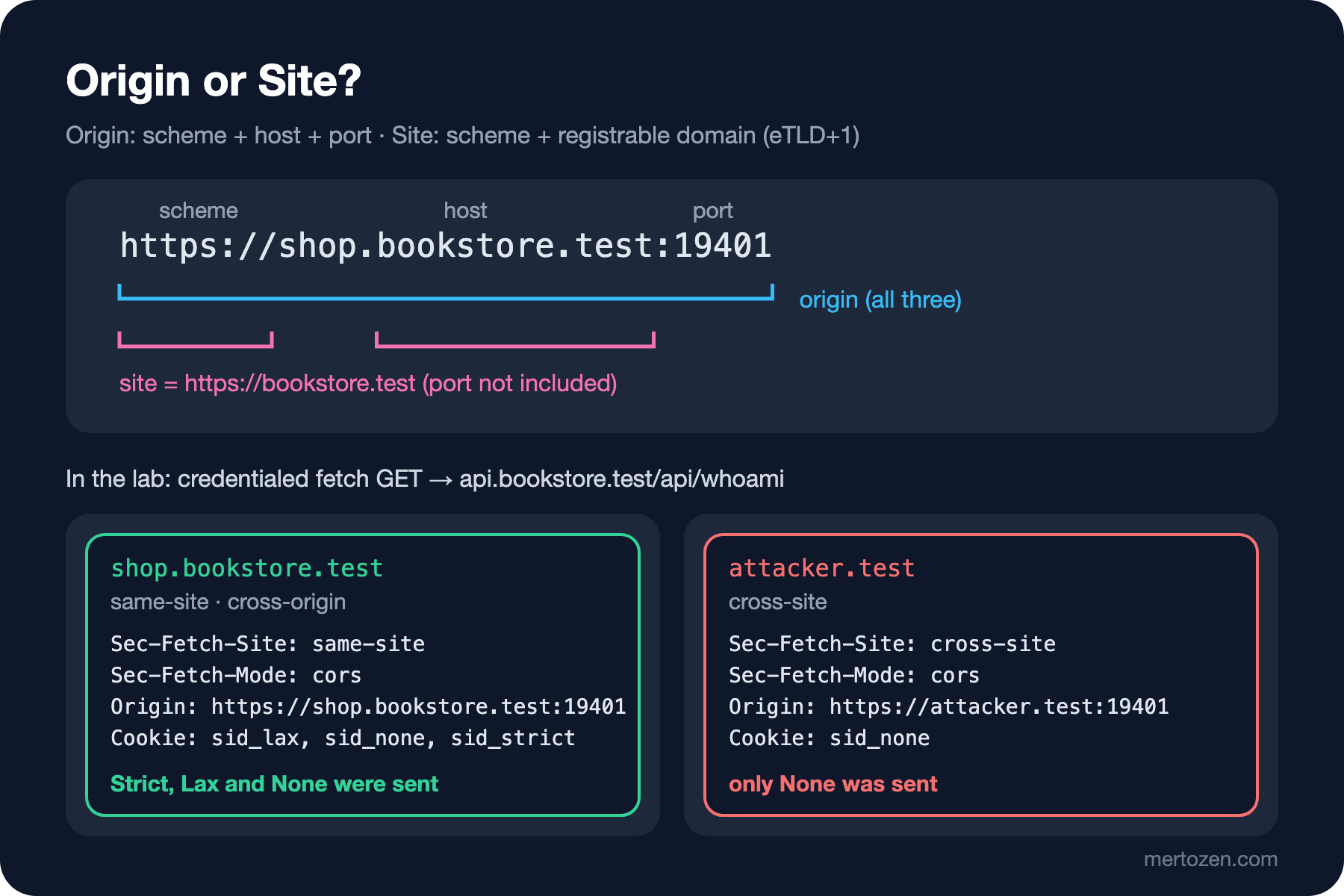
The browser draws two different boundaries, and half of its security mechanisms look at one while the other half look at the other. An origin is three parts of a URL (Uniform Resource Locator): scheme, host and port. https://shop.bookstore.test:19401 and https://api.bookstore.test:19401 have different hosts, so they are two separate origins. A site is a coarser boundary: the scheme plus the registrable domain. The registrable domain is the eTLD+1 (effective top-level domain plus one label) computed from the Public Suffix List (PSL). Both of those addresses have the same site: https://bookstore.test. They are same-site but cross-origin.
| A | B | Origin | Site |
|---|---|---|---|
https://shop.bookstore.test | https://api.bookstore.test | cross-origin | same-site |
https://shop.bookstore.test | https://shop.bookstore.test:8443 | cross-origin | same-site |
https://shop.bookstore.test | http://shop.bookstore.test | cross-origin | cross-site (schemeful) |
https://ada.github.io | https://mallory.github.io | cross-origin | cross-site (github.io is on the PSL) |
https://shop.bookstore.test | https://attacker.test | cross-origin | cross-site |
Two rows deserve attention. The port is part of the origin but not of the site. The scheme, on the other hand, became part of the site with "schemeful same-site": since Chrome 91, http:// and https:// on the same domain count as cross-site; according to the compatibility table on MDN (MDN Web Docs), Firefox keeps this behind a preference flag and Safari does not have it. The github.io row shows why the PSL matters: hosting platforms get their suffixes added to the list, so two different users' pages do not look same-site to each other.
The Lab: Three Hosts, One Process
To talk about this with logs instead of guesses, I wrote a single ASP.NET Core 10 minimal API. The same Kestrel process answers for three host names: api.bookstore.test (the API and login), shop.bookstore.test (the Bookstore storefront) and attacker.test (another site). Fetch Metadata headers are only sent to potentially trustworthy URLs, so the lab runs over HTTPS (Hypertext Transfer Protocol Secure); I generated the certificate with openssl in the work folder and did not use dotnet dev-certs. Program.cs:
using Bookstore.Lab;

var builder = WebApplication.CreateBuilder(args);
builder.Services.AddCors(options => options.AddPolicy("shop", policy => policy
    .WithOrigins("https://shop.bookstore.test:19401")
    .AllowCredentials()));

var app = builder.Build();
ILogger log = app.Services.GetRequiredService<ILoggerFactory>().CreateLogger("Bookstore.Lab");
bool fetchMetadataEnabled = app.Configuration.GetValue<bool>("FetchMetadata:Enabled");

// Log the Fetch Metadata headers and cookie names the browser sends with every API request
app.Use(async (context, next) =>
{
    HttpRequest request = context.Request;
    if (request.Path.StartsWithSegments("/api"))
    {
        string cookies = string.Join(",", request.Cookies.Keys.Order());
        log.LogInformation("{Method} {Host}{Path} site={Site} mode={Mode} dest={Dest} origin={Origin} cookies=[{Cookies}]",
            request.Method, request.Host, request.Path,
            request.Headers["Sec-Fetch-Site"], request.Headers["Sec-Fetch-Mode"], request.Headers["Sec-Fetch-Dest"],
            request.Headers.Origin, cookies);

        if (fetchMetadataEnabled && !FetchMetadataPolicy.IsAllowed(request))
        {
            log.LogWarning("Blocked by Fetch Metadata policy: {Method} {Path}", request.Method, request.Path);
            context.Response.StatusCode = StatusCodes.Status403Forbidden;
            return;
        }
    }
    await next();
});

app.UseCors();

// api.bookstore.test: on login, set cookies with three different SameSite values
app.MapGet("/login", (HttpContext context) =>
{
    CookieOptions secure = new() { Secure = true, HttpOnly = true, Path = "/" };
    context.Response.Cookies.Append("sid_strict", "s1", new CookieOptions(secure) { SameSite = SameSiteMode.Strict });
    context.Response.Cookies.Append("sid_lax", "s2", new CookieOptions(secure) { SameSite = SameSiteMode.Lax });
    context.Response.Cookies.Append("sid_none", "s3", new CookieOptions(secure) { SameSite = SameSiteMode.None });
    return Results.Text("logged in");
}).RequireHost("api.bookstore.test");

app.MapGet("/api/whoami", (HttpRequest request) =>
    Results.Ok(new { user = request.Cookies.ContainsKey("sid_strict") ? "ada" : "anonymous" }))
    .RequireCors("shop");

app.MapPost("/api/cart/items", (HttpRequest request) =>
    Results.Ok(new { added = true, cookies = request.Cookies.Count }));

// The same process serves a test page for two different "sites"
app.MapGet("/", () => Results.Content(Pages.Probe, "text/html"))
    .RequireHost("shop.bookstore.test", "attacker.test");

app.Run();

public partial class Program;
Login sets three cookies with the same value but different SameSite settings; all of them are Secure and HttpOnly. The first middleware logs the method, the Fetch Metadata headers, the Origin and the incoming cookie names for every request under /api. The Kestrel endpoint in appsettings.json is https://127.0.0.1:19401 and the certificate path is ../certs/lab.crt. The other two hosts serve the same HTML (HyperText Markup Language) page:
namespace Bookstore.Lab;

public static class Pages
{
    public const string Api = "https://api.bookstore.test:19401";

    public const string Probe = $$"""
        <!doctype html>
        <html>
        <body>
          <a id="nav" href="{{Api}}/api/whoami">whoami</a>
          <form id="cart" method="post" action="{{Api}}/api/cart/items">
            <input name="bookId" value="42">
          </form>
          <img id="pixel" alt="">
        </body>
        </html>
        """;
}
I drove the browser side with headless Chrome 156 through Playwright. The --host-resolver-rules flag maps all three host names to 127.0.0.1, so we get real cross-site and same-site requests without touching the hosts file or DNS (Domain Name System):
import { chromium } from 'playwright-core';

const API = 'https://api.bookstore.test:19401';
const browser = await chromium.launch({
  executablePath: process.env.CHROME,
  headless: true,
  args: ['--host-resolver-rules=MAP *.bookstore.test 127.0.0.1, MAP attacker.test 127.0.0.1'],
});
const context = await browser.newContext({ ignoreHTTPSErrors: true });
const page = await context.newPage();
page.on('console', m => console.log(`[console.${m.type()}] ${m.text()}`));
The script first visits /login, then makes the same five requests from each of the two pages: a credentialed fetch GET, a no-cors POST, an <img>, a link click and a form submit. The first two steps look like this:
for (const origin of ['https://attacker.test:19401', 'https://shop.bookstore.test:19401']) {
  step(`${origin}: fetch GET with credentials`);
  await page.goto(`${origin}/`);
  console.log(await page.evaluate(async api => {
    try {
      const r = await fetch(`${api}/api/whoami`, { credentials: 'include' });
      return `read ${r.status} ${await r.text()}`;
    } catch (e) { return `${e.name}: ${e.message}`; }
  }, API));

  step(`${origin}: fetch POST no-cors with credentials`);
  console.log(await page.evaluate(async api => {
    const r = await fetch(`${api}/api/cart/items`, { method: 'POST', mode: 'no-cors', credentials: 'include', body: 'bookId=42' });
cd Bookstore.Lab
FetchMetadata__Enabled=false dotnet run
# in a second terminal
node probe01.mjsThe Same-Origin Policy Blocks Reading, Not Sending
In the browser, the fetch on attacker.test ends the way you expect:
### https://attacker.test:19401: fetch GET with credentials
[console.error] Access to fetch at 'https://api.bookstore.test:19401/api/whoami' from origin 'https://attacker.test:19401' has been blocked by CORS policy: No 'Access-Control-Allow-Origin' header is present on the requested resource.
[console.error] Failed to load resource: net::ERR_FAILED
TypeError: Failed to fetch
Now look at the server log for the same moment. In the first run, with the policy turned off, all five requests from attacker.test reached the server:
GET api.bookstore.test:19401/api/whoami site=cross-site mode=cors dest=empty origin=https://attacker.test:19401 cookies=[sid_none]
POST api.bookstore.test:19401/api/cart/items site=cross-site mode=no-cors dest=empty origin=https://attacker.test:19401 cookies=[sid_none]
GET api.bookstore.test:19401/api/whoami site=cross-site mode=no-cors dest=image origin= cookies=[sid_none]
GET api.bookstore.test:19401/api/whoami site=cross-site mode=navigate dest=document origin= cookies=[sid_lax,sid_none]
POST api.bookstore.test:19401/api/cart/items site=cross-site mode=navigate dest=document origin=https://attacker.test:19401 cookies=[sid_none]
The Same-Origin Policy (SOP) stops a script on one origin from reading the response of another origin. It does not stop the request from being sent. The fetch in the first line went to the server and the server returned 200; the browser saw no Access-Control-Allow-Origin in the response and did not hand the body to JavaScript. The no-cors POST and the form submit had a side effect that had already happened on the server: a book was added to the cart. CSRF (Cross-Site Request Forgery) exploits exactly this gap; we covered the basic defence with cookie flags and CSRF tokens in the OWASP (Open Worldwide Application Security Project) series post "Authentication Failures (2)".
Where does CORS sit in this picture? CORS is a mechanism that relaxes the SOP, not one that tightens it. The server says "this origin may read the response", and that is all. In the lab I allowed only shop.bookstore.test:
curl -sk -i --resolve api.bookstore.test:19401:127.0.0.1 -H "Origin: https://shop.bookstore.test:19401" https://api.bookstore.test:19401/api/whoami
HTTP/2 200
content-type: application/json; charset=utf-8
date: Sun, 08 Nov 2026 05:24:58 GMT
server: Kestrel
access-control-allow-credentials: true
access-control-allow-origin: https://shop.bookstore.test:19401

{"user":"anonymous"}
### https://shop.bookstore.test:19401: fetch GET with credentials
read 200 {"user":"ada"}The same fetch, run from the storefront page, could read the response. For attacker.test the header was never written. In both cases, though, the request reached the server and the server did its work. That is why "we locked down CORS, so we are protected from CSRF" is wrong. We covered the server side of CORS in the ASP.NET Core Web API series post "CORS and Security" and in the OWASP series post "Broken Access Control (2)".
SameSite Cookies: Strict, Lax and None
Look at the cookies= column of the log above again. For the requests from attacker.test:
| Request | Sec-Fetch-Mode / Dest | Cookies received |
|---|---|---|
fetch GET | cors / empty | sid_none |
fetch POST | no-cors / empty | sid_none |
<img> | no-cors / image | sid_none |
| Link click (GET) | navigate / document | sid_lax, sid_none |
| Form submit (POST) | navigate / document | sid_none |
The Strict cookie was not attached to any cross-site request, not even the link click. That is why /api/whoami, reached through the link click, saw the user as anonymous. The Lax cookie went only with the top-level navigation that used a safe method (GET); it did not go with the cross-site form POST. None went everywhere; for that cookie the only protection is the server's own CSRF check.
What happens to a cookie without a SameSite attribute depends on the browser. Since Chrome 80, such a cookie is treated as Lax. According to MDN's compatibility data, Firefox keeps this default behind a preference flag and Safari does not have it at all. So always write SameSite explicitly; relying on the default means leaving Bookstore's Safari users unprotected. SameSite=None requires Secure; Chrome has enforced that since version 80 and Firefox since 131.
Same-Site but Cross-Origin: The Subdomain Risk
When we make the same five requests from shop.bookstore.test, the log looks like this:
GET api.bookstore.test:19401/api/whoami site=same-site mode=cors dest=empty origin=https://shop.bookstore.test:19401 cookies=[sid_lax,sid_none,sid_strict]
POST api.bookstore.test:19401/api/cart/items site=same-site mode=no-cors dest=empty origin=https://shop.bookstore.test:19401 cookies=[sid_lax,sid_none,sid_strict]
GET api.bookstore.test:19401/api/whoami site=same-site mode=no-cors dest=image origin= cookies=[sid_lax,sid_none,sid_strict]
GET api.bookstore.test:19401/api/whoami site=same-site mode=navigate dest=document origin= cookies=[sid_lax,sid_none,sid_strict]
POST api.bookstore.test:19401/api/cart/items site=same-site mode=navigate dest=document origin=https://shop.bookstore.test:19401 cookies=[sid_lax,sid_none,sid_strict]
All three cookies went with all five requests, Strict included. The SameSite boundary is the site, not the origin. As long as shop and api are on the same site, the browser sees these requests as coming "from your own site". Think about the consequence: if there is a blog.bookstore.test under bookstore.test, run by the marketing team, and an XSS (Cross-Site Scripting) hole appears there, the script on it can send requests to api.bookstore.test with the Strict cookies. SameSite does not protect subdomains from one another. If you host third-party content under the same registrable domain (user pages, an old WordPress, a test environment), either move it to a separate site or check at the origin level in the API. Setting the cookie without a Domain attribute and with the __Host- prefix also helps: that cookie goes only to the host that set it and cannot be overwritten by a subdomain.
Fetch Metadata: The Server Decides by Looking at Headers
Sec-Fetch-Site, Sec-Fetch-Mode and Sec-Fetch-Dest, which you see on every log line, are defined in the W3C (World Wide Web Consortium) Fetch Metadata Request Headers draft. Because they start with Sec-, they are forbidden headers: JavaScript on the page can neither change nor forge them. The values say who started the request and how: for Sec-Fetch-Site they are same-origin, same-site, cross-site, and none for requests the user started from the address bar or a bookmark. According to MDN, the header has been supported since Chrome 76, Firefox 90 and Safari 16.4.
With this information, the server can decide before handling the request. I adapted web.dev's "Resource Isolation Policy" recommendation for Bookstore:
namespace Bookstore.Lab;

public static class FetchMetadataPolicy
{
    // Resource Isolation Policy: https://web.dev/articles/fetch-metadata
    public static bool IsAllowed(HttpRequest request)
    {
        string site = request.Headers["Sec-Fetch-Site"].ToString();

        // No header: an older browser or a non-browser client (curl, a service)
        if (site is "" or "same-origin" or "same-site" or "none")
        {
            return true;
        }

        // cross-site: allow only simple top-level navigations made with GET
        string mode = request.Headers["Sec-Fetch-Mode"].ToString();
        string dest = request.Headers["Sec-Fetch-Dest"].ToString();
        return mode == "navigate"
            && HttpMethods.IsGet(request.Method)
            && dest is not ("object" or "embed");
    }
}
The rule is simple: allow when the header is missing (so non-browser clients and older browsers do not break), allow same-origin, same-site and none requests, and for cross-site requests accept only top-level navigations made with GET. The object and embed destinations may look like navigations, but they are embedded inside another page, so we leave them out. The log of the same probe with the policy turned on:
info: Bookstore.Lab[0] GET api.bookstore.test:19401/api/whoami site=cross-site mode=cors dest=empty origin=https://attacker.test:19401 cookies=[sid_none]
warn: Bookstore.Lab[0] Blocked by Fetch Metadata policy: GET /api/whoami
info: Bookstore.Lab[0] POST api.bookstore.test:19401/api/cart/items site=cross-site mode=no-cors dest=empty origin=https://attacker.test:19401 cookies=[sid_none]
warn: Bookstore.Lab[0] Blocked by Fetch Metadata policy: POST /api/cart/items
info: Bookstore.Lab[0] GET api.bookstore.test:19401/api/whoami site=cross-site mode=no-cors dest=image origin= cookies=[sid_none]
warn: Bookstore.Lab[0] Blocked by Fetch Metadata policy: GET /api/whoami
info: Bookstore.Lab[0] POST api.bookstore.test:19401/api/cart/items site=cross-site mode=navigate dest=document origin=https://attacker.test:19401 cookies=[sid_none]
warn: Bookstore.Lab[0] Blocked by Fetch Metadata policy: POST /api/cart/items
The four cross-site requests got a 403 before reaching the endpoint code; the form submit no longer adds a book to the cart. The link click still works, because linking to Bookstore from another site is legitimate. I pinned this decision down with automated tests; they start the application in memory with WebApplicationFactory:
using System.Net;
using Microsoft.AspNetCore.Mvc.Testing;

namespace Bookstore.Lab.Tests;

public class FetchMetadataTests(WebApplicationFactory<Program> factory)
    : IClassFixture<WebApplicationFactory<Program>>
{
    [Theory]
    [InlineData("POST", "/api/cart/items", "cross-site", "no-cors", "empty", HttpStatusCode.Forbidden)]
    [InlineData("POST", "/api/cart/items", "cross-site", "navigate", "document", HttpStatusCode.Forbidden)]
    [InlineData("GET", "/api/whoami", "cross-site", "no-cors", "image", HttpStatusCode.Forbidden)]
    [InlineData("GET", "/api/whoami", "cross-site", "navigate", "document", HttpStatusCode.OK)]
    [InlineData("POST", "/api/cart/items", "same-site", "cors", "empty", HttpStatusCode.OK)]
    [InlineData("POST", "/api/cart/items", "same-origin", "cors", "empty", HttpStatusCode.OK)]
    public async Task Policy_decides_by_fetch_metadata(
        string method, string path, string site, string mode, string dest, HttpStatusCode expected)
    {
        HttpClient client = factory.CreateClient();
        HttpRequestMessage request = new(new HttpMethod(method), path);
        request.Headers.Add("Sec-Fetch-Site", site);
        request.Headers.Add("Sec-Fetch-Mode", mode);
        request.Headers.Add("Sec-Fetch-Dest", dest);

        HttpResponseMessage response = await client.SendAsync(request);

        Assert.Equal(expected, response.StatusCode);
    }

    [Fact]
    public async Task Requests_without_fetch_metadata_are_allowed()
    {
        // curl, or an older browser that does not send Sec-Fetch-*
        HttpClient client = factory.CreateClient();

        HttpResponseMessage response = await client.PostAsync("/api/cart/items", null);

        Assert.Equal(HttpStatusCode.OK, response.StatusCode);
    }
}
dotnet test
Passed! - Failed: 0, Passed: 7, Skipped: 0, Total: 7, Duration: 126 ms - Bookstore.Lab.Tests.dll (net10.0)The same idea is making its way into the framework: in the .NET 11 previews, ASP.NET Core adds a CSRF protection that is on by default and looks at Sec-Fetch-Site and Origin for endpoints that read forms. .NET 10 does not have it; the middleware above or an antiforgery token is your job.
Browser Status in 2026: Third-Party Cookies, CHIPS and FedCM
For a few years some teams planned around "Chrome will turn off third-party cookies and CSRF will shrink on its own". That plan did not happen. In April 2025 Google said it would keep its current approach to third-party cookie choice in Chrome, which leaves them enabled by default, and in the Privacy Sandbox update of 17 October 2025 it announced the retirement of most of the APIs, including Topics, Protected Audience, Attribution Reporting, IP (Internet Protocol) Protection and Related Website Sets. Two of the technologies that remain supported matter to us directly: CHIPS (Cookies Having Independent Partitioned State) and FedCM (Federated Credential Management).
CHIPS uses the Partitioned attribute to split a cookie by top-level site: a cookie set by a payment widget running in an iframe inside Bookstore is not visible when the same widget opens on another site. According to MDN, Chrome 114, Firefox 141 and Safari 26.2 support it. FedCM is a browser API that offers sign-in with an identity provider without relying on third-party cookies. The practical outcome for Bookstore: do not count the removal of third-party cookies as a security measure. Write SameSite yourself, and reject cross-site requests on the server yourself.
Watch Out in Production
Do not turn on the Fetch Metadata policy in enforcing mode straight away. Log only first: keep the lab's log line in your own application for a week and count the site=cross-site requests that the policy would block. A payment provider's callback, form POSTs from partner sites or a mobile app's WebView may show up on that list. Add them as per-endpoint exceptions, then switch to enforcement.
A missing header is not evidence. Older browsers that do not send Sec-Fetch-* and pages served over HTTP (Hypertext Transfer Protocol) pass the policy. That is why Fetch Metadata does not replace SameSite cookies and a CSRF token; it is a cheap layer on top of them. A reverse proxy or CDN (Content Delivery Network) must not strip the Sec-Fetch-* headers; check that with a request in staging. Finally, count the 403s the policy returns as a separate metric: a sudden increase points either to an attack attempt or to a legitimate flow you broke, and you want to know about both.
Common Pitfalls
First, assuming a request was never sent because you see a CORS error in the console. The lab's first log line shows the opposite: the server received the request, handled it and returned 200. Protect every state-changing endpoint on the assumption that it will run even if nobody can read the response.
Second, changing state with GET. A Lax cookie goes with a cross-site link click; an endpoint like GET /api/cart/clear can be triggered by a single link on another site.
Third, not writing SameSite and relying on the browser default. Chrome's Lax default does not exist in Safari.
Fourth, treating subdomains as a security boundary. shop and blog are the same site; an XSS in one can send requests to the other with Strict cookies.
Fifth, rejecting the request in the Fetch Metadata policy when the header is missing. Your curl-based integration tests, health checks and server-to-server calls break overnight.
A Small Experiment
★☆☆ In the lab, remove the SameSite value of the sid_lax cookie, run the probe again and read from the log which cookies go with the link click from attacker.test. Compare the result with Chrome's Lax default.
★★☆ Tighten FetchMetadataPolicy so that it also rejects same-site requests, then find which endpoints need an exception so the fetch from shop.bookstore.test keeps working. Add a test row that covers this case.
★★★ Make the policy run in a "log only" mode first: when the FetchMetadata:Mode setting is Report, it should not block the request, only log a warning. Write tests for both modes.
In the next post we turn to the inside of the browser, to the Angular application itself: the paths Angular's sanitization does not protect. We will build a DOM (Document Object Model) XSS sink inventory and a code review checklist covering ElementRef, Renderer2, dynamic URLs and HTML-producing libraries.