

Taking Trusted Types to Production: Angular Policies, Third-Party Libraries and Baseline 2026
Trusted Types makes DOM sinks accept only typed objects produced by an allowed policy instead of plain strings; even writing the result of DomSanitizer.sanitize to innerHTML is a violation. In this post we verify Angular's policy names in node_modules, build an inventory with Report-Only, resolve DOMPurify, loader and third-party script violations, show the danger of the default policy and summarize support, which became Baseline 2026 with Firefox 148.
Version note: The examples in this post were run with Angular 22.2, Node.js 24, Chrome 156, DOMPurify 3.4 and playwright-core 1.65.
Guess First
You add this header to Bookstore's Angular app: Content-Security-Policy: require-trusted-types-for 'script'; trusted-types angular. The app has two lines of interest. The first is <p [innerHTML]="review.text"> in a template. The second is the "fixed" code from the previous post in the series: nativeElement.innerHTML = this.sanitizer.sanitize(SecurityContext.HTML, text). Both write sanitized HTML (HyperText Markup Language). Which one works?
Only the first. Trusted Types looks at a value's type, not its content. A sink is an API (Application Programming Interface) that writes into the DOM (Document Object Model) as HTML or script; if it receives a plain string, the browser rejects the assignment. DomSanitizer.sanitize returns a cleaned string; to the browser it is still a string. The template binding, on the other hand, goes through Angular's policy named angular, and a typed object reaches the sink. In this post we take Trusted Types to production in Bookstore: Angular's policy names, an inventory with Report-Only, resolving third-party library and script violations one by one, the danger of the default policy, ng serve and the test environment, and browser support that became Baseline in February 2026. The basic idea of Trusted Types and a first require-trusted-types-for experiment were covered in the Web Security (OWASP Top 10) series, in the post "OWASP A05: Injection (2)".
Two Directives, One Policy
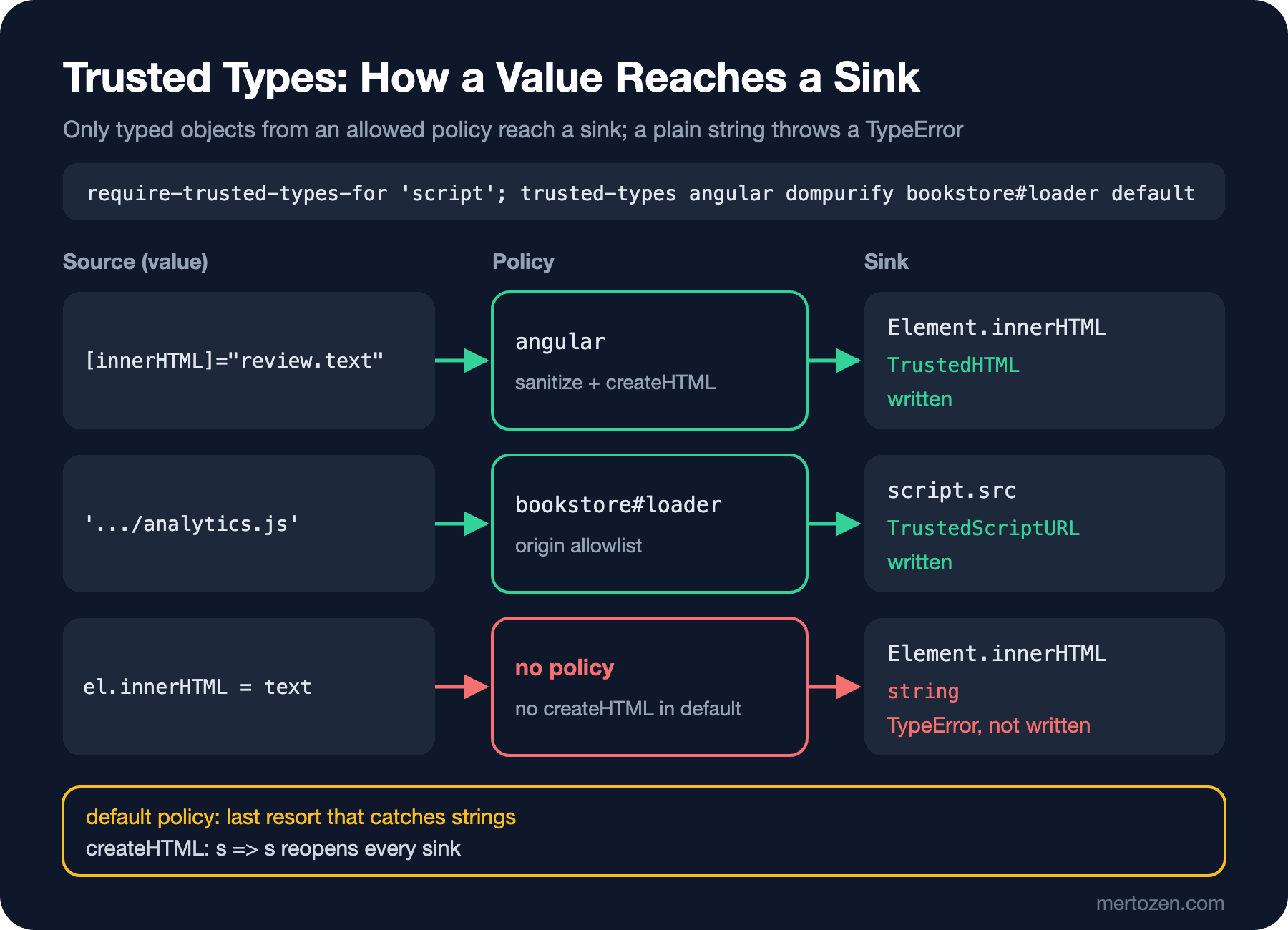
Trusted Types is switched on with two CSP (Content Security Policy) directives. require-trusted-types-for 'script' tells the browser "do not accept plain strings in DOM XSS (Cross-Site Scripting) sinks": innerHTML, outerHTML, insertAdjacentHTML, document.write, DOMParser.parseFromString, script.src, script.text, iframe.srcdoc, eval and setTimeout with a string are the main ones. These sinks now require one of three typed objects: TrustedHTML for HTML, TrustedScript for script text and TrustedScriptURL for a script URL (Uniform Resource Locator). Only a policy can produce these objects. Two lines from the lab's loader (the full version is below):
const loader = trustedTypes.createPolicy('bookstore#loader', { createScriptURL: toScriptUrl });
tm.src = loader.createScriptURL('http://127.0.0.1:19424/analytics.js');
The trusted-types directive limits which names can be used to create a policy. Calling createPolicy with a name that is not on the list is a violation. That way a security review shrinks from the whole code base to a handful of policy functions: a value can only reach a sink by passing through one of them.
Angular's Policy Names
The security guide on angular.dev lists five names and explains why each one is needed. I checked which ones are actually created in the lab's Angular 22.2 node_modules:
grep -rhoE --include='*.mjs' --include='*.js' "createPolicy\('[^']+'" node_modules/@angular/ | sort | uniq -c 1 createPolicy('angular#auto-csp'
1 createPolicy('angular#unsafe-bypass'
1 createPolicy('angular#unsafe-jit'
1 createPolicy('angular'| Policy | When it is needed | In the lab |
|---|---|---|
angular | Always when Trusted Types are enforced; Angular's reviewed internal code | @angular/core |
angular#unsafe-bypass | If you use the bypassSecurityTrust* methods | @angular/core |
angular#unsafe-jit | If you use the JIT (Just-in-Time) compiler directly | @angular/compiler |
angular#unsafe-upgrade | AngularJS hybrid apps with @angular/upgrade | package not installed |
angular#bundler | When the Angular CLI (Command-Line Interface) bundler creates lazy chunk files | not in @angular/build |
Two notes. The angular#bundler name does not appear in the current esbuild-based @angular/build package; in the lab I opened a lazily loaded route without it while Trusted Types were enforced, with no problems. Projects that have not moved off the old webpack-based builder should follow the guide's list. angular#auto-csp lives in the autoCsp loader but is only used when the loader is generated in Trusted Types mode; that mode is off in the Angular CLI's current autoCsp output. The # in the names is a common naming habit that keeps an application's and its libraries' policies readable side by side; giving your own policies names like bookstore#... is a good idea.
An Inventory with Report-Only
Enforcing Trusted Types directly on an existing app means breaking part of it at the first violation. Report-Only comes first:
Content-Security-Policy-Report-Only: require-trusted-types-for 'script'; trusted-types angular; report-uri /csp-reportI opened five Bookstore pages in headless Chrome. The important lines:
[console.log] [csp-violation] directive=require-trusted-types-for blocked=trusted-types-sink disposition=report sample=HTMLScriptElement src|http://127.0.0.1:19424/analytics.js
[console.log] [csp-violation] directive=require-trusted-types-for blocked=trusted-types-sink disposition=report sample=HTMLScriptElement src|http://127.0.0.1:19424/pixel.js
[console.log] [csp-violation] directive=require-trusted-types-for blocked=trusted-types-sink disposition=report sample=Element innerHTML|Great book <img src=x onerror="console.l
[console.log] [csp-violation] directive=require-trusted-types-for blocked=trusted-types-sink disposition=report sample=Element insertAdjacentHTML|Great book <img src=x onerror="console.l
[console.info] Creating a TrustedTypePolicy named 'dompurify' violates the following Content Security policy directive: "trusted-types angular". The policy is report-only, so the violation has been logged but no further action has been taken.
[console.info] Creating a TrustedTypePolicy named 'angular#unsafe-bypass' violates the following Content Security policy directive: "trusted-types angular". The policy is report-only, so the violation has been logged but no further action has been taken.
[console.log] [csp-violation] directive=require-trusted-types-for blocked=trusted-types-sink disposition=report sample=Element innerHTML|Great book <img src="x">
The sample field of Trusted Types reports is very useful: the sink's name, a | and the first 40 characters of the value. In the reports sent to /csp-report the same information appears as script-sample, together with source-file and the line number:
[report] application/csp-report {"csp-report":{"document-uri":"http://localhost:19425/sinks","referrer":"","violated-directive":"require-trusted-types-for","effective-directive":"require-trusted-types-for","original-policy":"require-trusted-types-for 'script'; trusted-types angular; report-uri /csp-report","disposition":"report","blocked-uri":"trusted-types-sink","line-number":3,"column-number":11,"source-file":"http://127.0.0.1:19424/analytics.js","status-code":200,"script-sample":"HTMLScriptElement src|http://127.0.0.1:19424/pixel.js"}}The inventory fell into five items:
- The tag manager loader in
index.htmlwrites a string toscript.src. - The third-party
analytics.jsdoes the same internally forpixel.js; we cannot change that code. - The vulnerable component from the previous post writes strings to
innerHTMLandinsertAdjacentHTML. - Even the "fixed" component produces a violation, because it writes the output of
DomSanitizer.sanitizetoinnerHTMLas a string (the last line). - DOMPurify cannot create its own
dompurifypolicy; the editor page needsangular#unsafe-bypass.
The lazily loaded route had no violations. When I enforced the same header I saw an exception instead of a report, and on the vulnerable page the first exception stopped the rest of the effect too:
[console.error] ERROR TypeError: Failed to set the 'innerHTML' property on 'Element': This document requires 'TrustedHTML' assignment.This shows why Report-Only is the first step: in enforce mode the first violation keeps the code after it from running, and the inventory stays incomplete.
Resolving Violations One by One
Your own code: back to the template
The cleanest fix is not to use the sink at all. Where HTML is needed, an [innerHTML] binding goes through Angular's angular policy; use interpolation for text, and the allowlist from the previous post with [href] for URLs:
@Component({
  selector: 'app-review-tt',
  template: `
    @for (review of reviews(); track review.author) {
      <article>
        <p [id]="'html-' + review.author" [innerHTML]="review.text"></p>
        <p [id]="'text-' + review.author">{{ review.text }}</p>
        @if (url(review.website); as href) {
          <a [href]="href">Website</a>
        }
      </article>
    }
  `,
})
export class ReviewTrustedTypes {
  private readonly http = inject(HttpClient);
  protected readonly reviews = toSignal(this.http.get<Review[]>('/api/reviews.json'), { initialValue: [] });
  protected readonly url = safeUrl;
}
HTML-producing library: allow its own policy
In a browser with Trusted Types, DOMPurify creates a policy named dompurify and relies on it for parsing. While the name was missing from the list, the lab showed both a DOMParser parseFromString and an innerHTML violation, and the Markdown area stayed empty. Adding dompurify to the trusted-types list fixed it. This means trusting DOMPurify's own policy; you do it deliberately, because that is exactly the code that cleans the HTML.
Loaders and third-party code you cannot change
Write a named policy for your own loader that validates the URL against an origin allowlist. analytics.js, however, is not your code; the only way to catch its script.src assignment is the default policy. When a string without a policy reaches a sink, the browser calls the policy named default if one exists. The key point: I give this policy only the method it needs, createScriptURL, with the same allowlist:
<script>
  (() => {
    const allowedOrigins = ['http://127.0.0.1:19424'];
    const toScriptUrl = (url) => {
      const parsed = new URL(url, document.baseURI);
      if (allowedOrigins.includes(parsed.origin)) return parsed.href;
      throw new TypeError(`Blocked script URL: ${url}`);
    };
    const tt = window.trustedTypes;
    const loader = tt
      ? tt.createPolicy('bookstore#loader', { createScriptURL: toScriptUrl })
      : { createScriptURL: toScriptUrl };
    // third-party code we cannot change: script URLs only, same allowlist
    tt?.createPolicy('default', {
      createScriptURL: (url, type, sink) => {
        console.warn(`default policy used by ${sink}: ${url}`);
        return toScriptUrl(url);
      },
    });
    const tm = document.createElement('script');
    tm.src = loader.createScriptURL('http://127.0.0.1:19424/analytics.js');
    document.head.append(tm);
  })();
</script>
This script runs before main.js, because the default policy has to exist before third-party code loads. In a browser without Trusted Types, loader falls back to a plain object and the allowlist check still runs. The new header:
Content-Security-Policy: require-trusted-types-for 'script'; trusted-types angular dompurify bookstore#loader defaultbypassSecurityTrust*: ask first, then allow
The page that highlights the editor's pick used bypassSecurityTrustHtml. While angular#unsafe-bypass was missing from the list, Angular could not create the policy and the assignment was rejected; once I added it, <b style="color: teal">Editor pick</b> was written. Before adding this name, check whether every bypass call is applied to a fixed value or to user data; once the name is on the list, every bypass call in the code base is open.
Verifying the Defense: Smoke Test, ng serve and jsdom
I want to show that the fixes work with a test, not by hand. The small Playwright script I wrote opens every route, collects securitypolicyviolation events and page errors, and exits with a non-zero code if there is any violation:
// Usage: node tt-smoke.mjs <baseUrl> <route> [<route> ...]
import { chromium } from 'playwright-core';

const [baseUrl, ...routes] = process.argv.slice(2);
const browser = await chromium.launch({ executablePath: process.env.CHROME });
let failures = 0;

for (const route of routes) {
  const page = await browser.newPage();
  const violations = [];
  await page.exposeFunction('reportViolation', (v) => violations.push(v));
  await page.addInitScript(() => {
    document.addEventListener('securitypolicyviolation', (e) =>
      window.reportViolation(`${e.effectiveDirective}: ${e.sample}`));
  });
  page.on('pageerror', (e) => violations.push(`pageerror: ${e.message}`));
  await page.goto(new URL(route, baseUrl).href, { waitUntil: 'networkidle' });
  await page.waitForTimeout(500);
  console.log(`${violations.length ? 'FAIL' : 'PASS'} ${route}`);
  for (const v of violations) console.log(`  ${v}`);
  failures += violations.length ? 1 : 0;
  await page.close();
}

await browser.close();
process.exit(failures ? 1 : 0);
With the new header, without angular#unsafe-bypass:
PASS /reviews
PASS /markdown
PASS /lazy
FAIL /bypass
  trusted-types: angular#unsafe-bypass
  require-trusted-types-for: Element innerHTML|<b style="color: teal">Editor pick</b>
FAIL /sinks
  require-trusted-types-for: Element innerHTML|Great book <img src=x onerror="console.l
The script exited with code 1. /sinks is the vulnerable page I left in on purpose; FAIL is the expected result there. On the /reviews page Mallory's review was written as Great book <img src="x">, and the javascript: link was never created. The analytics chain worked too, and the console got the warning default policy used by HTMLScriptElement src: http://127.0.0.1:19424/pixel.js; that line is how you see in production logs when the default policy kicks in.
If you only enable Trusted Types in production, you learn about violations in production. In angular.json you can define headers for the dev server:
"serve": {
  "builder": "@angular/build:dev-server",
  "options": {
    "headers": {
      "Content-Security-Policy": "require-trusted-types-for 'script'; trusted-types angular angular#unsafe-bypass dompurify bookstore#loader default"
    }
  }
}
Under ng serve, Vite's client script produced no violation; the Markdown page opened cleanly, and on the vulnerable page I got the same TypeError as in production. That way a developer sees the violation the moment they write the code.
Unit tests are a different story. In new Angular 22 projects the default test runner is Vitest, with jsdom as the DOM environment. jsdom has no Trusted Types:
jsdom trustedTypes: undefined | jsdom 30.1.3So tests in jsdom will never catch a Trusted Types violation. angular.dev describes setting the header through customHeaders in karma.config.js for projects that use Karma. If you run Vitest, put this check in a stage that runs in a real browser: a smoke test like the one above, or end-to-end tests.
The Danger of the default Policy
Writing the default policy as "just make everything work" is very tempting. In the same build I added one line to the default policy: createHTML: (html) => html. Result:
[console.log] analytics.js loaded
[console.warning] default policy used by HTMLScriptElement src: http://127.0.0.1:19424/pixel.js
[console.log] pixel.js loaded (created by analytics.js)
[console.log] XSS fired in #renderer
[console.log] XSS fired in #adjacent
[console.log] XSS fired in #native
The header is the same and require-trusted-types-for 'script' is still there; but because every string is silently turned into TrustedHTML, all three sinks are open again. The default policy takes back the guarantee that reduces a code base to "review the policies". If you use it, define only the method you really need, validate or sanitize the value, log every place it is used, and treat it as a bridge until the third-party code is fixed, not as a permanent solution.
Browser Support and Fallback
According to version 8.1.8 of MDN's (MDN Web Docs) browser-compat-data package and the web-features data:
| Browser | require-trusted-types-for and trusted-types |
|---|---|
| Chrome and Edge | 83 |
| Firefox | 148 |
| Safari | 26 |
With Firefox 148, Trusted Types became "Baseline 2026 newly available" on 24 February 2026. So in November 2026 all current browsers enforce the directive, but the 30 months for "widely available" have not passed yet and you still have users on older versions. A browser without support ignores the directive; for those users Angular's DomSanitizer still works, as angular.dev states explicitly. That is why Trusted Types is an additional layer: it does not replace correctly written code, it makes incorrectly written code definitively visible in the browser.
On the specification side, Trusted Types is developed in the W3C's (World Wide Web Consortium) Web Application Security Working Group; the latest published version is a Working Draft dated 7 October 2026. So all three browser engines implement it, but the text is still on the Recommendation track and details may change.
In Production
Think of Trusted Types together with a strict CSP. CSP limits which scripts run; Trusted Types limits which values reach a sink. Since 'strict-dynamic' trusts every script added by a script you trust, restricting script.src with Trusted Types keeps that chain under control.
Build the inventory from production traffic. Keep Report-Only on for at least one business cycle and group the reports by the sink name in script-sample. Report samples carry the first 40 characters of the value; plan your log retention accordingly, because an HTML fragment may contain user data.
Keep the policy list short and give every name an owner. Adding 'allow-duplicates' or * to the trusted-types directive reduces the benefit of restricting policy names. Adding a new name should require its own approval in code review.
Common Pitfalls
First, writing the result of DomSanitizer.sanitize to innerHTML and thinking you are safe. The value is clean but its type is string; with Trusted Types on, the assignment is rejected. Go back to the template binding.
Second, silencing violations wholesale with the default policy. In the lab, the one-line createHTML: (html) => html brought back three XSS bugs.
Third, defining the default policy after Angular bootstraps. If third-party scripts load before the policy exists, the first assignment is still rejected.
Fourth, trusting green tests in jsdom. jsdom has no trustedTypes; a violation only shows up in a real browser.
Fifth, going straight to enforcement. In enforce mode the first exception stops the code that follows, so the inventory stays incomplete and users see a broken page.
A Small Experiment
★☆☆ Remove dompurify from the lab header and open the Markdown page with the smoke test. Note which sinks are reported, then add the name back.
★★☆ Try loading a script from an origin that is not on the allowlist of the bookstore#loader policy. Look at how the error thrown by toScriptUrl appears in the console and in the smoke test.
★★★ Add a createHTML to the default policy, but make it clean the value with DOMPurify before returning it and log every call with the sink name. Open the vulnerable page: does the XSS run, and which sinks are logged? Note why this approach is still not a permanent fix.
With a strict CSP and Trusted Types, the two lines of defense in the browser are in place. In the next post we move to a different question: if XSS happens again one day, can the attacker reach your tokens? We build the threat model for localStorage, memory, cookies, service workers and the BFF (Backend for Frontend).