

Where Should Tokens Live? The Threat Model of localStorage, Memory, Cookies, Service Workers and the BFF
No browser storage location can stop XSS from sending requests as the user; the difference is whether the token can be read and carried away, which is why RFC 10017 recommends a BFF that never hands tokens to the browser. In this post we test localStorage, memory and HttpOnly cookie models with simulated XSS in an Angular 22 and ASP.NET Core 10 lab, weigh Web/Service Worker and refresh token risks, and pin down Bookstore's BFF decision with tests.
Version note: The examples in this post were built and run with Angular 22.2, .NET 10, Chrome 156 and Playwright 1.65.
Guess First
An XSS (Cross-Site Scripting) hole has turned up in Bookstore's Angular application, and the attacker's script runs on the user's page. Three teams made three different decisions: the first keeps the access token in localStorage, the second only in JavaScript memory, and the third never hands the token to the browser and uses an HttpOnly session cookie instead. On which team's app can the attacker place an order on the user's behalf? On which one can they take the token and use it from their own machine, even after the browser is closed?
"HttpOnly cookies protect against XSS" is half true. In this post we separate the two halves in our own lab: reading the token and sending requests as the user are two different threats, and each storage location behaves differently against them. Then we look at the recommendation in RFC (Request for Comments) 10017 and make a decision for Bookstore. Every experiment runs against the lab on my own machine.
The Threat Model: Reading the Token vs Acting as the User
RFC 10017, "OAuth 2.0 for Browser-Based Applications", published in August 2026 as BCP (Best Current Practice) 212, splits what can happen when malicious JavaScript runs on the page into four scenarios. Single-execution token theft: the script takes the current tokens from storage and sends them away. Persistent token theft: the script sets up something lasting and also takes every renewed token; short-lived tokens and rotation do not stop it. Acquisition and extraction of new tokens: the script starts a new authorization flow in a hidden iframe and gets fresh tokens for itself. Proxying requests via the user's browser: without stealing any token, the script sends requests as the user from the application's context.
The first three belong to the "reading the token" family. Their consequences are heavy: a stolen token works on the attacker's machine, even after the browser is closed, for the token's whole lifetime; a stolen refresh token can stretch that to days. The fourth is "acting as the user", and no storage location can stop it: as long as the script runs on your origin, it can do everything the application can. That is why choosing a storage location does not prevent XSS itself, it only limits the damage XSS can do. Preventing XSS is the job of this series' posts on strict CSP (Content Security Policy) and Trusted Types.
The Lab: Three Storage Models, One Angular Application
Bookstore's order API (Application Programming Interface) accepts two kinds of credential: an Authorization: Bearer header or a __Host-session cookie. Tokens and sessions are random 32-byte values kept in memory; I did not use JWT (JSON Web Token), because our topic is where the token lives, not its format. The ASP.NET Core 10 side:
using System.Collections.Concurrent;
using System.Security.Cryptography;

var builder = WebApplication.CreateBuilder(args);
var app = builder.Build();
ILogger log = app.Services.GetRequiredService<ILoggerFactory>().CreateLogger("Bookstore.TokenLab");

ConcurrentDictionary<string, string> accessTokens = new();
ConcurrentDictionary<string, string> sessions = new();
int nextOrderId = 1000;

static string NewSecret() => Convert.ToBase64String(RandomNumberGenerator.GetBytes(32));

app.UseDefaultFiles();
app.UseStaticFiles();

// Model 1: the token is handed to JavaScript (localStorage or memory)
app.MapPost("/api/token/login", () =>
{
    string token = NewSecret();
    accessTokens[token] = "ada";
    return Results.Ok(new { accessToken = token });
});

// Model 2: BFF style; the browser only sees an HttpOnly session cookie
app.MapPost("/api/session/login", (HttpContext context) =>
{
    string sessionId = NewSecret();
    sessions[sessionId] = "ada";
    context.Response.Cookies.Append("__Host-session", sessionId, new CookieOptions
    {
        Secure = true,
        HttpOnly = true,
        SameSite = SameSiteMode.Strict,
        Path = "/",
    });
    return Results.NoContent();
});

app.MapPost("/api/orders", (HttpContext context) =>
{
    string? user = null;
    string via = "none";
    string authorization = context.Request.Headers.Authorization.ToString();
    if (authorization.StartsWith("Bearer ") && accessTokens.TryGetValue(authorization[7..], out string? tokenUser))
    {
        (user, via) = (tokenUser, "bearer");
    }
    else if (context.Request.Cookies.TryGetValue("__Host-session", out string? sessionId)
        && sessions.TryGetValue(sessionId, out string? sessionUser))
    {
        (user, via) = (sessionUser, "cookie");
    }

    if (user is null)
    {
        log.LogWarning("Order rejected: no valid credential");
        return Results.Unauthorized();
    }

    int orderId = Interlocked.Increment(ref nextOrderId);
    log.LogInformation("Order {OrderId} created for {User} via {Via}, user-agent={Agent}",
        orderId, user, via, context.Request.Headers.UserAgent.ToString().Split(' ')[0]);
    return Results.Created($"/api/orders/{orderId}", new { orderId, via });
});

app.Run();

public partial class Program;
On the Angular 22 side, a single AuthStore knows all three modes. The local mode writes the token to localStorage, the memory mode keeps it in a private field, and the cookie mode never sees it:
import { HttpClient } from '@angular/common/http';
import { Injectable, inject } from '@angular/core';
import { firstValueFrom } from 'rxjs';

export type AuthMode = 'local' | 'memory' | 'cookie';

@Injectable({ providedIn: 'root' })
export class AuthStore {
  private readonly http = inject(HttpClient);
  private memoryToken: string | null = null;
  private mode: AuthMode = 'cookie';

  async login(mode: AuthMode): Promise<void> {
    this.mode = mode;
    if (mode === 'cookie') {
      // The token never reaches the browser; the server sets an HttpOnly session cookie
      await firstValueFrom(this.http.post('/api/session/login', { user: 'ada' }));
      return;
    }
    const { accessToken } = await firstValueFrom(
      this.http.post<{ accessToken: string }>('/api/token/login', { user: 'ada' }),
    );
    if (mode === 'local') {
      // Common but risky: every script on the same origin can read it
      localStorage.setItem('bookstore.accessToken', accessToken);
    } else {
      this.memoryToken = accessToken;
    }
  }

  token(): string | null {
    if (this.mode === 'local') {
      return localStorage.getItem('bookstore.accessToken');
    }
    return this.mode === 'memory' ? this.memoryToken : null;
  }
}
The functional interceptor that adds the token to requests looks a lot like code you have seen in many projects:
import { HttpInterceptorFn } from '@angular/common/http';
import { inject } from '@angular/core';
import { AuthStore } from './auth.store';

export const authInterceptor: HttpInterceptorFn = (req, next) => {
  const token = inject(AuthStore).token();
  return next(token ? req.clone({ setHeaders: { Authorization: `Bearer ${token}` } }) : req);
};
import { ApplicationConfig, provideBrowserGlobalErrorListeners } from '@angular/core';
import { provideHttpClient, withInterceptors } from '@angular/common/http';
import { authInterceptor } from './auth/auth.interceptor';
export const appConfig: ApplicationConfig = {
providers: [
provideBrowserGlobalErrorListeners(),
provideHttpClient(withInterceptors([authInterceptor])),
],
};The component signs in according to the mode parameter in the URL (Uniform Resource Locator) and shows a "Place order" button:
import { HttpClient } from '@angular/common/http';
import { Component, OnInit, inject, signal } from '@angular/core';
import { firstValueFrom } from 'rxjs';
import { AuthMode, AuthStore } from './auth/auth.store';

@Component({
  selector: 'app-root',
  template: `
    <p id="status">{{ status() }}</p>
    <button id="place-order" (click)="placeOrder()">Place order</button>
  `,
})
export class App implements OnInit {
  private readonly auth = inject(AuthStore);
  private readonly http = inject(HttpClient);
  protected readonly status = signal('signing in');

  async ngOnInit(): Promise<void> {
    const mode = (new URLSearchParams(location.search).get('mode') ?? 'cookie') as AuthMode;
    await this.auth.login(mode);
    this.status.set(`ready (${mode})`);
  }

  async placeOrder(): Promise<void> {
    const order = await firstValueFrom(
      this.http.post<{ orderId: number; via: string }>('/api/orders', { bookId: 42, quantity: 1 }),
    );
    this.status.set(`order ${order.orderId} via ${order.via}`);
  }
}
I copied the ng build output into ASP.NET Core's wwwroot folder; the application and the API share one origin, https://shop.bookstore.test:19402. As in the previous post, the certificate was generated with openssl in the work folder.
Simulating XSS: What Can the Script Read, What Can It Do?
Instead of adding a real hole to the application, I ran the injected script in the page's own context with Playwright's page.evaluate. The outcome is the same: the code runs on the page's origin with the page's privileges. The script first reads whatever it can, then tries to place an order on its own:
// Simulates XSS: this function runs in the page's own origin
const injected = async () => {
  const stored = localStorage.getItem('bookstore.accessToken');
  const headers = { 'Content-Type': 'application/json' };
  if (stored) headers.Authorization = `Bearer ${stored}`;
  const response = await fetch('/api/orders', { method: 'POST', headers, body: JSON.stringify({ bookId: 7, quantity: 3 }) });
  return { stored, cookie: document.cookie, injectedOrder: response.status };
};
For each mode the probe opens a clean browser context, runs the script, then clicks the application's own button, and finally sends a curl request from outside the browser with whatever the script could read:
for (const mode of ['local', 'memory', 'cookie']) {
  const context = await browser.newContext({ ignoreHTTPSErrors: true });
  const page = await context.newPage();
  await page.goto(`${APP}/?mode=${mode}`);
  await page.waitForSelector('#status:text("ready")');

  const result = await page.evaluate(injected);
  console.log(`\n### mode=${mode}`);
  console.log(`localStorage token : ${result.stored ? result.stored.slice(0, 8) + '...' : 'null'}`);
  console.log(`document.cookie    : "${result.cookie}"`);
  console.log(`injected fetch     : ${result.injectedOrder}`);

  await page.click('#place-order');
  await page.waitForSelector('#status:text("order")');
  console.log(`app button         : ${await page.textContent('#status')}`);

  const outside = result.stored ? curlOrder(['-H', `Authorization: Bearer ${result.stored}`]) : curlOrder([]);
  console.log(`curl from outside  : ${outside}`);
  await context.close();
}
### mode=local
localStorage token : trdZy0oD...
document.cookie : ""
injected fetch : 201
app button : order 1002 via bearer
curl from outside : 201
### mode=memory
localStorage token : null
document.cookie : ""
injected fetch : 401
app button : order 1004 via bearer
curl from outside : 401
### mode=cookie
localStorage token : null
document.cookie : ""
injected fetch : 201
app button : order 1006 via cookie
curl from outside : 401The server log tells the same story (I shortened the category name at the start of each line):
Order 1001 created for ada via bearer, user-agent=Mozilla/5.0
Order 1002 created for ada via bearer, user-agent=Mozilla/5.0
Order 1003 created for ada via bearer, user-agent=curl/8.7.1
warn: Order rejected: no valid credential
Order 1004 created for ada via bearer, user-agent=Mozilla/5.0
warn: Order rejected: no valid credential
Order 1005 created for ada via cookie, user-agent=Mozilla/5.0
Order 1006 created for ada via cookie, user-agent=Mozilla/5.0
warn: Order rejected: no valid credential
Read the three blocks side by side. In local mode the script read the token, placed an order, and the same token was accepted from curl too: the user-agent of order 1003 is curl/8.7.1. This is the worst case, because the token is now independent of the browser. In memory mode the script could not find the token and its own fetch got a 401; but clicking the application's button was enough, the interceptor added the token itself. In cookie mode the script saw nothing in document.cookie, yet its own fetch got a 201, because the browser attaches the cookie. The curl request from outside got a 401: the attacker holds no value they can carry away.
The Storage Options One by One
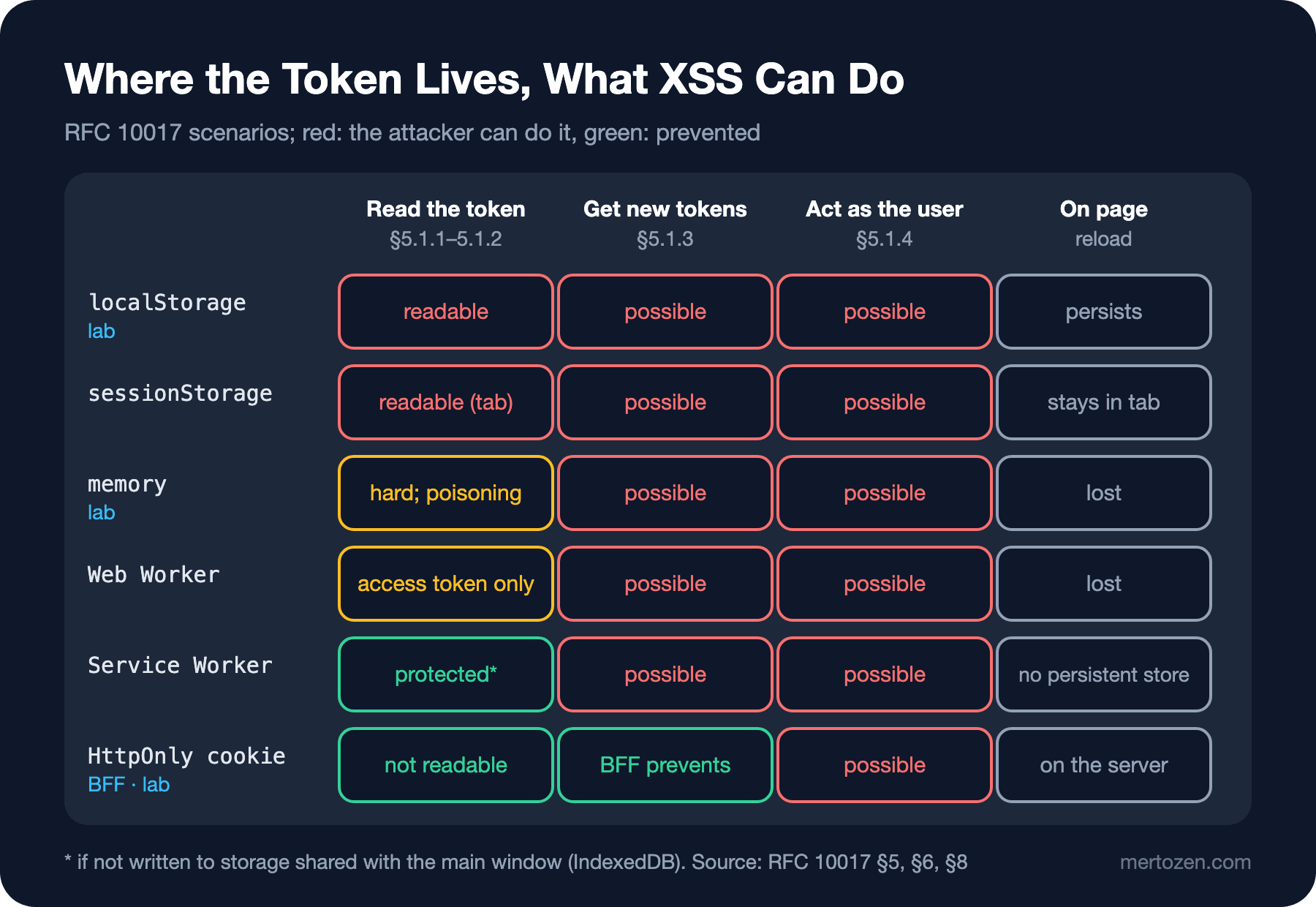
localStorage is open to every script on the same origin and persistent; it is still there after the browser is closed and reopened. sessionStorage is tied to the tab and not shared between tabs; RFC 10017 says this reduces the risk only "slightly", because the script runs in the same tab. The API of both was covered in the JavaScript series post "Web Storage and Cookies"; the point here is that both are equally exposed to XSS.
Keeping the token in memory makes reading it harder, at the cost of losing it on page reload. In the lab the script could not find the token. But RFC 10017 is careful here too: a value in memory can be captured on the next request through things like prototype poisoning, for example by replacing a global function the application uses. And the fourth scenario is not affected at all; order 1004 in the lab showed that.
Web Workers and Service Workers rely on the idea of keeping the token in a separate execution context and never giving it to the application. According to RFC 10017, the Service Worker approach can prevent token theft, but it must not write the token to persistent storage shared with the main window (IndexedDB included); in the common Web Worker setup the refresh token stays in the worker, while the access token is handed to the application and can be stolen. Neither stops the attacker from starting a new authorization flow and getting fresh tokens.
The value of an HttpOnly cookie is never visible to JavaScript; the document.cookie output in the lab is empty. Against all three scenarios based on reading the token, this is the best option, as long as the cookie points to a session on the server rather than carrying an access token. The cost is CSRF (Cross-Site Request Forgery): because the browser attaches the cookie on its own, it may attach it to another site's request too. SameSite=Strict and the Fetch Metadata check we saw in the previous post pay most of that cost.
Refresh Tokens in the Browser
An access token lives for a few minutes, a refresh token for days. So a refresh token kept in the browser stretches the damage of an XSS from minutes to days. For authorization servers that issue refresh tokens to a public client in the browser, RFC 10017 makes the following mandatory: rotation on every use or sender-constrained tokens, a maximum lifetime or expiry of unused tokens, and no extension of that lifetime during rotation.
A sender-constrained token, for example with DPoP (Demonstrating Proof of Possession), makes a stolen token useless on its own: the attacker also needs the private key. The RFC recommends generating the key as non-extractable with WebCrypto; then XSS cannot take the key out. Still, that does not stop the script from getting signatures made with that key while the page is open, and it does not stop the attacker from starting a new flow bound to a key of their own.
What RFC 10017 Recommends and the Decision for Bookstore
RFC 10017 presents three architectures "in decreasing order of security". At the top is the BFF (Backend for Frontend): a backend that is a confidential OAuth client keeps the tokens on the server, sets up a cookie-based session with the browser and proxies API requests. Second is the token-mediating backend: the backend obtains the tokens but hands the access token to the browser, which calls the API directly; the refresh token is protected, the access token can be stolen. Third is the public client that runs entirely in the browser: exposed to every scenario. The RFC calls the BFF "strongly recommended" for business applications.
Our decision for Bookstore is the BFF. The Angular application will not see tokens, API calls will go with a cookie to the ASP.NET Core backend on the same origin, and the backend will keep the OAuth tokens on the server and forward them to the services behind it. The RFC's recommendations for the BFF cookie: Secure and HttpOnly are required, plus SameSite=Strict, Path=/, no Domain, and the __Host-Http- prefix. In the lab I used __Host-; according to MDN (MDN Web Docs) data, __Host-Http- is available in Chrome 140 and Firefox 143 but not yet in Safari. The header the lab produces:
curl -sk -i --resolve shop.bookstore.test:19402:127.0.0.1 -X POST https://shop.bookstore.test:19402/api/session/login
HTTP/2 204
set-cookie: __Host-session=BO2pDHsNfwiI0g4ay2%2BP2TaZ264%2FqVlMQo45H7YRBaQ%3D; path=/; secure; samesite=strict; httponly
I pinned this decision down with two tests. The first checks the cookie's attributes; if someone accidentally removes HttpOnly or adds a Domain, the build breaks:
using System.Net;
using Microsoft.AspNetCore.Mvc.Testing;

namespace Bookstore.TokenLab.Tests;

public class SessionCookieTests(WebApplicationFactory<Program> factory)
    : IClassFixture<WebApplicationFactory<Program>>
{
    [Fact]
    public async Task Session_cookie_is_host_only_httponly_secure_and_strict()
    {
        HttpClient client = factory.CreateClient();

        HttpResponseMessage response = await client.PostAsync("/api/session/login", null);

        string setCookie = Assert.Single(response.Headers.GetValues("Set-Cookie"));
        Assert.StartsWith("__Host-session=", setCookie);
        Assert.Contains("path=/", setCookie);
        Assert.Contains("secure", setCookie);
        Assert.Contains("samesite=strict", setCookie);
        Assert.Contains("httponly", setCookie);
        // The __Host- prefix does not allow a Domain attribute
        Assert.DoesNotContain("domain=", setCookie);
    }

    [Fact]
    public async Task Order_without_credentials_is_rejected()
    {
        HttpClient client = factory.CreateClient();

        HttpResponseMessage response = await client.PostAsync("/api/orders", null);

        Assert.Equal(HttpStatusCode.Unauthorized, response.StatusCode);
    }
}
dotnet test
Passed! - Failed: 0, Passed: 2, Skipped: 0, Total: 2, Duration: 138 ms - Bookstore.TokenLab.Tests.dll (net10.0)The second is on the browser side: in real Chrome it verifies that after login no credential is left where JavaScript can reach it. The same script fails in local mode, so the test really catches something:
import { chromium } from 'playwright-core';

const browser = await chromium.launch({
  executablePath: process.env.CHROME,
  headless: true,
  args: ['--host-resolver-rules=MAP *.bookstore.test 127.0.0.1'],
});
const page = await browser.newPage({ ignoreHTTPSErrors: true });
await page.goto('https://shop.bookstore.test:19402/?mode=cookie');
await page.waitForSelector('#status:text("ready")');

// After login, no credential may be reachable from JavaScript
const exposed = await page.evaluate(() => ({
  localStorage: Object.keys(localStorage),
  sessionStorage: Object.keys(sessionStorage),
  cookie: document.cookie,
}));
const ok = exposed.localStorage.length === 0 && exposed.sessionStorage.length === 0 && !exposed.cookie.includes('session');
console.log(JSON.stringify(exposed));
console.log(ok ? 'PASS: no credential reachable from JavaScript' : 'FAIL: credential exposed to JavaScript');
await browser.close();
process.exit(ok ? 0 : 1);
node check05.mjs
{"localStorage":[],"sessionStorage":[],"cookie":""}
PASS: no credential reachable from JavaScript
# the same check with mode=local
{"localStorage":["bookstore.accessToken"],"sessionStorage":[],"cookie":""}
FAIL: credential exposed to JavaScriptThe full BFF setup with YARP (Yet Another Reverse Proxy), the OpenID Connect flow and authentication state on the Angular side are coming in the upcoming "Authentication and Authorization" series. Here we only have the decision and how to verify it.
DBSC: A New Direction Against Cookie Theft
A BFF stops XSS from reading tokens, but another threat remains: malware on the user's machine copying the cookie file and using the session on another machine. DBSC (Device Bound Session Credentials) is a proposed web standard developed against this. For each session the browser generates a key pair in hardware that cannot be exported, for example inside the TPM (Trusted Platform Module) on Windows; when the server refreshes the short-lived cookie, it asks the browser for proof made with that key. A copied cookie soon becomes invalid and cannot be refreshed without the key.
In April 2026 Google announced that DBSC is available to Windows users with Chrome 146 and that macOS support will come in a later release; the standards work continues in the W3C (World Wide Web Consortium) Web Application Security Working Group. For now it is an extra layer available only in Chrome; there is no need to put Bookstore's session design on hold for it, but building the BFF session with a short-lived cookie and a refresh endpoint makes a later move to DBSC easier.
Watch Out in Production
Align the session cookie's lifetime with the refresh token's maximum lifetime, as the RFC recommends; if the cookie lives 30 days and the refresh token 8 hours, users see strange errors. Measure the session store: after moving to a BFF you keep tokens on the server for every user, and with several instances that store has to be shared. On logout, deleting the cookie is not enough; revoke the session and the refresh token on the server as well.
Migrate with measurements. It is tempting to run the new cookie session in parallel for a while without dropping the code that reads the old token from localStorage; if you do that, do not forget to clean up the old key with localStorage.removeItem in the next release, otherwise a stealable token stays in the browser for months. Adding a check like the lab's check05.mjs to your end-to-end test suite catches someone writing the token back to storage as "a small convenience".
Common Pitfalls
First, thinking XSS is solved once you move to an HttpOnly cookie. Order 1005 in the lab was placed by a script that never saw the token. The cookie prevents theft; it does not prevent requests made as the user.
Second, putting the access token inside the cookie and calling it a BFF. Even if the cookie is HttpOnly, the token travels to the client; for sessions kept on the client side, the RFC recommends encrypting the cookie contents. A server-side session ID is simpler.
Third, treating memory storage as "safe". It makes reading harder, but does nothing against the fourth scenario or the new-token scenario.
Fourth, putting the refresh token in localStorage. The damage window of an XSS grows from minutes to days.
Fifth, moving to cookies and forgetting CSRF. Write SameSite explicitly and add a Fetch Metadata or antiforgery check to state-changing endpoints.
A Small Experiment
★☆☆ In the lab, switch the local mode of AuthStore to sessionStorage, run the probe and see whether the result changes. Then open the application in a second tab and check whether the script there can see the token.
★★☆ Extend check05.mjs to list IndexedDB databases next to document.cookie, and confirm it still passes in cookie mode.
★★★ Set the session cookie with a 5-minute lifetime and add a refresh endpoint called /api/session/refresh; show with an xUnit test that an /api/orders request with an expired session gets a 401 and gets a 201 after the refresh.
In the next post we look at the quietest source of XSS: third-party scripts and iframes you add to the page on purpose. We will talk about the privileges payment, analytics and chat widgets have on the page, iframe sandbox attributes, frame-ancestors and Permissions-Policy, and a safe postMessage service.