

Setting Up Tailwind v4 and CSS-First Configuration: @import "tailwindcss", @source and the Oxide Engine

In Tailwind v4 the configuration lives in CSS: @import "tailwindcss" puts theme, Preflight and utilities into three layers, and the Oxide engine scans sources as plain text and generates only classes whose full name it sees. We build the input.css → site.css chain in Bookstore.Web with the CLI, --watch and --minify, show why site.css returns 404 after a clean publish with BeforeTargets="Build", how .gitignore affects scanning, @source not/inline, and dynamic colors with --cat-color.
Version note: The examples in this post were run with Tailwind CSS 4.3.5 (@tailwindcss/cli and @tailwindcss/vite), Vite 8.3, Node.js 24, .NET 10 and Playwright 1.65 (Chromium 158).
Guess First
We are adding Tailwind to Bookstore.Web, the server-side UI of Bookstore, the online bookstore used as the shared example across this site's series. The setup you see most often on the internet is this: a css:build script in package.json, and a csproj Target that runs it in Release builds.
<Target Name="TailwindBuild" BeforeTargets="Build" Condition="'$(Configuration)' == 'Release'">
    <Exec Command="npm run css:build" />
</Target>
We clone the repo fresh (site.css is not in the repo, it is in .gitignore) and run dotnet publish -c Release. The build log shows the > css:build line, and the publish folder contains wwwroot/css/site.css. When we start the app in the Production environment and request /css/site.css, what comes back?
In this post we install Tailwind v4: the installation paths, what the @import "tailwindcss" line brings in, the chain from input.css to site.css in ASP.NET Core MVC with --watch and --minify, how the Oxide engine scans source files, and why some classes never reach the browser. The answer to the guess is in the Release section.
Installation Paths
Tailwind v4 doesn't need a tailwind.config.js file; the configuration lives inside the CSS file. The only thing that changes is which tool processes that CSS file:
| Path | Package | When |
|---|---|---|
| --- | --- | --- |
| Vite plugin | @tailwindcss/vite | Projects that use Vite (React, Vue, Svelte, plain Vite) |
| PostCSS plugin | @tailwindcss/postcss | Tools whose build goes through PostCSS; the Angular CLI uses this path |
| CLI | @tailwindcss/cli | Projects without a bundler: ASP.NET Core MVC, Razor Pages, static sites |
| webpack loader | @tailwindcss/webpack | Projects that use webpack; added in v4.2 |
| Standalone CLI | A single file from the GitHub release | Environments where you don't want to install Node.js |
The same compiler sits behind all of them; the same input.css produces the same CSS. We tried the Vite path with a small page:
// 02-vite/vite.config.js
import { defineConfig } from "vite";
import tailwindcss from "@tailwindcss/vite";

export default defineConfig({
    root: "02-vite",
    plugins: [tailwindcss()],
});
npx vite build --config 02-vite/vite.config.jsvite v8.3.8 building client environment for production...
transforming...
✓ 3 modules transformed.
rendering chunks...
computing gzip size...
02-vite/dist/index.html 0.28 kB │ gzip: 0.21 kB
02-vite/dist/assets/index-BreYr4sd.css 4.97 kB │ gzip: 1.72 kB
✓ built in 42msWe will see the PostCSS path in the Angular post of this series, with the .postcssrc.json that ng add tailwindcss generates. The webpack loader was introduced in the v4.2 announcement as a separate path that skips PostCSS; we did not run it in this post. The standalone CLI is published with every release as a separate executable for Windows, macOS and Linux (seven files in v4.3.5, including tailwindcss-windows-x64.exe); we did not run it either, because for Bookstore.Web pinning the npm package with package-lock.json is the easiest way to keep the version identical across the team and in CI.
What @import "tailwindcss" Brings In
The three @tailwind lines of v3 have been replaced by a single line. That line actually puts three files into three cascade layers:
/* the expanded form of the @import "tailwindcss"; line */
@layer theme, base, components, utilities;
@import "tailwindcss/theme.css" layer(theme);
@import "tailwindcss/preflight.css" layer(base);
@import "tailwindcss/utilities.css" layer(utilities);
theme.css defines the color palette, the spacing scale, fonts, breakpoints and the other design tokens as a @theme block. preflight.css is the base reset whose effect on CMS content we measured in the first post. utilities.css is a single @tailwind utilities line: the CSS for the classes found in your source files is generated there. The measurement script in the first post used this expanded form to leave Preflight out. Since @import is now resolved by Tailwind itself, an extra plugin like postcss-import is no longer needed.
Installing Bookstore.Web with the CLI
Bookstore.Web has no bundler; Razor views produce HTML on the server. So we install the CLI as an npm package in the project folder:
{
  "name": "bookstore-web-styles",
  "private": true,
  "scripts": {
    "css:watch": "tailwindcss -i ./Styles/input.css -o ./wwwroot/css/site.css --watch",
    "css:build": "tailwindcss -i ./Styles/input.css -o ./wwwroot/css/site.css --minify"
  },
  "devDependencies": {
    "@tailwindcss/cli": "4.3.5",
    "tailwindcss": "4.3.5"
  }
}
The source file is Styles/input.css, the output wwwroot/css/site.css. The reason we keep the source outside wwwroot is simple: every file under wwwroot gets published. In the first attempt we had put input.css under wwwroot/css, and the published app answered /css/input.css with a 200, Brotli and gzip versions included; there is no reason for the uncompiled source file to be open to the browser. The layout links a single stylesheet:
<link rel="stylesheet" href="~/css/site.css" asp-append-version="true">The .gitignore file is part of this setup too. site.css is build output, so it stays out of the repo; why the bin/ and obj/ lines matter becomes clear in the content scanning section:
bin/
obj/
node_modules/
wwwroot/css/site.css
This site's own setup uses the same chain: an input.css, a site.css produced by the CLI, and a csproj Target that runs --minify in Release builds.
--watch in Development, --minify in Release
Development: two terminals
During development two commands run side by side: dotnet watch run in one terminal and npm run css:watch in the other. The CLI does a first build, then waits for file changes. We added underline-offset-4 hover:underline to the title in the card partial:
≈ tailwindcss v4.3.5

Done in 25ms
Done in 4ms
The first build took 25 ms, the incremental build after the view change 4 ms. The new classes arrived in site.css; refreshing the browser was enough.
One detail: watch mode shuts itself down when the terminal's stdin closes. When we started the command in the background as a process with a closed stdin (some IDE tasks and scripts start processes this way), only the banner line was printed and the process exited immediately. The CLI's help text offers the --watch=always option for this; started with --watch=always, the same command stayed alive and picked up the changes.
Release: the csproj Target and the answer to the guess
We tried the Target from the guess on a fresh clone. The result:
dotnet publish -c Release -o ../../publish Bookstore.Web -> .../bin/Release/net10.0/Bookstore.Web.dll
> css:build
Bookstore.Web -> .../publish/We started the published app with ASPNETCORE_ENVIRONMENT=Production on 127.0.0.1:52861 and requested both CSS files:
node scripts/02-assets.mjs404 /css/site.css
404 /css/input.csssite.css returned 404 even though it is in the publish folder. The order in the log gives the hint: css:build ran after the assembly was compiled. BeforeTargets="Build" runs before the Build target itself, but after Build's dependencies, which include compilation and collecting static web assets. MapStaticAssets reads from a manifest produced during the build; site.css did not exist yet at that point, did not make it into the manifest, and the app never knew about it. The file sits in the folder but has no endpoint.
The fix has two parts. The Target has to run before BeforeBuild, and since a file that did not exist when the project was evaluated is not among the Content items, it has to be added by hand:
<Project Sdk="Microsoft.NET.Sdk.Web">

  <PropertyGroup>
    <TargetFramework>net10.0</TargetFramework>
    <Nullable>enable</Nullable>
    <ImplicitUsings>enable</ImplicitUsings>
  </PropertyGroup>

  <ItemGroup>
    <!-- npm files are build inputs, not part of the app -->
    <Content Update="package.json;package-lock.json" CopyToOutputDirectory="Never" CopyToPublishDirectory="Never" />
  </ItemGroup>

  <!-- fresh clone or CI: install the exact versions from package-lock.json -->
  <Target Name="NpmInstall" BeforeTargets="TailwindBuild" Condition="!Exists('node_modules')">
    <Exec Command="npm ci" />
  </Target>

  <!-- runs before static web assets are collected; a file created during the build must be added to Content by hand -->
  <Target Name="TailwindBuild" BeforeTargets="BeforeBuild" Condition="'$(Configuration)' == 'Release' Or !Exists('wwwroot/css/site.css')">
    <Exec Command="npm run css:build" />
    <ItemGroup>
      <Content Include="wwwroot/css/site.css" Exclude="@(Content)" />
    </ItemGroup>
  </Target>

</Project>
dotnet publish -c Release -o ../../publish
ls ../../publish/wwwroot/csssite.css
site.css.br
site.css.gz200 /css/site.css
404 /css/input.cssNow site.css is in the manifest, with Brotli and gzip versions next to it and an endpoint that carries a hash in the file name (css/site.jjvbubydq3.css). We also tried the two parts separately: with only BeforeBuild and no Content line, or with the Content line but BeforeTargets="Build", the file again did not make it into the manifest. The !Exists(...) part of the Condition makes a Debug build on a fresh clone produce site.css once; after that the watch process takes over. We removed package.json from Content because the Web SDK was copying it, as just another JSON file, into the publish folder.
Automatic Content Detection and Oxide
In v3 you listed the files to scan in the content array yourself. In v4 Tailwind finds them on its own, and knowing what it does explains both missing classes and CSS that grows for no reason.
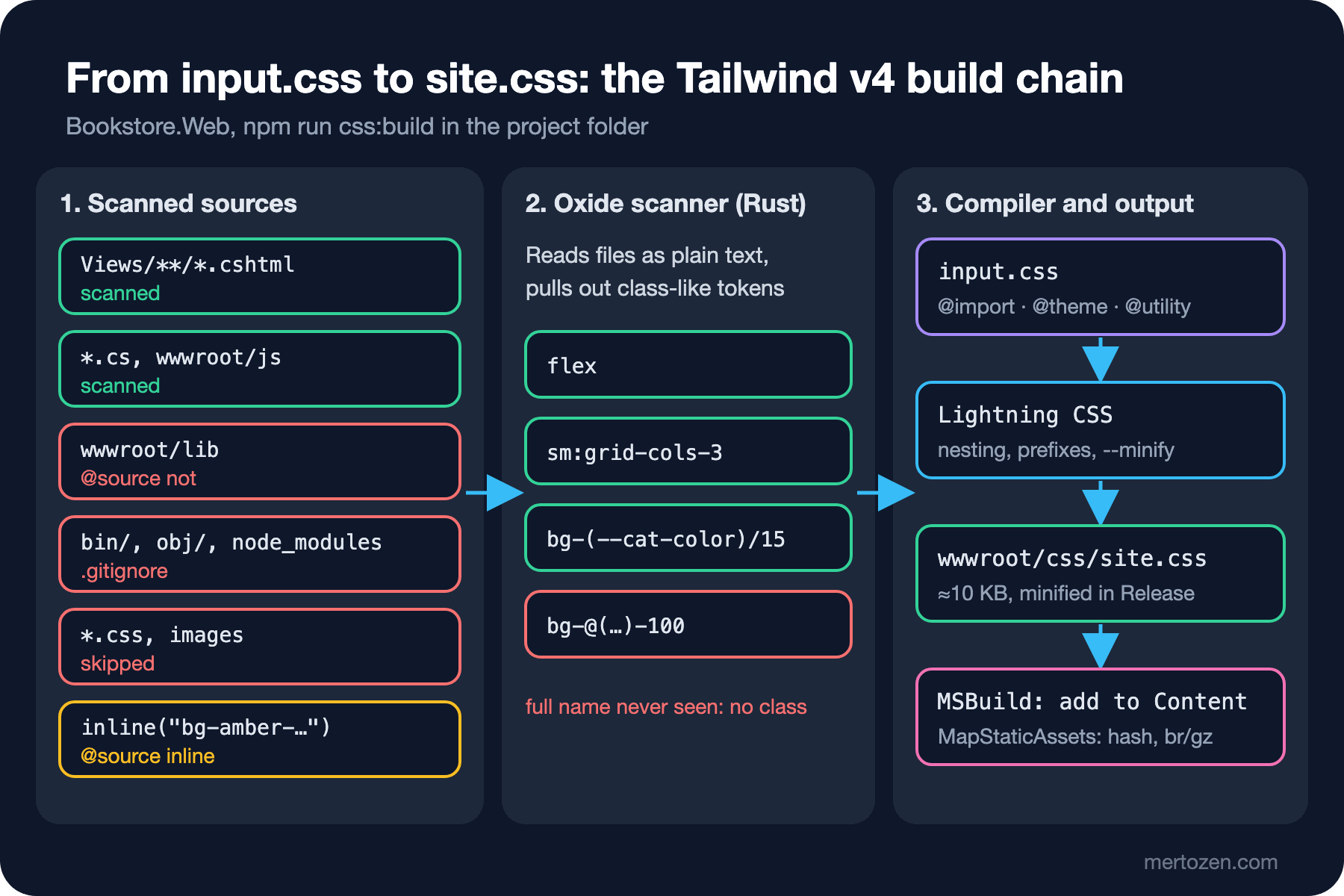
The scanning is done by a part called Oxide, written in Rust. On npm the @tailwindcss/oxide package pulls in a separate native package for each platform; on Windows it is @tailwindcss/oxide-win32-x64-msvc. The scanner reads files as plain text, not as a programming language, and collects every token that looks like a class name as a candidate. The compiler then generates CSS only for the candidates that match a utility it knows. That's why it doesn't matter whether a file is .cshtml, .cs, .ts, .html or even .json; it doesn't need to understand Razor syntax.
Not scanned by default: paths in .gitignore, node_modules, binary files such as images and archives, CSS files and lock files. With the CLI, scanning starts from the folder the command runs in. That makes .gitignore part of the setup rather than a convenience. We tested this by putting a file containing bg-lime-300 into the obj/ folder. The script builds the project inside the repo first, then copies it to a temporary folder outside git and builds it without a .gitignore and with the file dotnet new gitignore generates:
node scripts/02-scan.mjsin repo: lime=0
no git: lime=1
no git + dotnet new gitignore: lime=0Inside the repo obj/ is already in .gitignore, so no class was generated. Once the project was copied to a folder outside git, obj/ was scanned and bg-lime-300 made it into the CSS. Adding a .gitignore with dotnet new gitignore to the same folder kept it out again; so Tailwind reads .gitignore even without a git repository, and it understands patterns like [Oo]bj/ in that file.
@source, @source not and @source inline
There are three directives for places where automatic scanning is not enough or does too much. The final input.css of Bookstore.Web:
@import "tailwindcss";

/* third-party scripts copied into wwwroot/lib: not ours, do not scan */
@source not "../wwwroot/lib";

/* classes that only appear in CMS content: not in our source, generate them anyway */
@source inline("{hover:,}bg-amber-{100,200}");
Let's start with @source not. In ASP.NET Core projects third-party libraries are usually copied under wwwroot/lib with LibMan. We measured the size of site.css with a vendor script in that folder that contains words that look like class names (hidden, block, container, truncate…), first with the @source not line commented out, then with the line in place:
npm run css:build --silent && wc -c wwwroot/css/site.css 15001 wwwroot/css/site.css 10265 wwwroot/css/site.cssMost words in the script matched a real utility, so the CSS had grown by 4.7 KB. No view used these classes; they only sat in a string array.
@source "<path>" does the opposite: it adds a place that is not scanned by default. The most common use is scanning a component library built with Tailwind and installed under node_modules, or pointing at the views folder when you run the CLI from somewhere other than the project folder. Paths are relative to the CSS file. This site's input.css also has @source "../../Views" and @source "../js" lines; as long as the CLI runs from the project folder these folders are scanned anyway, but the lines guarantee that the views are found even when the command runs from another folder. @import "tailwindcss" source(none); turns automatic scanning off entirely; the measurement script in the first post used it to scan only the HTML of each step.
@source inline() generates classes that never appear in the source; it is the replacement for v3's safelist. Bookstore's campaign banners come from the CMS with their classes, and these classes are not in any file in the repo. Brace expansion lets you write several classes and variants on one line:
npx tailwindcss -i Styles/input.css | grep bg-amber .bg-amber-100
.bg-amber-200
.hover\:bg-amber-100:hover
.hover\:bg-amber-200:hoverDynamic Class Names: The Full Name Rule
Because the scanner reads plain text, one rule is mandatory: the full name of a class must be written somewhere in the source. We added a category badge to the book card. The category color is chosen in the back office; we have the old palette name (sky, emerald, rose) and a hex value. The first Razor code that comes to mind:
<span class="category-badge w-fit rounded-full px-2 py-0.5 text-xs font-medium bg-@(Model.Category.ColorName)-100 text-@(Model.Category.ColorName)-800">@Model.Category.Name</span>The HTML the server produces looks right: class="... bg-sky-100 text-sky-800". But measured with Playwright on the published app:
node scripts/02-badges.mjsDune category: bg rgba(0, 0, 0, 0), text oklch(0.208 0.042 265.755) | stock: -
The Hobbit category: bg rgba(0, 0, 0, 0), text oklch(0.208 0.042 265.755) | stock: -
Emma category: bg rgba(0, 0, 0, 0), text oklch(0.208 0.042 265.755) | stock: -The background is transparent and the text color is not the badge's but the body color (slate-900). The scanner saw the pieces bg- and -100 in the .cshtml file but never saw bg-sky-100; there is no such rule in the CSS. Correct HTML from the server proves nothing, because the CSS is generated at build time, independently of the HTML.
There are two correct ways, and which one to pick depends on the set of values. If the values are few and fixed, like stock status, write the full class names in code. If the values come from data, like a category color chosen in the back office, pass the color as a CSS custom property and tie the utility to that variable:
@model BookCardViewModel
@{
    // full class names: Tailwind only generates what it sees in the source
    string stockClasses = Model.InStock
        ? "bg-emerald-50 text-emerald-700"
        : "bg-slate-100 text-slate-500";
}
<article class="flex flex-col gap-3 rounded-xl border border-slate-200 bg-white p-4 shadow-sm">
    <img class="aspect-2/3 w-full rounded-md object-cover" src="@Model.CoverUrl" alt="Cover of @Model.Title" width="120" height="180" loading="lazy">
    <div class="flex flex-wrap gap-2">
        <span class="category-badge rounded-full bg-(--cat-color)/15 px-2 py-0.5 text-xs font-medium text-(--cat-color)" style="--cat-color: @Model.Category.Color">@Model.Category.Name</span>
        <span class="stock-badge rounded-full px-2 py-0.5 text-xs font-medium @stockClasses">@(Model.InStock ? "In stock" : "Out of stock")</span>
    </div>
    <!-- title, author and footer unchanged -->
</article>
bg-(--cat-color)/15 is v4's custom property syntax: it wraps the variable in parentheses with var(), and the /15 opacity modifier brings it down to 15 percent with color-mix(). The generated CSS:
  .bg-\(--cat-color\)\/15 {
    background-color: var(--cat-color);
    @supports (color: color-mix(in lab, red, red)) {
      background-color: color-mix(in oklab, var(--cat-color) 15%, transparent);
Dune category: bg oklab(0.587604 -0.0652444 -0.122562 / 0.15), text rgb(2, 132, 199) | stock: bg oklch(0.979 0.021 166.113), text oklch(0.508 0.118 165.612)
The Hobbit category: bg oklab(0.595965 -0.121967 0.0367818 / 0.15), text rgb(5, 150, 105) | stock: bg oklch(0.979 0.021 166.113), text oklch(0.508 0.118 165.612)
Emma category: bg oklab(0.585846 0.211683 0.0670975 / 0.15), text rgb(225, 29, 72) | stock: bg oklch(0.968 0.007 247.896), text oklch(0.554 0.046 257.417)Each category got its own color; Emma is out of stock and came with a gray badge. The CSS has no rule per category, just one rule; adding a new category needs no build. This site's category badges work the same way, with the --cat-color inline variable. We covered custom properties and color-mix() themselves in the custom property and color posts of the CSS3 series.
In Production
Make sure npm ci runs in CI. The NpmInstall Target in the csproj calls it when node_modules is missing, which means Node.js must be installed on the build machine. In a Docker image that means adding Node.js to the SDK image, or producing the CSS in a separate stage and copying it. Whichever you pick, let package-lock.json decide the Tailwind version that generates the CSS; a version-less call such as npx @tailwindcss/cli can pull whatever is latest on npm that day at every build.
npm 11's new install-scripts check prints a warning during npm ci for the install script of the @parcel/watcher package. Since that package's prebuilt platform package is installed as well, the build and watch mode worked for us despite the warning; still, don't be surprised when you see the line in the CI log.
Finally, watch the size. Bookstore.Web's minified site.css, Preflight included, is about 10 KB. If that number jumps to 14 KB in the next release, suspect that someone accidentally opened a new folder to scanning, as in the wwwroot/lib example.
Common Pitfalls
The first is the main finding of this post: hooking the Target that produces the CSS with BeforeTargets="Build". On a development machine site.css already exists, so everything works; the bug shows up only on a fresh clone, which means in CI and on the first deploy.
The second is running --watch in a process with a closed stdin. The process exits without an error and the CSS is never updated again; the developer spends hours wondering why Tailwind ignores the new class. Use --watch=always in such environments.
The third is working without a .gitignore. If bin/ and obj/ are scanned, the build doesn't just slow down; random words in the build output end up in the CSS as classes.
The fourth is building class names by concatenating strings. It's not only a Razor problem; $"text-{color}-600" in C# or a template literal in JavaScript gives the same result. Generating every possibility with @source inline looks like a way out, but it bloats the CSS as the set of values grows; when the value comes from data, a custom property is cleaner.
A Small Experiment
★☆☆ Comment out the @source not line in Styles/input.css, run npm run css:build and measure the size of site.css. Then add animate-spin to the string array in wwwroot/lib/vendor-widget/widget.js and measure again.
★★☆ Turn the stock badge classes in the card partial into three states with a C# switch expression: in stock, low stock (fewer than 5), sold out. Write the full class names for each state and verify the three colors with the Playwright script.
★★★ Set BeforeTargets of the TailwindBuild Target in the csproj to Build, delete bin/, obj/ and site.css, and run dotnet publish -c Release. Search for the css/site.css route in Bookstore.Web.staticwebassets.endpoints.json in the publish folder and confirm that it is not there; then go back to the fixed version and run the same search.
In the next post we get into the @theme block: we define Bookstore's colors and fonts as design tokens and use them both as utilities and as CSS variables, look at the difference between extending and resetting the default theme, @theme inline and @theme static, and set up dark mode with the class strategy.