

Working with Large Repos: Git LFS, Partial Clone, Sparse Checkout, Shallow Clone and Removing Big Files from History
Even a deleted file stays in the history and inflates every clone; the fix is to skip that weight with partial clone, sparse checkout and shallow clone, and to clean the history for good with git filter-repo. We move Bookstore's book covers to Git LFS and try GitHub's LFS quotas, fetch-depth in CI and scalar with Git 2.56.
Version note: The commands in this post were tested with Git 2.56.1, Git LFS 3.8.1 and git-filter-repo 2.47.0; git backfill has existed since Git 2.49, and cone mode has been the default since Git 2.37. GitHub quotas and limits are taken from GitHub Docs as of 15 November 2026.
Guess First
bookstore-web, the Angular client of Bookstore, the online bookstore used as the shared example across this site's series, consists of a few TypeScript files, four book covers and a README. The covers have been updated three times. The remote is again the local Git HTTP server on 127.0.0.1.
$ git clone -q http://127.0.0.1:52030/git/bookstore-web.git
$ cd bookstore-web
$ git log --oneline
7bef651 Remove local database backup
4cd32eb Add checkout page
aa30bd7 Add local database backup
ba3856e Add cart page
70fecea Update book covers (round 3)
85e6fb9 Update book covers (round 2)
736fe5f Update book covers (round 1)
806dd26 Add Angular skeleton
The files in the working folder add up to about 2.4 MB. How big do you think the .git folder is?
$ du -sh .git
 67M	.git
$ git count-objects -vH
count: 0
size: 0 bytes
in-pack: 49
packs: 1
size-pack: 67.06 MiB
prune-packable: 0
garbage: 0
size-garbage: 0 bytes
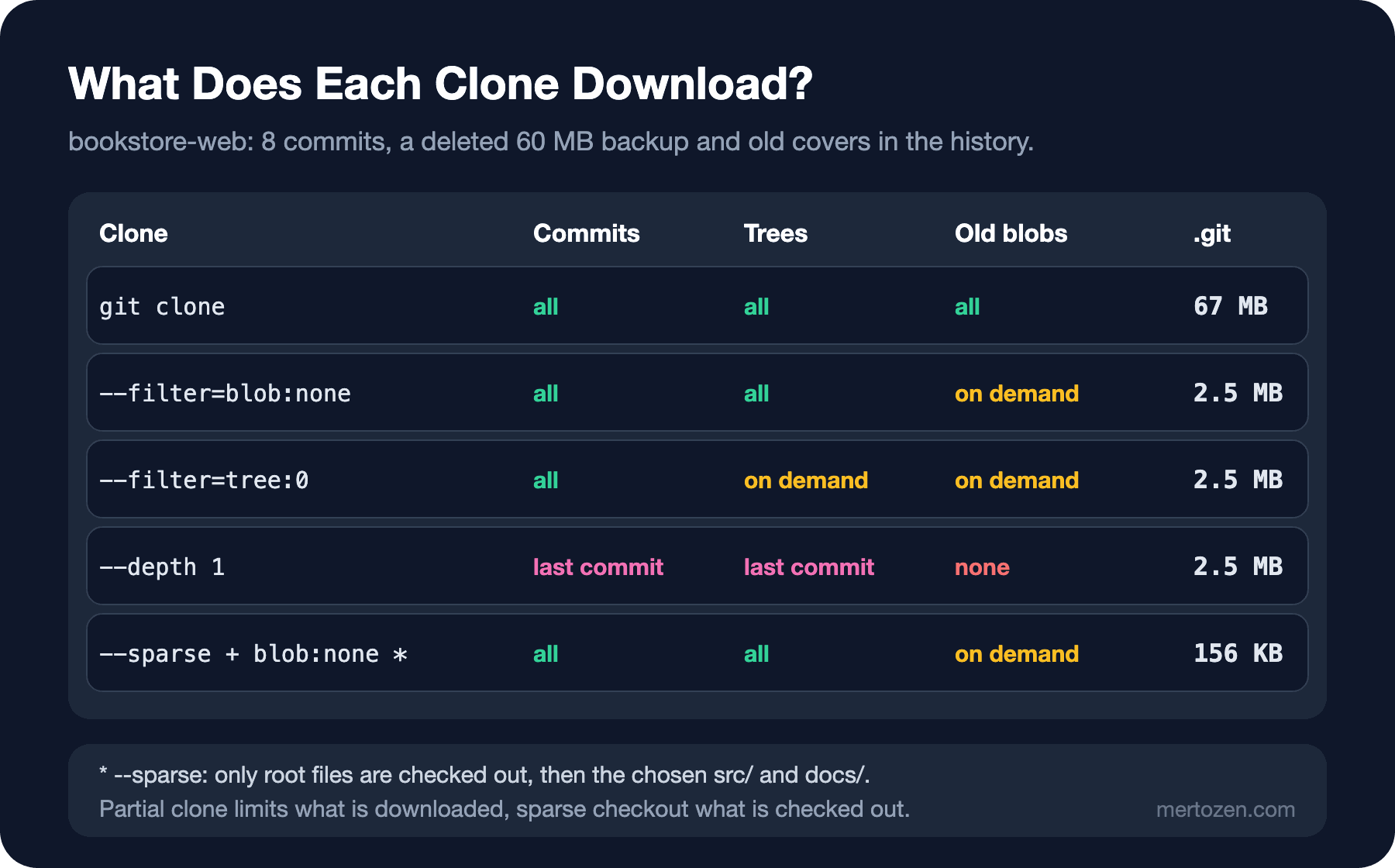
67 MB. The culprit is hidden in the log: someone committed a 60 MB database backup in aa30bd7, noticed it two commits later and deleted it. Deleting only removed the file from the latest snapshot; the commit in the history still points to it, and every clone downloads those 60 MB. The old versions of the covers sit in the history the same way. In this post we first look at how to skip this weight while cloning, and then at how to get rid of it for good.
Partial Clone: History First, Files Later
$ git clone -q --filter=blob:none http://127.0.0.1:52030/git/bookstore-web.git web-blobless
$ cd web-blobless
$ du -sh .git
2.5M	.git
$ git rev-list --objects --all --missing=print | grep -c '^?'
9
With --filter=blob:none you told clone: "bring all commits and trees, but limit blobs to the ones the checkout needs". 67 MB went down to 2.5 MB. Nine objects are missing: the first two versions of the covers and the database backup. log keeps working, because commits and trees are complete:
$ git log --oneline -1 -- covers/dune.jpg
70fecea Update book covers (round 3)
$ git show --stat HEAD~5 | tail -3
 covers/middlemarch.jpg | Bin 614400 -> 614400 bytes
 covers/the-hobbit.jpg  | Bin 614400 -> 614400 bytes
 4 files changed, 0 insertions(+), 0 deletions(-)
$ git rev-list --objects --all --missing=print | grep -c '^?'
1
show --stat had to know the size of the old covers; Git quietly downloaded the missing blobs from the remote and the missing count dropped to one. In a partial clone the remote is registered as a "promisor remote" and objects are fetched from it on demand. That has two consequences: if you cannot reach the remote, on a plane or outside the company network, a command that looks at the content of an old file fails; and commands that read many old blobs, such as git blame, are slow on their first run. If you want to download the missing ones in bulk, there has been git backfill since Git 2.49:
$ git backfill
$ git rev-list --objects --all --missing=print | grep -c '^?'
0
$ du -sh .git
 67M	.git
It downloaded those 60 MB from the history as well. So partial clone postponed the problem; it did not solve it.
The second filter is --filter=tree:0; it leaves trees for later as well:
$ cd ..
$ git clone -q --filter=tree:0 http://127.0.0.1:52030/git/bookstore-web.git web-treeless
$ du -sh web-treeless/.git
2.5M	web-treeless/.git
In this small repo there is no visible difference, because there are only a few trees. In big repos with thousands of folders the difference grows, but then every command that walks the history has to download trees. We end up where GitHub's article on partial clone does: blobless on developer machines, treeless for one-off CI builds that are deleted when they finish.
Sparse Checkout: Only Part of the Repo
Partial clone decides what is downloaded; sparse checkout decides what is put into the working folder. A backend developer who has nothing to do with the covers only wants the code and the docs:
$ git clone -q --filter=blob:none --sparse http://127.0.0.1:52030/git/bookstore-web.git web-sparse
$ cd web-sparse
$ ls
README.md
$ git sparse-checkout set src docs
$ git sparse-checkout list
docs
src
$ ls
README.md
docs
src
$ du -sh .git
156K	.git
With --sparse, clone only checked out the files at the root, and set added two folders. Cone mode, the default since Git 2.37, works with folder names instead of patterns and is fast in big repos. Using both together, covers/ was neither downloaded nor checked out; .git is 156 KB. git sparse-checkout disable brings everything back. Sparse checkout is most useful in big monorepos where many applications live together.
Shallow Clone and fetch-depth in CI
The third approach is to cut the history:
$ git clone -q --depth 1 http://127.0.0.1:52030/git/bookstore-web.git web-shallow
$ cd web-shallow
$ git rev-parse --is-shallow-repository
true
$ git log --oneline
7bef651 Remove local database backup
$ git describe --tags
fatal: No names found, cannot describe anything.
$ git fetch -q --unshallow --tags
$ git describe --tags
v1.1.0-3-g7bef651
--depth 1 brings only the last commit. It is the fastest option for a one-off build, and actions/checkout also uses fetch-depth: 1 by default. But everything that needs history breaks: git describe failed because it could not see any tag, and tools such as MinVer that derive the version from tags compute a wrong version for the same reason. We discussed the fix in the MinVer post of the Versioning and Release Management series: fetch-depth: 0 in the checkout step. Do not use shallow clones on a developer machine; fetch, merge and push work on them, but they put extra load on the server and log and blame stop where the history ends.
Git LFS: Moving the Covers out of the Repo
For binary files that change often, such as covers, the real fix is to take them out of Git's objects. Git LFS writes a small pointer into the repo instead of the file and keeps the content on a separate LFS server. You install the extension once on your machine; install writes LFS's clean and smudge filters to the global config, and LFS commands add a few hooks to the repo, pre-push first among them. In a new repo the next step would be git lfs track 'covers/*.jpg'. But in Bookstore the covers already sit in the history as ordinary blobs, and track only affects future commits. To move the old ones too, git lfs migrate rewrites the history. Measure first, then migrate:
$ git lfs install
Git LFS initialized.
$ git clone -q http://127.0.0.1:52030/git/bookstore-web.git web-lfs
$ cd web-lfs
$ git lfs migrate info --everything --include='covers/**'
Sorting commits: ..., done.
Examining commits: 100% (6/6), done.
*.jpg	7.4 MB	12/12 files	100%
$ git lfs migrate import --everything --include='covers/*.jpg'
Sorting commits: ..., done.
Rewriting commits: 100% (6/6), done.
Updating refs: ..., done.
Checkout: ..., done.
$ cat .gitattributes
covers/*.jpg filter=lfs diff=lfs merge=lfs -text
$ git log --oneline -4
503165a Add checkout page
32a0435 Add cart page
54f7722 Update book covers (round 3)
eb05092 Update book covers (round 2)
We had already removed the database backup from this clone with the method from the next section, which is why there are six commits. --everything walks all branches and tags; all twelve cover versions moved to LFS and .gitattributes was added to every commit. filter=lfs is the line that tells Git to hand these files to LFS when staging them and to store a pointer instead. This is what Git now keeps in the repo:
$ git show HEAD:covers/dune.jpg
version https://git-lfs.github.com/spec/v1
oid sha256:9375ab4baf3bfdde9cc495ae4e8b798ae10c66f1063eca83a241e39632f204c8
size 614400
$ git lfs ls-files
9375ab4baf - covers/dune.jpg
52a705f2cb - covers/emma.jpg
44be4f39ad - covers/middlemarch.jpg
723c922e55 - covers/the-hobbit.jpg
$ git lfs checkout
Checking out LFS objects: 100% (4/4), 2.5 MB | 0 B/s, done.
$ wc -c covers/dune.jpg
  614400 covers/dune.jpg
A three-line, 130-byte piece of text. The - in ls-files says there is only a pointer in the working folder: migrate moved the files to LFS but left the pointers in the working folder. git lfs checkout put the contents back from the local LFS store. From here on it is ordinary Git:
$ git add covers/frankenstein.jpg
$ git commit -q -m 'Add Frankenstein cover'
$ git lfs ls-files
9375ab4baf * covers/dune.jpg
52a705f2cb * covers/emma.jpg
b3082edffa * covers/frankenstein.jpg
44be4f39ad * covers/middlemarch.jpg
723c922e55 * covers/the-hobbit.jpg
$ git lfs track 'covers/*.png'
Tracking "covers/*.png"
$ git diff .gitattributes
diff --git a/.gitattributes b/.gitattributes
index 186ef86..2a1fe0a 100644
--- a/.gitattributes
+++ b/.gitattributes
@@ -1 +1,2 @@
 covers/*.jpg filter=lfs diff=lfs merge=lfs -text
+covers/*.png filter=lfs diff=lfs merge=lfs -text
* shows the content is present locally. track only adds a line to .gitattributes; make sure you commit that file. On push, the pre-push hook first sends the new LFS objects to the LFS server, then the Git push continues.
Migrate changed every hash; the rule from the rebase post applies here too: rewritten history only reaches the remote with a force push, and everyone on the team has to clone again. We did not run push in this lab; on GitHub the steps would be:
# not run: once, after the team has stopped pushing
$ git push --force --all origin
$ git push --force --tags origin
Cloning a Repo with LFS, and GitHub Quotas
You have a choice on the clone side as well. In the example below we gave the remote as a file:// URL; in that case git-lfs reads the LFS objects from the source folder through its own local transfer. On GitHub the same commands talk to GitHub's LFS server:
$ GIT_LFS_SKIP_SMUDGE=1 git clone -q file:///home/user/src/web-lfs web-pointers
$ cd web-pointers
$ cat covers/emma.jpg
version https://git-lfs.github.com/spec/v1
oid sha256:52a705f2cb15bdc098fcf856ba1fbf8dad2e67708b9e952dd8ca4fc1e942cc35
size 614400
$ git lfs pull --include='covers/emma.jpg'
$ wc -c covers/emma.jpg covers/dune.jpg
  614400 covers/emma.jpg
     131 covers/dune.jpg
  614531 total
GIT_LFS_SKIP_SMUDGE=1 does not download LFS content during clone; with git lfs pull --include you fetch only what you need. In actions/checkout LFS is off by default (lfs: false); if the build does not really need the covers, leaving it that way protects your quota.
You need to know GitHub's LFS limits. The Free and Pro plans include 10 GiB of storage and 10 GiB of monthly bandwidth, Team and Enterprise Cloud include 250 GiB. Overage is billed per GiB if a payment method and a budget are set up; without a payment method, or with a budget of 0, LFS is blocked for the rest of the month once the quota is used up, and clones only get pointer files. A single LFS file can be up to 2 GB on Free and Pro, 4 GB on Team and 5 GB on Enterprise Cloud. With plain Git and no LFS, GitHub warns about files over 50 MiB and rejects files over 100 MiB. Pulling LFS content in every CI build burns through bandwidth quickly; do not turn on lfs: true without measuring.
Removing a Big File from History: git filter-repo
What remains is the 60 MB backup. The recommended tool for removing it for good is git filter-repo; the Git project's own filter-branch documentation recommends it too. It is a single Python file and needs Git 2.22 and Python 3.6 or later. First, an analysis:
$ git clone -q http://127.0.0.1:52030/git/bookstore-web.git web-clean
$ cd web-clean
$ git filter-repo --analyze
Processed 19 blob sizes
Processed 8 commits
Writing reports to .git/filter-repo/analysis...done.
$ head -n 12 .git/filter-repo/analysis/path-all-sizes.txt
=== All paths by reverse accumulated size ===
Format: unpacked size, packed size, date deleted, path name
    62914560   62933766 2026-11-16 db/BookstoreDb.bak
     1843200    1843800 <present>  covers/the-hobbit.jpg
     1843200    1843800 <present>  covers/middlemarch.jpg
     1843200    1843800 <present>  covers/emma.jpg
     1843200    1843800 <present>  covers/dune.jpg
          47         51 <present>  README.md
          29         39 <present>  src/app/checkout.page.ts
          28         38 <present>  src/app/catalog/catalog.page.ts
          26         36 <present>  src/app/app.routes.ts
          25         35 <present>  src/app/cart.page.ts
The report put the deleted file at the top, along with the date it was deleted. Now let's remove it from the entire history:
$ git filter-repo --invert-paths --path db/BookstoreDb.bak
NOTICE: Removing 'origin' remote; see 'Why is my origin removed?'
        in the manual if you want to push back there.
        (was http://127.0.0.1:52030/git/bookstore-web.git)
Parsed 8 commits
HEAD is now at 4170685 Add checkout page

New history written in 0.07 seconds; now repacking/cleaning...
Repacking your repo and cleaning out old unneeded objects
Completely finished after 0.17 seconds.
$ git log --oneline
4170685 Add checkout page
ba3856e Add cart page
70fecea Update book covers (round 3)
85e6fb9 Update book covers (round 2)
736fe5f Update book covers (round 1)
806dd26 Add Angular skeleton
$ git remote -v
$ git count-objects -vH
count: 0
size: 0 bytes
in-pack: 43
packs: 1
size-pack: 7.04 MiB
prune-packable: 0
garbage: 0
size-garbage: 0 bytes
Notice three things. The two commits that added and removed the backup became empty and disappeared completely. The hashes of the commits before the backup (ba3856e and earlier) did not change; only the part after the file first appeared changed. Finally, filter-repo removed origin (git remote -v is empty): to stop you from accidentally pushing to the old remote, the tool wants you to work on a fresh clone and add the remote back deliberately.
What follows is a team job. You add the remote back and force push, everyone deletes their old clone and clones again, and open pull requests are reopened because they keep pointing to the old commits. If anyone pushes from an old clone, the file comes back. If the removed file is a secret, these steps are not enough: old commits can stay reachable on GitHub for a while, and the secret may already be in someone else's hands. Revoke the secret and issue a new one first; the secret scanning post of the DevSecOps series covers the first response to a leaked secret.
Maintenance: git maintenance and scalar
The job that keeps repos fast over time is git maintenance. You can run a single task by hand, such as git maintenance run --task=commit-graph, or use git maintenance start to register hourly prefetch, commit-graph and nightly repack tasks with the operating system's scheduler: Task Scheduler on Windows, launchd on macOS, a systemd timer or cron on Linux. Because start creates user-level scheduled tasks, we did not run it in this lab.
scalar, which has shipped inside Git since Git 2.38, applies the recommended settings for big repos in a single command:
$ scalar clone --no-maintenance http://127.0.0.1:52030/git/bookstore-web.git web-scalar 2>&1 | tail -3
Already on 'main'
branch 'main' set up to track 'origin/main'.
Your branch is up to date with 'origin/main'.
$ ls web-scalar web-scalar/src
web-scalar:
src

web-scalar/src:
README.md
$ git -C web-scalar/src config list --local | grep -E '^(core.fsmonitor|core.untrackedcache|index.version|gc.auto|fetch.writecommitgraph|remote.origin.partialclonefilter|remote.origin.promisor)='
core.untrackedcache=true
core.fsmonitor=true
remote.origin.promisor=true
remote.origin.partialclonefilter=blob:none
fetch.writecommitgraph=false
gc.auto=0
index.version=4
What it does is a summary of this post: a blobless partial clone, a cone-mode sparse checkout that starts with only the root files, fsmonitor watching for file changes, and scheduled maintenance instead of automatic gc. It puts the code under src/ so that build output can sit next to the repo, separately. Without --no-maintenance it would also have registered the scheduled tasks. A repo the size of Bookstore does not need it; for a monorepo with hundreds of thousands of files it is the first thing to try.
Common Pitfalls
The first is working on a machine without LFS. Ayşe forgot to install git-lfs on her new machine (we simulated this by removing git-lfs from PATH):
$ git clone -q file:///home/user/src/web-lfs web-nolfs
$ cd web-nolfs
$ cat covers/emma.jpg
version https://git-lfs.github.com/spec/v1
oid sha256:52a705f2cb15bdc098fcf856ba1fbf8dad2e67708b9e952dd8ca4fc1e942cc35
size 614400
$ git add covers/jane-eyre.jpg
$ git commit -q -m 'Add Jane Eyre cover'
The covers are text, not images; the app opens with broken pictures. Worse, the new cover was committed as an ordinary blob, not to LFS, without any warning. Checking the same repo on a machine with LFS shows the problem:
$ git lfs fsck --pointers
pointer: unexpectedGitObject: "covers/jane-eyre.jpg" (treeish 7cbc443c45be30ab49cf38f347173cefb747f23b) should have been a pointer but was not
Running this as a CI step catches the problem at the pull request stage. The opposite happens too: someone takes the pointer text for the file itself, edits it and commits it.
The second is computing a version in a shallow clone. git describe fails when it cannot see the tag; MinVer, as we saw in the Versioning series post, silently falls back to 0.0.0-alpha.0 and the build stays green. Every workflow that produces a version needs fetch-depth: 0.
The third is thinking that deleting a file cleans the history. The 67 MB from the opening is exactly that. When you notice a big file, the first job is to find out how far it has spread: if it has not been pushed yet, commit --amend or an interactive rebase is enough; if it has, filter-repo and a fresh clone for the whole team.
A Small Experiment
★☆☆ Clone one of your own repos with --filter=blob:none and compare the du -sh .git value with a normal clone. Then run git log -p and watch how the git rev-list --objects --all --missing=print | grep -c '^?' count changes.
★★☆ Commit a few large binary files to a test repo, then move them to LFS with git lfs migrate info --everything and git lfs migrate import. Compare the commit hashes before and after the migration.
★★★ Add a 50 MB file to a repo and delete it in the next commit. In a fresh clone, find the file in the git filter-repo --analyze report, remove it from the history and confirm that size-pack changed. Then fetch from the old clone and see how the old commits stay there.
In this post we dealt with the size of the repo. In the next post we go back to the settings that decide how Git behaves: separating work and personal identities by folder with includeIf, using two GitHub accounts on the same machine, url.insteadOf and the recommended settings for a team.