

Secret Rotation and Leak Response: Rotating Without Downtime, the First 60 Minutes After a Leak and Secretless Architecture
Seamless rotation treats two secrets as valid for a while: the new secret is added on the accepting side first, used once it has spread everywhere, and the old one is removed based on measurement. We rotate Bookstore's payment webhook secret with primary and secondary values without a restart, scope a leak with Vault's audit log, automate with Key Vault's SecretNearExpiry event, and reach a secretless architecture with zero secrets for Azure and database access.
Version note: The examples in this post were run with .NET 10 (SDK 10.0.402), xUnit 2.9, HashiCorp Vault 2.2.2 and openssl. The Azure Key Vault, Event Grid, Azure SQL and GitHub Actions steps were written from Microsoft Learn and GitHub documentation and were not run.
Guess First
The payment provider of Bookstore, the online bookstore used as the shared example across this site's series, signs every payment event with a shared webhook secret, and Bookstore verifies the signature. You need to change the secret. What happens to payment notifications that arrive between the moment you register the new secret in the provider's dashboard and the moment the new value reaches Bookstore's three instances? Second question: you have learned that a secret leaked. Is the first thing you do cleaning up Git history, or something else?
Why Is Rotation Hard?
Changing a secret has two sides: the system that issues or verifies the secret (the payment provider, the database, the API validating JWTs) and the app that uses it. The two sides never change at the same moment. With a single secret, every request between the moment one side switches to the new value and the moment the other side does is rejected. That window is the sum of the delays we measured in earlier posts: the Key Vault reload interval, ESO's refresh interval, the kubelet's volume update, the 24-hour cache of App Service references, or a restart if environment variables are used.
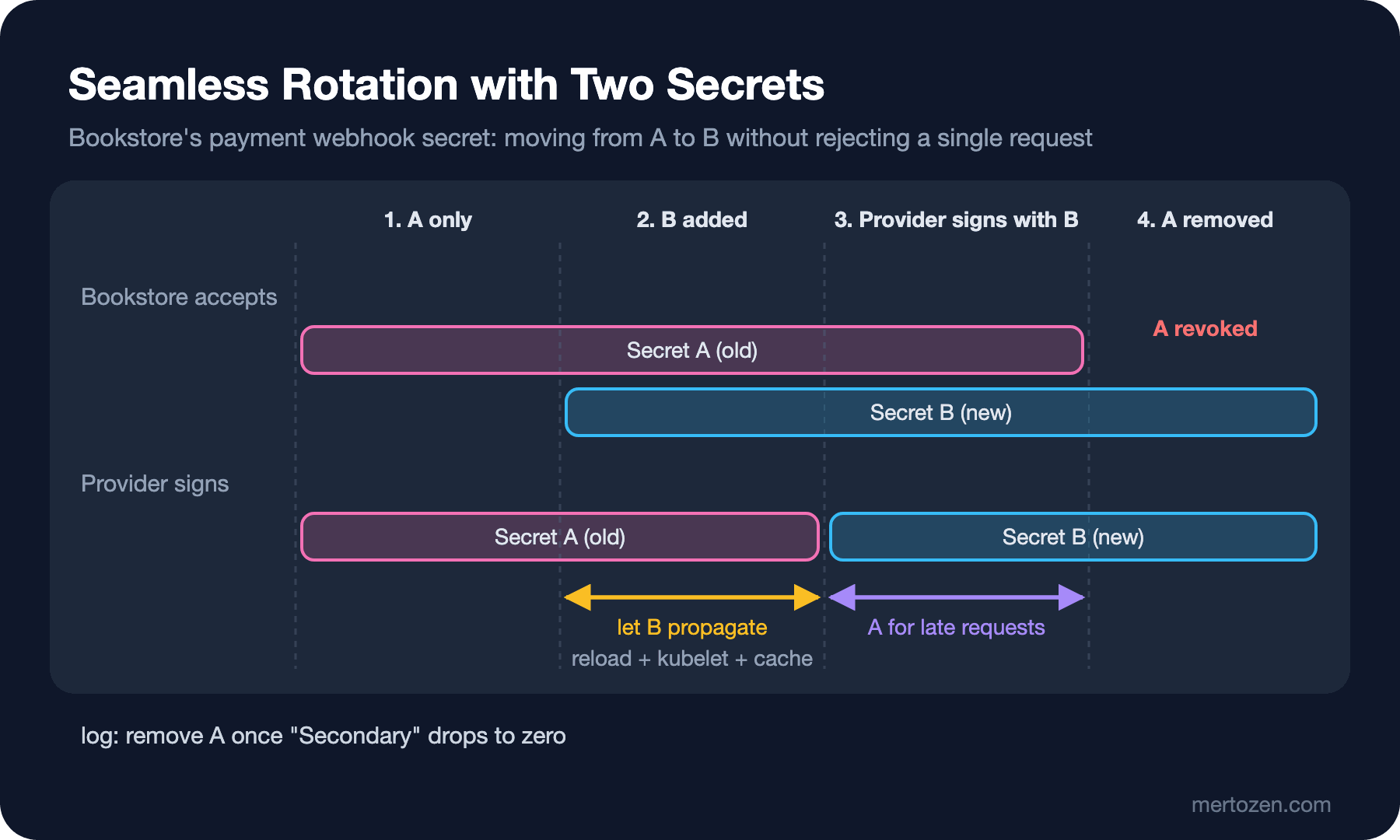
That is why the core idea of seamless rotation is the same everywhere: for a while, treat two secrets as valid. The new secret is first added on the "accepting" side, once you are sure it has spread everywhere the "using" side switches to it, and finally the old secret is removed. In pattern literature this three-step flow is usually called "dual credential" or "two-key rotation".
Two Active Secrets: Bookstore's Webhook Secret
On Bookstore's side, adding a second field to the options class is enough:
public sealed class PaymentWebhookOptions
{
    public const string SectionName = "Payments:Webhook";

    // The secret the payment provider currently signs with
    [Required, MinLength(32)]
    public string Secret { get; set; } = "";

    // A second secret accepted temporarily during rotation
    public string? SecondarySecret { get; set; }
}
Verification tries both secrets and returns which one matched. Using CryptographicOperations.FixedTimeEquals to compare signatures is essential; an ordinary string comparison stops at the first differing character, and the timing difference helps an attacker guess the signature:
public static string Sign(string secret, ReadOnlySpan<byte> body) =>
    Prefix + Convert.ToHexStringLower(HMACSHA256.HashData(Encoding.UTF8.GetBytes(secret), body));

// Both secrets are tried; the comparison is constant-time
public static WebhookSecretMatch Verify(string? header, ReadOnlySpan<byte> body, string primary, string? secondary)
{
    if (string.IsNullOrEmpty(header) || !header.StartsWith(Prefix, StringComparison.Ordinal))
    {
        return WebhookSecretMatch.None;
    }

    if (Matches(header, body, primary))
    {
        return WebhookSecretMatch.Primary;
    }

    return !string.IsNullOrEmpty(secondary) && Matches(header, body, secondary)
        ? WebhookSecretMatch.Secondary
        : WebhookSecretMatch.None;
}
// IOptionsMonitor: the new secret shows up during rotation without a restart
var current = options.CurrentValue;
var match = WebhookSignature.Verify(
request.Headers["X-Bookstore-Signature"], buffer.ToArray(), current.Secret, current.SecondarySecret);
if (match == WebhookSecretMatch.None)
{
return Results.Unauthorized();
}
// Which secret was used tells you when the old one can be removed
loggerFactory.CreateLogger("Bookstore.Payments.Webhook").LogInformation(
"Payment webhook verified with {SecretSlot} secret", match);
return Results.Ok(new { Accepted = true });I actually performed the rotation. The secrets are read from a folder with the key-per-file layout from post six, so changing a file corresponds to ESO updating the Secret in Kubernetes. A small script that signs a payment event with openssl plays the provider:
BODY='{"orderId":"A-1001","status":"paid","amount":389.00}'
SIG=$(printf '%s' "$BODY" | openssl dgst -sha256 -hmac "$(tr -d '\n' < $1)" -hex | awk '{print $NF}')
curl -s -o /dev/null -w "%{http_code}\n" -X POST localhost:5097/api/payments/webhook \
  -H "Content-Type: application/json" -H "X-Bookstore-Signature: sha256=$SIG" --data "$BODY"
# 1) Only the old secret is configured
old=200 new=401
# 2) New secret in "Secret", old one in "SecondarySecret": both valid
old=200 new=200
# 3) SecondarySecret file deleted; after the polling watcher sees the change
+0s old=200
+2s old=200
+4s old=200
+6s old=401info: Bookstore.Payments.Webhook[0]
Payment webhook verified with Primary secret
info: Bookstore.Payments.Webhook[0]
Payment webhook verified with Secondary secretThe app never restarted; IOptionsMonitor saw the new values. The answer to the opening question is here too: without a window where both secrets are accepted, every notification the provider signs with the new secret before it reaches Bookstore gets a 401, and the provider either retries or gives up. The Secondary lines in the log show that the old secret is still in use. Not removing it until that count drops to zero means setting the length of the overlap window by measurement rather than by guess.
Had the same code read through IOptions<PaymentWebhookOptions>, the app would have stayed on the first secret it read, as we saw in post two. This is the most common problem after a rotation: the new value is in the vault, in the Secret and in the file, but a singleton keeps the old one in memory.
The Same Idea for the JWT Signing Key and the SQL Password
For a JWT signing key, two active keys means "one key for signing, several keys for validation". The new key is first added to the validation list, then tokens start being signed with it, and the old key stays in the list until the longest-lived token expires. The kid header in the token says which key was used, and validators fetch keys from a JWKS endpoint; the mechanism is covered in detail in the JWT deep-dive post of the Authentication and Authorization series. That is why the jwtKeyFingerprint field in Bookstore's /api/info is useful: during a rotation it shows which instance runs with which key without revealing the value.
For the SQL Server password there are two ways. The first is two logins: bookstore_app_a and bookstore_app_b. While the app runs with A, B's password is changed, the connection string is switched to B and you wait for it to spread, then A's password is changed; on the next rotation the roles swap. This is the same idea as Key Vault's "two sets of credentials" rotation tutorial on Microsoft Learn: each new version of the secret carries the other one of the two credentials. The second way is the dynamic credential from post five: since every instance has its own short-lived user, there is no separate rotation step left; Vault Agent does it continuously.
Automating Rotation
Manual rotation gets forgotten. Key Vault has two mechanisms. For keys (cryptographic keys) you can define a rotation policy and Key Vault generates the new version itself. For secrets, Key Vault cannot generate the value itself, because the place where the value is valid (the payment provider, the database) is outside Key Vault. Instead, the event-driven flow described in the Microsoft Learn tutorial is used: the secret gets an expiry date, Key Vault publishes the SecretNearExpiry event to Event Grid 30 days before it expires, and a Function subscribed to that event generates the new value and writes it to both the target system and Key Vault. For Bookstore the setup would look like this (not run):
# Give the secret an expiry date: the event arrives 30 days before it
az keyvault secret set --vault-name bookstore-kv-prod \
  --name BookstoreApi-Payments--Webhook--SecondarySecret --value "$NEW_SECRET" \
  --expires 2027-02-14T00:00:00Z --tags ValidityPeriodDays=90

# Connect the event to the rotation Function
az eventgrid event-subscription create --name payments-webhook-near-expiry \
  --source-resource-id $(az keyvault show --name bookstore-kv-prod --query id -o tsv) \
  --endpoint-type azurefunction --endpoint "$ROTATION_FUNCTION_ID" \
  --included-event-types Microsoft.KeyVault.SecretNearExpiry
The Function itself applies the three steps above: it creates the new secret at the provider and writes it to Key Vault as the secondary, waits for the propagation time, switches the provider to the new secret and removes the old one on its next run. We now know what that time should be: longer than the sum of the ReloadInterval from post three, the roughly one-minute kubelet delay we measured in post six, and ESO's refresh interval.
The First 60 Minutes After a Leak
When you learn that a secret has leaked, order matters. The detection side (secret scanning, push protection) and the steps for cleaning Git history are covered in the Secret Scanning post of the DevSecOps series; here we give the order from the point of view of the side that manages the secret itself.
- 0–15 minutes: invalidate the secret. If a rotation procedure is ready, run it; if not, cancel the old value first, since a short outage is better than continuing with a leaked secret. In Vault, leases are revoked in bulk with
vault lease revoke -prefix. - 15–30 minutes: determine the scope. Since when was the secret exposed, who read it, what was done with it? Key Vault diagnostic logs, the Vault audit log and the target system's logs (the payment provider's dashboard, database login records) are used here.
- 30–45 minutes: close the source. If the secret was committed, clean the Git history; but that step alone is not enough, because forks, clones and CI caches already have the value. If it ended up in a log or a dump, delete those copies.
- 45–60 minutes: notify and record. Inform the affected teams and, if needed, customers, write up the incident with a timeline for a postmortem, and check whether there is a secretless alternative for that kind of secret.
I tried how scope analysis works with Vault's audit log. I enabled an audit device and read the payment secret with an AppRole identity:
$ vault audit enable file file_path=/work/vault-audit.log
# With a token obtained through the app's bookstore-payments identity
$ vault kv get -field=webhook_secret secret/bookstore/payments
{
"time": "2026-11-14T10:01:15.247280166Z",
"type": "response",
"auth": {
"display_name": "approle",
"policies": [
"bookstore-payments",
"default"
],
"metadata": {
"role_name": "bookstore-payments"
},
"accessor": "hmac-sha256:239ba5efef357595ad7b842c7b5d90044289d5932c67e686b8f8176c196940c7"
},
"request": {
"operation": "read",
"path": "secret/data/bookstore/payments",
"remote_address": "127.0.0.1"
},
"response": {
"data": {
"data": {
"webhook_secret": "hmac-sha256:e3ebe3a8b72d7ff5dc0296efc0226384de2b6886ea3d5fa1a30f29d86a1358dd"
}
}
}
}The log does not contain the secret's value, only its HMAC. Who read it, with which role, when and from where is plain to see. To find which entries contain the leaked value, have Vault compute the same HMAC and search the log for it:
$ vault write -field=hash sys/audit-hash/file input="$LEAKED_VALUE"
hmac-sha256:e3ebe3a8b72d7ff5dc0296efc0226384de2b6886ea3d5fa1a30f29d86a1358dd
$ grep -c "hmac-sha256:e3ebe3a8b72d7ff5dc0296efc0226384de2b6886ea3d5fa1a30f29d86a1358dd" vault-audit.log
7
Seven entries: the write and read requests and their responses. In a real incident you compare this list with the identities you expect: a read from any role other than bookstore-payments suggests the leak may also have come from inside Vault.
Moving to a Secretless Architecture
The best rotation is a design that needs none. Let's reopen the inventory from post one at the end of the series:
| Bookstore secret | At the start of the series | At the end of the series |
|---|---|---|
| SQL connection string | With a password, environment variable | Passwordless with managed identity on Azure; elsewhere a short-lived user from Vault |
| Key Vault and App Configuration access | - | Managed identity or workload identity, no secret |
| Storage (book covers) | Account key | Managed identity and a role assignment, account key disabled |
| CI/CD access to Azure | Service principal secret | GitHub Actions OIDC, no secret |
| JWT signing key | Environment variable | Key Vault, rotation with two active keys |
| Payment webhook secret | Environment variable | Key Vault, rotation with primary and secondary |
| E-mail service API key | Environment variable | Key Vault, read only by the Notifications module |
The number of secrets the app itself stores went from four to three, and the number of secrets used to reach Azure and the database went to zero. The remaining three are secrets an outside party gives us (the payment provider, the e-mail service) or the key for tokens we sign ourselves; these cannot be made secretless, but they are now centralized, auditable and replaceable with two-secret rotation.
Connecting to Azure SQL with a managed identity is a single setting in the connection string; Microsoft.Data.SqlClient obtains the token with the app's identity itself. In the database you connect as the Entra ID admin and create a user for the identity (neither was run):
Server=tcp:bookstore-sql.database.windows.net,1433;Database=BookstoreDb;Authentication=Active Directory Managed Identity;Encrypt=TrueCREATE USER [bookstore-api-prod] FROM EXTERNAL PROVIDER;
ALTER ROLE db_datareader ADD MEMBER [bookstore-api-prod];
ALTER ROLE db_datawriter ADD MEMBER [bookstore-api-prod];On the Storage side the same idea is applied with a role such as "Storage Blob Data Reader" and by disabling account key access. On the pipeline side, signing in to Azure without a secret using GitHub Actions' OIDC token was set up in the GitHub Actions series post on deploying to Azure App Service with OIDC.
Production Notes
Trying rotation only in production means trying it for the first time during an incident. Run the rotation procedure in staging regularly, preferably automatically, and measure how long it takes; that measurement is the answer to "how many minutes would it take me to change it after a leak?". Give every secret an expiry date; Key Vault's SecretNearExpiry event or TTLs in Vault make forgotten secrets visible. Set the overlap window by measurement: track the number of requests verified with Secondary as a metric and do not remove the old secret before it drops to zero. Since a rotation is a change, the answer to who did it, when and why belongs in the audit log and the change record.
Common Pitfalls
Keeping the secret in IOptions<T> or a singleton and continuing with the old value after rotation. Rotating with a single secret and rejecting requests during the propagation time. Removing the old secret without measuring because "nobody uses it anyway". On a leak, cleaning Git history first and delaying invalidation of the secret. Comparing signatures with ==. Rotating only in production and only during an incident. Insisting on a connection string with a password when managed identity is possible; however good your rotation is, a password that does not exist is always safer.
A Small Experiment
★☆☆ Pick a secret in your own app and write down its rotation steps: where is the new value generated, which side accepts it, how long is the propagation time, when is the old value removed?
★★☆ Add SecondarySecret to webhook verification, read it with IOptionsMonitor and try the rotation by changing files as in this post. Repeat the experiment with IOptions and watch how long the old secret stays valid.
★★★ Enable an audit device in Vault, read a secret with a few different roles and find the entries containing the value with sys/audit-hash. Then run a "leak drill": revoke the secret, work out the scope from the logs and note how long each step of the 60-minute runbook takes.
At the end of the series Bookstore's configuration is layered, its secrets are centralized, its identities are passwordless and its remaining secrets can be changed without downtime. There are two directions to continue from here: the detection tools that keep secrets out of repos and images entirely are in the DevSecOps series, and keeping encrypted secrets in Git and carrying them to the cluster with GitOps is in the GitOps and Argo CD series.