

Configuration or Secret? Classifying Settings, Twelve-Factor and Where Secrets Leak
A secret is any setting that lets someone act on your behalf once they have it, and its only natural home is a secret store; build-time, runtime and environment-specific config can live in the repo or the environment. Using Bookstore we see, with real output, a key left in Git history, a connection string exposed by docker inspect, /proc/environ and createdump, and an API key in the Angular bundle, then build the inventory that leads to the series' goal of secretless access.
Version note: The examples in this post were run with .NET 10 (ASP.NET Core 10.0.15 runtime), Docker 29.2, Git 2.54 and Angular 22.2 (TypeScript 6.0).
Guess First
A developer accidentally commits the JWT signing key in appsettings.Development.json. They notice, delete the file, add it to .gitignore and push a new commit titled "remove secrets from repo". Is the key safe now? Second question: in production you pass the connection string as an environment variable and there are no secrets in any appsettings file. How many commands does someone with docker exec access need to read that connection string? Last question: does anyone need access to the source code to see an API key placed in an Angular app's environment.ts?
We will see the answers with real output in the middle of the post. In short: the key is not safe, the connection string takes one command, and a browser is enough to see the Angular key.
Four Kinds of Settings and Where Each Belongs
This series uses Bookstore, the online bookstore used as the shared example across this site's series: an ASP.NET Core 10 API called Bookstore.Api and an Angular 22 client called bookstore-web. Both have plenty of settings, and calling all of them "config" and putting them in the same file is the most common starting point of a secret leak. Let's sort the settings by kind first; each kind has a natural home.
Build-time config is used while the artifact is produced and does not change afterwards: the target framework, Angular's bundle budgets, AOT options. These live in the repo with the code and should not vary by environment. If one does vary, it is really runtime config sitting in the wrong place.
Runtime config is read while the app runs and holds defaults that are the same in every environment: books per page, log level, retry count. appsettings.json is its natural home, overridden in an environment when needed.
Environment-specific config differs per deploy target but is not secret: the API's public URL, the payment provider's sandbox or live endpoint, the free shipping threshold. These live in the environment itself (environment variables, App Service app settings) or in a configuration service shared by several services.
A secret is any value that lets someone act on your behalf once they have it: a connection string with a database password, the JWT signing key, the e-mail service's API key, the payment provider's webhook secret. Their only natural home is a secret store such as Azure Key Vault, HashiCorp Vault or OpenBao. Feature flags are a separate kind: their values are not secret but change independently of deploys; the Feature Flags post in the Deployment Strategies series covers them in detail.
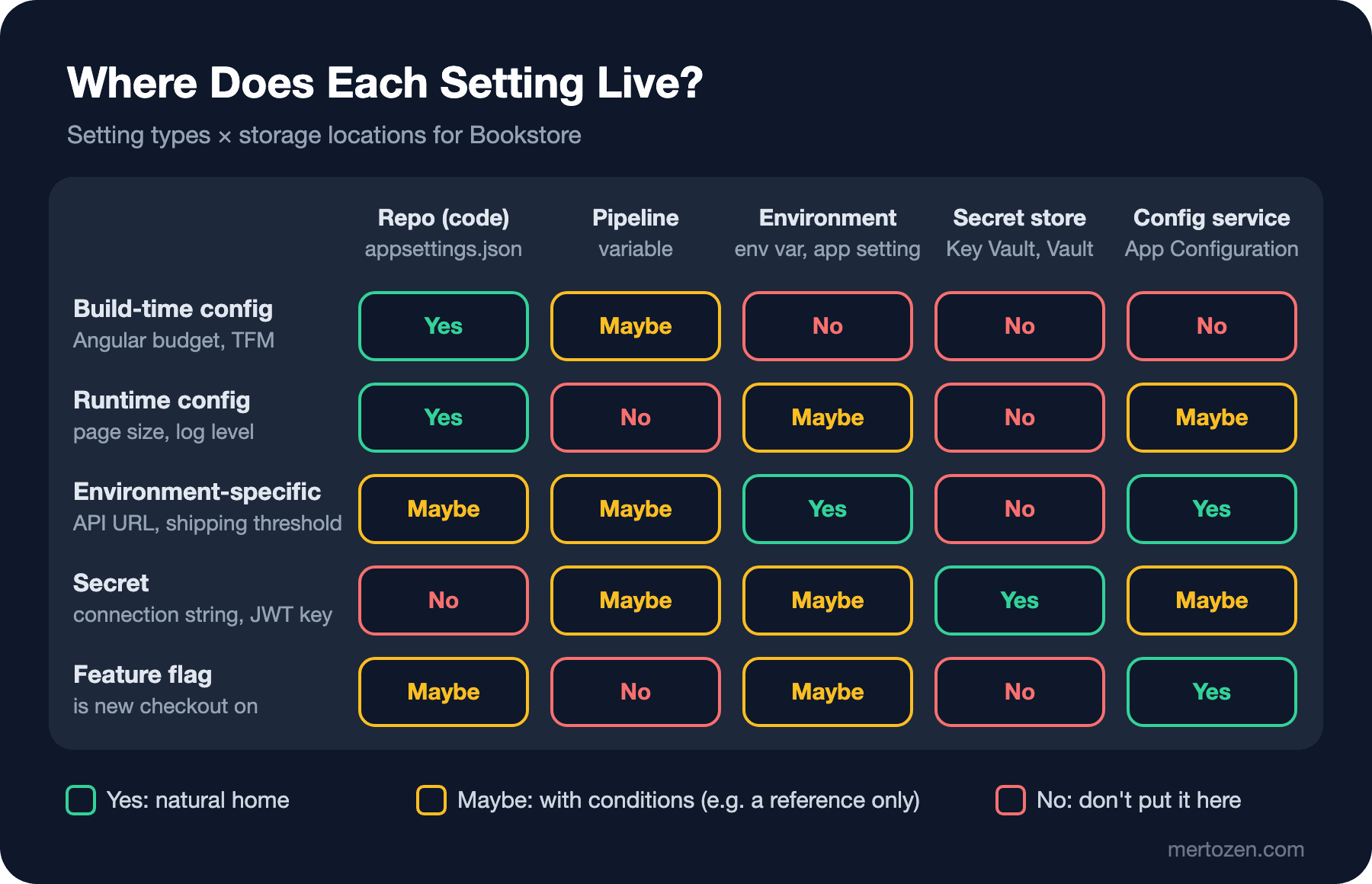
The "Maybe" cells are what the rest of the series is about. In the secret row, the environment is "Maybe" because an environment variable is a way to deliver a value, not a place to keep it; we will see its limits below. The config service is "Maybe" too, because a service like App Configuration should hold a reference to the secret's place in Key Vault, not the secret itself (post four). The pipeline column exists only for credentials the pipeline itself needs; that is covered in the GitHub Actions series post on secrets, variables and GITHUB_TOKEN and in the Pipeline Security post of the CI/CD Fundamentals series.
The Twelve-Factor Config Principle and Its Limits
The config section of the Twelve-Factor App defines config as everything likely to vary between deploys and asks for a strict separation from code. Its suggested test is practical: if you open-sourced the codebase right now, no credential should be exposed. To get there it recommends keeping config in environment variables, which are language- and OS-agnostic and hard to commit by accident. Another important point it makes is that grouping settings into named environments such as "development", "staging" and "production" does not scale; each variable should be managed independently per deploy.
The principle is sound, but it was written in 2011 and is not enough on its own in two respects. First, an environment variable is a way to deliver a value to a process, not a place to store it. The value comes from somewhere and is written into the environment; when that somewhere is a pipeline variable, a .env file or a Kubernetes manifest, the secret is still sitting in a file, usually unencrypted. Second, an environment variable is widely visible: all code in the same process, child processes, crash dumps and container metadata can see it. OWASP's Secrets Management Cheat Sheet also treats environment variables as a last resort for when file-based or in-memory delivery is not possible. So the approach of this series is: environment variables are fine for non-secret environment-specific settings; for secrets the goal is for the app to read them from a secret store using its own identity.
Where Do Secrets Leak? Git History First
Let's actually run the opening scenario. In an empty repo I commit the key, then delete the file and add it to .gitignore:
KEY=$(openssl rand -base64 32)
printf '{\n  "Jwt": {\n    "SigningKey": "%s"\n  }\n}\n' "$KEY" > appsettings.Development.json
git add . && git commit -qm "Add local JWT settings"

git rm -q appsettings.Development.json
echo "appsettings.Development.json" > .gitignore
git add .gitignore && git commit -qm "Remove secrets from repo"
The working tree no longer contains any secret. But git log -S finds the commits where a piece of text was added or removed:
$ git log -p -S SigningKey --oneline
857fe32 Remove secrets from repo
diff --git a/appsettings.Development.json b/appsettings.Development.json
deleted file mode 100644
index 46dd054..0000000
--- a/appsettings.Development.json
+++ /dev/null
@@ -1,5 +0,0 @@
-{
-  "Jwt": {
-    "SigningKey": "0KlKaWZDHG6cRbfaQ2jWdEDPTNtmgriob9higWQnw18="
-  }
-}
bce5f98 Add local JWT settings
...
The key is in two commits: the one that added it and the diff of the one that deleted it. It is also in every clone, every fork and the CI server's cache. Rewriting history is possible but not sufficient; the right order is to invalidate the key first and clean up afterwards. We will do that step by step in the leak runbook of post seven. Secret scanning tools that catch secrets at commit time and in the pipeline belong to the DevSecOps series.
Leaks From the Running Process: Logs, Environment and Dumps
Even with a clean repo, the secret shows up in many places around the running app. The first example is a log line added with good intentions. In the Configuration and Options Pattern post of the ASP.NET Core Web API series we used GetDebugView() to see which value came from which provider. Writing it to the startup log is tempting:
var app = builder.Build();

// An innocent line added to see "which setting came from where"
app.Logger.LogInformation("Configuration:\n{Config}", ((IConfigurationRoot)builder.Configuration).GetDebugView());
When I start the app with the connection string as an environment variable, the log contains these lines:
info: Bookstore.Api[0]
      Configuration:
      ...
      ConnectionStrings:
        Bookstore=Server=sql.internal;Database=BookstoreDb;User Id=bookstore_app;Password=7d4c323cf58cc0605e663a16;TrustServerCertificate=True (EnvironmentVariablesConfigurationProvider)
Logs are usually open to a far wider audience than secrets: everyone with access to the log platform, the support team, integrations that export logs. The same output also contained every environment variable on the machine, from PATH to the user name. Use GetDebugView() only locally and inside a debugger; never write it to a log. Redaction in logs is covered in the Sensitive Data in Logs post of the Logging in .NET series.
The second place is the container itself. I run the same image and pass the connection string with -e:
$ docker run -d --name secretseries-api -e "ConnectionStrings__Bookstore=$CONN" secretseries-api:01
$ docker inspect secretseries-api --format "{{json .Config.Env}}"
["ConnectionStrings__Bookstore=Server=sql.internal;Database=BookstoreDb;User Id=bookstore_app;Password=7d4c323cf58cc0605e663a16;TrustServerCertificate=True","PATH=/usr/local/sbin:/usr/local/bin:/usr/sbin:/usr/bin:/sbin:/bin","APP_UID=1654","ASPNETCORE_HTTP_PORTS=8080","DOTNET_RUNNING_IN_CONTAINER=true","DOTNET_VERSION=10.0.15","ASPNET_VERSION=10.0.15"]
Anyone who can run docker inspect, which means anyone with access to the Docker socket, sees the value in plain text. Looking from inside the container is a single command too; Linux keeps every process's initial environment in /proc/<pid>/environ:
$ docker exec secretseries-api sh -c 'tr "\0" "\n" < /proc/1/environ | grep -i conn'
ConnectionStrings__Bookstore=Server=sql.internal;Database=BookstoreDb;User Id=bookstore_app;Password=7d4c323cf58cc0605e663a16;TrustServerCertificate=True
Trying from another container that shares the same PID namespace, the result depended on privileges. A busybox container running as root without extra capabilities got Permission denied; given --cap-add SYS_PTRACE, it read the value again. So the protection rests on limiting which processes can read the environment; the value itself is not encrypted anywhere.
The third place is a memory dump. A dump taken in production to investigate a problem contains everything in the process's memory. I took a dump inside the container with the createdump tool that ships with the .NET runtime and ran a plain grep:
$ docker exec secretseries-api sh -c '/usr/share/dotnet/shared/Microsoft.NETCore.App/10.0.15/createdump --withheap -f /tmp/api.dmp 1 && grep -a -o "Password=[0-9a-f]*" /tmp/api.dmp | sort | uniq -c'
[createdump] Gathering state for process 1 dotnet
[createdump] Writing minidump with heap to file /tmp/api.dmp
[createdump] Written 146894848 bytes (35863 pages) to core file
[createdump] Target process is alive
[createdump] Dump successfully written in 148ms
      3 Password=7d4c323cf58cc0605e663a16
The password sits in three separate places in a 140 MB dump. Dumps usually get attached to a ticket, copied to a shared folder or sent out for support; from then on you no longer control the secret. This is a risk a secret store does not remove either: the app has to keep the secret in memory. The answer is to shorten the secret's lifetime and, where possible, to use no secret at all; that is the topic of the last post in the series.
The Angular Bundle Is Public
The most common front-end mistake is putting an API key in environment.ts and assuming "it gets compiled anyway". Suppose we want Bookstore to send newsletter sign-ups straight from the browser to the e-mail service:
export const environment = {
  apiBaseUrl: 'https://api.bookstore.example.com',
  emailApiKey: 'em_6a92d4dee37df8e87ae4279d3cbb49d3'
};
$ npx ng build
...
Application bundle generation complete. [0.839 seconds]
$ grep -o 'emailApiKey:"[^"]*"' dist/bookstore-web/browser/main-*.js
emailApiKey:"em_6a92d4dee37df8e87ae4279d3cbb49d3"The production build is minified, but string literals stay as they are. Everything sent to the browser is public: the Network tab in the developer tools or downloading the file and searching it is enough. In Angular the only correct place for a secret value is the backend. If the browser needs to call a service, make the call through Bookstore.Api and keep the key on the server. In post two we will see how to give Angular only non-secret config, at runtime rather than at build time.
Let's finish the list with CI logs and screenshots. A secret that ends up in a CI log is masked by systems such as GitHub Actions, but masking only catches an exact copy of the registered value; a base64-encoded or split version shows through. Screenshots are the most forgotten channel: posting an error screen to Slack and capturing the connection string with it is very easy. This scattering is called "secret sprawl": the same secret copied to dozens of places nobody has a complete list of. The worst consequence of sprawl is not knowing where you have to change it when it leaks.
Bookstore's Secret Inventory
Before you can protect something you need a list of it. Here are the Bookstore API's secrets today and where we want to be at the end of the series:
| Secret | Used by | Today | Target |
|---|---|---|---|
| SQL connection string (with password) | Bookstore.Api | environment variable | Passwordless: Azure SQL with managed identity, or a short-lived login from Vault |
| JWT signing key | Bookstore.Api | environment variable | Key Vault, rotation with two active keys |
| E-mail service API key | Notifications module | environment variable | Key Vault, a secret only this module can read |
| Payment webhook secret | Payments module | environment variable | Key Vault, seamless switch with primary and secondary |
For every row ask three questions: who can read it, when did it last change, and how many minutes would it take to change it after a leak? If the answer to the third is "I don't know", you have no rotation procedure for that secret. In Bookstore's starting code these settings are bound to four options classes and appsettings.json contains only non-secret values:
{
  "Shipping": {
    "FreeShippingThreshold": 500,
    "StandardFee": 49.90
  },
  "Jwt": {
    "Issuer": "https://bookstore.example.com"
  },
  "Email": {
    "FromAddress": "orders@bookstore.example.com"
  }
}
To check which secrets the app received, I added an endpoint that returns only whether each one is present, never the value. A "debug" endpoint that returns values is the shortest path to a leak:
$ curl -s localhost:18081/api/info
{"environment":"Production","freeShippingThreshold":500,"secrets":{"ConnectionStrings:Bookstore":true,"Jwt:SigningKey":false,"Email:ApiKey":false,"Payments:Webhook:Secret":false}}
The Compass: Secretless Access
The rest of the series walks toward the "Target" column of this table, and the direction is this: the best secret is the one that does not exist. When you give an app a managed identity in Azure, it reaches Key Vault, Azure SQL or Storage without carrying a password; the platform issues the token and it expires quickly. If you use Vault or OpenBao, the app gets its own database login that lives a few hours, every time it starts. Where none of that is possible, the secret lives in a secret store, access is audited and rotation is automated.
The order of the posts follows from that: post two covers layering and "one artifact, many environments", post three Key Vault and managed identity, post four App Configuration, post five dynamic credentials with Vault and OpenBao, post six Kubernetes, and post seven rotation and leak response.
Production Notes
Set a measurable goal: for every secret, its owner, its last rotation date and the list of identities that can read it should be written down somewhere. Key Vault and Vault keep this in their audit logs; environment variables and .env files do not. Accept that people allowed to use the Docker socket, kubectl exec or take dumps can also see secrets, and hand out those permissions accordingly. When dumps are taken, it should be clear where they are kept, who can access them and when they are deleted. An alert on your log platform for patterns such as "Password=", "AccountKey=" and "Bearer " is cheap and gives early warning.
As you grow, the real problem is the count. Bookstore has four secrets today; every new integration adds one and every environment multiplies the total. Four secrets, three environments and two services make 24 values. That is why the first goal is to reduce the number of secrets and the second is to centralize the rest.
Common Pitfalls
Thinking that deleting the file deletes the secret: it stays in Git history, forks and clones; change the key first. Treating environment variables as safe storage: docker inspect, /proc/<pid>/environ and dumps show plain text. Committing appsettings.Production.json with secrets because "it is only used in production anyway". Putting keys in Angular's environment.ts: the built JavaScript is public. Logging GetDebugView(), request bodies or whole exceptions; some exception messages can include parts of a connection string. And sprawl: giving the same key to several services and environments "for convenience". After a leak you have to change all of them at once.
A Small Experiment
★☆☆ In one of your own projects run git log -p -S Password --all and git log -p -S ApiKey --all. For every commit that shows up, ask: is this value still valid?
★★☆ Start an app's container with the connection string as an environment variable, then find the value with docker inspect and /proc/1/environ. Repeat the experiment reading the value from a file (a JSON file mounted with -v) and note which channels closed and which stayed open.
★★★ Build the secret inventory table for your own app: for every secret, who uses it, where it lives, how many copies exist and what the steps are to change it after a leak. For at least one secret, try to write a secretless path in the "target" column.
With the inventory in place, the next question is how to carry non-secret settings across environments. In the next post we look at configuration layering in .NET, making the app refuse to start with bad config, and giving Angular runtime config without breaking the build.