

HashiCorp Vault and OpenBao: KV, Auth Methods, Policies and Dynamic Credentials for SQL Server

Vault and OpenBao create a new, short-lived database user on every startup, and the best way to keep the app unaware of Vault is to read the file Vault Agent writes with reloadOnChange. We set up KV v2, policies and AppRole and see with real output on SQL Server lease renewal, a stored connection string failing with "Login failed" after revoke, a revoke stuck without KILL permission, and OpenBao lacking a SQL Server plugin.
Version note: The examples in this post were run with HashiCorp Vault 2.2.2, OpenBao 2.7.2, SQL Server 2025 (the mcr.microsoft.com/mssql/server:2025-latest image), .NET 10 (SDK 10.0.402), Microsoft.Data.SqlClient 7.1.2 and VaultSharp 1.17.5.1 on Docker 29.2.
Guess First
The API of Bookstore, the online bookstore used as the shared example across this site's series, connects to its database with a user that Vault issues at every startup and that lives for one hour. When the lease ends, Vault deletes that user. What happens if the app reads the connection string at startup and keeps it in a variable: do the open connections in the connection pool keep working, or do you get an error on the first query? And another one: what do you see if Vault tries to delete the user and fails?
Why a Separate Secret Server? Vault, OpenBao and Licensing
We used Key Vault in the previous two posts; on Azure it is the natural choice. A separate secret server has three justifications. First, cloud independence: if part of Bookstore runs in an on-prem data center and part of it on different clouds, you want one system and one policy language instead of each platform's own secret store. Second, dynamic secrets: Vault does not just store a secret, it generates one on request. It creates short-lived credentials for databases, cloud IAM, SSH and PKI and deletes them itself when they expire. Third, detailed audit and policy: every request is recorded with who accessed which path with which permissions.
Licensing matters when choosing. In August 2023 HashiCorp moved Vault from MPL 2.0 to BUSL 1.1; HashiCorp was later acquired by IBM. OpenBao is the community fork of the last MPL 2.0 release of Vault (1.14), developed under the Linux Foundation umbrella. The API and CLI are largely compatible; commands start with bao instead of vault. For using it inside your own application BUSL is not a blocker for most teams; if you plan to offer Vault as a service to customers or you have an open-source license requirement, OpenBao is the right choice. I ran the main flow in this post with Vault 2.2 and then repeated the same steps with OpenBao 2.7.
Dev Server, Seal/Unseal and What Changes in Production
The quickest way to try it is the dev server. I generated the root token myself and kept it only in the work folder:
$ docker run -d --name secretseries-vault --network secretseries-net --cap-add IPC_LOCK -p 18200:8200 \
    -e VAULT_DEV_ROOT_TOKEN_ID="$ROOT_TOKEN" -e VAULT_DEV_LISTEN_ADDRESS=0.0.0.0:8200 hashicorp/vault:2.2.2

$ vault status
Key             Value
---             -----
Seal Type       shamir
Initialized     true
Sealed          false
Total Shares    1
Threshold       1
Version         2.2.2
Storage Type    inmem
HA Enabled      false
Every line of the output tells you why dev mode must never be used in production: data is in memory (inmem) and disappears when the container stops; TLS is off; Vault starts with a single unseal key and already unsealed. In production Vault writes its data encrypted to a storage backend (usually integrated Raft storage) and starts "sealed": it does not have the master key that decrypts the encryption key. To unseal, either a threshold of key shares distributed among several people is entered using Shamir's scheme, or auto-unseal uses a cloud KMS or an HSM. A sealed Vault answers no requests, which means the data stays unreadable even if the Vault server's disk is stolen.
The root token that dev mode gives you is used in production only for setup and then revoked. A root token has unlimited permissions and never expires; continuing to work with it makes the whole policy system meaningless.
KV v2: Versioned Secrets
Static secrets use the KV secrets engine. The dev server enables version 2 of KV at the secret/ path; v2 keeps a new version on every write. I wrote the Bookstore API's JWT key and e-mail key and then updated the e-mail key:
$ vault kv put secret/bookstore/api jwt_signing_key="..." email_api_key="..."
$ vault kv patch secret/bookstore/api email_api_key="..."
$ vault kv metadata get secret/bookstore/api
========== Metadata ==========
Key                     Value
---                     -----
cas_required            false
current_version         2
delete_version_after    0s
last_updated_by         map[actor:token client_id:0DHqvq2D77kL2/JTPSZkTMJbkFVmUu0TzMi0jiXcFy8= operation:patch]
max_versions            0
...
====== Version 1 ======
created_by       {"actor":"token","client_id":"0DHqvq2D77kL2/JTPSZkTMJbkFVmUu0TzMi0jiXcFy8=","operation":"create"}
...
====== Version 2 ======
created_by       {"actor":"token","client_id":"0DHqvq2D77kL2/JTPSZkTMJbkFVmUu0TzMi0jiXcFy8=","operation":"patch"}
Versioning helps with rotation: you write the new value, the old version remains readable for a while, and vault kv rollback is there if you need to go back. Vault 2.2's metadata output also shows who created each version. When max_versions is 0 the engine applies its default limit; for secrets written very often you may want to set it. Watch out for the path: on the CLI you write secret/bookstore/api, but in the API and in policies the real path is secret/data/bookstore/api.
Policies and Auth Methods
In Vault everything is a path, and permissions are defined as capabilities on paths in HCL policies. The Bookstore API can read just two paths:
# Bookstore.Api can read only its own KV secrets and its own DB role
path "secret/data/bookstore/api" {
  capabilities = ["read"]
}

path "database/creds/bookstore-api" {
  capabilities = ["read"]
}
What binds a policy to an identity is an auth method. There are three common options for applications. AppRole signs in with a role_id (the identity, not secret) and a secret_id (the credential); it is used where there is no platform identity, such as VMs and containers. The Kubernetes auth method has the pod's service account token validated by the Kubernetes API; the app is given no secret at all, and we will use this path in post six. The JWT/OIDC auth method accepts a token signed by an identity provider; a GitHub Actions OIDC token or a cloud workload identity connects this way. In the experiment I used AppRole:
$ vault policy write bookstore-api bookstore-api.hcl
$ vault auth enable approle
$ vault write auth/approle/role/bookstore-api token_policies=bookstore-api \
    token_ttl=20m token_max_ttl=1h secret_id_ttl=24h

# Signed in with the app's identity, trying a path it has no access to
$ vault kv get secret/bookstore/payments
Error reading secret/data/bookstore/payments: Error making API request.

URL: GET http://127.0.0.1:8200/v1/secret/data/bookstore/payments
Code: 403. Errors:

$ vault token lookup
creation_ttl        20m
display_name        approle
policies            [bookstore-api default]
AppRole's weak point is how the secret_id reaches the app; you still have to carry a secret. Short-lived, single-use secret_ids and response wrapping soften that, but where possible prefer an auth method that uses the platform's own identity (Kubernetes, cloud workload identity).
Dynamic Credentials: A New Database User on Every Startup
This is where Vault really differs. The database secrets engine gives Vault an admin account that can create users in the database; when the app asks for a credential, Vault creates a new user on the spot, attaches a lease to it and deletes the user when the lease ends. Bookstore's database is SQL Server; I ran the flow against my own SQL Server 2025 container on the same Docker network as Vault. Giving Vault's account sysadmin is easy but unnecessary. I put the app users' table permissions into a database role; Vault's login can only create and drop logins and users, add members to that role and close sessions. The deploy/vault/sql/bookstoredb-vault.sql file also creates the database and the dbo.Books table; this is the Vault-related part:
$ docker run -d --name secretseries-sql --network secretseries-net -p 14350:1433 \
    -e ACCEPT_EULA=Y -e MSSQL_PID=Developer -e MSSQL_SA_PASSWORD="$SA_PASSWORD" \
    mcr.microsoft.com/mssql/server:2025-latest
$ sqlcmd -S localhost,14350 -U sa -P "$SA_PASSWORD" -C \
    -v VaultAdminPassword="$VAULT_ADMIN_PASSWORD" -i deploy/vault/sql/bookstoredb-vault.sql
USE BookstoreDb;
CREATE ROLE bookstore_api;
GRANT SELECT, INSERT, UPDATE, DELETE ON SCHEMA::dbo TO bookstore_api;
GO
USE master;
CREATE LOGIN vault_admin WITH PASSWORD = N'$(VaultAdminPassword)';
GRANT ALTER ANY LOGIN TO vault_admin;
GRANT ALTER ANY CONNECTION TO vault_admin;
GRANT VIEW SERVER PERFORMANCE STATE TO vault_admin;
GO
USE BookstoreDb;
CREATE USER vault_admin FOR LOGIN vault_admin;
GRANT ALTER ANY USER TO vault_admin;
GRANT ALTER ON ROLE::bookstore_api TO vault_admin;ALTER ANY LOGIN is needed to create and drop logins and for Vault to change its own password, ALTER ANY CONNECTION to close open sessions with KILL during a revoke. VIEW SERVER PERFORMANCE STATE is enough to see other logins' sessions in sys.dm_exec_sessions; it arrived with SQL Server 2022 and is narrower than VIEW SERVER STATE. Inside BookstoreDb, ALTER ANY USER covers creating and dropping users and ALTER ON ROLE::bookstore_api adding members to that one role only. HashiCorp's documentation gives a broader list (server roles such as securityadmin and processadmin, VIEW ANY DEFINITION, CONTROL on the schema); for this role and Vault's default revocation the set above was enough. Then the Vault side:
$ vault secrets enable database
$ vault write database/config/bookstore-sql plugin_name=mssql-database-plugin allowed_roles=bookstore-api \
    connection_url='sqlserver://{{username}}:{{password}}@secretseries-sql:1433?database=BookstoreDb&TrustServerCertificate=true' \
    username=vault_admin password="$VAULT_ADMIN_PASSWORD"
$ vault write -force database/rotate-root/bookstore-sql
$ vault write database/roles/bookstore-api db_name=bookstore-sql default_ttl=1m max_ttl=3m \
    creation_statements="CREATE LOGIN [{{name}}] WITH PASSWORD = '{{password}}'; CREATE USER [{{name}}] FOR LOGIN [{{name}}]; ALTER ROLE bookstore_api ADD MEMBER [{{name}}];"
The rotate-root step matters: Vault changes the admin account's password itself and nobody, including me, knows the new one. TrustServerCertificate=true is only there because of the certificate the container generates for itself; in production give SQL Server a trusted certificate and drop the parameter. I gave the role no revocation_statements: the SQL Server plugin's default revocation first disables the login, closes its open sessions with KILL, drops the user and finally drops the login. Because it only looks for the user in the database in connection_url, the database=BookstoreDb parameter is required; if you create users in another database you have to write the revocation statement yourself. To observe the TTLs I used one and three minutes; in production values such as one hour and 24 hours make more sense.
$ vault read database/creds/bookstore-api
Key                Value
---                -----
lease_id           database/creds/bookstore-api/KP33u3H1aOqXSDKLDga15iPl
lease_duration     1m
lease_renewable    true
password           <password>
username           v-token-bookstore-api-xB1uQDri79sgO2myW83A-1794651308

$ sqlcmd -S localhost,14350 -U v-token-bookstore-api-xB1uQDri79sgO2myW83A-1794651308 -P "$DB_PASSWORD" -C \
    -d BookstoreDb -W -Q "SET NOCOUNT ON; SELECT SUSER_SNAME() AS login_name, COUNT(*) AS books FROM dbo.Books"
login_name books
---------- -----
v-token-bookstore-api-xB1uQDri79sgO2myW83A-1794651308 4

$ vault lease renew -increment=2m database/creds/bookstore-api/KP33u3H1aOqXSDKLDga15iPl
lease_duration     2m
$ vault lease revoke database/creds/bookstore-api/KP33u3H1aOqXSDKLDga15iPl
All revocation operations queued successfully!

$ sqlcmd -S localhost,14350 -U sa -P "$SA_PASSWORD" -C -W -Q "SET NOCOUNT ON; SELECT COUNT(*) AS remaining \
    FROM sys.server_principals WHERE name = N'v-token-bookstore-api-xB1uQDri79sgO2myW83A-1794651308'"
remaining
---------
0
The login was created as a member of the bookstore_api role and could connect to BookstoreDb; after the revoke it was gone from sys.server_principals. Because every app instance has its own login, SQL Server's session list and audit records show which instance a query came from, and if one instance's credential leaks only that lease is revoked.
When I repeated the same steps with OpenBao 2.7, the KV, policy and AppRole steps worked exactly the same apart from the command name changing from vault to bao. The database step, though, showed a difference that matters for Bookstore: OpenBao has no SQL Server plugin:
$ bao write database/config/bookstore-sql plugin_name=mssql-database-plugin allowed_roles=bookstore-api \
    connection_url='sqlserver://{{username}}:{{password}}@secretseries-sql:1433?database=BookstoreDb&TrustServerCertificate=true' \
    username=vault_admin password="$VAULT_ADMIN_PASSWORD"
Error writing data to database/config/bookstore-sql: Error making API request.

URL: PUT http://127.0.0.1:8200/v1/database/config/bookstore-sql
Code: 400. Errors:

* error creating database object: invalid database version: 2 errors occurred:
    * plugin not found in the catalog: mssql-database-plugin
    * plugin not found in the catalog: mssql-database-plugin

$ bao plugin list database
Name                            Version
----                            -------
cassandra-database-plugin       v2.7.2+builtin.bao
influxdb-database-plugin        v2.7.2+builtin.bao
mysql-aurora-database-plugin    v2.7.2+builtin.bao
mysql-database-plugin           v2.7.2+builtin.bao
mysql-legacy-database-plugin    v2.7.2+builtin.bao
mysql-rds-database-plugin       v2.7.2+builtin.bao
postgresql-database-plugin      v2.7.2+builtin.bao
redis-database-plugin           v2.7.2+builtin.bao
valkey-database-plugin          v2.7.2+builtin.bao
OpenBao's plugin policy moved the SQL Server plugin out of the built-in plugins into the external plugins whose maintenance is left to the community; as of November 2026 the openbao-plugins repository has no published SQL Server plugin, and MongoDB is its only database plugin. If your database is SQL Server, three paths are left. If you need dynamic credentials, use HashiCorp Vault for SQL Server; the flow in this post works as is. If you want to stay on OpenBao, keep the SQL login's password as a static secret in KV and do the rotation yourself with the two-secret setup from post seven; the app side stays the same with the Agent and reloadOnChange. The third path is registering a plugin you build yourself, following OpenBao's custom database plugin documentation, for example adapted from the MPL-licensed source of Vault 1.14. I did not try it, and the plugin's maintenance and security updates become your team's job. That is one of the selection criteria besides licensing.
For Azure SQL, Vault's SQL Server plugin with contained_db=true creates users bound to the database without logins. But if you are on Azure, connecting with a managed identity, as we will see in post seven, removes the need for Vault entirely.
Access from .NET: VaultSharp or Vault Agent?
Vault has no official .NET SDK for talking to it directly; the most common community library is VaultSharp. Its latest release on NuGet is 1.17.5.1, dated September 2024; as of this writing in November 2026, there has been no new release for more than two years. It worked with .NET 10:
var client = new VaultClient(new VaultClientSettings(
    "http://localhost:18200",
    new AppRoleAuthMethodInfo(roleId.Trim(), secretId.Trim())));

// KV v2: mount "secret", path "bookstore/api"
var kv = await client.V1.Secrets.KeyValue.V2.ReadSecretAsync(path: "bookstore/api", mountPoint: "secret");
Console.WriteLine($"KV version {kv.Data.Metadata.Version}, keys: {string.Join(", ", kv.Data.Data.Keys)}");

// Dynamic credential: every call creates a new login and user in SQL Server
var creds = await client.V1.Secrets.Database.GetCredentialsAsync("bookstore-api");
Console.WriteLine($"DB user {creds.Data.Username}, lease {creds.LeaseDurationSeconds}s, renewable {creds.Renewable}");
KV version 2, keys: email_api_key, jwt_signing_key
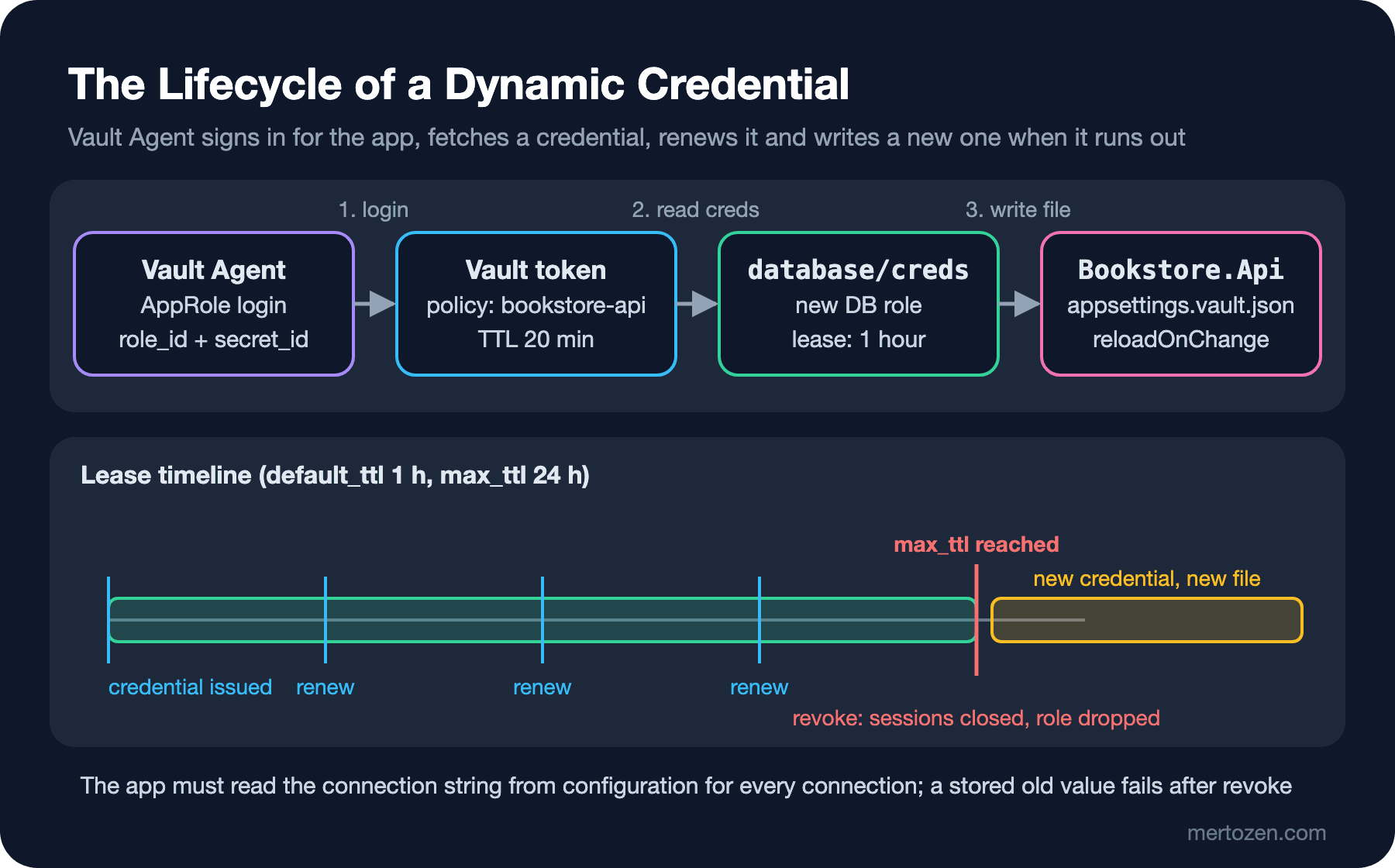
DB user v-approle-bookstore-api-oBSoapNrAtldwxd0HowK-1794651337, lease 60s, renewable TrueIt works, but the hard part starts here: renewing the token, renewing the lease, fetching a new credential near the max TTL and passing all that to the rest of the app become your code's job. The second way is to keep the app completely unaware of Vault: Vault Agent runs next to it, signs in with AppRole, reads the secrets in a template, writes them to a file and manages the leases. The app reads just a JSON file:
auto_auth {
  method "approle" {
    config = {
      role_id_file_path                   = "/vault/agent/role-id"
      secret_id_file_path                 = "/vault/agent/secret-id"
      remove_secret_id_file_after_reading = false
    }
  }
}

template_config {
  # When the lease can no longer be renewed, fetch a new credential and rewrite the file
  exit_on_retry_failure = true
}

template {
  source      = "/vault/agent/appsettings.vault.json.ctmpl"
  destination = "/vault/secrets/appsettings.vault.json"
  perms       = "0640"
}
{{- with secret "database/creds/bookstore-api" -}}
{
"ConnectionStrings": {
"Bookstore": "Server=localhost,14350;Database=BookstoreDb;User Id={{ .Data.username }};Password={{ .Data.password }};TrustServerCertificate=True"
},
{{- end }}
{{- with secret "secret/data/bookstore/api" }}
"Jwt": { "SigningKey": "{{ .Data.data.jwt_signing_key }}" },
"Email": { "ApiKey": "{{ .Data.data.email_api_key }}" }
}
{{- end }}// The secrets file written by Vault Agent (skipped if missing); reloaded whenever the agent renews it
if (builder.Configuration["Vault:SecretsFile"] is { Length: > 0 } vaultSecretsFile)
{
builder.Configuration.AddJsonFile(vaultSecretsFile, optional: true, reloadOnChange: true);
}Because of the container limit I ran the Agent as a separate process inside the Vault container, writing the file to a shared folder; in Kubernetes the same Agent is added to the pod as a sidecar. On the first try I gave the file path as the relative ../out/appsettings.vault.json; the configuration's file provider does not read paths outside the content root and, since the file was optional: true, quietly skipped it. What kept the app from starting was the ValidateOnStart we added in post two. With an absolute path I started the API and called /api/books every ten seconds:
10:16:30 {"dbUser":"v-approle-bookstore-api-guE2NFYjWRSazXDQiHxD-1794651384","books":4}
...
10:19:01 {"dbUser":"v-approle-bookstore-api-guE2NFYjWRSazXDQiHxD-1794651384","books":4}
10:19:11 {"dbUser":"v-approle-bookstore-api-XtjcoBX4UJC0NKfG5n53-1794651549","books":4}
...
10:21:52 {"dbUser":"v-approle-bookstore-api-XtjcoBX4UJC0NKfG5n53-1794651549","books":4}
10:22:02 {"dbUser":"v-approle-bookstore-api-LB9UljrmfEBDIMMyeLSe-1794651716","books":4}
10:19:09 [WARN] agent: vault.read(database/creds/bookstore-api): TTL of "1m" exceeded the effective max_ttl of "15s"; TTL value is capped accordingly
10:19:09 [WARN] agent: vault.read(database/creds/bookstore-api): renewer done (maybe the lease expired)
10:19:09 [INFO] agent: (runner) rendered "/work/agent/appsettings.vault.json.ctmpl" => "/work/out/appsettings.vault.json"The first credential was issued at 10:16:24 with a max TTL of three minutes. With 15 seconds left the Agent saw that the lease could not be renewed, fetched a new credential and rewrote the file; the app picked up the new connection string through reloadOnChange and the next request came in as the new login. There is not a single line of Vault-related code in the app. That is why I recommend the second way in most cases: the app stays portable, token and lease management lives in a component HashiCorp maintains, and the same image can be tested without Vault, with a plain file.
The Connection Pool and an Expiring Credential
Even though the Agent renews the file, whether the app sees the new value depends on how it reads the connection string. /api/books reads it from IConfiguration on every request. Another very common style is reading the value into a variable at startup and keeping it; reading the connection string into a variable before passing it to EF Core's AddDbContext has the same effect. Alongside the API I ran a second app that reads the same file but keeps the value:
// The trap: the connection string is read once at startup and kept
var connectionString = builder.Configuration.GetConnectionString("Bookstore");

var app = builder.Build();
app.MapGet("/api/books", async () =>
{
    await using var connection = new SqlConnection(connectionString);
    await connection.OpenAsync();
    await using var command = new SqlCommand("SELECT SUSER_SNAME(), COUNT(*) FROM dbo.Books", connection);
    await using var reader = await command.ExecuteReaderAsync();
    await reader.ReadAsync();
    return new { DbUser = reader.GetString(0), Books = reader.GetInt32(1) };
});
10:19:11 {"dbUser":"v-approle-bookstore-api-guE2NFYjWRSazXDQiHxD-1794651384","books":4} 200
10:19:21 {"dbUser":"v-approle-bookstore-api-guE2NFYjWRSazXDQiHxD-1794651384","books":4} 200
10:19:31 500
10:19:41 500
...
10:23:22 500
Microsoft.Data.SqlClient.SqlException (0x80131904): Login failed for user 'v-approle-bookstore-api-guE2NFYjWRSazXDQiHxD-1794651384'.
# SQL Server error log
10:19:31.60 Logon Error: 18456, Severity: 14, State: 5.
10:19:31.60 Logon Login failed for user 'v-approle-bookstore-api-guE2NFYjWRSazXDQiHxD-1794651384'. Reason: Could not find a login matching the name provided.The first credential's lease ended at 10:19:24 and Vault revoked it: it disabled the login, closed the open session in the pool with KILL, and dropped the user and the login. In this run SqlClient did not hand out the dead connection from the pool; the first request after the revoke went straight to opening a new connection, but still with the old login name and password. State 5 in the SQL Server log says that such a login no longer exists; from then on every request failed with 500. The Agent had written a new credential to the file at 10:19:09; the app never read it. That is also the answer to the opening question: with a revocation that does not close sessions, the old connections in the pool would keep working until their idle time ran out; with one that does, the error comes immediately. In both cases the fix is the same: read the connection string from configuration at the moment you open the connection. In EF Core it is enough to read it from IConfiguration in the (serviceProvider, options) overload of AddDbContext, or to use a DbConnection factory. Since every new connection string opens a new pool, the idle connections of old pools close when their own time runs out.
Production Notes
I also tried how a revocation can get stuck quietly. I took ALTER ANY CONNECTION away from Vault's login, fetched a credential, left a session open with it and revoked the lease. Vault's server log:
10:24:01 [ERROR] expiration: failed to revoke lease: lease_id=database/creds/bookstore-api/hMQKMRFIzmM6n3AxOeVWn7MA error="failed to revoke entry: resp: (*logical.Response)(nil) err: could not perform all sql statements: mssql: User does not have permission to use the KILL statement." attempts=1 next_attempt=27.011701996s
10:24:28 [ERROR] expiration: failed to revoke lease: lease_id=database/creds/bookstore-api/hMQKMRFIzmM6n3AxOeVWn7MA error="failed to revoke entry: resp: (*logical.Response)(nil) err: could not perform all sql statements: mssql: User does not have permission to use the KILL statement." attempts=2 next_attempt=51.291000155s
10:25:20 [ERROR] expiration: failed to revoke lease: lease_id=database/creds/bookstore-api/hMQKMRFIzmM6n3AxOeVWn7MA error="failed to revoke entry: resp: (*logical.Response)(nil) err: mssql: Could not drop login 'v-token-bookstore-api-fHvGYdnyihkR1AR2Qk9s-1794651837' as the user is currently logged in." attempts=3 next_attempt=1m18.188559614s
10:26:38 [INFO]  expiration: revoked lease: lease_id=database/creds/bookstore-api/hMQKMRFIzmM6n3AxOeVWn7MA
Vault disabled the login and dropped the user, but since it could not close the session it could not drop the login. The result is a half-done revoke: new connections are rejected with Reason: The account is disabled., while the open session keeps running and the login stays on the server. Nothing showed up on the app side; Vault retried the revoke at growing intervals. At 10:24:46 I ran GRANT ALTER ANY CONNECTION TO vault_admin. On the third attempt KILL worked, but the DROP LOGIN right after it failed again because the session had not closed yet; the fourth attempt completed the revoke. The lesson: set an alert on the failed to revoke lease lines in Vault's server logs. If revocation fails silently, "short-lived" credentials stop being short-lived.
Turn on an audit device from day one: Vault logs every request with hashed values, and in a leak investigation that is where you find who read which secret. Run Vault highly available (Raft with at least three nodes); for an app that gets its credentials from Vault at startup, Vault being unreachable has the same effect as the database being unreachable. Also watch the number of dynamic credentials: if hundreds of instances each create a new user every hour, the database's login and session limits come into play.
Common Pitfalls
Continuing to work with the root token, or handing it to an app. Using dev mode in production as a "quick setup". Giving Vault's account sysadmin for convenience. Writing secret/bookstore/api in a policy and forgetting KV v2's secret/data/ prefix. Keeping a credential whose lease has expired in a connection pool or a singleton. Not giving Vault's account the permission revocation needs; on SQL Server closing sessions requires ALTER ANY CONNECTION. Leaving the secret_id long-lived and unlimited and putting it in an environment variable too; then you have recreated the problem you had before Vault. Tying a critical path to a library whose maintenance has slowed down, such as VaultSharp.
A Small Experiment
★☆☆ Run Vault or OpenBao in dev mode, write a secret to KV v2, update it twice and read the first version with vault kv get -version=1. Then look at the version history in the output of vault kv metadata get.
★★☆ Set up the database secrets engine against your own SQL Server container, set default_ttl to one minute and renew the lease with vault lease renew. Watch what renew returns once max_ttl is reached and when the login disappears from sys.server_principals.
★★★ Run the API with the file written by Vault Agent; at the same time run a second copy that keeps the connection string from startup. Try the revoke once with and once without ALTER ANY CONNECTION on Vault's login and compare how the two apps behave.
With Vault and OpenBao, secrets are now both centralized and short-lived. But how does an app get these secrets in Kubernetes: a Vault Agent sidecar, a Kubernetes Secret or a CSI volume? In the next post we compare the External Secrets Operator with the Secrets Store CSI Driver and set up workload identity, which gives pods a cloud identity without a secret.