

Azure Key Vault with .NET: Managed Identity, RBAC, the Configuration Provider and the Right Credential in Production

A .NET app should reach Key Vault without carrying a password, through a managed identity holding the Key Vault Secrets User role on that vault only, and production should use ManagedIdentityCredential instead of DefaultAzureCredential. We set up AddAzureKeyVault with a prefixed secret manager and ReloadInterval, and see with real output from a local emulator the reload, a three-minute startup without managed identity, and an unresolved App Service reference left as the value.
Version note: The examples in this post were run with .NET 10 (SDK 10.0.402), Azure.Extensions.AspNetCore.Configuration.Secrets 1.5.2, Azure.Identity 1.21.0, xUnit 2.9 and the local Key Vault emulator Lowkey Vault 7.4 on Docker 29.2. No vault was created in Azure; the az commands come from Microsoft Learn and were not run.
Guess First
The API of Bookstore, the online bookstore used as the shared example across this site's series, reads its secrets from Key Vault when it starts in staging. One day the app's managed identity is removed by mistake. What does the app do: start without secrets and fail on the first request, exit immediately, or wait for a while? If it waits, for how long? Second question: the same app runs on App Service with Key Vault references and a reference cannot be resolved. What is the value of Jwt:SigningKey?
Key Vault Basics: Secrets, Keys, Certificates and the Access Model
Azure Key Vault holds three kinds of objects. A secret is any value the app reads as plain text: a connection string, an API key, a webhook secret. A key is a cryptographic key that never leaves the vault; signing and encryption happen inside the vault and the app never sees the key itself. A certificate manages the lifecycle of an X.509 certificate (renewal, issuer integration). This post focuses on secrets; the JWT signing key is stored as a secret for now, and we return to its rotation in post seven.
Access can be granted with two models: the older vault access policy and Azure RBAC. Microsoft made RBAC the default for new vaults created with API version 2026-02-01 or later; if you want access policies you have to choose them explicitly at creation. With RBAC the role to give the app is "Key Vault Secrets User": it can read secret values but cannot write or delete them. Assign the role on the vault itself, not at subscription or resource group level; otherwise the app can read every vault in that scope.
Turn on two protections from the start. Soft delete keeps a deleted secret recoverable for a period (between 7 and 90 days, 90 by default) and is already on for new vaults. Purge protection prevents permanent deletion before that period ends; once enabled it cannot be turned off. Even if an attacker or a buggy script deletes secrets, you can bring them back. On the network side, closing the production vault to public access and allowing only the app's network through a private endpoint or virtual network rule is a good default.
The last rule is the one broken most often: every environment needs its own vault. The Key Vault configuration provider page on Microsoft Learn also recommends separate vaults for different apps and environments. Bookstore has bookstore-kv-dev, bookstore-kv-staging and bookstore-kv-prod. Developers can read the dev vault; only the production app's identity can reach the production vault.
Managed Identity: An Identity Without a Password
The classic paradox of Key Vault is this: you need a credential to reach the vault, so where do you keep that credential? Managed identity breaks the loop. When you give an identity to an App Service, Container App, Function or VM, Azure creates a service principal for that resource in Microsoft Entra ID and manages its credential itself. The app asks for a token at the platform's local endpoint and never sees a password, client secret or certificate.
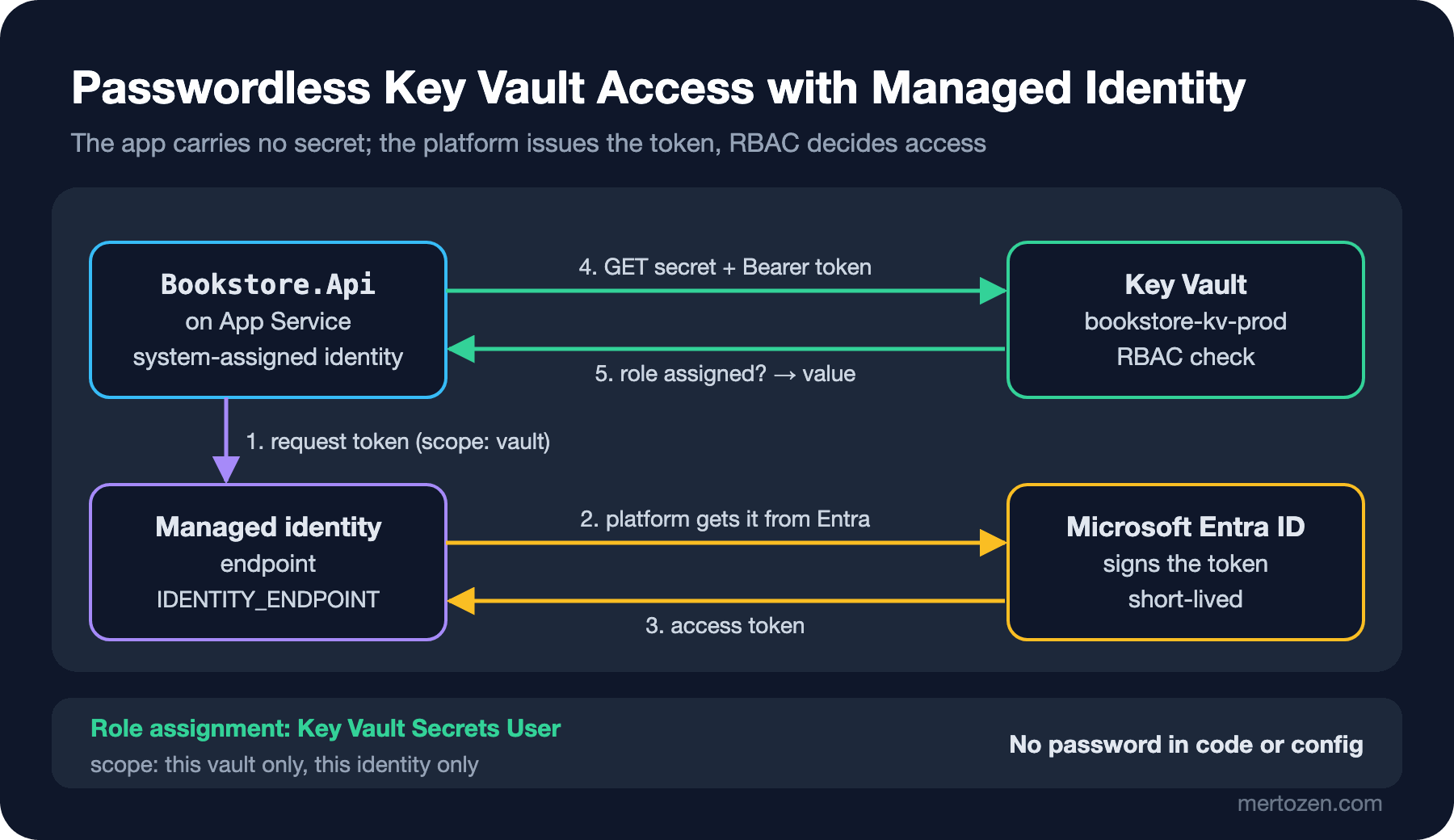
There are two kinds. A system-assigned identity is tied to the resource itself; when the App Service is deleted the identity goes with it, and it cannot be shared. A user-assigned identity is a separate Azure resource; it can be assigned to several apps and can be created and authorized before the app exists. For Bookstore's API a system-assigned identity is enough. A user-assigned identity helps when the app needs a secret at the moment it is created and in scenarios like blue-green where several resources share the same permissions.
The Azure side takes three steps. These commands were written from the examples on Microsoft Learn and were not run against an Azure subscription:
# 1) Give the App Service a system-assigned identity; you need the principalId from the output
az webapp identity assign --resource-group bookstore-prod --name bookstore-api-prod

# 2) "Key Vault Secrets User" for the identity, on this vault only
az role assignment create \
  --role "Key Vault Secrets User" \
  --assignee-object-id <principalId> \
  --assignee-principal-type ServicePrincipal \
  --scope $(az keyvault show --name bookstore-kv-prod --query id -o tsv)

# 3) Give the app only the vault's address
az webapp config appsettings set --resource-group bookstore-prod --name bookstore-api-prod \
  --settings KeyVault__Uri=https://bookstore-kv-prod.vault.azure.net/
The only value the app receives is the vault's address, and that is not a secret. Locally, a developer signs in with az login using their own account; their user has the same role on the dev vault.
The Right Credential in Production
The best-known class in the Azure Identity library is DefaultAzureCredential: it tries a series of methods in order, such as environment variables, workload identity, managed identity, Visual Studio and Azure CLI, and uses the first one that works. Very convenient in development, risky in production. Microsoft's Azure Identity best practices page illustrates the risk with a scenario: if managed identity quietly starts failing one day, the chain moves on to the next link; if someone ran az login on the server, the app starts running with that person's permissions. The recommendation is a single, specific credential in production. Bookstore's credential selection looks like this:
// Only managed identity in production; the developer's own Azure sign-in during development
public static TokenCredential CreateCredential(IHostEnvironment environment, IConfiguration configuration)
{
    if (environment.IsDevelopment())
    {
        return new ChainedTokenCredential(new AzureCliCredential(), new VisualStudioCredential());
    }

    return configuration["KeyVault:ManagedIdentityClientId"] is { Length: > 0 } clientId
        ? new ManagedIdentityCredential(ManagedIdentityId.FromUserAssignedClientId(clientId))
        : new ManagedIdentityCredential(ManagedIdentityId.SystemAssigned);
}
If you don't want to give up DefaultAzureCredential, the AZURE_TOKEN_CREDENTIALS environment variable narrows the chain: dev keeps only developer tools, prod keeps only credentials for deployed services, and since Azure.Identity 1.15 a single credential name such as ManagedIdentityCredential is accepted as well. The same page notes a behavioral difference: DefaultAzureCredential tries managed identity in "fail fast" mode, giving up after a short timeout without retrying. When you use ManagedIdentityCredential directly, or set AZURE_TOKEN_CREDENTIALS=ManagedIdentityCredential with version 1.16 or later, it switches to "resilient" mode: five retries with exponential backoff starting at 0.8 seconds. That is what you want in production; a transient IMDS failure should not take the app down. We measure the cost of that below.
The Configuration Provider: AddAzureKeyVault and a Prefixed Secret Manager
The Azure.Extensions.AspNetCore.Configuration.Secrets package adds Key Vault as an ordinary configuration provider. Because Key Vault secret names cannot contain :, the provider maps -- to :: Jwt--SigningKey becomes Jwt:SigningKey. By default every secret in the vault is loaded. When several apps share a vault (in Bookstore, the API and the Notifications worker), we write a KeyVaultSecretManager so that each app sees only its own secrets:
// "BookstoreApi-Jwt--SigningKey" → "Jwt:SigningKey"; other apps' secrets are not loaded
public sealed class PrefixKeyVaultSecretManager(string appPrefix) : KeyVaultSecretManager
{
    private readonly string _prefix = $"{appPrefix}-";

    public override bool Load(SecretProperties secret) =>
        secret.Name.StartsWith(_prefix, StringComparison.OrdinalIgnoreCase)
        && (secret.ExpiresOn is null || secret.ExpiresOn > DateTimeOffset.UtcNow);

    public override string GetKey(KeyVaultSecret secret) =>
        secret.Name[_prefix.Length..].Replace("--", ConfigurationPath.KeyDelimiter);
}
The second condition in Load has a reason: according to Microsoft Learn, the provider loads expired secrets by default; only disabled secrets are never read. Ignoring an expired key instead of continuing to run with it lets ValidateOnStart catch the missing value. The prefix is a convenience for isolation, not a security boundary: any identity with the Secrets User role on the vault can read every secret in it. If you need real separation, assign the role at secret level or split the apps into separate vaults. I pinned the behavior down with xUnit tests:
$ dotnet test --logger "console;verbosity=normal"
  Passed ...PrefixKeyVaultSecretManagerTests.Load_accepts_only_this_apps_secrets(name: "BookstoreApi-Jwt--SigningKey", expected: True)
  Passed ...PrefixKeyVaultSecretManagerTests.Load_accepts_only_this_apps_secrets(name: "NotificationsWorker-Email--ApiKey", expected: False)
  Passed ...PrefixKeyVaultSecretManagerTests.Load_skips_expired_secrets
  Passed ...PrefixKeyVaultSecretManagerTests.GetKey_strips_prefix_and_maps_double_dash_to_colon
...
Passed!  - Failed:     0, Passed:    11, Skipped:     0, Total:    11
Adding the provider takes a few lines in Program.cs. The vault address comes from the environment; without an address (running locally with user secrets) Key Vault is not added at all:
public static IConfigurationBuilder AddBookstoreKeyVault(
    this IConfigurationBuilder builder,
    Uri vaultUri,
    TokenCredential credential,
    TimeSpan reloadInterval,
    SecretClientOptions? clientOptions = null)
{
    var client = new SecretClient(vaultUri, credential, clientOptions ?? new SecretClientOptions());

    return builder.AddAzureKeyVault(client, new AzureKeyVaultConfigurationOptions
    {
        Manager = new PrefixKeyVaultSecretManager(AppPrefix),
        ReloadInterval = reloadInterval
    });
}
// The vault address comes from the environment: each environment has its own vault
if (builder.Configuration["KeyVault:Uri"] is { Length: > 0 } vaultUri)
{
var credential = KeyVaultConfigurationExtensions.CreateCredential(builder.Environment, builder.Configuration);
var clientOptions = new SecretClientOptions
{
// Local emulator only; this check is never disabled in Production
DisableChallengeResourceVerification = !builder.Environment.IsProduction()
&& builder.Configuration.GetValue<bool>("KeyVault:DisableChallengeResourceVerification")
};
var reloadInterval = builder.Configuration.GetValue("KeyVault:ReloadInterval", TimeSpan.FromMinutes(30));
builder.Configuration.AddBookstoreKeyVault(new Uri(vaultUri), credential, reloadInterval, clientOptions);
}Because the Key Vault provider is added at the end of the list, it also overrides environment variables: if a secret exists in the vault, an environment variable with the same name cannot override it. For secrets that is exactly what we want; the vault is the single source.
Trying It Without Azure: A Local Key Vault Emulator
Microsoft has no official Key Vault emulator. For the runs in this post I used Lowkey Vault, an open-source community project that imitates Key Vault's secret API and App Service's managed identity token endpoint. It does not enforce Azure's RBAC checks, so you cannot see permission errors here. I ran the emulator and the API on the same Docker network; the API container requests a token through IDENTITY_ENDPOINT and IDENTITY_HEADER, just like on App Service:
$ docker run -d --name secretseries-kv --network secretseries-net \
    --network-alias default.lowkey-vault.local -p 8443:8443 nagyesta/lowkey-vault:7.4.0

$ docker run -d --init --name secretseries-api --network secretseries-net -p 18083:8080 \
    -v ./lowkey-ca.pem:/certs/lowkey-ca.pem:ro -e SSL_CERT_FILE=/certs/lowkey-ca.pem \
    -e ASPNETCORE_ENVIRONMENT=Staging \
    -e KeyVault__Uri=https://default.lowkey-vault.local:8443 \
    -e KeyVault__DisableChallengeResourceVerification=true \
    -e KeyVault__ReloadInterval=00:00:15 \
    -e IDENTITY_ENDPOINT=http://default.lowkey-vault.local:8080/metadata/identity/oauth2/token \
    -e IDENTITY_HEADER=local-test \
    secretseries-api:03

$ curl -s localhost:18083/api/info
{"environment":"Staging","freeShippingThreshold":750,"jwtKeyFingerprint":"2fd269ee","secrets":{"ConnectionStrings:Bookstore":true,"Jwt:SigningKey":true,"Email:ApiKey":true,"Payments:Webhook:Secret":false}}
I had put four secrets into the vault: three with the BookstoreApi- prefix and one with NotificationsWorker-. The app took only its own three and ValidateOnStart passed; the container has no secret environment variables. jwtKeyFingerprint is the first eight characters of the key's SHA-256 hash; I added it to see which version is loaded without showing the value.
The two settings made for the emulator do not go to production. SSL_CERT_FILE tells the container to trust the emulator's self-signed certificate. DisableChallengeResourceVerification turns off one of the Key Vault client's security checks: before sending a token, the client verifies that the domain in the vault's challenge matches the address it called, which keeps tokens from leaking to a fake vault. The emulator returns that domain differently from Azure, so the check has to be off; the condition in the code ignores this setting in the Production environment.
ReloadInterval, Throttling and a Changing Secret
By default the provider reads secrets once and caches them for the app's lifetime; a secret changed or disabled in the vault never reaches the app. With ReloadInterval it rereads the whole list at that interval. In the run above I had lowered the interval to 15 seconds; while the app was running I wrote a new version of the JWT key:
09:09:34 {"environment":"Staging","freeShippingThreshold":750,"jwtKeyFingerprint":"2fd269ee",...}
# new version of BookstoreApi-Jwt--SigningKey written to the vault (09:09:34)
09:09:39 "jwtKeyFingerprint":"2fd269ee"
09:09:44 "jwtKeyFingerprint":"b51b8da0"
09:09:49 "jwtKeyFingerprint":"b51b8da0"
The new version arrived within one reload interval and code reading through IOptionsMonitor saw it. Consider two things when choosing the interval. First, throttling: according to the Key Vault service limits page on Microsoft Learn, the limit for "all other" operations, including reading secrets, is 4,000 per 10 seconds per vault per region. Every reload means as many GETs as the secrets it loads; 50 instances, 20 secrets and a 30-second interval come to about 330 requests per 10 seconds, far from the limit but added to every other app using the same vault. Second, rotation: the reload interval is the longest time a new secret takes to reach the app. In post seven, working with two active secrets, we will choose this time according to the overlap window.
The Alternative: App Service Key Vault References
You can also use Key Vault without changing any code. In App Service, Functions and Logic Apps an app setting's value can be a reference in this form:
Jwt__SigningKey = @Microsoft.KeyVault(SecretUri=https://bookstore-kv-prod.vault.azure.net/secrets/BookstoreApi-Jwt--SigningKey)The platform resolves the reference with the app's managed identity and hands it to the app as an ordinary environment variable. Without a version the latest one is used; App Service caches the values and, according to Microsoft Learn, picks up a new version within 24 hours, while any config change causes a restart and an immediate refetch. Azure Container Apps secrets can likewise reference a secret in Key Vault.
The trap with references is what happens on failure: an unresolved reference stays as the value. The app receives the text @Microsoft.KeyVault(...) as Jwt:SigningKey. I tried this without the emulator, passing two secrets as reference text:
$ docker run -d --init --name secretseries-api -p 18083:8080 \
    -e "Jwt__SigningKey=@Microsoft.KeyVault(SecretUri=https://bookstore-kv-prod.vault.azure.net/secrets/BookstoreApi-Jwt--SigningKey)" \
    -e "Email__ApiKey=@Microsoft.KeyVault(SecretUri=https://bookstore-kv-prod.vault.azure.net/secrets/BookstoreApi-Email--ApiKey)" \
    secretseries-api:03
$ curl -s localhost:18083/api/info
{"environment":"Production","freeShippingThreshold":500,"jwtKeyFingerprint":"2cc13d41","secrets":{"ConnectionStrings:Bookstore":false,"Jwt:SigningKey":true,"Email:ApiKey":true,"Payments:Webhook:Secret":false}}
The app started without complaint: the text is longer than 44 characters, so it even passed [MinLength(44)], and JWTs would have been signed with it. I added a small check that scans all configuration at startup:
// App Service leaves an unresolved reference as the value; catch it at startup
public static void ThrowIfAny(IConfiguration configuration)
{
    var unresolved = configuration.AsEnumerable()
        .Where(pair => pair.Value?.StartsWith(ReferencePrefix, StringComparison.OrdinalIgnoreCase) == true)
        .Select(pair => pair.Key)
        .Order()
        .ToList();

    if (unresolved.Count > 0)
    {
        throw new InvalidOperationException(
            $"Unresolved Key Vault references: {string.Join(", ", unresolved)}");
    }
}
$ docker run --init --name secretseries-api -e "Jwt__SigningKey=@Microsoft.KeyVault(...)" -e "Email__ApiKey=@Microsoft.KeyVault(...)" secretseries-api:03
Unhandled exception. System.InvalidOperationException: Unresolved Key Vault references: Email:ApiKey, Jwt:SigningKey
$ docker inspect secretseries-api -f '{{.State.ExitCode}}'
134Which one to choose? References need no code changes and keep the app independent of the Azure SDK; they are a good start for an app with a few secrets that lives on App Service. The provider gives you control over the reload interval, filtering by prefix and failure behavior, and the same code works across Kubernetes, Container Apps and App Service. Bookstore uses the provider because the same API goes to Kubernetes in post six.
Production Notes
I measured the answer to the first opening question. I started the API without a managed identity endpoint; ManagedIdentityCredential tried IMDS with retries in resilient mode and the app failed after about three minutes:
Unhandled exception. Azure.Identity.AuthenticationFailedException: ManagedIdentityCredential authentication failed: All Managed Identity sources are unavailable. The Azure Instance Metadata Service (IMDS) that runs on VMs was not detected: IMDSv2: IMDSv2 probe failed. ... (Connection refused (169.254.169.254:80)) ...With a wrong vault address (DNS does not resolve) the SDK gave up after four attempts, in about 23 seconds. In both cases the app did not start without secrets, which is far better than starting quietly with defaults. But tune your health checks and deploy timeouts to these durations: a three-minute startup restarts a pod with a short startup probe for no reason.
I noticed one more thing in this run: in the container started without --init, the exception was written to the log but the process did not exit, and the container was still running two minutes later. With --init the container exited with code 134. It is a side effect of the app running as PID 1 in the container; the fix is docker run --init or a small init process in the image. In Kubernetes, remember that a pod without a readiness probe can keep receiving traffic in this state.
Send Key Vault's diagnostic logs to a Log Analytics workspace: which identity read which secret and when is the primary source for a leak investigation. If only one app reads a secret, a SecretGet from any other identity is a reason to alert.
Common Pitfalls
Sharing one vault across all environments: everyone working in dev is one role assignment away from production secrets. Assigning the role at subscription or resource group level. Using DefaultAzureCredential in production without knowing which credential gets picked. Wrapping the Key Vault registration in a try/catch and starting the app "without secrets" on failure; without ValidateOnStart that means an API running with an empty key. Not knowing that an unresolved App Service reference leaves its own text as the value. Treating the prefix as a security boundary. Setting ReloadInterval so short that you get throttled, or not setting it at all and tying rotation to a restart. Finally, leaving local test settings such as DisableChallengeResourceVerification unconditional.
A Small Experiment
★☆☆ Find the credential your API uses to read secrets. If it is DefaultAzureCredential, switch production to ManagedIdentityCredential and write a separate ChainedTokenCredential for development.
★★☆ Run Lowkey Vault in Docker and write two secrets with your app's prefix and one with another prefix. Check with PrefixKeyVaultSecretManager that the app gets only its own secrets, and measure how long a new version takes to arrive when you shorten ReloadInterval.
★★★ Start the API first without a managed identity endpoint, then with a wrong vault address, and measure how many seconds startup takes. Compare those numbers with the startup probe or health check settings of the platform you deploy to, and adjust ManagedIdentityCredentialOptions.Retry if needed.
The secrets now live in the vault and the app reaches them without a password. Settings that are not secret but change often, such as the shipping threshold, still need a deploy or a restart for every change. In the next post we centralize them with Azure App Configuration, split them across environments with labels and refresh them without a deploy using a sentinel key.