

Error Handling: Terminating and Non-Terminating Errors, $ErrorActionPreference, try/catch and Native Command Exit Codes

In PowerShell, $ErrorActionPreference = 'Stop' only stops on PowerShell errors; a failing exit code from a native command such as dotnet test also needs $PSNativeCommandUseErrorActionPreference = $true, otherwise publish runs even when tests break and the script exits with 0. We cover the two kinds of errors, try/catch/finally and trap, Write-Error vs throw, stderr and 2>&1, Set-StrictMode, the set -euo pipefail counterparts and a Bookstore build script that stops at the first failure.
Version note: The examples in this post were run with PowerShell 7.6.10 (LTS) and PowerShell 7.7.0 on Ubuntu 24.04 with the .NET 10 SDK (10.0.404) and git 2.43 installed; error behaviour was the same on both versions. Information about Windows PowerShell 5.1 comes from the Microsoft Learn documentation and was not run.
Guess First
The old build script of Bookstore, the online bookstore used as the shared example across this site's series, looks short and "safe"; at the top there is a line to make it stop on errors:
$ErrorActionPreference = 'Stop'

dotnet test ./Bookstore.slnx --nologo -v q
dotnet publish ./src/Bookstore.Api -c Release -o ./artifacts/api --nologo -v q
Write-Output "Published, deploy will pick up ./artifacts/api"
Someone accidentally swapped the weights in Isbn.IsValid, and a unit test broke. The CI step runs the script with pwsh -NoProfile -File. When the tests fail, does dotnet publish run? Does the artifacts/api folder get created? Which exit code does the CI step see?
In the previous post we saw how a catch block in the cover script swallowed a real error. This post covers error handling in PowerShell as a whole: the two kinds of errors, $ErrorActionPreference, try/catch/finally and trap, the difference between Write-Error and throw, exit codes of native commands such as dotnet and git, Set-StrictMode, and a comparison with set -euo pipefail from the Bash Scripting series. At the end we write a build script that stops at the first failing step and leaves no half-done work for the deploy.
Two Kinds of Errors: Non-Terminating and Terminating
Most errors in PowerShell do not stop the script. When a cmdlet fails on one element, it writes the error and continues with the next one; this is a non-terminating error. Lab note: the commands in this post run in the Bookstore lab folder from the earlier posts; there is no appsettings.json in this folder.
PS> Get-Item ./appsettings.json, ./Bookstore.slnx | Select-Object Name
Get-Item: Cannot find path '/home/user/bookstore/appsettings.json' because it does not exist.

Name
----
Bookstore.slnx
PS> $?
False
PS> try { Get-Item ./appsettings.json } catch { "caught: $_" }
Get-Item: Cannot find path '/home/user/bookstore/appsettings.json' because it does not exist.
PS> try { Get-Item ./appsettings.json -ErrorAction Stop } catch { "caught: $($_.Exception.GetType().Name)" }
caught: ItemNotFoundException
PS> $Error.Count
3
PS> $Error[0].CategoryInfo.Category
ObjectNotFound
PS> $Error[0].TargetObject
/home/user/bookstore/appsettings.json
PS> Get-Item ./appsettings.json -ErrorAction SilentlyContinue -ErrorVariable missing
PS> $missing.Count
1
The first command could not find one of the two files, wrote an error and still returned the other one; $? says the last command did not fully succeed. The second line is the most important lesson: a try block does not catch a non-terminating error, because nothing was thrown. To make the error catchable you have to turn it into a terminating one with -ErrorAction Stop. Every error is also added to the $Error list (the newest is $Error[0]); CategoryInfo and TargetObject carry the kind of error and what it was about. -ErrorVariable collects errors in your own variable without printing them.
The terminating side has two parts as well. Three different errors in one script:
$stock = [int]'fourteen'
"1. after a failed conversion, stock is '$stock'"
Write-Error 'stock service is down'
"2. after Write-Error"
throw 'catalog file is corrupt'
"3. after throw"
$ pwsh -NoProfile -File ./lab/kinds.ps1; echo "exit=$?"
InvalidArgument: /home/user/bookstore/lab/kinds.ps1:1
Line |
1 | $stock = [int]'fourteen'
| ~~~~~~~~~~~~~~~~~~~~~~~~
| Cannot convert value "fourteen" to type "System.Int32". Error: "The
| input string 'fourteen' was not in a correct format."
1. after a failed conversion, stock is ''
Write-Error: stock service is down
2. after Write-Error
Exception: /home/user/bookstore/lab/kinds.ps1:5
Line |
5 | throw 'catalog file is corrupt'
| ~~~~~~~~~~~~~~~~~~~~~~~~~~~~~~~
| catalog file is corrupt
exit=1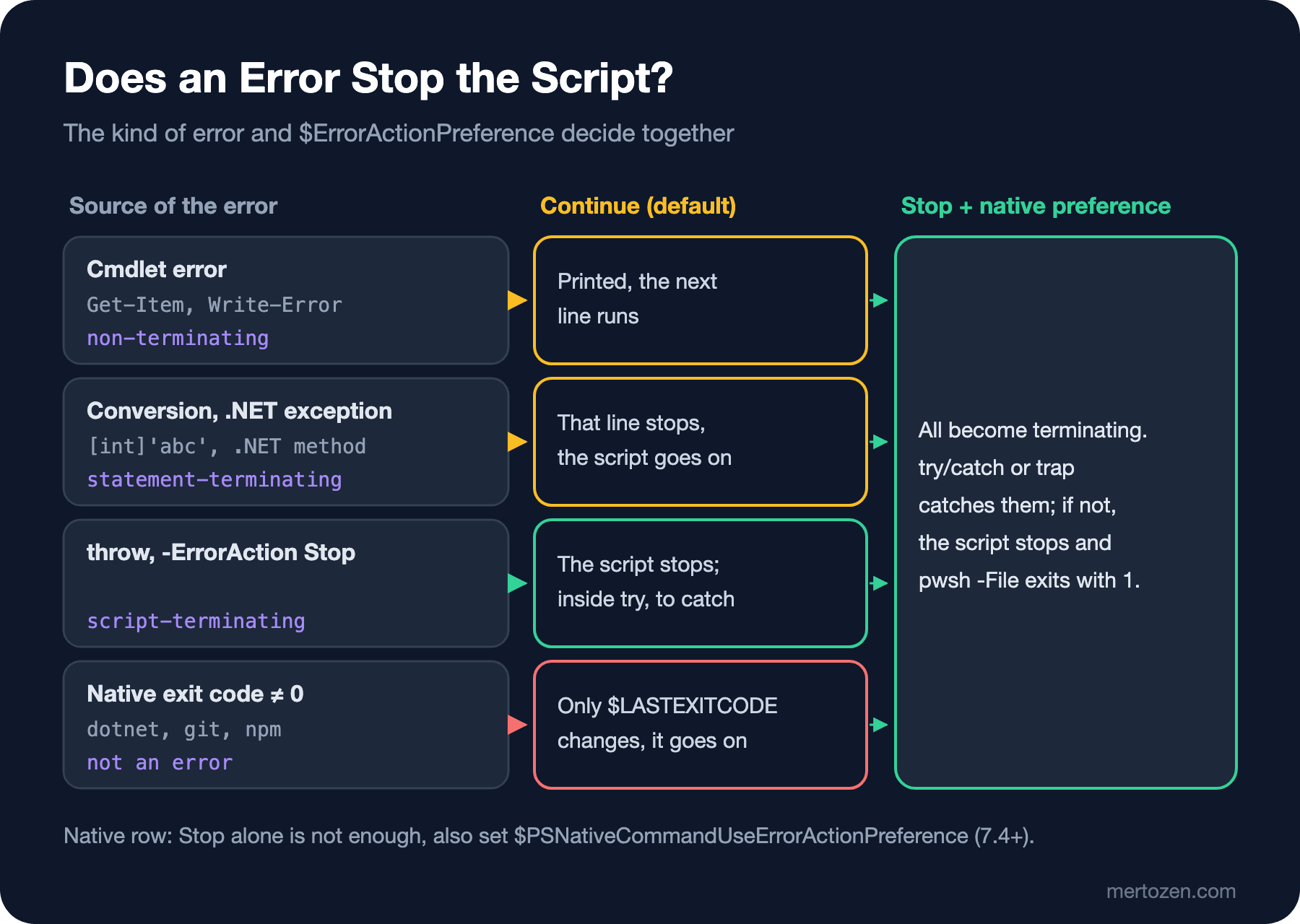
The conversion error is statement-terminating: that line stopped (nothing was assigned to $stock) but the script went on with the next line. Exceptions from .NET methods behave the same way. Write-Error produces a non-terminating error, and the script went on again. throw, on the other hand, is script-terminating: the script ended there, the third line was not printed, and pwsh -File exited with 1. Think of Write-Error as "record this error, I can carry on" and throw as "nothing after this makes sense". Add $ErrorActionPreference = 'Stop' at the top of the same script and the picture changes:
$ pwsh -NoProfile -File ./lab/kinds-stop.ps1; echo "exit=$?"
InvalidArgument: /home/user/bookstore/lab/kinds-stop.ps1:2
Line |
   2 |  $stock = [int]'fourteen'
     |  ~~~~~~~~~~~~~~~~~~~~~~~~
     | Cannot convert value "fourteen" to type "System.Int32". Error: "The
     | input string 'fourteen' was not in a correct format."
exit=1
Stop turns non-terminating and statement-terminating errors into errors that stop the script as well; the script ended at the conversion error. In scripts, especially those running in CI, this is the behaviour you want by default: stopping rather than carrying on after an unknown error.
try/catch/finally and trap
try/catch works as in C#: multiple catch blocks are chosen by exception type, an untyped catch catches everything else, and finally always runs. Inside catch, $_ is an ErrorRecord, and the actual .NET exception is in $_.Exception.
try {
    $books = Invoke-RestMethod http://127.0.0.1:5098/api/books -TimeoutSec 2
}
catch [System.Net.Http.HttpRequestException] {
    "network error: $($_.Exception.Message)"
}
catch {
    "something else: $($_.Exception.GetType().FullName)"
}
finally {
    'finally runs in both cases'
}

try {
    'cleaning up before exit'
    exit 3
}
finally {
    'finally runs on exit too'
}
$ pwsh -NoProfile -File ./lab/trycatch.ps1; echo "exit=$?"
network error: Connection refused (127.0.0.1:5098)
finally runs in both cases
cleaning up before exit
finally runs on exit too
exit=3The connection error arrived as an HttpRequestException and landed in the right catch. The second block shows a detail that matters for people coming from bash: even on an exit inside try, finally ran and the script exited with 3. For cleanup work such as deleting temporary files or releasing a lock, finally is the counterpart of bash's trap ... EXIT.
trap defines a single error handler for a whole script or function. Since it can be added at the top without changing the script, it is easy to add to old scripts as a last resort:
trap {
    "trap: $($_.Exception.Message)"
    exit 2
}
$ErrorActionPreference = 'Stop'
'step 1'
Get-Item ./missing-release.zip
'step 2'
$ pwsh -NoProfile -File ./lab/trap.ps1; echo "exit=$?"
step 1
trap: Cannot find path '/home/user/bookstore/missing-release.zip' because it does not exist.
exit=2Because the trap contains exit 2, the script exited with 2 and step 2 never ran; with continue instead of exit it would have carried on with the line after the failing one. In code you write today, try/catch reads better, because you can see which lines are protected.
Native Commands: $LASTEXITCODE and $PSNativeCommandUseErrorActionPreference
The answer:
$ pwsh -NoProfile -File ./lab/build-old.ps1; echo "exit=$?"
Test run for /home/user/bookstore/tests/Bookstore.Api.Tests/bin/Debug/net10.0/Bookstore.Api.Tests.dll (.NETCoreApp,Version=v10.0)
A total of 1 test files matched the specified pattern.
[xUnit.net 00:00:00.06]     Bookstore.Api.Tests.IsbnTests.Valid_isbn_passes(isbn: "978-0-14-143958-7") [FAIL]

Failed!  - Failed:     1, Passed:     3, Skipped:     0, Total:     4, Duration: 11 ms - Bookstore.Api.Tests.dll (net10.0)
Published, deploy will pick up ./artifacts/api
exit=0
$ ls artifacts/api | head -3
Bookstore.Api
Bookstore.Api.deps.json
Bookstore.Api.dll
The tests broke, yet dotnet publish ran, artifacts/api was created and the script exited with 0. CI is green, and the deploy will pick up broken code. $ErrorActionPreference = 'Stop' only governs PowerShell errors; a non-zero exit code from a native program such as dotnet, git or npm is not an error for PowerShell. The result is only written to $LASTEXITCODE, $? becomes false and the script goes on. $PSNativeCommandUseErrorActionPreference, which we saw briefly in the fourth post of the Terminal and Command Line series, changes that. It became permanent in PowerShell 7.4, and its default value is still $false in 7.6 and 7.7:
PS> $ErrorActionPreference = 'Stop'
PS> git rev-parse --short HEAD; "still running, LASTEXITCODE=$LASTEXITCODE, ?=$?"
fatal: not a git repository (or any of the parent directories): .git
still running, LASTEXITCODE=128, ?=False
PS> $PSNativeCommandUseErrorActionPreference = $true
PS> try { git rev-parse --short HEAD } catch { "caught: $($_.Exception.Message)"; $_.Exception.ExitCode }
fatal: not a git repository (or any of the parent directories): .git
caught: Program "git" ended with non-zero exit code: 128 (0x80).
128
PS> $PSNativeCommandUseErrorActionPreference = $false
PS> $out = git rev-parse --short HEAD 2>&1
PS> $out.GetType().Name
ErrorRecord
PS> $out[0].GetType().FullName
System.Management.Automation.ErrorRecord
PS> "$($out[0])"
fatal: not a git repository (or any of the parent directories): .git
On the first try Stop was on, but git's 128 did not stop the script. With the preference turned on, the same call became a NativeCommandExitException; the exception's ExitCode property carries the actual code, and since a change in 7.6 the message also shows the code in hexadecimal. You need to write both lines together: the preference on its own only ties the error to $ErrorActionPreference; without Stop that error stays non-terminating and never reaches catch. That is exactly what I saw on my first try in the lab.
This preference has an important difference from bash's set -e. Bash switches set -e off for commands used as conditions (if, ||, &&). PowerShell does not:
PS> $ErrorActionPreference = 'Stop'
PS> $PSNativeCommandUseErrorActionPreference = $true
PS> try { bash -c 'echo partial; exit 3' | Select-String partial } catch { "pipeline: $($_.Exception.Message)" }

partial
pipeline: Program "bash" ended with non-zero exit code: 3 (0x03).
PS> try { if (git rev-parse HEAD) { 'in a repo' } else { 'not a repo' } } catch { "condition: $($_.Exception.Message)" }
fatal: not a git repository (or any of the parent directories): .git
condition: Program "git" ended with non-zero exit code: 128 (0x80).
PS> try { git rev-parse HEAD 2>$null || 'fallback after ||' } catch { "chain: $($_.Exception.Message)" }
chain: Program "git" ended with non-zero exit code: 128 (0x80).
PS> $commit = & { $PSNativeCommandUseErrorActionPreference = $false; git rev-parse --short HEAD 2>$null }
PS> if ($LASTEXITCODE -ne 0) { $commit = 'local' }; "version: 1.4.2+$commit"
version: 1.4.2+local
The native command in the pipeline raised an error too, so the preference also does the job of bash's pipefail. But the git in the if condition and on the left of || threw an exception as well; the right side of || never ran. Where a non-zero exit code is an expected case (a folder that is not a git repo, a tool that returns 1 when there are no changes, robocopy), turn the preference off for that block. The robocopy example in the documentation uses the same pattern: a preference changed inside & { } goes back to its old value when the block ends, and you read the result from $LASTEXITCODE yourself.
stderr Is Not an Error, but 2>&1 Produces ErrorRecords
Many tools write warnings to stderr and exit with 0. Since PowerShell 7.2, writing to stderr is not an error by itself:
PS> $ErrorActionPreference = 'Stop'
PS> $PSNativeCommandUseErrorActionPreference = $true
PS> bash -c 'echo "warn: cache is cold" >&2; echo ok'; "exit=$LASTEXITCODE"
warn: cache is cold
ok
exit=0
PS> $all = bash -c 'echo "warn: cache is cold" >&2; echo ok' 2>&1; $all.Count
2
PS> $all | ForEach-Object { '{0,-12} {1}' -f $_.GetType().Name, $_ }
String       ok
ErrorRecord  warn: cache is cold
PS> $lines = bash -c 'echo "warn: cache is cold" >&2; echo ok' 2>&1 | ForEach-Object { "$_" }; $lines
ok
warn: cache is cold
Even with Stop and the native preference on, the warning reached the screen and the script went on, because the exit code was 0. Merge stderr into stdout with 2>&1, though, and you get objects of two different types: stdout lines are String, stderr lines are ErrorRecord. Convert them to strings with "$_" before writing them to a file or searching them with -match. Watch the order too: in the merged output ok came before the warning; the order between the two streams is not preserved. According to the documentation, before 7.2, and so in Windows PowerShell 5.1 too, these redirected records were written to $Error and were affected by $ErrorActionPreference; in 5.1, using Stop together with 2>&1 can stop the script at the first stderr line. That part was not run on 5.1.
Set-StrictMode and a Comparison with set -euo pipefail
A misspelled variable is $null by default in PowerShell and quietly turns into an empty string. Set-StrictMode -Version Latest turns that, and properties that do not exist, into errors:
PS> $release = '1.4.2'
PS> "deploying $relase"
deploying
PS> $book = [pscustomobject]@{ Title = 'Dune'; Price = 12.99d }
PS> "price: $($book.Prise)"
price:
PS> Set-StrictMode -Version Latest
PS> "deploying $relase"
InvalidOperation: The variable '$relase' cannot be retrieved because it has not been set.
PS> "price: $($book.Prise)"
PropertyNotFoundException: The property 'Prise' cannot be found on this object. Verify that the property exists.
price:
$relase and Prise first passed as empty; in strict mode both raised errors. Note: on the last line the error was written but price: was still printed; a strict mode error does not stop the script without Stop either. Put the three lines together at the top of your scripts: Set-StrictMode -Version Latest, $ErrorActionPreference = 'Stop' and $PSNativeCommandUseErrorActionPreference = $true. The sixth post of the Bash Scripting series looked at how set -euo pipefail really behaves; the counterparts between the two worlds:
| bash | PowerShell 7.6 | Difference |
|---|---|---|
set -e | $ErrorActionPreference = 'Stop' + native preference | bash switches off in conditions, PowerShell stops inside if and || too |
set -u | Set-StrictMode -Version Latest | Also catches missing properties; needs Stop to halt |
set -o pipefail | Native preference | The exit code of every native command in the pipeline is checked |
trap ... ERR | try/catch or trap { } | catch can tell exception types apart |
trap ... EXIT | try/finally | finally runs on exit too |
$?, PIPESTATUS | $?, $LASTEXITCODE | $LASTEXITCODE is only the last native command's code |
| Writing to stderr | Not an error (7.2+) | 2>&1 turns stderr lines into ErrorRecords |
Bookstore: A Build Script That Stops When Tests Fail
Now let's write the script from Guess First properly. The goals: stop at the first failing step, pass the failing step and the native command's real exit code to the caller, replace the folder the deploy picks up only if every step succeeded, and clean up temporary files no matter what.
#!/usr/bin/env pwsh
#Requires -Version 7.6

<#
.SYNOPSIS
    Restores, builds, tests and publishes Bookstore.Api; stops at the first failing step.

.DESCRIPTION
    Runs dotnet restore, build, test and publish for Bookstore.slnx. The publish output
    is prepared in a temporary folder and copied to -OutputPath only when every step
    succeeded, so the deploy never picks up the output of a failed build.

.PARAMETER Configuration
    Build configuration: Debug or Release.

.PARAMETER OutputPath
    Folder the deploy picks up. Replaced only after a successful build.

.EXAMPLE
    ./Invoke-BookstoreBuild.ps1

.EXAMPLE
    pwsh -NoProfile -File ./scripts/Invoke-BookstoreBuild.ps1 -Configuration Debug

.OUTPUTS
    Progress lines. Exit codes: 0 success, the failing dotnet exit code, or 1 for other errors.
#>
[CmdletBinding()]
param(
    [ValidateSet('Debug', 'Release')]
    [string] $Configuration = 'Release',
    [string] $OutputPath = (Join-Path -Path (Split-Path -Path $PSScriptRoot -Parent) -ChildPath 'artifacts', 'api')
)

Set-StrictMode -Version Latest
$ErrorActionPreference = 'Stop'
$PSNativeCommandUseErrorActionPreference = $true

$root = Split-Path -Path $PSScriptRoot -Parent
$solution = Join-Path -Path $root -ChildPath 'Bookstore.slnx'
$project = Join-Path -Path $root -ChildPath 'src', 'Bookstore.Api'
$staging = Join-Path -Path ([System.IO.Path]::GetTempPath()) -ChildPath "bookstore-publish-$PID"

function Invoke-Dotnet {
    param(
        [string] $Command,
        [string[]] $Arguments
    )
    Write-Output "==> dotnet $Command"
    $watch = [System.Diagnostics.Stopwatch]::StartNew()
    dotnet $Command @Arguments --nologo -v quiet
    Write-Output ('    {0} finished in {1:N1} s' -f $Command, $watch.Elapsed.TotalSeconds)
}

try {
    Invoke-Dotnet -Command restore -Arguments $solution
    Invoke-Dotnet -Command build -Arguments $solution, '-c', $Configuration, '--no-restore'
    Invoke-Dotnet -Command test -Arguments $solution, '-c', $Configuration, '--no-build'
    Invoke-Dotnet -Command publish -Arguments $project, '-c', $Configuration, '--no-build', '-o', $staging

    # Replace the drop folder only now: every step above has succeeded
    if (Test-Path -Path $OutputPath) { Remove-Item -Path $OutputPath -Recurse -Force }
    $null = New-Item -Path $OutputPath -ItemType Directory -Force
    Copy-Item -Path (Join-Path -Path $staging -ChildPath '*') -Destination $OutputPath -Recurse
    Write-Output "Build OK, output in $OutputPath"
}
catch [System.Management.Automation.NativeCommandExitException] {
    Write-Output "FAILED: $($_.Exception.Message)"
    exit $_.Exception.ExitCode
}
catch {
    Write-Output "FAILED: $($_.Exception.Message)"
    Write-Output $_.ScriptStackTrace
    exit 1
}
finally {
    if (Test-Path -Path $staging) { Remove-Item -Path $staging -Recurse -Force }
}
The three lines at the top of the script sum up the table above. Invoke-Dotnet uses the array splatting we promised in the second post: the arguments come in as a [string[]] and @Arguments passes them to dotnet one by one. The publish output first goes to a temporary folder; artifacts/api changes only after every step has passed, so a failed build does not delete the previous good output. The catch blocks map the exit code: the code of the native command if one failed, otherwise 1 and the ScriptStackTrace showing where the error came from. finally deletes the temporary folder in every case. First with the broken code, then with the fixed code, and last with a wrong parameter:
$ pwsh -NoProfile -File ./scripts/Invoke-BookstoreBuild.ps1; echo "exit=$?"
==> dotnet restore
    restore finished in 0.4 s
==> dotnet build

Build succeeded.
    0 Warning(s)
    0 Error(s)

Time Elapsed 00:00:00.37
    build finished in 0.4 s
==> dotnet test
Test run for /home/user/bookstore/tests/Bookstore.Api.Tests/bin/Release/net10.0/Bookstore.Api.Tests.dll (.NETCoreApp,Version=v10.0)
A total of 1 test files matched the specified pattern.
[xUnit.net 00:00:00.07]     Bookstore.Api.Tests.IsbnTests.Valid_isbn_passes(isbn: "978-0-14-143958-7") [FAIL]

Failed!  - Failed:     1, Passed:     3, Skipped:     0, Total:     4, Duration: 11 ms - Bookstore.Api.Tests.dll (net10.0)
FAILED: Program "dotnet" ended with non-zero exit code: 1 (0x01).
exit=1
$ ls artifacts
ls: cannot access 'artifacts': No such file or directory
$ cp ~/Catalog.cs.good src/Bookstore.Api/Catalog.cs
$ pwsh -NoProfile -File ./scripts/Invoke-BookstoreBuild.ps1; echo "exit=$?"
==> dotnet restore
    restore finished in 0.4 s
==> dotnet build

Build succeeded.
    0 Warning(s)
    0 Error(s)

Time Elapsed 00:00:00.36
    build finished in 0.4 s
==> dotnet test
Test run for /home/user/bookstore/tests/Bookstore.Api.Tests/bin/Release/net10.0/Bookstore.Api.Tests.dll (.NETCoreApp,Version=v10.0)
A total of 1 test files matched the specified pattern.

Passed!  - Failed:     0, Passed:     4, Skipped:     0, Total:     4, Duration: 6 ms - Bookstore.Api.Tests.dll (net10.0)
    test finished in 0.8 s
==> dotnet publish
    publish finished in 0.3 s
Build OK, output in /home/user/bookstore/artifacts/api
exit=0
$ ls artifacts/api | head -3
Bookstore.Api
Bookstore.Api.deps.json
Bookstore.Api.dll
$ pwsh -NoProfile -File ./scripts/Invoke-BookstoreBuild.ps1 -Configuration Staging; echo "exit=$?"
Invoke-BookstoreBuild.ps1: Cannot validate argument on parameter 'Configuration'. The argument "Staging" does not belong to the set "Debug,Release" specified by the ValidateSet attribute. Supply an argument that is in the set and then try the command again.
exit=1
When the test step failed, the script stopped there, publish did not run, the artifacts folder was never created, and CI saw exit code 1. Once the code was fixed, every step passed. The last call shows the ValidateSet on -Configuration at work: the wrong value was rejected during parameter binding, before the body of the script ran at all. Parameter validation in detail is the subject of the next post.
In Production
Do not swallow errors in catch. As in the first draft of the cover script in the previous post, a catch that catches everything and writes nothing also hides your own mistakes, such as a parameter binding error. Either catch specific exception types, or write the error you caught together with its message and ScriptStackTrace and exit with a suitable code. If it is not an error you can continue from, rethrow it: a throw without arguments inside catch passes the same error up unchanged.
Give CI an exit code it understands. GitHub Actions and Azure Pipelines treat a step as failed based on its exit code; verify that every failure path of the script ends with a non-zero value, by breaking it on purpose in the lab as in this post. Keeping the native command's code ($_.Exception.ExitCode) makes the "did the tests fail, or the restore" question in the CI log easier. We will use these codes in GitHub Actions with shell: pwsh in the last post of the series.
Leave no half-done work. Since the script can stop at any line, leave the permanent change (deploy folder, database, service) for the end and prepare it somewhere temporary. In this script the publish output is prepared in a temporary folder and copied in one step. In the sixth post we apply the same principle with app_offline, migrations and a health check when deploying to a real server.
Common Pitfalls
An error that never reaches catch. If a Get-Item or Remove-Item inside try produces a non-terminating error, catch does not run and the script carries on as if all were well. Either give that cmdlet -ErrorAction Stop or have $ErrorActionPreference = 'Stop' at the top of the script. The same applies to native commands with $PSNativeCommandUseErrorActionPreference; if either one is missing, catch stays empty.
Reading $LASTEXITCODE at the wrong time. This variable only holds the code of the last native command; if another native command runs in between (a git call, a dotnet --version), its value changes. Store the code in a variable right after the command.
Treating output collected with 2>&1 as strings. In $out = git ... 2>&1, stderr lines are ErrorRecords. An if ($out -match 'fatal') often seems to work, but unexpected fields show up when you write the objects to a file or to JSON. Convert them to strings first with ForEach-Object { "$_" }.
Expecting Write-Error to stop instead of throw. Same root as the Guess First question in the first post of the series: Write-Error does not stop the script by default, and a script run with -File exits with 0. If you mean to stop, use throw or exit.
A Small Experiment
★☆☆ Add $PSNativeCommandUseErrorActionPreference = $true to the top of build-old.ps1 and break the tests again. Does publish run, and what is the exit code? Then delete the $ErrorActionPreference = 'Stop' line and explain the difference.
★★☆ Add a -SkipTests switch to Invoke-BookstoreBuild.ps1. When it is given, the test step is skipped, but at the end the script writes with Write-Warning that the tests did not run. What would you do so that the deploy notices output produced with -SkipTests?
★★★ Add a step to the build script that gets the commit id with git rev-parse --short HEAD and passes it to publish as -p:SourceRevisionId=. When the script runs in a folder that is not a git repo (for example source code unpacked from a CI artifact), the build must not fail and the id must be local. Write the block that turns the native preference off for that line only, and try both cases.
The build script is reliable now, but the Invoke-Dotnet inside it will be needed in other scripts too, and the param() block has only a ValidateSet so far. The next post moves from functions to modules: advanced functions, [CmdletBinding()], parameter validation, pipeline input, -WhatIf and the Bookstore.Ops module that collects Bookstore's shared jobs.