

From Functions to Modules: Advanced Functions, [CmdletBinding()], Parameter Validation, Pipeline Input and -WhatIf

In PowerShell, a function's result is not its return value but everything that lands on the success stream; advanced functions ([CmdletBinding()]) let you manage that, parameter validation, pipeline input and -WhatIf/-Confirm like a cmdlet. We write the Bookstore.Ops module with its manifest, show preferences that do not reach a module and the ShouldProcess trap in CI, and install it from a local repository with PSResourceGet.
Version note: The examples in this post were run with PowerShell 7.6.10 (LTS) and PowerShell 7.7.0 on Ubuntu 24.04 with the .NET 10 SDK (10.0.404) installed; PSResourceGet ships as 1.2.1 with 7.6.10 and as 1.3.1 with 7.7.0, and the output was the same on both versions. The code that touches IIS, Windows PowerShell 5.1 and the Azure Artifacts part come from the Microsoft Learn documentation and were not run.
Guess First
A small function that finds the books running low on stock in the book list of Bookstore, the online bookstore used as the shared example across this site's series. We store the result in a variable and check how many books came back:
function Get-LowStockTitle {
    param($Books, $Threshold = 5)
    $result = [System.Collections.ArrayList]::new()
    foreach ($book in $Books) {
        if ([int]$book.Stock -lt $Threshold) { $result.Add($book.Title) }
    }
    "Found $($result.Count) titles"
    return $result
}

$books = Import-Csv -Path ./data/books.csv
$low = Get-LowStockTitle -Books $books
$low.Count
$low
Four books in the list have fewer than 5 in stock. What does $low.Count print?
In the previous four posts we wrote single-file scripts. The Invoke-Dotnet from the build script, the health check and the cover check are now needed in other scripts too. In this post we move them into a module called Bookstore.Ops. Along the way we cover advanced functions, [CmdletBinding()], parameter validation, parameter sets, pipeline input, output streams and -WhatIf/-Confirm. At the end we package the module with its manifest and install it from a local repository with PSResourceGet.
A Function's Output Is More Than Its return
The answer to the guess:
PS> ./lab05/low-stock.ps1
9
0
1
2
3
Found 4 titles
Emma
The Hobbit
Crime and Punishment
Norwegian Wood
Not four, nine. In PowerShell, a function's result is everything that lands on the success stream while the function runs. return only leaves the function and adds the given value to the stream; it does not act as the single return value. Three sources were merged in this function: ArrayList.Add returns the index of the element it added, and since it was not assigned, it leaked into the output (0, 1, 2, 3); the string written as an info message went into the output as well; and at the end return added the array element by element. If you remember the True returned by List.Remove in the second post, this is the same thing inside a function.
function Get-LowStockTitle {
    [CmdletBinding()]
    param($Books, $Threshold = 5)
    $result = [System.Collections.Generic.List[string]]::new()
    foreach ($book in $Books) {
        if ([int]$book.Stock -lt $Threshold) { $result.Add($book.Title) }
    }
    Write-Verbose "Found $($result.Count) titles"
    $result
}
PS> ./lab05/low-stock-fixed.ps1
VERBOSE: Found 4 titles
4The fix has three parts: we replaced Add with List[string], whose Add returns void (if you keep the old code, $null = $result.Add(...) is enough), moved the info message to Write-Verbose and left the result as a single expression. The [CmdletBinding()] line also gave the function the common parameters, -Verbose included. We look at which call writes to which stream in detail below.
Advanced Functions: [CmdletBinding()] and Positional Parameters
As soon as you add [CmdletBinding()] above the param() block, or [Parameter()] to any parameter, the function becomes an advanced function and behaves like a cmdlet: it gets common parameters such as -Verbose, -ErrorAction and -WhatIf, an undefined parameter causes an error, and $PSCmdlet becomes available. In the first post of the series we saw the "Position? 2" line in the Get-Help output. Script and function parameters also bind by position by default:
function Get-BookPrice {
    param([string] $Isbn, [string] $Currency = 'TRY')
    "price of $Isbn in $Currency"
}

function Get-BookPriceStrict {
    [CmdletBinding(PositionalBinding = $false)]
    param([string] $Isbn, [string] $Currency = 'TRY')
    "price of $Isbn in $Currency"
}
PS> . ./lab05/positional.ps1
PS> Get-Command Get-BookPrice -Syntax
Get-BookPrice [[-Isbn] <string>] [[-Currency] <string>]
PS> Get-BookPrice EUR 9780441172719
price of EUR in 9780441172719
PS> Get-Command Get-BookPriceStrict -Syntax
Get-BookPriceStrict [-Isbn <string>] [-Currency <string>] [<CommonParameters>]
PS> Get-BookPriceStrict 9780441172719
Get-BookPriceStrict: A positional parameter cannot be found that accepts argument '9780441172719'.
PS> Get-BookPriceStrict -Isbn 9780441172719 -Currency EUR
price of 9780441172719 in EURGet-BookPrice EUR 9780441172719 did not fail; the currency took the place of the ISBN and the function quietly produced a wrong result. With PositionalBinding = $false the square brackets disappeared from the syntax and the same call was rejected during parameter binding. Other people and CI scripts will call the functions in a module; forcing them to write parameter names also protects you from shifted positions when you add a parameter later. For a single, obvious parameter (like the path of Get-Item) you can still give a position one by one with [Parameter(Position = 0)].
Parameter Validation, Parameter Sets and Pipeline Input
The first function in the module is the reusable form of the health check script from the first post. The script returned an exit code; the function returns an object and lets the caller decide what to do. In the repo every function has comment-based help; I removed it here to save space:
function Get-BookstoreHealth {
    [CmdletBinding(DefaultParameterSetName = 'Environment', PositionalBinding = $false)]
    [OutputType('Bookstore.Health')]
    param(
        [Parameter(ParameterSetName = 'Environment')]
        [ValidateSet('Local', 'Staging', 'Production')]
        [string] $Environment = 'Local',

        [Parameter(Mandatory, ParameterSetName = 'Url', ValueFromPipeline, ValueFromPipelineByPropertyName)]
        [Alias('Url')]
        [ValidatePattern('^https?://', ErrorMessage = "'{0}' is not an http or https address.")]
        [string] $BaseUrl,

        [ValidateRange(1, 60)]
        [int] $TimeoutSec = 5
    )

    process {
        $url = '{0}/health' -f (Resolve-BookstoreBaseUrl -Environment $Environment -BaseUrl $BaseUrl)
        Write-Verbose "GET $url (timeout $TimeoutSec s)"
        $watch = [System.Diagnostics.Stopwatch]::StartNew()
        $statusCode = 0
        $status = $null
        $errorMessage = $null
        try {
            $response = Invoke-RestMethod -Uri $url -TimeoutSec $TimeoutSec -SkipHttpErrorCheck -StatusCodeVariable statusCode
            $status = $response.status
        }
        catch {
            # Unreachable is a result, not an exception: the caller decides what to do
            $errorMessage = $_.Exception.Message
        }
        [pscustomobject]@{
            PSTypeName = 'Bookstore.Health'
            Url        = $url
            StatusCode = $statusCode
            Status     = $status
            Healthy    = $statusCode -eq 200 -and $status -eq 'Healthy'
            Ms         = $watch.ElapsedMilliseconds
            Error      = $errorMessage
        }
    }
}
Each parameter shows something. There is ValidateSet for -Environment, ValidateRange for -TimeoutSec and ValidatePattern for the address; in 7.x you can give your own error message with ErrorMessage. There are two parameter sets: either a known environment name or an address is given, never both. -BaseUrl takes values from the pipeline directly (ValueFromPipeline) and also from the BaseUrl property of incoming objects, or from Url, its alias (ValueFromPipelineByPropertyName). The process block runs once for every element coming from the pipeline.
PS> Get-Command Get-BookstoreHealth -Syntax

Get-BookstoreHealth [-Environment <string>] [-TimeoutSec <int>] [<CommonParameters>]

Get-BookstoreHealth -BaseUrl <string> [-TimeoutSec <int>] [<CommonParameters>]
PS> Get-BookstoreHealth

Url        : http://127.0.0.1:5080/health
StatusCode : 200
Status     : Healthy
Healthy    : True
Ms         : 30
Error      :
PS> Get-BookstoreHealth -Environment Test
Get-BookstoreHealth: Cannot validate argument on parameter 'Environment'. The argument "Test" does not belong to the set "Local,Staging,Production" specified by the ValidateSet attribute. Supply an argument that is in the set and then try the command again.
PS> Get-BookstoreHealth -BaseUrl 127.0.0.1:5080
Get-BookstoreHealth: Cannot validate argument on parameter 'BaseUrl'. '127.0.0.1:5080' is not an http or https address.
PS> Get-BookstoreHealth -Environment Local -BaseUrl http://127.0.0.1:5080
Get-BookstoreHealth: Parameter set cannot be resolved using the specified named parameters. One or more parameters issued cannot be used together or an insufficient number of parameters were provided.
PS> Import-Csv ./lab05/servers.csv | Get-BookstoreHealth -TimeoutSec 2 -Verbose | Format-Table Url, StatusCode, Healthy, Error -Wrap
VERBOSE: GET http://127.0.0.1:5080/health (timeout 2 s)
VERBOSE: WebRequest: v1.1 GET http://127.0.0.1:5080/health
VERBOSE: WebResponse: 200 OK with application/json payload

VERBOSE: GET http://127.0.0.1:5081/health (timeout 2 s)
VERBOSE: WebRequest: v1.1 GET http://127.0.0.1:5081/health
Url                          StatusCode Healthy Error
---                          ---------- ------- -----
http://127.0.0.1:5080/health        200    True
http://127.0.0.1:5081/health          0   False Connection refused (127.0.0.1:5081)
PS> Invoke-BookstoreBackup -Path ./artefacts/api -Destination ./backups
Invoke-BookstoreBackup: Cannot validate argument on parameter 'Path'. Folder './artefacts/api' does not exist.
Bad values were rejected during binding, before the body of the function ran at all; you do not need to write validation code in the body. Get-Command -Syntax shows the two parameter sets on separate lines, and the call that mixed the two sets got the "Parameter set cannot be resolved" error. The Url column in the CSV file was bound to -BaseUrl through the alias; the second server was down, so its result came back with Healthy = False and the error text, without an exception. One nice detail: -Verbose did not only turn on our Write-Verbose line, it also reached the Invoke-RestMethod inside through the preference variable, so its WebRequest lines appeared too. The ValidateScript in the last line belongs to the backup function in the next section; it caught the typo in the folder name, again before running.
Output Streams: Writing to the Screen Is Not the Same as Returning Output
PowerShell has six streams, and a function's "result" is only the first one. Not every line you see on the screen is a result:
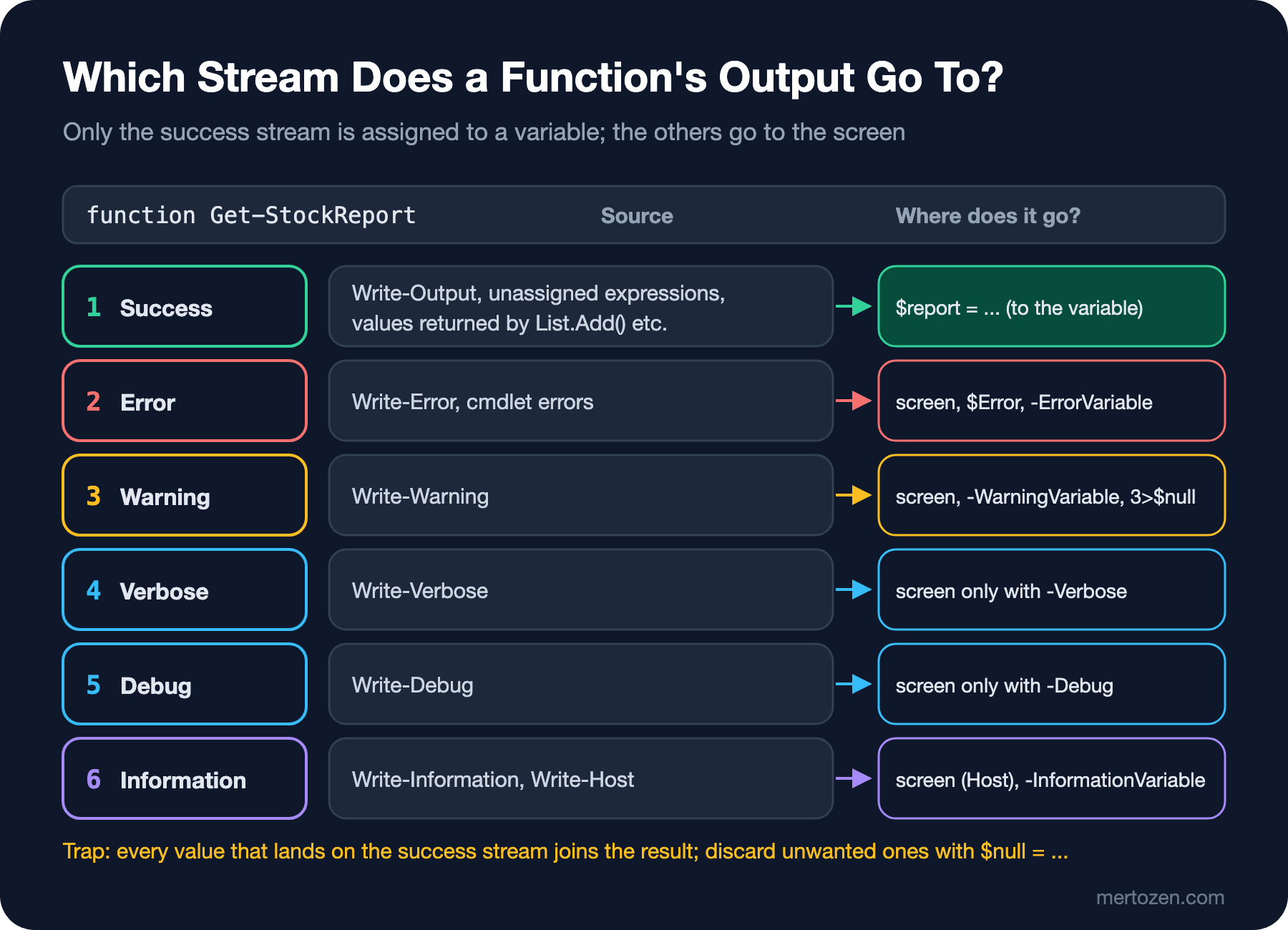
function Get-StockReport {
    [CmdletBinding()]
    param()
    Write-Output 'output: 4 titles low on stock'
    Write-Verbose 'verbose: read 12 rows from books.csv'
    Write-Information 'information: report ready'
    Write-Warning 'warning: The Hobbit has 0 in stock'
    Write-Host 'host: done'
    'Emma', 'The Hobbit'
}
PS> . ./lab05/streams.ps1
PS> $report = Get-StockReport
WARNING: warning: The Hobbit has 0 in stock
host: done
PS> $report
output: 4 titles low on stock
Emma
The Hobbit
PS> $report = Get-StockReport -Verbose -InformationAction Continue -WarningAction SilentlyContinue
VERBOSE: verbose: read 12 rows from books.csv
information: report ready
host: done
PS> $report.Count
3
PS> $report = Get-StockReport -InformationVariable info 6>$null 3>$null
PS> $info.MessageData
information: report ready
Message NoNewLine ForegroundColor BackgroundColor
------- --------- --------------- ---------------
host: done False -1 -1In the first call only the three values on the success stream went into $report; the warning and the Write-Host line went to the screen but not into the variable. Write-Verbose and Write-Information are hidden by default; in the second call they were turned on with -Verbose and -InformationAction Continue. The third call shows that Write-Host has written to the information stream (6) since 5.0: 6>$null removed it too, and -InformationVariable captured both. The rule is simple: data goes to the success stream, status messages to Write-Verbose or Write-Information, and a warning the user must see to Write-Warning. Even though Write-Host can be captured now, do not use it for anything except colored console output; PSScriptAnalyzer's PSAvoidUsingWriteHost rule, which we see in the last post of the series, says the same.
-WhatIf and -Confirm: SupportsShouldProcess
A function that deletes, changes or restarts something should give the caller the option to "show what you would do first". SupportsShouldProcess provides this through the -WhatIf and -Confirm parameters; all you need is to guard every line that makes a change with $PSCmdlet.ShouldProcess(). The backup function that zips the site folder before a deploy and keeps the last few backups:
function Invoke-BookstoreBackup {
    [CmdletBinding(SupportsShouldProcess, PositionalBinding = $false)]
    [OutputType([System.IO.FileInfo])]
    param(
        [Parameter(Mandatory)]
        [ValidateScript({ Test-Path -Path $_ -PathType Container }, ErrorMessage = "Folder '{0}' does not exist.")]
        [string] $Path,

        [Parameter(Mandatory)]
        [string] $Destination,

        [ValidateRange(1, 100)]
        [int] $KeepLast = 7
    )

    $zip = Join-Path -Path $Destination -ChildPath ('bookstore-{0:yyyyMMdd-HHmmss}.zip' -f [datetime]::UtcNow)
    if ($PSCmdlet.ShouldProcess($zip, "Back up $Path")) {
        $null = New-Item -Path $Destination -ItemType Directory -Force
        Compress-Archive -Path (Join-Path -Path $Path -ChildPath '*') -DestinationPath $zip
        Write-Verbose "Created $zip"
        Get-Item -Path $zip
    }

    if (-not (Test-Path -Path $Destination)) { return }
    $old = Get-ChildItem -Path $Destination -Filter 'bookstore-*.zip' |
        Sort-Object -Property Name -Descending |
        Select-Object -Skip $KeepLast
    foreach ($file in $old) {
        # Remove-Item sees -WhatIf and -Confirm through the preference variables
        Remove-Item -LiteralPath $file.FullName
    }
}
We did not wrap the Remove-Item that deletes old backups in ShouldProcess. There is no need: when -WhatIf is given, $WhatIfPreference is turned on inside the function, and cmdlets that support ShouldProcess, like Remove-Item, see it on their own. The function that recycles the IIS application pool is marked with ConfirmImpact = 'High'; since the default $ConfirmPreference is also High, it asks for confirmation even without -Confirm:
function Restart-BookstorePool {
    [CmdletBinding(SupportsShouldProcess, ConfirmImpact = 'High', PositionalBinding = $false)]
    param(
        [Parameter(ValueFromPipeline, ValueFromPipelineByPropertyName)]
        [ValidateSet('BookstoreApi', 'BookstoreWeb')]
        [string[]] $Name = 'BookstoreApi'
    )

    process {
        foreach ($pool in $Name) {
            # The work stays inside the if: if ShouldProcess fails, nothing runs
            if ($PSCmdlet.ShouldProcess("application pool $pool", 'Recycle')) {
                if (-not $IsWindows) {
                    throw [System.PlatformNotSupportedException]::new('Restart-BookstorePool needs IIS on Windows.')
                }
                # Microsoft.Web.Administration works in PowerShell 7 without the compatibility layer
                Add-Type -Path (Join-Path -Path $env:SystemRoot -ChildPath 'System32\inetsrv\Microsoft.Web.Administration.dll')
                $manager = [Microsoft.Web.Administration.ServerManager]::new()
                try {
                    $appPool = $manager.ApplicationPools[$pool]
                    if (-not $appPool) { throw "Application pool '$pool' was not found." }
                    $state = $appPool.Recycle()
                    Write-Verbose "Recycled $pool, state: $state"
                }
                finally {
                    $manager.Dispose()
                }
            }
        }
    }
}
We recycle the pool directly through the Microsoft.Web.Administration API instead of the IISAdministration module. Microsoft's PowerShell 7 module compatibility list shows IISAdministration as "Untested with Compatibility Layer", and Microsoft's IIS support blog also recommends this API for PowerShell 7; more on this in the next post. The lab has no IIS, so the recycle lines were not run; -WhatIf and the platform check were:
PS> Invoke-BookstoreBackup -Path ./artifacts/api -Destination ./backups -WhatIf
What if: Performing the operation "Back up ./artifacts/api" on target "./backups/bookstore-20261115-055848.zip".
PS> Invoke-BookstoreBackup -Path ./artifacts/api -Destination ./backups -KeepLast 2 | Select-Object Name, Length

Name                          Length
----                          ------
bookstore-20261115-055848.zip  54553
PS> Invoke-BookstoreBackup -Path ./artifacts/api -Destination ./backups -KeepLast 2 -Verbose | Select-Object Name
VERBOSE: Performing the operation "Back up ./artifacts/api" on target "./backups/bookstore-20261115-055850.zip".
VERBOSE: Created ./backups/bookstore-20261115-055850.zip

Name
----
bookstore-20261115-055850.zip
PS> (Get-ChildItem ./backups).Name
bookstore-20261115-055849.zip
bookstore-20261115-055850.zip
PS> Invoke-BookstoreBackup -Path ./artifacts/api -Destination ./backups -KeepLast 1 -WhatIf
What if: Performing the operation "Back up ./artifacts/api" on target "./backups/bookstore-20261115-055851.zip".
What if: Performing the operation "Remove File" on target "/home/user/bookstore/backups/bookstore-20261115-055849.zip".
PS> Restart-BookstorePool -Name BookstoreApi, BookstoreWeb -WhatIf
What if: Performing the operation "Recycle" on target "application pool BookstoreApi".
What if: Performing the operation "Recycle" on target "application pool BookstoreWeb".
PS> Restart-BookstorePool -Confirm:$false
OperationStopped: /home/user/bookstore/modules/Bookstore.Ops/Public/Restart-BookstorePool.ps1:26
Line |
  26 |  …             throw [System.PlatformNotSupportedException]::new('Restar …
     |                ~~~~~~~~~~~~~~~~~~~~~~~~~~~~~~~~~~~~~~~~~~~~~~~~~~~~~~~~~
     | Restart-BookstorePool needs IIS on Windows.
With -WhatIf no file was created or deleted; in the last -WhatIf call, the backup that would be deleted showed up with Remove-Item's own message. When the third backup was taken with -KeepLast 2, the oldest one was deleted. -Confirm:$false skipped the confirmation, and on Linux the expected PlatformNotSupportedException arrived.
Confirmation Prompts in CI
Nobody is there to answer in CI. In my first draft I had written ShouldProcess as the guard clause I am used to from C#:
        foreach ($pool in $Name) {
            if (-not $PSCmdlet.ShouldProcess("application pool $pool", 'Recycle')) { continue }
            if (-not $IsWindows) {
                throw [System.PlatformNotSupportedException]::new('Restart-BookstorePool needs IIS on Windows.')
            }
            # ... recycle the pool
        }
Called with -NonInteractive, as in CI:
$ pwsh -NoProfile -NonInteractive -Command 'Import-Module ./modules/Bookstore.Ops; Restart-BookstorePool; "next line"'; echo "exit=$?"
MethodInvocationException: /home/user/bookstore/modules/Bookstore.Ops/Public/Restart-BookstorePool.ps1:24
Line |
  24 |  …         if (-not $PSCmdlet.ShouldProcess("application pool $pool", 'R …
     |                ~~~~~~~~~~~~~~~~~~~~~~~~~~~~~~~~~~~~~~~~~~~~~~~~~~~~~~~~~
     | Exception calling "ShouldProcess" with "2" argument(s): "PowerShell is
     | in NonInteractive mode. Read and Prompt functionality is not available."
OperationStopped: /home/user/bookstore/modules/Bookstore.Ops/Public/Restart-BookstorePool.ps1:26
Line |
  26 |  …             throw [System.PlatformNotSupportedException]::new('Restar …
     |                ~~~~~~~~~~~~~~~~~~~~~~~~~~~~~~~~~~~~~~~~~~~~~~~~~~~~~~~~~
     | Restart-BookstorePool needs IIS on Windows.
exit=1
This output shows the most important trap of the post. When the confirmation prompt could not be shown, ShouldProcess threw an exception; since that is a statement-terminating error, only the if line stopped and the script went on with the next line, which is the code that recycles the pool. In the lab the platform check stopped it; on Windows the pool would have been recycled without confirmation. With the final version above, which puts the work inside the if ($PSCmdlet.ShouldProcess(...)) { ... } block, the same call ends like this:
$ pwsh -NoProfile -NonInteractive -Command 'Import-Module ./modules/Bookstore.Ops; Restart-BookstorePool; "next line"'; echo "exit=$?"
MethodInvocationException: /home/user/bookstore/modules/Bookstore.Ops/Public/Restart-BookstorePool.ps1:25
Line |
  25 |  …         if ($PSCmdlet.ShouldProcess("application pool $pool", 'Recycl …
     |                ~~~~~~~~~~~~~~~~~~~~~~~~~~~~~~~~~~~~~~~~~~~~~~~~~~~~~~~~~
     | Exception calling "ShouldProcess" with "2" argument(s): "PowerShell is
     | in NonInteractive mode. Read and Prompt functionality is not available."
next line
exit=0
Nothing was done, but the script exited with 0 and the CI step stayed green. The rule: when calling from CI, state your intent explicitly (-Confirm:$false), and have $ErrorActionPreference = 'Stop' at the top of the script so that such an error breaks the step.
Script Module and Manifest: Bookstore.Ops
A script module, in its simplest form, is a .psm1 file. Once the functions grow, putting each one in its own file and dot-sourcing them in the .psm1 is a common layout:
PS> Get-ChildItem ./modules -Recurse -File | ForEach-Object { [System.IO.Path]::GetRelativePath($PWD, $_.FullName) }
modules/Bookstore.Ops/Bookstore.Ops.psd1
modules/Bookstore.Ops/Bookstore.Ops.psm1
modules/Bookstore.Ops/Public/Get-BookstoreHealth.ps1
modules/Bookstore.Ops/Public/Invoke-BookstoreBackup.ps1
modules/Bookstore.Ops/Public/Invoke-BookstoreDotnet.ps1
modules/Bookstore.Ops/Public/Restart-BookstorePool.ps1
modules/Bookstore.Ops/Public/Test-BookstoreCover.ps1
modules/Bookstore.Ops/Private/Resolve-BookstoreBaseUrl.ps1
Set-StrictMode -Version Latest
# Known environments; Get-BookstoreHealth -Environment reads its address from here
$script:BookstoreEnvironments = @{
Local = 'http://127.0.0.1:5080'
Staging = 'https://staging.bookstore.test'
Production = 'https://api.bookstore.test'
}
# One function per file: Private first, because Public functions use them
foreach ($folder in 'Private', 'Public') {
$files = Get-ChildItem -Path (Join-Path -Path $PSScriptRoot -ChildPath $folder) -Filter '*.ps1' -ErrorAction Ignore
foreach ($file in $files) {
. $file.FullName
}
}The module folder's name must match the names of the .psm1 and .psd1 files; when Import-Module is given a folder, it looks for files with these names inside. Instead of writing the manifest by hand, generate it with New-ModuleManifest and edit it afterwards:
$manifest = @{
    Path                 = './modules/Bookstore.Ops/Bookstore.Ops.psd1'
    RootModule           = 'Bookstore.Ops.psm1'
    ModuleVersion        = '0.1.0'
    Author               = 'Bookstore Team'
    Description          = 'Shared operations for Bookstore: health checks, cover checks, backups, builds and IIS pools.'
    PowerShellVersion    = '7.6'
    CompatiblePSEditions = 'Core'
    FunctionsToExport    = 'Get-BookstoreHealth', 'Test-BookstoreCover', 'Invoke-BookstoreBackup',
                           'Invoke-BookstoreDotnet', 'Restart-BookstorePool'
    CmdletsToExport      = @()
    VariablesToExport    = @()
    AliasesToExport      = @()
}
New-ModuleManifest @manifest
PS> ./lab05/new-manifest.ps1
PS> (Test-ModuleManifest -Path ./modules/Bookstore.Ops/Bookstore.Ops.psd1).ExportedFunctions.Keys
Get-BookstoreHealth
Test-BookstoreCover
Invoke-BookstoreBackup
Invoke-BookstoreDotnet
Restart-BookstorePool
PS> Import-Module ./modules/Bookstore.Ops -Force
PS> Get-Command -Module Bookstore.Ops
CommandType Name Version Source
----------- ---- ------- ------
Function Get-BookstoreHealth 0.1.0 Bookstore.Ops
Function Invoke-BookstoreBackup 0.1.0 Bookstore.Ops
Function Invoke-BookstoreDotnet 0.1.0 Bookstore.Ops
Function Restart-BookstorePool 0.1.0 Bookstore.Ops
Function Test-BookstoreCover 0.1.0 Bookstore.Ops
PS> Get-Command Resolve-BookstoreBaseUrl
Get-Command: The term 'Resolve-BookstoreBaseUrl' is not recognized as a name of a cmdlet, function, script file, or executable program.
Check the spelling of the name, or if a path was included, verify that the path is correct and try again.
PS> Import-Module ./lab05/Draft.Ops
WARNING: The names of some imported commands from the module 'Draft.Ops' include unapproved verbs that might make them less discoverable. To find the commands with unapproved verbs, run the Import-Module command again with the Verbose parameter. For a list of approved verbs, type Get-Verb.FunctionsToExport sets the list the module exposes: Resolve-BookstoreBaseUrl works inside the module but is not visible from outside. Writing the list with names instead of a wildcard (*) lets PowerShell know which commands live where without loading the module; the module is loaded automatically the first time you use one of its commands. CompatiblePSEditions = 'Core' and PowerShellVersion = '7.6' keep the module from being loaded into Windows PowerShell 5.1. The last line keeps the promise from the first post: verbs such as Check and Recycle, which are not on the approved verb list, produce a warning in Import-Module; the list is in Get-Verb. According to the about_Character_Encoding page on Microsoft Learn, New-ModuleManifest in Windows PowerShell 5.1 writes the file as UTF-16LE; in 7.x it is UTF-8 without a BOM. Convert a manifest generated in 5.1 before using it on Linux (not run).
Preferences Do Not Reach a Module
I fell into a trap while moving Invoke-Dotnet from the build script into the module. In the fourth post we set $ErrorActionPreference = 'Stop' and the native preference at the top of the script. With a small module and a script that calls it:
function Invoke-GitStatus {
    git -C ./no-such-folder status
    "after git, exit code $LASTEXITCODE"
}
$ErrorActionPreference = 'Stop'
$PSNativeCommandUseErrorActionPreference = $true
Import-Module (Join-Path -Path $PSScriptRoot -ChildPath 'Pref.Demo') -Force
try {
Invoke-GitStatus
'script went on'
}
catch {
"caught: $($_.Exception.Message)"
}PS> ./lab05/pref-caller.ps1
fatal: cannot change to './no-such-folder': No such file or directory
after git, exit code 128
script went on$ pwsh -NoProfile -File ./lab05/pref-caller.ps1
fatal: cannot change to './no-such-folder': No such file or directory
caught: Program "git" ended with non-zero exit code: 128 (0x80).Called from the console, the git error did not stop the script; called with pwsh -File, it did. The reason is scope: a module has its own scope chain, and after the global scope it does not see the variables of the calling script. pwsh -File, according to about_Pwsh, runs the script as if it were dot-sourced into the new session's scope, so the preferences in the script become global and the module sees them. A script that works in CI but behaves differently in a teammate's console is one of the hardest kinds of bug to find. The fix is for the module function to set the preferences it needs itself:
function Invoke-BookstoreDotnet {
    [CmdletBinding(PositionalBinding = $false)]
    param(
        [Parameter(Mandatory)]
        [ValidateSet('restore', 'build', 'test', 'publish')]
        [string] $Command,

        [string[]] $Arguments = @()
    )
    # Preferences are per scope: set them here, not only in the calling script
    $ErrorActionPreference = 'Stop'
    $PSNativeCommandUseErrorActionPreference = $true

    Write-Information "==> dotnet $Command" -InformationAction Continue
    $watch = [System.Diagnostics.Stopwatch]::StartNew()
    dotnet $Command @Arguments --nologo -v quiet
    Write-Information ('    {0} finished in {1:N1} s' -f $Command, $watch.Elapsed.TotalSeconds) -InformationAction Continue
}
The build script now imports the module and calls Invoke-BookstoreDotnet instead of its own function; the health and cover scripts turned into thin scripts that use the functions in the module as well. Exit codes and console output live in the script, the logic lives in the module.
Publishing to a Local Repository with PSResourceGet
Installing the module from a repository instead of copying it to servers makes the version traceable. PSResourceGet has shipped with PowerShell since 7.4. The simplest repository is a folder, or a file share on Windows (such as \\fileserver\psrepo). In the lab with a folder:
PS> Register-PSResourceRepository -Name BookstoreLocal -Uri ~/psrepo -Trusted
PS> Get-PSResourceRepository | Format-Table Name, Uri, Trusted, Priority

Name           Uri                                      Trusted Priority
----           ---                                      ------- --------
BookstoreLocal file:///home/user/psrepo                    True       50
PSGallery      https://www.powershellgallery.com/api/v2   False       50
PS> Publish-PSResource -Path ./modules/Bookstore.Ops -Repository BookstoreLocal
PS> Get-ChildItem ~/psrepo | Select-Object Name

Name
----
Bookstore.Ops.0.1.0.nupkg
PS> Find-PSResource -Name Bookstore.Ops -Repository BookstoreLocal | Format-Table Name, Version, Repository

Name          Version Repository
----          ------- ----------
Bookstore.Ops 0.1.0   BookstoreLocal
PS> Install-PSResource -Name Bookstore.Ops -Repository BookstoreLocal -Scope CurrentUser
PS> Get-InstalledPSResource -Name Bookstore.Ops | Format-Table Name, Version, InstalledLocation -Wrap

Name          Version InstalledLocation
----          ------- -----------------
Bookstore.Ops 0.1.0   /home/user/.local/share/powershell/Modules
PS> Publish-PSResource -Path ./modules/Bookstore.Ops -Repository BookstoreLocal
PS> Set-Location ~
PS> Import-Module Bookstore.Ops
PS> Get-Module Bookstore.Ops | Format-Table Name, Version, Path -Wrap

Name          Version Path
----          ------- ----
Bookstore.Ops 0.1.0   /home/user/.local/share/powershell/Modules/Bookstore.Ops/0.1.0/Bookstore.Ops.psm1
PS> (Get-BookstoreHealth).Healthy
True
Publish-PSResource packaged the module as a .nupkg, Install-PSResource installed it into the user's module folder, and the module is now imported by name, without a path. Two details: when I published the same 0.1.0 version a second time, the repository did not complain and overwrote the package, so a file share does not protect a version number; raise ModuleVersion on every change. Also, without a FileList in the manifest, the package takes every file in the folder. In the lab, hidden ._ files that slipped into the folder during a copy went into the first package and broke PSScriptAnalyzer too; check that the folder is clean before you publish, or write a FileList.
To share within a team, an Azure Artifacts feed can also be registered as a PSResourceGet repository. According to the guide on Microsoft Learn, Register-PSResourceRepository is given the feed's nuget/v3/index.json address, the credential is a PAT kept in a SecretManagement vault and attached with -CredentialInfo, and the Azure Artifacts Credential Provider is not supported with PSResourceGet. This part was not run; we look at keeping secrets in a vault in the seventh post.
In Production
A module function does not return an exit code and does not call exit. Called from inside a module, exit closes the whole session, not the function: in the lab, a module function that ran exit 3 ended the pwsh process with 3, and the remaining lines of the calling code never ran. A function returns objects or throws an exception; turning that into an exit code is the job of the thin script that CI calls. Test-BookstoreHealth.ps1 in this post does exactly that.
Version the module and pin the version. Deploy scripts should ask for a specific version, such as Import-Module Bookstore.Ops -RequiredVersion 0.1.0; when a new version is installed on the server, running scripts are affected only when you change the version. The ModuleVersion in the manifest also sets the name of the published package and of the install folder.
Every function that makes changes should have SupportsShouldProcess, and you should use it in CI: running the deploy step with -WhatIf first and writing it to the log is a cheap check that shows what will happen before the real deploy. Mark irreversible work such as recycling and deleting with ConfirmImpact = 'High', and write -Confirm:$false explicitly in CI.
Common Pitfalls
A forgotten return value inside a function. Like ArrayList.Add in Guess First, calls that return a value, such as StringBuilder.Append, New-Item and Dictionary.Remove, leak into the output unless assigned. It is also hard to notice, because only a few innocent-looking lines appear on the screen. Use $null = ... or [void], and check the function's result with Count in a test.
Relying on positional parameters. Parameters bound by position shift silently when a new parameter is added in between. Use PositionalBinding = $false in module functions, and write parameter names when you call them from scripts.
The if (-not $PSCmdlet.ShouldProcess(...)) { continue } form. The guard clause habit is dangerous here: if ShouldProcess fails, the guard disappears. Always put the work inside the if ($PSCmdlet.ShouldProcess(...)) { } block.
Relying on the caller's preferences inside a module. $ErrorActionPreference, $PSNativeCommandUseErrorActionPreference and Set-StrictMode do not pass from the calling script into a module; because they seem to pass when run with -File, the bug is found late. Set what the module needs inside the module.
A Small Experiment
★☆☆ Give Get-BookstoreHealth -Environment Staging and run it with -Verbose. Which address was called, and what is in the Error field of the result object? Then delete the function's [OutputType] line and compare the output of Get-Command Get-BookstoreHealth | Select-Object OutputType.
★★☆ Add an -Exclude parameter to Invoke-BookstoreBackup (for example appsettings.*.json and logs); give it a default value and protect it with ValidateNotNullOrEmpty. Show that the -WhatIf output does not change anything, and that in a real run these files are not in the zip.
★★★ Publish Bookstore.Ops as 0.2.0 while 0.1.0 stays installed. Which one does Import-Module Bookstore.Ops load? Ask for the old version in a script with the line #Requires -Modules @{ ModuleName = 'Bookstore.Ops'; RequiredVersion = '0.1.0' } and show the two versions working side by side on the same machine.
Our module is ready, but the work inside it is still small: a health check, a cover check and a backup. The next post moves to real work: the file system, REST APIs, JSON and CSV, Windows Services, scheduled tasks, IIS and network diagnostics on Windows; at the end, a deploy script for Bookstore.Api with app_offline, migrations and a health check.