

Error Handling: Terminating ve Non-Terminating Hatalar, $ErrorActionPreference, try/catch ve Native Komutların Exit Code'u

PowerShell'de $ErrorActionPreference = 'Stop' yalnız PowerShell hatalarını durdurur; dotnet test gibi native komutun başarısız exit code'u için $PSNativeCommandUseErrorActionPreference = $true da gerekir, yoksa testler kırılsa bile publish çalışır ve script 0 ile çıkar. İki hata türünü, try/catch/finally ve trap'i, Write-Error ile throw farkını, stderr ve 2>&1 davranışını, Set-StrictMode'u, set -euo pipefail karşılıklarını ve Bookstore için ilk hatada duran bir build script'ini gösteriyoruz.
Sürüm notu: Bu yazıdaki örnekler PowerShell 7.6.10 (LTS) ve PowerShell 7.7.0 ile, Ubuntu 24.04 üzerinde .NET 10 SDK (10.0.404) ve git 2.43 kurulu bir ortamda denenmiştir; hata davranışları iki sürümde aynı çıktı. Windows PowerShell 5.1'e ait bilgiler Microsoft Learn dokümanlarından aktarıldı, çalıştırılmadı.
Önce Tahmin Et
Sitedeki serilerin ortak örnek uygulaması Bookstore'un (bir online kitapçı) eski build script'i kısa ve "güvenli" görünüyor; en üstte hata olursa durması için bir satır var:
$ErrorActionPreference = 'Stop'

dotnet test ./Bookstore.slnx --nologo -v q
dotnet publish ./src/Bookstore.Api -c Release -o ./artifacts/api --nologo -v q
Write-Output "Published, deploy will pick up ./artifacts/api"
Birisi Isbn.IsValid'deki ağırlıkları yanlışlıkla ters çevirmiş ve bir unit test kırılmış. CI adımı script'i pwsh -NoProfile -File ile çalıştırıyor. Testler başarısız olunca dotnet publish çalışır mı? artifacts/api klasörü oluşur mu? CI adımı hangi exit code'u görür?
Önceki yazıda kapak script'inde bir catch bloğunun gerçek bir hatayı nasıl yuttuğunu gördük. Bu yazı PowerShell'de hata yönetiminin tamamı: iki hata türü, $ErrorActionPreference, try/catch/finally ve trap, Write-Error ile throw farkı, dotnet ve git gibi native komutların exit code'ları, Set-StrictMode ve Bash Scripting serisindeki set -euo pipefail ile karşılaştırma. Sonunda ilk başarısız adımda duran ve deploy'a yarım iş bırakmayan bir build script'i yazacağız.
İki Hata Türü: Non-Terminating ve Terminating
PowerShell'deki hataların çoğu script'i durdurmaz. Bir cmdlet bir elemanda başarısız olursa hatayı yazar ve sıradaki elemanla devam eder; bu non-terminating error. Lab notu: Bu yazıdaki komutlar önceki yazılardaki Bookstore lab klasöründe çalışıyor; appsettings.json bu klasörde yok.
PS> Get-Item ./appsettings.json, ./Bookstore.slnx | Select-Object Name
Get-Item: Cannot find path '/home/user/bookstore/appsettings.json' because it does not exist.

Name
----
Bookstore.slnx
PS> $?
False
PS> try { Get-Item ./appsettings.json } catch { "caught: $_" }
Get-Item: Cannot find path '/home/user/bookstore/appsettings.json' because it does not exist.
PS> try { Get-Item ./appsettings.json -ErrorAction Stop } catch { "caught: $($_.Exception.GetType().Name)" }
caught: ItemNotFoundException
PS> $Error.Count
3
PS> $Error[0].CategoryInfo.Category
ObjectNotFound
PS> $Error[0].TargetObject
/home/user/bookstore/appsettings.json
PS> Get-Item ./appsettings.json -ErrorAction SilentlyContinue -ErrorVariable missing
PS> $missing.Count
1
İlk komut iki dosyadan birini bulamadı, hata yazdı ve diğerini yine döndürdü; $? son komutun tam başarılı olmadığını söylüyor. İkinci satır en önemli ders: try bloğu non-terminating bir hatayı yakalamaz, çünkü ortada fırlatılan bir şey yok. Hatayı yakalanabilir yapmak için -ErrorAction Stop ile terminating'e çevirmek gerekiyor. Her hata ayrıca $Error listesine eklenir (en yenisi $Error[0]); CategoryInfo ve TargetObject hatanın türünü ve neyle ilgili olduğunu taşır. -ErrorVariable ise hataları ekrana basmadan kendi variable'ında toplar.
Terminating tarafı da iki parça. Bir script'te üç ayrı hata:
$stock = [int]'fourteen'
"1. after a failed conversion, stock is '$stock'"
Write-Error 'stock service is down'
"2. after Write-Error"
throw 'catalog file is corrupt'
"3. after throw"
$ pwsh -NoProfile -File ./lab/kinds.ps1; echo "exit=$?"
InvalidArgument: /home/user/bookstore/lab/kinds.ps1:1
Line |
1 | $stock = [int]'fourteen'
| ~~~~~~~~~~~~~~~~~~~~~~~~
| Cannot convert value "fourteen" to type "System.Int32". Error: "The
| input string 'fourteen' was not in a correct format."
1. after a failed conversion, stock is ''
Write-Error: stock service is down
2. after Write-Error
Exception: /home/user/bookstore/lab/kinds.ps1:5
Line |
5 | throw 'catalog file is corrupt'
| ~~~~~~~~~~~~~~~~~~~~~~~~~~~~~~~
| catalog file is corrupt
exit=1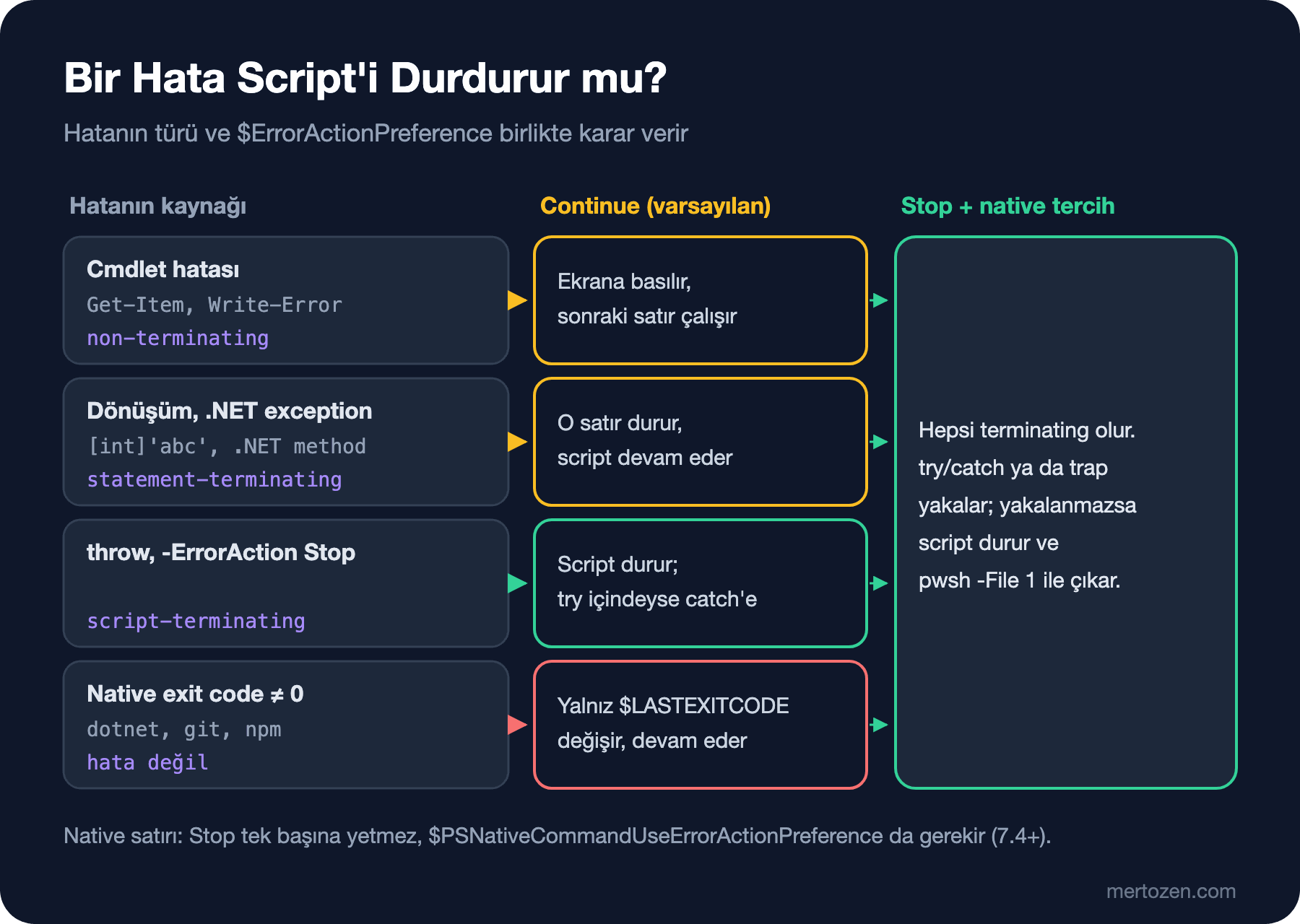
Dönüşüm hatası statement-terminating: o satır durdu ($stock'a hiçbir şey atanmadı) ama script bir sonraki satırla devam etti. .NET method'larından gelen exception'lar da böyle davranır. Write-Error non-terminating error üretir, script yine devam etti. throw ise script-terminating: script orada bitti, üçüncü satır yazılmadı ve pwsh -File 1 ile çıktı. Write-Error'ı "bu hatayı kaydet, devam edebilirim", throw'u "buradan sonrası anlamsız" diye düşün. Aynı script'in başına $ErrorActionPreference = 'Stop' eklenince tablo değişiyor:
$ pwsh -NoProfile -File ./lab/kinds-stop.ps1; echo "exit=$?"
InvalidArgument: /home/user/bookstore/lab/kinds-stop.ps1:2
Line |
   2 |  $stock = [int]'fourteen'
     |  ~~~~~~~~~~~~~~~~~~~~~~~~
     | Cannot convert value "fourteen" to type "System.Int32". Error: "The
     | input string 'fourteen' was not in a correct format."
exit=1Stop, non-terminating ve statement-terminating hataları da script'i durduran hatalara çeviriyor; dönüşüm hatasında script bitti. Script'lerde, özellikle CI'da çalışanlarda, varsayılan olarak istediğin davranış bu: bilinmeyen bir hatayla devam etmektense durmak.
try/catch/finally ve trap
try/catch C#'taki gibi çalışır: birden çok catch exception tipine göre seçilir, tipsiz catch geri kalan her şeyi yakalar, finally her durumda çalışır. catch içinde $_ bir ErrorRecord'dur, asıl .NET exception'ı $_.Exception'dadır.
try {
    $books = Invoke-RestMethod http://127.0.0.1:5098/api/books -TimeoutSec 2
}
catch [System.Net.Http.HttpRequestException] {
    "network error: $($_.Exception.Message)"
}
catch {
    "something else: $($_.Exception.GetType().FullName)"
}
finally {
    'finally runs in both cases'
}

try {
    'cleaning up before exit'
    exit 3
}
finally {
    'finally runs on exit too'
}
$ pwsh -NoProfile -File ./lab/trycatch.ps1; echo "exit=$?"
network error: Connection refused (127.0.0.1:5098)
finally runs in both cases
cleaning up before exit
finally runs on exit too
exit=3Bağlantı hatası HttpRequestException olarak geldi ve doğru catch'e düştü. İkinci blok bash'ten gelenler için önemli bir ayrıntıyı gösteriyor: try içindeki exit'te bile finally çalıştı ve script 3 ile çıktı. Geçici dosya silmek, kilidi bırakmak gibi temizlik işleri için finally, bash'teki trap ... EXIT'in karşılığı.
trap ise script'in ya da function'ın tamamı için tek bir hata yakalayıcı tanımlar. Script'i değiştirmeden en üste eklenebildiği için eski script'lere son çare olarak eklemek kolay:
trap {
    "trap: $($_.Exception.Message)"
    exit 2
}
$ErrorActionPreference = 'Stop'
'step 1'
Get-Item ./missing-release.zip
'step 2'
$ pwsh -NoProfile -File ./lab/trap.ps1; echo "exit=$?"
step 1
trap: Cannot find path '/home/user/bookstore/missing-release.zip' because it does not exist.
exit=2trap içinde exit 2 olduğu için script 2 ile çıktı ve step 2 hiç çalışmadı; exit yerine continue yazsaydık hatalı satırdan sonraki satırla devam edecekti. Yeni yazdığın kodda try/catch daha okunur, çünkü hangi satırların korunduğu görünür.
Native Komutlar: $LASTEXITCODE ve $PSNativeCommandUseErrorActionPreference
Tahminin cevabı:
$ pwsh -NoProfile -File ./lab/build-old.ps1; echo "exit=$?"
Test run for /home/user/bookstore/tests/Bookstore.Api.Tests/bin/Debug/net10.0/Bookstore.Api.Tests.dll (.NETCoreApp,Version=v10.0)
A total of 1 test files matched the specified pattern.
[xUnit.net 00:00:00.06]     Bookstore.Api.Tests.IsbnTests.Valid_isbn_passes(isbn: "978-0-14-143958-7") [FAIL]

Failed!  - Failed:     1, Passed:     3, Skipped:     0, Total:     4, Duration: 11 ms - Bookstore.Api.Tests.dll (net10.0)
Published, deploy will pick up ./artifacts/api
exit=0
$ ls artifacts/api | head -3
Bookstore.Api
Bookstore.Api.deps.json
Bookstore.Api.dll
Testler kırıldı, ama dotnet publish çalıştı, artifacts/api oluştu ve script 0 ile çıktı. CI yeşil, deploy bozuk kodu alacak. $ErrorActionPreference = 'Stop' yalnız PowerShell hatalarını yönetir; dotnet, git ya da npm gibi native bir programın sıfırdan farklı exit code'u PowerShell için hata değildir. Sonuç yalnız $LASTEXITCODE'a yazılır, $? false olur ve script devam eder. Terminal ve Command Line serisinin dördüncü yazısında kısaca gördüğümüz $PSNativeCommandUseErrorActionPreference bunu değiştiriyor. PowerShell 7.4'te kalıcı hâle geldi, varsayılan değeri 7.6 ve 7.7'de hâlâ $false:
PS> $ErrorActionPreference = 'Stop'
PS> git rev-parse --short HEAD; "still running, LASTEXITCODE=$LASTEXITCODE, ?=$?"
fatal: not a git repository (or any of the parent directories): .git
still running, LASTEXITCODE=128, ?=False
PS> $PSNativeCommandUseErrorActionPreference = $true
PS> try { git rev-parse --short HEAD } catch { "caught: $($_.Exception.Message)"; $_.Exception.ExitCode }
fatal: not a git repository (or any of the parent directories): .git
caught: Program "git" ended with non-zero exit code: 128 (0x80).
128
PS> $PSNativeCommandUseErrorActionPreference = $false
PS> $out = git rev-parse --short HEAD 2>&1
PS> $out.GetType().Name
ErrorRecord
PS> $out[0].GetType().FullName
System.Management.Automation.ErrorRecord
PS> "$($out[0])"
fatal: not a git repository (or any of the parent directories): .git
İlk denemede Stop açıktı ama git'in 128'i script'i durdurmadı. Tercih açılınca aynı çağrı bir NativeCommandExitException oldu; exception'ın ExitCode property'si asıl kodu taşıyor ve 7.6 ile gelen değişiklikle mesajda kodun onaltılık hâli de var. İki satırı birlikte yazman gerekiyor: tercih tek başına hatayı $ErrorActionPreference'a bağlar, Stop olmadan o hata da non-terminating kalır ve catch'e düşmez; lab'da ilk denememde tam olarak bunu gördüm.
Bu tercihin bash'teki set -e'den önemli bir farkı var. Bash, koşul olarak kullanılan komutlarda (if, ||, &&) set -e'yi devre dışı bırakır. PowerShell bırakmıyor:
PS> $ErrorActionPreference = 'Stop'
PS> $PSNativeCommandUseErrorActionPreference = $true
PS> try { bash -c 'echo partial; exit 3' | Select-String partial } catch { "pipeline: $($_.Exception.Message)" }

partial
pipeline: Program "bash" ended with non-zero exit code: 3 (0x03).
PS> try { if (git rev-parse HEAD) { 'in a repo' } else { 'not a repo' } } catch { "condition: $($_.Exception.Message)" }
fatal: not a git repository (or any of the parent directories): .git
condition: Program "git" ended with non-zero exit code: 128 (0x80).
PS> try { git rev-parse HEAD 2>$null || 'fallback after ||' } catch { "chain: $($_.Exception.Message)" }
chain: Program "git" ended with non-zero exit code: 128 (0x80).
PS> $commit = & { $PSNativeCommandUseErrorActionPreference = $false; git rev-parse --short HEAD 2>$null }
PS> if ($LASTEXITCODE -ne 0) { $commit = 'local' }; "version: 1.4.2+$commit"
version: 1.4.2+local
Pipeline'daki native komut da hata verdi, yani bu tercih bash'teki pipefail'in işini de görüyor. Ama if'in koşulundaki ve ||'nin solundaki git da exception fırlattı; ||'nin sağı hiç çalışmadı. Sıfırdan farklı exit code'un beklenen bir durum olduğu yerde (git repo'su olmayan bir klasör, değişiklik yoksa 1 dönen bir araç, robocopy) tercihi o blok için kapat. Dokümandaki robocopy örneği de aynı kalıbı kullanıyor: & { } içinde değiştirilen tercih blok bitince eski değerine dönüyor, sonucu $LASTEXITCODE'dan kendin okuyorsun.
stderr Hata Değildir, 2>&1 ise ErrorRecord Üretir
Birçok araç uyarıları stderr'e yazar ve 0 ile çıkar. PowerShell 7.2'den beri stderr'e yazmak tek başına hata sayılmıyor:
PS> $ErrorActionPreference = 'Stop'
PS> $PSNativeCommandUseErrorActionPreference = $true
PS> bash -c 'echo "warn: cache is cold" >&2; echo ok'; "exit=$LASTEXITCODE"
warn: cache is cold
ok
exit=0
PS> $all = bash -c 'echo "warn: cache is cold" >&2; echo ok' 2>&1; $all.Count
2
PS> $all | ForEach-Object { '{0,-12} {1}' -f $_.GetType().Name, $_ }
String       ok
ErrorRecord  warn: cache is cold
PS> $lines = bash -c 'echo "warn: cache is cold" >&2; echo ok' 2>&1 | ForEach-Object { "$_" }; $lines
ok
warn: cache is cold
Stop ve native tercih açık olduğu hâlde uyarı ekrana geldi ve script devam etti, çünkü exit code 0. 2>&1 ile stderr'i stdout'a birleştirince ise iki farklı tipte object geliyor: stdout satırları String, stderr satırları ErrorRecord. Bunları bir dosyaya yazmadan ya da -match ile aramadan önce "$_" ile string'e çevir. Satırların sırasına da dikkat: birleştirilmiş çıktıda ok uyarıdan önce geldi, iki akışın sırası korunmuyor. Dokümana göre 7.2'den önce, yani Windows PowerShell 5.1'de de, bu yönlendirilmiş kayıtlar $Error'a yazılıyor ve $ErrorActionPreference'tan etkileniyordu; 5.1'de Stop ile 2>&1 birlikte kullanılınca ilk stderr satırında script durabilir. Bu kısım 5.1'de çalıştırılmadı.
Set-StrictMode ve set -euo pipefail ile Karşılaştırma
Yazım hatası yapılmış bir variable, PowerShell'de varsayılan olarak $null'dır ve sessizce boş string'e dönüşür. Set-StrictMode -Version Latest bunu ve olmayan property'leri hataya çevirir:
PS> $release = '1.4.2'
PS> "deploying $relase"
deploying
PS> $book = [pscustomobject]@{ Title = 'Dune'; Price = 12.99d }
PS> "price: $($book.Prise)"
price:
PS> Set-StrictMode -Version Latest
PS> "deploying $relase"
InvalidOperation: The variable '$relase' cannot be retrieved because it has not been set.
PS> "price: $($book.Prise)"
PropertyNotFoundException: The property 'Prise' cannot be found on this object. Verify that the property exists.
price:
$relase ve Prise önce boş geçti, strict mode'da ikisi de hata verdi. Dikkat: son satırda hata yazıldı ama price: yine basıldı; strict mode hatası da Stop olmadan script'i durdurmuyor. Script'lerin başına üç satırı birlikte koy: Set-StrictMode -Version Latest, $ErrorActionPreference = 'Stop' ve $PSNativeCommandUseErrorActionPreference = $true. Bash Scripting serisinin altıncı yazısında set -euo pipefail'in gerçek davranışını incelemiştik; iki dünya arasındaki karşılıklar:
| bash | PowerShell 7.6 | Fark |
|---|---|---|
set -e | $ErrorActionPreference = 'Stop' + native tercih | bash koşullarda kapanır, PowerShell if ve || içinde de durur |
set -u | Set-StrictMode -Version Latest | Olmayan property'yi de yakalar; durması için Stop gerekir |
set -o pipefail | Native tercih | Pipeline'daki her native komutun exit code'u kontrol edilir |
trap ... ERR | try/catch ya da trap { } | catch exception tipine göre ayırabilir |
trap ... EXIT | try/finally | finally, exit'te de çalışır |
$?, PIPESTATUS | $?, $LASTEXITCODE | $LASTEXITCODE yalnız son native komutun kodu |
| stderr'e yazmak | Hata sayılmaz (7.2+) | 2>&1 stderr satırlarını ErrorRecord yapar |
Bookstore: Test Başarısızsa Duran Build Script'i
Şimdi Önce Tahmin Et'teki script'i düzgün yazalım. Hedefler: ilk başarısız adımda dur, hangi adımın başarısız olduğunu ve native komutun gerçek exit code'unu çağırana ilet, deploy'un aldığı klasörü yalnız bütün adımlar başarılıysa değiştir, ne olursa olsun geçici dosyaları temizle.
#!/usr/bin/env pwsh
#Requires -Version 7.6

<#
.SYNOPSIS
    Restores, builds, tests and publishes Bookstore.Api; stops at the first failing step.

.DESCRIPTION
    Runs dotnet restore, build, test and publish for Bookstore.slnx. The publish output
    is prepared in a temporary folder and copied to -OutputPath only when every step
    succeeded, so the deploy never picks up the output of a failed build.

.PARAMETER Configuration
    Build configuration: Debug or Release.

.PARAMETER OutputPath
    Folder the deploy picks up. Replaced only after a successful build.

.EXAMPLE
    ./Invoke-BookstoreBuild.ps1

.EXAMPLE
    pwsh -NoProfile -File ./scripts/Invoke-BookstoreBuild.ps1 -Configuration Debug

.OUTPUTS
    Progress lines. Exit codes: 0 success, the failing dotnet exit code, or 1 for other errors.
#>
[CmdletBinding()]
param(
    [ValidateSet('Debug', 'Release')]
    [string] $Configuration = 'Release',
    [string] $OutputPath = (Join-Path -Path (Split-Path -Path $PSScriptRoot -Parent) -ChildPath 'artifacts', 'api')
)

Set-StrictMode -Version Latest
$ErrorActionPreference = 'Stop'
$PSNativeCommandUseErrorActionPreference = $true

$root = Split-Path -Path $PSScriptRoot -Parent
$solution = Join-Path -Path $root -ChildPath 'Bookstore.slnx'
$project = Join-Path -Path $root -ChildPath 'src', 'Bookstore.Api'
$staging = Join-Path -Path ([System.IO.Path]::GetTempPath()) -ChildPath "bookstore-publish-$PID"

function Invoke-Dotnet {
    param(
        [string] $Command,
        [string[]] $Arguments
    )
    Write-Output "==> dotnet $Command"
    $watch = [System.Diagnostics.Stopwatch]::StartNew()
    dotnet $Command @Arguments --nologo -v quiet
    Write-Output ('    {0} finished in {1:N1} s' -f $Command, $watch.Elapsed.TotalSeconds)
}

try {
    Invoke-Dotnet -Command restore -Arguments $solution
    Invoke-Dotnet -Command build -Arguments $solution, '-c', $Configuration, '--no-restore'
    Invoke-Dotnet -Command test -Arguments $solution, '-c', $Configuration, '--no-build'
    Invoke-Dotnet -Command publish -Arguments $project, '-c', $Configuration, '--no-build', '-o', $staging

    # Drop klasörünü ancak şimdi değiştir: yukarıdaki bütün adımlar başarılı oldu
    if (Test-Path -Path $OutputPath) { Remove-Item -Path $OutputPath -Recurse -Force }
    $null = New-Item -Path $OutputPath -ItemType Directory -Force
    Copy-Item -Path (Join-Path -Path $staging -ChildPath '*') -Destination $OutputPath -Recurse
    Write-Output "Build OK, output in $OutputPath"
}
catch [System.Management.Automation.NativeCommandExitException] {
    Write-Output "FAILED: $($_.Exception.Message)"
    exit $_.Exception.ExitCode
}
catch {
    Write-Output "FAILED: $($_.Exception.Message)"
    Write-Output $_.ScriptStackTrace
    exit 1
}
finally {
    if (Test-Path -Path $staging) { Remove-Item -Path $staging -Recurse -Force }
}
Script'in başındaki üç satır yukarıdaki tablonun özeti. Invoke-Dotnet, ikinci yazıda söz verdiğimiz array splatting'i kullanıyor: argümanlar bir [string[]] olarak geliyor ve @Arguments ile dotnet'e tek tek geçiyor. Publish çıktısı önce geçici bir klasöre gidiyor; artifacts/api ancak bütün adımlar geçtikten sonra değişiyor, böylece başarısız bir build önceki sağlam çıktıyı silmiyor. catch blokları exit code'u eşliyor: native bir komut başarısızsa onun kodu, başka bir hata ise 1 ve hatanın nereden geldiğini gösteren ScriptStackTrace. finally geçici klasörü her durumda siliyor. Önce bozuk kodla, sonra düzeltilmiş kodla, en son yanlış bir parametreyle:
$ pwsh -NoProfile -File ./scripts/Invoke-BookstoreBuild.ps1; echo "exit=$?"
==> dotnet restore
    restore finished in 0.4 s
==> dotnet build

Build succeeded.
    0 Warning(s)
    0 Error(s)

Time Elapsed 00:00:00.37
    build finished in 0.4 s
==> dotnet test
Test run for /home/user/bookstore/tests/Bookstore.Api.Tests/bin/Release/net10.0/Bookstore.Api.Tests.dll (.NETCoreApp,Version=v10.0)
A total of 1 test files matched the specified pattern.
[xUnit.net 00:00:00.07]     Bookstore.Api.Tests.IsbnTests.Valid_isbn_passes(isbn: "978-0-14-143958-7") [FAIL]

Failed!  - Failed:     1, Passed:     3, Skipped:     0, Total:     4, Duration: 11 ms - Bookstore.Api.Tests.dll (net10.0)
FAILED: Program "dotnet" ended with non-zero exit code: 1 (0x01).
exit=1
$ ls artifacts
ls: cannot access 'artifacts': No such file or directory
$ cp ~/Catalog.cs.good src/Bookstore.Api/Catalog.cs
$ pwsh -NoProfile -File ./scripts/Invoke-BookstoreBuild.ps1; echo "exit=$?"
==> dotnet restore
    restore finished in 0.4 s
==> dotnet build

Build succeeded.
    0 Warning(s)
    0 Error(s)

Time Elapsed 00:00:00.36
    build finished in 0.4 s
==> dotnet test
Test run for /home/user/bookstore/tests/Bookstore.Api.Tests/bin/Release/net10.0/Bookstore.Api.Tests.dll (.NETCoreApp,Version=v10.0)
A total of 1 test files matched the specified pattern.

Passed!  - Failed:     0, Passed:     4, Skipped:     0, Total:     4, Duration: 6 ms - Bookstore.Api.Tests.dll (net10.0)
    test finished in 0.8 s
==> dotnet publish
    publish finished in 0.3 s
Build OK, output in /home/user/bookstore/artifacts/api
exit=0
$ ls artifacts/api | head -3
Bookstore.Api
Bookstore.Api.deps.json
Bookstore.Api.dll
$ pwsh -NoProfile -File ./scripts/Invoke-BookstoreBuild.ps1 -Configuration Staging; echo "exit=$?"
Invoke-BookstoreBuild.ps1: Cannot validate argument on parameter 'Configuration'. The argument "Staging" does not belong to the set "Debug,Release" specified by the ValidateSet attribute. Supply an argument that is in the set and then try the command again.
exit=1
Test adımı başarısız olunca script orada durdu, publish çalışmadı, artifacts klasörü hiç oluşmadı ve CI 1 kodunu gördü. Kod düzeltilince bütün adımlar geçti. Son çağrı -Configuration'daki ValidateSet'in işini gösteriyor: hatalı değer script'in gövdesi hiç çalışmadan, parameter binding sırasında reddedildi. Parametre doğrulamanın ayrıntısı bir sonraki yazıda.
Üretimde Dikkat
catch'te hatayı yutma. Önceki yazıdaki kapak script'inin ilk taslağında olduğu gibi, her şeyi yakalayıp hiçbir şey yazmayan bir catch, parameter binding hatası gibi senin hatalarını da gizler. Ya belirli exception tiplerini yakala ya da yakaladığın hatayı mesajı ve ScriptStackTrace'iyle birlikte yaz ve uygun bir exit code ile çık. Devam edebileceğin bir hata değilse yeniden fırlat: catch içinde parametresiz throw, aynı hatayı aynen yukarı taşır.
Exit code'u CI'ın anlayacağı biçimde ver. GitHub Actions ya da Azure Pipelines bir adımı exit code'una göre başarısız sayar; script'in her başarısızlık yolunun 0 dışında bir değerle bittiğini, lab'da bu yazıdaki gibi bilerek bozarak doğrula. Native komutun kodunu ($_.Exception.ExitCode) korumak, CI log'unda "test mi başarısız oldu, restore mu" sorusunu kolaylaştırır. Bu kodları serinin son yazısında GitHub Actions'ta shell: pwsh ile kullanacağız.
Yarım iş bırakma. Script herhangi bir satırda durabileceğine göre, kalıcı değişikliği (deploy klasörü, veritabanı, servis) en sona bırak ve geçici bir yerde hazırla. Bu script'te publish çıktısı geçici klasörde hazırlanıp tek adımda kopyalanıyor. Gerçek bir sunucuya deploy ederken app_offline, migration ve health check ile aynı ilkeyi altıncı yazıda uygulayacağız.
Sık Düşülen Tuzaklar
catch'e hiç düşmeyen hata. try içindeki Get-Item ya da Remove-Item non-terminating hata üretiyorsa catch çalışmaz ve script her şey yolundaymış gibi devam eder. Ya o cmdlet'e -ErrorAction Stop ver ya da script'in başında $ErrorActionPreference = 'Stop' olsun. Aynı şey native komutlar için $PSNativeCommandUseErrorActionPreference ile geçerli; ikisinden biri eksikse catch boş kalır.
$LASTEXITCODE'u yanlış zamanda okumak. Bu variable yalnız son native komutun kodunu tutar; arada başka bir native komut çalışırsa (bir git çağrısı, bir dotnet --version) değeri değişir. Kodu, komuttan hemen sonra bir variable'a al.
2>&1 ile toplanan çıktıyı string sanmak. $out = git ... 2>&1 içinde stderr satırları ErrorRecord'dur. Bir if ($out -match 'fatal') çoğu zaman çalışır gibi görünür, ama object'leri bir dosyaya ya da JSON'a yazarken beklemediğin alanlar çıkar. Önce ForEach-Object { "$_" } ile string'e çevir.
throw yerine Write-Error ile durmayı beklemek. Serinin ilk yazısındaki Önce Tahmin Et sorusuyla aynı kök: Write-Error varsayılan olarak script'i durdurmaz ve -File ile çalışan script 0 ile çıkar. Duracaksan throw ya da exit kullan.
Küçük Bir Deneme
★☆☆ build-old.ps1'in başına $PSNativeCommandUseErrorActionPreference = $true ekle ve testleri yine kır. Publish çalışıyor mu, exit code ne? Sonra $ErrorActionPreference = 'Stop' satırını sil ve farkı açıkla.
★★☆ Invoke-BookstoreBuild.ps1'e bir -SkipTests switch'i ekle. Verildiğinde test adımı atlansın ama script en sonda Write-Warning ile testlerin çalışmadığını yazsın. -SkipTests ile üretilen bir çıktıyı deploy'un fark etmesi için ne yapardın?
★★★ Build script'ine git rev-parse --short HEAD ile commit kimliğini alıp publish'e -p:SourceRevisionId= olarak veren bir adım ekle. Script git repo'su olmayan bir klasörde (örneğin bir CI artifact'ından açılmış kaynak kodda) çalıştığında build başarısız olmamalı ve kimlik local olmalı. Native tercihi yalnız o satır için kapatan bloğu yaz ve iki durumu da dene.
Build script'i artık güvenilir, ama içindeki Invoke-Dotnet başka script'lerde de lazım olacak ve param() bloğunda henüz yalnız ValidateSet var. Bir sonraki yazıda function'dan module'e geçiyoruz: advanced function, [CmdletBinding()], parametre doğrulama, pipeline input, -WhatIf ve Bookstore'un ortak işlerini toplayan Bookstore.Ops module'ü.