

Function'dan Module'e: Advanced Function, [CmdletBinding()], Parametre Doğrulama, Pipeline Input ve -WhatIf

PowerShell'de function'ın sonucu return değil, success stream'e düşen her şeydir; advanced function ([CmdletBinding()]) bunu, parametre doğrulamayı, pipeline input'u ve -WhatIf/-Confirm'ü cmdlet gibi yönetmeyi sağlar. Bookstore.Ops module'ünü manifest'iyle yazıyor, module'e geçmeyen preference'ları ve CI'da ShouldProcess tuzağını gösteriyor, PSResourceGet ile yerel bir repository'den kuruyoruz.
Sürüm notu: Bu yazıdaki örnekler PowerShell 7.6.10 (LTS) ve PowerShell 7.7.0 ile, Ubuntu 24.04 üzerinde .NET 10 SDK (10.0.404) kurulu bir ortamda denenmiştir; PSResourceGet 7.6.10'da 1.2.1, 7.7.0'da 1.3.1 sürümüyle geliyor ve çıktılar iki sürümde aynı. IIS'e (Windows'un web sunucusu) dokunan kod, Windows PowerShell 5.1 ve Azure Artifacts kısmı Microsoft Learn dokümanlarından aktarıldı, çalıştırılmadı.
Önce Tahmin Et
Sitedeki serilerin ortak örnek uygulaması Bookstore'un (bir online kitapçı) kitap listesinden stoğu azalan kitapları bulan küçük bir function. Sonucu bir variable'a alıp kaç kitap döndüğüne bakıyoruz:
function Get-LowStockTitle {
    param($Books, $Threshold = 5)
    $result = [System.Collections.ArrayList]::new()
    foreach ($book in $Books) {
        if ([int]$book.Stock -lt $Threshold) { $result.Add($book.Title) }
    }
    "Found $($result.Count) titles"
    return $result
}

$books = Import-Csv -Path ./data/books.csv
$low = Get-LowStockTitle -Books $books
$low.Count
$low
Listede stoğu 5'in altında olan dört kitap var. $low.Count kaç yazar?
Önceki dört yazıda tek dosyalık script'ler yazdık. Build script'indeki Invoke-Dotnet, health check ve kapak kontrolü artık başka script'lerde de lazım. Bu yazıda onları Bookstore.Ops adlı bir module'e taşıyoruz. Yolda advanced function'ı, [CmdletBinding()]'i, parametre doğrulamayı, parameter set'leri, pipeline input'u, output stream'lerini ve -WhatIf/-Confirm'ü göreceğiz. Sonunda module'ü manifest'iyle paketleyip PSResourceGet ile yerel bir repository'den kuracağız.
Function'ın Çıktısı return'den İbaret Değil
Tahminin cevabı:
PS> ./lab05/low-stock.ps1
9
0
1
2
3
Found 4 titles
Emma
The Hobbit
Crime and Punishment
Norwegian Wood
Dört değil, dokuz. PowerShell'de function'ın sonucu, function çalışırken success stream'e düşen her şeydir. return yalnız function'dan çıkar ve verilen değeri de stream'e ekler; tek dönüş değeri gibi davranmaz. Bu function'da üç kaynak birleşti: ArrayList.Add eklediği elemanın indeksini döndürüyor ve atanmadığı için çıktıya karıştı (0, 1, 2, 3); bilgi mesajı olarak yazılan string de çıktıya girdi; en sonda return, array'i eleman eleman ekledi. İkinci yazıda List.Remove'un döndürdüğü True'yu hatırlıyorsan, bu onun function içindeki hâli.
function Get-LowStockTitle {
    [CmdletBinding()]
    param($Books, $Threshold = 5)
    $result = [System.Collections.Generic.List[string]]::new()
    foreach ($book in $Books) {
        if ([int]$book.Stock -lt $Threshold) { $result.Add($book.Title) }
    }
    Write-Verbose "Found $($result.Count) titles"
    $result
}
PS> ./lab05/low-stock-fixed.ps1
VERBOSE: Found 4 titles
4Düzeltme üç parça: Add'i void döndüren List[string] ile değiştirdik (eski kodda kalacaksan $null = $result.Add(...) yeterli), bilgi mesajını Write-Verbose'a taşıdık ve sonucu tek bir ifade olarak bıraktık. [CmdletBinding()] satırı da function'a -Verbose dahil common parameter'ları kazandırdı. Hangi çağrının hangi stream'e yazdığını aşağıda ayrıntılı göreceğiz.
Advanced Function: [CmdletBinding()] ve Positional Parametreler
param() bloğunun üstüne [CmdletBinding()] ya da herhangi bir parametreye [Parameter()] eklediğin anda function bir advanced function olur ve cmdlet gibi davranır: -Verbose, -ErrorAction, -WhatIf gibi common parameter'lar gelir, tanımlanmamış bir parametre verilince hata alırsın, $PSCmdlet kullanılabilir. Serinin ilk yazısında Get-Help çıktısında "Position? 2" satırını görmüştük. Script ve function parametreleri varsayılan olarak sırayla da bağlanır:
function Get-BookPrice {
    param([string] $Isbn, [string] $Currency = 'TRY')
    "price of $Isbn in $Currency"
}

function Get-BookPriceStrict {
    [CmdletBinding(PositionalBinding = $false)]
    param([string] $Isbn, [string] $Currency = 'TRY')
    "price of $Isbn in $Currency"
}
PS> . ./lab05/positional.ps1
PS> Get-Command Get-BookPrice -Syntax
Get-BookPrice [[-Isbn] <string>] [[-Currency] <string>]
PS> Get-BookPrice EUR 9780441172719
price of EUR in 9780441172719
PS> Get-Command Get-BookPriceStrict -Syntax
Get-BookPriceStrict [-Isbn <string>] [-Currency <string>] [<CommonParameters>]
PS> Get-BookPriceStrict 9780441172719
Get-BookPriceStrict: A positional parameter cannot be found that accepts argument '9780441172719'.
PS> Get-BookPriceStrict -Isbn 9780441172719 -Currency EUR
price of 9780441172719 in EURGet-BookPrice EUR 9780441172719 hata vermedi; ISBN'in (kitabın uluslararası standart numarası) yerine para birimi geçti ve function yanlış sonucu sessizce üretti. PositionalBinding = $false ile syntax'taki köşeli parantezler kalktı ve aynı çağrı parameter binding sırasında reddedildi. Bir module'deki function'ları başkaları ve CI script'leri çağıracak; parametre adlarını yazmaya zorlamak, ileride parametre eklediğinde sıranın kaymasından da korur. Gerçekten tek ve belli bir parametre için (Get-Item'daki path gibi) [Parameter(Position = 0)] ile tek tek pozisyon verebilirsin.
Parametre Doğrulama, Parameter Set'ler ve Pipeline Input
Module'ün ilk function'ı, birinci yazıdaki health check script'inin yeniden kullanılabilir hâli. Script exit code dönüyordu; function ise bir object döndürüyor ve ne yapılacağına çağıran karar veriyor. Repo'daki dosyalarda her function'ın comment-based help'i var, yer kazanmak için burada çıkardım:
function Get-BookstoreHealth {
    [CmdletBinding(DefaultParameterSetName = 'Environment', PositionalBinding = $false)]
    [OutputType('Bookstore.Health')]
    param(
        [Parameter(ParameterSetName = 'Environment')]
        [ValidateSet('Local', 'Staging', 'Production')]
        [string] $Environment = 'Local',

        [Parameter(Mandatory, ParameterSetName = 'Url', ValueFromPipeline, ValueFromPipelineByPropertyName)]
        [Alias('Url')]
        [ValidatePattern('^https?://', ErrorMessage = "'{0}' is not an http or https address.")]
        [string] $BaseUrl,

        [ValidateRange(1, 60)]
        [int] $TimeoutSec = 5
    )

    process {
        $url = '{0}/health' -f (Resolve-BookstoreBaseUrl -Environment $Environment -BaseUrl $BaseUrl)
        Write-Verbose "GET $url (timeout $TimeoutSec s)"
        $watch = [System.Diagnostics.Stopwatch]::StartNew()
        $statusCode = 0
        $status = $null
        $errorMessage = $null
        try {
            $response = Invoke-RestMethod -Uri $url -TimeoutSec $TimeoutSec -SkipHttpErrorCheck -StatusCodeVariable statusCode
            $status = $response.status
        }
        catch {
            # Ulaşılamamak bir sonuçtur, exception değil: ne yapılacağına çağıran karar verir
            $errorMessage = $_.Exception.Message
        }
        [pscustomobject]@{
            PSTypeName = 'Bookstore.Health'
            Url        = $url
            StatusCode = $statusCode
            Status     = $status
            Healthy    = $statusCode -eq 200 -and $status -eq 'Healthy'
            Ms         = $watch.ElapsedMilliseconds
            Error      = $errorMessage
        }
    }
}
Parametrelerin her biri bir şey gösteriyor. -Environment için ValidateSet, -TimeoutSec için ValidateRange, adres için ValidatePattern var; 7.x'te ErrorMessage ile kendi hata mesajını verebiliyorsun. İki parameter set var: ya bilinen bir ortam adı ya da bir adres verilir, ikisi birden verilemez. -BaseUrl hem pipeline'dan doğrudan (ValueFromPipeline) hem de gelen object'in BaseUrl ya da alias'ı olan Url property'sinden (ValueFromPipelineByPropertyName) değer alabiliyor. Pipeline'dan gelen her eleman için process bloğu bir kez çalışıyor.
PS> Get-Command Get-BookstoreHealth -Syntax

Get-BookstoreHealth [-Environment <string>] [-TimeoutSec <int>] [<CommonParameters>]

Get-BookstoreHealth -BaseUrl <string> [-TimeoutSec <int>] [<CommonParameters>]
PS> Get-BookstoreHealth

Url        : http://127.0.0.1:5080/health
StatusCode : 200
Status     : Healthy
Healthy    : True
Ms         : 30
Error      :
PS> Get-BookstoreHealth -Environment Test
Get-BookstoreHealth: Cannot validate argument on parameter 'Environment'. The argument "Test" does not belong to the set "Local,Staging,Production" specified by the ValidateSet attribute. Supply an argument that is in the set and then try the command again.
PS> Get-BookstoreHealth -BaseUrl 127.0.0.1:5080
Get-BookstoreHealth: Cannot validate argument on parameter 'BaseUrl'. '127.0.0.1:5080' is not an http or https address.
PS> Get-BookstoreHealth -Environment Local -BaseUrl http://127.0.0.1:5080
Get-BookstoreHealth: Parameter set cannot be resolved using the specified named parameters. One or more parameters issued cannot be used together or an insufficient number of parameters were provided.
PS> Import-Csv ./lab05/servers.csv | Get-BookstoreHealth -TimeoutSec 2 -Verbose | Format-Table Url, StatusCode, Healthy, Error -Wrap
VERBOSE: GET http://127.0.0.1:5080/health (timeout 2 s)
VERBOSE: WebRequest: v1.1 GET http://127.0.0.1:5080/health
VERBOSE: WebResponse: 200 OK with application/json payload

VERBOSE: GET http://127.0.0.1:5081/health (timeout 2 s)
VERBOSE: WebRequest: v1.1 GET http://127.0.0.1:5081/health
Url                          StatusCode Healthy Error
---                          ---------- ------- -----
http://127.0.0.1:5080/health        200    True
http://127.0.0.1:5081/health          0   False Connection refused (127.0.0.1:5081)
PS> Invoke-BookstoreBackup -Path ./artefacts/api -Destination ./backups
Invoke-BookstoreBackup: Cannot validate argument on parameter 'Path'. Folder './artefacts/api' does not exist.
Hatalı değerler function'ın gövdesi hiç çalışmadan, binding sırasında reddedildi; doğrulama kodunu gövdeye yazmana gerek kalmadı. Get-Command -Syntax iki parameter set'i ayrı satırlarda gösteriyor ve iki set'i karıştıran çağrı "Parameter set cannot be resolved" hatası aldı. CSV (virgülle ayrılmış metin dosyası) dosyasındaki Url sütunu alias sayesinde -BaseUrl'e bağlandı; ikinci sunucu kapalı olduğu için sonuç Healthy = False ve hata metniyle geldi, exception fırlamadı. Bir de güzel ayrıntı: -Verbose yalnız bizim Write-Verbose satırımızı açmadı, preference variable üzerinden içerideki Invoke-RestMethod'a da geçti ve onun WebRequest satırları da ekrana geldi. Son satırdaki ValidateScript ise bir sonraki bölümdeki backup function'ından; klasör adındaki yazım hatasını yine çalışmadan yakaladı.
Output Stream'leri: Ekrana Yazmakla Çıktı Vermek Aynı Şey Değil
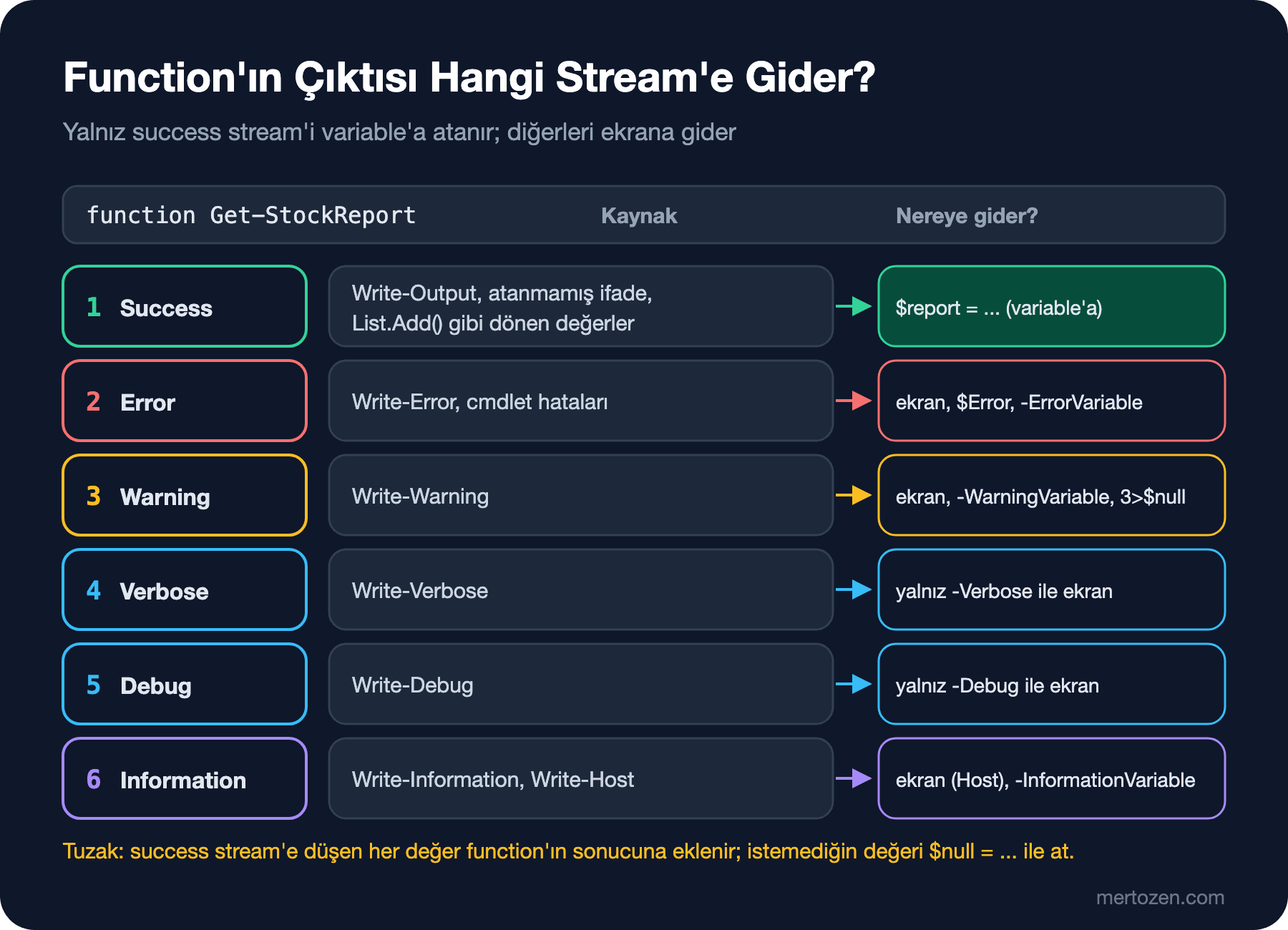
PowerShell'de altı stream var ve function'ın "sonucu" yalnız birincisi. Ekranda gördüğün her satır sonuç değildir:
function Get-StockReport {
    [CmdletBinding()]
    param()
    Write-Output 'output: 4 titles low on stock'
    Write-Verbose 'verbose: read 12 rows from books.csv'
    Write-Information 'information: report ready'
    Write-Warning 'warning: The Hobbit has 0 in stock'
    Write-Host 'host: done'
    'Emma', 'The Hobbit'
}
PS> . ./lab05/streams.ps1
PS> $report = Get-StockReport
WARNING: warning: The Hobbit has 0 in stock
host: done
PS> $report
output: 4 titles low on stock
Emma
The Hobbit
PS> $report = Get-StockReport -Verbose -InformationAction Continue -WarningAction SilentlyContinue
VERBOSE: verbose: read 12 rows from books.csv
information: report ready
host: done
PS> $report.Count
3
PS> $report = Get-StockReport -InformationVariable info 6>$null 3>$null
PS> $info.MessageData
information: report ready
Message NoNewLine ForegroundColor BackgroundColor
------- --------- --------------- ---------------
host: done False -1 -1İlk çağrıda $report'a yalnız success stream'deki üç değer girdi; warning ve Write-Host satırı ekrana gitti ama variable'a girmedi. Write-Verbose ve Write-Information varsayılan olarak görünmüyor, ikinci çağrıda -Verbose ve -InformationAction Continue ile açıldı. Üçüncü çağrı, Write-Host'un 5.0'dan beri information stream'e (6) yazdığını gösteriyor: 6>$null onu da sildi ve -InformationVariable ikisini birlikte yakaladı. Kural basit: veri success stream'e, durum mesajı Write-Verbose ya da Write-Information'a, kullanıcının görmesi gereken bir uyarı Write-Warning'e. Write-Host artık yakalanabilir olsa da renkli konsol çıktısı dışında bir sebeple kullanma; PSScriptAnalyzer'ın serinin son yazısında göreceğimiz PSAvoidUsingWriteHost kuralı da bunu söylüyor.
-WhatIf ve -Confirm: SupportsShouldProcess
Bir şeyi silen, değiştiren ya da yeniden başlatan function, çağırana "önce ne yapacağını göster" seçeneği vermeli. SupportsShouldProcess bunu -WhatIf ve -Confirm parametreleriyle sağlar; değişikliği yapan her satırı $PSCmdlet.ShouldProcess() ile koruman yeterli. Deploy öncesinde site klasörünü zip'leyen ve son birkaç yedeği tutan backup function'ı:
function Invoke-BookstoreBackup {
    [CmdletBinding(SupportsShouldProcess, PositionalBinding = $false)]
    [OutputType([System.IO.FileInfo])]
    param(
        [Parameter(Mandatory)]
        [ValidateScript({ Test-Path -Path $_ -PathType Container }, ErrorMessage = "Folder '{0}' does not exist.")]
        [string] $Path,

        [Parameter(Mandatory)]
        [string] $Destination,

        [ValidateRange(1, 100)]
        [int] $KeepLast = 7
    )

    $zip = Join-Path -Path $Destination -ChildPath ('bookstore-{0:yyyyMMdd-HHmmss}.zip' -f [datetime]::UtcNow)
    if ($PSCmdlet.ShouldProcess($zip, "Back up $Path")) {
        $null = New-Item -Path $Destination -ItemType Directory -Force
        Compress-Archive -Path (Join-Path -Path $Path -ChildPath '*') -DestinationPath $zip
        Write-Verbose "Created $zip"
        Get-Item -Path $zip
    }

    if (-not (Test-Path -Path $Destination)) { return }
    $old = Get-ChildItem -Path $Destination -Filter 'bookstore-*.zip' |
        Sort-Object -Property Name -Descending |
        Select-Object -Skip $KeepLast
    foreach ($file in $old) {
        # Remove-Item, -WhatIf ve -Confirm'ü preference variable'ları üzerinden görür
        Remove-Item -LiteralPath $file.FullName
    }
}
Eski yedekleri silen Remove-Item'ı ShouldProcess ile sarmadık. Gerek yok: -WhatIf verildiğinde function içinde $WhatIfPreference açılıyor ve Remove-Item gibi ShouldProcess destekleyen cmdlet'ler bunu kendiliğinden görüyor. IIS application pool'unu recycle eden function ise ConfirmImpact = 'High' ile işaretli; varsayılan $ConfirmPreference da High olduğu için -Confirm verilmeden de onay ister:
function Restart-BookstorePool {
    [CmdletBinding(SupportsShouldProcess, ConfirmImpact = 'High', PositionalBinding = $false)]
    param(
        [Parameter(ValueFromPipeline, ValueFromPipelineByPropertyName)]
        [ValidateSet('BookstoreApi', 'BookstoreWeb')]
        [string[]] $Name = 'BookstoreApi'
    )

    process {
        foreach ($pool in $Name) {
            # İş if'in içinde kalır: ShouldProcess hata verirse hiçbir şey çalışmaz
            if ($PSCmdlet.ShouldProcess("application pool $pool", 'Recycle')) {
                if (-not $IsWindows) {
                    throw [System.PlatformNotSupportedException]::new('Restart-BookstorePool needs IIS on Windows.')
                }
                # Microsoft.Web.Administration, PowerShell 7'de compatibility layer olmadan çalışır
                Add-Type -Path (Join-Path -Path $env:SystemRoot -ChildPath 'System32\inetsrv\Microsoft.Web.Administration.dll')
                $manager = [Microsoft.Web.Administration.ServerManager]::new()
                try {
                    $appPool = $manager.ApplicationPools[$pool]
                    if (-not $appPool) { throw "Application pool '$pool' was not found." }
                    $state = $appPool.Recycle()
                    Write-Verbose "Recycled $pool, state: $state"
                }
                finally {
                    $manager.Dispose()
                }
            }
        }
    }
}
Pool'u IISAdministration module'ü yerine doğrudan Microsoft.Web.Administration API'si ile recycle ediyoruz. Microsoft'un PowerShell 7 module uyumluluk listesinde IISAdministration "Untested with Compatibility Layer" olarak geçiyor ve Microsoft'un IIS destek blogu da PowerShell 7 için bu API'yi öneriyor; ayrıntısı bir sonraki yazıda. Lab'da IIS yok, bu yüzden recycle satırları çalıştırılmadı; -WhatIf ve platform kontrolü çalıştı:
PS> Invoke-BookstoreBackup -Path ./artifacts/api -Destination ./backups -WhatIf
What if: Performing the operation "Back up ./artifacts/api" on target "./backups/bookstore-20261115-055848.zip".
PS> Invoke-BookstoreBackup -Path ./artifacts/api -Destination ./backups -KeepLast 2 | Select-Object Name, Length

Name                          Length
----                          ------
bookstore-20261115-055848.zip  54553
PS> Invoke-BookstoreBackup -Path ./artifacts/api -Destination ./backups -KeepLast 2 -Verbose | Select-Object Name
VERBOSE: Performing the operation "Back up ./artifacts/api" on target "./backups/bookstore-20261115-055850.zip".
VERBOSE: Created ./backups/bookstore-20261115-055850.zip

Name
----
bookstore-20261115-055850.zip
PS> (Get-ChildItem ./backups).Name
bookstore-20261115-055849.zip
bookstore-20261115-055850.zip
PS> Invoke-BookstoreBackup -Path ./artifacts/api -Destination ./backups -KeepLast 1 -WhatIf
What if: Performing the operation "Back up ./artifacts/api" on target "./backups/bookstore-20261115-055851.zip".
What if: Performing the operation "Remove File" on target "/home/user/bookstore/backups/bookstore-20261115-055849.zip".
PS> Restart-BookstorePool -Name BookstoreApi, BookstoreWeb -WhatIf
What if: Performing the operation "Recycle" on target "application pool BookstoreApi".
What if: Performing the operation "Recycle" on target "application pool BookstoreWeb".
PS> Restart-BookstorePool -Confirm:$false
OperationStopped: /home/user/bookstore/modules/Bookstore.Ops/Public/Restart-BookstorePool.ps1:26
Line |
  26 |  …             throw [System.PlatformNotSupportedException]::new('Restar …
     |                ~~~~~~~~~~~~~~~~~~~~~~~~~~~~~~~~~~~~~~~~~~~~~~~~~~~~~~~~~
     | Restart-BookstorePool needs IIS on Windows.
-WhatIf ile hiçbir dosya oluşmadı ya da silinmedi; son -WhatIf çağrısında hangi yedeğin silineceği Remove-Item'ın kendi mesajıyla göründü. -KeepLast 2 ile üçüncü yedek alındığında en eskisi silindi. -Confirm:$false onayı atladı ve Linux'ta beklenen PlatformNotSupportedException geldi.
CI'da Onay İstemi
CI'da cevap verecek kimse yok. İlk taslağımda ShouldProcess'u C#'tan alışık olduğum guard clause biçiminde yazmıştım:
        foreach ($pool in $Name) {
            if (-not $PSCmdlet.ShouldProcess("application pool $pool", 'Recycle')) { continue }
            if (-not $IsWindows) {
                throw [System.PlatformNotSupportedException]::new('Restart-BookstorePool needs IIS on Windows.')
            }
            # ... pool'u recycle et
        }
-NonInteractive ile, yani CI'daki gibi çağırınca:
$ pwsh -NoProfile -NonInteractive -Command 'Import-Module ./modules/Bookstore.Ops; Restart-BookstorePool; "next line"'; echo "exit=$?"
MethodInvocationException: /home/user/bookstore/modules/Bookstore.Ops/Public/Restart-BookstorePool.ps1:24
Line |
  24 |  …         if (-not $PSCmdlet.ShouldProcess("application pool $pool", 'R …
     |                ~~~~~~~~~~~~~~~~~~~~~~~~~~~~~~~~~~~~~~~~~~~~~~~~~~~~~~~~~
     | Exception calling "ShouldProcess" with "2" argument(s): "PowerShell is
     | in NonInteractive mode. Read and Prompt functionality is not available."
OperationStopped: /home/user/bookstore/modules/Bookstore.Ops/Public/Restart-BookstorePool.ps1:26
Line |
  26 |  …             throw [System.PlatformNotSupportedException]::new('Restar …
     |                ~~~~~~~~~~~~~~~~~~~~~~~~~~~~~~~~~~~~~~~~~~~~~~~~~~~~~~~~~
     | Restart-BookstorePool needs IIS on Windows.
exit=1
Bu çıktı, yazının en önemli tuzağını gösteriyor. Onay istemi açılamayınca ShouldProcess exception fırlattı; bu statement-terminating bir hata olduğu için yalnız if satırı durdu ve script bir sonraki satırla, yani pool'u recycle eden koda devam etti. Lab'da platform kontrolü durdurdu, Windows'ta pool onaysız recycle edilecekti. İşi if ($PSCmdlet.ShouldProcess(...)) { ... } bloğunun içine koyan yukarıdaki son hâlde aynı çağrı böyle bitiyor:
$ pwsh -NoProfile -NonInteractive -Command 'Import-Module ./modules/Bookstore.Ops; Restart-BookstorePool; "next line"'; echo "exit=$?"
MethodInvocationException: /home/user/bookstore/modules/Bookstore.Ops/Public/Restart-BookstorePool.ps1:25
Line |
  25 |  …         if ($PSCmdlet.ShouldProcess("application pool $pool", 'Recycl …
     |                ~~~~~~~~~~~~~~~~~~~~~~~~~~~~~~~~~~~~~~~~~~~~~~~~~~~~~~~~~
     | Exception calling "ShouldProcess" with "2" argument(s): "PowerShell is
     | in NonInteractive mode. Read and Prompt functionality is not available."
next line
exit=0
İş yapılmadı, ama script 0 ile çıktı ve CI adımı yeşil kaldı. Kural: CI'dan çağırırken niyetini açıkça yaz (-Confirm:$false) ve script'in başında $ErrorActionPreference = 'Stop' olsun ki böyle bir hata adımı kırsın.
Script Module ve Manifest: Bookstore.Ops
Bir script module en basit hâliyle bir .psm1 dosyasıdır. Function'lar büyüyünce her birini kendi dosyasına koyup .psm1'de dot-source etmek yaygın bir düzen:
PS> Get-ChildItem ./modules -Recurse -File | ForEach-Object { [System.IO.Path]::GetRelativePath($PWD, $_.FullName) }
modules/Bookstore.Ops/Bookstore.Ops.psd1
modules/Bookstore.Ops/Bookstore.Ops.psm1
modules/Bookstore.Ops/Public/Get-BookstoreHealth.ps1
modules/Bookstore.Ops/Public/Invoke-BookstoreBackup.ps1
modules/Bookstore.Ops/Public/Invoke-BookstoreDotnet.ps1
modules/Bookstore.Ops/Public/Restart-BookstorePool.ps1
modules/Bookstore.Ops/Public/Test-BookstoreCover.ps1
modules/Bookstore.Ops/Private/Resolve-BookstoreBaseUrl.ps1
Set-StrictMode -Version Latest
# Bilinen ortamlar; Get-BookstoreHealth -Environment adresi buradan okur
$script:BookstoreEnvironments = @{
Local = 'http://127.0.0.1:5080'
Staging = 'https://staging.bookstore.test'
Production = 'https://api.bookstore.test'
}
# Her dosyada bir function: önce Private, çünkü Public function'lar onları kullanır
foreach ($folder in 'Private', 'Public') {
$files = Get-ChildItem -Path (Join-Path -Path $PSScriptRoot -ChildPath $folder) -Filter '*.ps1' -ErrorAction Ignore
foreach ($file in $files) {
. $file.FullName
}
}Module klasörünün adı, .psm1 ve .psd1 dosyalarının adıyla aynı olmalı; Import-Module bir klasör verildiğinde içinde bu adlarla dosya arar. Manifest'i elle yazmak yerine New-ModuleManifest ile üret ve sonra düzenle:
$manifest = @{
    Path                 = './modules/Bookstore.Ops/Bookstore.Ops.psd1'
    RootModule           = 'Bookstore.Ops.psm1'
    ModuleVersion        = '0.1.0'
    Author               = 'Bookstore Team'
    Description          = 'Shared operations for Bookstore: health checks, cover checks, backups, builds and IIS pools.'
    PowerShellVersion    = '7.6'
    CompatiblePSEditions = 'Core'
    FunctionsToExport    = 'Get-BookstoreHealth', 'Test-BookstoreCover', 'Invoke-BookstoreBackup',
                           'Invoke-BookstoreDotnet', 'Restart-BookstorePool'
    CmdletsToExport      = @()
    VariablesToExport    = @()
    AliasesToExport      = @()
}
New-ModuleManifest @manifest
PS> ./lab05/new-manifest.ps1
PS> (Test-ModuleManifest -Path ./modules/Bookstore.Ops/Bookstore.Ops.psd1).ExportedFunctions.Keys
Get-BookstoreHealth
Test-BookstoreCover
Invoke-BookstoreBackup
Invoke-BookstoreDotnet
Restart-BookstorePool
PS> Import-Module ./modules/Bookstore.Ops -Force
PS> Get-Command -Module Bookstore.Ops
CommandType Name Version Source
----------- ---- ------- ------
Function Get-BookstoreHealth 0.1.0 Bookstore.Ops
Function Invoke-BookstoreBackup 0.1.0 Bookstore.Ops
Function Invoke-BookstoreDotnet 0.1.0 Bookstore.Ops
Function Restart-BookstorePool 0.1.0 Bookstore.Ops
Function Test-BookstoreCover 0.1.0 Bookstore.Ops
PS> Get-Command Resolve-BookstoreBaseUrl
Get-Command: The term 'Resolve-BookstoreBaseUrl' is not recognized as a name of a cmdlet, function, script file, or executable program.
Check the spelling of the name, or if a path was included, verify that the path is correct and try again.
PS> Import-Module ./lab05/Draft.Ops
WARNING: The names of some imported commands from the module 'Draft.Ops' include unapproved verbs that might make them less discoverable. To find the commands with unapproved verbs, run the Import-Module command again with the Verbose parameter. For a list of approved verbs, type Get-Verb.FunctionsToExport module'ün dışarıya açtığı listeyi belirliyor: Resolve-BookstoreBaseUrl module içinde çalışıyor ama dışarıdan görünmüyor. Listeyi joker karakter (*) yerine adlarla yazmak, PowerShell'in module'ü yüklemeden hangi komutların nerede olduğunu bilmesini sağlıyor; bir komutu ilk kullandığında module otomatik yükleniyor. CompatiblePSEditions = 'Core' ve PowerShellVersion = '7.6', module'ün Windows PowerShell 5.1'e yüklenmesini engelliyor. Son satır ilk yazıda verdiğimiz sözü tutuyor: approved verb listesinde olmayan Check ve Recycle gibi fiiller Import-Module'da uyarı üretiyor; liste Get-Verb'de. Microsoft Learn'deki about_Character_Encoding sayfasına göre Windows PowerShell 5.1'deki New-ModuleManifest dosyayı little-endian Unicode (UTF-16LE) kodlamasıyla yazıyor; 7.x'te ise BOM'suz (dosyanın başında kodlamayı belirten byte işareti olmadan) UTF-8. 5.1'de üretip Linux'ta kullanacağın bir manifest'i önce dönüştür (çalıştırılmadı).
Preference'lar Module'e Geçmez
Build script'indeki Invoke-Dotnet'i module'e taşırken bir tuzağa düştüm. Dördüncü yazıda $ErrorActionPreference = 'Stop' ve native tercihi script'in başında set etmiştik. Küçük bir module ve onu çağıran bir script ile:
function Invoke-GitStatus {
    git -C ./no-such-folder status
    "after git, exit code $LASTEXITCODE"
}
$ErrorActionPreference = 'Stop'
$PSNativeCommandUseErrorActionPreference = $true
Import-Module (Join-Path -Path $PSScriptRoot -ChildPath 'Pref.Demo') -Force
try {
Invoke-GitStatus
'script went on'
}
catch {
"caught: $($_.Exception.Message)"
}PS> ./lab05/pref-caller.ps1
fatal: cannot change to './no-such-folder': No such file or directory
after git, exit code 128
script went on$ pwsh -NoProfile -File ./lab05/pref-caller.ps1
fatal: cannot change to './no-such-folder': No such file or directory
caught: Program "git" ended with non-zero exit code: 128 (0x80).Konsoldan çağrılınca git hatası script'i durdurmadı; pwsh -File ile çağrılınca durdu. Sebep scope: module'ün kendi scope zinciri var ve global scope'tan sonra çağıran script'in variable'larını görmüyor. pwsh -File ise about_Pwsh'a göre script'i yeni oturumun scope'unda dot-source edilmiş gibi çalıştırıyor, yani script'teki preference'lar global oluyor ve module onları görüyor. CI'da çalışan ama bir ekip arkadaşının konsolunda farklı davranan bir script, en zor bulunan hata türlerinden. Çözüm, module function'ının ihtiyaç duyduğu preference'ları kendi içinde set etmesi:
function Invoke-BookstoreDotnet {
    [CmdletBinding(PositionalBinding = $false)]
    param(
        [Parameter(Mandatory)]
        [ValidateSet('restore', 'build', 'test', 'publish')]
        [string] $Command,

        [string[]] $Arguments = @()
    )
    # Preference'lar scope'a bağlıdır: yalnız çağıran script'te değil, burada da set et
    $ErrorActionPreference = 'Stop'
    $PSNativeCommandUseErrorActionPreference = $true

    Write-Information "==> dotnet $Command" -InformationAction Continue
    $watch = [System.Diagnostics.Stopwatch]::StartNew()
    dotnet $Command @Arguments --nologo -v quiet
    Write-Information ('    {0} finished in {1:N1} s' -f $Command, $watch.Elapsed.TotalSeconds) -InformationAction Continue
}
Build script'i artık kendi function'ı yerine module'ü import edip Invoke-BookstoreDotnet'i çağırıyor; health ve kapak script'leri de module'deki function'ları kullanan ince script'lere dönüştü. Exit code ve konsol çıktısı script'te, iş mantığı module'de.
PSResourceGet ile Yerel Repository'ye Yayınlamak
Module'ü sunuculara kopyalamak yerine bir repository'den kurmak, sürümü takip edilebilir yapar. PSResourceGet, PowerShell 7.4'ten beri PowerShell ile birlikte geliyor. En basit repository bir klasör ya da Windows'ta bir file share (\\fileserver\psrepo gibi). Lab'da bir klasörle:
PS> Register-PSResourceRepository -Name BookstoreLocal -Uri ~/psrepo -Trusted
PS> Get-PSResourceRepository | Format-Table Name, Uri, Trusted, Priority

Name           Uri                                      Trusted Priority
----           ---                                      ------- --------
BookstoreLocal file:///home/user/psrepo                    True       50
PSGallery      https://www.powershellgallery.com/api/v2   False       50
PS> Publish-PSResource -Path ./modules/Bookstore.Ops -Repository BookstoreLocal
PS> Get-ChildItem ~/psrepo | Select-Object Name

Name
----
Bookstore.Ops.0.1.0.nupkg
PS> Find-PSResource -Name Bookstore.Ops -Repository BookstoreLocal | Format-Table Name, Version, Repository

Name          Version Repository
----          ------- ----------
Bookstore.Ops 0.1.0   BookstoreLocal
PS> Install-PSResource -Name Bookstore.Ops -Repository BookstoreLocal -Scope CurrentUser
PS> Get-InstalledPSResource -Name Bookstore.Ops | Format-Table Name, Version, InstalledLocation -Wrap

Name          Version InstalledLocation
----          ------- -----------------
Bookstore.Ops 0.1.0   /home/user/.local/share/powershell/Modules
PS> Publish-PSResource -Path ./modules/Bookstore.Ops -Repository BookstoreLocal
PS> Set-Location ~
PS> Import-Module Bookstore.Ops
PS> Get-Module Bookstore.Ops | Format-Table Name, Version, Path -Wrap

Name          Version Path
----          ------- ----
Bookstore.Ops 0.1.0   /home/user/.local/share/powershell/Modules/Bookstore.Ops/0.1.0/Bookstore.Ops.psm1
PS> (Get-BookstoreHealth).Healthy
True
Publish-PSResource module'ü .nupkg olarak paketledi, Install-PSResource onu kullanıcının module klasörüne kurdu ve module artık yolu verilmeden, adıyla import ediliyor. İki ayrıntı: aynı 0.1.0 sürümünü ikinci kez yayınladığımda repository hata vermedi ve paketin üzerine yazdı, yani file share sürüm numarasını korumuyor; her değişiklikte ModuleVersion'ı artır. Ayrıca manifest'te FileList yoksa paket klasördeki her dosyayı alıyor. Lab'da kopyalama sırasında klasöre karışan gizli ._ dosyaları ilk pakete girdi ve PSScriptAnalyzer'ı da bozdu; paketi yayınlamadan önce klasörün temiz olduğunu kontrol et ya da FileList yaz.
Ekip içinde paylaşmak için Azure Artifacts feed'i de bir PSResourceGet repository'si olarak kaydedilebiliyor. Microsoft Learn'deki rehbere göre Register-PSResourceRepository'ye feed'in nuget/v3/index.json adresi veriliyor, kimlik bilgisi bir PAT (personal access token; kullanıcı yerine geçen erişim anahtarı) olarak SecretManagement vault'unda tutulup -CredentialInfo ile bağlanıyor ve Azure Artifacts Credential Provider PSResourceGet ile desteklenmiyor. Bu kısım çalıştırılmadı; secret'ları vault'ta tutmayı yedinci yazıda göreceğiz.
Üretimde Dikkat
Module function'ı exit code dönmez, exit de çağırmaz. exit, module içinden çağrılınca function'ı değil bütün oturumu kapatır: lab'da exit 3 yapan bir module function'ı pwsh sürecini 3 ile bitirdi ve çağıran kodun kalan satırları hiç çalışmadı. Function object döndürür ya da exception fırlatır; exit code'a çevirmek, CI'ın çağırdığı ince script'in işi. Bu yazıdaki Test-BookstoreHealth.ps1 tam olarak bunu yapıyor.
Module'ü sürümle ve sürümü sabitle. Deploy script'leri Import-Module Bookstore.Ops -RequiredVersion 0.1.0 gibi belirli bir sürümü istemeli; sunucuya yeni bir sürüm kurulduğunda çalışan script'ler ancak sen sürümü değiştirdiğinde etkilenir. Manifest'teki ModuleVersion, yayınlanan paketin ve kurulum klasörünün adını da belirliyor.
Değişiklik yapan her function'da SupportsShouldProcess olsun ve bunu CI'da kullan: deploy adımını önce -WhatIf ile çalıştırıp log'a yazmak, gerçek deploy'dan önce ne olacağını gösteren ucuz bir kontrol. Recycle ve silme gibi geri alınamaz işleri ConfirmImpact = 'High' ile işaretle ve CI'da -Confirm:$false'u açıkça yaz.
Sık Düşülen Tuzaklar
Function içinde unutulan bir dönüş değeri. Önce Tahmin Et'teki ArrayList.Add, StringBuilder.Append, New-Item ve Dictionary.Remove gibi değer döndüren çağrılar atanmadıkça çıktıya karışır. Fark etmen de zordur, çünkü ekranda masum görünen birkaç satır çıkar. $null = ... ya da [void] kullan ve function'ın sonucunu bir testte Count ile kontrol et.
Positional parametrelere güvenmek. Sıraya göre bağlanan parametreler, araya yeni bir parametre eklendiğinde sessizce kayar. Module function'larında PositionalBinding = $false kullan, script'lerden çağırırken parametre adlarını yaz.
if (-not $PSCmdlet.ShouldProcess(...)) { continue } biçimi. Guard clause alışkanlığı burada tehlikeli: ShouldProcess hata verirse koruma ortadan kalkar. İşi her zaman if ($PSCmdlet.ShouldProcess(...)) { } bloğunun içine yaz.
Module içinde çağıranın preference'larına güvenmek. $ErrorActionPreference, $PSNativeCommandUseErrorActionPreference ve Set-StrictMode module'e çağıran script'ten geçmez; -File ile çalışınca geçiyor gibi göründüğü için hata geç fark edilir. Module'ün ihtiyaç duyduğunu module'ün içinde set et.
Küçük Bir Deneme
★☆☆ Get-BookstoreHealth'e -Environment Staging ver ve -Verbose ile çalıştır. Hangi adrese istek gitti, sonuç object'inde Error alanında ne var? Sonra function'ın [OutputType] satırını silip Get-Command Get-BookstoreHealth | Select-Object OutputType çıktısını karşılaştır.
★★☆ Invoke-BookstoreBackup'a bir -Exclude parametresi ekle (örneğin appsettings.*.json ve logs); varsayılan değer verip ValidateNotNullOrEmpty ile koru. -WhatIf çıktısında hiçbir değişiklik olmadığını, gerçek çalıştırmada zip'in içinde bu dosyaların olmadığını göster.
★★★ Bookstore.Ops'u 0.2.0 olarak yayınla, 0.1.0 kurulu kalsın. Import-Module Bookstore.Ops hangisini yüklüyor? Bir script'te #Requires -Modules @{ ModuleName = 'Bookstore.Ops'; RequiredVersion = '0.1.0' } satırıyla eski sürümü iste ve iki sürümün aynı makinede yan yana çalıştığını göster.
Module'ümüz hazır, ama içindeki iş henüz küçük: health check, kapak kontrolü ve backup. Bir sonraki yazıda gerçek işlere geçiyoruz: dosya sistemi, REST (HTTP üzerinde kaynak odaklı API tarzı) API'leri, JSON ve CSV, Windows Service'leri, scheduled task, IIS ve Windows'ta network teşhisi; sonunda app_offline, migration ve health check ile Bookstore.Api için bir deploy script'i.