

Sandbox and Approvals in Codex: Read-Only, Workspace-Write, Full Access and Auto-Review
In Codex the sandbox decides what can be done and the approval policy decides when to ask: Full access removes both, while Approve for me hands the prompts to a reviewer agent without widening the boundary. The MXC, elevated and unelevated sandboxes on native Windows, the network proxy and domain rules, protected paths, trust-gated project settings and a rules file that puts Bookstore's SQL Server tests behind an approval.
Version note: This post describes Codex CLI 0.169.0 (13 November 2026); details of sandbox modes, the approval policy, auto-review, the Windows sandbox, network access and rules were checked on 15 November 2026 against the Agent approvals & security, Sandbox, Permissions, Auto-review, Windows sandbox, Rules and Developer commands pages at learn.chatgpt.com/docs. This post is based on the official documentation. The sample config.toml files were validated against Codex's official JSON schema, and the rules file was parsed with Python's parser and its example commands were checked against the prefix matching rule in the documentation.
Guess First
On Bookstore, the online bookstore used as the shared example across this site's series, Emre got tired of the desktop app asking for approval on every dotnet restore and picked Full access in the permissions menu: "No more approval prompts, and Codex can't leave the project folder anyway." Ayşe picked Approve for me: "From now on network access is open too, Codex will download packages without asking." The team had committed a .codex/config.toml with network rules to the repo; Ayşe had never trusted the folder.
What is your guess? In Full access, is Codex still limited to the project folder? Does Approve for me widen the sandbox? And do the committed network rules work on Ayşe's machine? The answers are in the interface modes and Bookstore sections.
This post looks not at instructions but at the technical boundary. The tool-independent side of secret and prompt injection risks in AI tools is in the fifth post of the AI-Assisted Development series, and the Claude Code equivalent in the third post of the Claude Code series (/blog/claude-code-permission-modes-settings-sandbox).
Two Separate Controls: Sandbox and Approvals
The documentation describes Codex's security model as two layers. The sandbox decides what Codex can technically do when it runs model-generated commands: where it can write and whether it can reach the network. The approval policy decides when Codex must stop and ask you before an action. The sandbox applies not only to Codex's own file operations but also to the commands it runs, such as git, dotnet or npm, and to their child processes.
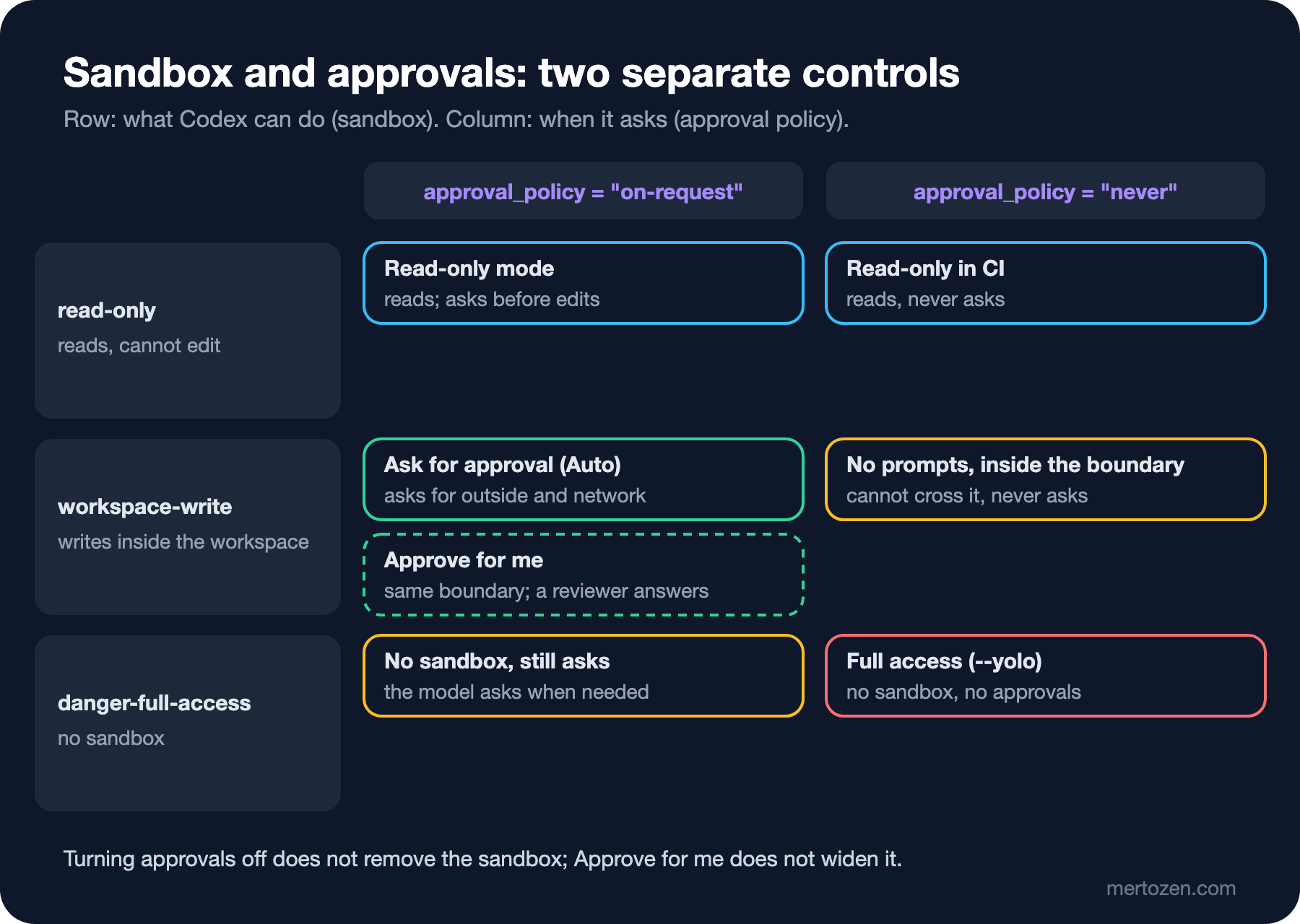
There are three sandbox modes. In read-only Codex reads files and runs the commands the sandbox allows, but cannot edit files. In workspace-write it can edit and run commands inside the working directory and temporary folders; the network is off by default. In danger-full-access there is no sandbox. On the approval side there are two options: with on-request Codex works freely inside the sandbox and asks when it needs to go beyond the boundary; with never it never asks and does its best within the limits it was given. Between the two there is also a granular policy that keeps specific prompt categories interactive and rejects the others automatically.
The approval_policy = "untrusted" you see in old configurations has been retired, and according to the documentation that value can even stop Codex from starting. If you want every command to require approval, the documentation's migration advice is to omit approval_policy and give that project trust_level = "untrusted" in your user file. That has a side effect: in an untrusted project the project .codex/ layer is not loaded either.
Even inside the writable roots of workspace-write some paths are protected: the .git, .agents, .codex and .aws folders, with everything in them, are read-only. This means Codex cannot change its own skills, hooks and sandbox settings from inside the sandbox.
Interface Modes and CLI Flags
In the desktop app and the IDE extension, the permissions menu below the composer offers ready-made combinations of these two settings; in the CLI the same picker is /permissions. According to the documentation the most common combinations are (-a is the short form of the approval policy flag):
| Mode | Flags | Effect |
|---|---|---|
| Ask for approval (Auto preset) | --sandbox workspace-write -a on-request | Reads, edits and runs commands inside the workspace; asks to write outside the workspace and for network |
| Approve for me | --approve-for-me | Same boundary; approval requests go to a reviewer agent instead of you |
| Read-only | --sandbox read-only -a on-request | Reads, runs commands in the read-only sandbox; asks before edits |
| Read-only, non-interactive (CI) | --sandbox read-only -a never | Reads, never asks |
| Full access | --dangerously-bypass-approvals-and-sandbox (--yolo) | No sandbox, no approvals |
The answers to the first two questions from the guess are in this table. Full access is the combination of danger-full-access and never: along with the approval prompts Emre also removed the sandbox, and Codex is no longer limited to the project folder. The documentation explicitly warns that this mode can perform destructive actions that lead to data loss, and recommends it only in an externally hardened environment, such as a disposable VM or container. Approve for me does not widen the boundary at all; instead of asking you, it sends actions that want to cross the boundary to a separate reviewer agent. Ayşe's package download still becomes an approval request; it is just the reviewer that judges it now.
If you need a single extra folder, the documentation recommends not removing the sandbox but granting write access to that folder with --add-dir. --approve-for-me cannot be combined with --sandbox or --yolo.
How Does Auto-review Decide?
Auto-review only makes sense when approvals are interactive: on-request, or a granular policy that keeps the relevant prompt category open. With never there is nothing to review. In configuration it is approvals_reviewer = "auto_review"; the default value is user.
The reviewer examines commands that want to leave the sandbox, matches of a rules entry with the prompt decision, network requests that need approval, file edits outside the writable roots and MCP tool calls that require approval. Actions that already have permission run without review. According to the documentation the reviewer is designed to block sending private data to untrusted destinations, probing for credentials, persistent security weakening and destructive actions that are hard to undo; it denies critical-risk actions. It sees a compact transcript and the approval request itself, not the model's hidden reasoning. It fails closed: if the review cannot be set up or times out, the action is not executed.
After a denial the main agent is told not to reach the same outcome by a workaround, and either to find a materially safer path or to stop and ask you. In the CLI, for most models, 3 consecutive denials or 10 denials in the last 50 reviews stop the turn. If you think a denial is wrong, /approve retries that single action once; the retry still goes through the reviewer. Because Auto-review makes extra model calls, it uses your usage limit; admins can restrict it with allowed_approvals_reviewers.
Sandbox on Each Platform: Windows, WSL 2 and the Others
On every operating system the sandbox is enforced with that system's own mechanism. Seatbelt on macOS, bwrap and seccomp by default on Linux, the Linux implementation on WSL 2. On Linux and WSL 2 you need to install the distribution's bubblewrap package. Unlike Claude Code, Codex also has a sandbox on native Windows, with three implementations:
mxc: the recommended option on compatible Windows 11 devices. It uses native process isolation without administrator-approved setup, extra Windows accounts or firewall rules. It needs the MXC capabilities that Microsoft is gradually rolling out for Windows 11 24H2 and 25H2.elevated: the preferred legacy method when MXC is unavailable. It needs administrator-approved setup and works with dedicated lower-privilege sandbox users, filesystem permissions and firewall rules.unelevated: the last option when administrator setup is not possible. Its network isolation is weaker thanelevatedand it does not support denied read paths.
The desktop app prefers MXC on its own for personal accounts when the device supports it. In the CLI you turn it on in your user file and leave a legacy implementation as a fallback. This is a machine-specific setting; it goes into %USERPROFILE%\.codex\config.toml, not into the project file:
# Windows sandbox selection for this machine
[features]
prefer_mxc = true

[windows]
sandbox = "elevated"
With CLI 0.162 and later you can test whether the device supports MXC with a single command, without changing the saved selection. According to the documentation the expected result is MXC_OK on the screen and an exit code of 0:
codex -c windows.sandbox=mxc sandbox --include-managed-config --permission-profile :workspace -- cmd.exe /d /c echo MXC_OK
$LASTEXITCODE
MXC has two limits that matter for Bookstore. It permits connections to loopback services on the host; and it stops the remaining child processes when the foreground command exits, so an ng serve that Codex starts in the background can close as soon as the command finishes. In the desktop app, for sandbox protection to apply, Ask for approval must be selected below the composer before you send messages.
Network Access
In the default workspace-write mode, commands have no network access. Turning it on has two stages, and the documentation keeps them apart deliberately. network_access = true under [sandbox_workspace_write] opens the network to commands but does not limit destinations. features.network_proxy limits an open network with the domain rules you write; on its own it does not open the network. With the network off the proxy has no effect, and with the network on and the proxy off there is unrestricted direct outbound access.
Domain rules work allowlist-first: an exact host name matches only itself, *.example.com matches subdomains but not the apex, **.example.com matches both, and deny always beats allow. Loopback and private network addresses are blocked by default (with MXC this default differs); if you need a single local target you add an exact IP address or a localhost rule. Some traffic is not filtered by the proxy: web search, MCP server connections, the browser and computer use, cloud tasks and Codex's own model requests. By default web search returns cached results from an index maintained by OpenAI; according to the documentation this reduces the prompt injection risk from arbitrary live pages.
Bookstore: Project Settings and Rules
Bookstore's .codex/config.toml spells out the Auto preset and opens the network only to the package registries. dotnet restore can reach nuget.org and npm ci the npm registry; a request to any other address stops at the proxy:
#:schema https://developers.openai.com/codex/config-schema.json
# Bookstore project settings for Codex. Codex loads this file only when the project is trusted.

sandbox_mode = "workspace-write"
approval_policy = "on-request"

# Commands may reach the network, but only the package registries below.
[sandbox_workspace_write]
network_access = true

[features.network_proxy]
enabled = true
domains = { "**.nuget.org" = "allow", "registry.npmjs.org" = "allow" }

[mcp_servers.playwright]
command = "npx"
args = ["-y", "@playwright/mcp@0.0.85"]
startup_timeout_sec = 30
default_tools_approval_mode = "prompt"
The answer to the third question from the guess is here: because this file is in the project layer, it is loaded only in a trusted project. As long as Ayşe does not trust the folder, the committed network rules, the MCP server and the rules file below never take effect on her machine. /debug-config shows which layers are loaded.
The API tests are a separate problem. Bookstore's tests connect to the SQL Server on the developer's machine. The documentation says MXC permits host loopback connections, but for the other platforms it does not describe separately how a TCP connection to a local database behaves inside the sandbox. So the team chose to run the tests outside the sandbox, with an approval each time. Rules files exist for exactly this: prefix_rule entries written in Starlark give an allow, prompt or forbidden decision for a command prefix. Project rules live under .codex/rules/:
# Bookstore command rules for Codex (Starlark). Loaded only when the project is trusted.

# API tests need the local SQL Server, which the sandbox cannot reach: ask before each run outside the sandbox.
prefix_rule(
    pattern = ["dotnet", "test"],
    decision = "prompt",
    justification = "API tests connect to the local SQL Server outside the sandbox. Approve each run.",
    match = [
        "dotnet test",
        "dotnet test tests/Bookstore.Api.Tests --filter Category=Ordering",
    ],
    not_match = ["dotnet build Bookstore.slnx"],
)

# Only the developer changes a database schema.
prefix_rule(
    pattern = ["dotnet", "ef", "database", ["update", "drop"]],
    decision = "forbidden",
    justification = "The developer applies migrations. Create one with the add-migration skill instead.",
    match = [
        "dotnet ef database update --project src/Bookstore.Api",
        "dotnet ef database drop --force",
    ],
    not_match = ["dotnet ef migrations list --project src/Bookstore.Api"],
)

# Publishing work always needs a person.
prefix_rule(
    pattern = ["git", "push"],
    decision = "prompt",
    justification = "Pushing publishes the branch. Review the diff first.",
    match = ["git push origin feature/order-paging"],
    not_match = ["git status"],
)
When more than one rule matches, the most restrictive decision wins (forbidden, then prompt, then allow). The match and not_match lists are inline tests that Codex validates when it loads the file. A plain command chain such as bash -lc "git add . && rm -rf /" is split into its parts and each part is evaluated separately; scripts with redirection, variables or wildcards are treated as a single command. The documentation describes this splitting for the bash, zsh and sh wrappers; it does not mention the same splitting for PowerShell commands. To try a rule:
codex execpolicy check --pretty --rules .codex/rules/bookstore.rules -- dotnet ef database updateRules are still marked experimental. When you approve a command in the TUI with "don't ask again", Codex writes the rule not to the project file but to ~/.codex/rules/default.rules in the user layer; your setting changes, not the team's.
Mapping the Concepts to Claude Code
The two tools' concepts are not identical; the table below is only for orientation. The Claude Code side is based on the documentation in the third post of that series.
| Topic | Claude Code | Codex |
|---|---|---|
| Ready-made modes | Manual, Accept edits, Plan, Auto, Don't ask, Bypass permissions | Read-only, Ask for approval, Approve for me, Full access |
| Automatic decisions | In Auto mode every action goes through a classifier | Auto-review examines only actions that need approval |
| Command rules | permissions allow, ask and deny rules | prefix_rule in a .rules file: allow, prompt, forbidden |
| Operating system sandbox | macOS, Linux and WSL 2; not on native Windows | macOS, Linux, WSL 2 and native Windows |
In Production
Separate team rules from personal preferences. Sandbox and network rules go in the project's .codex/config.toml, the Windows sandbox selection and personal approvals in the user file. In a company, admins can set limits such as allowed_sandbox_modes and allowed_approval_policies with requirements.toml; for example, they can forbid Full access and never entirely.
Permission profiles are beta. default_permissions and [permissions.<name>] tables bundle file and network rules into named profiles, but according to the documentation they do not combine with the older sandbox settings: if any loaded file contains sandbox_mode, Codex uses the older settings instead of the profile. Pick one of the two; for now Bookstore stays on the stable sandbox_mode.
If a container is your boundary, do it deliberately. The documentation describes making the container the outer boundary and running danger-full-access inside when Codex cannot set up its own sandbox in Docker or a Dev Container; but then everything in the container, including Codex's sign-in, is open to a malicious project. Use this route only with repos you trust.
Common Pitfalls
Using Full access on the host machine. The sandbox goes away along with the approval prompts. If you need the network or another folder, network_access, --add-dir or a prefix_rule is enough.
Thinking the sandbox goes away when you turn approvals off, or the other way round. -a never does not change the sandbox; Codex only stops asking and stays inside the boundary.
Taking Approve for me for broad permission. The boundary is the same; only the reviewer answers the prompts, and it uses extra usage.
Expecting project settings in an untrusted directory. Network rules, the MCP server and the rules file are not loaded without trust. Since 0.169 codex exec also keeps project configuration and MCP servers off in an untrusted directory; we see that in post six.
A Small Experiment
★☆☆ In your repo, list the workspace directories with /status and the loaded configuration layers with /debug-config. How does the output change before and after you trust the project?
★★☆ Adapt Bookstore's rules file to your repo and try three commands with codex execpolicy check: one should give allow, one prompt and one forbidden. Write a not_match example wrong on purpose and see what Codex says when it loads the file.
★★★ On Windows, run the MXC test, then with network_proxy on allow only nuget.org and watch what happens to npm ci. Write the behaviour of dotnet restore and npm ci in a table for three cases: network off, network on, and proxy on.
With the boundaries in place, it is time for everyday work. In post four we look at choosing the model and reasoning effort, working in parallel with worktrees, subagents, hooks and the IDE extension while adding an order CSV export to Bookstore.