

A Map of API Testing Tools: Choosing Between curl, .http Files, Postman, Bruno and OpenAPI UIs
The real question when choosing a tool is where the request definitions live: .http files and Bruno collections in the repo change in the same pull request as the API code, while a cloud collection falls behind. We add login and JWT to Bookstore.Api, run the shared scenario with curl, put the Bearer scheme into the OpenAPI document, and compare Scalar's role, Postman's single-user free plan since March 2026 and Bruno's editions.
Version note: The code in this post was built and run with .NET 10 (ASP.NET Core 10, built-in OpenAPI 3.1) and Scalar.AspNetCore 2.21; the commands were run with curl 8.x. Postman and Bruno plan and pricing details were taken from their official pages on 14 November 2026.
Guess First
Three people on the team are trying out the same API. Every morning Emre finds the same four curl commands in his history and runs them. Ayşe has built a nice collection in Postman, and the script on the login request writes the token into the environment automatically. Hakan only has a Scalar tab open in his browser. One day a new required field is added to the body of POST /api/orders and goes into a pull request.
Question: whose tool does this change show up in during code review? Whose experiment quietly starts returning 400 the next morning? If Ayşe wants to share her collection with the team, can she still do that on Postman's free plan since March 2026? The answers are in the middle of the post, but here is a hint: the real question when picking a tool is not "which one is nicer" but "where do the request definitions live".
Four Different Needs: Exploring, Repeating, Sharing, Automating
What we call "testing the API" is really four different jobs. Trying to pick one tool for all of them either makes the simple jobs heavy or leaves the serious ones to manual work.
- Exploring: You see an endpoint for the first time and wonder what it returns. Speed matters, persistence does not. An OpenAPI UI like Scalar or a one-line curl is enough.
- Repeated manual checks: You run the same flow by hand every day: login, cart, order. Here the requests need to live in a file, and the token needs to pass from one request to the next on its own.
.httpfiles, Postman and Bruno exist for this. - Sharing: Your teammate, the frontend developer or QA will use the same requests. The request definition has to be updated when the API changes, and everyone has to see that update.
- Automating: The same flow should run in CI on every commit and turn the build red when it breaks. At this point you need a CLI and a machine-readable report (such as JUnit XML).
The last item draws an important line. A collection with assertions that runs in CI is a test suite, but it does not replace real integration tests. The tests we covered in the ASP.NET Core Web API series post "Integration Testing an ASP.NET Core Web API: End-to-End Tests with WebApplicationFactory" run in the same process, against a real database and with a debugger; the upcoming Integration and E2E Test series will cover Testcontainers and Playwright. The tools in this series are for manual and semi-automated checks while you develop. Load testing belongs to the Performance and Load Testing series, security testing to the API Security (OWASP API Top 10) series post "Continuously Testing and Monitoring API Security".
The Shared Scenario: From Login to an Order in Bookstore.Api
In every post of the series we send requests to the same API with the same flow. The API is the Bookstore.Api project of Bookstore, the online bookstore used as the shared example across this site's series. The reference application had catalog, cart and order endpoints but no authentication. For this series I added a login endpoint; in the Development environment it issues a JWT for two demo users. The users live in appsettings.Development.json:
{
  "Auth": {
    "DemoUsers": [
      { "Email": "ada@example.com", "Password": "Bookstore-Demo-1", "Name": "Ada Lovelace", "Role": "Customer" },
      { "Email": "grace@example.com", "Password": "Bookstore-Demo-2", "Name": "Grace Hopper", "Role": "StoreStaff" }
    ]
  }
}
These passwords are for local development only and are visible on purpose; real users come from the Identity module. The key that signs the JWT is not in the file: in Development the API generates a random 32-byte key on every start, and in any other environment it refuses to start without Auth:SigningKey. The side effect: when you restart the API, old tokens become invalid and you have to log in again in your tools. The details of issuing and validating tokens are in the Web API series post "Authentication with JWT in ASP.NET Core Web API: Issuing and Validating Tokens".
The heart of the login handler is this:
// POST /api/auth/login  { "email": "...", "password": "..." }  → bearer token
private static Results<Ok<TokenResponse>, ProblemHttpResult> Login(
    LoginRequest request, IOptions<AuthOptions> options, JwtSigningKey signingKey, TimeProvider clock)
{
    AuthOptions auth = options.Value;
    DemoUser? user = auth.DemoUsers.FirstOrDefault(u =>
        string.Equals(u.Email, request.Email, StringComparison.OrdinalIgnoreCase));

    if (user is null || !CryptographicOperations.FixedTimeEquals(
            Encoding.UTF8.GetBytes(user.Password), Encoding.UTF8.GetBytes(request.Password)))
    {
        return TypedResults.Problem("Invalid email or password.", statusCode: StatusCodes.Status401Unauthorized);
    }
    // ... a 15-minute token via SecurityTokenDescriptor
}
The cart and order endpoints are now protected with RequireAuthorization(); the catalog stays public. I also added a small but important rule: GET /api/orders/{id} shows customers only their own orders, while the StoreStaff role sees all of them. Without it, the flow we will run with every tool would exercise a BOLA hole every day, the very issue the API Security series describes.
The steps of the scenario:
| Step | Request | Token | Carried to the next step |
|---|---|---|---|
| 1 | POST /api/auth/login | No | accessToken |
| 2 | GET /api/books?page=1 | No | A book's isbn |
| 3 | POST /api/carts | Yes | The cart's id |
| 4 | PUT /api/carts/{id}/items/{isbn} | Yes | The cart total |
| 5 | POST /api/orders | Yes | The order address in the Location header |
| 6 | GET /api/orders/{id} | Yes | The order status |
The last column is exactly what sets the tools apart. A tool's "request chaining" ability is how easily it carries a value from one response (a token, an ID, a header) into the next request. When I chained the same flow by hand in bash with curl and jq, the output was:
$ TOKEN=$(curl -s $B/api/auth/login --json '{"email":"ada@example.com","password":"Bookstore-Demo-1"}' | jq -r .accessToken)
$ curl -s "$B/api/books?page=1&pageSize=3" | jq -c '.items[] | {isbn, title, price}'
{"isbn":"9780451524935","title":"1984","price":279.00}
{"isbn":"9780143035008","title":"Anna Karenina","price":429.00}
{"isbn":"9780060850524","title":"Brave New World","price":299.00}
$ CART=$(curl -s -X POST $B/api/carts -H "Authorization: Bearer $TOKEN" | jq -r .id)
$ curl -s -X PUT $B/api/carts/$CART/items/9780261102217 -H "Authorization: Bearer $TOKEN" --json '{"quantity":2}' | jq -c '{total, items: [.items[].title]}'
{"total":659.80,"items":["The Hobbit"]}
$ curl -s -D - -o /dev/null $B/api/orders -H "Authorization: Bearer $TOKEN" \
    --json "{\"cartId\":\"$CART\",\"customerName\":\"Ada Lovelace\",\"customerEmail\":\"ada@example.com\"}" | grep -iE '^(HTTP|location)'
HTTP/1.1 201 Created
Location: http://localhost:5080/api/orders/1
$ curl -s $B/api/orders/1 -H "Authorization: Bearer $TOKEN" | jq -c '{id, status, total}'
{"id":1,"status":"Placed","total":659.80}($B is http://localhost:5080.) It works, but it is fragile: the variables live in the shell session, the flow is gone when you close the terminal, and your teammate cannot see these commands in your history. In the next post we will turn curl into a script and solve part of these problems; the other tools exist for the rest.
Every Tool's Input: /openapi/v1.json
All the tools share one source: the OpenAPI document the API generates itself. ASP.NET Core 10 produces it with AddOpenApi() and MapOpenApi(), in OpenAPI 3.1 format by default (details in the Web API series post "What's New in .NET 10: AddValidation, OpenAPI 3.1 and Server-Sent Events in ASP.NET Core"). I also made the document describe how to send the token: a document transformer adds the Bearer security scheme, and an operation transformer marks only the endpoints that have RequireAuthorization():
options.AddOperationTransformer((operation, context, _) =>
{
    bool requiresAuth = context.Description.ActionDescriptor.EndpointMetadata.OfType<IAuthorizeData>().Any()
        && !context.Description.ActionDescriptor.EndpointMetadata.OfType<IAllowAnonymous>().Any();
    if (requiresAuth)
    {
        operation.Security ??= [];
        operation.Security.Add(new OpenApiSecurityRequirement
        {
            [new OpenApiSecuritySchemeReference("Bearer", context.Document)] = []
        });
    }
    return Task.CompletedTask;
});
Listing the endpoints from the document:
$ curl -s localhost:5080/openapi/v1.json | jq -r '.paths | to_entries[] | .key as $p | .value | to_entries[]
    | "\(.key|ascii_upcase) \($p)\(if .value.security then "  [Bearer]" else "" end)"'
POST /api/auth/login
GET /api/auth/me  [Bearer]
GET /api/books
GET /api/books/{isbn}
GET /api/categories
POST /api/carts  [Bearer]
GET /api/carts/{cartId}  [Bearer]
PUT /api/carts/{cartId}/items/{isbn}  [Bearer]
DELETE /api/carts/{cartId}/items/{isbn}  [Bearer]
POST /api/orders  [Bearer]
GET /api/orders/{orderId}  [Bearer]
This small addition pays for itself later: when Postman and Bruno import the OpenAPI document, they look at the security scheme and set up the collection's auth themselves. Without it you add the Authorization header to every request by hand.
The fastest exploration tool feeds on the same document: Scalar. Add the Scalar.AspNetCore package we covered in the Web API series post "What's New in .NET 9: Built-in OpenAPI, Scalar and HybridCache in ASP.NET Core", call app.MapScalarApiReference() in Development, and http://localhost:5080/scalar opens with the endpoint list, the schemas and a test panel that sends each request from the browser. Paste the token from login into the Bearer field and you can try the protected endpoints too (I describe the UI from Scalar's documentation rather than with screenshots; I checked with curl that the endpoint serves the page). That is also where Scalar stops: the requests you send are not saved to a file, the token stays in the browser, and since the API only exposes the UI in Development it is no help on staging. Great for exploring, not for repeating or sharing.
The Real Decision: Do the Request Definitions Live in the Repo or in the Cloud?
I compared the tools with four questions: do the request definitions live in the repo, can they run in CI, how does the team share them, and where do the secrets live.
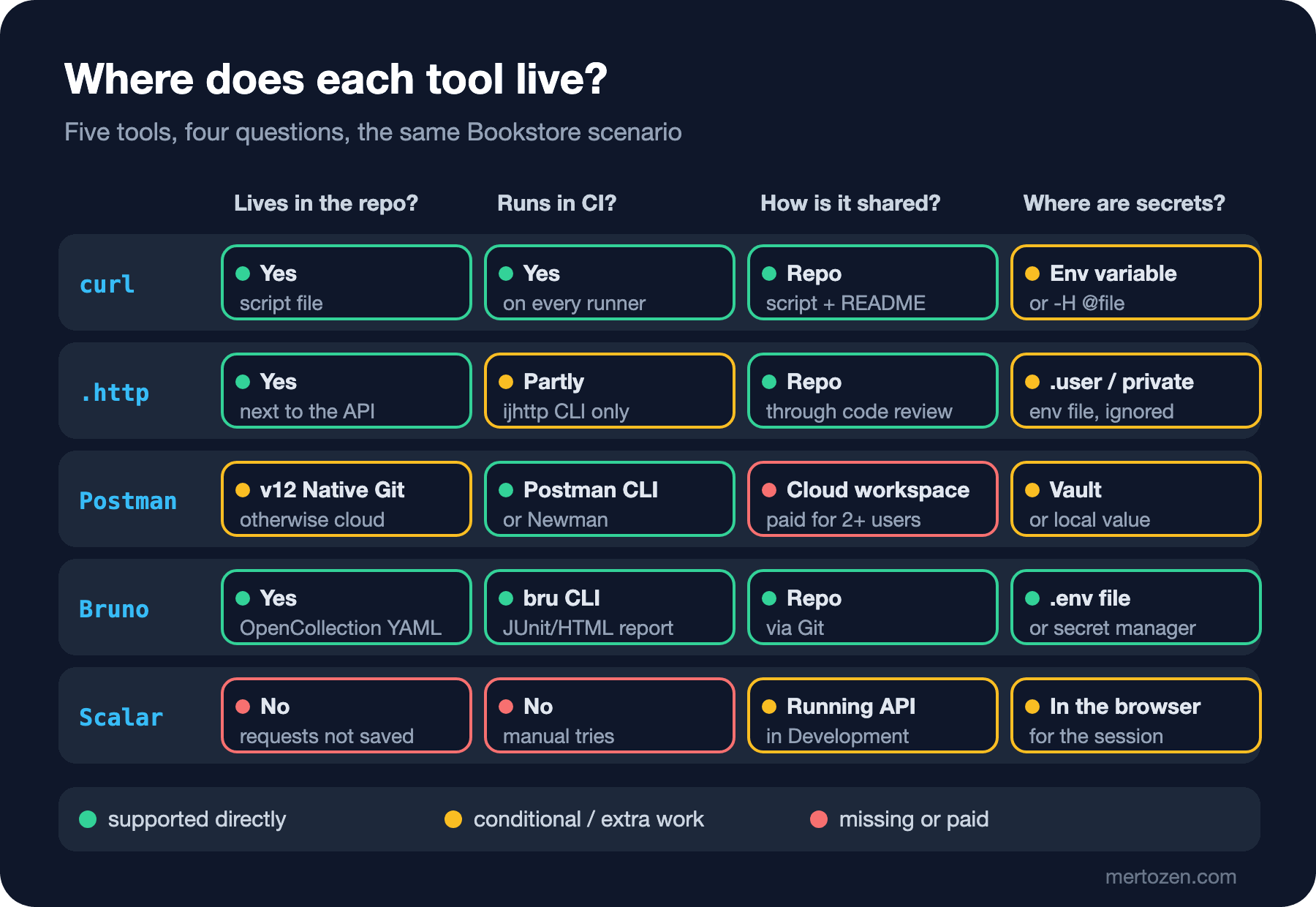
A request definition that lives in the repo changes in the same commit as the API code. In the opening example, the developer who adds a required field to POST /api/orders also updates the .http file or Bruno's YAML file in the same pull request; the reviewer sees both side by side in the diff. When you switch branches, the requests switch to that branch's state too. A collection in the cloud has its own version line, independent of the code: the API changes, the collection stays stale for a while, and the first to notice is whoever gets a 400 the next morning. That is the answer to the opening question: the change only shows up in the definitions in the repo. Emre's history and Ayşe's cloud collection keep sending the old body the next morning.
Postman closed this gap with Native Git in v12: when you open "Local View" in the desktop app, collections are written as YAML files in Collection 3.0 format into a postman/ folder in the repo, and pushed to the cloud side to share with the team. That moves Postman into the "conditional" column of the matrix; I will describe how it works from Postman's documentation in the fourth post. Bruno has been file-based from the start, and since version 3.1 it saves new collections in the OpenCollection YAML format.
Secrets are a separate axis. With curl the token sits in an environment variable or a file. .http files have a user file that is not committed (http-client.env.json.user, or http-client.private.env.json in Rider). In Postman a variable's shared value syncs to the cloud while its local value does not; for real secrets there is Postman Vault. Bruno keeps secrets in a .env file or in a secret manager. The same rule applies to every tool: no token, password or API key in a file that goes into the repo. In the relevant posts we will see, with real examples, how each tool breaks this rule.
Cost: Postman's 2026 Plans and Bruno
According to Postman's documentation, the plans changed in March 2026: the free plan is now limited to one user and cannot create a team. Before that, the free plan could invite up to three people. The table I saw on the pricing page on 14 November 2026: Free at 0 dollars for 1 user, Solo at 9 dollars a month billed annually for 1 user, Team at 19 dollars per user per month billed annually, and Enterprise through sales. With the same change, collection runs and mock server usage became unlimited on all plans; on the free plan API monitoring is limited to 1,000 requests a month.
In practice: a two-person team that wants to edit the collection together in the Postman cloud has to move to the Team plan. Or it puts the collection into the repo as JSON or YAML and leaves sharing to Git. That second route moves Postman closer to Bruno in the matrix.
Bruno's core is open source under the MIT license, and so is its CLI (@usebruno/cli). The app has Pro (6 dollars per user per month billed annually), Ultimate (11 dollars) and Enterprise (18 dollars) editions. According to the pricing page, some operations of the in-app Git UI, unlimited workspaces and some integrations are in the paid editions. Since collection files are ordinary files, committing them with your own git commands works in every edition. .http files and curl cost nothing extra, but the CI side of .http files is weak: Visual Studio has no CLI, and JetBrains' ijhttp runs its own dialect. I will show this difference with a real run in the third post.
Which Tool for Which Need
| Need | First choice | Why |
|---|---|---|
| A quick look at a new endpoint | Scalar or a one-line curl | No setup, comes ready from OpenAPI |
| Reproducing a bug, attaching it to an issue | curl | Available on every machine; DevTools gives it via "Copy as cURL" |
| Running the same flow from the IDE every day | .http file | Lives next to the API project, goes through code review |
| A scripted collection shared with frontend and QA | Bruno or Postman | Request chaining, assertions, environment management |
| Building Angular against an endpoint that does not exist yet | Postman mock server | Returns the saved example responses in the collection |
| Running the flow in CI and getting a report | Bruno CLI, Postman CLI or Newman | JUnit report, exit code, environment file |
You do not have to commit to a single tool; a sensible setup for the Bookstore team would be: backend developers keep .http files next to the API project, the shared flow lives in the repo as a Bruno collection and runs in CI, quick exploration happens in Scalar, and bug reports come with a curl command. The same logic holds for a team that already uses Postman: move the collection into the repo and run it in CI with the Postman CLI.
In Production
All of these tools end up sending requests to a real API, and the most common mistake is sending them to the wrong environment. If a collection takes baseUrl from the environment, leaving production selected in the environment picker sends a DELETE request to real data. Keep a separate, read-only environment for production, or do not put production in these tools' environment lists at all.
The second risk is the traffic these tools send ending up in logs. Access logs of reverse proxies and web servers usually write the URL including its query string; if a tool sends the token in the query string (?access_token=...), the token lands in the log file. Always send the token in the Authorization header, and do not accept tokens from the query string on the API side.
Third, where the OpenAPI document and Scalar are exposed. Bookstore.Api maps both only in Development. If you want them on staging as well, make that a separate decision and put them behind authentication; the document itself is an endpoint inventory for an attacker (the API Security series post "API8 and API9: Misconfiguration and Inventory" covers this).
Common Pitfalls
Choosing the tool by popularity. "Everybody uses Postman" may be true, but if the team will share the collection in the cloud, that now needs a paid plan; know this when you choose the tool, not when the budget is discussed.
Mistaking manual checks for tests. A collection can have a hundred requests and two hundred pm.test calls; these are checks from outside the API, over the real network, and they do not show you in a debugger which line broke. Lasting behaviour checks belong in WebApplicationFactory tests; collections should stay as a way to confirm the flow works end to end.
Importing from OpenAPI once and forgetting about it. An imported collection is a copy of the document at that moment; it drifts as the API changes. Postman and Bruno need a re-import or a sync, and that is not always smooth (posts four and five).
Writing the token into the tool's saved file. The most common form: a line like @token = eyJhbGciOi... in an .http file, or a production token left as a shared value in a Postman environment. The middle part of a JWT is easily read with base64; the payload of the token I got in the curl flow above was:
{"aud":"bookstore-clients","iss":"bookstore-api","exp":1794647336,"iat":1794646436,"nbf":1794646436,"sub":"ada@example.com","email":"ada@example.com","name":"Ada Lovelace","role":"Customer"}The token is not encrypted, only signed; anyone can use a token that lands in the repo until it expires, and read the information inside it.
A Small Experiment
★☆☆ Run Bookstore.Api and open http://localhost:5080/scalar. Get a token as grace@example.com with POST /api/auth/login, paste it into Scalar's auth field and see that GET /api/auth/me returns the StoreStaff role.
★★☆ Place an order with Ada's token, then read the same order with GET /api/orders/{id} using Grace's token. Then change appsettings.Development.json to add a second customer (role Customer) and confirm that this user cannot read Ada's order and gets a 404. Think about why it returns 404 rather than 403.
★★★ Fill in this post's matrix for your own team: your tools as rows, the four questions as columns. For every cell in the "Where are secrets?" column you are unsure about, run git log -p -S "Bearer ey" in the repo and check whether a token was ever committed.
In the next post we start with the first row of this table: methods, headers, --json, authentication, file uploads and error codes with curl; then we turn the same flow into a script that can run in CI and stops with the right exit code when something fails.