

Incident Management: Severity, Incident Commander, Communication and Mitigation First
Incident management means running an outage from a single decision point, the incident commander, and stopping the customer impact before looking for the cause; severity definitions, roles and levers are prepared in advance. We add a payment timeout and a kill switch that need no restart to Bookstore, play a tabletop exercise in the lab where the payment provider first slows down and then fails, and measure the effect of every decision.
Version note: The examples in this post were tried in the lab with .NET 10, Prometheus 3.16.0 and SQL Server 2025; the commands were run with bash. The human decisions in the tabletop exercise were scripted in advance; no status page or chat tool was used.
Guess First
It is 22:10 UTC. The payment provider of Bookstore, the online bookstore used as the shared example across this site's series, has started answering every request after 4 seconds, while Bookstore.Api waits at most 3 seconds for a payment. The result: every checkout gets a 502 after 3 seconds, the order is cancelled and the customer's cart is deleted. Emre, the on-call engineer, has four options: wait for the provider to recover, restart the API, raise the payment timeout, or switch checkout off for a while. Which one do you do first, and which one never? Second question: is this an incident, and if so, what is its severity? Third: if a few minutes later the provider fails completely (a 503 for every request), does your decision change? The answers are in the tabletop exercise in the middle of the post.
Declaring an Incident
The runbook in the previous post covered the first five minutes of an alert: one person, one alert, known causes. An incident is an outage that is bigger than one person and needs coordination. Incident management is the set of rules agreed in advance for that: its goal is not to solve the technical problem but to make sure the people solving it do not get in each other's way, nobody is left uninformed and decisions come from one place.
The first decision is whether this is an incident at all. The "Managing Incidents" chapter of Google's SRE book suggests three questions: do you need a second team to fix the problem, is the outage visible to customers, is the issue still unsolved after an hour of concentrated analysis? One yes is enough. The same chapter explicitly recommends declaring early: declaring an incident and closing it with a simple fix beats setting up a process from scratch hours later.
Bookstore's rule is these three questions adapted to the team, and it lives in the repository as docs/incidents/README.md:
## Declare early
Declare an incident (post in `#incident` and start a document from `TEMPLATE.md`) if any of these is true:
- Customers can see the problem (checkout, search or the institutional portal fails or is clearly slow).
- A second person or another team is needed to fix it.
- The on-call has not found a cause or a mitigation in 30 minutes.
- A runbook says so (e.g. checkout error ratio above 50 % for 15 minutes).

Declaring costs one message. Closing a small incident after ten minutes is fine; a late declaration is not.
The low threshold is deliberate. Declaring costs one message; declaring late costs a night in which nobody told the customers, two people changed different things at the same time and afterwards nobody remembers what was done when.
Severity Levels
Severity decides how many people are called, when customers are told and whether a postmortem is needed. The scale differs between companies; most add a number to "SEV" or "P", and a lower number means more severe. PagerDuty's open incident response documentation defines five levels. What matters is that each level is defined concretely by user impact. "Critical problem" is useless at 02:00; "more than half of the checkouts have been failing for 5 minutes" is not. Bookstore uses four levels, from SEV1, the most severe, to SEV4, no customer impact yet.
| Level | Meaning for Bookstore | Example | Response |
|---|---|---|---|
| SEV1 | Most customers cannot buy, or data or money is wrong | more than 50 percent of checkouts have failed for 5 minutes; a payment charged twice | an IC at once, all hands, status page within 15 minutes, then an update every 30 minutes |
| SEV2 | A critical journey is broken for some customers | more than 10 percent of checkouts have failed for 15 minutes; the institutional portal is down | an IC at once, status page within 30 minutes, then an update every 30 minutes |
| SEV3 | Small impact, or a workaround exists | search is slow in one category; a back office report fails | the on-call handles it, no IC needed |
| SEV4 | No customer impact yet | a disk fills up slowly; a certificate expires in 10 days | ticket |
Two rules matter as much as the table. First, if you are not sure, pick the higher level: PagerDuty's documentation also says to take the higher one when you cannot decide between SEV2 and SEV1. Second, severity is not debated during the incident; that debate belongs to the postmortem. This also answers the second question of Guess First: all checkouts fail and customers see it, so it is a SEV1.
Roles: The Incident Commander and the Others
The most important role in an incident is the incident commander, the IC: the person who runs the incident and makes the final call. Google's incident management comes from the Incident Command System that firefighters developed for large fires, and the core idea of that model is a single decision point. The IC does not run commands or watch dashboards; the IC decides, hands out work by name, sets the time of the next update and declares the end of the incident. Two practical tips from PagerDuty's IC training documentation: do not hand out work as "can someone look at this?" but by name and with a time box, "Ayşe, check the provider's status page within 10 minutes and get back to me"; and when you make a decision, do not ask "does everyone agree?" but "are there any strong objections?".
The other roles are the ops lead, the only person or group who investigates and changes production; the comms lead, who keeps the status page, customer support and management informed; and the scribe, who keeps the timeline.
The three-person Bookstore team does not have four separate people. Combining roles is normal, but it must be clear who wears which hat. At Bookstore the on-call engineer who got the page becomes the ops lead; the second person to join becomes the IC and also keeps the timeline; Selin, the product owner, is the comms lead. Handing over the IC role is said out loud too: "I am handing over IC to Ayşe." "I am IC." A silent handover means a call where two people think they are the IC, or nobody is.
Mitigation First, Root Cause Later
During an incident the goal is not to find the cause but to stop the impact on customers. The "Managing Incidents" chapter of the SRE book puts the priority in one sentence: "Stop the bleeding, restore service, and preserve the evidence for root-causing." Google's SRE Workbook calls these quick interventions generic mitigations: rough but fast steps that can be taken before the cause is fully understood. A rollback, moving traffic to another region, adding capacity and a kill switch, a setting that turns a feature off at once without a deploy, are examples.
A generic mitigation only works if it was prepared before the incident; building a new deploy at midnight is not a mitigation but a second risk. Bookstore had no such lever on the payment side: in the Payments module we wrote in the second post of the series, the timeout was set once at startup through HttpClient.Timeout, and the only way to switch checkout off was a deploy. In this post we add two levers. Both are read from a small file next to the application, without a restart:
// Bookstore.Api/Program.cs
WebApplicationBuilder builder = WebApplication.CreateBuilder(args);
// Incident levers (kill switch, payment timeout) live in their own small file that is watched for changes.
// Added last, so it wins over appsettings*.json and environment variables. See docs/incidents/levers.md.
builder.Configuration.AddJsonFile(builder.Configuration["SwitchesFile"] ?? "switches.json", optional: true, reloadOnChange: true);
// Bookstore.Api/Payments/PaymentsOptions.cs
// Bound to the "Payments" section. TimeoutSeconds and CheckoutEnabled are incident levers: they are read on every
// checkout through IOptionsMonitor, so a change in switches.json takes effect without a restart or a deploy.
public sealed class PaymentsOptions
{
public const string SectionName = "Payments";
[Required]
public Uri? BaseAddress { get; set; }
// How long one authorization may take before the checkout gives up and answers 502.
[Range(1, 30)]
public int TimeoutSeconds { get; set; } = 3;
// Kill switch: false stops checkouts before an order is created (503 + Retry-After, the cart is kept).
public bool CheckoutEnabled { get; set; } = true;
}The timeout now belongs to each call's own CancellationTokenSource instead of the HttpClient. IOptionsMonitor returns the new value when the file changes, and the next call uses it:
internal sealed class PaymentGatewayClient(HttpClient http, IOptionsMonitor<PaymentsOptions> options) : IPaymentGateway
{
    public async Task<PaymentResult> AuthorizeAsync(PaymentRequest request, CancellationToken ct)
    {
        // Read on every call: an incident commander can raise the timeout in switches.json without a restart.
        using CancellationTokenSource timeout = CancellationTokenSource.CreateLinkedTokenSource(ct);
        timeout.CancelAfter(TimeSpan.FromSeconds(options.CurrentValue.TimeoutSeconds));

        using HttpRequestMessage message = new(HttpMethod.Post, "/v1/charges")
        {
            Content = JsonContent.Create(new { request.OrderId, request.Amount, request.Currency })
        };
        message.Headers.Add("Idempotency-Key", $"order-{request.OrderId}");

        using HttpResponseMessage response = await http.SendAsync(message, timeout.Token);
        response.EnsureSuccessStatusCode();
        return await response.Content.ReadFromJsonAsync<PaymentResult>(timeout.Token)
            ?? throw new InvalidOperationException("The payment provider returned an empty body.");
    }
}
The kill switch is checked at the very start of the checkout, before anything is written to the database. The place is deliberate: in the existing flow the order is first stored as PaymentPending and the cart is deleted, and if the payment fails the order is cancelled. So every failed payment also costs the customer the cart. With the kill switch on, no order is created, no stock is reserved, the cart stays where it is and the customer gets a clear message without waiting 3 seconds:
public async Task<PlaceOrderOutcome> PlaceOrderAsync(PlaceOrderRequest request, CancellationToken ct)
{
    // Kill switch, checked before anything is written: no order, no reservation, the cart stays as it is.
    if (!paymentOptions.CurrentValue.CheckoutEnabled)
    {
        return new PlaceOrderOutcome.CheckoutPaused();
    }
    ...
}

// OrderingModule.PlaceOrder
PlaceOrderOutcome.CheckoutPaused =>
    TypedResults.Problem("Checkout is paused while the payment provider has problems. Your cart is kept; please try again in a few minutes.",
        statusCode: StatusCodes.Status503ServiceUnavailable),
In this case the endpoint also adds a Retry-After: 300 header. This 503 still counts as a failure in the SLI; the kill switch does not save the error budget, it makes the customer's loss smaller. A new integration test pins this behavior (503, Retry-After, cart and stock unchanged); 13 of 13 tests pass. Where the kill switch fits in a deployment strategy is in the "Rollback or Roll Forward?" post of the Deployment Strategies series, and choosing the right timeout value is in the reliability patterns post of the System Design series; here we only care about having them ready during an incident.
Tabletop Exercise: When the Payment Provider Slows Down
A tabletop exercise is the team playing an outage scenario step by step around a table: one person tells the scenario, the others answer "what do I do now?" according to their roles. We played the scenario in the lab on the real system: the fake payment provider, the traffic tool producing about 228 checkouts a minute (4 user journeys per second), Prometheus and the SLO alerts from the earlier posts. Ayşe took the IC role, Emre was the ops lead and Selin the comms lead. The human decisions were written into the scenario in advance and applied at fixed minutes; everything measured comes from the real run. These were the scenario steps and the decisions (the API was started with the SwitchesFile setting pointing at switches.json):
# 22:09:47 scenario: the provider answers every charge after 4 seconds (Bookstore's payment timeout is 3 seconds)
curl -X PUT http://localhost:5090/admin/faults -H "content-type: application/json" -d '{"slowRatio":1,"slowDelayMs":4000}'
# 22:14:47 IC decision: the provider is slow but answers, raise the timeout to 6 seconds
echo '{ "Payments": { "TimeoutSeconds": 6, "CheckoutEnabled": true } }' > switches.json
# 22:19:47 scenario: the provider answers 503 to every charge
curl -X PUT http://localhost:5090/admin/faults -H "content-type: application/json" -d '{"failRatio":1}'
# 22:21:47 IC decision: a timeout cannot fix a 503, kill switch
echo '{ "Payments": { "TimeoutSeconds": 6, "CheckoutEnabled": false } }' > switches.json
# 22:25:47 scenario: the provider is healthy again
curl -X PUT http://localhost:5090/admin/faults -H "content-type: application/json" -d '{"failRatio":0.001,"slowRatio":0.002,"slowDelayMs":1500}'
# 22:27:47 closing: the levers go back to their defaults
echo '{ "Payments": { "TimeoutSeconds": 3, "CheckoutEnabled": true } }' > switches.json
The relevant lines of the traffic tool's per-minute summary (we removed the search, book, cart and health columns; each line summarizes the minute before the time it was written):
22:09 UTC checkout=228 5xx=0 slowest-checkout=158ms
22:10 UTC checkout=216 5xx=216 slowest-checkout=3106ms
22:14 UTC checkout=228 5xx=228 slowest-checkout=3032ms
22:15 UTC checkout=225 5xx=12 slowest-checkout=4032ms
22:16 UTC checkout=227 5xx=0 slowest-checkout=4067ms
22:19 UTC checkout=228 5xx=0 slowest-checkout=4038ms
22:20 UTC checkout=244 5xx=228 slowest-checkout=4021ms
22:21 UTC checkout=228 5xx=228 slowest-checkout=34ms
22:22 UTC checkout=228 5xx=228 slowest-checkout=7ms
22:27 UTC checkout=228 5xx=228 slowest-checkout=1ms
22:28 UTC checkout=228 5xx=3 slowest-checkout=1631ms
22:29 UTC checkout=228 5xx=1 slowest-checkout=154ms
We also read the order statuses from the database every half minute; the summary lines:
SELECT Status, COUNT(*) FROM ordering.Orders GROUP BY Status;  SELECT COUNT(*) FROM ordering.Carts;

22:09:04  Cancelled 1     Paid 748                    carts 0
22:15:07  Cancelled 1141  Paid 973   PaymentPending 15  carts 0
22:19:09  Cancelled 1142  Paid 1893  PaymentPending 15  carts 0
22:22:11  Cancelled 1599  Paid 2050                   carts 92
22:27:13  Cancelled 1599  Paid 2050                   carts 1241
22:32:16  Cancelled 1600  Paid 3071                   carts 1370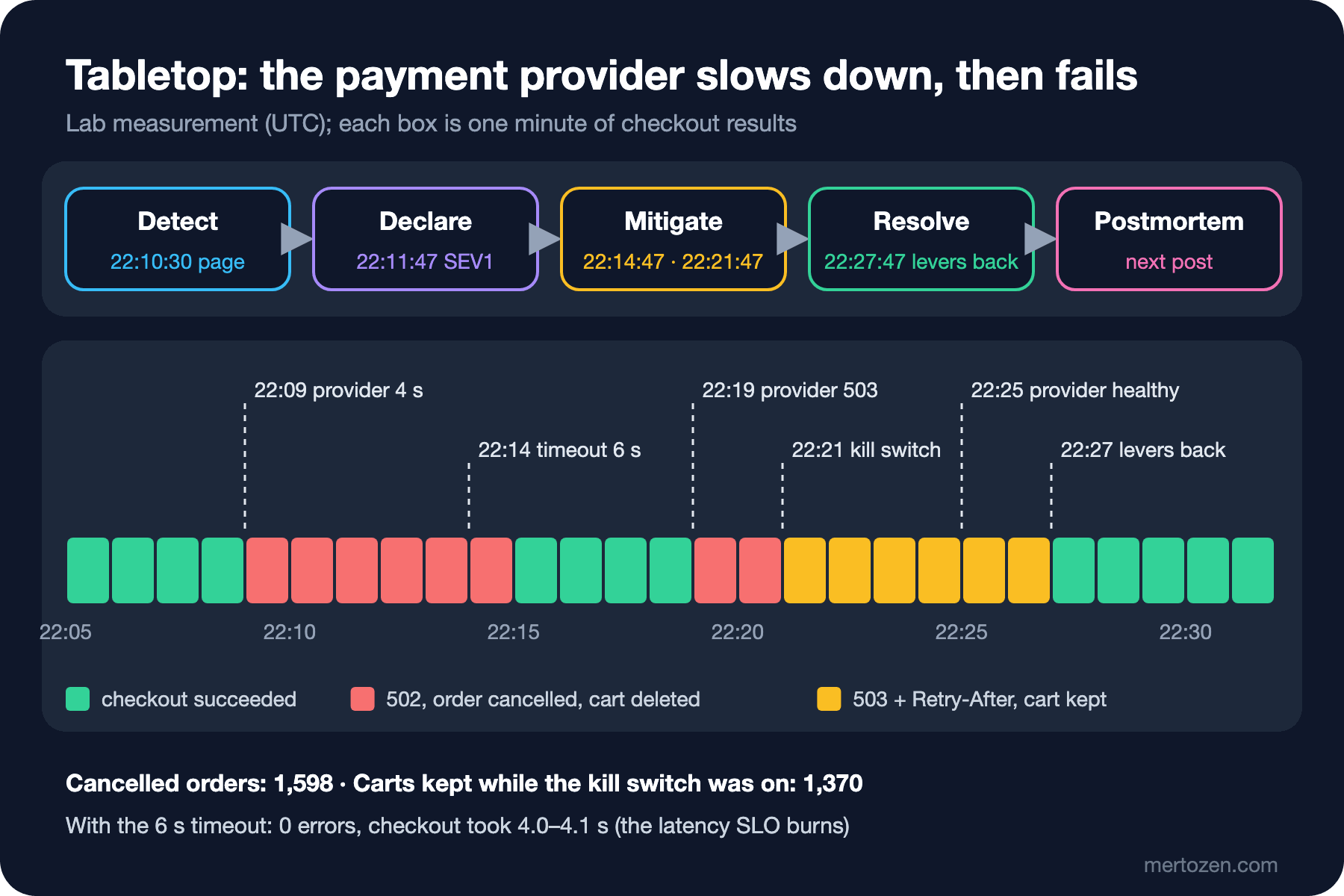
The numbers answer Guess First. While the provider was slow (22:09:47–22:14:47), every checkout got a 502 after about 3.1 seconds and 1,140 orders were cancelled in five minutes; each one a customer's deleted cart. The lever that raised the timeout to 6 seconds brought the errors to zero within a minute: no 5xx after 22:16, the slowest checkout took 4.07 seconds. No restart was needed. The price is the latency SLO: for the 800 ms latency SLO every checkout in those five minutes counted as "slow". It is a deliberate trade: a customer who waits 4 seconds and pays is better off than one who waits 3 seconds and loses the cart.
When the provider started answering 503 (22:19:47), the timeout lever no longer meant anything: the errors now came within milliseconds, and 457 more orders were cancelled in two minutes. After the kill switch went on, checkout answered 503 within 1–7 ms, the number of cancelled orders stopped at 1,599 and the carts stayed; 1,370 carts were kept until the kill switch was turned off. A checkout's answer under the kill switch:
HTTP/1.1 503 Service Unavailable
Content-Type: application/problem+json
Retry-After: 300

{"type":"https://tools.ietf.org/html/rfc9110#section-15.6.4","title":"Service Unavailable","status":503,"detail":"Checkout is paused while the payment provider has problems. Your cart is kept; please try again in a few minutes.","traceId":"00-1ee648b3ee0a7e2034d3ac92b73879c0-4bf0f99da7ab89cc-02"}
The intervals read from the ALERTS series: the 6-hour page from 22:10:30 to 22:33:00, the 1-hour page 22:10:45–22:19:30 and 22:20:45–22:32:30. The page firing after 43 seconds comes from the lab's short windows (explained in the fourth post of the series); in production it takes a few minutes. The real observation is this: the page did not stop while the kill switch was on, because a 503 is also a failed checkout in the SLI. The page does not answer "is the mitigation working?"; for that the IC has to look at the number of cancelled orders and the ratio of 502 to 503.
The most important gap the tabletop found was not in the plan. The provider recovered at 22:25:47, but we did not see it: with the kill switch on, Bookstore.Api never calls the provider, so the query in step 3 of the runbook comes back empty. Calls to the provider between 22:21:40 and 22:25:40:
sum by (server_address, http_response_status_code, error_type) (increase(http_client_request_duration_seconds_count{job="bookstore-api", server_address="127.0.0.1"}[4m]))

{http_response_status_code="200", server_address="127.0.0.1"} 0
{error_type="503", http_response_status_code="503", server_address="127.0.0.1"} 0
{error_type="System.Threading.Tasks.TaskCanceledException", server_address="127.0.0.1"} 0
The levers were set back at 22:27:47, after the two-minute delay in the scenario; in those two minutes 456 checkouts got a 503 while the provider was already healthy. A kill switch creates its own blind spot: to see that the dependency you switched off has recovered you need a separate signal, the provider's status page or a small synthetic payment attempt that keeps running while the kill switch is on. This will be one of the action items of the postmortem in the next post.
The scribe's timeline is in the repository as docs/incidents/2026-11-14-tabletop-payment-provider.md. A part of it:
| Time | Who | What |
|---|---|---|
| 22:09:47 | scenario | Provider answers every charge after 4 s; our payment timeout is 3 s. Every checkout gets 502 after about 3 s. |
| 22:10:30 | Prometheus | CheckoutErrorBudgetBurn (6h, page) fires; 1h page at 22:10:45. |
| 22:11:47 | Ayse | Incident declared, SEV1 (all checkouts fail). Ayse IC, Emre ops lead, Selin comms lead. |
| 22:12 | Emre | Runbook step 3: provider calls end in TaskCanceledException, no status code. Provider is slow, not down. |
| 22:14:47 | Emre | Lever: Payments:TimeoutSeconds 3 → 6. |
| 22:21:47 | Emre | Lever: Payments:CheckoutEnabled → false (decided by Ayse: raising the timeout cannot help a 503). |
| 22:25:47 | scenario | Provider healthy again. We did not see it: with the kill switch on, nothing calls the provider. |
| 22:27:47 | Emre | Levers back to default (3 s, enabled). 456 checkouts got 503 while the provider was already healthy. |
Every line is a fact or a decision, with a UTC time and an owner; "something seems wrong with the provider" is not a line. This also answers the first question of Guess First: raise the timeout first (the provider is slow but answers), never restart; switch to the kill switch once the provider fails completely. Severity SEV1.
Communication: One Channel, the Status Page and the Next Update
Inside the company the rule is simple: one incident, one channel. At Bookstore every incident gets a chat channel named #incident-<date>-<topic> and a document copied from docs/incidents/TEMPLATE.md. The SRE book describes this document as the living incident document that several people edit at the same time during the incident; it may be messy but it must be useful, and it becomes the raw material of the postmortem.
# Incident: <short title>

Status: Investigating | Mitigated | Resolved · Severity: SEV<n> · Started: <UTC> · Declared: <UTC>
IC: <name> · Ops lead: <name> · Comms lead: <name> · Scribe: <name>
Channel: #incident-<yyyymmdd>-<topic> · Status page: <link>

## Now (the IC keeps this up to date)
- Impact: who cannot do what, since when, how many.
- Current hypothesis and what is being tried.
- Next update: <UTC>.

## Timeline (UTC, one line per fact or decision)
| Time | Who | What |
|---|---|---|

## Levers changed (must be reverted before close)
| Time | Lever | From → To | Reverted at |
|---|---|---|---|

## After
- Postmortem needed? (SEV1/SEV2, or more than 20 % of a 30-day error budget) Owner and date:
The "Levers changed" table was added after the tabletop: every lever changed during the incident must be set back before closing, with the time it was set back. A forgotten kill switch keeps stopping sales after the incident is over.
External communication has two rules. First, do not promise anything you are not sure of; write "next update at 22:45" instead of "fixed in 30 minutes". Atlassian's Statuspage templates also end every message (Investigating, Identified, Monitoring, Resolved) with the time of the next update. Second, the frequency depends on the severity and is written down in advance: at Bookstore a SEV1 gets a status page message within 15 minutes and then an update every 30 minutes, even when there is nothing new to say. The status page itself must also live somewhere independent of Bookstore's infrastructure; in the eighth post of the series we will see in the Cloudflare and Google Cloud cases why that matters.
In Production
Levers are tested like code. Ours were tried in an integration test and in the tabletop; docs/incidents/levers.md records when each lever was last tried. An untried lever can start a second incident.
The levers are a configuration change themselves. switches.json reaches all instances at once, and a wrong value affects all of them at once. We measure what happens when the file is broken or invalid in the eighth post of the series.
Being an IC is a skill and needs practice. Having everyone on the team take the IC role at least once in a tabletop is much cheaper than trying the role for the first time on a real night.
Common Pitfalls
Everyone debugging. When five people read logs and try different fixes at the same time, nobody knows what happened. Only the ops lead changes production; the others post what they find in the channel.
The IC taking the keyboard. When the IC starts debugging, decisions and communication stop; for a while nobody is running the call.
Mistaking a restart for a mitigation. In the tabletop a restart would have fixed nothing and only dropped the checkouts in flight.
Forgetting the levers when closing. A kill switch or a raised timeout left on after the incident is a new incident.
A Small Experiment
★☆☆ Write a severity table for your own team. Define every level by user impact and a number (without using the word "critical"), and add when the status page is updated for each level.
★★☆ In the lab, set the fake payment provider's slowDelayMs to 4000 and raise TimeoutSeconds to 6 in switches.json. Watch the burn rate of the checkout latency SLO (800 ms) in Prometheus: how fast does this lever spend the latency budget while it protects the availability budget? At what point is the kill switch the better choice?
★★★ Run a 30-minute tabletop exercise with your team. Scenario: the payment provider slows down and fails completely 10 minutes later. One person is IC, one ops lead, one comms lead; write the timeline into TEMPLATE.md. At the end answer three questions: how many minutes did it take to declare, which lever was missing, when did the first message go to the status page?
The incident is closed and the levers are back. What is left is to write down what happened, why, and what we will do so it does not happen again, and to follow up on it. In the next post we cover the postmortem process, the review meeting, action item tracking and why incident metrics such as MTTR can mislead, using the postmortem of this tabletop.