

How HTML Works: The Living Standard, Document Structure and the Forgiving Parser
HTML has no version: the WHATWG's continuously updated Living Standard is the reference, and Baseline tells you whether you can use a feature. In this post we look at the minimal valid document, the element/attribute/void element/content model concepts and how the parser silently repairs broken markup, with real DOM output from Chromium and WebKit, and catch the errors with the Nu Html Checker.
Version note: This post follows the HTML (HyperText Markup Language) Living Standard and Baseline as of November 2026; the examples were run with Chrome 158, WebKit 27.2 (Playwright 1.65) and Nu Html Checker 26.11.9.
Guess First
Someone wrote this line to show the price on the Bookstore book detail page:
<p>Price: <div class="price">42.50 USD</div></p>The page looks fine in the browser and the price is where it should be. The question: how many <p> elements does the browser put into the DOM (Document Object Model) for this line? One, two, zero? And does the div with the .price class stay inside the p?
Write down your guess; halfway through the post we will see the output from two different browser engines. This is the first post of the series. The series is about choosing the right element for the right meaning, but first we need the ground floor: who defines HTML today and how, what the smallest valid document looks like, and how the browser turns your markup into a tree. The last part in particular shows why the "it looks right in the browser, so it is right" habit is dangerous.
What Does "HTML5" Mean Today? The Living Standard and the W3C–WHATWG Agreement
Job ads still ask for "HTML5 (the fifth generation of HTML) skills", but nobody develops a separate HTML5 version any more. The short history: in 2004 Apple, Mozilla and Opera, unhappy with the W3C's (World Wide Web Consortium) XHTML (Extensible HyperText Markup Language) 2.0 direction, founded the WHATWG (Web Hypertext Application Technology Working Group) and started evolving HTML in a backward-compatible way. For a while the two bodies published parallel texts; the W3C's "HTML5" Recommendation came out in 2014. The WHATWG dropped the version number in 2011 and called its text the HTML Living Standard: one text, continuously updated, no sixth version coming.
The era of two parallel texts ended with the W3C–WHATWG Memorandum of Understanding signed on 28 May 2019. Under the agreement, the HTML and DOM standards are developed at the WHATWG through the Living Standard process; the W3C takes the Review Drafts the WHATWG freezes at intervals, endorses them through its own process and publishes them as Recommendations. So when you ask "what is the rule in HTML?" today, the place to look is html.spec.whatwg.org. "HTML5" survives as a label that in practice means "modern HTML", and that is the sense in which it appears in the series name.
This has a practical consequence: "which version of HTML are we using?" has no answer. You do not write a version in the doctype and the spec has no version. The right question is "which browsers support this feature today?", and that question now has a shared answer.
Baseline: The Answer to "Can I Use This?"
In an unversioned standard, a feature being in the spec does not mean you can use it. For example, the closedby attribute of the dialog element is in the spec; it has worked since Chrome 134 and Firefox 141, but Safari still does not have it. Instead of reading browser tables for every feature, the W3C's WebDX Community Group defined a shared label called Baseline.
Baseline's core browser set is Chrome, Edge, Firefox and Safari; Chrome and Firefox count on desktop and Android, Safari on macOS and iOS. A feature becomes "newly available" on the day it works in the current version of all of them. Thirty months after that date it becomes "widely available", on the assumption that most users on older versions have updated by then. A feature still missing in one browser has "limited availability".
Whenever this series recommends a feature, I will give its Baseline status as of November 2026. You can check the same sources in your own project: the Baseline box at the top of MDN (MDN Web Docs) pages and the web-features explorer site (web-platform-dx.github.io/web-features-explorer). For example, the <search> element we will use in the second post became newly available in October 2023 and moved to widely available in April 2026. A team rule such as "we use everything widely available without fallbacks and newly available features with progressive enhancement" reduces the debate to one sentence.
The Minimal Valid Document and the Core Concepts
Everything starts with the smallest Bookstore page that gets not a single warning from the Nu Html Checker:
<!doctype html>
<html lang="en">
<head>
    <meta charset="utf-8">
    <meta name="viewport" content="width=device-width, initial-scale=1">
    <title>Clean Architecture | Bookstore</title>
</head>
<body>
    <h1>Clean Architecture</h1>
    <p>Robert C. Martin</p>
</body>
</html>
Line by line. <!doctype html> is not an element; it tells the browser "process this page in standards mode". It is case-insensitive and contains no version; it is all that remains of the long DTD (Document Type Definition) lines of HTML 4. Forget the doctype and the browser processes the page in quirks mode: some CSS (Cascading Style Sheets) rules change to imitate browsers from the early 2000s. On a page without a doctype both Chrome and WebKit return BackCompat for document.compatMode; with the doctype they return CSS1Compat.
The lang attribute states the page language. Screen readers pick the pronunciation, the browser picks its translation offer and language-sensitive CSS rules such as text-transform: uppercase behave according to it. On a Turkish page without lang="tr", the uppercase form of "i" becomes "I" instead of "İ". The text in this example is English, so I wrote lang="en"; Bookstore's Turkish pages carry lang="tr".
<meta charset="utf-8"> declares the character encoding and must be within the first 1024 bytes of the file; the viewport meta stops mobile browsers from rendering the page at desktop width. Both are covered in detail in this series' post on the head and meta tags. <title> is the required child of the head; without it the Nu Html Checker reports an error.
This small example shows all four core concepts. An element is the building block made of a start tag, content and an end tag: <h1>…</h1>. An attribute is a name–value pair written in the element's start tag: lang="en". A void element is an element that cannot have content and therefore has no end tag; the list in the spec is short: area, base, br, col, embed, hr, img, input, link, meta, source, track and wbr. The content model is the rule that defines what may go inside each element. The spec groups content into categories such as flow content (almost everything that can go into the body) and phrasing content (text and text-level elements: a, em, code, span…). The content model of p is phrasing content. That is the hint to the guessing question: div is not phrasing content.
One last note: the <html>, <head> and <body> tags and the end tags of elements such as li, p and td are optional; the parser creates the elements even if you leave them out. To keep things readable, the examples in this series write all of them explicitly.
The Parser: From Tokenizer to DOM
The browser downloads HTML as text, but what it draws on the screen and what JavaScript reaches is a tree: the DOM. The HTML parser does this translation, and the spec defines it in two stages.
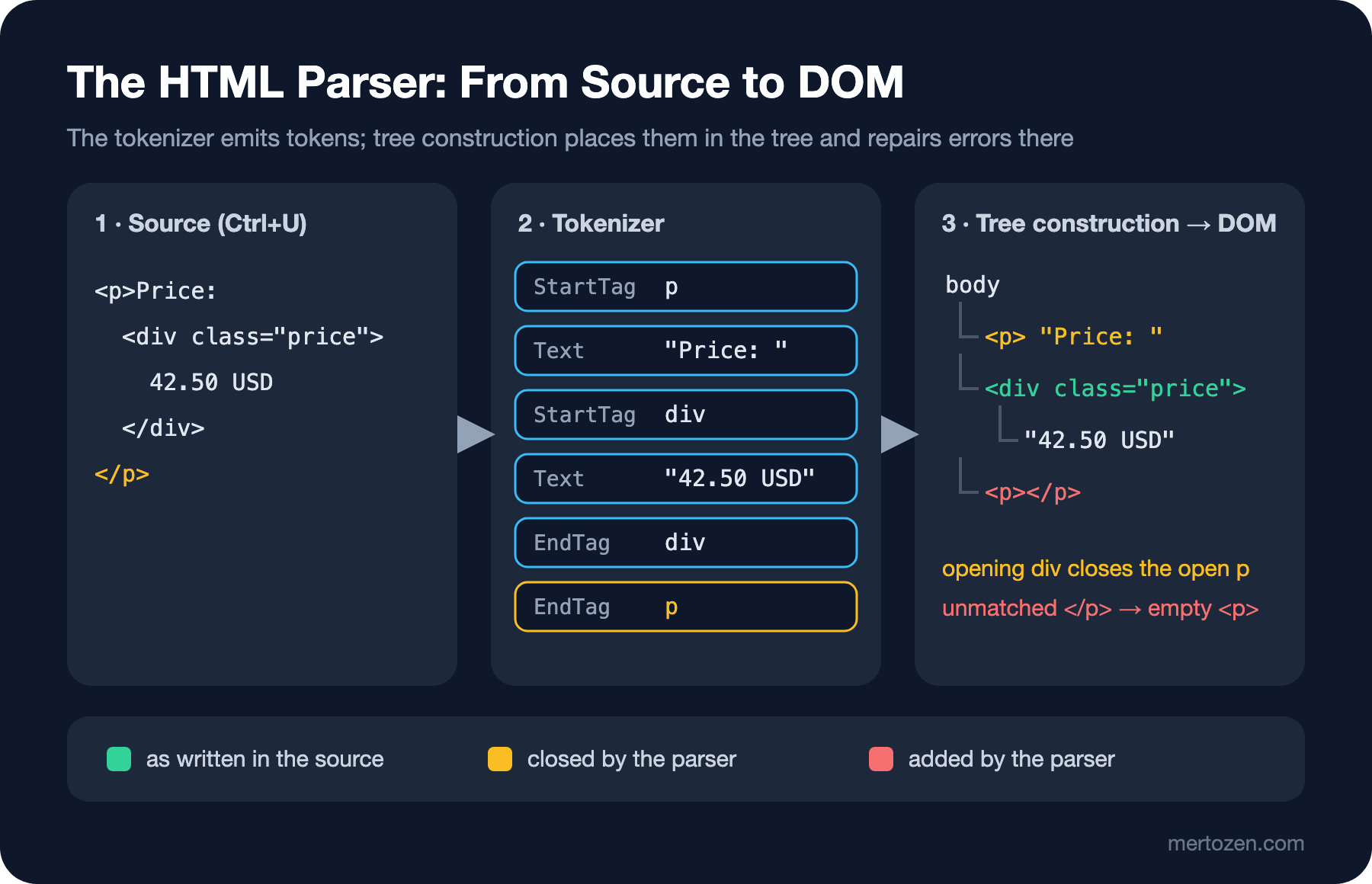
The first stage is the tokenizer. It reads characters one by one and emits tokens through a state machine: start tag (with its name and attributes), end tag, character, comment, doctype. The tokenizer knows nothing about structure; when it sees </p> it does not care whether a p is open, it just emits an "EndTag p" token.
The second stage is tree construction. It places each incoming token into the tree based on the current insertion mode (for example "in body", "in table") and the stack of open elements. This is where broken markup gets repaired. Every error case is defined in the spec: which element closes, which one is created, which one is moved elsewhere. This was one of the most important contributions of the HTML5 work: before, every browser repaired broken markup its own way; now all major engines implement the same algorithm. The same broken page produces the same DOM in Chrome and in Safari. That consistency is good news, but it is no guarantee that the DOM they produce is the tree you had in mind.
The Forgiving Parser: Three Real Examples
I combined the line from the guessing question with two more mistakes into one page. All three are common in real projects, especially in HTML produced by concatenating strings in the backend or by lines added to a template later:
<!doctype html>
<html lang="en">
<head>
    <meta charset="utf-8">
    <title>Clean Architecture - Bookstore</title>
</head>
<body>
    <h1>Clean Architecture</h1>
    <p>Price: <div class="price">42.50 USD</div></p>
    <table>
        <tr><th>Format</th><th>Stock</th></tr>
        <tr><td>Paperback</td><td>12</td></tr>
        <div class="note">Ships in 2 days</div>
    </table>
    <p><b>Bestseller <i>this week</b> in Software</i></p>
</body>
</html>
To see what the browser makes of it, I wrote a small Playwright script. It loads the page into Chromium and WebKit and prints the parsed body and the number of p elements in the DOM:
const { chromium, webkit } = require('playwright');
const fs = require('fs');

const source = fs.readFileSync(process.argv[2], 'utf8');

(async () => {
  for (const engine of [chromium, webkit]) {
    const browser = await engine.launch();
    const page = await browser.newPage();
    await page.setContent(source);
    // innerHTML serializes the parsed DOM, not the source
    const dom = await page.evaluate(() => document.body.innerHTML);
    const pCount = await page.locator('p').count();
    console.log(`--- ${engine.name()} ${browser.version()} | p elements: ${pCount}`);
    dom.split('\n').map(l => l.trim()).filter(Boolean).forEach(l => console.log(l));
    await browser.close();
  }
})();
> node dom-diff.js book.html
--- chromium 158.0.8127.18 | p elements: 3
<h1>Clean Architecture</h1>
<p>Price: </p><div class="price">42.50 USD</div><p></p>
<div class="note">Ships in 2 days</div><table>
<tbody><tr><th>Format</th><th>Stock</th></tr>
<tr><td>Paperback</td><td>12</td></tr>
</tbody></table>
<p><b>Bestseller <i>this week</i></b><i> in Software</i></p>
--- webkit 27.2 | p elements: 3
<h1>Clean Architecture</h1>
<p>Price: </p><div class="price">42.50 USD</div><p></p>
<div class="note">Ships in 2 days</div><table>
<tbody><tr><th>Format</th><th>Stock</th></tr>
<tr><td>Paperback</td><td>12</td></tr>
</tbody></table>
<p><b>Bestseller <i>this week</i></b><i> in Software</i></p>The answer to the guessing question: the price line yields two p elements and neither contains the div. When the parser sees the <div> start tag it notices an open p, and because div is not phrasing content it closes the p first. The div is added as a sibling. The </p> that follows has no open p left to close; for this case the spec says to create an empty <p></p>. If you see a one-line gap on a page and cannot find where it comes from, this empty paragraph is a likely suspect. And a p > .price selector matches nothing.
The second example is in the table. Only table elements such as caption, colgroup, thead, tbody, tfoot and tr may sit inside a table. When the parser is in the "in table" insertion mode and sees a div, it moves it right in front of the table using a rule called foster parenting. You expect the note below the table and it shows up above it. A tbody you never wrote appears as well: the parser always puts tr elements written directly inside a table into a table section. A table > tr selector written by someone who does not know this returns nothing either.
The third example is misnested formatting elements: an i opened inside b is closed after the b. The spec defines the adoption agency algorithm for this case: it closes the i at the end of the b and opens a new i outside the b. The rendering is nearly identical, but the DOM now has two separate i elements; when a CSS rule or a test selector works "halfway", a difference like this is often the reason.
Source or DOM? Seeing the Difference in DevTools
You can see this difference without a script. On Windows, in Chrome or Edge, Ctrl+U opens the source view: the text the server sent, as is. The Elements panel of DevTools, opened with F12 (the DevTools shortcut), shows the DOM: the tree as repaired by the parser and changed by JavaScript up to that moment. For the page above, the Elements panel shows div.note above the table and an empty <p></p> below the price line. The source view only highlights syntax; it does not show you parse errors, that is the validator's job.
The Elements panel is covered in detail in the first post of the Browser DevTools series. The rule is simple: the answer to "what is on the page?" is in the Elements panel, the answer to "what did the server send?" is in the source. When a selector or a test locator does not match, put the two side by side.
If you use Angular or another framework, the difference doubles: the framework builds the DOM itself, but the browser's rules do not change. When you put a div inside a p in a template, Angular's compiler may accept it, but when server-side rendered (SSR, Server-Side Rendering) HTML is parsed by the browser, the repair above still happens. Hydration then cannot find the DOM the framework expects; Angular's hydration guide says that a div inside a p, a table without tbody and nested a elements cause a DOM mismatch error, and recommends always writing the tbody explicitly. We will look at the HTML that frameworks produce in one of the last posts of the series.
Validating with the Nu Html Checker
The parser forgiving an error does not make the error go away; it just makes it silent. The tool that makes it loud is the Nu Html Checker (vnu), which also runs at the W3C's validator.w3.org/nu. This is its output for the same page:
:9.49-9.52: error: No “p” element in scope but a “p” end tag seen.
:12.47-13.26: error: Start tag “div” seen in “table”.
:12.47-13.26: error fatal: Cannot recover after last error. Any further errors will be ignored.
The first line points to the unmatched </p> in the price line with line and column numbers. The second finds the div in the table. The third is an important detail: the checker stopped after the table error, so it did not report the b/i problem. After turning the note in the table into a <tr><td colspan="2"> row and running it again, the next error shows up too:
:9.49-9.52: error: No “p” element in scope but a “p” end tag seen.
:15.34-15.37: error: End tag “b” violates nesting rules.
So do not run the validator once and conclude "there are three errors"; fix and repeat until you reach zero.
Another common mistake the validator catches is the self-closing tag written into plain HTML out of JSX (React's syntax extension for writing HTML-like markup inside JavaScript) or Angular template habits:
<!doctype html>
<html lang="en">
<title>x</title>
<img src="cover.jpg" alt="Cover" />
<div class="spacer" />
<p>Stock: 12</p>
:4.1-4.35: info: Trailing slash on void elements has no effect and interacts badly with unquoted attribute values.
:5.1-5.22: error: Self-closing syntax (“/>”) used on a non-void HTML element. Ignoring the slash and treating as a start tag.
:6.17-6.17: error: End of file seen and there were open elements.
:5.1-5.22: error: Unclosed element “div”.The / on a void element is harmless; the parser ignores it and the checker only adds an info note. But div is not void: the parser ignores the /, leaves the div open, and the rest of the page, here <p>Stock: 12</p>, ends up inside that div. In the DOM Chromium builds from this snippet, the p really is a child of div.spacer.
If you want to check the whole build output instead of pasting one file into the web UI, the checker's official Docker image does the job. On Windows in PowerShell, with Docker Desktop running:
docker run --rm -v "${PWD}/dist:/site" ghcr.io/validator/validator:latest vnu --errors-only /site"file:/site/book.html":9.49-9.52: error: No “p” element in scope but a “p” end tag seen.
"file:/site/book.html":12.47-13.26: error: Start tag “div” seen in “table”.
"file:/site/book.html":12.47-13.26: error fatal: Cannot recover after last error. Any further errors will be ignored.The command exits with exit code 1 when it finds errors, which makes it easy to put into a CI (Continuous Integration) step. --errors-only hides info notes and warnings. If you do not use Docker, the same checker is also distributed as vnu.jar and runs on Java.
In Production
Run the validator against the HTML that reaches the browser, not against source files. Feeding a Razor view or an Angular template straight to the validator makes no sense, because the @if blocks, Tag Helpers and component selectors have not turned into HTML yet. The right target is the output of the application: the build folder for a static site, or, if you render on the server, the HTML of a few critical pages fetched from the running application. For Bookstore that list is the home page, catalog, book detail, search results and checkout.
Second: not every checker message weighs the same. error lines are spec violations, and most of them, as you saw above, turn the DOM into a structure you did not expect. info warning lines (for example a missing lang) are advice. Breaking the build only on errors in CI at first, and reporting warnings to clean up over time, is a practical start. On a large application the first run can report hundreds of errors; recording that number and starting with a "this number must not grow" rule is more realistic.
Third: most parse errors come from code that builds HTML by concatenating strings: rich text from a CMS (Content Management System), a fragment built with StringBuilder in the backend, a string pushed into innerHTML. These sources produce both structural breakage and security holes; the security side is covered in the Frontend Security series.
Common Pitfalls
First, saying "it looks right in the browser, so it is right". Every example in this post looked fine in the browser. Even when the rendering holds up, the DOM is different; and CSS selectors, tests, screen readers and search engines look at the DOM, not at the rendering.
Second, forgetting the doctype. A single layout file missing the doctype sends every page that uses that layout into quirks mode; the symptom is box model calculations that are off on only some pages.
Third, using p as a general-purpose box. p means paragraph and only phrasing content goes inside it. The moment you put a div, ul, table or another p into it, the parser splits it.
Fourth, carrying JSX and framework template habits into plain HTML: writing <div />, <span /> or self-closing custom elements. For the HTML parser, these are elements left open.
A Small Experiment
★☆☆ Save the book.html from this post to a file on your machine, open it in Chrome and put the source (Ctrl+U) and the Elements panel (F12) side by side. Find the three places in the Elements panel where the parser moved, closed and added something; then delete the doctype at the top of the file and check document.compatMode in the DevTools Console.
★★☆ Give the same page to the Nu Html Checker and fix it until there are zero errors. If you want to keep the price inside the p, which element would you use instead of div? If you want to keep the note inside the table, which table element is the right place?
★★★ Run the Docker vnu --errors-only command against the build output of your project or the rendered HTML of a few critical pages. Group the errors by type and find which template or which code produces the three most frequent ones. Think about how you would apply a "the error count must not grow" rule to add it to CI.
In the next post we put meaning on top of this skeleton: we take the Bookstore book detail page out of "div soup", rebuild it with header, nav, main, article, section, aside, footer and search, and see which landmark each element becomes in the accessibility tree.