

Functional Dependencies and Anomalies: Why Does a Flat Table Break?
A flat table breaks because one row carries several independent facts together; insert, update and delete anomalies are the three faces of this. We load the order spreadsheet into SQL Server and show the three anomalies live, define functional dependencies, determinants and full, partial and transitive dependencies, compute the closure with a T-SQL procedure to find the candidate key, and show why discovering dependencies from data misleads.
Version note: The SQL (Structured Query Language) examples in this post were run on SQL Server 2025 (17.0, Cumulative Update 10).
Guess First: Which One Is Ada's Phone?
I loaded the order spreadsheet we met in the first post of the series into SQL Server as it is. Every Excel column is a table column, every row an order; since the order number is the only thing we are sure is unique, it is the primary key:
CREATE TABLE dbo.order_sheet (
    order_no         INT           NOT NULL PRIMARY KEY,
    order_date       DATE          NOT NULL,
    customer         NVARCHAR(100) NOT NULL,
    email            VARCHAR(254)  NOT NULL,
    phone            VARCHAR(20)   NULL,
    city             NVARCHAR(50)  NULL,
    region           NVARCHAR(50)  NULL,
    shipping_address NVARCHAR(200) NULL,
    isbns            VARCHAR(500)  NOT NULL,
    books            NVARCHAR(1000) NOT NULL,
    authors          NVARCHAR(1000) NULL,
    prices           VARCHAR(200)  NOT NULL,
    quantities       VARCHAR(100)  NOT NULL,
    total            DECIMAL(10,2) NOT NULL
);
SELECT order_no, customer, phone, isbns, books, prices, quantities, total
FROM dbo.order_sheet
ORDER BY order_no;order_no customer phone isbns books prices quantities total
-------- ------------ ---------------- ---------------------------- ------------------------------- -------------- ---------- -------
1001 Ada Lovelace +90 532 000 0001 9798900000268, 9798900000428 Dune, Good Omens 390.50, 340.90 1, 1 731.40
1002 Alan Turing +90 533 000 0002 9798900000572 The Pragmatic Programmer 1150.00 1 1150.00
1003 Ada Lovelace +90 532 000 0001 9798900000305, 9798900000268 The Left Hand of Darkness, Dune 660.00, 351.45 1, 2 1362.90
1004 Grace Hopper +90 535 000 0003 9798900000411 A Wizard of Earthsea 200.50 3 601.50
1005 Alan Turing +90 533 000 0002 9798900000428 Good Omens 340.90 1 340.90
(5 rows affected)Ada calls customer service and says her phone number has changed. The colleague in the support team opens Ada's latest order and updates the number there. Then someone pulls the "customer list":
UPDATE dbo.order_sheet SET phone = '+90 532 000 0099' WHERE order_no = 1003;

SELECT DISTINCT customer, email, phone
FROM dbo.order_sheet
ORDER BY customer, phone;
Guess: how many customers appear in the list, and which one is Ada's phone?
(1 rows affected)
customer      email              phone
------------  -----------------  ----------------
Ada Lovelace  ada@example.com    +90 532 000 0001
Ada Lovelace  ada@example.com    +90 532 000 0099
Alan Turing   alan@example.com   +90 533 000 0002
Grace Hopper  grace@example.com  +90 535 000 0003

(4 rows affected)
Three customers came out as four rows, and Ada has two phones. The table cannot know which one is right; you can only say so by looking at the order dates and guessing "the number on the later order is probably current". Yet the update was done without error: one UPDATE, one row. The problem is not the update but the table: the same fact (Ada's phone) is written separately on two rows, and the table knows nothing that would guarantee the two copies stay the same.
In this post we look systematically at why flat tables break: the three kinds of anomaly, the concept of functional dependency they come from, and how to work out from the business rules whether a set of attributes is a key. Normalization itself, the work of splitting the table, is in the next post.
Update Anomaly: Several Copies of the Same Fact
An update anomaly is when a single real-world fact is repeated on several rows and an update does not reach all of the copies. The phone example is its simplest form. The spreadsheet has another one, and this time nobody even updated anything:
SELECT order_no, books, authors
FROM dbo.order_sheet
WHERE authors LIKE N'%Le Guin%';
order_no books authors
-------- ------------------------------- --------------------------------
1003 The Left Hand of Darkness, Dune Ursula K. Le Guin; Frank Herbert
1004 A Wizard of Earthsea Ursula Le Guin
(2 rows affected)The same author is "Ursula K. Le Guin" in 1003 and "Ursula Le Guin" in 1004. Two different people entered the two orders; one wrote the initial, the other did not. The answer to "How many copies of Le Guin's books were sold?" now depends on which spelling you search for. This is the sneaky side of the update anomaly: the inconsistency is born not from an update error but from writing the same information separately in several places, and it builds up from day one.
The spreadsheet has a third kind of copy: the total column. This value, which can be computed from the price and quantity columns, is a copy too; if an item is corrected and the total is forgotten, the two columns contradict each other.
Insert Anomaly: Not Being Able to Save Something Without Saving Something That Doesn't Exist
Isaac Asimov's Foundation has arrived at the bookshop. It needs to be added to the catalogue and priced, but nobody has ordered it yet. In this table the only way to save a book is inside an order row:
INSERT INTO dbo.order_sheet (isbns, books, authors, prices, quantities, total)
VALUES ('9798900000282', N'Foundation', N'Isaac Asimov', '660.90', '0', 0);
Msg 515, Level 16, State 2, Server b8be943222fa, Line 1
Cannot insert the value NULL into column 'order_no', table 'dm_05.dbo.order_sheet'; column does not allow nulls. INSERT fails.
The statement has been terminated.Technically the error message says order_no cannot be empty, but what it really says is this: in this table a book cannot exist without being part of an order. The options are bad: either you invent a fake order number (an "order number 0" appears in reports), or you keep the book aside, in another spreadsheet, until an order arrives. The same goes for customers: you cannot register a customer who has not ordered yet.
Delete Anomaly: Losing Something While Deleting Something Else
Grace cancels order 1004 and someone deletes the row:
DELETE FROM dbo.order_sheet WHERE order_no = 1004;

SELECT
    (SELECT COUNT(*) FROM dbo.order_sheet WHERE email = 'grace@example.com') AS grace_rows,
    (SELECT COUNT(*) FROM dbo.order_sheet WHERE isbns LIKE '%9798900000411%') AS earthsea_rows;
(1 rows affected)
grace_rows earthsea_rows
---------- -------------
0 0
(1 rows affected)We deleted an order, but Grace's email, phone and city went with it, because that information was written only on that row. A Wizard of Earthsea also disappeared from the table entirely: its ISBN (International Standard Book Number), its title, its author. What we wanted to delete was a single fact (this order); what we lost were three separate facts (an order, a customer, a book). According to the requirement list in the first post, orders are not deleted but cancelled; but "moving the last order to an archive" or "cleaning up old orders" instead of deleting gives the same result here.
What the three anomalies have in common is this: one row of the table carries several independent facts together. In his 1971 work "Further Normalization of the Data Base Relational Model", E. F. Codd defined 2NF (Second Normal Form) and 3NF (Third Normal Form) with the aim of freeing relations from exactly these insert, update and delete dependencies. The tool for telling these facts apart is the functional dependency.
Functional Dependency: X → Y
If, in a table, every value of an attribute set X goes with a single value of Y, we say Y is functionally dependent on X and write X → Y. X is called the determinant. You can also read it as "if two rows have the same X, they must have the same Y". email → phone says: two rows with the same email cannot have different phones. After the update above, the table violates exactly this rule.
A trivial dependency is one where Y is already inside X: {order_no, isbn} → isbn is always true and says nothing. The dependencies normalization cares about are the non-trivial ones.
The most important point: dependencies come from the business rule, not from the data. email → phone is true because the bookshop decided to keep a single phone per customer. If the bookshop says tomorrow "a customer can have several phones", this dependency disappears and the model changes. In the same way, what shipping_address depends on is a business decision. Is the address a property of the customer (email → shipping_address), or information fixed at the time of the order (order_no → shipping_address)? The bookshop wants the shipping address, like the order price, kept as it was at the time of the order; even if the customer moves, where a past order went must not change. So the address depends on the order.
Because the spreadsheet's cells hold lists, we have to think about dependencies at item level: one row, one book in one order. In the next post we make this view physical with 1NF. The dependencies that come out of the bookshop's rules are these:
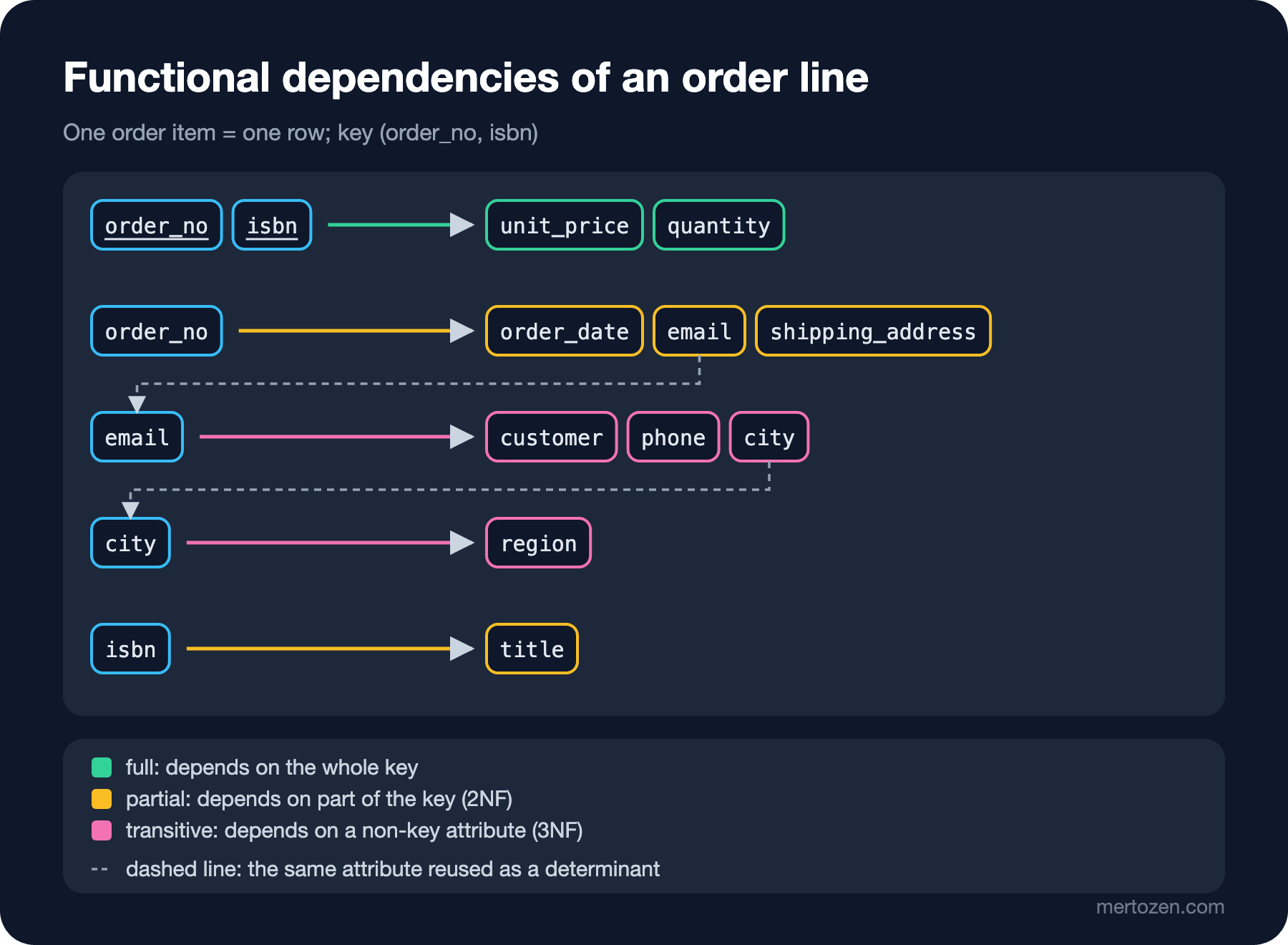
order_no → order_date, email, shipping_address: the order number determines the order's date, customer and shipping address. email → customer, phone, city: the email determines the customer and the customer's registered details. city → region: the city determines the region. isbn → title: the ISBN determines the book's title. {order_no, isbn} → unit_price, quantity: price and quantity are determined only when order and book are known together. Because Dune was sold for 390.50 in 1001 and for 351.45 in 1003, isbn → unit_price is not a dependency; the rule "the price belongs to the item" from the first post shows up here as the absence of a dependency. The authors, on the other hand, hold several values for one book, so isbn → authors is not a functional dependency in the usual sense; we will discuss such multivalued dependencies with 4NF in the 7th post of the series.
Full, Partial and Transitive Dependencies
The colours in the figure are the map of the split we will make in the next post. The key of the item table is {order_no, isbn}, and how each non-key attribute depends on this key falls into three classes.
A full dependency is when the attribute depends on the whole key: unit_price and quantity need both the order and the book. These must stay in the item table.
A partial dependency is when the attribute depends on only part of a composite key: order_date depends only on order_no, title only on isbn. Wherever there is a partial dependency there is repetition: because Dune appears in two orders, its title is written twice. 2NF removes these dependencies.
A transitive dependency is when the attribute depends on the key through another non-key attribute: order_no → email → phone and email → city → region. Ada's phone is not the order's information but Ada's; the order reaches it only through the email. That is exactly where the phone anomaly comes from. 3NF removes these dependencies.
William Kent's 1983 paper "A Simple Guide to Five Normal Forms in Relational Database Theory" combines the two rules into a single reminder; in our own words: a non-key field must depend on the whole key, not on a part of it, and it must depend on the key directly, not through another field. The first half rules out partial dependencies, the second half transitive ones.
Finding Keys with Closure
You can work out from the dependencies whether a set of attributes is a key. The method is to find the set's closure: start from the set, add the right-hand side of every dependency whose left-hand side is entirely inside the set, and repeat until there is nothing left to add. The result is every attribute the starting set determines. If the closure contains all of the table's attributes, the starting set is a superkey. The rules of this inference were formulated by William W. Armstrong in 1974 and are known today as Armstrong's axioms (reflexivity, augmentation, transitivity); but you don't need to memorise the rules to do the calculation. Let's write the dependencies into a table and let SQL Server compute the closure:
CREATE TABLE dbo.fds (
    fd_id INT         NOT NULL,
    side  CHAR(3)     NOT NULL CHECK (side IN ('lhs', 'rhs')),
    attr  VARCHAR(30) NOT NULL
);
INSERT INTO dbo.fds (fd_id, side, attr) VALUES
    (1, 'lhs', 'order_no'), (1, 'rhs', 'order_date'), (1, 'rhs', 'email'), (1, 'rhs', 'shipping_address'),
    (2, 'lhs', 'email'),    (2, 'rhs', 'customer'),   (2, 'rhs', 'phone'), (2, 'rhs', 'city'),
    (3, 'lhs', 'city'),     (3, 'rhs', 'region'),
    (4, 'lhs', 'isbn'),     (4, 'rhs', 'title'),
    (5, 'lhs', 'order_no'), (5, 'lhs', 'isbn'),       (5, 'rhs', 'unit_price'), (5, 'rhs', 'quantity');
GO

CREATE OR ALTER PROCEDURE dbo.attribute_closure @attrs VARCHAR(400)
AS
BEGIN
    SET NOCOUNT ON;
    DECLARE @closure TABLE (attr VARCHAR(30) PRIMARY KEY, step INT NOT NULL);
    INSERT INTO @closure (attr, step)
    SELECT TRIM(value), 0 FROM STRING_SPLIT(@attrs, ',');

    DECLARE @step INT = 0, @added INT = 1;
    WHILE @added > 0
    BEGIN
        SET @step += 1;
        INSERT INTO @closure (attr, step)
        SELECT DISTINCT r.attr, @step
        FROM dbo.fds AS r
        WHERE r.side = 'rhs'
          AND r.attr NOT IN (SELECT attr FROM @closure)
          AND NOT EXISTS (SELECT 1 FROM dbo.fds AS l
                          WHERE l.fd_id = r.fd_id AND l.side = 'lhs'
                            AND l.attr NOT IN (SELECT attr FROM @closure));
        SET @added = @@ROWCOUNT;
    END;

    SELECT step, STRING_AGG(attr, ', ') WITHIN GROUP (ORDER BY attr) AS attributes
    FROM @closure
    GROUP BY step
    ORDER BY step;
END;
EXEC dbo.attribute_closure 'order_no';
EXEC dbo.attribute_closure 'order_no, isbn';step attributes
---- -----------------------------------
0 order_no
1 email, order_date, shipping_address
2 city, customer, phone
3 region
step attributes
---- ----------------------------------------------------------------
0 isbn, order_no
1 email, order_date, quantity, shipping_address, title, unit_price
2 city, customer, phone
3 regionThe closure of order_no reaches eight attributes, but isbn, title, unit_price and quantity stay outside; so the order number alone does not determine an item row. The closure of {order_no, isbn} reaches all twelve attributes: a superkey. Is it minimal? order_no alone was not enough; the closure of isbn is just {isbn, title}. Drop either one and the key property is lost, so {order_no, isbn} is a candidate key. In the previous post we said "you find candidate keys by looking at the business rule"; closure is the calculation behind that sentence.
The steps carry information too. The attributes arriving in step 1 depend on the key directly; those arriving in steps 2 and 3 can only be reached through an attribute in between, that is, they are transitive dependencies. The pink boxes in the figure are exactly these attributes.
In Production
Write down the dependency list as part of the model. Next to the requirement list, a list of "which information determines what?" answers in advance the questions most argued about in a schema review. A small table like the one above is enough.
The way to notice anomalies in production is to check the dependencies that should hold, regularly. A query such as GROUP BY email HAVING COUNT(DISTINCT phone) > 1 catches inconsistency early in a denormalized reporting table or an import staging table. This query can show that a rule is violated; it can never show that the rule is right.
Don't forget that normalization has a cost on the read side. In the same paper Kent stresses that the normal form rules are designed to protect updates and that the read side often pays for it. As you split tables, queries turn into joins. When you will not accept that cost, that is, deliberate denormalization, is the topic of the 8th post of the series.
In import jobs, treat the flat table as staging. Loading Excel or CSV (Comma-Separated Values) files into a staging table as they are first is right; the mistake is letting that staging table become the permanent model. The bulk import flow is in the "Toplu Import ve Validation Raporu" post of the Çözüm Desenleri series.
Common Pitfalls
The most common trap is "discovering" dependencies by looking at sample data. Let's reload the spreadsheet and test a few candidate dependencies against the data. For each candidate, the query counts the groups that violate the rule:
SELECT 'email -> phone' AS candidate,
       (SELECT COUNT(*) FROM (SELECT email FROM dbo.order_sheet
                              GROUP BY email HAVING COUNT(DISTINCT phone) > 1) AS v) AS violations
UNION ALL
SELECT 'city -> email',
       (SELECT COUNT(*) FROM (SELECT city FROM dbo.order_sheet
                              GROUP BY city HAVING COUNT(DISTINCT email) > 1) AS v)
UNION ALL
SELECT 'order_date -> order_no',
       (SELECT COUNT(*) FROM (SELECT order_date FROM dbo.order_sheet
                              GROUP BY order_date HAVING COUNT(DISTINCT order_no) > 1) AS v)
UNION ALL
SELECT 'customer -> total',
       (SELECT COUNT(*) FROM (SELECT customer FROM dbo.order_sheet
                              GROUP BY customer HAVING COUNT(DISTINCT total) > 1) AS v);
candidate violations
---------------------- ----------
email -> phone 0
city -> email 0
order_date -> order_no 0
customer -> total 2
(4 rows affected)The data says the dependencies city → email and order_date → order_no "hold": one customer per city, one order per day. Both are nonsense; they will break the moment a second customer from Istanbul or a second order on the same day arrives. In a five-row table there are many relationships that hold by accident, and in a five-thousand-row table there are more than you would think. If you turn such a "discovery" into a key or a table boundary, the model breaks on the first real data. For customer → total the result is different: two violations. Data can refute a dependency but cannot prove it. Only the business rule decides which dependency is real.
Mistaking a snapshot for a repetition. unit_price and the catalogue price may hold the same value, but isbn → unit_price is not a dependency. Moving it to the book table as "a repetition" changes the amounts of past orders.
Leaving derived columns out of the dependency list. total can be computed from the items, so it is really the result of a dependency; if it does not appear in the list, it quietly stays in the order table during normalization and starts contradicting the items.
Patching anomalies with application code. The rule "when we update the phone, we update all of the customer's rows" breaks on the day a second screen or a bulk script does not know the same rule. Instead of trying to keep the copy in sync, you need to remove the copy.
A Small Experiment
★☆☆ Test the candidates email → customer and isbns → books on the order_sheet table with the same violation query. Why does the second candidate not give a meaningful result? Is it possible to talk about dependencies on a column that holds a list?
★★☆ The bookshop says "a customer can choose a different delivery city on each order, and the region report should be based on the delivery city". Change the dependencies in the dbo.fds table accordingly and compute the closure of order_no again. Which attribute arrives at which step?
★★★ Using the dbo.attribute_closure procedure, write a script that finds all candidate keys: try all subsets of the attributes from small to large, and list those whose closure contains all attributes and none of whose subsets is a superkey. How many subsets do you need to try for twelve attributes?
We have seen the anomalies and named their source as dependencies. In the next post we split the table with this map: opening the lists into rows with 1NF, separating partial dependencies with 2NF and transitive ones with 3NF, and showing at each step that the split tables join back losslessly with SQL JOIN.