

1NF, 2NF and 3NF: Normalizing the Order Table Step by Step
Normalization splits a table along its dependencies: 1NF opens lists into rows, 2NF separates partial and 3NF transitive dependencies, and because the determinant becomes the new table's key the join is lossless. In SQL Server we take the order spreadsheet to 1NF with STRING_SPLIT, then to 2NF and 3NF, prove at each step with EXCEPT that no row is missing or spurious, and discuss JSON columns and 1NF and the mapping to the Bookstore schema.
Version note: The SQL (Structured Query Language) examples in this post were run on SQL Server 2025 (17.0, Cumulative Update 10).
Guess First: Do the Split Tables Give Back the Same Data?
In the previous post we drew the dependency map of the order spreadsheet. In this post we split the table step by step following that map, and in the end the five-row flat table becomes six tables: customers, cities, orders, order_items, books and book_authors. In the 3rd post of the series, when we split a ternary relationship into two tables and joined it back, spurious rows appeared. Guess: when we join these tables back with JOIN, do we get exactly the starting rows, more of them, or fewer?
The answer: exactly the same. At the end of every step we check this in both directions with EXCEPT, and both the "missing" and the "spurious" row counts come out as zero. This is not luck; it happens because we split along the dependencies rather than at random. At the end of the post we tie the reason to a single rule.
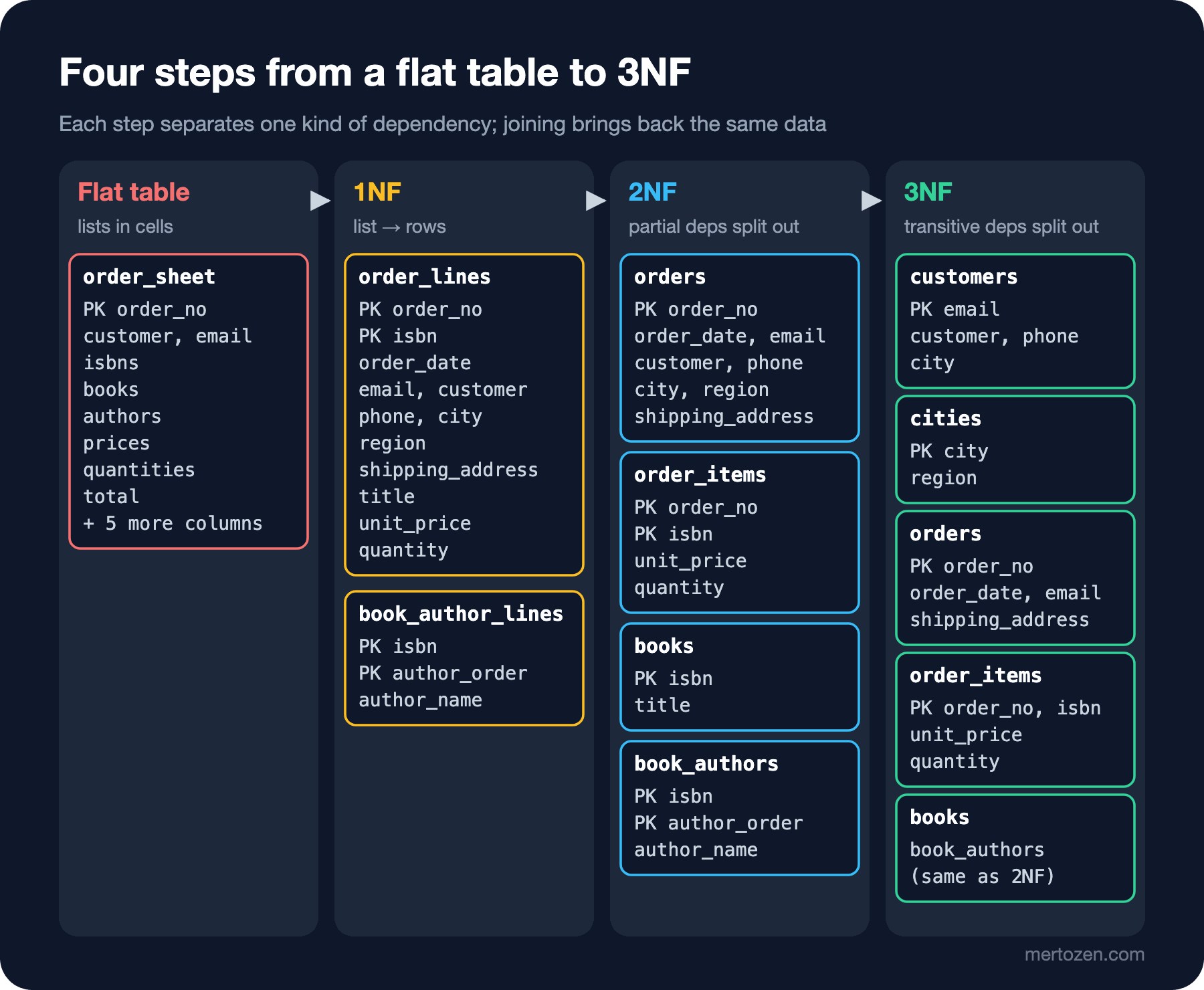
In the SQL experiments I named each step's tables with the step's suffix (order_lines_1nf, orders_2nf, customers_3nf), so they can sit side by side in the same database. The starting point is a freshly reloaded, clean copy of the dbo.order_sheet table from the previous post.
1NF: Atomic Values and Repeating Groups
The essence of 1NF (First Normal Form) is this: every column of a row holds a single value, and a row does not contain a group that repeats values of the same kind. The spreadsheet's isbns, books, prices and quantities cells are exactly a repeating group: a list of four pieces of information for each book in an order, spread over four separate cells by position. Moving to 1NF means opening each book into its own row. Since SQL Server 2022, STRING_SPLIT also returns each part's position when given a third argument; we can align the four lists by that position:
SELECT s.order_no, s.order_date, s.customer, s.email, s.phone, s.city, s.region, s.shipping_address,
       i.ordinal                          AS line_no,
       TRIM(i.value)                      AS isbn,
       TRIM(b.value)                      AS title,
       CAST(TRIM(p.value) AS DECIMAL(10,2)) AS unit_price,
       CAST(TRIM(q.value) AS INT)           AS quantity
INTO dbo.order_lines_1nf
FROM dbo.order_sheet AS s
CROSS APPLY STRING_SPLIT(s.isbns, ',', 1) AS i
CROSS APPLY STRING_SPLIT(s.books, ',', 1) AS b
CROSS APPLY STRING_SPLIT(s.prices, ',', 1) AS p
CROSS APPLY STRING_SPLIT(s.quantities, ',', 1) AS q
WHERE b.ordinal = i.ordinal AND p.ordinal = i.ordinal AND q.ordinal = i.ordinal;

ALTER TABLE dbo.order_lines_1nf ALTER COLUMN isbn CHAR(13) NOT NULL;
ALTER TABLE dbo.order_lines_1nf
    ADD CONSTRAINT PK_order_lines_1nf PRIMARY KEY (order_no, isbn);

SELECT order_no, line_no, isbn, title, unit_price, quantity, customer
FROM dbo.order_lines_1nf
ORDER BY order_no, line_no;
(7 rows affected)
order_no line_no isbn title unit_price quantity customer
-------- ------- ------------- ------------------------- ---------- -------- ------------
1001 1 9798900000268 Dune 390.50 1 Ada Lovelace
1001 2 9798900000428 Good Omens 340.90 1 Ada Lovelace
1002 1 9798900000572 The Pragmatic Programmer 1150.00 1 Alan Turing
1003 1 9798900000305 The Left Hand of Darkness 660.00 1 Ada Lovelace
1003 2 9798900000268 Dune 351.45 2 Ada Lovelace
1004 1 9798900000411 A Wizard of Earthsea 200.50 3 Grace Hopper
1005 1 9798900000428 Good Omens 340.90 1 Alan Turing
(7 rows affected)Five rows opened into seven, and each row is now "one book in one order". The key is (order_no, isbn), the candidate key we found with closure in the previous post. But notice how fragile the query is: it relies on four separate lists being written in the same order. A book with a comma in its title (such as Tinker, Tailor, Soldier, Spy) makes the books list one element longer and shifts the whole alignment of that order: prices go to the wrong books, quantities to the wrong rows. This is the real cost of putting a list in a cell; to read the data you have to rely on a rule that is not in the data (the order and the separator).
The authors are a two-level list: books separated by semicolons, the authors of the same book by commas. We open them into a separate table, because the author is a repeating group about the book, not about the order item:
SELECT DISTINCT
       TRIM(i.value)  AS isbn,
       TRIM(a.value)  AS author_name,
       a.ordinal      AS author_order
INTO dbo.book_author_lines_1nf
FROM dbo.order_sheet AS s
CROSS APPLY STRING_SPLIT(s.isbns, ',', 1) AS i
CROSS APPLY STRING_SPLIT(s.authors, ';', 1) AS g
CROSS APPLY STRING_SPLIT(g.value, ',', 1) AS a
WHERE g.ordinal = i.ordinal;

SELECT isbn, author_order, author_name
FROM dbo.book_author_lines_1nf
ORDER BY isbn, author_order;
(7 rows affected)
isbn author_order author_name
------------- ------------ -----------------
9798900000268 1 Frank Herbert
9798900000305 1 Ursula K. Le Guin
9798900000411 1 Ursula Le Guin
9798900000428 1 Terry Pratchett
9798900000428 2 Neil Gaiman
9798900000572 1 Andrew Hunt
9798900000572 2 David Thomas
(7 rows affected)DISTINCT threw away the repetitions that came from Dune and Good Omens appearing in two different orders. But there is something else in the output: "Ursula K. Le Guin" and "Ursula Le Guin" stand as two separate authors. Normalization merges copies of the same value; it cannot merge different spellings of the same person. That is a data quality job; it is solved when you move the author into an authors table with an identity of its own (author_id) and do the matching during import. A normalized model stops this mistake from happening again; the ones that already happened, you have to find.
The Modern Face of 1NF: JSON and ARRAY Columns
The definition of an "atomic value" looks clear at first sight, but its boundary is debatable. Is a date atomic, or a structure made of day, month and year? An address? In modern databases a column can hold a JSON (JavaScript Object Notation) document or, in PostgreSQL, an array (such as text[]), and SQL Server 2025 brought the native json type (the "SQL Server 2025 ile T-SQL'e Gelenler" post of the SQL Temelleri series). Do these columns break 1NF? The practical answer is this: the moment a value becomes the subject of a query that has to look inside it, that value is no longer atomic for you. Let's try a table that keeps order items in a JSON column:
CREATE TABLE dbo.orders_json (
    order_no INT  NOT NULL PRIMARY KEY,
    items    JSON NOT NULL
);
INSERT INTO dbo.orders_json (order_no, items) VALUES
    (1001, '[{"isbn":"9798900000268","qty":1,"price":390.50},{"isbn":"9798900000428","qty":1,"price":340.90}]'),
    (1003, '[{"isbn":"9798900000305","qty":1,"price":660.00},{"isbn":"9798900000268","qty":2,"price":351.45}]'),
    (1006, '[{"isbn":"9790000000000","qty":1,"price":10.00}]');

SELECT o.order_no, i.qty, i.price
FROM dbo.orders_json AS o
CROSS APPLY OPENJSON(o.items)
     WITH (isbn CHAR(13) '$.isbn', qty INT '$.qty', price DECIMAL(10,2) '$.price') AS i
WHERE i.isbn = '9798900000268';
(3 rows affected)
order_no qty price
-------- --- ------
1001 1 390.50
1003 2 351.45
(2 rows affected)The query works; the answer to "Who bought Dune?" is correct. But every query has to open every order's JSON, and more importantly, order 1006 was saved without complaint with an ISBN (International Standard Book Number) that does not exist. You cannot define a foreign key on a value inside the JSON, you cannot put a UNIQUE on it, and guaranteeing with CHECK that the quantity is positive is a separate job. If the items are something you query, constrain and connect to other tables, they are a separate table.
Conversely, metadata specific to a book's format that nobody joins or filters on (an e-book's file size, an audiobook's narrator notes) sits perfectly well in a JSON column, because the database stores that value as a whole and hands it to the application as a whole. If the same data one day enters the WHERE clause of a report query, that is the day you rethink where the column belongs. The right place for JSON columns is covered in detail in the 11th post of the series.
2NF: Splitting Out Partial Dependencies
2NF (Second Normal Form) requires that, in a table already in 1NF, no non-key attribute depends on only part of a composite key. The key of order_lines_1nf is (order_no, isbn); but the order date, the customer and the address depend only on order_no, and the title only on isbn. Each partial dependency moves out to a separate table together with its determinant, and what depends on the full key stays in the item table:
SELECT DISTINCT order_no, order_date, email, customer, phone, city, region, shipping_address
INTO dbo.orders_2nf
FROM dbo.order_lines_1nf;

SELECT DISTINCT isbn, title
INTO dbo.books_2nf
FROM dbo.order_lines_1nf;

SELECT order_no, isbn, line_no, unit_price, quantity
INTO dbo.order_items_2nf
FROM dbo.order_lines_1nf;
(5 rows affected)
(5 rows affected)
(7 rows affected)The order information on seven item rows came down to five order rows, the book information to five book rows. Now let's join the three tables and compare them with the starting 1NF table in both directions. missing counts rows that are in 1NF but not in the join, spurious rows that are in the join but not in 1NF:
WITH rejoined AS (
    SELECT o.order_no, o.order_date, o.customer, o.email, o.phone, o.city, o.region, o.shipping_address,
           oi.line_no, oi.isbn, b.title, oi.unit_price, oi.quantity
    FROM dbo.order_items_2nf AS oi
    JOIN dbo.orders_2nf AS o ON o.order_no = oi.order_no
    JOIN dbo.books_2nf AS b ON b.isbn = oi.isbn
)
SELECT 'missing' AS direction, COUNT(*) AS row_count
FROM (SELECT * FROM dbo.order_lines_1nf EXCEPT SELECT * FROM rejoined) AS m
UNION ALL
SELECT 'spurious', COUNT(*)
FROM (SELECT * FROM rejoined EXCEPT SELECT * FROM dbo.order_lines_1nf) AS s;
direction row_count
--------- ---------
missing 0
spurious 0
(2 rows affected)Nothing missing, nothing spurious. book_author_lines_1nf did not change in this step: its key is (isbn, author_order) and its only non-key attribute, author_name, depends on the whole key, so the table is already in 2NF. Now let's look at this: does orders_2nf no longer contain repetition?
SELECT order_no, email, customer, phone, city, region
FROM dbo.orders_2nf
ORDER BY order_no;
order_no email customer phone city region
-------- ----------------- ------------ ---------------- -------- ----------------
1001 ada@example.com Ada Lovelace +90 532 000 0001 Istanbul Marmara
1002 alan@example.com Alan Turing +90 533 000 0002 Ankara Central Anatolia
1003 ada@example.com Ada Lovelace +90 532 000 0001 Istanbul Marmara
1004 grace@example.com Grace Hopper +90 535 000 0003 Izmir Aegean
1005 alan@example.com Alan Turing +90 533 000 0002 Ankara Central Anatolia
(5 rows affected)It does. Ada's phone, city and region are still on two rows, and so are Alan's. The phone anomaly from the start of the previous post can still happen in 2NF, because its source is not a partial but a transitive dependency. A table whose candidate keys all consist of a single column cannot contain a partial dependency, since there is no "part" to depend on; so if such a table is in 1NF, it is automatically in 2NF. But that does not mean it contains no repetition.
3NF: Splitting Out Transitive Dependencies
3NF (Third Normal Form) requires that, in a table already in 2NF, no non-key attribute depends on the key through another non-key attribute. orders_2nf has two chains: order_no → email → customer, phone, city and email → city → region. The determinant in the middle of each chain becomes the key of its own table:
SELECT DISTINCT email, customer, phone, city
INTO dbo.customers_3nf
FROM dbo.orders_2nf;

SELECT DISTINCT city, region
INTO dbo.cities_3nf
FROM dbo.orders_2nf;

SELECT order_no, order_date, email, shipping_address
INTO dbo.orders_3nf
FROM dbo.orders_2nf;
(3 rows affected)
(3 rows affected)
(5 rows affected)Now let's join five tables at once and compare with the 1NF table again. The same script recomputes the spreadsheet's total column from the items and compares it:
WITH rejoined AS (
    SELECT o.order_no, o.order_date, c.customer, c.email, c.phone, c.city, ci.region, o.shipping_address,
           oi.line_no, oi.isbn, b.title, oi.unit_price, oi.quantity
    FROM dbo.order_items_2nf AS oi
    JOIN dbo.orders_3nf AS o ON o.order_no = oi.order_no
    JOIN dbo.customers_3nf AS c ON c.email = o.email
    JOIN dbo.cities_3nf AS ci ON ci.city = c.city
    JOIN dbo.books_2nf AS b ON b.isbn = oi.isbn
)
SELECT 'missing' AS direction, COUNT(*) AS row_count
FROM (SELECT * FROM dbo.order_lines_1nf EXCEPT SELECT * FROM rejoined) AS m
UNION ALL
SELECT 'spurious', COUNT(*)
FROM (SELECT * FROM rejoined EXCEPT SELECT * FROM dbo.order_lines_1nf) AS s;

SELECT o.order_no, SUM(oi.quantity * oi.unit_price) AS computed_total, s.total AS sheet_total
FROM dbo.orders_3nf AS o
JOIN dbo.order_items_2nf AS oi ON oi.order_no = o.order_no
JOIN dbo.order_sheet AS s ON s.order_no = o.order_no
GROUP BY o.order_no, s.total
ORDER BY o.order_no;
direction row_count
--------- ---------
missing 0
spurious 0
(2 rows affected)
order_no computed_total sheet_total
-------- -------------- -----------
1001 731.40 731.40
1002 1150.00 1150.00
1003 1362.90 1362.90
1004 601.50 601.50
1005 340.90 340.90
(5 rows affected)Five tables gave back the seven rows with nothing missing and nothing extra. The totals can be computed exactly from the items too; that is why total was not moved to any 3NF table. If it needs to be stored, that is a denormalization decision and the topic of the 8th post of the series. Ada's phone now lives on a single row; the UPDATE from the previous post can only change that row, and two different phones cannot appear. Deleting Grace's order does not delete Grace, because Grace is in customers_3nf. Foundation can be added to books_2nf without ever being ordered. All three anomalies are gone.
Why Was the Split Lossless?
At every step we split one table into two, and the common column of the two parts was the key of one of them: the common column of orders_2nf and order_items_2nf is order_no, the key of orders_2nf; the common column of customers_3nf and orders_3nf is email, the key of customers_3nf. When this condition holds, a row can find at most one match on the other side during the join; the multiple matches that would produce spurious rows cannot occur. In the printing rights example of the 3rd post, the common column was book_id, and it was a key in neither part: Dune was linked to two publishers and two countries, and the join matched every publisher with every country. This is the practical guarantee of splitting along dependencies: when you make the determinant the key of the new table, the join is lossless.
The Resulting Schema: Mapping to the Bookstore
The 3NF tables line up with the skeleton of the Bookstore schema in the SQL Temelleri series. The differences come from decisions we made in the earlier posts of the series:
| 3NF table | Bookstore counterpart | Difference and reason |
|---|---|---|
customers_3nf | customers | Surrogate customer_id instead of key email, email UNIQUE (4th post); name split into first_name and last_name |
cities_3nf | none | region is not kept because the Bookstore does not want a region report; the city is text on the customer |
orders_3nf | orders | Surrogate order_id, customer via customer_id; status added (cancel instead of delete) |
order_items_2nf | order_items | Linked to the book via book_id; UNIQUE (order_id, book_id) preserves the old key |
books_2nf | books | Surrogate book_id, ISBN UNIQUE; list_price added |
book_author_lines_1nf | authors and book_authors | The author in a separate table with its own identity; the relationship is (book_id, author_id) with author_order |
The cities row is a small but instructive decision. 3NF says that if the dependency city → region exists, the region should live in a separate table. But whether the dependency exists is up to the business rule: if the bookshop does not want a region report, there is no need for the region column or the cities table. Normalization answers "If you keep this data, where should you keep it?", not "Should you keep this data?"
order_items.unit_price and books.list_price sitting side by side is not a repetition. According to the requirement in the first post, the price at the time of the order never changes; so that price is a separate fact depending on {order_no, isbn}, while the catalogue price is another fact depending only on the book. Normalization put each in the right place: one in the item table, the other in the book table.
In Production
Use normalization not as a one-off transformation but as a verification tool. Asking "What does this column depend on?" when adding a new column is the shortest way to put it in the right table. If the answer is not the table's key, the column is in the wrong place.
In a real migration, make the EXCEPT check above part of the script. When moving data from an old flat table to a new schema, a "zero missing and zero spurious rows" check is the cheapest test of the migration. Sum and count comparisons (total per order, number of orders per customer) go into the same script.
Accept that the number of joins grows, but don't optimise early. An order detail in 3NF means joining five tables; with the right indexes this is usually not a problem under an OLTP (Online Transaction Processing) load. Denormalizing without measuring calls back the anomalies we removed in this post. When to measure and when to denormalize is in the 8th post of the series.
Plan data cleaning separately from normalization. Spelling differences as in the "Ursula Le Guin" example, duplicate customers and phones in different formats have to be matched before they are moved into the schema. The staging table, matching rules and row-level error report for this job are in the "Toplu Import ve Validation Raporu" post of the Çözüm Desenleri series.
Common Pitfalls
Reading 3NF as "split everything into separate tables". 3NF splits only along dependencies: if there is a dependency whose determinant is not a key, it splits; otherwise it doesn't. Putting a customer's first name, last name and email into three separate tables is not normalization but needless joins; they all depend directly on the same key.
Lookup table mania. Opening a lookup table for every text column (a separate table for every city, every colour, every status) is not something 3NF requires. A lookup table only makes sense if the value has attributes of its own (such as a city's region) or if you want to constrain the set of values in the database. The enum versus lookup table decision is in the "Enum mı Lookup Tablosu mu?" post of the Çözüm Desenleri series.
Mistaking a snapshot for a repetition and splitting it out. Deleting unit_price from the item table because "the book's price is already in books" ties the amounts of past orders to today's catalogue price. The same trap applies to the shipping address.
Carrying a derived column along. Putting total in the orders table because "it is the order's information anyway" creates a copy that can contradict the items. Either don't store it at all, or store it deliberately and design its synchronisation.
Relying on parsing lists to normalize. STRING_SPLIT is a good tool for a one-off transformation; but a single value containing the separator breaks the whole alignment. After the transformation, always compare row counts and totals.
A Small Experiment
★☆☆ Add a new order to order_sheet with a book whose title contains a comma (such as N'Tinker, Tailor, Soldier, Spy') and run the 1NF query again. Which rows come out wrong? Can the query notice it?
★★☆ Derive an authors table (author_id, full_name) and a book_authors table (isbn, author_id, author_order) from book_author_lines_1nf. How do you map Le Guin's two spellings to a single author_id? After the mapping, repeat the lossless join check.
★★★ The bookshop says "the shipping address belongs to the customer, not to the order; when a customer moves, old orders should show the new address too". Change the dependencies and redo the 2NF and 3NF steps. Which table changed? Why is this rule dangerous in an accounting or shipping scenario?
The Bookstore skeleton is in 3NF. In the next post we look at the cases where 3NF is not enough: BCNF (Boyce-Codd Normal Form), which requires every determinant to be a candidate key, 4NF, which separates independent multivalued facts, 5NF with join dependencies, and when these are really needed in practice.