

The Cost of Event-Driven Architecture: Observability, Debugging, and When Not to Use It
Answering "what happened?" in an event-driven system takes carrying the W3C traceparent in message headers, keeping correlation and causation ids on every message, and watching signals such as lag, DLQ, duplicate rate and stuck sagas, while flows where the user waits for an answer stay synchronous. Trace propagation and how the outbox breaks the trace with real output, a DLQ runbook, the distributed monolith and Bookstore's final architecture.
Version note: The code in this post was built and run with C# 14 and .NET 10; the tracing examples use only System.Diagnostics, no extra packages.
Guess First
A ticket reaches the support team: "Ada's order has shown 'processing' for two hours." The order was accepted at checkout, written to the outbox, and published by the relay a few seconds later. The relay's publishing code opens a send span for every row:
using (Activity? relay = MessagingTelemetry.Source.StartActivity("outbox relay", ActivityKind.Internal, default(ActivityContext)))
{
    Envelope lost = MessagingTelemetry.Send("bookstore.ordering.order-placed", "OrderPlaced", "Ordering", Guid.CreateVersion7(), null);
    Envelope kept = MessagingTelemetry.Send("bookstore.ordering.order-placed", "OrderPlaced", "Ordering", Guid.CreateVersion7(), null,
        storedContext: requestContext);
    Console.WriteLine($"  request trace {requestContext.TraceId.ToHexString()[..8]}: " +
                      $"without stored context {lost.Headers["traceparent"][3..11]}, with stored context {kept.Headers["traceparent"][3..11]}");
}
Both Send calls publish the same event; the only difference is that the second one receives storedContext. When you open Ada's checkout request in the tracing tool, will you see the spans of Inventory and Payments? For which call?
The "What Happened?" Question in an Asynchronous Flow
Debugging a synchronous chain, however long, means reading a call stack: the request enters somewhere, blows up somewhere, and the exception trace shows every step in between. In the series' "Why Messaging?" post we listed the benefits of breaking that chain; this post is the bill. An asynchronous flow has no single call stack. OrderPlaced is born in Ordering's process, waits a few seconds in the outbox, queues up in the broker, is processed by one of Inventory's three instances, and the resulting StockReserved travels through another queue to Payments. Between the steps there are sometimes minutes rather than milliseconds, and each step logs somewhere else. Answering "where did Ada's order get stuck?" takes three tools together: correlation and causation ids that record how messages led to one another, distributed traces that show the steps of one flow on a timeline, and metrics that look at the system as a whole rather than at individual orders.
Carrying the Trace Context with the Message
In the HTTP (Hypertext Transfer Protocol) world the standard for carrying trace context is W3C (World Wide Web Consortium) Trace Context: its Level 1 spec, a Recommendation since February 2020 (current text dated November 2021), defines the traceparent header in the form version-traceid-parentid-flags (for example 00-4bf92f3577b34da6a3ce929d0e0e4736-00f067aa0ba902b7-01). ASP.NET Core and HttpClient carry it on their own. With messages the job is yours: the producer must write its span's context into the message headers, and the consumer must read it and make it the parent of its own span. In .NET this needs no extra package; Activity and DistributedContextPropagator in System.Diagnostics are enough:
public static class MessagingTelemetry
{
    public static readonly ActivitySource Source = new("Bookstore.Messaging");

    // Producer: open the send span and write its context into the headers as W3C traceparent
    public static Envelope Send(string destination, string type, string service, Guid correlationId, Guid? causationId,
        ActivityContext? storedContext = null)
    {
        using Activity? send = Source.StartActivity($"send {destination}", ActivityKind.Producer,
            storedContext ?? Activity.Current?.Context ?? default);
        Guid messageId = Guid.CreateVersion7();
        send?.SetTag("messaging.system.name", "rabbitmq");
        send?.SetTag("messaging.operation.type", "send");
        send?.SetTag("messaging.destination.name", destination);
        send?.SetTag("messaging.message.id", messageId.ToString());

        Dictionary<string, string> headers = [];
        DistributedContextPropagator.Current.Inject(send, headers,
            static (carrier, key, value) => ((Dictionary<string, string>)carrier!)[key] = value);
        return new Envelope(messageId, correlationId, causationId, type, service, headers);
    }

    // Consumer: open the process span with the context from the headers as its parent
    public static Activity? StartProcess(string destination, Envelope envelope)
    {
        DistributedContextPropagator.Current.ExtractTraceIdAndState(envelope.Headers,
            static (object? carrier, string name, out string? value, out IEnumerable<string>? values) =>
            {
                values = null;
                ((Dictionary<string, string>)carrier!).TryGetValue(name, out value);
            },
            out string? traceParent, out string? traceState);
        ActivityContext.TryParse(traceParent, traceState, isRemote: true, out ActivityContext parent);

        Activity? process = Source.StartActivity($"process {destination}", ActivityKind.Consumer, parent);
        process?.SetTag("messaging.operation.type", "process");
        process?.SetTag("messaging.message.id", envelope.MessageId.ToString());
        process?.SetTag("bookstore.correlation_id", envelope.CorrelationId.ToString());
        return process;
    }
}
I simulated a checkout request together with the reactions of Inventory and Payments in one process; an ActivityListener prints each span's kind, name, trace id and parent span id when it ends:
1) Direct publish inside the request
  Producer send bookstore.ordering.order-placed           trace dbe26313 parent a3a04f02
  Producer send bookstore.inventory.stock-reserved        trace dbe26313 parent df9e5637
  Producer send bookstore.payments.payment-failed         trace dbe26313 parent 5e0ae8f0
  Consumer process bookstore.inventory.stock-reserved     trace dbe26313 parent 5e40a5e5
  Consumer process bookstore.ordering.order-placed        trace dbe26313 parent 71d74beb
  Server   POST /orders                                   trace dbe26313 parent -
All six spans are in the same trace (dbe26313): the HTTP request, sending and processing OrderPlaced, Inventory's StockReserved, Payments' PaymentFailed. In a tracing tool that means a single timeline that crosses the broker. The span names and attributes come from OpenTelemetry's messaging semantic conventions: the span name is {operation} {destination}, and the operation types are create, send, receive, process and settle. These conventions are still in "Development" status and attribute names can change (for example messaging.system.name in the example); so rather than baking them into your own code, leaving them to the instrumentation of the client library or messaging framework you use costs less maintenance. The same spec says a consumer span should use the producer context as its parent only for single-message processing; for batches, each message's context should be added as a link instead, because a span can have only one parent. Setting up the OpenTelemetry SDK (Software Development Kit) and exporters is the subject of the upcoming DevOps › Observability series, and instrumentation in message clients is covered in the Backend series' "Observability in Messaging" post.
The Outbox and Tracing: Write the Context on the Row
The opening question is a hidden side effect of the outbox. The relay publishes the message seconds after the checkout request ended, in its own loop; at that moment Activity.Current is the relay's span, not the request's:
2) Outbox relay publishes later, without and with the stored traceparent
  Server   POST /orders                                   trace f1b3e59f parent -
  Producer send bookstore.ordering.order-placed           trace 1dfd7818 parent fee3988e
  Producer send bookstore.ordering.order-placed           trace f1b3e59f parent cb6f7198
  request trace f1b3e59f: without stored context 1dfd7818, with stored context f1b3e59f
  Internal outbox relay                                   trace 1dfd7818 parent -
The call without storedContext attached the message to the relay's trace (1dfd7818); in the trace of Ada's checkout request (f1b3e59f), this message and everything after it is invisible. The second call used the context stored during the request as its parent, and the chain held. That is why the series' "Transactional Outbox and Inbox" post suggested putting traceparent on the outbox row: the context must be written to the row at commit time, like the message's other metadata. Alternatively, the relay can open its own span and add a link to the stored context; the tracing tool shows two separate traces but lets you navigate between them. If you use CloudEvents, the same information can travel in the traceparent attribute of the Distributed Tracing extension; the extension spec notes that it does not replace the transport headers and that, in a multi-hop flow, it carries the starting trace.
The Correlation and Causation Chain
Traces are powerful but have two weaknesses: most systems apply sampling, so not every flow's trace is kept, and traces are usually retained for a few days. If the support ticket arrives three weeks later, the trace is long gone. That is why every message's envelope always carries, and logs, the two fields introduced in the series' "Message Types" post: the correlation id, which stays the same across all messages of one workflow, and the causation id, which is the id of the message that directly caused this one. Building the flow's tree from the envelopes in the log takes a few lines:
public static class CausationTree
{
    // Builds the "what led to what" tree from envelopes written to the log
    public static void Print(IReadOnlyList<Envelope> log, Guid correlationId, TimeSpan quietFor)
    {
        Envelope[] flow = [.. log.Where(e => e.CorrelationId == correlationId)];
        ILookup<Guid?, Envelope> children = flow.ToLookup(e => e.CausationId);
        foreach (Envelope root in children[null])
            Print(root, children, "", quietFor);
    }

    private static void Print(Envelope e, ILookup<Guid?, Envelope> children, string indent, TimeSpan quietFor)
    {
        Envelope[] next = [.. children[e.MessageId]];
        string note = next.Length == 0 ? $"   <- nothing happened after this for {quietFor.TotalMinutes:0} min" : "";
        Console.WriteLine($"  {indent}{e.Type} ({e.Service}){note}");
        foreach (Envelope child in next)
            Print(child, children, indent + "  ", quietFor);
    }
}
3) Causation tree for the first checkout
OrderPlaced (Ordering)
StockReserved (Inventory)
PaymentFailed (Payments) <- nothing happened after this for 10 minThe tree answers the ticket in seconds: the payment was declined and nothing happened after that. Nobody who should have reacted to PaymentFailed (Inventory releasing the stock, Ordering cancelling the order) did; the place to look is those consumers' DLQ (dead-letter queue) and logs. In a saga that uses orchestration the same answer comes even faster: the saga table says which step the order is in and since when. That was exactly the row we wrote in orchestration's favour in the table of the series' "Saga Pattern" post. Do not confuse the correlation id with the trace id: a trace is a technical record subject to sampling, while the correlation id is the durable identity of the business workflow; adding it as a scope to every log line with the structured logging from the ASP.NET Core Web API (Application Programming Interface) series' "Logging" post turns a log search into one query.
Metrics That Are Architectural Signals, and the DLQ Runbook
Traces and logs tell one order's story; a handful of metrics tell the system's health. They look technical but actually measure the architecture's assumptions. Consumer lag, or the age of the oldest message in the queue, tells you how "later" the promise "the reaction may come later" really is; in Bookstore a minute is acceptable for a confirmation email, ten minutes are not. The age of the oldest unprocessed outbox row shows that we cannot reach the broker before the users notice. The number and rate of messages landing in the DLQ say that a contract or a consumer broke; if it rises right after a deploy, the cause is most likely a schema change. The duplicate rate caught by the inbox shows how many repeats the relay or the broker produces; a sudden jump can signal a crash loop. The number of sagas per step and the longest time spent in that step show stuck workflows; every saga in Failed is a job for a human. Finally, end-to-end latency (the time between an event's OccurredAt and the processing of the last reaction) measures the real size of eventual consistency. Collecting these metrics and building the dashboard belong to the Backend series' observability post; what matters for the architecture is that each one gets a threshold and an owner.
Reprocessing a message from the DLQ needs as much discipline as an architectural decision. The order Bookstore agreed on:
- Classify: group by error type (deserialization, business rule, external system, bug); hundreds of messages that failed for the same reason are a single incident.
- Fix the root cause and deploy; replaying before the fix sends the messages back to the DLQ.
- Replay with the original
MessageId; generating a new id disables the inbox's duplicate protection. - Limit the rate and start with a small batch; releasing thousands of messages at once crushes the consumer and the external systems.
- For order-sensitive messages, rely on the version field; a replayed old message must not overwrite a newer state.
- Verify and record the outcome: is the DLQ empty, did the related sagas move on, and does the incident need an ADR (Architecture Decision Record) or a postmortem note?
DLQ configuration on the brokers and the reprocessing tools are in the Backend series' "Managing Dead-Letter Queues" post.
The Known Diseases of Event-Driven Architecture
Martin Fowler's 2017 article "What do you mean by Event-Driven?" states event notification's biggest risk plainly: while you decouple the system nicely, it is easy to lose sight of the larger-scale flow. If the flow is written nowhere in the code, the only place that knows it is people's heads, and as the team changes, that knowledge leaves too. Its common name is event spaghetti: every service listens to a few events and publishes a few, and the answer to "what happens when an order is cancelled?" can only be found by reading every service's subscriptions. That is what we saw as the cost of choreography in the series' "Saga Pattern" post. The cure is to make important workflows visible in an orchestrator and to keep who listens to what in a catalog with AsyncAPI.
The second disease is a distributed monolith built with events. Services deploy separately and there is a broker between them, but every symptom of the distributed monolith described in the Introduction to Architecture series' "Understanding the Monolith" post is still there: the contracts live in a shared DLL (dynamic-link library) and every change forces everyone to deploy together; a service sends a "request" message and makes the user wait for its reply within the same request, hiding a synchronous call behind a queue; processing an event requires every service in the chain to be up at the same time. You pay the full price of asynchronous communication and get none of its benefits. The third is the command disguised as an event described in the series' "Message Types" post: an "event" like SendEmailEvent, with a single recipient and telling that recipient what to do, is really a command and couples the publisher to the recipient.
Common Pitfalls
Using traces instead of logs and correlation ids
Traces that are subject to sampling and kept for a few days cannot answer a customer complaint that arrives weeks later. Correlation and causation ids belong on every message and every log line; the trace is a convenience on top of them.
Losing the trace context in the outbox
The output above showed it: a message published by the relay detaches from the request's trace unless a stored context exists. The context must be written to the outbox row.
Generating a new MessageId on replay
Creating a new message when re-sending from the DLQ keeps the inbox from recognizing it, and the consumer applies a message it had partially processed a second time.
Leaving metrics to the broker's default dashboard
Queue depth alone says nothing; 10,000 messages are normal on a campaign morning and a reason to alert at three at night. Thresholds must come from business expectations: "the confirmation email within a minute" is a threshold, "1,000 messages in the queue" is not.
Making everything an event
That is the subject of the next section: event-driven is a tool, not a goal.
When Not to Use It: Bookstore's Final Architecture
In the series' "Why Messaging?" post we saw the reasons to break the synchronous chain, and in the posts that followed, its cost piece by piece: eventual consistency, duplicates, ordering, the outbox, sagas, contract evolution and observability. The decision can now be made flow by flow. Anything where the user waits for the answer and the answer does not depend on another system's reaction should stay synchronous; if a fact has several reactions whose number may grow over time and whose delay is acceptable, an event fits; a workflow that changes several systems and needs compensation if it stops halfway is a saga. For Bookstore:
| Flow | Choice | Reason |
|---|---|---|
| Catalog search | Synchronous HTTP, same process | The user waits for the answer; p95 < 300 ms target; read-only |
| Price and promotion calculation in the cart | Synchronous, in-process | The result must show at once; one module's rule |
| Checkout | Synchronous acceptance + asynchronous saga | "Received" for the user right away, the outcome when the saga ends |
| Stock, payment, shipping | Orchestration (OrderSaga) | There is a pivot, timeouts and compensation; the flow must be visible |
| Payment provider call | Synchronous HTTP + timeout inside Payments | The external API is synchronous; its result goes back to the saga as an event |
| Confirmation and shipping emails | Event + outbox (choreography) | A reaction that does not affect the flow; a few seconds of delay is fine |
Price change (BookPriceChanged) | Event-carried state transfer | Ordering keeps its own copy and does not query Catalog |
| Carrier tracking webhook | Receive over HTTP, process with an inbox | The carrier may resend; processing must be idempotent |
| Management reports | Read model and queries | Read the data instead of "requesting" the report with a message |
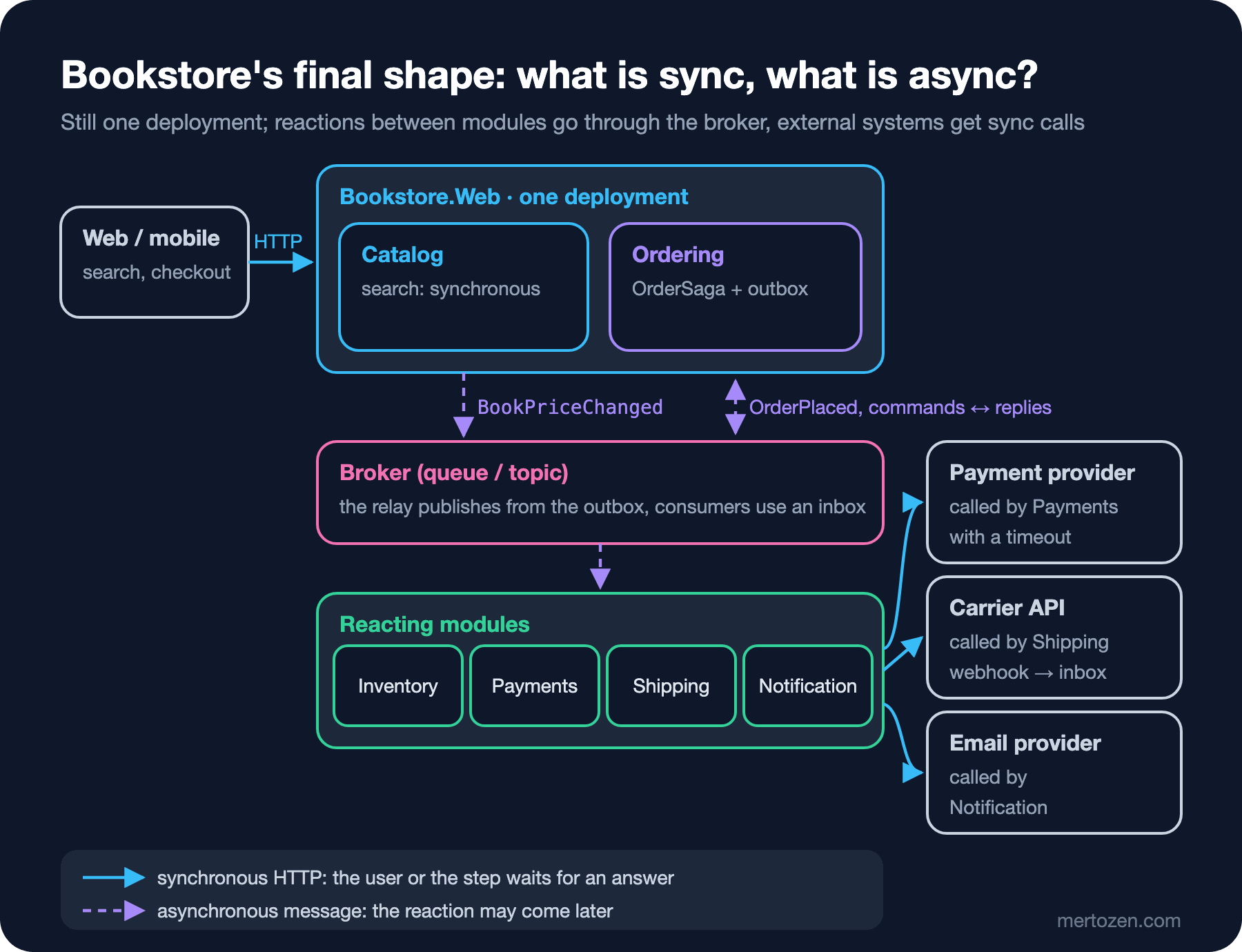
The most important detail in the figure is that it is still a single deployment. Event-driven architecture does not mean microservices; Bookstore's modules benefit from the outbox, the broker, the inbox and the saga while running in the same process, because the real need was to protect checkout from the slowness and failures of external systems. Independent deployability is a characteristic we deliberately marked "not for now" in the Introduction to Architecture series; when the number of teams reaches four, that decision will be reopened, and these events between modules will be the ready-made seams of service boundaries. The situations where you should not use event-driven architecture at all are also clear: a CRUD (Create, Read, Update, Delete) application with a few tables run by one team; a money transfer where every operation needs immediate, strict consistency; a wizard screen where the user expects a result at every step. In these cases adding a broker adds a system to operate, a flow to debug and a delay to explain, and gives nothing in return.
A Small Experiment
★☆☆ Extend CausationTree.Print to also show when each message was logged and to warn when more than five minutes passed between two steps. At which step did Ada's order wait?
★★☆ Rewrite MessagingTelemetry.StartProcess for batch processing: handle ten messages in one process span and add each message's context as an ActivityLink instead of a parent. How does the tracing output change?
★★★ For every flow in Bookstore's table, write a signal (metric and threshold) and an owner. Whose threshold does the tenfold campaign traffic break, and how would you express that?
With this post the series is complete. We started with why the synchronous call chain breaks; we covered message types, channels, delivery guarantees, ordering and the idempotent consumer, the outbox and the inbox, the saga as concept and code, contract evolution, and finally the cost of all of it. The concepts were broker-independent; the next step is to build them with real clients. The Working with Message Queues series in the Backend category continues from here with the RabbitMQ, Azure Service Bus and Kafka clients, with MassTransit and Wolverine, and with the full Entity Framework Core (EF Core) implementation of this series' outbox and inbox.