

Channels: Point-to-Point Queues, Publish/Subscribe Topics, and Competing Consumers

In a point-to-point channel each message goes to exactly one consumer, in publish/subscribe each subscriber group gets its own copy, and competing consumers scale by sharing a channel. Two adapters publishing the same OrderPlaced to RabbitMQ and Kafka, exchanges/queues/bindings versus topics/partitions/consumer groups, Kafka 4.2 share groups, and choosing between a queue and a log, with real output.
Version note: The code in this post was built and run with C# 14 and .NET 10, against RabbitMQ 4.4 and Apache Kafka 4.2 (Docker containers).
Guess First
Bookstore now publishes OrderPlaced to a broker. Inventory has one consumer. Because of campaign load, Shipping scaled its consumer to two instances. Six orders come in.
Three questions. How many messages does Inventory see, and how many messages do Shipping's two instances share? If, a week later, the Analytics team opens a new queue to listen to the same events, how many of last week's orders will it find in that queue? Does the answer change if we ask the same question about Kafka?
Channels: The Road a Message Travels
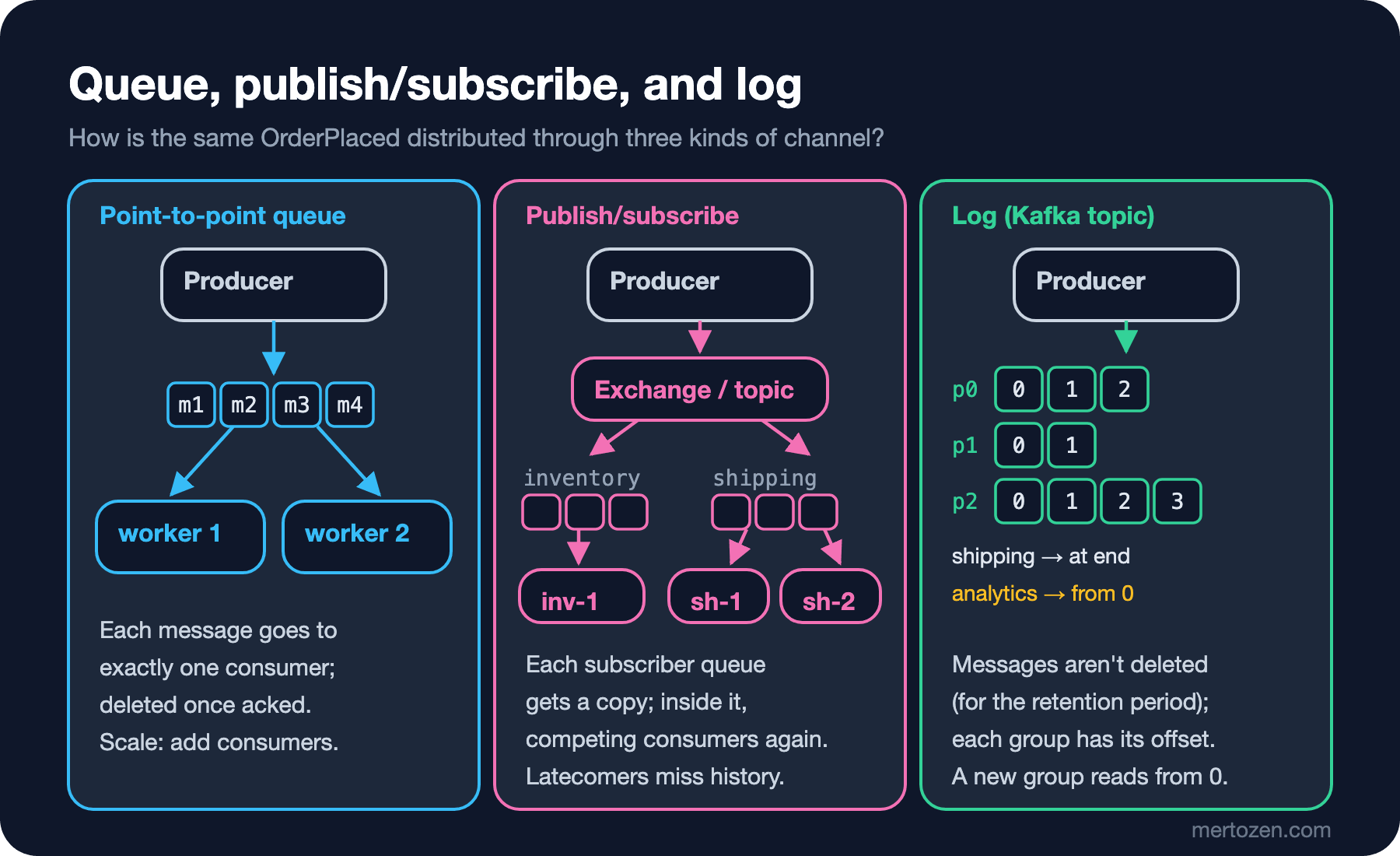
In the previous post we looked at the message itself. The book Enterprise Integration Patterns (EIP: Gregor Hohpe and Bobby Woolf, 2003) calls the road a message travels a message channel: a logical address connecting producer to consumer. The book splits channels into two by behavior. In a Point-to-Point Channel, each message is received by exactly one consumer. In a Publish-Subscribe Channel, every subscriber gets its own copy of the message. This maps directly onto the command/event split from the previous post: a command is sent to a point-to-point channel that goes to a single receiver; an event is published to a publish/subscribe channel that doesn't know who's listening.
The book also names the case of several consumers reading from the same channel: Competing Consumers. The consumers compete for messages, and each message goes to only one of them. That's the basic way to scale a queue: if the work can't keep up, you add consumer instances.
The concepts are broker-independent, but each broker builds them with different objects. Let's publish the same OrderPlaced to two brokers, RabbitMQ and Kafka, and see the difference in running code. The abstraction both adapters will sit behind is small:
namespace Bookstore.Ordering.Contracts;

public interface IIntegrationEvent
{
    static abstract string MessageType { get; }
}

public sealed record OrderPlaced(Guid OrderId, string Customer, string Title, int Quantity, decimal Total)
    : IIntegrationEvent
{
    public static string MessageType => "bookstore.ordering.order-placed.v1";
}
using Bookstore.Ordering.Contracts;
namespace Bookstore.Messaging;
// All the application sees: "publish this event"
public interface IMessagePublisher
{
Task PublishAsync<T>(T message, string key, CancellationToken ct = default) where T : IIntegrationEvent;
}using Bookstore.Messaging;
using Bookstore.Ordering.Contracts;
namespace Bookstore.Ordering;
// Doesn't know which broker is in use
public sealed class PlaceOrderHandler(IMessagePublisher publisher)
{
public Task HandleAsync(OrderPlaced placed, CancellationToken ct = default) =>
publisher.PublishAsync(placed, key: placed.OrderId.ToString(), ct);
}The client code in this post is enough to show the concepts, but not for production: connection management, publisher confirms, retries, and serialization settings are the subject of the upcoming Backend › Working with Message Queues series.
RabbitMQ: Exchanges, Queues, and Bindings
In RabbitMQ the producer writes not to a queue but to an exchange. The exchange copies the message to zero or more queues according to its bindings. The exchange type decides the rule: direct (the routing key matches exactly), fanout (to every bound queue), topic (wildcard pattern matching on the routing key), and headers. That's what publish/subscribe looks like in RabbitMQ: each consumer group opens its own queue and binds it to the exchange.
using System.Text.Json;
using Bookstore.Ordering.Contracts;
using RabbitMQ.Client;

namespace Bookstore.Messaging.RabbitMq;

// RabbitMQ: send to the exchange, let the routing key distribute it to queues
public sealed class RabbitMqPublisher(IChannel channel, string exchange) : IMessagePublisher
{
    public async Task PublishAsync<T>(T message, string key, CancellationToken ct = default)
        where T : IIntegrationEvent
    {
        BasicProperties properties = new()
        {
            MessageId = Guid.CreateVersion7().ToString(),
            Type = T.MessageType,
            ContentType = "application/json",
            DeliveryMode = DeliveryModes.Persistent,
        };
        await channel.BasicPublishAsync(exchange, routingKey: T.MessageType, mandatory: false,
            basicProperties: properties, body: JsonSerializer.SerializeToUtf8Bytes(message), cancellationToken: ct);
    }
}
using System.Collections.Concurrent;
using System.Text.Json;
using Bookstore.Messaging.Kafka;
using Bookstore.Messaging.RabbitMq;
using Bookstore.Ordering;
using Bookstore.Ordering.Contracts;
using Confluent.Kafka;
using Confluent.Kafka.Admin;
using RabbitMQ.Client;
using RabbitMQ.Client.Events;
OrderPlaced[] orders =
[
new(Guid.CreateVersion7(), "Ada", "Dune", 2, 60m),
new(Guid.CreateVersion7(), "Alan", "Emma", 1, 20m),
new(Guid.CreateVersion7(), "Grace", "The Hobbit", 1, 25m),
new(Guid.CreateVersion7(), "Linus", "Middlemarch", 3, 66m),
new(Guid.CreateVersion7(), "Ada", "Emma", 1, 20m),
new(Guid.CreateVersion7(), "Alan", "Dune", 1, 30m),
];
// ---------- RabbitMQ: an exchange + one queue per consumer group ----------
ConnectionFactory factory = new() { HostName = "localhost" };
await using IConnection connection = await factory.CreateConnectionAsync();
await using IChannel channel = await connection.CreateChannelAsync();
const string exchange = "bookstore.ordering";
await channel.ExchangeDeclareAsync(exchange, ExchangeType.Topic, durable: true);
Dictionary<string, object?> quorum = new() { ["x-queue-type"] = "quorum" };
foreach (string queue in new[] { "inventory.order-placed", "shipping.order-placed" })
{
await channel.QueueDeclareAsync(queue, durable: true, exclusive: false, autoDelete: false, arguments: quorum);
await channel.QueueBindAsync(queue, exchange, routingKey: OrderPlaced.MessageType);
}
ConcurrentDictionary<string, ConcurrentQueue<string>> received = new();
await StartRabbitConsumerAsync(connection, "inventory.order-placed", "inventory-1", received);
await StartRabbitConsumerAsync(connection, "shipping.order-placed", "shipping-1", received);
await StartRabbitConsumerAsync(connection, "shipping.order-placed", "shipping-2", received);
PlaceOrderHandler viaRabbit = new(new RabbitMqPublisher(channel, exchange));
foreach (OrderPlaced order in orders) await viaRabbit.HandleAsync(order);
await Task.Delay(TimeSpan.FromSeconds(2));
foreach ((string consumer, ConcurrentQueue<string> titles) in received.OrderBy(r => r.Key))
Console.WriteLine($"[rabbitmq] {consumer,-12} got {titles.Count}: {string.Join(", ", titles)}");
// A queue created after publishing: it can't see the history
await channel.QueueDeclareAsync("analytics.order-placed", durable: true, exclusive: false, autoDelete: false, arguments: quorum);
await channel.QueueBindAsync("analytics.order-placed", exchange, routingKey: OrderPlaced.MessageType);
uint waiting = await channel.MessageCountAsync("analytics.order-placed");
Console.WriteLine($"[rabbitmq] analytics queue created after publishing: {waiting} messages");
Console.WriteLine();static async Task StartRabbitConsumerAsync(
IConnection connection, string queue, string name, ConcurrentDictionary<string, ConcurrentQueue<string>> received)
{
IChannel channel = await connection.CreateChannelAsync();
await channel.BasicQosAsync(prefetchSize: 0, prefetchCount: 1, global: false);
AsyncEventingBasicConsumer consumer = new(channel);
consumer.ReceivedAsync += async (_, delivery) =>
{
OrderPlaced order = JsonSerializer.Deserialize<OrderPlaced>(delivery.Body.Span)!;
received.GetOrAdd(name, _ => new()).Enqueue(order.Title);
await Task.Delay(50); // pretend to do some work
await channel.BasicAckAsync(delivery.DeliveryTag, multiple: false);
};
await channel.BasicConsumeAsync(queue, autoAck: false, consumer);
}The queues are quorum queues: RabbitMQ's durable queue type, replicated across nodes using the Raft algorithm. RabbitMQ 4.0 removed the old classic mirrored queues entirely; for queues that must not lose data, this is now the recommended type. The output:
[rabbitmq] inventory-1  got 6: Dune, Emma, The Hobbit, Middlemarch, Emma, Dune
[rabbitmq] shipping-1   got 3: Dune, The Hobbit, Dune
[rabbitmq] shipping-2   got 3: Emma, Middlemarch, Emma
[rabbitmq] analytics queue created after publishing: 0 messages
The first question is answered. Inventory's single consumer got all six messages: each subscriber group gets its own copy. Shipping's two instances read from the same queue and therefore shared the messages, three each: competing consumers. prefetchCount: 1 tells the broker not to send a consumer a new message until it has acked the one it holds; that's why the split is even. Which order went to which instance changes from run to run, though; when I ran the same program a second time, the lists on the Shipping side were different. Why ordering breaks and when that matters is the subject of post 05 in the series.
Second question: the Analytics queue created after publishing sees zero messages. The exchange copies a message only to the queues bound at that moment; if no queue is bound (and no mandatory flag or alternate exchange is set up), the message is dropped. An acked message is also deleted from its queue. That's the queue-based broker model: a message is a unit of work and disappears once it's processed.
Kafka: Topics, Partitions, and Consumer Groups
In Kafka the channel is a topic, but a topic is not a queue; it's a log: records appended to the end, numbered in order, and not deleted when read. A topic is split into partitions for parallelism; each partition is an ordered log of its own, and each record has an offset within its partition. The key the producer supplies decides which partition a record goes to.
using System.Text;
using System.Text.Json;
using Bookstore.Ordering.Contracts;
using Confluent.Kafka;

namespace Bookstore.Messaging.Kafka;

// Kafka: append to the topic (the log); the key picks the same partition
public sealed class KafkaPublisher(IProducer<string, byte[]> producer, string topic) : IMessagePublisher
{
    public async Task PublishAsync<T>(T message, string key, CancellationToken ct = default)
        where T : IIntegrationEvent
    {
        Message<string, byte[]> record = new()
        {
            Key = key,
            Value = JsonSerializer.SerializeToUtf8Bytes(message),
            Headers = new Headers
            {
                { "message-id", Encoding.UTF8.GetBytes(Guid.CreateVersion7().ToString()) },
                { "message-type", Encoding.UTF8.GetBytes(T.MessageType) },
            },
        };
        await producer.ProduceAsync(topic, record, ct);
    }
}
// ---------- Kafka: one topic, 3 partitions, consumer groups ----------
const string bootstrap = "localhost:9092";
const string topic = "bookstore.ordering";
using (IAdminClient admin = new AdminClientBuilder(new AdminClientConfig { BootstrapServers = bootstrap }).Build())
{
await admin.CreateTopicsAsync([new TopicSpecification { Name = topic, NumPartitions = 3, ReplicationFactor = 1 }]);
}
using IProducer<string, byte[]> producer =
new ProducerBuilder<string, byte[]>(new ProducerConfig { BootstrapServers = bootstrap }).Build();
PlaceOrderHandler viaKafka = new(new KafkaPublisher(producer, topic));
foreach (OrderPlaced order in orders) await viaKafka.HandleAsync(order);
Console.WriteLine($"[kafka] shipping (first read): {ReadAll("shipping")}");
Console.WriteLine($"[kafka] analytics (new group): {ReadAll("analytics")}");
Console.WriteLine($"[kafka] shipping (second read): {ReadAll("shipping")}");
// Cleanup: so the sample can be run again
foreach (string queue in new[] { "inventory.order-placed", "shipping.order-placed", "analytics.order-placed" })
await channel.QueueDeleteAsync(queue);
await channel.ExchangeDeleteAsync(exchange);
using (IAdminClient admin = new AdminClientBuilder(new AdminClientConfig { BootstrapServers = bootstrap }).Build())
{
await admin.DeleteTopicsAsync([topic]);
await admin.DeleteGroupsAsync(["shipping", "analytics"]);
}string ReadAll(string groupId)
{
ConsumerConfig config = new()
{
BootstrapServers = bootstrap,
GroupId = groupId,
AutoOffsetReset = AutoOffsetReset.Earliest, // a new group without an offset reads from the beginning
};
using IConsumer<string, byte[]> consumer = new ConsumerBuilder<string, byte[]>(config).Build();
consumer.Subscribe(topic);
List<string> titles = [];
DateTime until = DateTime.UtcNow.AddSeconds(8);
while (DateTime.UtcNow < until)
{
ConsumeResult<string, byte[]>? result = consumer.Consume(TimeSpan.FromMilliseconds(500));
if (result is null) { if (titles.Count > 0) break; continue; }
titles.Add($"{JsonSerializer.Deserialize<OrderPlaced>(result.Message.Value)!.Title}@p{result.Partition.Value}");
}
consumer.Close(); // offsets are committed, the consumer leaves the group
return titles.Count == 0 ? "nothing new" : $"{titles.Count} -> {string.Join(", ", titles)}";
}[kafka] shipping (first read): 6 -> Dune@p2, Emma@p1, The Hobbit@p1, Emma@p1, Middlemarch@p0, Dune@p0
[kafka] analytics (new group): 6 -> Dune@p2, Emma@p1, The Hobbit@p1, Emma@p1, Middlemarch@p0, Dune@p0
[kafka] shipping (second read): nothing newThe unit on the reading side is the consumer group. Consumers using the same group id share the topic's partitions among themselves: each partition is assigned to a single consumer in the group. That's competing consumers too, but at the partition level. Groups are independent of each other; each group keeps track of where it left off (its offset) by itself. The three lines of output are the consequences.
The Shipping group read the six records and committed its offsets. The Analytics group came later and read the same six records from the beginning: AutoOffsetReset.Earliest makes a group with no stored offset start at the beginning of the log. When Shipping connected a second time there was nothing new, because where it left off was the end of the log. That's the answer to the third question: in Kafka, a late subscriber sees the history, as long as the records are within the retention period. A topic's default retention is 7 days; you can also choose unlimited retention, or log compaction, which keeps the latest record per key.
Notice the order in the output too: the records didn't arrive in the order they were published, but partition by partition. Kafka guarantees order only within a partition. Another consequence: if a group runs more consumers than there are partitions, the extra ones sit idle; a topic with three partitions can be read by at most three consumers in parallel. Kafka 4.2 declared share groups (the "Queues for Kafka" work that came with KIP-932, Kafka Improvement Proposal 932) production-ready, loosening that limit: consumers in a share group consume records together without single-owner partition assignment, with per-record acknowledgement and delivery attempt counting. So Kafka can now behave like a queue too; the price is giving up the in-partition ordering guarantee for those records.
From Concept to Broker
The same EIP concept in three common brokers:
| Concept | RabbitMQ | Azure Service Bus | Apache Kafka |
|---|---|---|---|
| Point-to-point channel | Queue (via the default or a direct exchange) | Queue | Topic + a single consumer group (or a share group) |
| Publish/subscribe channel | Fanout/topic exchange + one queue per subscriber | Topic + subscriptions | Topic + one consumer group per subscriber |
| Subscriber group | A queue | A subscription | A consumer group |
| Competing consumers | Several consumers on the same queue | Several receivers on the same queue/subscription | Consumers sharing partitions; share groups in 4.2 |
| Routing | Bindings, routing key | Subscription filters | Topic name and key (partition) |
| Processed message | Deleted on ack | Deleted on complete | Stays; the group's offset moves |
| Late subscriber | Doesn't see history | Doesn't see history | Can read what's within retention from the start |
Azure Service Bus's model is closer to RabbitMQ than to Kafka: every message that reaches a topic is copied to every subscription, and each subscription behaves like a queue of its own. The difference is that routing is done with filter rules on the subscription instead of exchanges and bindings.
Queue or Log?
The two models answer different questions. In a queue-based broker (RabbitMQ, Azure Service Bus), a message is a unit of work: someone should do it, and once it's done, forget it. Per-message ack, retries, delayed delivery, priority, and dead-lettering are natural in that model. In a log-based broker (Kafka), a message is a record of a fact: whoever wants to can read it, whenever they want. Replay, feeding a new consumer with history, high throughput, and many independent groups reading the same data are natural in that model.
For Bookstore, the reading goes like this: commands such as "send the confirmation email" and one-off jobs fit a queue very well. For events like OrderPlaced, which several contexts listen to and new contexts will want to listen to later, the log's replay ability is valuable. When the Analytics team shows up six months later saying "we also want last quarter's orders", in Kafka that's an offset setting; in RabbitMQ, it's a separate data migration project. But for a team taking 800 orders a day with a single ops person, running a Kafka cluster is a serious load too. The lines are blurring as well: RabbitMQ streams (since 3.9) offer a replayable log, and Kafka's share groups offer queue-like consumption. Make the choice based on the behavior you need, not the broker's name: do you need replay, do you need per-message retries and delays, how many independent readers will there be?
How Thin Should the Abstraction Be?
IMessagePublisher hides both brokers, and PlaceOrderHandler doesn't know which one it's talking to. But the abstraction leaks, and that should be admitted honestly. The key parameter isn't even used in the RabbitMQ adapter: routing is done by the routing key there, and that comes from the message type. In Kafka, the key decides ordering and parallelism. The application code makes the decision "the order id is the key" independently of the broker; the consequences of that decision in Kafka are in post 05 of the series.
On my first attempt I wrote both adapters in the same file, and the compiler stopped me:
error CS0104: 'Headers' is an ambiguous reference between 'RabbitMQ.Client.Headers' and 'Confluent.Kafka.Headers'A small error, but the right signal: two client libraries shouldn't live in the same file, or even the same project. In a real application each adapter lives in its own project (Bookstore.Messaging.RabbitMq, Bookstore.Messaging.Kafka) and the composition root registers only one. It's a direct application of the port/adapter split we covered in the Clean, Onion, and Hexagonal Architecture series. Trying to abstract the consumer side this far, on the other hand, is usually a bad idea: ack, offset commits, prefetch, and partition assignment are broker-specific behaviors, and presenting them as identical behind a common interface makes mistakes easy. Libraries like MassTransit and Wolverine do this work ready-made; the details are in the Backend series.
Common Pitfalls
Attaching two different consumer groups to the same queue
If the Shipping team says "OrderPlaced is already in the inventory queue" and starts reading from there, it competes with Inventory for messages: each sees half the orders. Competing consumers are only for instances doing the same job. A different job means a different queue (or, in Kafka, a different consumer group).
Forgetting to feed a new subscriber with history
In RabbitMQ and Azure Service Bus, a newly opened queue or subscription sees only the messages after that moment. If a new context also needs to know about existing orders, you need a separate initial load (backfill) plan; the broker doesn't solve that on its own.
More consumers than partitions
Scaling the Shipping consumer to ten instances in Kafka for the campaign means seven idle instances if the topic has three partitions. In a classic consumer group the upper limit of parallelism is the partition count; increasing the partition count later changes how keys are distributed across partitions. The effect of that on ordering is in post 05 of the series.
Sending a command to publish/subscribe
The channel version of the previous post's warning: if ChargePayment is sent to a fanout exchange, the money gets charged twice the day a second queue is bound. Commands should be sent down a road that leads to a single queue.
A Small Experiment
★☆☆ Start a third consumer for Shipping in the program (shipping-3). How are the six messages split? Does the split change if you set prefetchCount to 10, and why?
★★☆ On the RabbitMQ side, create and bind the analytics.order-placed queue before publishing, but don't attach a consumer to it. How many messages are in the queue when the program ends? What's the equivalent of doing the same in Kafka?
★★★ Create the Kafka topic with 1 partition instead of 3, and run ReadAll in parallel with two separate consumers using the same group id. How many records does the second consumer get? Then repeat the experiment with 3 partitions.
The consumers in this post always ran on the happy path: a message arrived, was processed, was acked. But what if shipping-1 crashes after processing a message but before acking it? What does the broker do with that message, and does Shipping prepare the same order twice? In the next post we'll look at delivery guarantees and what the "exactly-once" promise actually covers.