

Environments and Promotion: Dev, Test, Staging, Production and Configuration
The same artifact moves through dev, test, staging and production without being rebuilt; the only thing that should change from step to step is configuration coming from the environment. Layered configuration in ASP.NET Core with appsettings.{Environment}.json and environment variables, a missing setting that fails at startup with ValidateOnStart, a difference inventory between staging and production, preview environments per PR, and masking non-prod data.
Version note: The examples in this post were run with .NET 10 (SDK 10.0.402), Docker 29, PostgreSQL 18, act 0.2.97 and actionlint 1.7.12.
Guess First
The same image of the Bookstore API (Application Programming Interface) runs fine on staging. You start the same image in production but forget the environment variable that gives the payment service's address. Does the application start, does it start and then blow up on the first payment request, or does it not start at all? And in which state does docker ps show that container? The answer to the second question surprised me too.
The Environment Chain
Bookstore's artifact passes four stops before reaching production. Each stop has a different purpose and audience:
| Environment | Purpose | Who uses it | Data |
|---|---|---|---|
| Development | Developer machine, quick experiments | Developers | Seed data |
| Test | Automated integration and e2e tests | The pipeline | Recreated on every run |
| Staging | The closest rehearsal to production | QA (Quality Assurance), product team | Masked or synthetic |
| Production | Real users | Customers | Real data |
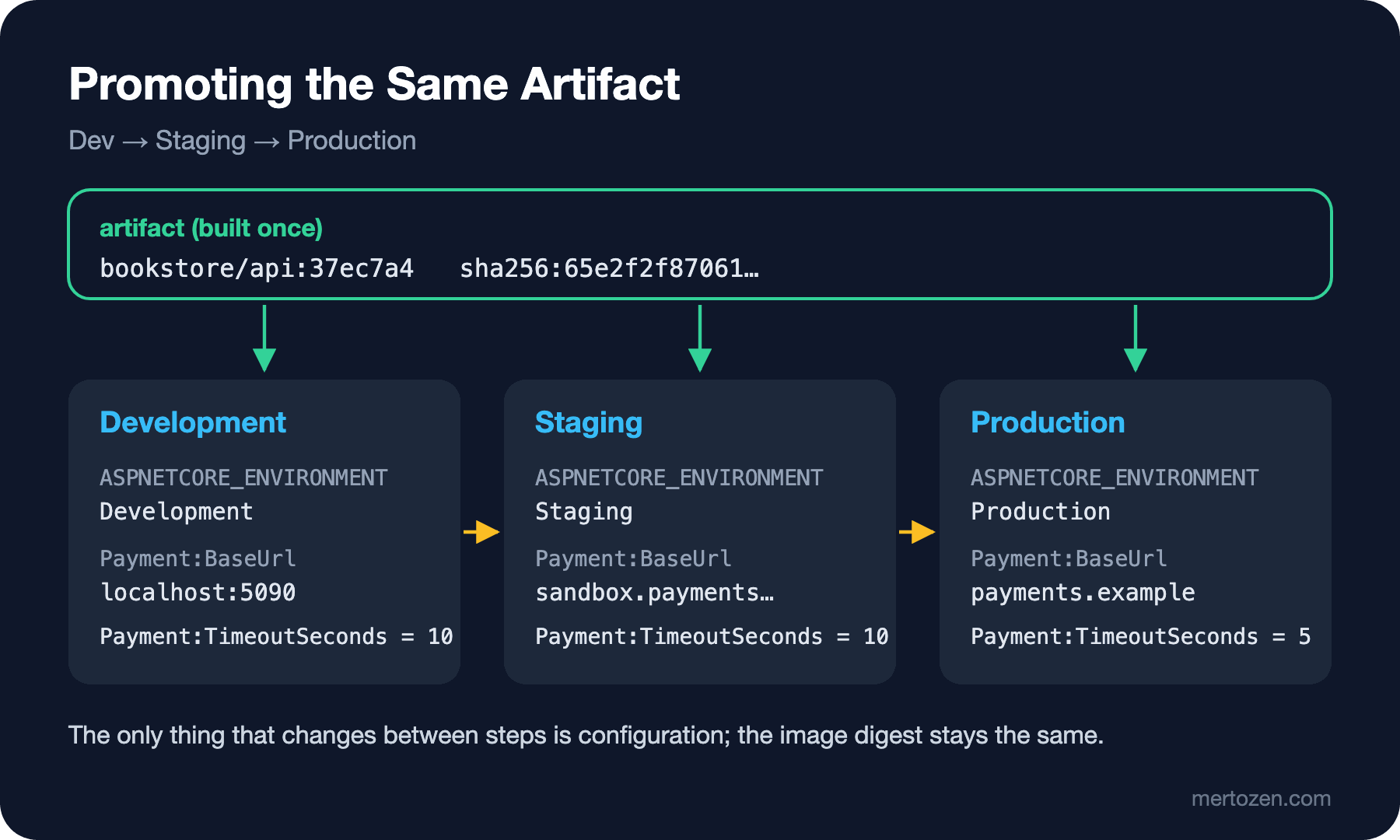
Promotion means moving the same artifact from one stop to the next. Remember the principle from the previous post: no stop rebuilds anything. The only thing that changes is not inside the artifact but next to it: configuration.
The number of stops is not sacred. For a small team three stops, "test on the PR (pull request), staging on merge, production with approval", are enough; a regulated environment may add a separate UAT (User Acceptance Testing) stop. Every new stop brings a waiting point and a maintenance burden; before adding one, you should be able to say which risk that stop catches.
Separating Configuration from the Artifact
The third factor of The Twelve-Factor App says it in one sentence: store config in the environment. Everything that does not change with the code but changes from deploy to deploy (connection addresses, credentials, timeout values) should come from outside the artifact. ASP.NET Core has the infrastructure ready; I covered the mechanics in the ASP.NET Core Web API series posts "Program.cs and the Hosting Model in ASP.NET Core: WebApplication and Environments" and "Configuration and the Options Pattern in ASP.NET Core: Provider Order, User Secrets and Validation". Here we look at it from the pipeline's point of view.
Bookstore connects to a payment service. The settings live in an options class:
using System.ComponentModel.DataAnnotations;

namespace Bookstore.Api.Payments;

public sealed class PaymentOptions
{
    [Required, Url]
    public string BaseUrl { get; init; } = "";

    [Range(1, 60)]
    public int TimeoutSeconds { get; init; } = 10;
}
In Program.cs they are bound, validated and written to the log at startup:
builder.Services.AddOptions<PaymentOptions>()
    .BindConfiguration("Payment")
    .ValidateDataAnnotations()
    .ValidateOnStart();

var app = builder.Build();

PaymentOptions payment = app.Services.GetRequiredService<IOptions<PaymentOptions>>().Value;
app.Logger.LogInformation("Environment {Environment}, payment gateway {BaseUrl}, timeout {Timeout}s",
    app.Environment.EnvironmentName, payment.BaseUrl, payment.TimeoutSeconds);
Values arrive in layers. appsettings.json holds the defaults shared by all environments, appsettings.Staging.json only what is specific to staging:
// appsettings.json
{
  "Logging": {
    "LogLevel": {
      "Default": "Information",
      "Microsoft.AspNetCore": "Warning"
    }
  },
  "AllowedHosts": "*",
  "Payment": {
    "TimeoutSeconds": 10
  }
}

// appsettings.Staging.json
{
  "Payment": {
    "BaseUrl": "https://sandbox.payments.example/api"
  }
}
Production's value is not in the image at all; it arrives as an environment variable at deploy time. In ASP.NET Core, nested keys are written with a double underscore in environment variables: Payment__BaseUrl. I started the same image in two containers:
$ docker run -d --name cicdwork-api-staging -p 127.0.0.1:18101:8080 \
    -e ASPNETCORE_ENVIRONMENT=Staging bookstore/api:37ec7a4
$ docker logs cicdwork-api-staging
info: Bookstore.Api[0]
      Environment Staging, payment gateway https://sandbox.payments.example/api, timeout 10s
info: Microsoft.Hosting.Lifetime[14]
      Now listening on: http://[::]:8080

$ docker run -d --name cicdwork-api-prod -p 127.0.0.1:18102:8080 \
    -e ASPNETCORE_ENVIRONMENT=Production \
    -e Payment__BaseUrl=https://payments.example/api \
    -e Payment__TimeoutSeconds=5 bookstore/api:37ec7a4
$ docker logs cicdwork-api-prod
info: Bookstore.Api[0]
      Environment Production, payment gateway https://payments.example/api, timeout 5s
One image, two behaviours. Values like BaseUrl in these lines are not secret; secrets such as passwords or API keys are not written in plain text into environment variables either, they come from a secret store. We will cover that in the seventh post and in the upcoming Configuration and Secret Management series.
Break at Startup: Missing Configuration
Back to the opening question. When I started the production container without Payment__BaseUrl:
$ docker logs cicdwork-api-prod
Unhandled exception. Microsoft.Extensions.Options.OptionsValidationException: DataAnnotation validation failed for 'PaymentOptions' members: 'BaseUrl' with the error: 'The BaseUrl field is required.'.
   at Microsoft.Extensions.Options.OptionsFactory`1.Create(String name)
   at Microsoft.Extensions.Options.UnnamedOptionsManager`1.get_Value()
The application went down at startup, without waiting for the first payment request. That is a good thing: without ValidateOnStart the application would start, health checks would be green, and the error would surface hours later on the first customer's payment. Missing configuration should break at deploy time, in front of the person doing the deploy.
The surprising part was in docker ps. Even though the application had crashed, the container kept showing as "running" for 20 seconds:
$ docker run -d --name cicdwork-api-prodfail -e ASPNETCORE_ENVIRONMENT=Production bookstore/api:37ec7a4
2s running exit=0
4s running exit=0
…
20s running exit=0

$ docker run -d --init --name cicdwork-api-prodfail -e ASPNETCORE_ENVIRONMENT=Production bookstore/api:37ec7a4
2s exited exit=134
Inside the container the dotnet process runs as PID (Process ID) 1. The most likely explanation is how PID 1 handles signals: Linux does not apply the default action of signals without a handler to the first process of a PID namespace, so the abort signal the runtime sends itself after an unhandled exception may not have ended the process right away. What is certain is this: with --init, a small init process became PID 1 and the container exited immediately with exit code 134. The lesson: measure the success of a deploy with a health check, not with "is the container running?". We will add that to the pipeline as a smoke test in the next post. Orchestrators such as Kubernetes may behave differently; we will look at that in the upcoming Kubernetes series.
Dev/Prod Parity
The tenth factor of The Twelve-Factor App describes the difference between environments as three gaps: time (between writing code and it reaching production), personnel (the people who write it are not the people who run it) and tools (SQLite in development, PostgreSQL in production, for example). Continuous delivery already narrows the first two. The third takes deliberate effort.
In Bookstore the rule is simple: staging uses the same image as production, the same PostgreSQL major version and the same reverse proxy configuration. On developer machines PostgreSQL runs in a container too; the integration tests in the previous post use the same image. The decision "SQLite is enough locally" means a PostgreSQL-specific query bug only shows up on staging.
"It Worked on Staging": The Difference Inventory
When a build that was green on staging blows up in production, the first job is not guessing but taking inventory. Confirm that both come from the same image, then list the differences. For configuration differences, comparing the environment variables of the two containers is enough:
$ docker inspect --format '{{.Image}}' cicdwork-api-staging cicdwork-api-prod
sha256:65e2f2f87061b7f062285c55286280310d168b917036141857d7aeb20f6cf44a
sha256:65e2f2f87061b7f062285c55286280310d168b917036141857d7aeb20f6cf44a
$ diff <(docker inspect --format '{{range .Config.Env}}{{println .}}{{end}}' cicdwork-api-staging | sort) \
       <(docker inspect --format '{{range .Config.Env}}{{println .}}{{end}}' cicdwork-api-prod | sort)
3c3
< ASPNETCORE_ENVIRONMENT=Staging
---
> ASPNETCORE_ENVIRONMENT=Production
8a9,10
> Payment__BaseUrl=https://payments.example/api
> Payment__TimeoutSeconds=5
Same image, a three-line difference. A list this clear usually answers "why does it behave differently?" within minutes. Places to look beyond configuration:
- Data volume: 3,000 orders on staging, 30 million in production; a query without an index takes 20 ms on staging and 20 seconds in production.
- Network: firewalls and proxies that sit in between in production, different DNS (Domain Name System) records and TLS (Transport Layer Security) certificates.
- Resource limits: memory and CPU (Central Processing Unit) limits given to the container, connection pool sizes.
- Dependency versions: the database minor version, behavioural differences between the payment service's sandbox and live APIs.
- Traffic: the number of concurrent requests, whether the cache is cold or warm.
"Staging resembles production" is an assumption; checking this list regularly turns it into a fact.
Preview Environments per PR
Some teams open a temporary environment for every PR: the product manager can see a change at a real address before it is merged. In Bookstore the skeleton looks like this:
name: preview

on:
  pull_request:
    types: [opened, synchronize, reopened, closed]

concurrency:
  group: preview-${{ github.event.number }}
  cancel-in-progress: true

jobs:
  deploy:
    if: github.event.action != 'closed'
    runs-on: ubuntu-latest
    environment:
      name: pr-${{ github.event.number }}
      url: https://pr-${{ github.event.number }}.preview.bookstore.example
    steps:
      - run: echo "deploy ${GITHUB_SHA::7} to pr-${{ github.event.number }} with seed data"

  teardown:
    if: github.event.action == 'closed'
    runs-on: ubuntu-latest
    steps:
      - run: echo "delete pr-${{ github.event.number }} and its database"
The deploy and delete steps are placeholders here; the real commands depend on the platform (a Kubernetes namespace, a PaaS (Platform as a Service) application). What matters is the skeleton: deploy when the PR is opened or gets a new commit, delete when it closes, and concurrency so that two deploys of the same PR do not race. I ran both events with act, using event files for PR number 42:
$ act pull_request -W .github/workflows/preview.yml -e events/opened.json
[preview/deploy  ]   | deploy a6b8464 to pr-42 with seed data
[preview/deploy  ] 🏁  Job succeeded
$ act pull_request -W .github/workflows/preview.yml -e events/closed.json
[preview/teardown]   | delete pr-42 and its database
[preview/teardown] 🏁  Job succeeded
Preview environments are very valuable for UI (User Interface) changes and product reviews. Their cost is real, though: every PR means an application and a database, and PRs that never close mean forgotten resources. In addition to the delete job, a scheduled job that cleans up previews older than a certain age is good insurance.
Data Outside Production
Staging needs data to be realistic, but copying production data as it is means personal data spreading out of control; it is also a risk under regulations such as KVKK (Kişisel Verilerin Korunması Kanunu, Turkey's personal data protection law) and GDPR (General Data Protection Regulation). There are two ways: entirely synthetic seed data, or a masked copy. In a masked copy, the fields that identify a person are changed before the copy is opened up on staging. On Bookstore's staging database:
UPDATE customers
SET full_name = 'Customer ' || id,
    email = 'customer' || id || '@example.test',
    phone = NULL;

SELECT id, full_name, email, phone, city FROM customers ORDER BY id;
UPDATE 3
id | full_name | email | phone | city
----+------------+------------------------+-------+------------
1 | Customer 1 | customer1@example.test | | London
2 | Customer 2 | customer2@example.test | | Manchester
3 | Customer 3 | customer3@example.test | | Arlington
(3 rows)The city field stayed, because it is needed to test things like shipping calculations and does not identify a person on its own. Which fields to mask is a decision; writing it down once and making the masking script a pipeline step removes the risk of "we forgot this time". Using a reserved domain like @example.test also prevents staging from accidentally emailing a real customer.
In Production
A configuration change is a change too. MinimumCD's "application configuration deploys with the artifact" item says exactly that: changing a timeout value by hand in production is a deploy that went through no review and has no history. Keep environment-specific values in the repository (except secrets) or in a versioned configuration store, and apply them through the pipeline.
Do not write business logic based on the environment name. Code that changes payment behaviour with if (env.IsProduction()) means the path you tested on staging never runs in production. What differs between environments should be values, not behaviour.
Watch for configuration drift. Over time, small manual changes push environments apart. Running a comparison like the diff above regularly lets you notice the difference on a calm day rather than during an incident.
Common Pitfalls
The "staging resembles production" assumption: if data volume, network and resource limits have never been compared, the resemblance is only in the name.
A build per environment: files like environment.prod.ts or compile-time constants like #if PRODUCTION produce a separate artifact for each environment. Move configuration to runtime.
Colliding tests on a shared staging database: when two pipelines change the same test data at the same time, results become random. Automated tests should set up their own isolated data.
Silently falling back to a default for missing configuration: an application that starts with an empty BaseUrl raises no error, but sends requests to the wrong place. Put validation at startup.
A Small Experiment
★☆☆ Add ValidateDataAnnotations and ValidateOnStart to a critical options class in your own API, then start it without the required value. Did the error come at startup or on the first request?
★★☆ Compare the environment variables of your staging and production containers (or pods) with the diff above. Did a difference you did not expect turn up?
★★★ Write a masking script for your staging database, justify in a table why you mask or keep each field, and put the script in the pipeline right after the copy step.
In the next post we will look at the checkpoints of promotion: the difference between manual approvals and automated gates, who may deploy to production, and what DORA (DevOps Research and Assessment) research says about heavyweight approval processes.