

CI, Continuous Delivery and Continuous Deployment: The Differences and Why They Matter
CI means everyone integrates into the mainline every day and every push runs an automated build and tests; continuous delivery keeps every commit releasable and leaves going to production as a decision, while continuous deployment removes that button too. An integration hell scenario, Fowler's 2024 practices, a CI workflow run with act, and the MinimumCD checklist.
Version note: The examples in this post were run with .NET 10 (SDK 10.0.402), act 0.2.97, actionlint 1.7.12 and Docker 29.
Guess First
The Bookstore team has five people. Everyone works on their own feature branch for a week, and on Friday afternoon everything gets merged into main. Last month the team set up GitHub Actions; now every push to every branch runs the build and the tests, and they are all green. Here is the question: is this team doing Continuous Integration?
Second question: in another team every commit goes to staging automatically, passes the tests, and then a manager presses a "Deploy to production" button. Is that continuous delivery or continuous deployment? Write your answers down; we will come back to both at the end of the post.
Friday Evening: Integration Hell
Let me describe a Friday at Bookstore. Ada has spent a week on feature/discounts writing discount rules and has reworked PriceCalculator. In the same week Alan worked on feature/inventory and moved the Stock property of the Book record into a separate Inventory type. Grace added a new endpoint to the API (Application Programming Interface) for the order screen, and it uses the old Stock. All three branches are green on their own, because each one forked from last week's main and knows nothing about the others.
At 16:00 the first merge goes in without trouble. The second one produces conflicts in 14 files. The third merges cleanly but breaks the build: Grace's code now reads a property that no longer exists. They fix it, and this time Ada's tests break, because the discount calculation turned out to depend on the stock check. This is exactly what Martin Fowler describes in his article: every fix reveals two new problems and nobody can say when it will end. The literature calls it "integration hell".
The real problem is not the merge itself but how rarely integration happens. A week apart means a week of accumulated difference. As the differences grow, so does the chance of a collision, because every new change can interact with everybody else's changes and nobody sees that interaction until the merge. The fix follows from that: integrate so often that each integration is small and boring.
What Continuous Integration Is, and What It Is Not
CI (Continuous Integration) is a practice that Kent Beck described in the 1990s as part of XP (Extreme Programming) and that Fowler popularised with his article in 2000. The revision of that article dated 18 January 2024 lists the practices like this:
- Everything lives in a single mainline in version control.
- The build is automated and runs with one command.
- The build tests itself (a self-testing build).
- Everyone pushes to the mainline at least every day.
- Every push to the mainline triggers a build.
- Broken builds are fixed immediately.
- The build is kept fast (XP's "ten minute build" target).
- Work in progress is hidden (for example behind a feature flag).
- Tests run in an environment that resembles production.
- Everyone can see what is happening.
- Deployment is automated.
Look at the list carefully: the tool only appears in the fifth item, and even there indirectly. Most of the rest is about how the team behaves. "Everyone pushes to the mainline every day" directly rules out the Bookstore team's weekly branches. So the answer to the opening question is no, that team is not doing CI. Running a build on every branch is useful automation, but integration still happens once a week.
The automation part is still necessary; a build that someone runs by hand stays broken while nobody is looking. Bookstore's smallest CI workflow looks like this:
name: ci

on:
  push:
    branches: [main]
  pull_request:

jobs:
  build-and-test:
    runs-on: ubuntu-latest
    steps:
      - uses: actions/checkout@v7
      - uses: actions/setup-dotnet@v6
        with:
          global-json-file: global.json
      - run: dotnet test -c Release
The triggers are deliberate: every push to main and every PR (pull request). There is no need to trigger on every push to every feature branch as well, because the branch is meant to be short-lived and the workflow runs anyway once the PR is opened. I ran this workflow locally with act instead of pushing it to GitHub; act runs the jobs in a Docker container that resembles a GitHub runner. The relevant lines of the output:
$ act push -W .github/workflows/ci.yml
[ci/build-and-test]   | SDK Version: 10.0.403
[ci/build-and-test]   | Passed!  - Failed:     0, Passed:     6, Skipped:     0, Total:     6, Duration: 101 ms - Bookstore.Api.Tests.dll (net10.0)
[ci/build-and-test]   ✅  Success - Main dotnet test -c Release [7.267571667s]
[ci/build-and-test] 🏁  Job succeeded
Six tests passed in 101 milliseconds; the whole job took about 37 seconds and most of that was installing the SDK. Note one detail: global.json says SDK 10.0.402, but the runner installed 10.0.403 because rollForward is set to latestFeature. Small differences like this affect how reproducible the build is; we will come back to that in the third post of the series.
Continuous Delivery: Every Commit Is Releasable
CI tells you that the code is integrated and passes the tests. But there is still a gap between "the tests are green" and "we can give this to customers": packaging, configuration, database migrations, a trial run on staging. Jez Humble and David Farley's 2010 book Continuous Delivery describes how to close that gap: every change goes through an automated pipeline and is kept in a state where it could go to production at any moment.
The key word is "could". In continuous delivery, going to production is not a technical task but a decision. The pipeline does everything automatically up to staging; a person decides when to go to production, usually with a single button. The decision may come from the business ("the campaign starts on Monday"), from regulation, or simply from the team saying "it's Friday, let's ship tomorrow morning". What matters is that pressing the button requires no manual steps.
That is why the second team in the opening question is doing continuous delivery: every commit goes to staging automatically, and production is a button.
Continuous Deployment: Removing the Button Too
Continuous deployment goes one step further: every commit that comes out of the pipeline green goes to production without waiting for a human. Nobody presses a button; the decision has been handed over to tests and automated checks.
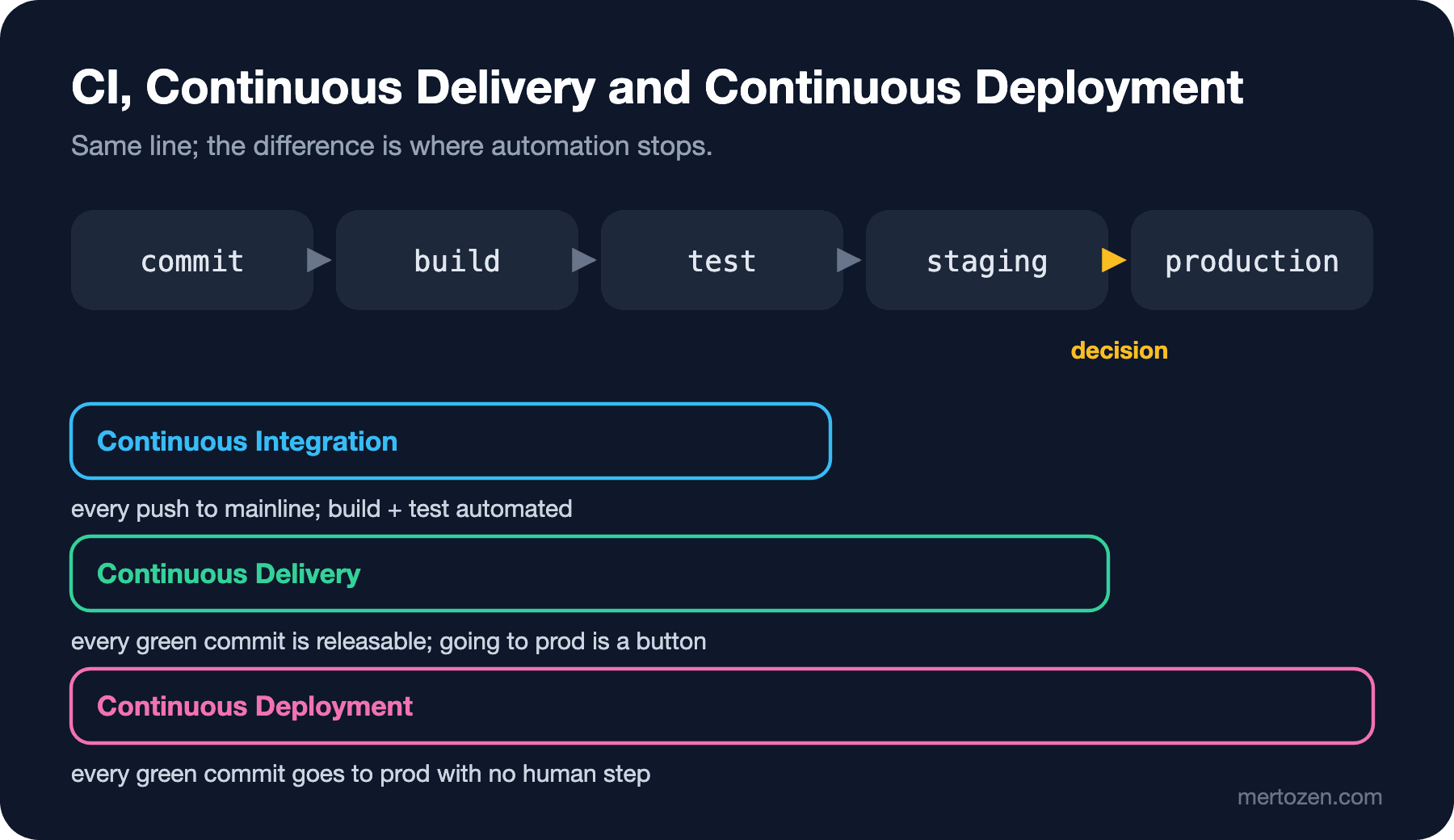
All three concepts sit on the same line; the difference is where automation stops. The abbreviations are confusing here: CD (Continuous Delivery or Continuous Deployment) is used for both concepts. When someone in a meeting says "we're moving to CD", asking which one they mean is a good habit.
Continuous deployment has one more prerequisite: deploying and exposing to users must not be the same thing. An unfinished feature can be deployed to production and stay switched off behind a feature flag; a deploy is a technical event, a release is a business decision. I will cover this distinction in detail, together with techniques such as blue-green and canary, in the upcoming Deployment Strategies series.
The Precondition for CI: Small Batches and Trunk-Based Development
Pushing to the mainline every day means splitting work into pieces that can be integrated every day. That makes trunk-based development the natural fit: if there are branches at all, they are short-lived and return to trunk within a day or two. I covered branching strategies, the difference between GitHub flow and Git flow, and rulesets in the Git & GitHub series post "Teamwork with Git: Branching Strategies, Rulesets and Conventional Commits"; I will not repeat that here.
The objection "our work doesn't finish in a day" is fair, but a small batch does not mean finishing the work in a day; it means integrating a coherent piece of it every day. Ada's discount rules could have been split into three PRs: first the new DiscountRule type and its tests (called from nowhere), then wiring it into the calculation (flag off), and finally turning the flag on. Each one can be merged on its own, and each one meets Alan's change on the same day, not on Friday.
A good starting point for checking whether you really do continuous delivery is the checklist from the MinimumCD community. The nine items in its continuous delivery section and what they mean for Bookstore:
| MinimumCD item | What it means for Bookstore |
|---|---|
| Use continuous integration | Everyone integrates into main every day |
| The pipeline is the only way to deploy to any environment | No copying files to a server by hand |
| The pipeline decides releasability | "But I tested it" does not override a red pipeline |
| Pipeline artifacts meet the definition of deployable | No extra manual signing or packaging |
| Immutable artifact | Nobody changes the package after the commit |
| Feature work stops while the main pipeline is red | main gets fixed first |
| Production-like test environment | Staging runs the same image and the same database engine |
| Rollback on demand | The previous image comes back with one command |
| Application configuration deploys with the artifact | Config changes also go through the pipeline |
We will open up most of these items one by one later in the series: artifacts in the third post, environments in the fifth, controls in the sixth.
A Short History
Knowing the order in which the ideas arrived makes it easier to understand why the terms are used the way they are. CI appeared in the late 1990s as one of XP's practices. Fowler published the first version of his article in 2000 and revised it significantly in 2006 and 2024. In 2010 Humble and Farley's Continuous Delivery book extended CI all the way to production with the idea of a deployment pipeline. From 2014 onwards the DORA (DevOps Research and Assessment) programme started measuring how these practices relate to delivery performance, using surveys from thousands of teams, and in 2015 it settled on its well-known four-metric model. Those metrics became five in 2024; we will calculate all of them in the last post of the series.
In Production
The value of CI depends on how long feedback takes. Fowler's article considers XP's ten-minute build target reasonable for most projects, and notes that most of his colleagues consider a one-hour build unacceptable. If your pipeline takes 25 minutes, people start new work instead of waiting, and by the time the result arrives the context has already changed.
The second thing to watch is how long main stays red. When a broken build is left waiting for "someone to look at it", new commits pile on top and it becomes unclear which commit broke what. The rule is simple: if main is red, the first job is to fix it or revert the commit that broke it. MinimumCD's "feature work stops while it is red" item says exactly that.
The third is trust. Tests that fail now and then for no reason (flaky tests) teach the team that "red is not always real", and real failures then get the same shrug. We will look at how to deal with flaky tests in the fourth post.
Common Pitfalls
"We installed Jenkins, so we do CI" is the most common misconception. The tool only provides the automation part of the practice; seeing green builds on every branch while branches live for weeks does not mean integration is happening.
Counting a nightly build as CI is a similar mistake. A build that runs once a day tells you what broke, at best, the next morning; by then new work has been added on top of the broken code.
Confusing continuous delivery with continuous deployment causes needless fear. Worried that "every commit will go to production", teams avoid automating the pipeline. Yet in continuous delivery the production button stays where it is; the only change is that pressing it no longer involves any manual step.
The last pitfall is ignoring a red build because "it's not my change". CI is a shared responsibility; if main is broken, everyone's work stops.
A Small Experiment
★☆☆ In your own project, list how many merges went into main in the last month and how many days feature branches lived on average, using git log --merges --since="1 month ago" --format="%ad %s". On average, after how many days do branches return to trunk?
★★☆ Put the ci.yml above into your own .NET project, run it locally with act, then break a test on purpose and watch how the job fails. How many seconds did it take to see the red build?
★★★ Fill in the MinimumCD table for your own project. Write "yes", "partly" or "no" for each item, and pick the "no" you will fix first.
In the next post we will look at the anatomy of a pipeline: triggers, stages, jobs and steps, running jobs in parallel, and catching failures as early as possible by moving cheap checks to the front.