

What Is a Design Pattern? The GoF Catalog, Pattern Anatomy and Patterns That Vanish in Modern Languages
A design pattern is a named solution to a design problem that recurs in a given context, with defined roles and a known price (its consequences); it is not a diagram to memorise. The idea from Alexander to the GoF, the GoF's 13-section template, the purpose × scope map, and Norvig's observation on patterns that turn invisible in C# as yield, event and lambdas.
Version note: The code in this post was built and run with C# 14 and .NET 10.
Guess First
The Bookstore catalog screen lists the books that are in stock. Shelf.InStock returns an IEnumerable<Book>, and inside it there is neither a List nor an array; only yield return. When the code runs, what type name does the first line print, and which interfaces does that type implement? List`1, Book[], or something else?
using Bookstore.Catalog;

Book[] books =
[
    new("978-0441013593", "Dune", 3),
    new("978-0141439518", "Emma", 0),
    new("978-0547928227", "The Hobbit", 5)
];

IEnumerable<Book> available = Shelf.InStock(books);

Type type = available.GetType();
Console.WriteLine($"Type: {type.Name}");
Console.WriteLine($"Compiler generated: {type.IsDefined(typeof(System.Runtime.CompilerServices.CompilerGeneratedAttribute), false)}");
Console.WriteLine("Interfaces:");
foreach (Type i in type.GetInterfaces().OrderBy(i => i.Name))
    Console.WriteLine($"  {i.Name}");

foreach (Book book in available)
    Console.WriteLine(book.Title);

namespace Bookstore.Catalog
{
    public record Book(string Isbn, string Title, int Stock);

    public static class Shelf
    {
        public static IEnumerable<Book> InStock(IEnumerable<Book> books)
        {
            foreach (Book book in books)
            {
                if (book.Stock > 0)
                    yield return book;
            }
        }
    }
}
The Pattern Did Not Vanish, It Moved Into the Compiler
Output:
Type: <InStock>d__0
Compiler generated: True
Interfaces:
  IDisposable
  IEnumerable
  IEnumerable`1
  IEnumerator
  IEnumerator`1
Dune
The Hobbit
Neither a list nor an array: a class the compiler wrote for you, named <InStock>d__0. It is both an IEnumerable<Book> and an IEnumerator<Book>; the collection to walk and the cursor that holds the traversal state. That is exactly the Iterator pattern from the Design Patterns book published in 1994. Had you written it by hand, it would look roughly like this:
using System.Collections;
using Bookstore.Catalog;

Book[] books =
[
    new("978-0441013593", "Dune", 3),
    new("978-0141439518", "Emma", 0),
    new("978-0547928227", "The Hobbit", 5)
];

foreach (Book book in new InStockBooks(books))
    Console.WriteLine(book.Title);

namespace Bookstore.Catalog
{
    public record Book(string Isbn, string Title, int Stock);

    // The Aggregate role in GoF: the collection that creates the iterator
    public sealed class InStockBooks(IReadOnlyList<Book> source) : IEnumerable<Book>
    {
        public IEnumerator<Book> GetEnumerator() => new Iterator(source);
        IEnumerator IEnumerable.GetEnumerator() => GetEnumerator();

        // The ConcreteIterator role in GoF: it owns the traversal state (the index)
        private sealed class Iterator(IReadOnlyList<Book> source) : IEnumerator<Book>
        {
            private int _index = -1;

            public Book Current => source[_index];
            object IEnumerator.Current => Current;

            public bool MoveNext()
            {
                while (++_index < source.Count)
                {
                    if (source[_index].Stock > 0)
                        return true;
                }
                return false;
            }

            public void Reset() => _index = -1;
            public void Dispose() { }
        }
    }
}
Dune
The HobbitIn the book's role names, InStockBooks is the aggregate and the nested Iterator is the concrete iterator. The traversal state (_index) lives in the iterator, not in the collection, which is why two foreach loops can walk the same collection at the same time without disturbing each other. yield return, introduced in C# 2.0, shrank these forty-odd lines to four. The pattern disappeared from your code, not from the program: the compiler generates the same structure and adds a state machine on top.
This is the opening post of the series, and starting with this observation is deliberate. If you learn design patterns as 23 diagrams to memorise, you start looking for them everywhere. If you learn to recognise the shape of the problem, you see that a pattern is sometimes an interface hierarchy, sometimes a lambda, and sometimes a class the compiler writes on your behalf. The series aims for the second.
From Alexander to the GoF: A Short History of an Idea
The word "pattern" came to software from architecture. In A Pattern Language, published in 1977, the architect Christopher Alexander describes 253 patterns, from towns down to window seats. Each one follows the same shape: a problem that keeps recurring in a given context, and the core of its solution, which can be applied differently every time. Alexander's point is that you can use a pattern a million times without ever doing the same thing twice; a pattern is a problem-solution relationship, not a mould.
Two of the first people to bring the idea to software were Kent Beck (later known for Extreme Programming and TDD, Test-Driven Development) and Ward Cunningham (the inventor of the wiki). In a short paper for the 1987 OOPSLA (Object-Oriented Programming, Systems, Languages and Applications) conference they proposed a small pattern language of five patterns for people designing user interfaces in Smalltalk. The real breakthrough came in 1994: Design Patterns: Elements of Reusable Object-Oriented Software by Erich Gamma, Richard Helm, Ralph Johnson and John Vlissides. Because it had four authors, the book soon became known as the GoF (Gang of Four); this series uses that name for the book and its 23 patterns.
According to the GoF, a pattern has four essential elements: a name, the problem it solves, the solution, and the consequences. The name gives the team a shared vocabulary; "let's put a decorator here" replaces a ten-minute explanation. The problem says when to apply the pattern. The solution is not concrete code but a template describing the roles, relationships and responsibilities of classes and objects. The consequences are the part most often skipped and the most valuable one: the price of the pattern, what it makes more expensive in exchange for flexibility.
Pattern Anatomy: The GoF Template
The GoF describes every pattern with the same thirteen sections. Knowing this structure makes the book and other pattern catalogues easier to read, and it clarifies which question you are answering when you discuss a pattern. The table below illustrates each section with one of .NET's oldest decorators, the Stream wrappers:
| Section | Question it answers | Decorator and the .NET Stream example |
|---|---|---|
| Pattern Name and Classification | What is it called, which group is it in? | Decorator, structural, object scope |
| Intent | What does it do, in one sentence? | Add responsibilities to an object at runtime without subclassing |
| Also Known As | What other names does it go by? | Wrapper |
| Motivation | Which scenario gives rise to it? | You want both buffering and compression on a file without a subclass for every combination |
| Applicability | When does it apply? | When the added behaviours are independent and composable |
| Structure | What does the class diagram look like? | Component, ConcreteComponent, Decorator, ConcreteDecorator |
| Participants | Which types play the roles? | Stream, FileStream, BufferedStream, GZipStream |
| Collaborations | How do the roles talk? | The decorator forwards the call to the wrapped stream and does its own work before or after |
| Consequences | What are the gains and the price? | Flexible composition; in exchange, many small objects and a call chain that is hard to follow |
| Implementation | What to watch for when implementing? | Preserving the interface exactly, ownership of the inner stream (leaveOpen) |
| Sample Code | What does the code look like? | C++ and Smalltalk in the book, C# 14 in this series |
| Known Uses | Where is it in real systems? | CryptoStream, DelegatingHandler |
| Related Patterns | Which patterns is it confused or combined with? | Adapter (changes the interface), Proxy (controls access), Composite |
The book's two most quoted sentences come not from these sections but from its introductory chapter: program to an interface, not an implementation, and favour object composition over class inheritance. Most of the 23 patterns are these two ideas applied to different problems. We discussed the second one at length in the Composition over Inheritance post, part of the SOLID (Single Responsibility, Open/Closed, Liskov Substitution, Interface Segregation, Dependency Inversion) and Design Principles series.
Pattern, Principle, Idiom, Framework
These four words are often used interchangeably in code review, yet they live at different levels and answer different questions.
A principle is a criterion: a question you use to judge whether a design is good. "How many reasons to change does this class have?" is the question of SRP (Single Responsibility Principle), and it produces no code on its own. A pattern is a named solution to a specific problem; it can be one way of satisfying a principle. Strategy is the best-known implementation of the "extend without modifying" idea that OCP (Open/Closed Principle) describes, but it is not the only way to satisfy OCP.
An idiom is a smaller-scale habit specific to one language. James Coplien popularised the term with his 1991 book Advanced C++ Programming Styles and Idioms. In C#, releasing resources with using, the TryParse family's convention of returning a bool and handing back the result through out, or raising an event with ?.Invoke are idioms. Move them to another language and they lose their meaning or become unnecessary. The GoF says plainly at the start of the book that the line is relative: its patterns assume a language at the level of Smalltalk and C++; had the authors assumed procedural languages, they write, they might have listed inheritance, encapsulation and polymorphism as patterns too. What is a pattern in one language can be an ordinary language feature in a more powerful one. Later in this post we look at what that sentence means for C#.
A framework is a large body of working code, and it calls your code. ASP.NET Core's middleware pipeline is part of a framework; the Chain of Responsibility pattern lives inside it, but you are using the framework, not the pattern. The GoF sums up the difference in three points: patterns are more abstract than frameworks (they correspond to an idea, not code), they are smaller architectural elements (a framework usually contains several patterns), and they are less specialised (not tied to a particular application domain).
A Map of the 23 Patterns: Purpose and Scope
The GoF classifies patterns along two axes. The first is purpose, what the pattern does: creational patterns deal with the process of object creation, structural patterns with how classes and objects are composed, and behavioral patterns with how responsibilities are distributed and how objects communicate. The second axis is scope: class-scope patterns establish the relationship through inheritance, fixed at compile time; object-scope patterns establish it between objects, and it can change at runtime.
| Scope | Creational | Structural | Behavioral |
|---|---|---|---|
| Class | Factory Method | Adapter (class) | Interpreter, Template Method |
| Object | Abstract Factory, Builder, Prototype, Singleton | Adapter (object), Bridge, Composite, Decorator, Facade, Flyweight, Proxy | Chain of Responsibility, Command, Iterator, Mediator, Memento, Observer, State, Strategy, Visitor |
What stands out is how small the class row is. Only four of the 23 patterns build the relationship through inheritance; the rest use object composition. Adapter appears in both rows because it can be written with a subclass or with a wrapped object; since C# has no multiple class inheritance, in practice you will write object adapters, and the Adapter post explains why.
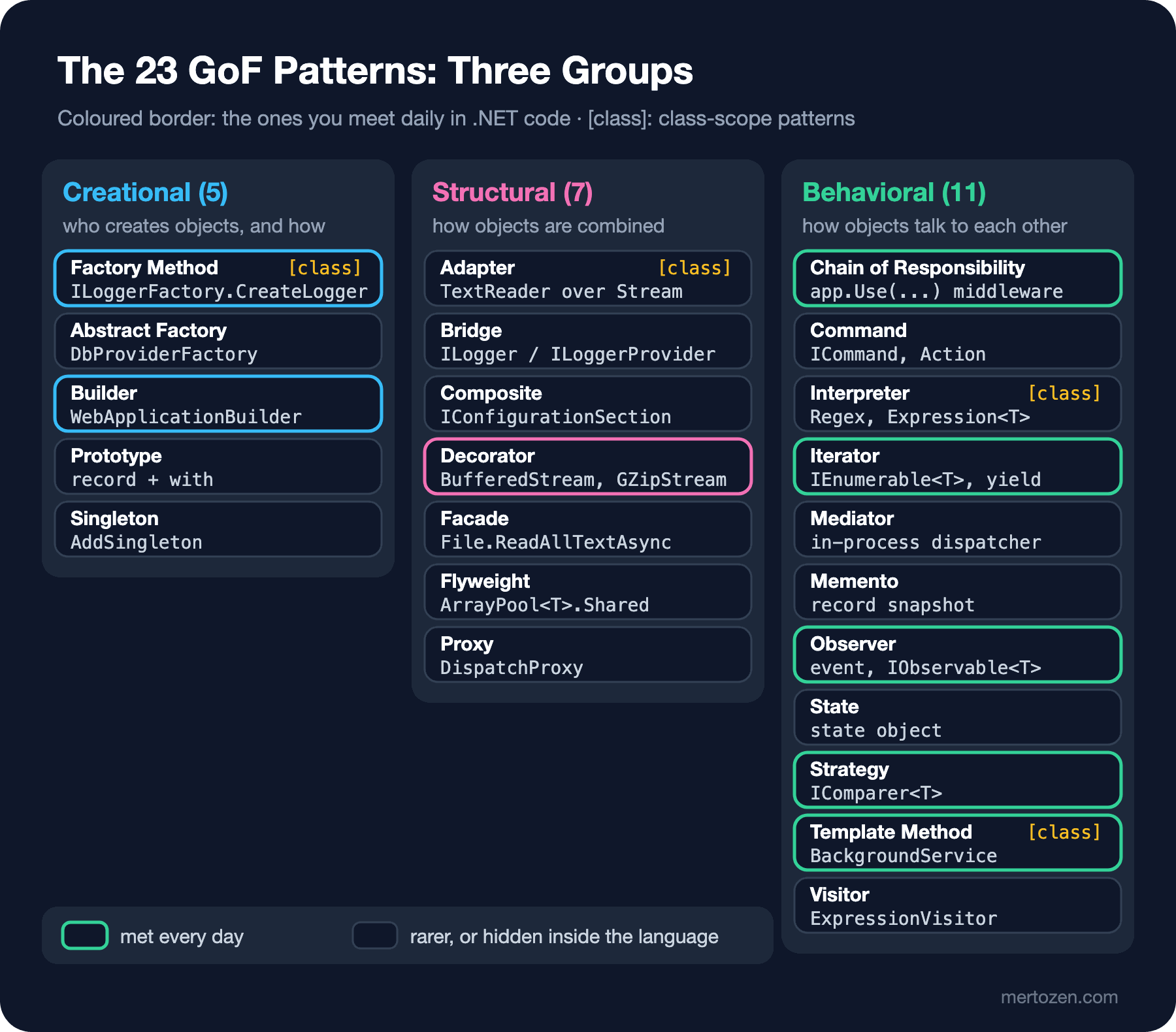
The map below shows the same 23 patterns with their groups and the place in .NET where you will meet each one first. The ones with a coloured border are those you use every day in a .NET project, whether you notice or not:
Curious how common pattern names are inside the BCL (Base Class Library, .NET's core library), I ran a count on my own machine: a small program that walks the public types of every assembly in the shared framework and looks at how their names end:
using System.Reflection;
using System.Runtime.InteropServices;

// Public types in the shared framework (Microsoft.NETCore.App); CoreLib is added explicitly
string runtimeDir = RuntimeEnvironment.GetRuntimeDirectory();
List<Assembly> assemblies = [typeof(object).Assembly];
foreach (string path in Directory.EnumerateFiles(runtimeDir, "System.*.dll"))
{
    try
    {
        assemblies.Add(Assembly.LoadFrom(path));
    }
    catch (Exception ex) when (ex is BadImageFormatException or FileNotFoundException)
    {
        // skip native or unloadable files
    }
}

string[] suffixes = ["Factory", "Builder", "Visitor", "Provider", "Adapter", "Proxy", "Handler", "Observer", "Iterator", "Enumerator"];
HashSet<string> seen = [];
Dictionary<string, List<string>> hits = suffixes.ToDictionary(s => s, _ => new List<string>());

foreach (Type type in assemblies.Distinct().SelectMany(a => a.GetExportedTypes()))
{
    if (!seen.Add(type.FullName!))
        continue;

    int tick = type.Name.IndexOf('`');
    string name = tick < 0 ? type.Name : type.Name[..tick];
    foreach (string suffix in suffixes.Where(s => name.EndsWith(s, StringComparison.Ordinal)))
        hits[suffix].Add(name);
}

Console.WriteLine($".NET {Environment.Version}: {assemblies.Distinct().Count()} assemblies, {seen.Count} public types");
foreach ((string suffix, List<string> names) in hits.OrderByDescending(h => h.Value.Count))
    Console.WriteLine($"{suffix,-10} {names.Count,4}  e.g. {string.Join(", ", names.Distinct().Order().Take(3))}");
.NET 10.0.13: 163 assemblies, 3954 public types
Enumerator 95 e.g. AceEnumerator, ArrayEnumerator, AsnEncodedDataEnumerator
Handler 84 e.g. ActiveDesignerEventHandler, AddingNewEventHandler, AppendInterpolatedStringHandler
Builder 49 e.g. AssemblyBuilder, AsyncIteratorMethodBuilder, AsyncTaskMethodBuilder
Provider 42 e.g. AesCryptoServiceProvider, AssociatedMetadataTypeTypeDescriptionProvider, CaseInsensitiveHashCodeProvider
Iterator 29 e.g. AncestorDocOrderIterator, AncestorIterator, ArgIterator
Factory 10 e.g. DbProviderFactory, FormattableStringFactory, ICustomFactory
Adapter 5 e.g. DataAdapter, DbDataAdapter, ICustomAdapter
Proxy 4 e.g. AssemblyNameProxy, DispatchProxy, IWebProxy
Visitor 2 e.g. DynamicExpressionVisitor, ExpressionVisitor
Observer 1 e.g. IObserverThe numbers prove nothing on their own, and that is the real lesson. Almost all of the 84 types ending in Handler are event handler delegates; they have nothing to do with Chain of Responsibility. Most Provider types are plug-in points with no GoF counterpart. The 95 Enumerator types at the top of the list are nested structs like List<T>.Enumerator inside every collection: Iterator is by far the most common pattern in .NET even where its name does not appear. You recognise a pattern by its roles and its problem, not by its name.
Norvig's Observation: Patterns That Vanish in Modern Languages
In 1996 Peter Norvig (co-author of the standard artificial intelligence textbook Artificial Intelligence: A Modern Approach, then at Harlequin and later Director of Research at Google) gave a talk at the Object World conference titled "Design Patterns in Dynamic Languages". Its most quoted slide says that 16 of the GoF's 23 patterns are either invisible or much simpler in dynamic languages such as Dylan or Lisp. Norvig groups the reasons by language feature: first-class types simplify six patterns (Abstract Factory, Flyweight, Factory Method, State, Proxy, Chain of Responsibility), first-class functions four (Command, Strategy, Template Method, Visitor), macros Interpreter and Iterator, method combination Mediator and Observer, multimethods Builder, and modules Facade.
Norvig also says a pattern can exist in a language at three levels. Invisible: so much part of the language that you do not notice it. Informal: referred to by name but written from scratch for every use. Formal: the pattern is defined once inside the language and you simply invoke it. The yield return example at the top of this post is evidence of how Iterator moved in C# from the informal level to the invisible one.
C# is not a dynamic language, but over twenty-five years it has gained a good share of the features Norvig lists. Delegates and lambdas brought first-class functions, the event keyword brought Observer, yield brought Iterator, expression trees part of Interpreter, record and with brought Prototype, and switch with pattern matching absorbed most uses of Visitor. Each gets its own post; here a single example draws one boundary. The Command pattern, turning a request into an object, can shrink in C# to an Action:
using System.Globalization;
using System.Text.Json;
using Bookstore.Catalog;

CultureInfo.CurrentCulture = CultureInfo.InvariantCulture;

PriceList prices = new();

// 1) The "invisible" form: the command is just a lambda
Queue<Action> pending = new();
pending.Enqueue(() => prices.Change("978-0441013593", 14.99m));
pending.Enqueue(() => prices.Change("978-0141439518", 6.50m));
while (pending.TryDequeue(out Action? run))
    run();

// 2) The explicit form: the command is a named object that carries data
ChangePrice command = new("978-0547928227", 11.25m);
command.Execute(prices);

Console.WriteLine(JsonSerializer.Serialize(command));

Action lambda = () => prices.Change("978-0547928227", 9.99m);
Console.WriteLine($"Lambda method: {lambda.Method.Name}");
try
{
    Console.WriteLine(JsonSerializer.Serialize(lambda));
}
catch (NotSupportedException ex)
{
    Console.WriteLine($"{ex.GetType().Name}: {ex.Message}");
}

namespace Bookstore.Catalog
{
    public sealed class PriceList
    {
        private readonly Dictionary<string, decimal> _prices = [];

        public void Change(string isbn, decimal newPrice)
        {
            _prices[isbn] = newPrice;
            Console.WriteLine($"{isbn} -> {newPrice:0.00}");
        }
    }

    public sealed record ChangePrice(string Isbn, decimal NewPrice)
    {
        public void Execute(PriceList prices) => prices.Change(Isbn, NewPrice);
    }
}
978-0441013593 -> 14.99
978-0141439518 -> 6.50
978-0547928227 -> 11.25
{"Isbn":"978-0547928227","NewPrice":11.25}
Lambda method: <<Main>$>b__2
NotSupportedException: Serialization and deserialization of 'System.Action' instances is not supported. Path: $.Both forms changed the price. The difference shows up when you want to write the work to a queue, log it or send it to another process. The ChangePrice record is a named object that carries data; it can become JSON (JavaScript Object Notation), travel through a message queue and be read again the next day. The lambda points to a method the compiler named <<Main>$>b__2 plus the variables it captured; it cannot be serialized, has no meaningful name in a log, and cannot be undone. Norvig is right: once the pattern's structure (interface, subclass, invoker) turns into a language feature, it disappears. But some of the benefits listed in the GoF's consequences section (queuing, logging, undo) remain only in the explicit object form. The choice is yours, and every post in this series tries to give you the criteria for it.
The Template for Every Post in This Series
The GoF's thirteen-section template is ideal for a catalogue but heavy for a blog post. In this series every pattern follows the same six steps:
- Problem: a Bookstore scenario that genuinely needs the pattern; we start from the pain, not the pattern.
- Naive code: the solution most of us write first and exactly where it breaks, with real output.
- Pattern: the GoF definition, its roles, and the C# 14 version.
- The real .NET example: where the same pattern lives inside the BCL or ASP.NET Core.
- Modern C# alternative: reaching the same result with less ceremony through language and framework features such as lambdas, records, pattern matching and keyed DI (Dependency Injection).
- When not to use it: where the pattern does harm, and the option of using no pattern at all.
This structure is related to the Pattern Template of the Çözüm Desenleri (Solution Patterns) series but differs from it. That series covered application problems outside the GoF that cut across several layers, from the database to the user interface (soft delete, audit trails, numbering). This series looks at the structure inside the code: how classes and objects are created, composed and how they talk. The "A Few Design Patterns in C#: Factory, Strategy and Observer" post in the C# OOP (Object-Oriented Programming) series was a small preview; here we look at the same patterns with different examples and in much more depth.
Common Pitfalls
Using a pattern as a goal instead of a solution. If "let's add a factory to this module" does not describe a problem, it is decoration, not design. Every GoF pattern has a motivation section; if that scenario is not in your code, you do not need the pattern.
Trying to recognise a pattern by its name. As the count showed, the name of a class ending in Handler, Provider or Manager does not tell you which pattern it is. Conversely, an IComparer<T> parameter, whose name mentions no pattern at all, is a pure Strategy.
Copying the book's diagram verbatim. The GoF examples were written in C++ and Smalltalk; those languages had no delegates, lambdas, generics or yield. When you write the same pattern in C#, first check whether the language already gives it to you. A Strategy written with an abstract base class, two interfaces and four subclasses is a burden to the reader if a single Func<T, TResult> parameter does the same job.
Skipping the pattern's consequences section. Every pattern makes something cheaper and something else more expensive. Decorator makes composition easy but lengthens the call chain while debugging; Abstract Factory makes switching families easy but adding a new product to the family hard. If you cannot state a pattern's price when you propose it, you have not fully understood it yet.
Thinking an anti-pattern is just bad code. Some patterns, such as Singleton, are reasonable in the right place and close to an anti-pattern when used widely. The last part of the series covers anti-patterns separately; Singleton in the next post is the first example.
A Small Experiment
★☆☆ Add a second method with yield return to Shelf.InStock's class (for example, books priced under 10). What is the name of the type the new method returns? Observe how the compiler numbers these names.
★★☆ Add undo support to the Command example: ChangePrice should remember the price before it ran and have an Undo method. Try the same with the Queue<Action> form, and note the point where a lambda is no longer enough.
★★★ Extend the counting program to cover the Microsoft.AspNetCore.App shared framework and list the types ending in Middleware, Builder and Factory. Pick three of them and write one sentence each on which GoF role they play (or that they play none).
The next post starts the creational patterns with the most controversial one: Singleton. We will see why double-checked locking was written wrongly for years, the beforefieldinit detail that decides when static readonly fields are initialised, and why Lazy<T> caches exceptions; and finally how the DI container's singleton lifetime gives the same guarantee more cleanly.