

Automating the Rules: Pre-Commit Hooks, CI Gates, Gradual Adoption in Legacy Codebases and .git-blame-ignore-revs
A pre-commit hook gives fast feedback but is skipped by --no-verify; the only place that stops a convention violation before main is a required CI check. The post shows formatting only staged files with Husky.Net and lint-staged, CI steps that name the fix command, choosing between touched files and a big bang in legacy code, .git-blame-ignore-revs, updating open PRs without conflicts and a suppression policy, all with real output.
Version note: The code in this post was tried with .NET 10 (SDK 10.0.402, CSharpier 1.4.0, Husky.Net 0.9.1) and Angular 22.2 (Husky 9.1.7, lint-staged 17.6.0, Prettier 3.10.1, ESLint 10.15) on Git 2.54; the GitHub Actions workflow was validated with actionlint 1.7.12 and its steps were run locally with the same commands.
Guess First: With a Hook in Place, Do We Still Need CI?
The Bookstore repo now has a pre-commit hook: on every commit, staged C# files go through CSharpier, and TypeScript and HTML (HyperText Markup Language) files through ESLint and Prettier. At the first meeting after the hook is installed, someone asks: "Commits arrive formatted anyway; if we drop the formatting check in CI, the build gets two minutes shorter."
The same week, Grace pushes this commit for an urgent fix; she does not want to wait for the hook, so she uses --no-verify:
$ git commit -qam "Extract threshold" --no-verify
$ git log --oneline | head -1
2323705 Extract threshold
The change contains a var and a cramped line like isExpress?29m:0m. Does this code reach main? If not, which layer stops it, and with what message? And what does the same CI check say about the OrderService the team wrote a year ago and nobody has touched since?
The Local Layer: Formatting Only the Changed Files
The point of a hook is fast feedback: show the problem at commit time, only in the files you changed, and fix it automatically. Formatting the whole repo is not this layer's job; people start skipping a hook that takes more than a few seconds. We covered the Git side of hooks in the Git & GitHub series' post that also covers signing commits with an SSH key, "Git Hooks and Commit Signing: From pre-commit to SSH Signatures", and the config-based hooks that came with Git 2.54 in "Git 2.50–2.56: git history, Config-Based Hooks and git add --resolved". Here we pick a hook manager for Bookstore, which keeps .NET and Angular in the same repo.
In Bookstore, Bookstore.slnx is at the root and the Angular app is in the web/ folder. We chose Husky.Net as the hook manager because it comes through the same dotnet-tools.json manifest as CSharpier and can run npm commands too. Setup, at the repo root:
$ dotnet tool install husky --version 0.9.1
$ dotnet husky install
Git hooks installed
$ git config --get core.hooksPath
.husky
$ dotnet husky add pre-commit -c "dotnet husky run --group pre-commit"
created .husky/pre-commit
Tasks live in .husky/task-runner.json. The ${staged} variable expands to the list of staged files; include runs a task only when matching files are staged:
{
  "$schema": "https://alirezanet.github.io/Husky.Net/schema.json",
  "tasks": [
    {
      "name": "csharpier",
      "group": "pre-commit",
      "command": "dotnet",
      "args": ["csharpier", "format", "${staged}"],
      "include": ["**/*.cs", "**/*.csproj", "**/*.props"]
    },
    {
      "name": "web-lint-staged",
      "group": "pre-commit",
      "command": "npx",
      "args": ["lint-staged"],
      "cwd": "web",
      "include": ["web/**/*"]
    }
  ]
}
The second task hands the Angular side to lint-staged. web/.lintstagedrc.json says which command applies to which glob; TypeScript files go through eslint --fix first, then Prettier:
{
  "*.ts": ["eslint --fix", "prettier --write"],
  "*.{html,css,scss,json}": "prettier --write"
}
The hook's output when someone commits a deliberately cramped C# file and a TypeScript file (we removed the separator lines):
$ git commit -m "Add shipping rules"
[Husky] 🚀 Loading tasks ...
[Husky] ⚡ Preparing task 'csharpier'
[Husky] ⌛ Executing task 'csharpier' ...
Formatted 1 files in 119ms.
[Husky]  ✔ Successfully executed in 248ms
[Husky] ⚡ Preparing task 'web-lint-staged'
[Husky] ⌛ Executing task 'web-lint-staged' ...
⋯ Running tasks for staged files…
    *.ts — 1 file
      ⋯ eslint --fix
      ⋯ prettier --write
✔ eslint --fix
✔ prettier --write
✔ Done running tasks for staged files!
⋯ Staging changes from tasks…
✔ Done staging changes from tasks!
[Husky]  ✔ Successfully executed in 1,440ms
[main 313ac7d] Add shipping rules
 2 files changed, 12 insertions(+)
The ShippingCalculator.cs that went into the commit is the formatted version; the working tree stayed clean, so the formatted file was re-staged. We also tried partial staging: we made two changes in a file, staged only one with git add, and left the other, marked as WIP with a "WIP: not approved yet" comment, unstaged. Only the staged line went into the commit, formatted, and the WIP line stayed in the working tree. Not leaking half-finished work into the commit is the most critical property of this layer; be sure to test it in your own setup.
If the repo is Angular only, you do not need Husky.Net; Husky from npm does the same job. npx husky init adds a "prepare": "husky" script to package.json and a .husky/pre-commit containing npm test; after we changed that line to npx lint-staged, the line export const maxCartItems=20 was committed as export const maxCartItems = 20;.
A Hook Is Not a Gate
First half of the answer: the hook did not stop Grace's commit, because --no-verify does not run the hook at all. That is not the only way around a hook. Hooks do not come with git clone; each developer has to run dotnet tool restore and dotnet husky install once (with npm Husky, the prepare script does this during npm install). An edit made in GitHub's web UI, a rebase, or a commit made by another tool may also bypass the hook. CSharpier's docs recommend disabling Husky.Net in CI with the HUSKY=0 environment variable; Bookstore's workflow does that.
The upshot: a hook is a convenience, not a gate. The only place that keeps rule violations out of main is a CI check that cannot be skipped, plus the branch rule that makes it mandatory. Dropping the hook means late feedback for developers; dropping the CI check means effectively dropping the rule.
The CI Layer: Check, Don't Fix
Bookstore's convention workflow consists of two jobs. Each step runs the tool in check mode and, on failure, writes an error line telling the developer what to run. In GitHub Actions, lines starting with ::error title=…:: show up as annotations on the PR page and in the job summary:
name: conventions

on:
  pull_request:
  push:
    branches: [main]

jobs:
  dotnet:
    runs-on: ubuntu-latest
    env:
      HUSKY: 0
    steps:
      - uses: actions/checkout@v7
      - uses: actions/setup-dotnet@v6
        with:
          global-json-file: global.json
      - run: dotnet tool restore
      - name: Formatting (CSharpier)
        run: |
          dotnet csharpier check . || {
            echo "::error title=Formatting::Run 'dotnet csharpier format .' and commit the result."
            exit 1
          }
      - name: Code style (IDE rules)
        run: |
          dotnet format style Bookstore.slnx --verify-no-changes || {
            echo "::error title=Code style::Run 'dotnet format style Bookstore.slnx' and commit the result."
            exit 1
          }
      - name: Build with style rules
        run: dotnet build Bookstore.slnx -warnaserror

  web:
    runs-on: ubuntu-latest
    defaults:
      run:
        working-directory: web
    steps:
      - uses: actions/checkout@v7
      - uses: actions/setup-node@v7
        with:
          node-version: 24
      - run: npm ci
      - name: Formatting (Prettier)
        run: |
          npx prettier --check . || {
            echo "::error title=Formatting::Run 'npx prettier --write .' in web/ and commit the result."
            exit 1
          }
      - name: Lint (ESLint)
        run: npx ng lint
The details of setup-dotnet, global.json and setup-node are in the GitHub Actions series' ".NET CI with GitHub Actions: setup-dotnet, global.json, NuGet Cache, Test Reports and Coverage" and "Angular CI with GitHub Actions: setup-node, npm ci, Lint, Vitest, Build Budgets and Playwright" posts; here there are only the convention steps. On Grace's --no-verify commit, we ran the first step of the dotnet job locally with the same command:
$ dotnet csharpier check .
Error ./src/Bookstore.Ordering/ShippingCalculator.cs - Was not formatted.
  ----------------------------- Expected: Around Line 9 -----------------------------
          if (subtotal >= freeShippingThreshold)
              return isExpress ? 29m : 0m;
          return isExpress ? 79m + bookCount * 5m : 39m;
  ----------------------------- Actual: Around Line 9 -----------------------------
          if (subtotal >= freeShippingThreshold)
              return isExpress?29m:0m;
          return isExpress ? 79m + bookCount * 5m : 39m;

Checked 5 files in 125ms.
::error title=Formatting::Run 'dotnet csharpier format .' and commit the result.
That is the second half of the answer: the code does not reach main, CI goes red and the message names the fix command. For this to be a gate, the workflow result must be required for merging; on GitHub that is the "required status checks" setting in rulesets or branch protection (we covered rulesets and CODEOWNERS in the Git & GitHub series' "Teamwork with Git: Branching Strategies, Rulesets and Conventional Commits" post).
There is one thing the workflow deliberately does not do: it does not fix the code and commit it. Having CI run the formatter in write mode and commit on behalf of a bot looks tempting but has three problems. The developer's local branch silently falls behind and the next push conflicts. The code that was reviewed and the code that gets merged diverge. And CI needs write access to the repo, which opens an unnecessary door on the security side. CI reports, the developer fixes.
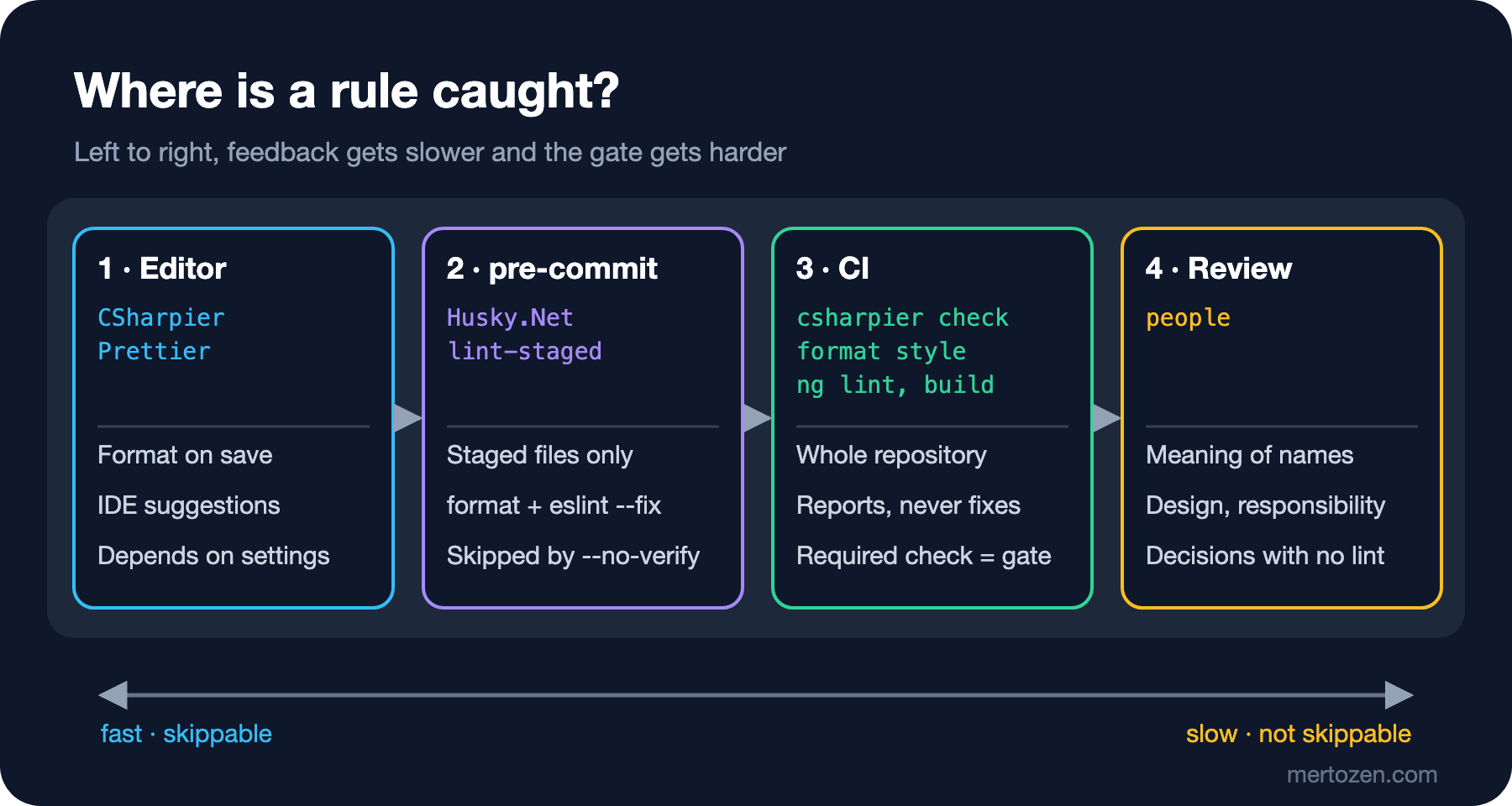
All four layers together: from left to right, feedback slows down but the gate gets harder. Formatting and style rules are caught in the first three layers; only the decisions without a tool are left for review.
Migrating a Legacy Codebase: Touched Files or Big Bang?
When the same CI step was switched on for the first time, it did not look only at new code. Next to Grace's single var, the output of dotnet format style brought six more warnings from the OrderService written a year ago:
$ dotnet format style Bookstore.slnx --verify-no-changes
src/Bookstore.Ordering/OrderService.cs(1,1): warning IDE0161: Convert to file-scoped namespace
src/Bookstore.Ordering/OrderService.cs(20,13): warning IDE0008: Use explicit type instead of 'var'
src/Bookstore.Ordering/OrderService.cs(21,13): warning IDE0008: Use explicit type instead of 'var'
src/Bookstore.Ordering/OrderService.cs(28,13): warning IDE0008: Use explicit type instead of 'var'
src/Bookstore.Ordering/OrderService.cs(15,13): warning IDE0003: Name can be simplified
src/Bookstore.Ordering/OrderService.cs(22,40): warning IDE0003: Name can be simplified
src/Bookstore.Ordering/ShippingCalculator.cs(7,9): warning IDE0008: Use explicit type instead of 'var'
In a real legacy codebase this list runs to thousands of lines, and there are two paths. The first is to apply the check only to the files the PR changed. dotnet format and CSharpier both accept a list of files:
$ CHANGED=$(git diff --name-only --diff-filter=ACMR HEAD~1 HEAD -- '*.cs')
$ dotnet format style Bookstore.slnx --verify-no-changes --include $CHANGED
src/Bookstore.Ordering/ShippingCalculator.cs(7,9): warning IDE0008: Use explicit type instead of 'var'
$ dotnet csharpier check $CHANGED
Error ./src/Bookstore.Ordering/ShippingCalculator.cs - Was not formatted.
...
Checked 1 files in 126ms.
In CI, the PR's target branch replaces HEAD~1 (with enough history fetched at checkout). This path is the automated version of the "boy scout rule" that Robert C. Martin mentions in Clean Code (leave the campground cleaner than you found it): you bring the file you touch in line with the rules. The cost is that whoever enters a file for a small change must also fix all of its old violations; a one-line bug fix's diff grows again. And the rule may never hold across the whole codebase.
The second path is the big bang: bring the whole repo in line with the rules at once, in a single commit. In Bookstore we chose this: we ran dotnet format style and dotnet csharpier format . and committed the result as a separate commit. That commit has no behavior change and no other change. The advantage is that from the next day on, CI can check the whole repo and nobody carries "old violations". The cost is paid in two places: git blame and open PRs.
.git-blame-ignore-revs and Open PRs
After the big bang commit, git blame for OrderService shows the formatting commit as the owner of every line:
$ git blame src/Bookstore.Ordering/OrderService.cs
aeadc118 (Linus 2026-11-14 01:54:38 +0300 18)     public decimal CalculateTotal()
aeadc118 (Linus 2026-11-14 01:54:38 +0300 19)     {
aeadc118 (Linus 2026-11-14 01:54:38 +0300 20)         decimal subtotal = 0m;
aeadc118 (Linus 2026-11-14 01:54:38 +0300 21)         int bookCount = 0;
aeadc118 (Linus 2026-11-14 01:54:38 +0300 22)         foreach (OrderItem item in _items)
The answer to "who wrote this line and why?" is now "Linus formatted it". The fix is a .git-blame-ignore-revs file at the repo root. According to GitHub Docs, the file holds one full commit hash per line, a descriptive comment can go above it, and GitHub's blame view automatically skips the listed commits when it finds this file at the repo root:
# style: apply conventions to the whole repository (CSharpier + dotnet format style)
aeadc1185b799d60a34a35811e2ba13b47da7bb6
Local Git does not read the file on its own; you either pass it on the command line or write it into config once:
$ git blame --ignore-revs-file .git-blame-ignore-revs src/Bookstore.Ordering/OrderService.cs
^3b79c97 (Ada   2026-11-14 01:53:00 +0300 18)     public decimal CalculateTotal()
aeadc118 (Linus 2026-11-14 01:54:38 +0300 19)     {
^3b79c97 (Ada   2026-11-14 01:53:00 +0300 20)         decimal subtotal = 0m;
^3b79c97 (Ada   2026-11-14 01:53:00 +0300 21)         int bookCount = 0;
^3b79c97 (Ada   2026-11-14 01:53:00 +0300 22)         foreach (OrderItem item in _items)
$ git config blame.ignoreRevsFile .git-blame-ignore-revs
Most lines went back to Ada's original commit; even the decimal subtotal line, although the original said var. But the { on line 19 still belongs to Linus. Git cannot map every line in the skipped commit to an earlier one; lines whose indentation and position changed because of the old file's block-scoped namespace may fail to match. Two settings make this visible: blame.markIgnoredLines marks lines found by passing through a skipped commit with ?, and blame.markUnblamableLines marks lines that could not be mapped with *:
$ git -c blame.markUnblamableLines=true -c blame.markIgnoredLines=true blame src/Bookstore.Ordering/OrderService.cs
^?3b79c9 (Ada   2026-11-14 01:53:00 +0300 18)     public decimal CalculateTotal()
*aeadc11 (Linus 2026-11-14 01:54:38 +0300 19)     {
^?3b79c9 (Ada   2026-11-14 01:53:00 +0300 20)         decimal subtotal = 0m;
The second cost is open PRs. We tried to rebase onto main a branch that was opened before the big bang and changes BulkDiscountRate:
$ git rebase main
Could not apply efed0e8... # Raise bulk discount to 15%
$ git status --short
UU src/Bookstore.Ordering/OrderService.cs
A one-line business change conflicted with a formatting commit that changed the whole file. The path that works is to format the branch first with the same tools: on the branch based on main just before the big bang commit, we ran dotnet format style and dotnet csharpier format . with the same configuration and committed, then recorded the formatting commit as "merged" without taking any changes, and merged main normally:
$ dotnet format style Bookstore.slnx
$ dotnet csharpier format .
$ git commit -qam "style: apply conventions (same tools as aeadc11)"
$ git merge -q -s ours aeadc11 -m "Merge formatting commit aeadc11 (already applied)"
$ git merge main -m "Merge main"
...
$ git diff main -- src/Bookstore.Ordering/OrderService.cs | grep '^[-+] '
-    private const decimal BulkDiscountRate = 0.10m;
+    private const decimal BulkDiscountRate = 0.15m;
No conflict, and the only difference from main is the business change. The -s ours strategy takes nothing from the other side; so use it only when you are sure both sides were formatted with the same tool version and the same configuration, and verify with git diff at the end. Timing matters too: announce the big bang to the team in advance, time it for when the number of open PRs is lowest (right after a release, for example), and prepare the steps above as a script everyone can run.
Suppression Policy
Every rule has legitimate exceptions, and there are two ways to silence them. The [SuppressMessage] attribute binds to a single symbol and carries a Justification; #pragma warning disable applies to a range of lines and carries no reasoning. In Bookstore, for a field read by name through reflection:
using System.Diagnostics.CodeAnalysis;

namespace Bookstore.Ordering;

public sealed class LegacyInvoiceSnapshot
{
    [SuppressMessage(
        "Style",
        "IDE1006:Naming Styles",
        Justification = "Read by name via reflection in the legacy invoice exporter (INV-142)."
    )]
    private readonly string invoiceNumber;

#pragma warning disable IDE0008
    private readonly decimal _total;
#pragma warning restore IDE0008

    public LegacyInvoiceSnapshot(string number, decimal total)
    {
        invoiceNumber = number;
        _total = total;
    }

    public override string ToString() => $"{invoiceNumber}: {_total}";
}
With the _camelCase rule on, the build raised no IDE1006 for this file; the attribute did its job. The #pragma block, however, is unnecessary: the line inside has no var, so there is nothing for IDE0008 to silence. IDE0079 (unnecessary suppression) should catch this, but as we saw in the second post, IDE0079 is one of the rules that never run on build. We tried: with dotnet_diagnostic.IDE0079.severity = warning the build gave zero warnings, and dotnet format style --diagnostics IDE0079 reported nothing either. Today, unnecessary suppressions are found only by the IDE and review.
Bookstore's policy is therefore short: suppress only with [SuppressMessage], with a reason and a ticket number in Justification; use #pragma only where a symbol cannot be targeted (such as the middle of a generated block); if a file- or folder-wide exception is needed, set severity none for that folder in .editorconfig and record the reason in the convention document. Changes to .editorconfig, eslint.config.js and .prettierrc require the tech lead's approval through CODEOWNERS; changing these files means changing a rule.
AI Coding Agents and Conventions
The Bookstore team also uses AI coding agents when writing code, and agents read the instruction files in the repo (AGENTS.md and similar). The first idea that comes to mind is copying the whole convention document into this file. Don't. The rules already live in the tools; putting a second copy into a document recreates the first post's "convention left in a wiki" problem for the agent. The two copies will drift apart one day and the agent will follow the wrong one. All an agent needs are the commands that enforce the rules:
## Conventions

Formatting, style and naming are enforced by tools. Before you finish a task, run:

- dotnet csharpier format .
- dotnet format style Bookstore.slnx
- dotnet build Bookstore.slnx -warnaserror
- in web/: npx prettier --write . and npx ng lint

Do not edit .editorconfig, eslint.config.js or .prettierrc to make a check pass.
The last line matters: the shortest way to pass a check is to loosen the rule, and an agent may offer that as a "fix". The pre-commit hook and CI work the same way for agent-written code; the gate stays the same. The details of giving agents context are the subject of the upcoming AI-Assisted Development series.
Common Pitfalls
Having CI fix and commit formatting. That means silent changes, conflicts with local branches and write access for CI. CI runs in check mode, and the error message names the fix command.
Mistaking the hook for a gate. --no-verify, hooks that were never installed and edits made in the web UI all bypass the hook. Without a required CI check, there is no rule.
A slow hook. A pre-commit hook that builds the whole solution or runs tests turns into everyone's --no-verify habit within days. In the hook: staged files only and fast tools only; build, tests and full dotnet format belong in CI.
Timing the big bang commit badly. A formatting commit made while twenty PRs are open means twenty conflicts. Announce it, pick a quiet moment, and prepare the format-then-merge script for open branches.
Forgetting .git-blame-ignore-revs or writing the wrong hash. The file takes full hashes, not short ones, and only pure formatting commits go in; hiding a commit that contains a behavior change from blame also hides the trail of that change.
Silencing with blanket #pragmas. Putting #pragma warning disable at the top of a file without a restore at the end turns the rule off permanently for that file. A suppression must be bound to a symbol and justified.
A Small Experiment
★☆☆ Set up a pre-commit hook in your own repo that formats staged files (Husky.Net, Husky or Git's config-based hooks). Make two changes in a file, stage only one, and verify with git show that only that one went into the commit.
★★☆ Add an ::error line to the formatting step in CI that names the fix command on failure. Then open a PR with an unformatted file committed with --no-verify and see how the message appears on the PR page.
★★★ On a test branch, make a commit that formats the whole repo, add its hash to .git-blame-ignore-revs, and count with blame.markUnblamableLines how many lines remain tied to the formatting commit. Update a branch opened before the big bang with the format-then-merge method above and verify that git diff main shows only the business change.
The series ends here. In the first post we said that a convention's value comes not from the rule itself but from it being settled and automatic. At the end of five posts, every rule in Bookstore has an owner: formatting belongs to CSharpier and Prettier, style and naming to the analyzer and ESLint, the gate to CI, and meaning to review. The next step is to extend this setup to code quality rules; that is the subject of the upcoming Static Analysis series.