

Claude Memory, Chat Search and Incognito: What It Remembers and How to Manage It
Deleting a conversation in Claude does not delete the memory entries generated from it; you have to delete them separately on the Manage screen under Settings > Your Claude. Topic-based memory in 2026, the sensitive topics setting, project memory versus account memory, chat search, the limits of incognito, and working safely with customer data on the Bookstore team.
Version note: This post covers Claude's memory, chat search and incognito features as of 15 November 2026; setting names and behavior were checked the same day in the Claude Help Center (support.claude.com) and the release notes. This post is based on the official documentation. Because the new memory structure is rolling out to accounts gradually, some menus may appear in the older layout (such as Settings > Memory).
Guess First
Gül from customer service worked on an incoming complaint for Bookstore, the online bookstore used as the shared example across this site's series, with Claude. She was careless: she pasted the e-mail as it was, with the customer's name, phone number and delivery address in it. When she noticed, she deleted the conversation and felt relieved.
What is your guess? Since the conversation was deleted, is everything about that customer also gone from Claude's memory? How should Gül do this job next time: by turning memory off completely, in an incognito chat, or by never pasting the data at all? The Help Center's memory article has a short and slightly surprising answer to this question; it comes halfway through the post.
How Memory Works in 2026
Claude's memory reached its current form in three steps during 2026. According to the release notes, on 2 March 2026 memory from chat history opened to all users, including Free. On 10 July 2026 the structure changed: instead of writing a daily summary, Claude now keeps separate, categorized entries that it reads and updates. On 25 August 2026 memory became shared between chat and Cowork tasks running in the cloud.
The Help Center article "Use Claude's chat search and memory to build on previous context" (https://support.claude.com/en/articles/11817273, 15 November 2026) describes today's behavior as follows. Claude does not write a summary after the conversation ends; it saves separate topics during the conversation. It does this on its own, and you can also say "remember this". The topics it remembers are mostly work-focused: your role and projects, the people and places in your work, your communication and technical preferences, details of ongoing work. Tasks that run in the cloud share memory with chat; older Cowork sessions that run only on your computer do not use memory.
The defaults depend on the plan. On Free, Pro, Max and Ultra, memory is on by default on the web, Desktop and mobile. On Team and Enterprise the organization owner decides: organizations created on or after 31 October 2026 start with it on for members, older organizations keep it off until the member turns it on. If it is off, you turn it on with "Generate memory from chats" under Settings > Your Claude.
Seeing, Correcting and Stopping Memory
To see what Claude keeps about you, click "Manage" next to "Your memory" in Settings > Your Claude. The topics are listed; you can select one to read it, edit it with the pencil icon or remove it with "Delete". You can say the same things in a conversation too: "remember this", "change this", "forget this".
There are two ways to stop memory entirely, and the difference matters. "Pause memory" keeps the existing entries but neither uses them nor creates new ones; when you turn it back on, it continues where you left off. "Reset memory" permanently deletes all entries, including project memories.
You can also turn memory off for a single conversation: before sending the first message, turn off "Memory" in the "+" menu. This setting cannot be changed after the conversation starts. Such a conversation stays in your history and can be found with chat search; it just neither reads nor writes memory.
The answer to Guess First is here too. The Help Center says it plainly: deleting a conversation does not delete the memories generated from it. If Claude saved a topic from the e-mail Gül pasted, that entry may still be there after the conversation is deleted. The right clean-up is to open the "Manage" screen, find the relevant topic and delete it.
Moving memory elsewhere is also possible. According to the Help Center article "Import and export your memory from Claude" (https://support.claude.com/en/articles/12123587), you can take what another AI assistant keeps about you as text and paste it into Claude; Claude turns it into separate memory entries. The feature is experimental; some personal details unrelated to work may not be kept, and conversation history cannot be imported from another provider. You can also export Claude's memory as a backup; the full data export in Settings > Privacy includes memory as well.
Sensitive Topics and What Is Never Saved
Sensitive topics are off by default in memory. The Help Center lists these categories as health, race, ethnicity, religion, politics and gender identity. If you want them remembered, you have to turn on "Include sensitive topics in memory" in Settings > Your Claude; while it is on, Claude shows a notice every time it saves such a topic. Turning the setting off or declining the notice also removes sensitive entries already saved.
Regardless of the setting, some information is never saved: government ID numbers, criminal history, financial account numbers and immigration status. This list is a safety net, not a permission. A customer's name, phone number or address is not on it; so work information about a customer can be saved under "your role and the people in your work".
Project Memory and Account Memory
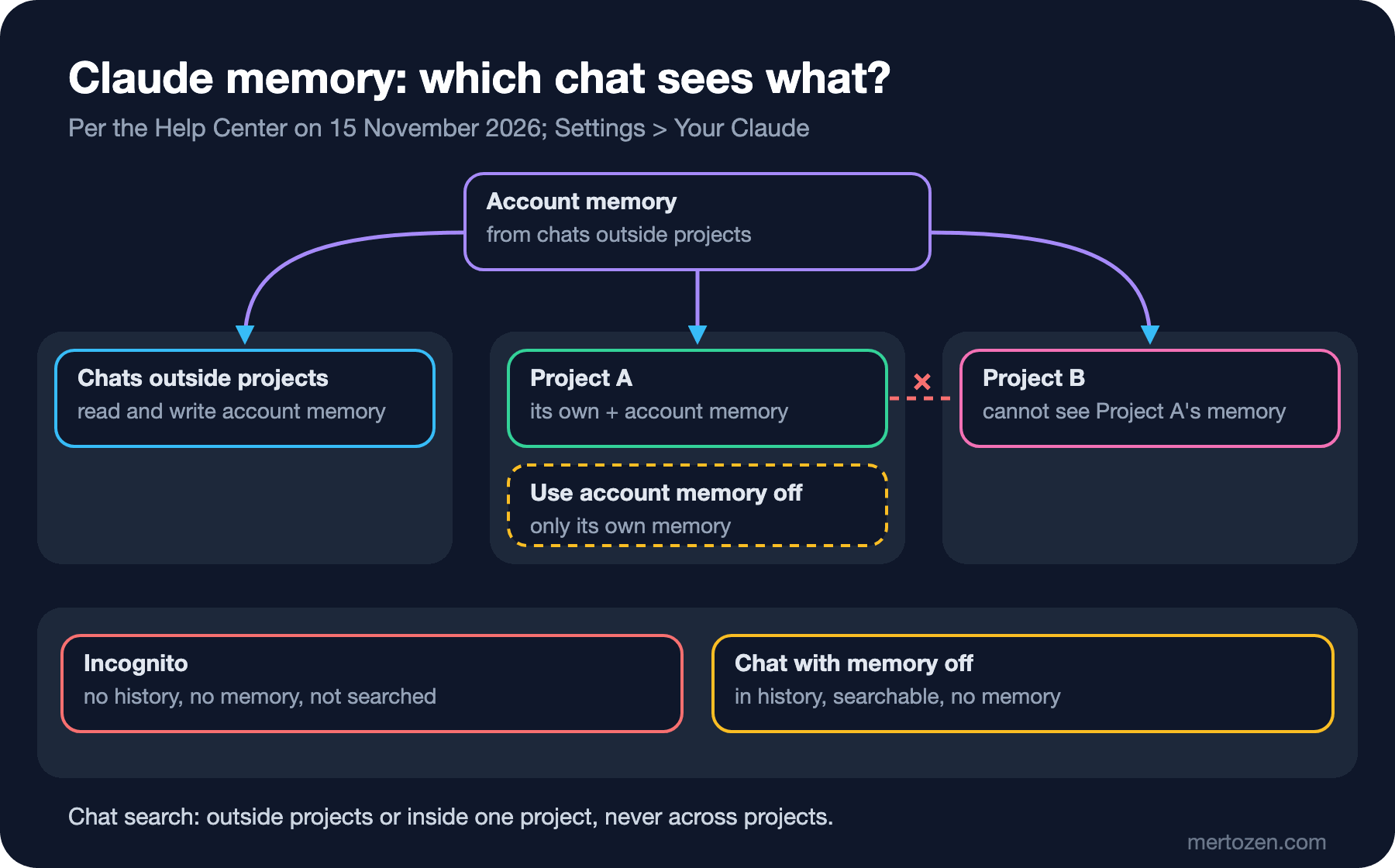
As we saw in the fourth post, each project has its own memory. Account memory forms from conversations outside projects. In a conversation inside a project, Claude uses that project's memory and the account memory together; it does not use another project's memory. New entries that form inside a project are written to that project. If you also want to separate a project from account memory, you turn off "Use account memory" in the Memory section of the project page.
This separation helps in daily work. Something learned in Bookstore's technical documentation project, such as "ADRs are the source of decisions", does not leak into the project Selin opened for campaign e-mails. But Ayşe's preference in account memory, "write code in C# 14", applies in every project as long as "Use account memory" is on. Remember that Reset memory deletes project memories too.
Chat Search: Searching Past Conversations
Chat search is Claude searching your past conversations and bringing context from them. It is available on paid plans (Pro, Max, Ultra, Team and Enterprise) on the web, Desktop and mobile, and it is on by default once it reaches your account. Claude searches conversations outside projects or conversations inside a single project; it does not search across projects. When it searches, this shows up as a tool call in the answer, so you can see what Claude brought from the past.
To turn it off there is the "Search and reference chats" setting in Settings > Your Claude. The unified experience has a limitation too: older Cowork tasks are not included in search; you have to find them by name in the Recents list.
The difference between memory and chat search is this: memory is topics that Claude summarizes and keeps, chat search is a search over the raw conversations. A detail that is not in memory can still be found with chat search as long as the conversation has not been deleted; turning memory off does not turn chat search off.
Incognito: A Conversation That Leaves No Trace
You start an incognito chat with the ghost icon at the top right when you are outside a project; the conversation is marked with a black border and an "Incognito chat" label. According to the Help Center article "Use incognito chats" (https://support.claude.com/en/articles/12260368), these conversations are not written to history or memory, are not used for model training and do not appear in chat search. But they are not unsaved either: they are kept for 30 days by default, or longer on Enterprise if a custom retention period is set. On Team and Enterprise they are included in the data exports organization owners receive and, on Enterprise, in the Compliance API.
There are a few limits. An incognito chat cannot be turned into a normal conversation later and cannot be reopened once closed. There is no incognito inside a project; there you use the "Memory" setting in the "+" menu to turn memory off. In accounts that have moved to the unified experience, incognito chats open in the previous experience; so Claude cannot create files or run code there.
Bookstore: Preferences in Memory, Customer Data Outside
For Ayşe, the most useful use of memory is to state once the preferences she does not want to repeat in every conversation:
Remember these for my future chats:
- I am a backend developer on Bookstore (.NET 10, SQL Server, Angular).
- Show code examples in C#; explain in Turkish, keep technical terms in English.
- When you suggest a SQL change, also tell me how to roll it back.
Information like this could also be written into the Instructions for Claude from the third post. The difference: Instructions is text you write that goes into every conversation as is; memory is topics Claude keeps and uses when needed. Instructions suits firm rules, memory suits context that builds up over time. Looking at the "Manage" screen a week later to see how Claude saved these is a good check.
Gül's job asks for the opposite: customer data should stay nowhere. For that there is a rule that comes before any memory setting: mask the customer's name, phone number, address and order number before putting anything in the prompt. The complaint itself ("the book arrived wet", "shipping was three days late") is enough for the analysis; who complained is not needed. We prepare the masking checklist in the last post of the series. Even with masked data there are two options:
- Incognito chat: leaves no trace in history or memory, but cannot create files in the unified experience. Enough for a short summary or a reply draft.
- Normal conversation with memory off: can create files, stays in history and is searchable. This is the option when an Excel output such as a weekly complaints report is needed; deleting the conversation when the job is done and checking the "Manage" screen are part of the job.
This is also the right answer among the three options in Guess First: first, do not paste the data; then use incognito or a conversation with memory off depending on what the job needs.
In Production
On Team and Enterprise memory is an organization setting. The owner can turn memory on or off for the whole organization from Organization settings > Capabilities; while it is off nobody can turn it on themselves, existing entries are kept and come back when memory is turned on again. Owners cannot see or edit members' memory; for sensitive topics each user has to opt in individually. On Enterprise the audit log records the owner's setting changes but not members' own memory edits.
Think about it together with retention. According to the Help Center, custom retention periods covering conversations also apply to memory when the unified experience is on, except for project memory. If your company has a retention policy, know that project memory falls outside this rule.
Relying on memory instead of giving context is also a risk. Memory forms according to what Claude finds important; do not assume a detail is there. If a critical piece of information is needed every time, write it into the instructions or the project knowledge.
Common Pitfalls
Thinking memory is deleted when the conversation is deleted. It is not; delete the related topic separately from the "Manage" screen.
Thinking memory knows everything. Claude mostly saves work-focused topics, does not share memory between projects and does not use memory in older sessions that ran locally. Instead of saying "we talked about this last month", give the context needed.
Thinking incognito leaves no trace at all. It is not written to history or memory, but it is kept for at least 30 days and is included in exports on organization plans. Data that really must not be shared should not be pasted into incognito either.
Mixing up Pause and Reset. Pause can be undone; Reset permanently deletes everything, including project memories.
Assuming memory is a personal setting on a team account. On Team and Enterprise the organization owner can turn memory off for everyone; it appearing on in your own settings does not override the organization setting.
A Small Experiment
★☆☆ Open the "Manage" screen in Settings > Your Claude and read the topics Claude keeps about you. Is there an entry that is wrong or no longer valid? Edit one and delete one.
★★☆ Ask the same question in three conversations: a normal one, one with memory turned off before the first message, and an incognito one. Then in a new conversation ask "have we talked about this before?". Which conversation did chat search find?
★★★ Write a "which job goes into which conversation" rule for your team: a normal conversation with memory on, a conversation with memory off, incognito, and a project whose memory is separated from account memory. For each, add an example job from Bookstore and how customer data gets masked.
Memory and projects decide what Claude knows; in the sixth post we move on to what Claude produces: artifacts, in-conversation visuals and Excel, PowerPoint, Word and PDF files, using Bookstore's monthly sales report.