

Getting Started with the Claude Apps: Web, Desktop, Mobile, Plans and Usage Limits

In Claude, the limit is used up mostly by long conversations, large files and multi-step tasks that create files; usage is measured in a five-hour session and a weekly limit and tracked in Settings > Usage. Web, Desktop and mobile surfaces, the merge of chat and Cowork, the Free, Pro, Max, Ultra, Team and Enterprise plans as of 15 November 2026, and choosing a plan for the Bookstore team.
Version note: This post describes the Claude apps (claude.ai on the web, Claude Desktop, iOS and Android) as they stood on 15 November 2026; plan, price and limit details were checked the same day on claude.com/pricing and the Claude Help Center (support.claude.com). This post is based on the official documentation. Anthropic rolls out new features gradually, so some of what is described here may not be in your account yet.
Guess First
Ayşe is a backend developer on Bookstore, the online bookstore used as the shared example across this site's series. Last week she bought Claude Pro with her own card. On Monday morning she did three things: she uploaded a 40-page architecture decision document again for every question, each time in a new conversation; she spent two hours discussing the order flow in a single conversation; and finally she asked Claude to build an Excel report with charts from the orders CSV. Around noon she saw the warning that her five-hour limit was almost used up.
What is your guess? Which of these used most of the limit: uploading the same PDF again and again, the long conversation, or the multi-step task that creates a file? And does Ayşe need a bigger plan, or a different way of working? The answer comes halfway through the post, using the rules on the Help Center's usage limit page.
This series is about using Claude well in daily work: model choice, good task briefs, projects, memory, artifacts, research, connectors, skills, agentic tasks and privacy settings. The coding agent Claude Code has its own series, and so does building applications with the Claude API ("Building Applications with the Claude API"); here we touch them only where they come up. The first job is to be clear about where Claude runs and how much of it you can use.
Where Claude Runs
The same Claude account is used from several surfaces: claude.ai in the browser, Claude Desktop on the computer (Windows, macOS and Linux in beta) and the iOS and Android apps on the phone. Conversations, projects, artifacts and memory belong to the account, so a job you start on the phone can be opened on the desktop. According to the Help Center article "Use Claude Cowork on web, desktop, and mobile" (https://support.claude.com/en/articles/15520349, 15 November 2026), Claude's work runs on Anthropic's servers: you can start a long task and close the laptop and the work continues, and scheduled tasks run even when no device is on.
Reaching things on your computer is a separate matter. Files in folders you connect, local MCP servers, browser use as part of a task and computer use only work while Claude Desktop is open. In that case Desktop is the bridge between the cloud and your machine. You see folder access in the "Trusted folders" list under Settings, and where created files are saved in the "Storage folder" setting.
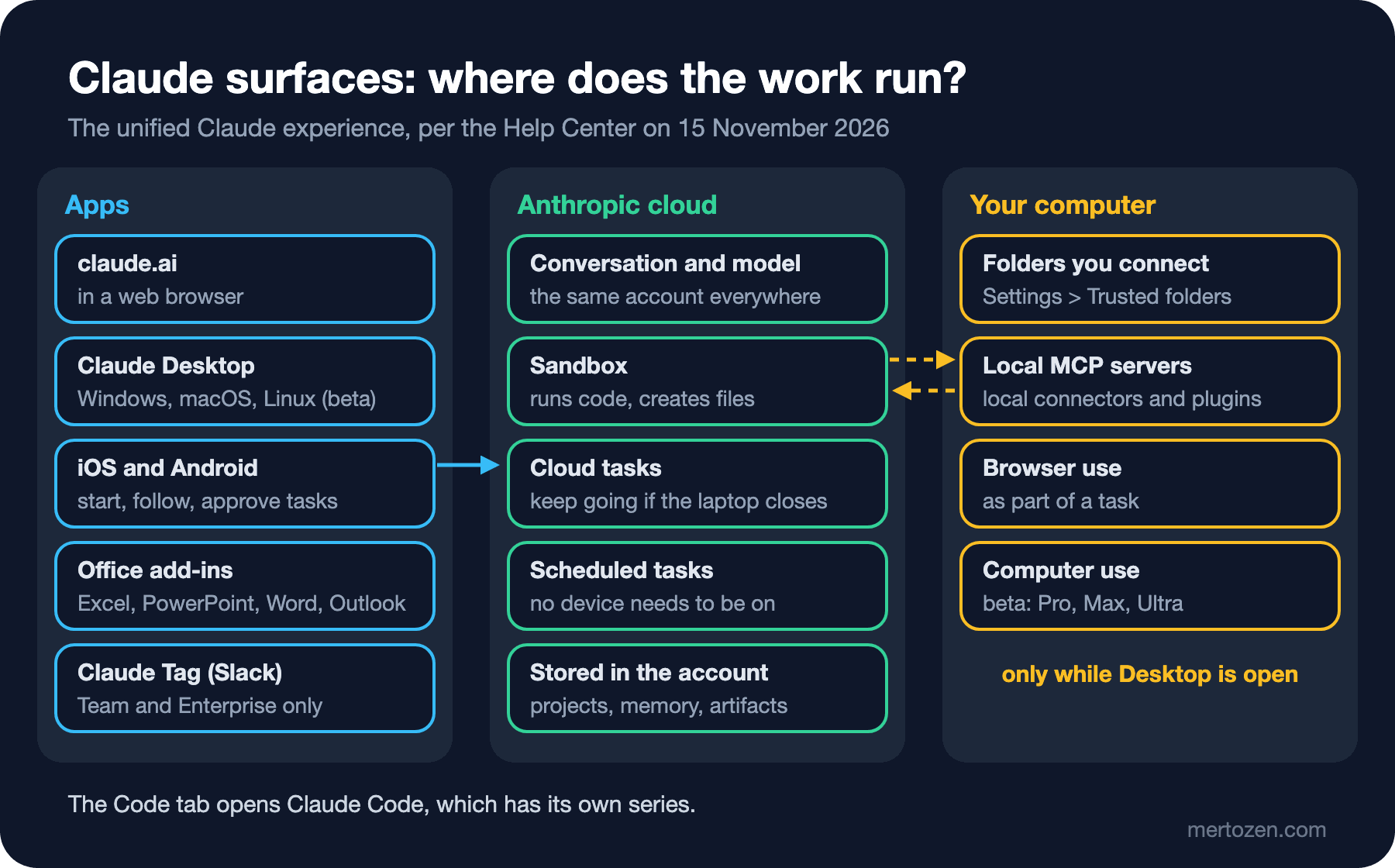
There are a few more surfaces. The Claude add-ins for Excel, PowerPoint, Word and Outlook are on paid plans; Outlook is still in beta. Claude Tag lets you hand work to Claude by writing @Claude in a Slack conversation, and it exists only on the Team and Enterprise plans. The "Code" tab in the app opens Claude Code, which as a coding agent is the subject of a separate series. Claude Meetings, opened in beta for Team and Enterprise on 12 November 2026, can join Google Meet calls and take notes. This series focuses on the web, Desktop and mobile apps.
One Conversation: Chat and Cowork Merged
The big change of 2026 is that chat and Cowork, where Claude takes on long tasks, merged into one experience. According to the release notes, since 16 September 2026 Cowork's capabilities are available from any conversation, with no mode to choose. The article "Claude Cowork and chat are one Claude" (https://support.claude.com/en/articles/16761823) sums it up: Claude decides on its own whether a request needs a quick answer or a longer task. You only describe the work.
The rollout is gradual. It reaches Pro, Max and Ultra accounts on the web, Desktop and mobile bit by bit; if the message box still shows separate "Chat" and "Cowork" options, your account has not moved yet. Once it has, you cannot go back. On the Team plan, according to the Help Center article "Set up and manage the new unified Claude experience for your Team organization" (https://support.claude.com/en/articles/18342806, 15 November 2026), the "Chat and Cowork unified" setting under Organization settings > Capabilities turns on by default on 1 December 2026 unless an owner keeps it off, and the separate experience is retired on 1 February 2027; on Enterprise the default switch-on date is 16 November 2026. The unified experience is not available to organizations with zero data retention.
Some things moved with the merge. The old Cowork "Global instructions" field is now "Instructions for Claude" under Settings > Your Claude; in-depth research starts with the /deep-research command or with "Research" in the "+" menu; there is no separate switch for web search, Claude searches when it helps. The permission setting in the message box decides how often Claude asks for approval: the default is "Auto" on Pro, Max, Ultra and Team, and "Manual" on Enterprise. There are known limitations too: "Add from GitHub" is not supported, branching a conversation from an earlier point is not available yet, and incognito chats open in the previous experience, so Claude cannot create files or run code there. We come back to the details in the related posts.
Plans (15 November 2026)
These are the plans shown on claude.com/pricing on 15 November 2026. Prices are in US dollars and may exclude tax; check the current page before you buy.
| Plan | Price | Usage | Highlights |
|---|---|---|---|
| Free | Free | Limited every five hours and every week | Sonnet and Haiku, memory, connectors, up to 5 projects, artifacts; no Opus, Research, Claude Code or Fable |
| Pro | 20 dollars a month, 17 dollars a month billed annually | Baseline (1x) | Opus, Research, Claude Code, Claude in Chrome, Microsoft 365, usage credits; Fable only through usage credits |
| Max | 100 dollars a month | 5 times Pro | Fable included up to half of the weekly limit, 100 dollars of API credits a month |
| Ultra | 200 dollars a month | 10 times Pro per week; no five-hour limit on verified accounts | Everything in Max, 200 dollars of API credits a month |
| Team standard seat | 25 dollars per person a month, 20 dollars billed annually | More than Pro | Claude Code, Cowork, Claude Tag, SSO, central billing; 2–150 people |
| Team premium seat | 125 dollars per person a month, 100 dollars billed annually | 5 times a standard seat | Fable included up to half of the weekly limit |
| Enterprise | 20 dollars per seat billed annually plus usage at API rates, at least 20 seats | Per contract | Role-based access, audit logs, custom retention, Compliance API, admin spend limits |
The "API credits" in the table are not spent in the Claude apps. According to the Help Center, these monthly credits are claimed by linking an organization in the Claude Console and are used on the Claude API; they do not count toward extra usage in the apps. We look at how Fable models are counted on each plan in detail in the second post.
Usage Limits: The Five-Hour Session and the Weekly Limit
Claude has no fixed number like "this many messages a month". Usage is measured by the amount of content you send and receive, the model you pick and the kind of work you ask for, and it is limited in two windows. The "Plan usage limits" section on the Settings > Usage screen shows both (https://support.claude.com/en/articles/9797557):
- Five-hour session limit: shows how much you have used in this session and how long until the session resets. Verified Ultra accounts do not have this limit.
- Weekly limit: shows when the weekly quota resets; if your plan includes Fable, a separate bar appears for it.
What you can do at the limit depends on the plan. Pro, Max, Ultra, Team and seat-based Enterprise plans can turn on usage credits: when you go past the plan limit, usage is taken from these credits and billed separately from the subscription. With usage credits on, buying bundles in advance saves up to 30 percent against the standard credit rate; on individual plans, discounted bundle purchases are capped at 2,000 dollars a month. Usage-based Enterprise plans have no fixed limit, and spending is again tracked in Settings > Usage.
One note: usage may be measured differently between accounts that have moved to the unified experience and those that have not. So a colleague saying "the same job used half a bar for me" cannot be compared one to one with yours; look at your own screen.
What Uses More
The Help Center's usage limit page lists what increases usage: longer messages, larger file attachments, longer conversations, tool use such as Research and web search, the choice of model, the effort level, artifacts, and multi-step tasks such as running code, creating files or using a browser. The logic behind it is the one we covered in "The LLM Context Window" post of the LLM Fundamentals series: the model processes the whole conversation so far for every answer, so as the conversation grows, each new message costs more.
The same page has two more important details. First, content uploaded to a project is cached and counts less when it is reused. Second, these caches expire after a period of inactivity; when you return to a project after a long break, its content counts in full again.
Now back to Guess First. All three of Ayşe's jobs are expensive, but for different reasons. Uploading the same 40-page PDF to every new conversation makes the same content count again and again without any benefit from the cache; had the document been in a project, reusing it would have counted less. The two-hour conversation carries a context that grows with every new message. The Excel report is a multi-step task in which Claude runs code and creates a file; according to the documentation, creating files uses more than normal chat. No single rule says which one took the biggest share, but the easiest fix is clear: put the document in a project, and close the conversation when the topic is done and open a new one. Ayşe's first step should not be a bigger plan but a different way of working.
Bookstore: Which Plan Is Enough?
The Bookstore team has three kinds of usage. Ayşe and Emre ask Claude to explain code a few times a day, ask questions about architecture documents and now and then have a report generated. Selin, the Product Owner, has feature descriptions and user story drafts written a few times a week. Gül from customer service wants complaint e-mails summarized.
Three questions are enough for the decision. First, will the work involve company data? Gül's e-mails contain customer names and addresses. Putting company and customer data into a personal Pro account means working outside the team's settings and admin control; we cover privacy and data settings in detail in the last post of the series, but the short answer is that if the team works together on company data, the right place is Team or Enterprise. Second, who hits the limit, and how often? For Selin, who uses it a few times a week, a standard seat is enough; for someone like Ayşe who runs long tasks all day, a premium seat or usage credits can be considered. Third, is the strongest model really needed? For a team that will not use Fable every day, the premium seat's extra cost can be higher than paying with usage credits when it is needed.
A sensible start for Bookstore: a Team plan with a standard seat for everyone, usage credits on but capped by the admin with a spending limit; after a month, look at the Settings > Usage data and move the one or two people who really hit the limit to a premium seat. For personal experiments Free or Pro is enough, but company data should not go there.
In Production
On Team and Enterprise many features depend on admin settings. The unified experience, code execution, memory, connectors, and the model and effort options can be turned off or limited in the organization settings. If you cannot see a feature in your account, ask your admin first; the screen in the Help Center may not match the one in your organization.
Decide by measuring. Settings > Usage shows who gets close to the limit and in which window. A "biggest plan for everyone" decision puts the needs of the two heaviest users on everyone's bill.
Prices and limits change. The table in this post is dated 15 November 2026; new plans and models were added several times during 2026. Check claude.com/pricing and the plan pages in the Help Center before you decide.
Common Pitfalls
Not thinking about the limit before picking a model. The model and the effort level are among the settings that affect usage most; giving every job to the strongest model at the highest effort burns through the limit quickly. We cover this in the second post.
Uploading the same document to every conversation. The place for documents you use often is a project; there they are cached and you no longer need to upload them in every conversation.
Never closing a conversation. Opening a new conversation when a job is done both reduces usage and keeps the old topic out of new answers. If earlier context is needed, memory and chat search can carry it on paid plans.
Taking API credits for an app quota. The monthly API credits that come with Max, Ultra and Team are not spent as extra usage in the Claude apps; they are valid only on the Claude API.
Using a personal account for company work. The bill, settings and data of a personal plan are yours; the company's policy and admin control do not cover it.
A Small Experiment
★☆☆ Open the Settings > Usage screen and note the five-hour session and weekly limit bars. Send five messages in a long conversation, then combine the same questions into a single message and ask them in a new conversation. How far did the bar move in each case?
★★☆ Put a document you use often into a project and ask about it in three different conversations on the same day. Take a day off and ask again. Given the cache rule in the Help Center, why can the first question on the second day count as more expensive?
★★★ Write a plan proposal for your team: how many people, who uses it how often, is there company data, is Fable needed? Calculate the monthly cost of a mix of Team standard, Team premium and usage credits with the current prices on claude.com/pricing, and compare it with the Settings > Usage data after a month.
The setting that affects the limit most is which job you give to which model at which effort level. In the second post we look at the differences between Opus, Sonnet, Haiku and Fable, what the effort setting does, and a way to compare them using Bookstore's return policy draft.