

Bookstore's Technical Structure: Modules, Data Model, Web API and the Angular Client
Bookstore's reference application holds the Catalog, Ordering and Inventory modules in a single ASP.NET Core 10 API, one BookstoreContext with a SQL schema per module, xUnit v3 integration tests and an Angular 22 client. We cover the module map, the data model, the endpoints, the first stock code that deadlocked under concurrent orders and the conditional UPDATE that fixed it, and the steps to run it on Windows.
Version note: The code in this post was built and run with C# 14, .NET 10, EF Core 10, SQL Server 2025 and Angular 22 with TypeScript 6.0.
Guess First: The Last Three Copies of War and Peace
While writing the reference application for Bookstore, the online bookstore used as the shared example across this site's series, the first version of stock reservation looked like this. The Inventory module reads the stock rows, checks whether there is enough, and if so increases the reserved quantity. Saving happens together with the order in a single SaveChangesAsync, so everything runs in one transaction:
public async Task<ReservationResult> ReserveAsync(IReadOnlyCollection<StockLine> lines, CancellationToken ct)
{
    int[] bookIds = [.. lines.Select(l => l.BookId)];
    Dictionary<int, StockItem> stock = await db.StockItems
        .Where(s => bookIds.Contains(s.BookId))
        .ToDictionaryAsync(s => s.BookId, ct);

    List<int> unavailable =
    [
        .. lines
            .Where(l => !stock.TryGetValue(l.BookId, out StockItem? item) || item.Available < l.Quantity)
            .Select(l => l.BookId)
    ];
    if (unavailable.Count > 0)
    {
        return new ReservationResult(false, unavailable);
    }

    foreach (StockLine line in lines)
    {
        stock[line.BookId].QuantityReserved += line.Quantity;
    }
    // The caller (OrderService) saves this together with the order.
    return new ReservationResult(true, []);
}
StockItem also had a RowVersion column, and OrderService caught DbUpdateConcurrencyException and returned 409. The seed data has 3 copies of War and Peace in stock. Grace and Linus each order 2 copies at the same moment. What happens? Do both orders go through, does one of them get a 409, or does something else happen?
Modules and Their Responsibilities
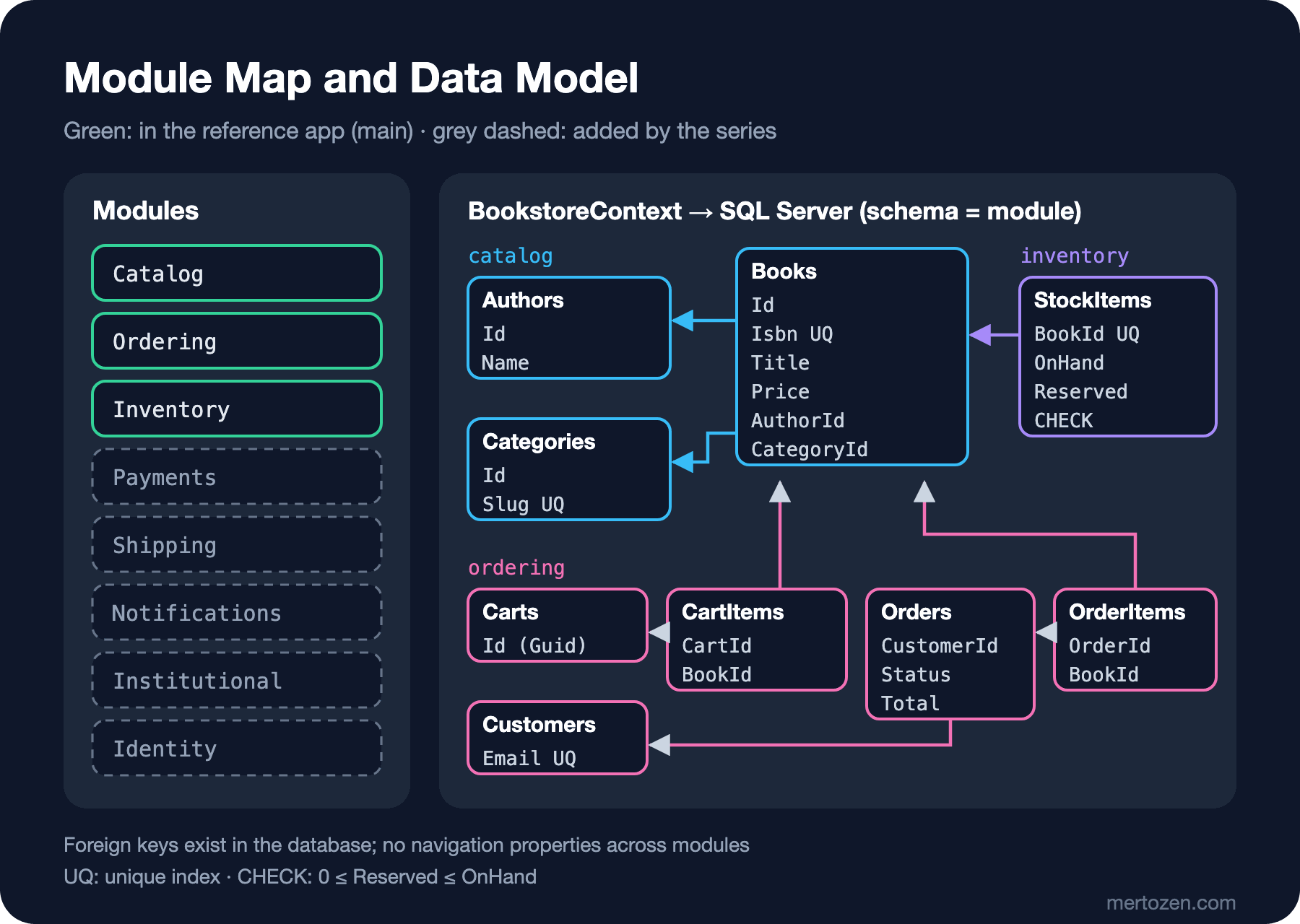
Bookstore's architectural parts were defined in the Introduction to Architecture series, and every series uses the same names. Each module is defined by a namespace, a few main types and the events it publishes:
| Module | Namespace | Responsibility | Events |
|---|---|---|---|
| Catalog | Bookstore.Catalog | Books, authors, categories, search, prices | BookPriceChanged |
| Ordering | Bookstore.Ordering | Cart, order, customer, order status | OrderPlaced, OrderCancelled |
| Inventory | Bookstore.Inventory | Stock, reservations, goods receipts | StockReserved, OutOfStock |
| Payments | Bookstore.Payments | Authorize, capture and refund with the payment provider | PaymentCaptured, PaymentFailed |
| Shipping | Bookstore.Shipping | Shipping label, tracking number | OrderShipped |
| Notifications | Bookstore.Notifications | Order and shipping e-mails, SMS | None |
| Institutional | Bookstore.Institutional | Institutions, unit hierarchy, institution users, purchase approval | Defined by the series |
| Identity | Bookstore.Identity | Users and roles | Defined by the series |
Only three of them exist in the reference application: Catalog, Ordering and Inventory. That is the smallest core an order needs to work end to end. The other modules are added on the branches of the series that explain them. The right-hand side of the figure below shows what these three modules look like in SQL Server, a summary of the entity-relationship model.
The Repo's main Branch: Folders and Running It
The reference application is the main branch of the repo. Its layout:
Bookstore.slnx
global.json
Directory.Build.props
Directory.Packages.props
dotnet-tools.json
README.md
src/Bookstore.Api/
    Catalog/
    Ordering/
    Inventory/
    Data/
    Program.cs
tests/Bookstore.Api.Tests/
web/bookstore-web/
global.json pins the .NET 10 SDK and the test runner. Directory.Build.props gives every project net10.0, Nullable, ImplicitUsings and "warnings are errors"; Directory.Packages.props keeps package versions in one place with Central Package Management. dotnet-tools.json holds dotnet-ef as a local tool. In the API project every module is a folder: Catalog has Book, Author, Category and the seed data, Ordering has Cart, Order, Customer and OrderService, Inventory has StockItem and InventoryService, and Data has BookstoreContext and the migrations.
There is a single API project, and the modules are separated inside it as folders and namespaces. Each module offers its own AddXModule and MapXEndpoints extension methods; Program.cs only calls them. Starting with folders instead of separate projects is deliberate: the Introduction to Architecture series justified starting Bookstore as a monolith, and moving modules into separate projects is the topic of the Modular Monolith series.
We assume readers use Windows/x64. You need the .NET 10 SDK, Node.js 24 LTS and Docker Desktop. The engines field in Angular 22's package.json asks for Node.js ^22.22.3 || ^24.15.0 || >=26.0.0. In PowerShell:
# 1. Start SQL Server 2025 as a container
docker run -e "ACCEPT_EULA=Y" -e "MSSQL_SA_PASSWORD=<YourStrong!Passw0rd>" `
  -p 1433:1433 --name bookstore-sql -d mcr.microsoft.com/mssql/server:2025-latest

# 2. Put the connection string in user-secrets, not in the repo
dotnet user-secrets set "ConnectionStrings:BookstoreDb" `
  "Server=localhost,1433;Database=BookstoreDb;User Id=sa;Password=<YourStrong!Passw0rd>;TrustServerCertificate=True" `
  --project src/Bookstore.Api

# 3. The API (in Development, migrations and seed are applied on startup)
dotnet run --project src/Bookstore.Api

# 4. The Angular client in a second terminal
cd web/bookstore-web
npm ci
npm start

# 5. Tests
dotnet test
On startup the API applies the migration and listens on http://localhost:5080:
info: Microsoft.EntityFrameworkCore.Migrations[20402]
      Applying migration '20261114005447_InitialCreate'.
info: Microsoft.Hosting.Lifetime[14]
      Now listening on: http://localhost:5080
The Angular client opens at http://localhost:4200. BookstoreDb in appsettings.json is empty on purpose: without a connection string the API stops before starting, with a message that says where to set it. Committing a password even once writes it into the repo's history for good.
The Data Model: BookstoreContext, Schemas and Seed
All modules share one DbContext, but each module's tables live in their own SQL schema:
// One context for the reference app; each module maps to its own SQL schema (catalog, ordering, inventory).
public sealed class BookstoreContext(DbContextOptions<BookstoreContext> options) : DbContext(options)
{
    public DbSet<Book> Books => Set<Book>();
    public DbSet<Author> Authors => Set<Author>();
    public DbSet<Category> Categories => Set<Category>();
    public DbSet<StockItem> StockItems => Set<StockItem>();
    public DbSet<Cart> Carts => Set<Cart>();
    public DbSet<Customer> Customers => Set<Customer>();
    public DbSet<Order> Orders => Set<Order>();

    protected override void OnModelCreating(ModelBuilder modelBuilder) =>
        modelBuilder.ApplyConfigurationsFromAssembly(typeof(BookstoreContext).Assembly);

    // All times are stored in UTC; values read back are marked as UTC too.
    protected override void ConfigureConventions(ModelConfigurationBuilder configurationBuilder) =>
        configurationBuilder.Properties<DateTime>().HaveConversion<UtcDateTimeConverter>();

    private sealed class UtcDateTimeConverter() : ValueConverter<DateTime, DateTime>(
        v => v, v => DateTime.SpecifyKind(v, DateTimeKind.Utc));
}
Mappings live in IEntityTypeConfiguration<T> classes in the module folders. An example of a relationship across modules is the stock row in Inventory:
stock.ToTable("StockItems", "inventory", t =>
{
    t.HasCheckConstraint("CK_StockItems_Quantities", "[QuantityReserved] >= 0 AND [QuantityReserved] <= [QuantityOnHand]");
});
stock.HasIndex(s => s.BookId).IsUnique();
// Foreign key in the database, but no navigation property across modules.
stock.HasOne<Book>().WithOne().HasForeignKey<StockItem>(s => s.BookId);
StockItem knows a book only by its BookId; it cannot reach into Catalog with stockItem.Book.Title. When one module needs information from another, it asks through an interface: Ordering gets book prices from ICatalogService and stock levels from IInventoryService. The foreign key in the database still protects data integrity. This separation makes it clear from day one where to cut if you later want to move a module into a separate service.
The seed data is part of the model through HasData, so it is inside the first migration: 4 categories, 18 authors, 20 classic books and one stock row per book. Don Quixote has 0 copies in stock and War and Peace has 3; all others have 25. That way the out-of-stock paths are visible on the first run. After the migration the database looks like this:
Schema     Table        Rows
---------- ------------ --------------------
catalog    Authors                        18
catalog    Books                          20
catalog    Categories                      4
inventory  StockItems                     20
ordering   CartItems                       0
ordering   Carts                           0
ordering   Customers                       0
ordering   OrderItems                      0
ordering   Orders                          0
The naming conventions are the same in every series. Table names are English and plural (Books, OrderItems), and the schema name is the module name in lower case. Money is decimal, decimal(10,2) in the database, with totals as decimal(12,2). The ISBN is varchar(13) and unique. Time columns end with the Utc suffix and hold UTC. Enums are written to the database as strings: the Orders.Status column shows Placed, not 2. The cart id is a time-ordered Guid created with Guid.CreateVersion7(); the order id is an int.
The Web API: Endpoints and Error Responses
The API is written with Minimal APIs and its endpoints are grouped by module:
| Method | Path | What it does |
|---|---|---|
| GET | /api/books?search=&category=&page=&pageSize= | Catalog list and search |
| GET | /api/books/{isbn} | Book details and sellable stock |
| GET | /api/categories | Categories |
| POST | /api/carts | New cart |
| GET | /api/carts/{cartId} | Cart |
| PUT | /api/carts/{cartId}/items/{isbn} | Adds a book or changes its quantity |
| DELETE | /api/carts/{cartId}/items/{isbn} | Removes a book from the cart |
| POST | /api/orders | Places an order |
| GET | /api/orders/{orderId} | Order |
Catalog's endpoints are gathered in one method:
public static IEndpointRouteBuilder MapCatalogEndpoints(this IEndpointRouteBuilder app)
{
    RouteGroupBuilder catalog = app.MapGroup("/api").WithTags("Catalog");
    catalog.MapGet("/books", SearchBooks);
    catalog.MapGet("/books/{isbn}", GetBook);
    catalog.MapGet("/categories", GetCategories);
    return app;
}
Request models are records, and validation rules are DataAnnotations attributes. The validation for Minimal APIs that arrived in .NET 10 is turned on with builder.Services.AddValidation(); according to the What's new in ASP.NET Core 10 page on Microsoft Learn, it works through a source generator and returns 400 before the handler runs when validation fails:
public sealed record SetQuantityRequest([property: Range(1, 99)] int Quantity);

public sealed record PlaceOrderRequest(
    Guid CartId,
    [property: Required, StringLength(200)] string CustomerName,
    [property: Required, EmailAddress, StringLength(256)] string CustomerEmail);
These are the API's real responses after putting 2 Dune and 1 Emma in a cart, trying to set Emma's quantity to 0, and then placing the order:
PUT /api/carts/01a1d78e-309d-72ce-9975-9d9907f5463f/items/9780141439587   { "quantity": 0 }
{"type":"https://tools.ietf.org/html/rfc9110#section-15.5.1","title":"One or more validation errors occurred.","status":400,"errors":{"Quantity":["The field Quantity must be between 1 and 99."]},"traceId":"00-61aa18975a2e24017c54864eaffa96bc-c80599baa854a47f-00"}

POST /api/orders   { "cartId": "01a1d78e-309d-72ce-9975-9d9907f5463f", "customerName": "Ada Lovelace", "customerEmail": "ada@example.com" }
HTTP/1.1 201 Created
Location: http://localhost:5080/api/orders/2
{"id":2,"status":"Placed","placedAtUtc":"2026-11-14T00:56:22.532117Z","items":[{"title":"Dune","unitPrice":489.00,"quantity":2,"lineTotal":978.00},{"title":"Emma","unitPrice":249.90,"quantity":1,"lineTotal":249.90}],"total":1227.90,"currency":"TRY"}
Errors always come back as ProblemDetails: Program.cs has AddProblemDetails(), UseExceptionHandler() and UseStatusCodePages(). That is why the Angular client can read a 400 and a 409 the same way.
What Happens When an Order Is Placed?
When I sent two orders at the same time against the code from Guess First, one got a 201 and the other a 500. The log said:
System.InvalidOperationException: An exception has been raised that is likely due to a transient failure. Consider enabling transient error resiliency by adding 'EnableRetryOnFailure' to the 'UseSqlServer' call.
 ---> Microsoft.EntityFrameworkCore.DbUpdateException: An error occurred while saving the entity changes. See the inner exception for details.
 ---> Microsoft.Data.SqlClient.SqlException (0x80131904): Transaction (Process ID 58) was deadlocked on lock resources with another process and has been chosen as the deadlock victim. Rerun the transaction.
Both requests read the stock as 3 and both decided "enough" on the C# side. Then the two transactions tried to lock the same resources in a different order, and SQL Server picked one of them as the deadlock victim. RowVersion never came into play, because the failure arrived as a deadlock rather than a concurrency conflict, and the uncaught exception turned into a 500. The stock stayed correct, but the customer saw a meaningless error instead of "out of stock".
In the fixed version the database does the check and the increment in a single conditional UPDATE:
public async Task<ReservationResult> ReserveAsync(IReadOnlyCollection<StockLine> lines, CancellationToken ct)
{
    List<int> unavailable = [];

    // One conditional UPDATE per book, always in BookId order, so concurrent orders lock rows in the same order.
    foreach (StockLine line in lines.OrderBy(l => l.BookId))
    {
        int updated = await db.StockItems
            .Where(s => s.BookId == line.BookId && s.QuantityOnHand - s.QuantityReserved >= line.Quantity)
            .ExecuteUpdateAsync(s => s.SetProperty(x => x.QuantityReserved, x => x.QuantityReserved + line.Quantity), ct);
        if (updated == 0)
        {
            unavailable.Add(line.BookId);
        }
    }

    return new ReservationResult(unavailable.Count == 0, unavailable);
}
The SQL that EF Core generates:
UPDATE [s]
SET [s].[QuantityReserved] = [s].[QuantityReserved] + @line_Quantity
FROM [inventory].[StockItems] AS [s]
WHERE [s].[BookId] = @line_BookId AND [s].[QuantityOnHand] - [s].[QuantityReserved] >= @line_Quantity
The first transaction to lock the row performs the update; the second waits for the lock to be released and evaluates the condition against the new value: with one sellable copy left, 0 rows are updated and the result is a 409. OrderService performs the reservation, the order and the cart removal inside one explicit transaction; if the reservation fails, the transaction is disposed without a commit and any stock reserved so far is rolled back. The answer to Guess First is now the expected one: one 201 and one 409 with the detail "Not enough stock for: 9781400079988." When I repeated the experiment with 30 orders sent at the same time, each for one copy of three different books in mixed order, with 25 copies of each book in stock, 25 orders got a 201, 5 got a 409, and the log stayed free of errors.
On the endpoint side the result of OrderService is turned into an HTTP response with a record hierarchy and a switch expression:
return outcome switch
{
    PlaceOrderOutcome.Placed placed =>
        TypedResults.CreatedAtRoute(ToView(placed.Order), "GetOrder", new { orderId = placed.Order.Id }),
    PlaceOrderOutcome.CartNotFound => TypedResults.NotFound(),
    PlaceOrderOutcome.CartEmpty =>
        TypedResults.Problem("The cart is empty.", statusCode: StatusCodes.Status400BadRequest),
    PlaceOrderOutcome.OutOfStock outOfStock =>
        TypedResults.Problem(
            $"Not enough stock for: {string.Join(", ", outOfStock.Isbns)}.",
            statusCode: StatusCodes.Status409Conflict),
    PlaceOrderOutcome.CartChanged =>
        TypedResults.Problem("The cart changed while the order was being placed.",
            statusCode: StatusCodes.Status409Conflict),
    _ => throw new UnreachableException()
};
The result type is an abstract record with nested records inside it. If a new result is added and the switch does not get an arm for it, the code still compiles and the mistake only shows up at run time as an UnreachableException; the compiler does not warn you here.
Tests: WebApplicationFactory and a Separate Database
The Bookstore.Api.Tests project uses xUnit v3, and the tests call the API end to end against a real SQL Server. The whole test run has one host and one database created from scratch; an xUnit v3 assembly fixture provides that:
[assembly: AssemblyFixture(typeof(Bookstore.Api.Tests.BookstoreApiFactory))]

namespace Bookstore.Api.Tests;

// One API host and one fresh database for the whole test run.
// The database is the development one with a "_Tests" suffix: BookstoreDb → BookstoreDb_Tests.
public sealed class BookstoreApiFactory : WebApplicationFactory<Program>, IAsyncLifetime
{
    private readonly string connectionString = TestConnectionString();

    protected override void ConfigureWebHost(IWebHostBuilder builder)
    {
        builder.UseSetting("ConnectionStrings:BookstoreDb", connectionString);
        builder.UseSetting("Database:MigrateOnStartup", "false");
    }

    public async ValueTask InitializeAsync()
    {
        await using AsyncServiceScope scope = Services.CreateAsyncScope();
        BookstoreContext db = scope.ServiceProvider.GetRequiredService<BookstoreContext>();
        await db.Database.EnsureDeletedAsync();
        await db.Database.MigrateAsync();
    }
    // TestConnectionString: reads user-secrets and environment variables, appends "_Tests" to the database name.
}
There is no public partial class Program; line at the end of Program.cs. In .NET 10 a source generator in ASP.NET Core emits that declaration for apps that use top-level statements; the test project compiled WebApplicationFactory<Program> without the line.
Of the ten tests, three cover Catalog, four cover Ordering and three cover the rounding rule. One of the Ordering tests is the Guess First situation itself: it sends two orders at the same time with Task.WhenAll, and one must get a 201, the other a 409, with 1 copy left in stock. global.json selects Microsoft.Testing.Platform as the test runner. Without that setting, dotnet test with the xunit.v3 4.x package stops on the .NET 10 SDK with an error saying the VSTest path is no longer supported.
dotnet test

Test run summary: Passed!
  total: 10
  failed: 0
  succeeded: 10
  skipped: 0
  duration: 1s 902ms
The Angular Client: bookstore-web
web/bookstore-web is a standalone application created with Angular CLI 22. It has three pages: catalog, book details and cart. Angular 22.2 projects require TypeScript 6.0; the project comes with TypeScript ~6.0.2. The routes:
export const routes: Routes = [
  { path: '', component: CatalogPage, title: 'Bookstore' },
  { path: 'books/:isbn', component: BookDetailPage, title: 'Book · Bookstore' },
  { path: 'cart', component: CartPage, title: 'Cart · Bookstore' },
  { path: '**', redirectTo: '' },
];
Reads use httpResource, which is stable in Angular 22. The catalog page keeps two signals for search and category; when one of them changes, the request is sent again on its own:
export class CatalogPage {
  protected readonly cartStore = inject(CartStore);
  protected readonly search = signal('');
  protected readonly category = signal('');

  protected readonly categories = httpResource<CategoryView[]>(() => '/api/categories', { defaultValue: [] });

  // Re-runs automatically whenever search or category changes.
  protected readonly books = httpResource<PagedResult<BookSummary>>(() => ({
    url: '/api/books',
    params: { search: this.search(), category: this.category(), pageSize: 50 },
  }));

  protected applySearch(event: Event, value: string): void {
    event.preventDefault();
    this.search.set(value.trim());
  }
}
Writes (adding to the cart, changing quantities, placing the order) are in a root service called CartStore, using HttpClient with async/await. The cart itself lives in the API; the browser only remembers the cart id in localStorage. The book details page receives the ISBN from the route parameter with input.required<string>() (withComponentInputBinding()).
The client makes every request with relative paths such as /api/.... During development the Angular dev server proxies them to the API, so no CORS configuration is needed:
{
  "/api": {
    "target": "http://localhost:5080",
    "secure": false
  }
}
I checked with Playwright in a headless browser that the client and the API really talk to each other: the catalog showed 20 books, a "tolkien" search showed 1 book, The Hobbit's details showed "25 in stock", adding 2 copies showed "Cart (2)" in the header, the cart showed "Total: ₺659.80", placing the order showed "Order #1 placed (Placed)", Don Quixote showed "Out of stock" and The Hobbit "23 in stock"; the browser console had no errors.
How Do the Series Extend This Core?
The reference application is kept small because every series grows it in its own direction, and each series' changes must stay readable on its own branch. A few example directions:
On the architecture side, the Modular Monolith series moves module boundaries into separate projects and rules; the Microservices series discusses the cost of splitting the same modules into separate services, and the .NET Microservices Application series does it in code. The CQRS and Event Sourcing series treats the ordering side with separate write and read models. The Messaging and Event-Driven Architecture series actually publishes events such as OrderPlaced and adds an outbox.
On the application side, the Caching series puts a cache in front of catalog search, the Authentication and Authorization series brings the Identity module and roles, the Integration and E2E Testing series extends the tests here, and the State Management in Angular series discusses where CartStore belongs. Putting the app in containers is the topic of the upcoming Docker and Docker Compose series, and moving search to a separate search engine is the topic of the upcoming Search with Elasticsearch series.
The shared rule: a series does not rename anything in the core. Book, Order, StockItem, the schema names and the endpoint paths stay the same across series; when a series adds something new, it gives it a new name.
Common Pitfalls
Checking in the application and writing in the database. The code in Guess First never failed with a single user; the problem only appeared with concurrent requests. If you use the "read, decide, write" pattern for a shared counter, the decision has to be made in the database, in the same statement.
Adding navigation properties across modules. Adding StockItem.Book is convenient on day one, but it ties Inventory to Catalog's classes, and it is the first thing that breaks when you want to separate the module.
Writing the connection string with its password into appsettings.json. The repo only has an empty value; the password lives in user-secrets or an environment variable.
Running the tests against the development database. The factory deletes the database first; if it used the same name, every dotnet test would wipe your local data. That is why the name gets the _Tests suffix.
A new customer placing two orders with the same e-mail at the same moment is still unprotected: if both requests fail to find the customer and try to insert it, the second one hits the unique index and gets a 500. This is left open on purpose in the reference application; it goes away when customer records move to Identity with signed-in users.
A Small Experiment
★☆☆ Run the reference application on Windows with the steps above. Search the catalog for "austen" and look at which query parameters are listed for /api/books in the http://localhost:5080/openapi/v1.json document.
★★☆ Put ReserveAsync back to its Guess First version and run the Two_parallel_orders_cannot_reserve_more_than_the_stock test several times. Does the test fail the same way every time? Write down the error message and the HTTP status code.
★★★ Add the institutional minimum of at least 20 copies to the API: a field on PlaceOrderRequest that marks an institutional order, a new result in PlaceOrderOutcome and an integration test for it. Did you put the rule in Ordering or in a new Institutional module? Write down your reasoning.
In this post we saw Bookstore's technical structure and the reference application on the repo's main branch. The last post of the series looks at the repo itself: series branches and post tags, getting the code of a post, seeing the difference between two posts, and the reading map that shows which part is explained in which series.